How to Build a Competitor Database That Actually Wins Deals
A competitor database turns scattered battlecards and screenshots into a living asset your whole revenue team can query. Here's how to build one in 2026 without drowning in stale data.
Most teams don't lose competitive deals because their product is worse. They lose because the rep on the call couldn't remember the one objection that flips a switch—and the answer was buried in a Slack thread from eight months ago. A competitor database fixes that. It turns your scattered battlecards, pricing screenshots, and win/loss notes into a single, queryable source of truth your whole revenue team can trust.
This guide walks through what a competitor database actually is, how to structure one, where to get the data, and which tools are worth paying for in 2026. No fluff, no "synergy"—just the build.
TL;DR#
- A competitor database is a structured, continuously updated record of who you compete against, how they position, what they charge, and how you beat them.
- Spreadsheets work to start, but they rot fast—stale intel is worse than no intel because reps act on it with false confidence.
- The four load-bearing fields: positioning, pricing, feature gaps, and win/loss patterns. Everything else is decoration.
- Data enrichment and website-visitor tools keep the database fresh automatically, so you're not manually re-checking a competitor's pricing page every quarter.
- Start narrow (your top 5 competitors), prove the workflow, then scale—don't try to catalog all 40 vendors in your category on day one.
What is a competitor database?#
A competitor database is a centralized, structured collection of intelligence about the companies you compete with—stored so any teammate can find, filter, and act on it in seconds.
Think of it like a restaurant's recipe binder versus a chef who keeps everything in their head. When that chef is out sick, service falls apart. A competitor database is the binder: it survives rep turnover, scales across regions, and means a new hire in week two can pull up "how we win against Vendor X" without booking time with your one competitive-intel guru.
Technically, it's a set of records—one per competitor—each holding fields like positioning statements, pricing tiers, target segments, product gaps, recent funding, notable customers, and your own battle-tested rebuttals. The best versions link out to source evidence (a pricing screenshot, a G2 review, a lost-deal note) so claims are auditable, not folklore.
It's distinct from generic B2B data and intelligence about your market. Market intel tells you where the category is going. A competitor database tells your rep what to say on the call at 2 p.m.
Why do spreadsheets fail as a competitor database?#
Spreadsheets fail because competitive intelligence has a short shelf life, and a spreadsheet has no mechanism to tell you when a cell has gone stale.
Here's the failure pattern nearly every team hits:
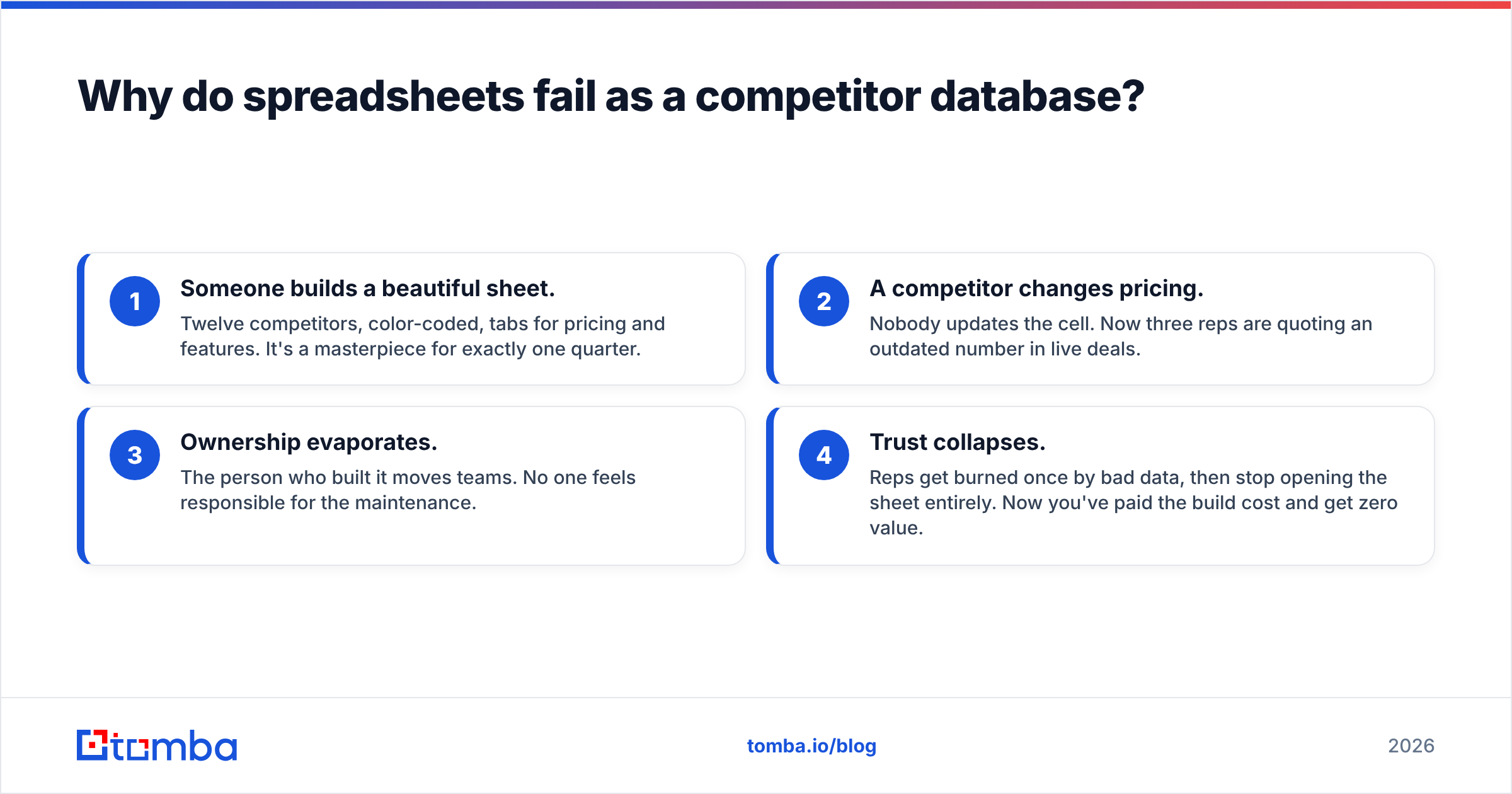
- Someone builds a beautiful sheet. Twelve competitors, color-coded, tabs for pricing and features. It's a masterpiece for exactly one quarter.
- A competitor changes pricing. Nobody updates the cell. Now three reps are quoting an outdated number in live deals.
- Ownership evaporates. The person who built it moves teams. No one feels responsible for the maintenance.
- Trust collapses. Reps get burned once by bad data, then stop opening the sheet entirely. Now you've paid the build cost and get zero value.
Stale competitive data is genuinely worse than no data, because it creates false confidence. A rep who knows they don't know a competitor's price will ask. A rep who "knows" the wrong price walks into an ambush.

The fix isn't a better spreadsheet. It's structure plus a refresh mechanism—which is where dedicated tools and automated data enrichment earn their keep.
How should you structure a competitor database?#
Structure it around decisions your reps make, not around data you happen to have. Every field should answer a question someone asks mid-deal. If a column never influences a conversation, cut it.
The core schema for each competitor record:
- Positioning & category — how they describe themselves in one sentence, and which segment they actually win. This is what the prospect has already heard before your rep dials in.
- Pricing model & tiers — exact numbers where public, model (per-seat, usage, flat) where not. Link a dated screenshot as evidence.
- Feature strengths & gaps — the two or three things they genuinely do well, and the two or three holes you exploit. Honesty here matters; overclaiming gets reps caught.
- Win/loss patterns — which deal shapes you win, which you lose, and the trigger phrases from prospects that signal each. This is your highest-value column and the hardest to keep current.
- Trap-setting questions — the discovery questions that surface a competitor's weakness without you naming them.
- Freshness metadata — who last verified this record, and when. A record older than 90 days should visually flag itself.
Keep the primary record scannable—a rep on a call has maybe 20 seconds. Push depth (full teardowns, recorded demos, source docs) into linked pages, not the main row.
Where do you get competitor data in 2026?#
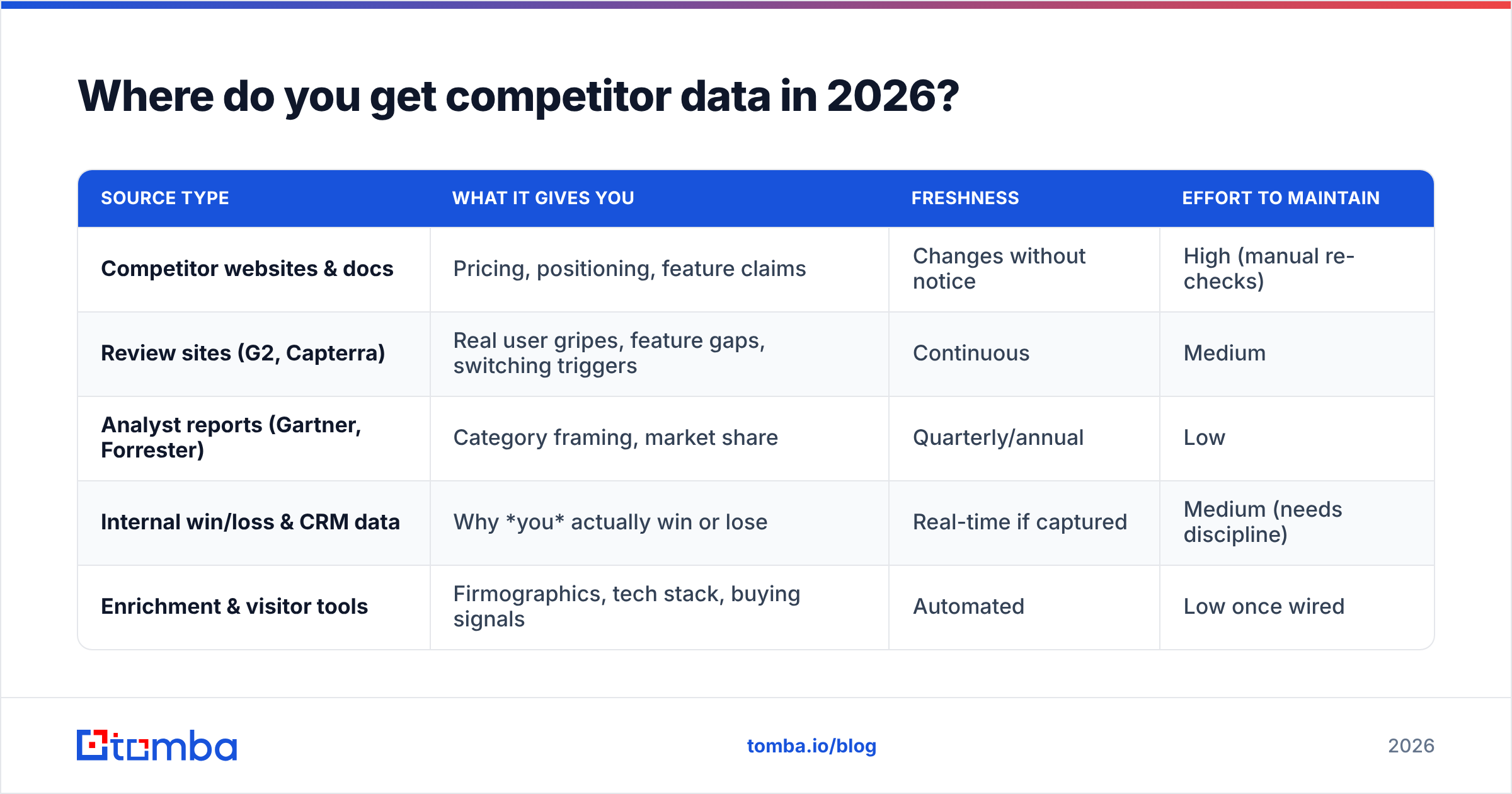
You pull from four source types, and the reliable competitor database blends all four rather than leaning on any single one. Public sources give breadth; internal sources give the truth that actually wins deals.
| Source type | What it gives you | Freshness | Effort to maintain |
|---|---|---|---|
| Competitor websites & docs | Pricing, positioning, feature claims | Changes without notice | High (manual re-checks) |
| Review sites (G2, Capterra) | Real user gripes, feature gaps, switching triggers | Continuous | Medium |
| Analyst reports (Gartner, Forrester) | Category framing, market share | Quarterly/annual | Low |
| Internal win/loss & CRM data | Why you actually win or lose | Real-time if captured | Medium (needs discipline) |
| Enrichment & visitor tools | Firmographics, tech stack, buying signals | Automated | Low once wired |
The two most underused sources are review sites and your own lost deals. G2 and Capterra reviews are where a competitor's customers openly list the reasons they're frustrated—that's your feature-gap column, written for you. And your win/loss notes are the only source no competitor can replicate.
To keep firmographic and contact layers current without manual work, automated tooling matters. A B2B database with enrichment can attach company size, tech stack, and funding signals to each competitor and their customers, so your records update themselves instead of decaying. Tools that handle website visitor reveal can even tell you when a prospect who's evaluating a competitor lands on your own pricing page—a live buying signal, not a stale record.
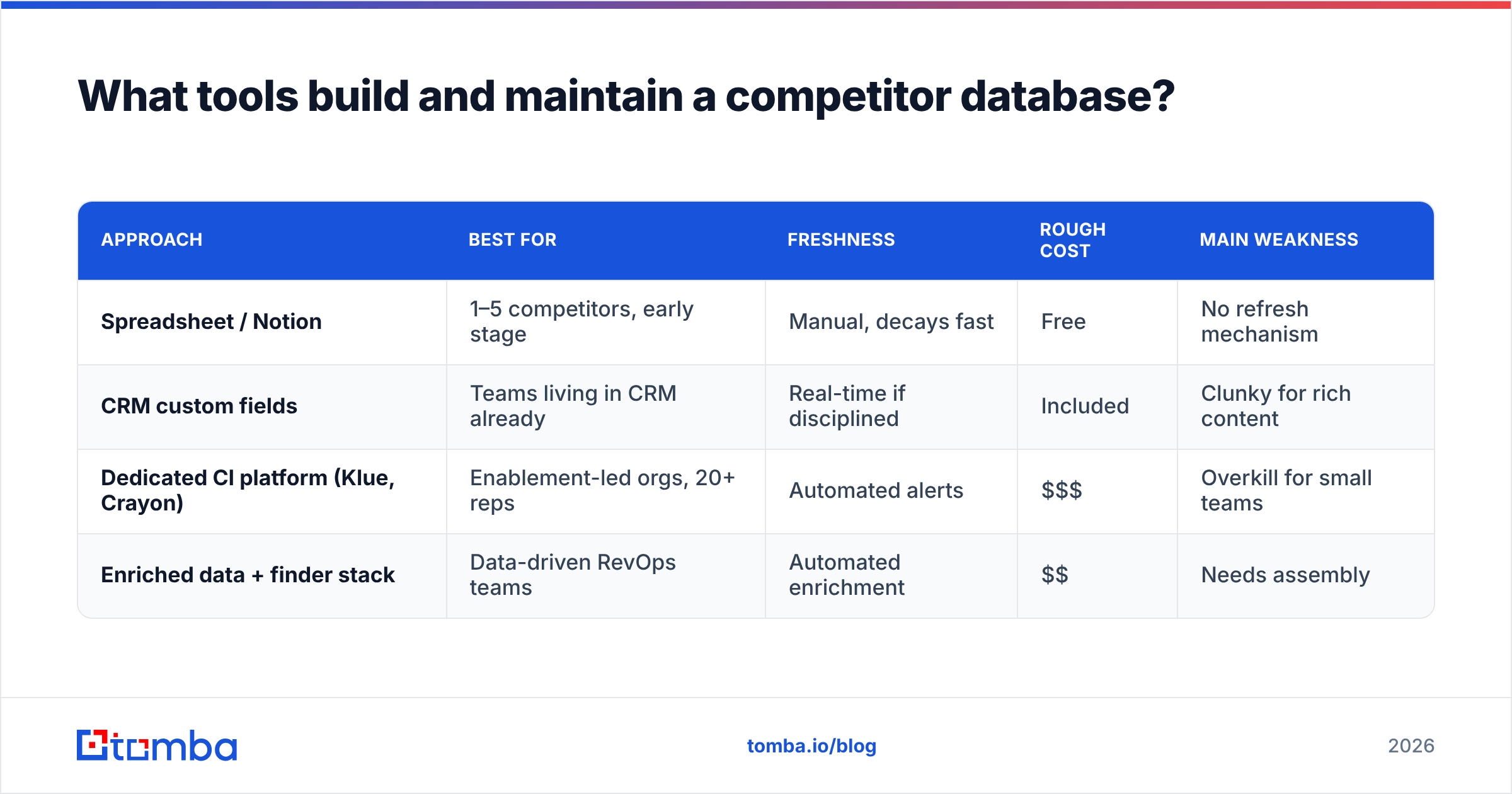
What tools build and maintain a competitor database?#
The right tool depends on scale. A five-person team and a 200-rep org have genuinely different needs, and paying for the enterprise option too early wastes budget you could spend on data.
Here's an honest comparison of the four common approaches:
| Approach | Best for | Freshness | Rough cost | Main weakness |
|---|---|---|---|---|
| Spreadsheet / Notion | 1–5 competitors, early stage | Manual, decays fast | Free | No refresh mechanism |
| CRM custom fields | Teams living in CRM already | Real-time if disciplined | Included | Clunky for rich content |
| Dedicated CI platform (Klue, Crayon) | Enablement-led orgs, 20+ reps | Automated alerts | $$$ | Overkill for small teams |
| Enriched data + finder stack | Data-driven RevOps teams | Automated enrichment | $$ | Needs assembly |
There's no single winner—there's a right fit. Klue and Crayon are excellent if you have a full-time competitive-intelligence function and the budget to match. A Notion or CRM setup enriched by an API is far cheaper and, for most teams under 30 reps, more than enough.
The layer nearly everyone forgets is the contact and firmographic data underneath. Knowing a competitor's positioning is table stakes. Knowing which of their customers just changed roles, raised funding, or started evaluating alternatives is where a competitor database becomes an offense, not just a defense. That's where an email finder and enrichment API turn a static reference doc into a prospecting engine—you're not just cataloging competitors, you're finding and reaching the accounts in play around them.
How do you keep a competitor database from going stale?#
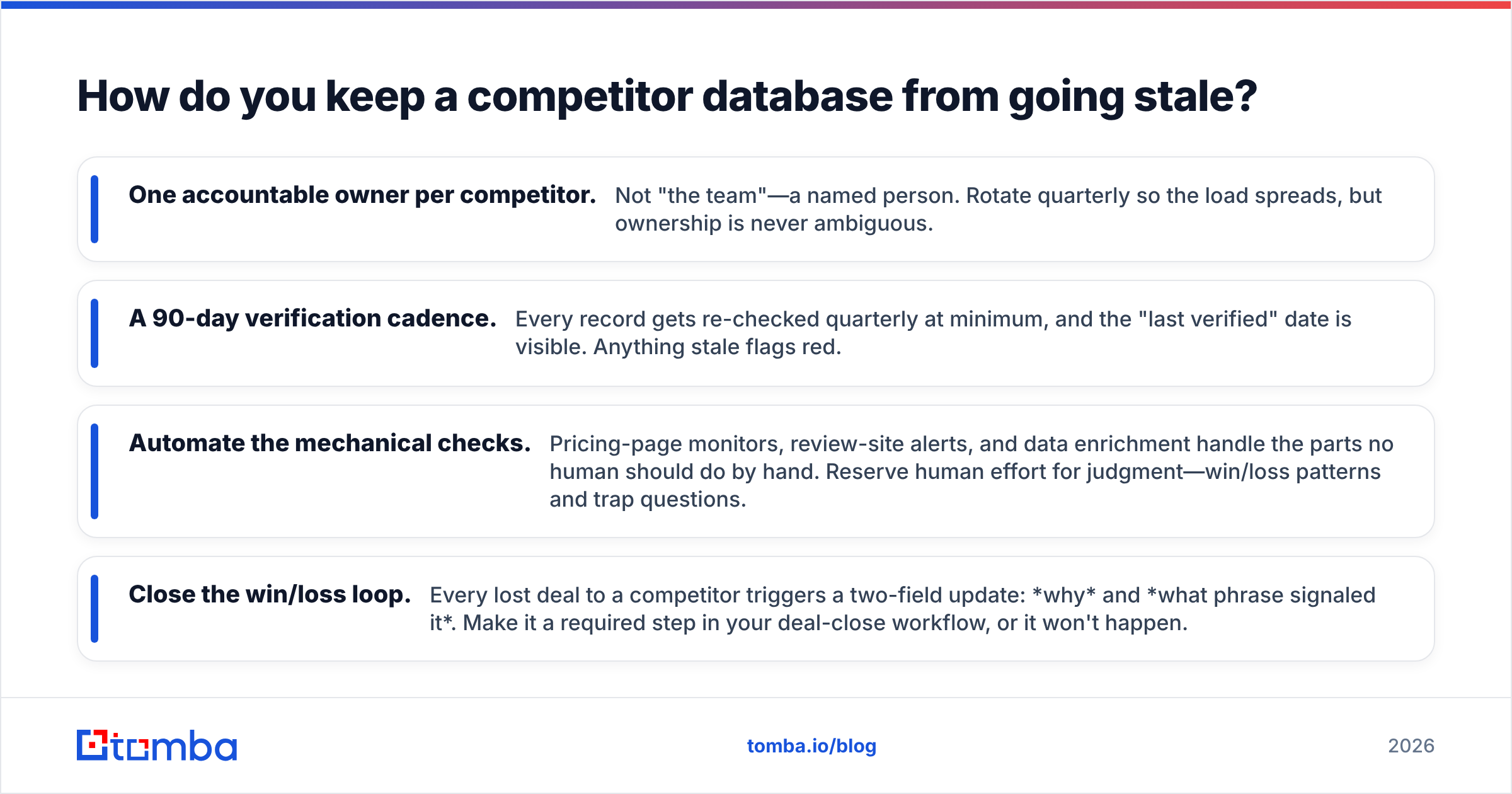
Assign an owner and automate everything a human shouldn't have to check manually. Freshness is a process problem, not a data problem—and it's the single reason most databases die.
Four practices that keep it alive:
- One accountable owner per competitor. Not "the team"—a named person. Rotate quarterly so the load spreads, but ownership is never ambiguous.
- A 90-day verification cadence. Every record gets re-checked quarterly at minimum, and the "last verified" date is visible. Anything stale flags red.
- Automate the mechanical checks. Pricing-page monitors, review-site alerts, and data enrichment handle the parts no human should do by hand. Reserve human effort for judgment—win/loss patterns and trap questions.
- Close the win/loss loop. Every lost deal to a competitor triggers a two-field update: why and what phrase signaled it. Make it a required step in your deal-close workflow, or it won't happen.
The teams that win this aren't the ones with the fanciest tool. They're the ones who made updating the database a habit tied to work reps already do—closing deals—rather than a separate chore nobody owns. Wiring your database into a HubSpot or Salesforce workflow, so updates happen where reps already live, beats any standalone app they have to remember to open.
Is a competitor database worth the effort?#
Yes—if you're in a category with three or more real competitors and deals routinely go head-to-head. The ROI shows up as higher win rate on competitive deals and faster ramp for new reps, both of which are measurable within a quarter.
It's not worth it if you're in a genuinely uncontested niche, or if you have fewer than a handful of deals a month—at that volume, tribal knowledge still works and the maintenance cost outweighs the payoff.
For everyone in between, the math is simple: one saved competitive deal per quarter usually covers the entire cost of building and maintaining the database. And the compounding value—every win/loss note makes the next deal easier—means the asset gets more valuable the longer you run it, right when a spreadsheet would be rotting.
Build the data layer first#
A competitor database is only as strong as the contact and company data underneath it. You can catalog every competitor's positioning perfectly and still lose if you can't reach the accounts evaluating them.
That's the layer to nail first. Tomba's Email Finder lets you find verified professional emails by domain, name, or company—so once your database flags an in-play account, you can actually reach the buyer instead of watching the signal go cold. Pair it with enrichment to keep every record fresh automatically, and check the Tomba pricing plans (a free tier covers 25 searches a month to test the workflow before you commit). Start with your top five competitors, wire in the data layer, and let the database earn its keep one won deal at a time.
Related guides#
Ready to find emails that actually work?
Join 150,000+ professionals who stopped guessing and started sending. Free credits on signup — no credit card required.
Get the Tomba newsletter
Practical outbound tactics and product updates — once every two weeks.
About the author