Conditional Sequences: How Branching Logic Lifts Reply Rates
Conditional sequences branch your outreach based on what each prospect actually does—opens, replies, clicks, or silence. Here's how if/then logic beats one-size-fits-all blasts, which triggers matter, and how to build your first branch.
Most outreach still runs on rails: send email one, wait two days, send email two, wait three days, send email three, done. Every prospect gets the same five touches whether they opened once, replied twice, or never existed. Conditional sequences break that rail. They read what each prospect does and route them down a different path based on the answer.
If you run cold email or multichannel outbound and you're still sending linear drip campaigns, this is the upgrade that quietly lifts reply rates without adding a single new lead.
TL;DR#
- Conditional sequences are outreach flows that branch on prospect behavior—open, click, reply, bounce, or silence—instead of pushing everyone through identical steps.
- They beat linear sequences because interested prospects get faster, warmer follow-up while cold ones get de-prioritized, so you spend effort where intent actually lives.
- The most useful triggers are replied, opened but didn't reply, clicked a link, bounced, and no activity—each one deserves a different next move.
- Bad data breaks every branch: a bounce trigger firing on a mistyped address wastes a slot. Clean your list with an email verifier before you build logic on top of it.
- Start simple. One "if replied → stop and route to a human" branch usually returns more than a ten-step maze you never maintain.
What are conditional sequences?#
A conditional sequence is an automated outreach flow that uses if/then logic to decide the next step for each contact based on their behavior, rather than sending the same steps to everyone in the same order.
Think of it like a restaurant host instead of a conveyor belt. A conveyor belt hands every guest the same tray on the same timer. A good host watches the room—this table is ready to order, that one just sat down, this guest waved for the check—and reacts to each. A conditional sequence is the host: it watches signals and sends the right touch at the right moment.
Concretely, a branch is built from three pieces:
- A trigger — the event the sequence watches for (opened, clicked, replied, bounced, no activity by day X).
- A condition — the yes/no test applied to that trigger ("did they reply within 48 hours?").
- An action — what happens on each answer (send a different email, pause, add to a list, notify a rep, exit the sequence).
Chain a few of those together and a single campaign can treat a hot prospect and a ghost completely differently—automatically, at scale.

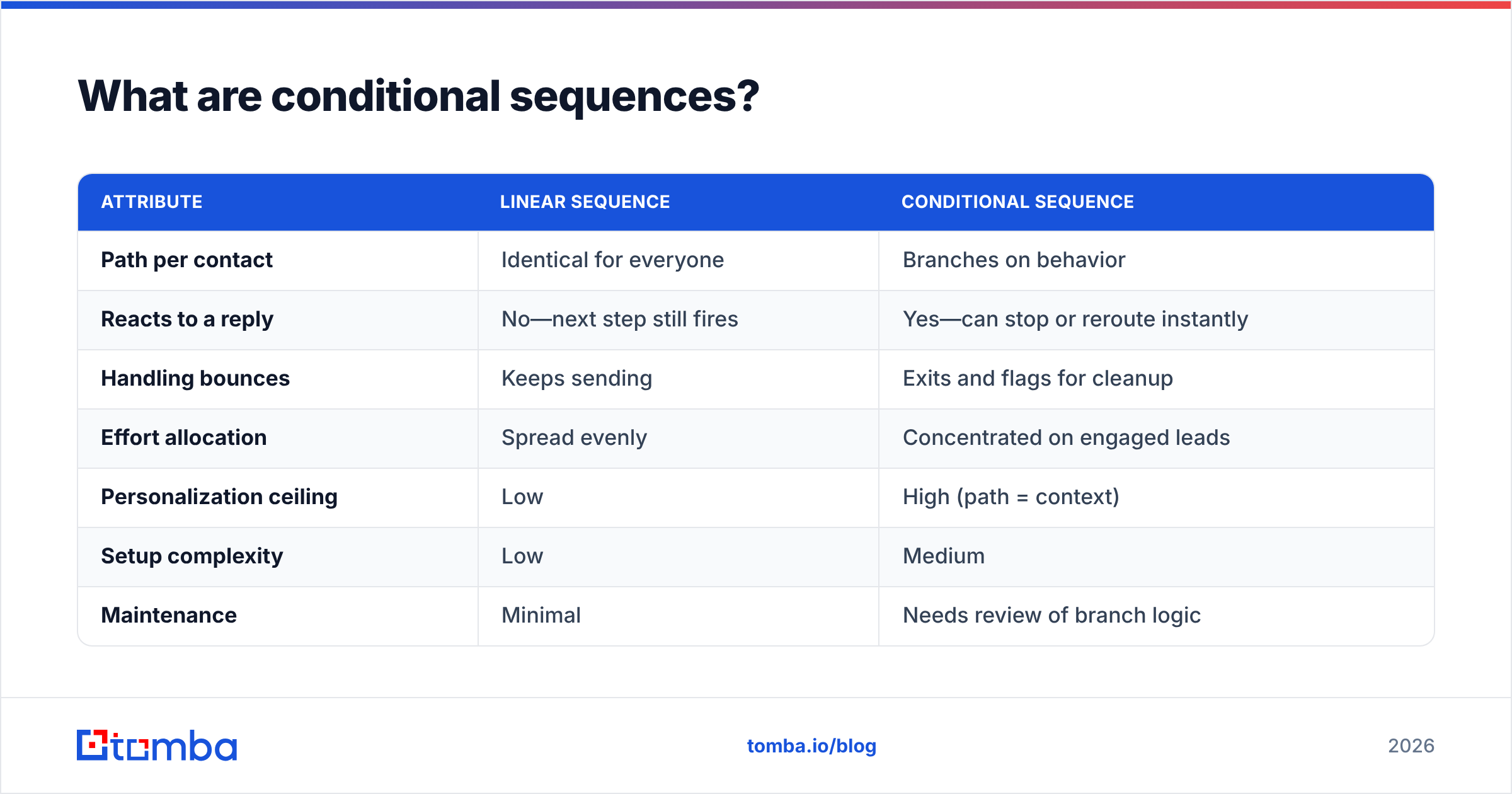
Here's the core difference at a glance:
| Attribute | Linear sequence | Conditional sequence |
|---|---|---|
| Path per contact | Identical for everyone | Branches on behavior |
| Reacts to a reply | No—next step still fires | Yes—can stop or reroute instantly |
| Handling bounces | Keeps sending | Exits and flags for cleanup |
| Effort allocation | Spread evenly | Concentrated on engaged leads |
| Personalization ceiling | Low | High (path = context) |
| Setup complexity | Low | Medium |
| Maintenance | Minimal | Needs review of branch logic |
How do conditional sequences work?#
A conditional sequence runs on an event loop. After each step, the tool checks the contact's state against your conditions before deciding whether—and what—to send next.
Say you send touch one on Monday. By Wednesday, the sequence evaluates: Did they reply? If yes, the contact exits the automation and gets routed to a rep. If no, the next check runs: Did they open? An opener who stayed silent might get a short, value-add nudge referencing the same offer. A non-opener might get a completely different subject line to beat inbox fatigue, or a switch to another channel like LinkedIn or a call.
The key mechanic is that the branch decides, not the calendar. In a linear flow, day three always sends email two. In a conditional flow, day three sends whatever the prospect's behavior earned.
This is also why sales automation tools invest so heavily in tracking. A branch is only as smart as the signal feeding it. Open tracking, click tracking, reply detection, and bounce classification are the sensory inputs; the branching logic is the brain acting on them.
One caution worth stating early: open tracking has gotten noisier since Apple Mail Privacy Protection and similar features started pre-fetching images and inflating open counts. Treat "opened" as a soft signal and "replied" or "clicked" as hard signals when you design branches.
Why do conditional sequences beat linear sequences?#
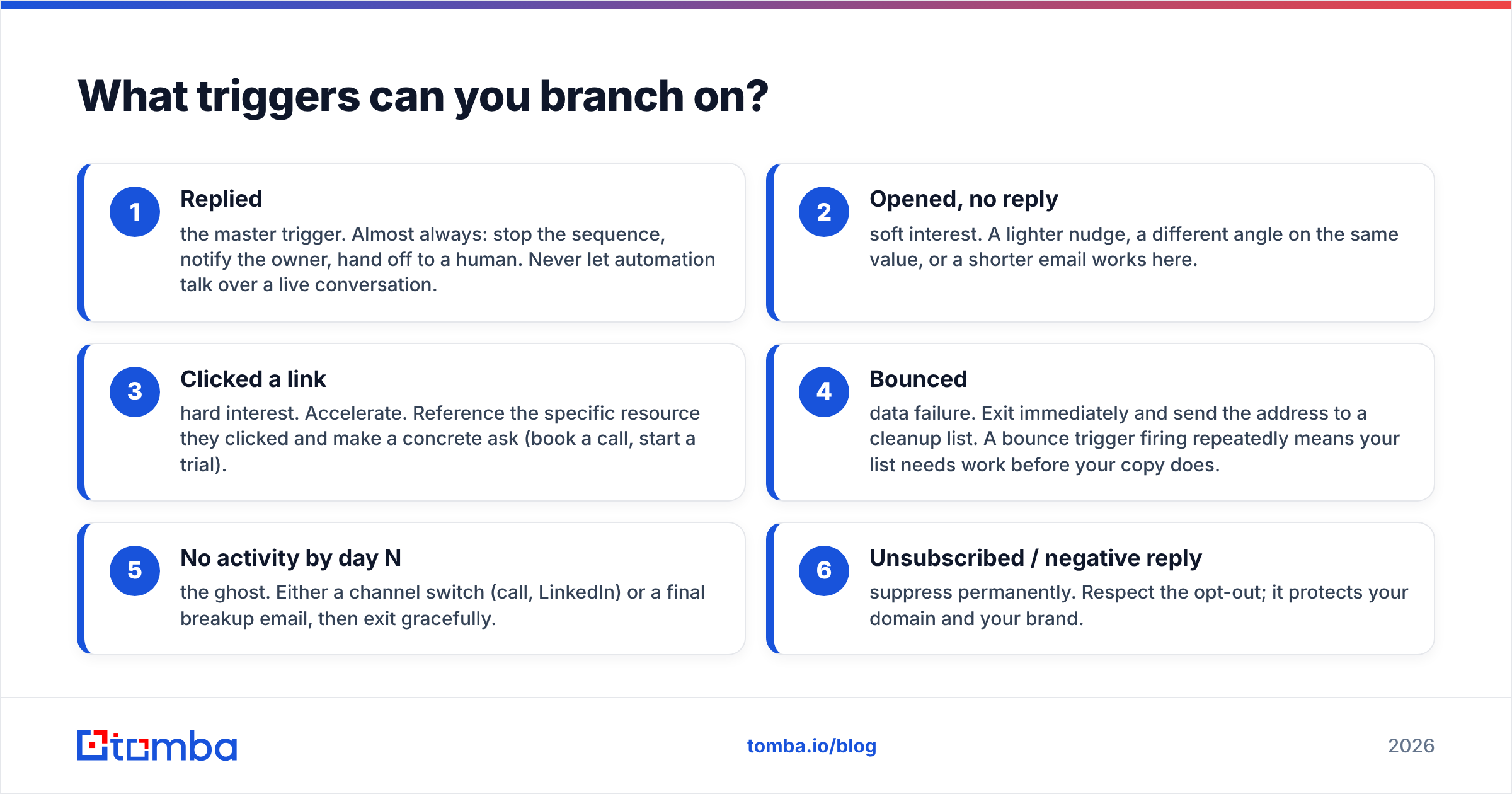
Conditional sequences win because they match effort to intent—warm prospects get accelerated, cold ones get de-prioritized, and nobody gets a tone-deaf follow-up after they've already said yes.
Three concrete advantages:
- You stop annoying people who replied. The single most common cold-email own-goal is sending "just following up" to someone who answered you yesterday. A "if replied → exit" branch removes that failure mode entirely. It's the highest-ROI branch you'll ever build.
- Engaged prospects move faster. A contact who clicked your pricing link is a different animal from one who ignored you. Conditional logic lets you shorten the wait and sharpen the ask for clickers instead of making them sit through a generic three-day gap.
- Your sending reputation improves. By exiting bounces and dead contacts early, you reduce the volume of mail hitting invalid or unengaged inboxes—which is exactly what mailbox providers watch when scoring email deliverability. Fewer wasted sends, healthier domain.
The measurable effect shows up in response rate. When follow-ups are relevant to the last action a prospect took, they read as attentive rather than robotic, and more of them get answered. You're not sending more email; you're sending the right email.
What triggers can you branch on?#
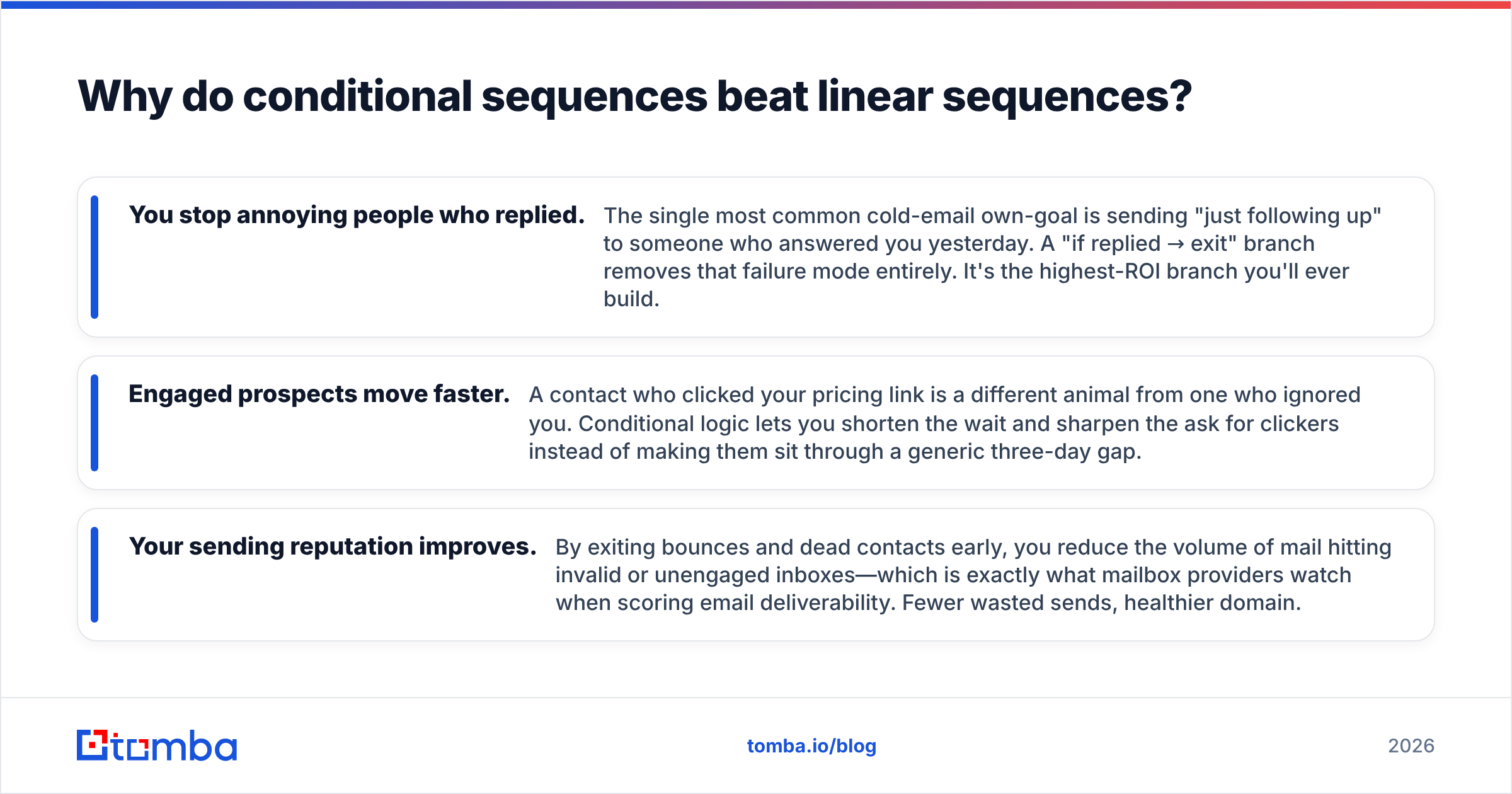
The value of a conditional sequence comes from choosing the right triggers. Too few and it's basically linear; too many and you build a maze no teammate can debug. These are the branches that earn their keep:
- Replied — the master trigger. Almost always: stop the sequence, notify the owner, hand off to a human. Never let automation talk over a live conversation.
- Opened, no reply — soft interest. A lighter nudge, a different angle on the same value, or a shorter email works here.
- Clicked a link — hard interest. Accelerate. Reference the specific resource they clicked and make a concrete ask (book a call, start a trial).
- Bounced — data failure. Exit immediately and send the address to a cleanup list. A bounce trigger firing repeatedly means your list needs work before your copy does.
- No activity by day N — the ghost. Either a channel switch (call, LinkedIn) or a final breakup email, then exit gracefully.
- Unsubscribed / negative reply — suppress permanently. Respect the opt-out; it protects your domain and your brand.
Notice how each trigger implies a different next action. That mapping—trigger to action—is the actual design work. The tool just executes it.
How do you build a conditional sequence step by step?#
Start with clean inputs, map behavior to actions on paper, then build the smallest useful branch and expand only where data tells you to.
Step 1 — Fix the data first. Every branch depends on the contact actually existing and the address being valid. Source accurate contacts with an email finder, then run the list through verification so your "bounced" branch fires on real problems, not typos. Garbage in means garbage branching.
Step 2 — Map triggers to actions on paper. Before touching a tool, write the flow: Replied → exit + notify. Clicked → accelerate to ask. Opened only → soft nudge. No activity by day 7 → channel switch. Bounced → suppress. If you can't explain the flow in five lines, it's too complex.
Step 3 — Build the reply branch first. The "if replied, stop everything" rule is non-negotiable and returns value on day one. Ship that alone before adding anything else.
Step 4 — Layer one behavioral branch. Add clickers or openers next—whichever signal you trust more. Resist adding all six triggers at once; you can't tell which branch is helping if you launch them together.
Step 5 — Enrich for better routing. If you route by seniority, industry, or company size, data enrichment lets you branch on firmographics, not just behavior—for example, sending enterprise clickers straight to a rep while SMB clickers get a self-serve trial link.
Step 6 — Review the branch report weekly. Look at where contacts pile up. If 90% funnel into "no activity," your subject lines or targeting—not your branching—are the problem. Conditional logic exposes weak copy; it doesn't fix it.
What are the most common conditional sequence mistakes?#
The failure modes are predictable, and every one of them is avoidable.
- Over-engineering. A twelve-branch flowchart looks impressive and gets abandoned in a month because nobody can maintain it. Two or three well-chosen branches outperform a maze you're afraid to touch.
- Trusting open data too much. Inflated opens from image pre-fetching will route uninterested people into your "warm" branch. Weight clicks and replies far above opens.
- Branching on dirty data. If your list is full of guesses, your bounce branch becomes your main branch. Clean before you build.
- Forgetting the human handoff. Automation should get out of the way the instant a real reply lands. If your reply branch just sends another automated email, you've built a faster way to annoy interested buyers.
- No exit conditions. Every path needs a clean endpoint—exit on reply, exit on bounce, exit after the final touch. Sequences that never terminate quietly re-mail suppressed contacts and hurt your reputation.
Which tools support conditional sequences?#
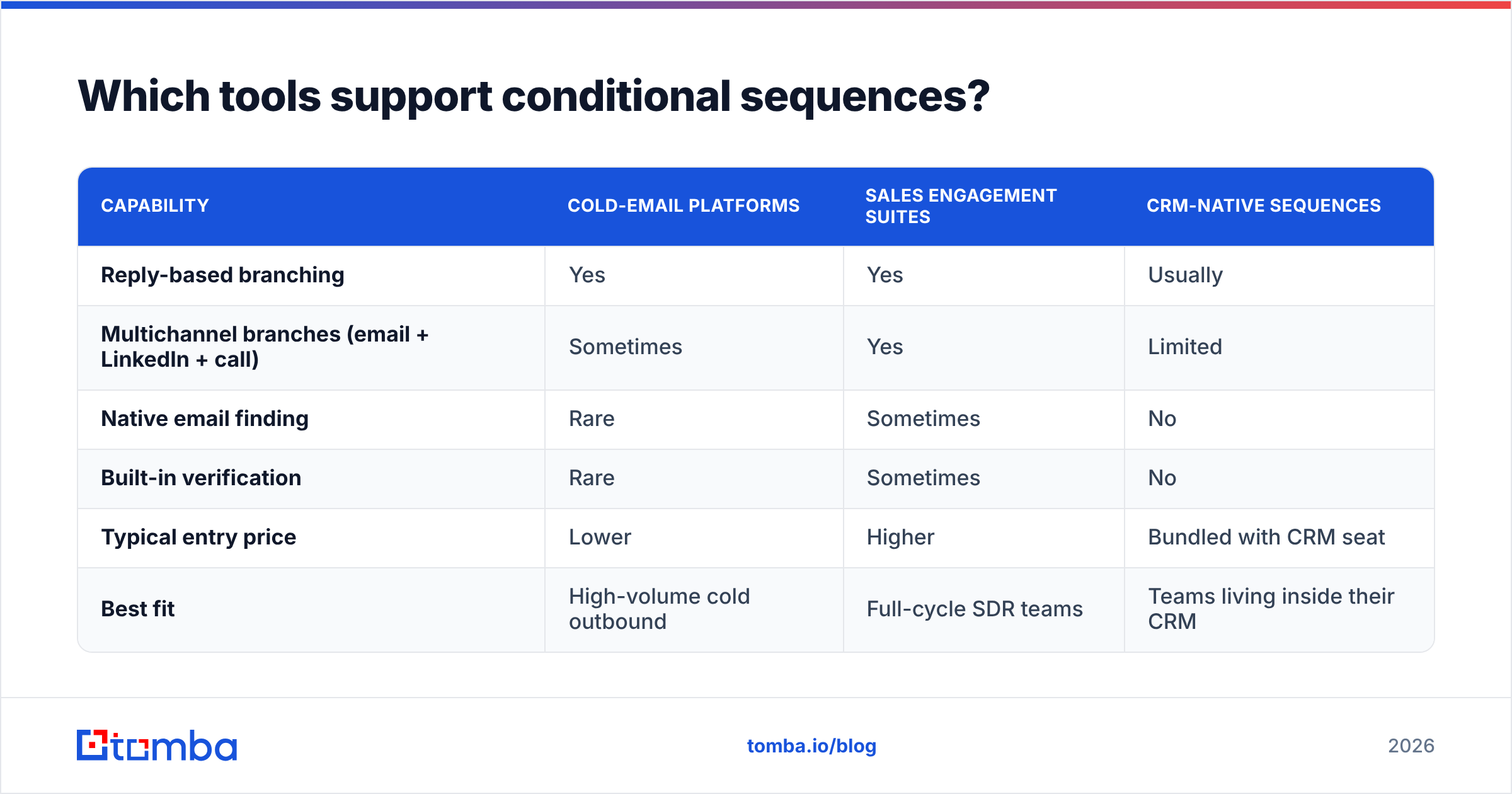
Most modern outbound platforms support some form of branching, but the depth varies widely. Here's a neutral snapshot of common categories buyers compare in 2026:
| Capability | Cold-email platforms | Sales engagement suites | CRM-native sequences |
|---|---|---|---|
| Reply-based branching | Yes | Yes | Usually |
| Multichannel branches (email + LinkedIn + call) | Sometimes | Yes | Limited |
| Native email finding | Rare | Sometimes | No |
| Built-in verification | Rare | Sometimes | No |
| Typical entry price | Lower | Higher | Bundled with CRM seat |
| Best fit | High-volume cold outbound | Full-cycle SDR teams | Teams living inside their CRM |
Two honest notes. First, tool category matters less than data quality—no branching engine rescues a list of invalid addresses. Second, most platforms don't find or verify contacts for you; they assume you arrive with a clean, enriched list. That's the gap Tomba fills upstream of whichever sequencer you choose. If you're weighing a specific vendor, review options on G2 and study how established playbooks structure sequences at HubSpot before committing. If you're actively shopping cold-email senders, our Instantly alternative breakdown compares the branching feature sets directly.
Frequently asked questions#
Are conditional sequences worth it for a small list? Yes—arguably more so. On a small, high-value list, sending a "just following up" to someone who already replied is a bigger relative loss. The reply-exit branch alone justifies the setup even for a few hundred contacts.
Do conditional sequences hurt deliverability? The opposite, when built right. Exiting bounces and dead contacts early reduces sends to bad inboxes, which mailbox providers reward. The risk isn't branching—it's building branches on an unverified list.
How many branches should a beginner start with? One: if replied, stop and notify. Add a second (clickers or openers) once that's stable. You can always expand; you rarely need to.
Can I branch on data other than behavior? Yes. With enriched contacts you can branch on job title, company size, industry, or location, then combine those with behavioral triggers for genuinely tailored paths.
What's the difference between a conditional sequence and an A/B test? An A/B test splits contacts randomly to compare two versions. A conditional sequence routes each contact deliberately based on what they did. You can run A/B tests inside a conditional sequence, but they answer different questions.
Start with the data your branches depend on#
Conditional sequences are only as smart as the contacts feeding them—every trigger, every branch, every "if replied" rule assumes the person and the address are real. Get that foundation right and the logic on top does its job; get it wrong and your bounce branch becomes the whole campaign.
Tomba's Email Finder gives you accurate, verified professional emails to build on, so your branches fire on genuine behavior instead of bad data. Pair it with an email verifier to keep bounce rates low, check the Tomba pricing plans—including a free tier with 25 searches a month to test the waters—and feed your sequencer the clean list conditional logic actually deserves.
Related guides#
Ready to find emails that actually work?
Join 150,000+ professionals who stopped guessing and started sending. Free credits on signup — no credit card required.
Get the Tomba newsletter
Practical outbound tactics and product updates — once every two weeks.
About the author