How to Write a Conference Follow Up Email That Gets Replies
You collected 40 badges at the booth — now what? A practical 2026 guide to the conference follow up email, with timing, templates, and the data step most reps skip.
You shook 60 hands, scanned a stack of badges, and promised half the room you'd "follow up next week." Then Monday hits, the momentum is gone, and most of those conversations quietly die. The conference follow up email is where trade-show ROI is won or lost — and almost everyone does it wrong.
This guide fixes that. You'll get timing rules, seven copy-paste templates for different scenarios, and the one preparation step that separates a 4% reply rate from a 30% one.
TL;DR#
- Send within 24–48 hours. Reply rates fall off a cliff after the first work week — you're competing with everyone else's follow-up and the fading memory of your booth.
- Reference something specific. "Great to meet you" gets deleted. "Your point about migrating off Salesforce by Q3" gets a reply.
- One clear ask per email. Book a call, share a resource, or answer a question — not all three.
- Verify the address before you send. Badge scanners and business cards are riddled with typos; a bounce kills the thread before it starts.
- Sequence it. One email is a coin flip. A 3-touch sequence over two weeks doubles most reply rates.
Why do most conference follow up emails fail?#
Three reasons, and none of them are the copy.
First, timing. The person you met talked to 30 other vendors. By day five, your face has blurred into the crowd. HubSpot's sales research has repeatedly shown that speed-to-lead is one of the strongest predictors of conversion, and a conference lead is the most time-sensitive lead you'll ever get.
Second, generic openers. If your first line could be pasted into any of your 60 emails without changing a word, it's not a follow-up — it's a broadcast. The recipient can smell the template instantly.
Third — and this is the silent killer — bad contact data. You scribbled an email on the back of a card, or a badge scanner OCR'd "rn" as "m." The email bounces, you never notice, and you blame your copy. Before you write a single word, you need clean, verified addresses. More on that below.

When should you send a conference follow up email?#
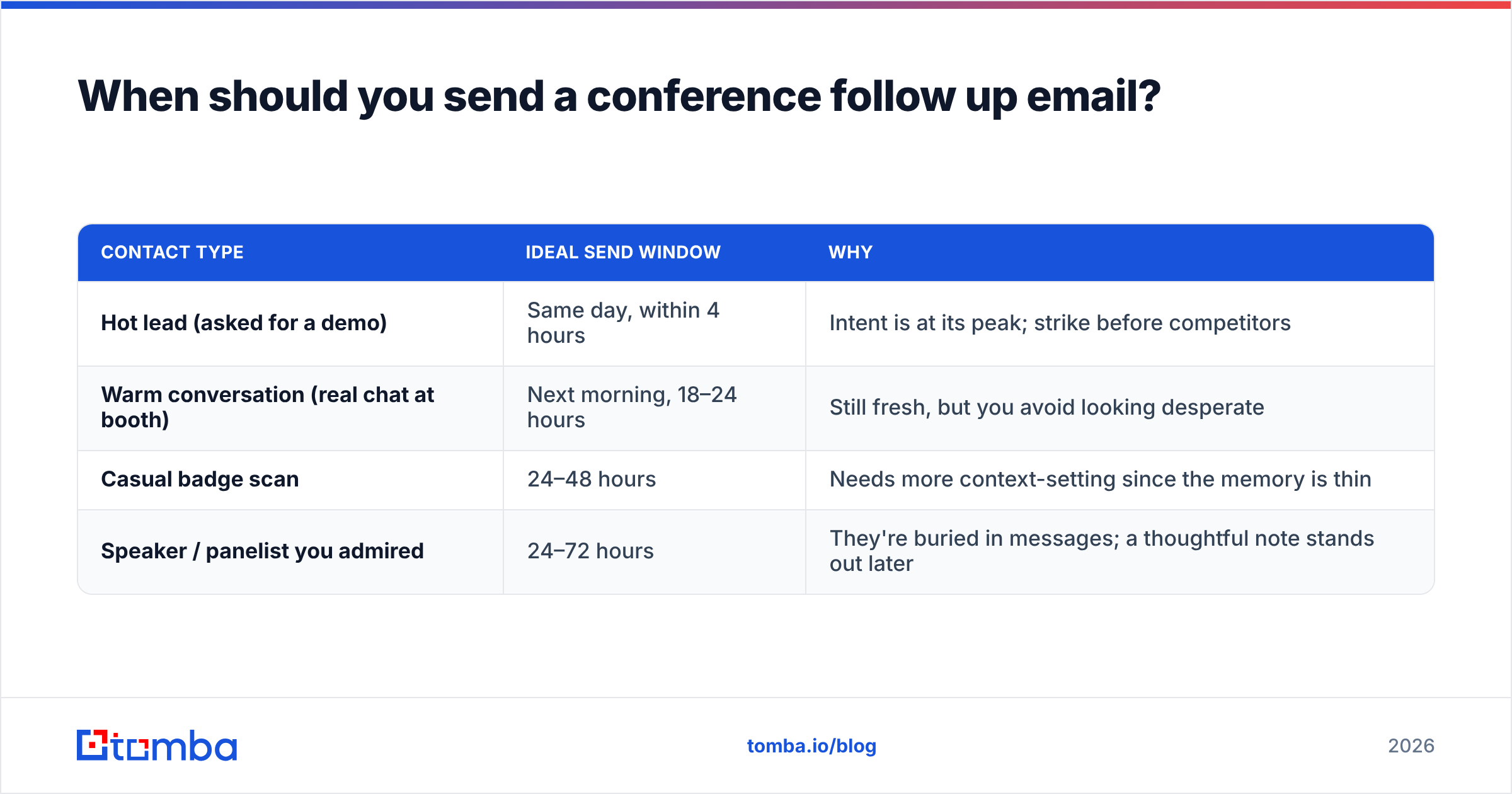
Fast. Here's the window that actually works, mapped to the type of contact.
| Contact type | Ideal send window | Why |
|---|---|---|
| Hot lead (asked for a demo) | Same day, within 4 hours | Intent is at its peak; strike before competitors |
| Warm conversation (real chat at booth) | Next morning, 18–24 hours | Still fresh, but you avoid looking desperate |
| Casual badge scan | 24–48 hours | Needs more context-setting since the memory is thin |
| Speaker / panelist you admired | 24–72 hours | They're buried in messages; a thoughtful note stands out later |
The one rule that beats all of these: never let the weekend swallow your lead. If the conference ends Thursday, everything goes out Friday morning. Monday-batch follow-ups compete with the entire industry's Monday-batch follow-ups.
What should a conference follow up email include?#
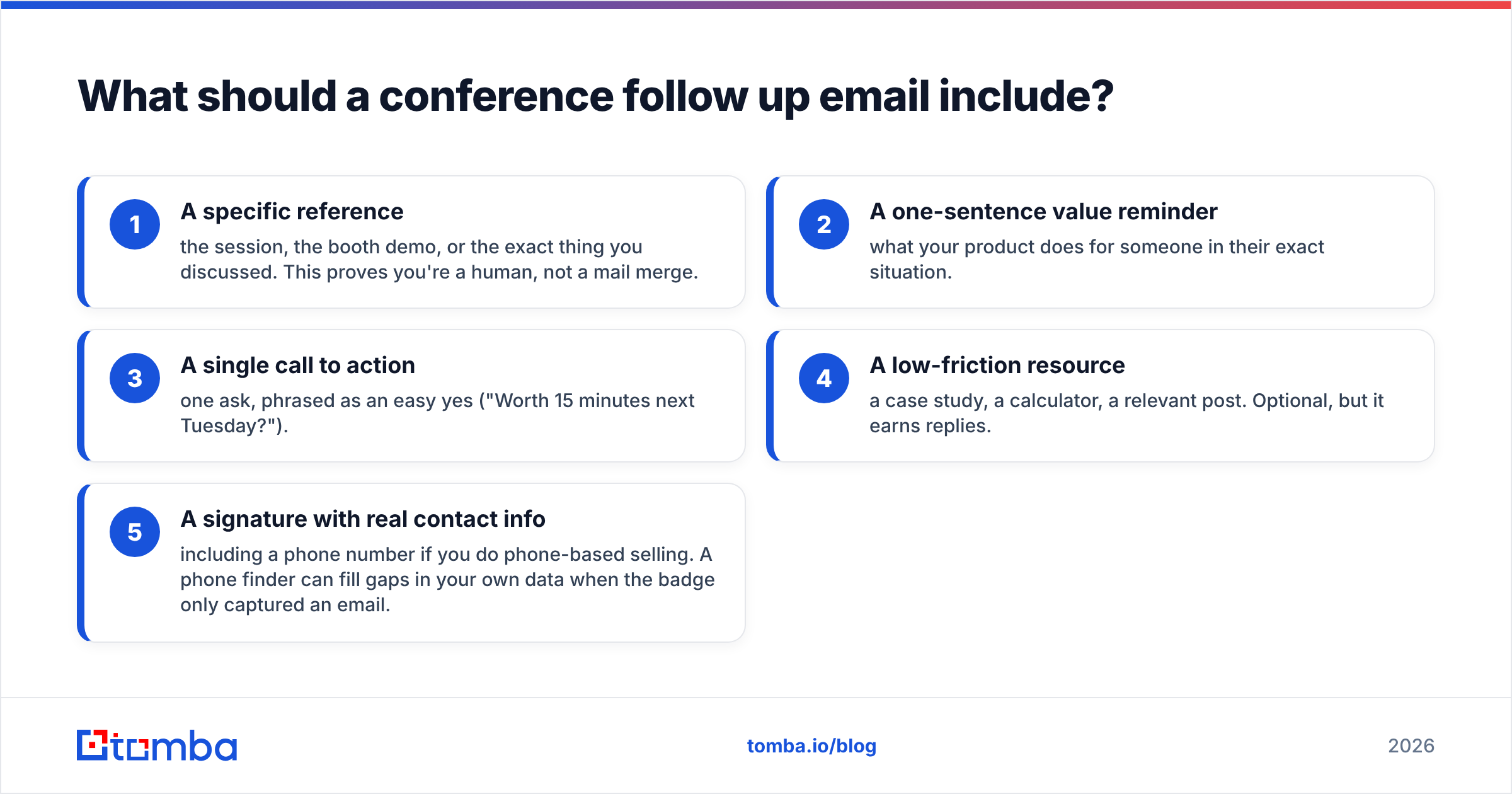
Five parts, in order. Keep the whole thing under 120 words.
- A specific reference — the session, the booth demo, or the exact thing you discussed. This proves you're a human, not a mail merge.
- A one-sentence value reminder — what your product does for someone in their exact situation.
- A single call to action — one ask, phrased as an easy yes ("Worth 15 minutes next Tuesday?").
- A low-friction resource — a case study, a calculator, a relevant post. Optional, but it earns replies.
- A signature with real contact info — including a phone number if you do phone-based selling. A phone finder can fill gaps in your own data when the badge only captured an email.
If you want the reference line to feel effortless, jot a two-word note on each card at the event ("data migration" / "hiring 3 SDRs"). Future you will thank present you.
Conference follow up email templates for 2026#
Steal these. Swap the brackets, keep the structure.
1. The hot-lead demo request#
Subject: Your [product] demo — Tuesday or Thursday?
Hi [Name],
Great talking at [Event] — you mentioned [specific pain, e.g. "your team is drowning in manual list-building"]. That's exactly the workflow we cut from hours to minutes.
I've got Tuesday 2pm or Thursday 10am open for a quick walkthrough tailored to [their company]. Which works?
[Your name]
2. The warm-conversation nurture#
Subject: Following up from [Event] — the [topic] we discussed
Hi [Name],
Enjoyed our chat about [specific topic] at the booth. You asked how we handle [objection] — I put together a 2-minute case study from [similar company] that answers it directly: [link].
Happy to go deeper whenever you're ready. No rush.
[Your name]
3. The casual badge-scan re-introduction#
Subject: We met at [Event] — quick hello
Hi [Name],
We connected briefly at the [Booth #] on Wednesday. In case the day was a blur (it was for me too), we help [role] at companies like yours [core value in one line].
Worth a 15-minute intro call to see if there's a fit?
[Your name]
4. The speaker / thought-leader note#
Subject: Your [session title] talk — one question
Hi [Name],
Your point about [specific idea] at [Event] reframed how I think about [topic]. Quick question: [genuine, specific question that shows you listened].
Would love your take. And if you ever want to see how we're tackling this, I'm around.
[Your name]
5. The bump (no reply after 3 days)#
Subject: Re: [original subject]
Hi [Name] — floating this back up in case it slipped. Still happy to grab 15 minutes if [pain point] is on your radar this quarter.
If now's not the time, just say the word and I'll check back after [next quarter/event].
6. The break-up (final touch)#
Subject: Should I close the loop?
Hi [Name] — I haven't heard back, so I'll assume the timing's off. I'll stop here, but the door's open. If [pain] becomes a priority, you know where to find me.
7. The referral pivot#
Subject: Wrong person? No problem
Hi [Name] — you may not own [area], and that's fine. Could you point me to whoever handles [function] on your team? I'll take it from there and stop cluttering your inbox.
How many follow-ups should you send?#
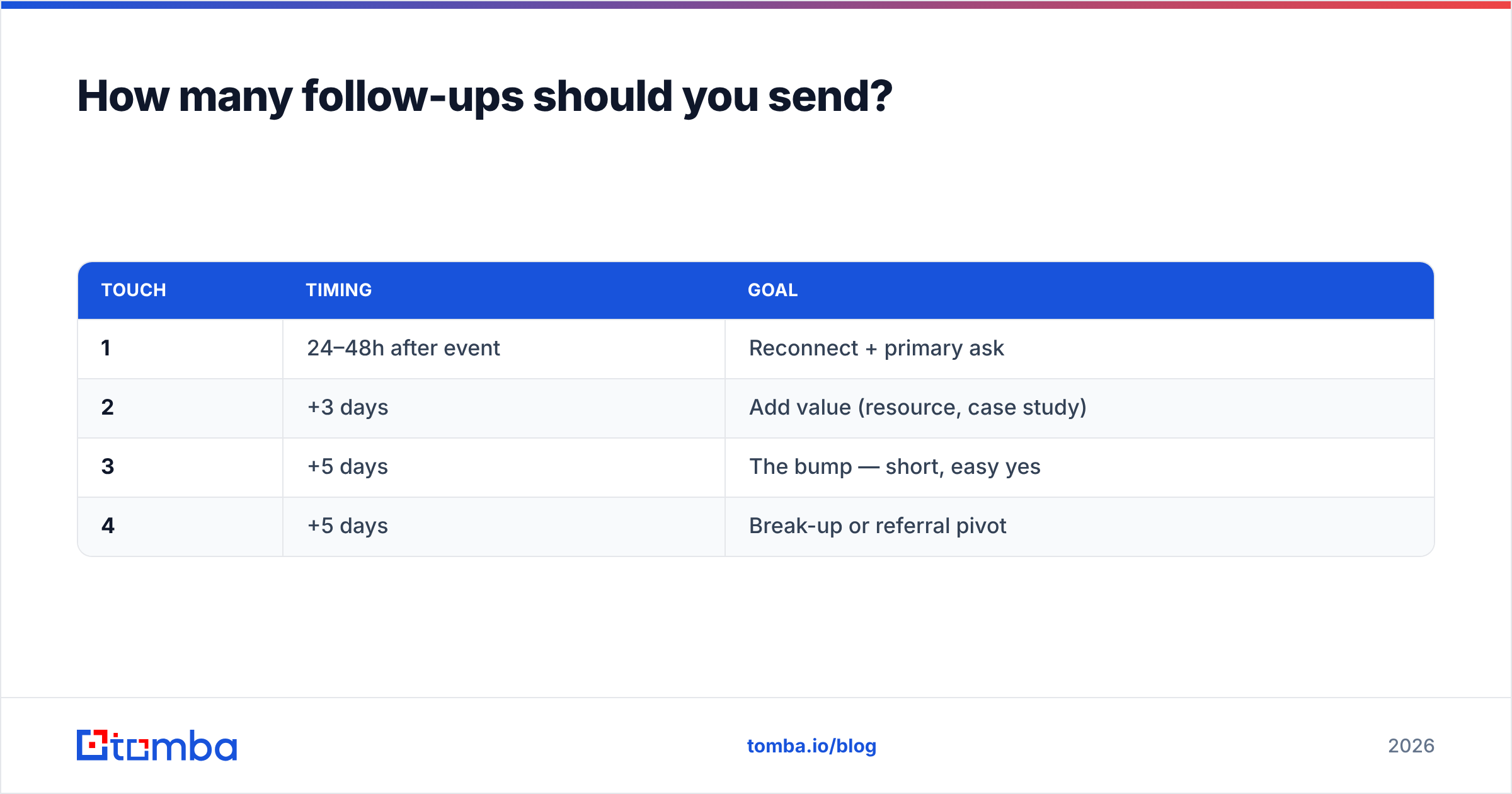
Three to four touches over two weeks, then stop. A single email is a coin flip; a short sequence is a system. Here's the cadence that balances persistence with not being annoying.
| Touch | Timing | Goal |
|---|---|---|
| 1 | 24–48h after event | Reconnect + primary ask |
| 2 | +3 days | Add value (resource, case study) |
| 3 | +5 days | The bump — short, easy yes |
| 4 | +5 days | Break-up or referral pivot |
Notice each touch does something new. Sending the same "just checking in" four times is how you get marked as spam and torch your sender reputation. Vary the angle, respect the exit, and keep deliverability healthy so your whole domain doesn't suffer.

What's the one step that actually moves reply rates?#
Clean data — before the first send. This is the unglamorous step that beats any subject-line trick.
Conference contact data is dirty by nature. Badge scanners misread characters, attendees hand-write cards, and people give personal Gmail addresses instead of work ones you can actually route through your CRM. If even 15% of your list bounces, you've not only wasted those sends — you've dinged your domain's email deliverability for everyone else on the list.
The fix is a two-part hygiene pass:
- Fill the gaps. When a badge only captured a name and company, use an email finder to recover the correct work address by name and domain instead of guessing at
first.last@company.com. - Verify before you send. Run every address — scanned, typed, or found — through an email verifier to catch typos, dead mailboxes, and catch-all traps before they turn into bounces.
Do this once, at the start, and every downstream metric improves: fewer bounces, better inbox placement, higher reply rates. Skip it, and the best copy in the world lands in a mailbox that no longer exists.
For a booth that collected hundreds of badges, a bulk email finder turns a messy spreadsheet into a routable, verified list in one pass — so your SDRs spend Monday selling, not cleaning.
How do you personalize at scale without sounding like a robot?#
Batch the mechanics, personalize the hook. Here's the workflow that keeps 200 follow-ups feeling one-to-one:
- Tag at the event. Two-word note per card: the topic, the pain, or a memorable detail.
- Enrich the list. Push your scanned names through data enrichment to attach title, company size, and LinkedIn so you can segment (SDR vs. VP gets different copy).
- Group by intent. Hot / warm / cold buckets, each with its own template from the set above.
- Personalize only line one. Your reference sentence carries all the personalization weight. The rest is a proven template — that's fine.
- Sequence and track. Load into your outreach tool, set the 4-touch cadence, and let replies pull people out automatically.
You're not writing 200 unique emails. You're writing five great templates and 200 unique first lines. That's the leverage.
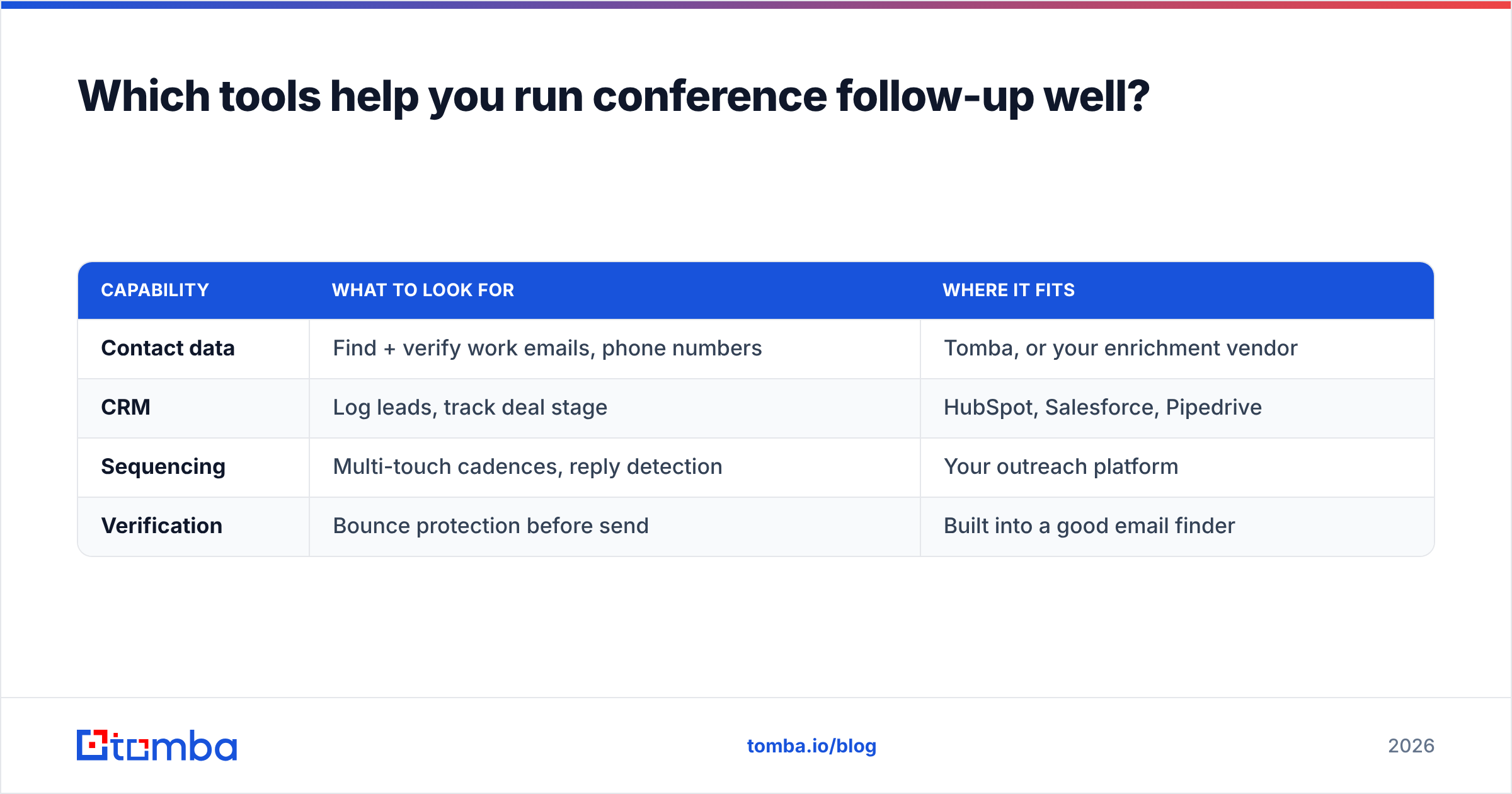
Which tools help you run conference follow-up well?#
You need three capabilities: find/verify contacts, personalize, and sequence. Many teams already own a CRM and a sequencer — the missing piece is usually the data layer.
| Capability | What to look for | Where it fits |
|---|---|---|
| Contact data | Find + verify work emails, phone numbers | Tomba, or your enrichment vendor |
| CRM | Log leads, track deal stage | HubSpot, Salesforce, Pipedrive |
| Sequencing | Multi-touch cadences, reply detection | Your outreach platform |
| Verification | Bounce protection before send | Built into a good email finder |
You can compare the data-layer options on a review site like G2 before committing, and check Tomba pricing against what you're paying today — the Free tier (25 searches/month) is enough to clean a small booth's worth of leads before you upgrade. For larger events, Starter runs $49/month and Growth $99/month.
The bottom line#
A conference follow up email isn't a thank-you note — it's the first move in a deal you already started in person. Move fast (24–48 hours), reference something real, ask for one thing, and sequence your touches. But before any of that: get the addresses right. A verified list is the foundation every template stands on.
Ready to turn that stack of badges into a clean, routable list? Start with the Tomba Email Finder — recover the correct work emails your scanner missed, verify them in the same pass, and hit "send" on your follow-ups knowing they'll actually land. Your booth already did the hard part. Don't let a typo waste it.
Related guides#
Ready to find emails that actually work?
Join 150,000+ professionals who stopped guessing and started sending. Free credits on signup — no credit card required.
Get the Tomba newsletter
Practical outbound tactics and product updates — once every two weeks.
About the author