How to Confirm an Email Address Is Real Before You Send
Bounced emails wreck your sender reputation. Here's how to confirm an email address is real in 2026 — free checkers, SMTP pings, and catch-all handling that actually hold up in production.
Every message you send is a small bet: that the address on the other end exists, accepts mail, and belongs to a real person. Lose that bet often enough and mailbox providers stop trusting you. This guide shows you how to confirm an email address is real before you hit send — the manual checks, the automated tools, and the traps that make "verified" lists still bounce.
TL;DR#
- To confirm an email address you validate four things in order: syntax, domain/MX records, mailbox existence (SMTP), and risk signals (disposable, role-based, catch-all).
- A single SMTP ping is not enough — catch-all domains accept everything, so they need separate handling.
- Free tools are fine for one-off checks; use a bulk email verifier or API when you're validating lists.
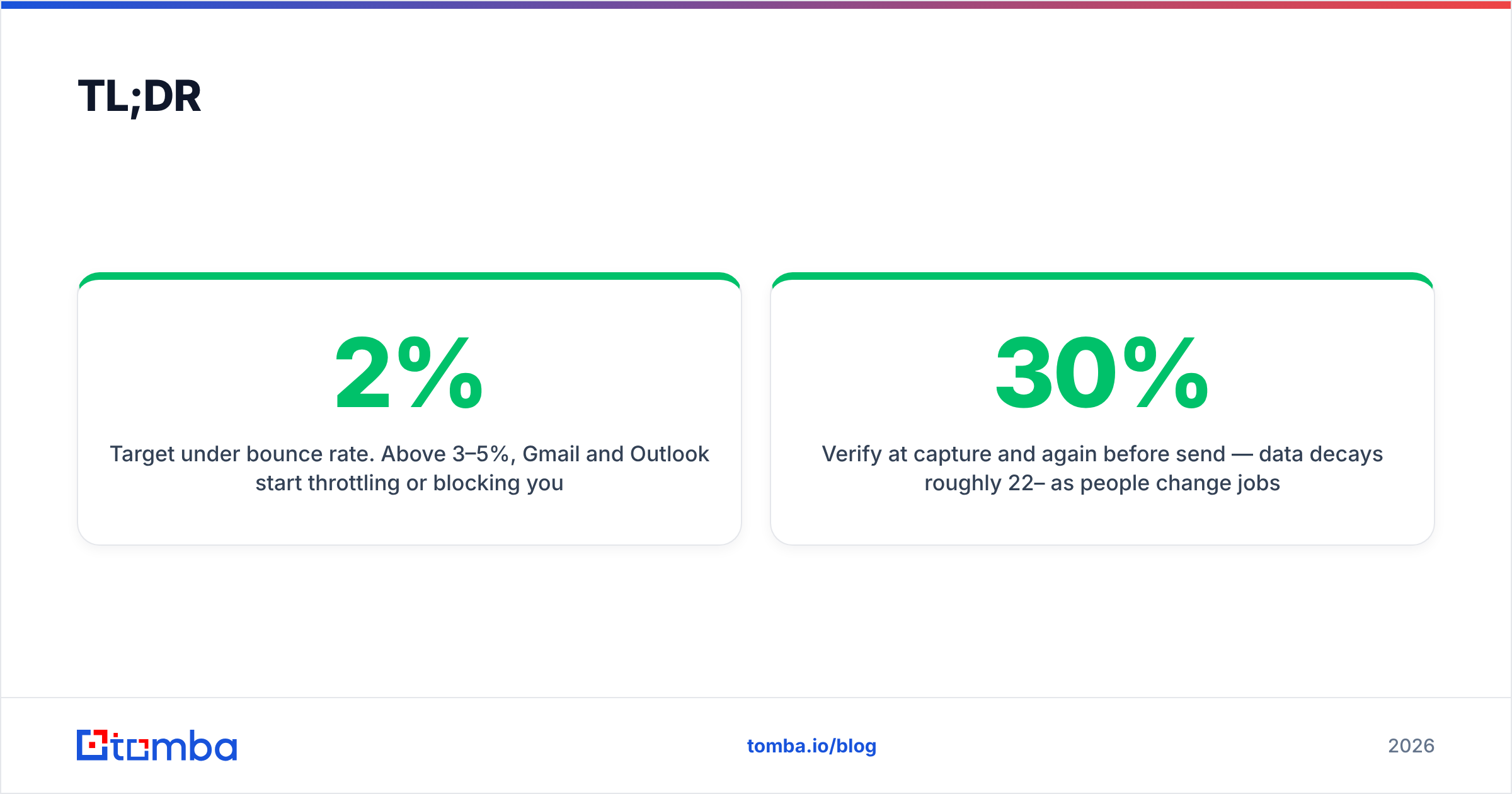
- Target under 2% bounce rate. Above 3–5%, Gmail and Outlook start throttling or blocking you.
- Verify at capture and again before send — data decays roughly 22–30% per year as people change jobs.
What does it mean to confirm an email address?#
Confirming an email address means proving, without sending a real campaign message, that mail delivered to it will actually land in an inbox. Think of it like checking that a phone number rings before you dial it in front of a client — you want to know it connects, not discover it's dead mid-conversation.
There are two very different meanings people blur together:
- Confirmation via opt-in — the recipient clicks a link in a "please confirm your email" message. This proves consent and ownership. It's what you do for newsletter signups.
- Verification via validation checks — you technically test whether the address is deliverable without contacting the person. This is what sales, RevOps, and outbound teams mean 90% of the time.
This guide covers both, but leans on the second, because that's where bounces, blocklists, and wasted send credits come from.
Why should you confirm an email address before sending?#
Because bad addresses are expensive in ways that compound. One hard bounce doesn't just fail to deliver — it tells the receiving server that you don't clean your list, which lowers your sender reputation for every future message, including the ones going to valid inboxes.
Here's what an unverified list actually costs you:
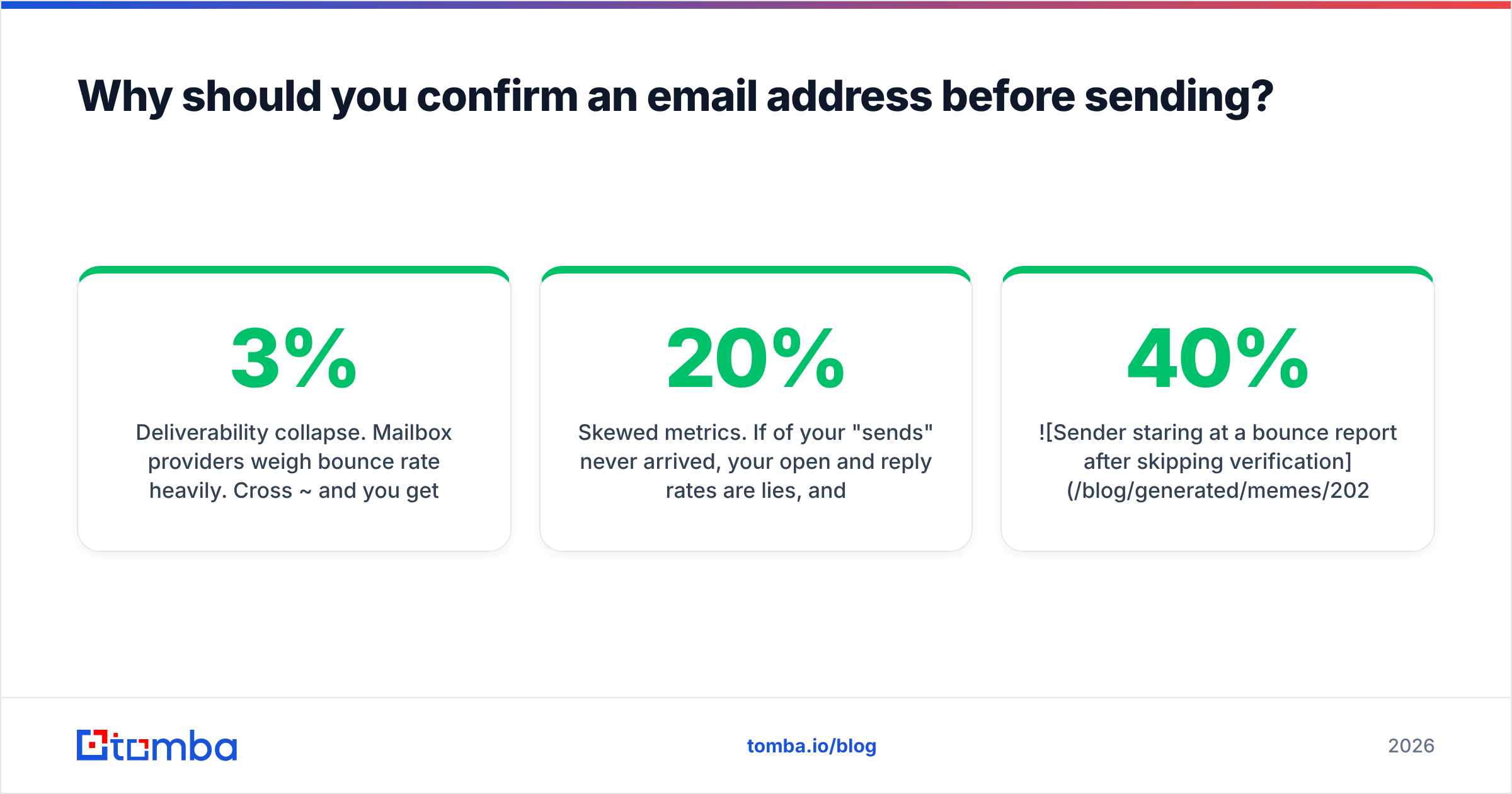
- Deliverability collapse. Mailbox providers weigh bounce rate heavily. Cross ~3% and you get throttled; cross ~5% and you risk a full block.
- Blocklisting. Repeated bounces and spam-trap hits can land your domain on Spamhaus or Barracuda, which is painful to escape.
- Skewed metrics. If 20% of your "sends" never arrived, your open and reply rates are lies, and you'll optimize campaigns against fiction.
- Wasted spend. Every sending tool, enrichment credit, and SDR hour spent on a dead address is money set on fire.

According to HubSpot's research on email marketing, list hygiene is one of the strongest predictors of long-term deliverability — and it's the single cheapest thing most teams neglect.
How do you confirm an email address? The four-layer check#
You confirm an email address by running it through four checks, cheapest and fastest first, so you fail obvious junk before spending an SMTP round-trip on it.
- Syntax validation. Does it match the RFC 5322 format — one
@, a valid local part, a real TLD? This catches typos likejohn@gmail,cominstantly and for free. Use a free email checker for a quick single lookup. - Domain and MX records. Does the domain resolve, and does it publish MX (mail exchange) records? No MX record means the domain can't receive mail at all — instant fail.
- Mailbox / SMTP check. Connect to the mail server and ask, via the SMTP
RCPT TOcommand, whether the specific mailbox exists — without actually delivering a message. A250 OKsuggests it's real; a550means no such user. - Risk scoring. Even a "valid" address can be a landmine: disposable domains (mailinator.com), role accounts (
info@,sales@), or catch-all domains that accept everything. Flag these so you can decide, not guess.
Only an address that passes all four with a clean risk profile should be treated as safe to send. The SMTP protocol is the backbone of step three — but as you'll see below, it lies more often than you'd like.
What are the ways to confirm an email address?#
You have three practical paths, and the right one depends on volume and how much bounce risk you can tolerate.
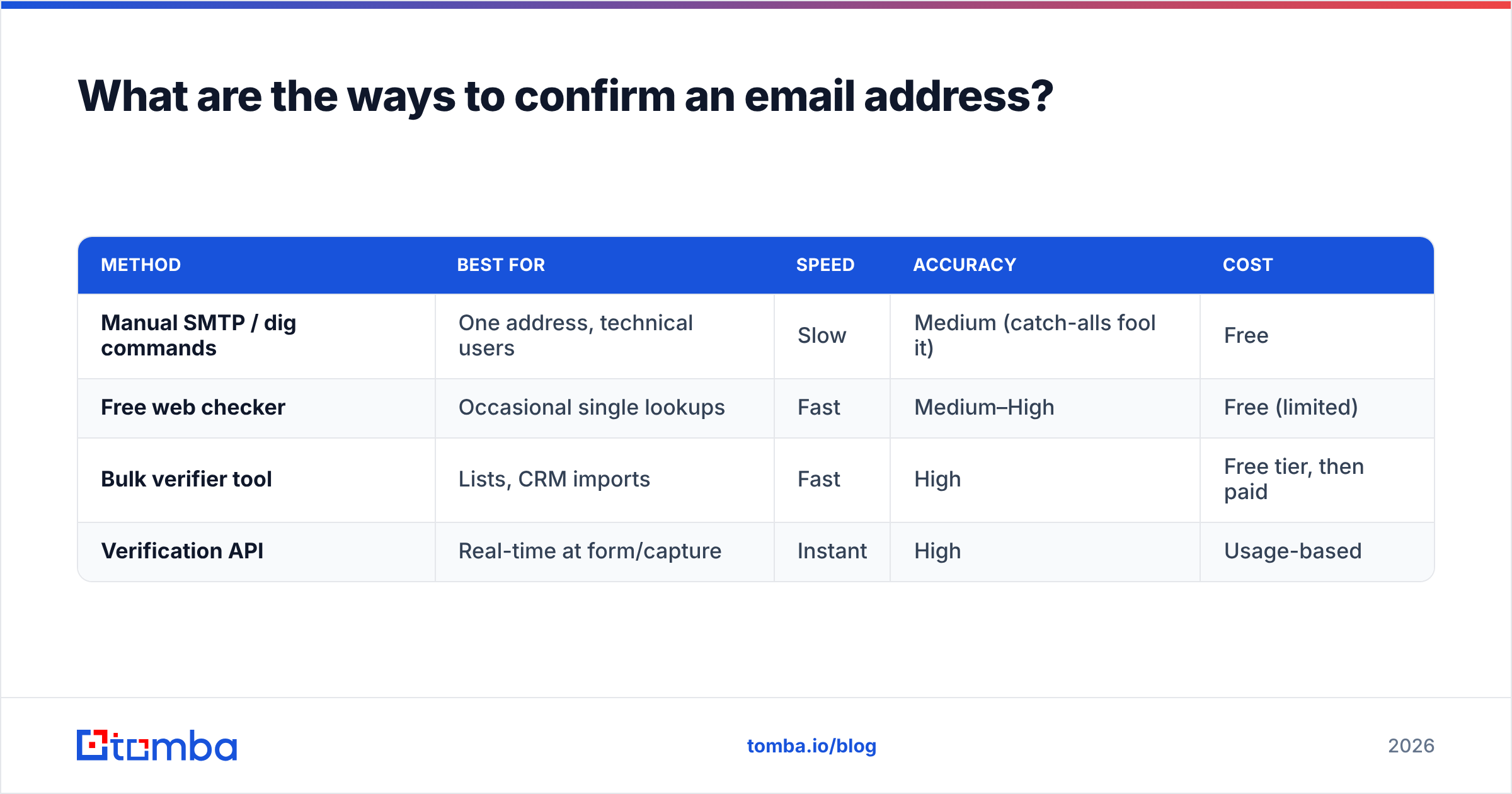
| Method | Best for | Speed | Accuracy | Cost |
|---|---|---|---|---|
| Manual SMTP / dig commands | One address, technical users | Slow | Medium (catch-alls fool it) | Free |
| Free web checker | Occasional single lookups | Fast | Medium–High | Free (limited) |
| Bulk verifier tool | Lists, CRM imports | Fast | High | Free tier, then paid |
| Verification API | Real-time at form/capture | Instant | High | Usage-based |
Manual checks work when you're verifying your own boss's address and have a terminal open. They fall apart at scale and can't reliably read catch-all domains. Web checkers are the sweet spot for a quick gut-check before an important cold email. Bulk verifiers and APIs are what you actually deploy in production — validating a 10,000-row export or gating every signup form in real time.
If you're cleaning an existing list, run it through a bulk email finder and verifier together so you both fill gaps and drop dead rows in one pass.
What is a catch-all, and why does it break verification?#
A catch-all (or "accept-all") domain is configured to accept mail for any address at that domain — anything@company.com returns 250 OK even if no such mailbox exists. It's the single biggest reason "verified" lists still bounce.

Picture a mailroom that signs for every package addressed to the building, then sorts out who actually works there afterward. The SMTP handshake succeeds, so a naive checker marks the address "valid" — but the message may still bounce internally days later. Roughly 10–20% of B2B domains are catch-alls, so ignoring them quietly poisons your results.
The fix is not to blanket-reject catch-alls (you'd throw away real prospects) but to score them separately. A dedicated catch-all verifier uses pattern analysis, historical deliverability data, and provider-level signals to estimate whether a catch-all address is genuinely reachable, instead of returning a useless "unknown." Handle these as their own risk tier, not as confirmed sends.
Free vs. paid: how should you confirm email addresses at scale?#
Free confirmation is perfect until it isn't. The line is volume and consequence.
- Use free tools when: you're checking one address, testing a format, or verifying a personal contact. A browser-based checker gives you syntax, MX, and a basic SMTP result in seconds.
- Use a paid tool when: you're validating lists, protecting a signup form, feeding a CRM, or your bounce rate directly affects revenue. Paid tools add catch-all scoring, disposable/role detection, bulk processing, and an SLA-backed API.
Tomba's own tiers are built around this jump: a Free plan at 25 searches per month for testing, then Starter at $49/mo, Growth at $99/mo, and Pro at $249/mo as your verification volume climbs. You can see the full breakdown on the Tomba pricing page. The point isn't the specific numbers — it's that per-check cost drops sharply once you move from ad-hoc lookups to a real pipeline.
When comparing vendors, cross-reference independent reviews on G2 rather than trusting any single vendor's accuracy claim — including Tomba's. Real deliverability numbers show up in user reviews, not marketing pages.
How accurate is email verification, really?#
No tool is 100% accurate, and any vendor claiming otherwise is selling you something. Here's why, and how to think about it honestly:
- Some servers refuse to tell the truth. Yahoo, and increasingly others, "greylist" or accept-all at the SMTP layer to defeat verification, so even the best checker returns "unknown" for a slice of addresses.
- Data decays constantly. An address valid today can be dead next quarter when the person changes jobs. Verification is a snapshot, not a warranty.
- Catch-alls are probabilistic. The best you get is a confidence score, not a yes/no.
Realistic expectations: a good verifier confidently classifies 90–95% of a typical B2B list and flags the rest as risky or unknown. Your job is to act on those tiers — send freely to the confirmed, send cautiously (or warm up) to the risky, and skip or re-verify the unknowns.
Best practices to keep bounce rates low#
- Verify twice — once at capture (real-time API on the form) and once right before a campaign, since time has passed.
- Segment by risk tier and route catch-alls and role accounts to their own, gentler sequences.
- Re-verify quarterly. Bake it into your ops calendar; don't wait for a bounce spike.
- Warm up new sending domains before blasting even a clean list — clean data plus a cold domain still lands in spam.
- Enrich as you go. If an address is dead, a tool that also does data enrichment can often surface the person's current one instead of leaving a hole.
Frequently asked questions#
Can I confirm an email address without sending an email?
Yes — that's the entire point of SMTP-based verification. Tools query the mail server with RCPT TO to check whether a mailbox exists without ever delivering a message the recipient sees.
Does confirming an email address guarantee it won't bounce? No. It sharply reduces bounces, but catch-all domains, server-side greylisting, and mailboxes that fill up or get disabled between check and send mean a small residual bounce rate is normal. Aim for under 2%, not zero.
Is it legal to verify someone's email address? Verification itself — checking deliverability — is standard practice and legal. What's regulated is sending: consent, unsubscribe, and disclosure rules under GDPR and CAN-SPAM apply to your outreach, not to a technical existence check.
How often should I re-confirm my list? Every 3 months for active lists, and always before a major send. B2B email data decays roughly 22–30% per year, so a list verified in January is meaningfully stale by summer.
Confirm every address before it costs you an inbox#
Bounces aren't a rounding error — they're a slow tax on every future email you send. The teams with the best deliverability aren't lucky; they just refuse to send to an address they haven't confirmed.
Start by running your next list through the Tomba Email Finder and verifier together: fill the gaps, drop the dead rows, and score the catch-alls before a single message goes out. Your sender reputation — and your reply rate — will thank you. Verify first, send second, and let the people who skip that step wonder why their inbox placement keeps sliding.
Related guides#
Ready to find emails that actually work?
Join 150,000+ professionals who stopped guessing and started sending. Free credits on signup — no credit card required.
Get the Tomba newsletter
Practical outbound tactics and product updates — once every two weeks.
About the author