Contact Data Enrichment in 2026: The Complete Practical Guide
Contact data enrichment turns half-empty CRM records into complete, sales-ready profiles. Here's how it works, what it costs, and how to do it without wrecking deliverability.
Your CRM is lying to you. Not on purpose, but every quarter roughly 20-30% of your contact records quietly rot: people change jobs, companies rebrand, direct dials get reassigned. Contact data enrichment is the process that fights that decay by filling missing fields and correcting stale ones so your reps talk to the right person at the right company.
This guide explains what contact data enrichment actually does, how the mechanics work, what it costs, where accuracy breaks down, and how to run an enrichment program without torching your sender reputation.
TL;DR#
- Contact data enrichment appends or corrects missing fields (email, phone, title, company size, tech stack) on records you already have, using a name, email, or domain as the input key.
- It splits into two jobs: identity resolution (matching your record to a real person/company) and attribute append (adding the fields you're missing).
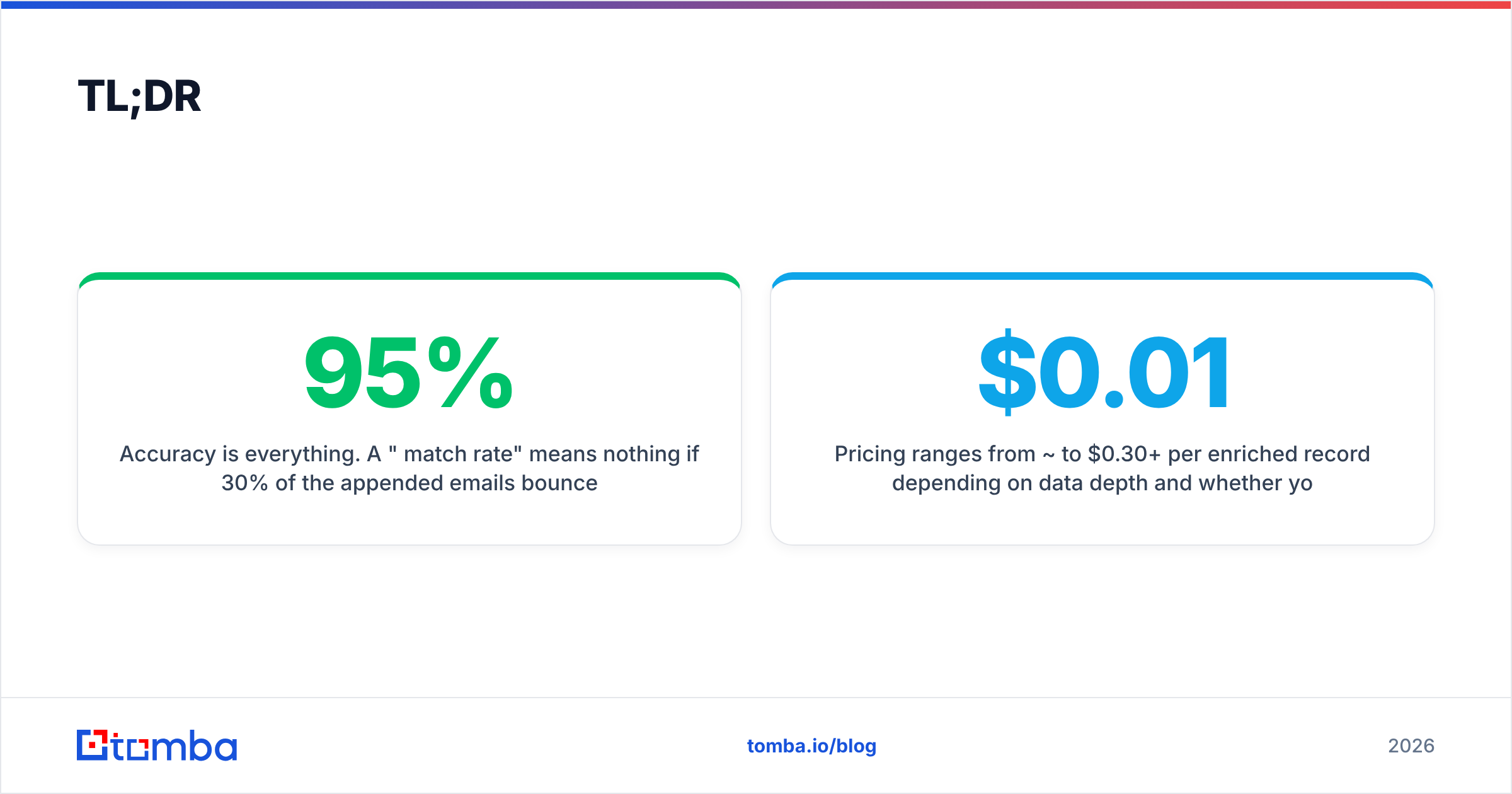
- Accuracy is everything. A "95% match rate" means nothing if 30% of the appended emails bounce — always pair enrichment with email verification.
- Pricing ranges from ~$0.01 to $0.30+ per enriched record depending on data depth and whether you buy a platform or use an email finder API.
- The biggest hidden risk is deliverability: enriched-but-unverified emails inflate bounce rates and get your domain flagged.
What is contact data enrichment?#
Contact data enrichment is like getting a business card with only a name on it, then having a research assistant hand it back fully filled in — work email, direct dial, job title, company, headcount, and LinkedIn URL — all verified. You supply a partial record; the enrichment layer returns a complete one.
In B2B, a "contact" record usually starts life thin. A lead fills out a form with just an email. A rep scrapes a name and company from LinkedIn. A trade-show list gives you first name, last name, and a company. None of that is enough to route, score, or sequence. Enrichment closes the gap.
There are two distinct operations happening under the hood, and conflating them is where most teams get burned:
- Identity resolution — matching your fragment ("John at Acme") to a single real person in a reference dataset. This is a probabilistic join, not a lookup.
- Attribute append — once matched, copying additional fields (firm size, industry, seniority, verified email) onto your record.
- Verification — confirming the appended contactable fields (email, phone) are actually live right now, not just historically accurate.
- Deduplication and normalization — collapsing "IBM", "I.B.M.", and "ibm.com" into one canonical company so you don't enrich the same account five times.
Skip step 3 and you get a database that looks complete and performs terribly. Gartner has estimated that poor data quality costs organizations an average of $12.9 million per year — most of that waste hides inside records that appear filled in but point nowhere.

How does contact data enrichment actually work?#
The workflow is the same whether you enrich one record or a million.
Step 1 — Choose your input key. Enrichment always needs an anchor. The strongest keys, in order, are: a work email > a full name + company domain > a full name + company name > a LinkedIn URL. The weaker the key, the higher the mismatch risk.
Step 2 — Resolve identity. The provider queries its reference graph — a blend of public web crawling, company websites, licensed panels, and self-reported profiles — to find the single best match. Good systems return a confidence score, not just a yes/no.
Step 3 — Append attributes. Missing fields get filled from the matched profile: role, seniority, department, company revenue band, employee count, technologies used, and social profiles.
Step 4 — Find and verify the email. This is the field most teams care about. A pattern engine derives likely addresses (jsmith@, john.smith@) from the company's known format, then SMTP-checks each one. Tools like the Tomba Email Finder combine domain pattern detection with live verification so the address that lands in your CRM is one that actually accepts mail.
Step 5 — Score and write back. Each enriched field carries a confidence and a source. You decide the threshold: auto-write above 90%, queue for review between 70-90%, discard below.
The point of the confidence gate is simple: an unverified guess is worse than a blank field, because a blank field doesn't bounce.
Real-time vs. batch enrichment: which do you need?#
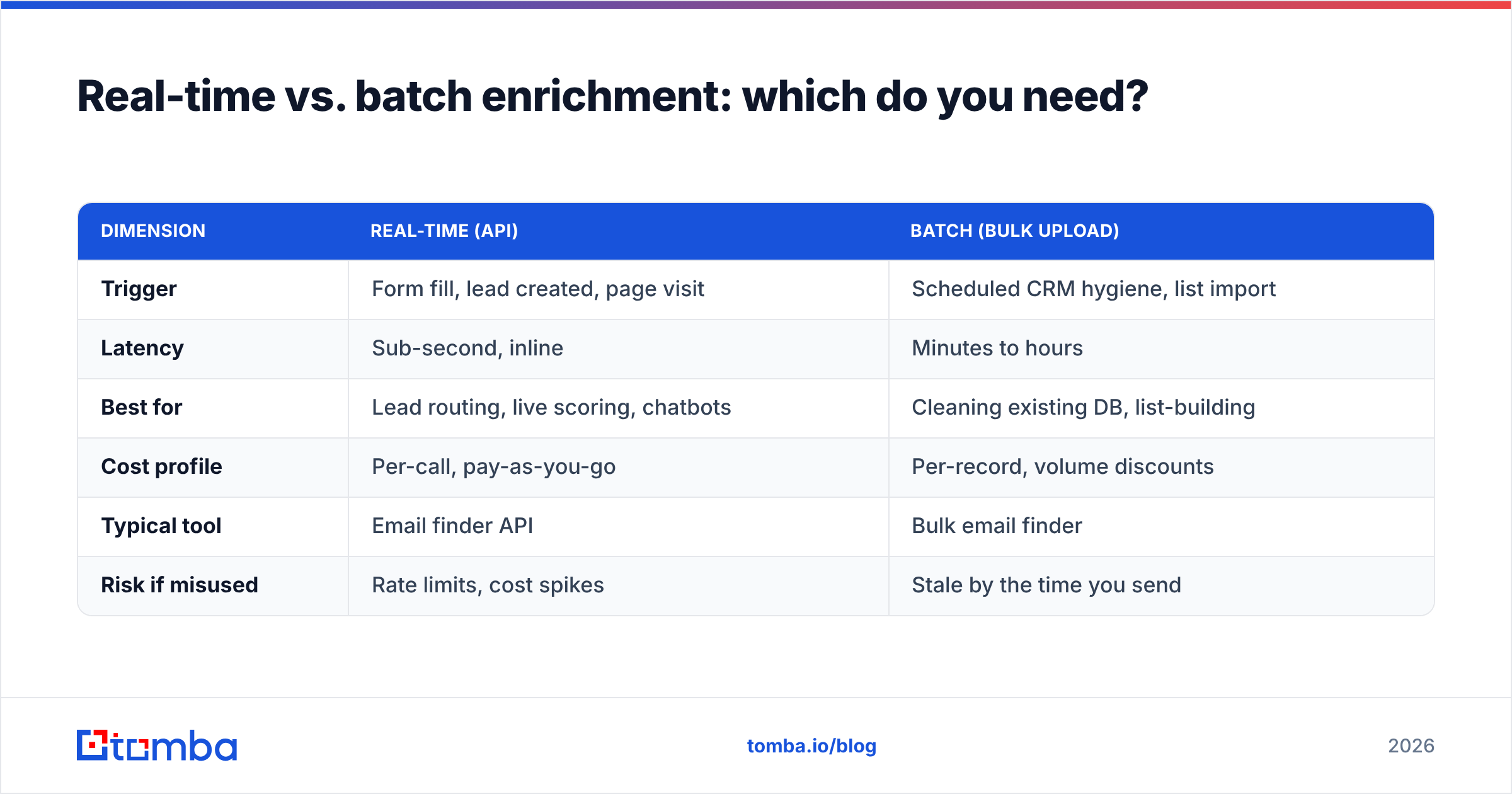
Two delivery models exist, and most mature stacks run both.
| Dimension | Real-time (API) | Batch (bulk upload) |
|---|---|---|
| Trigger | Form fill, lead created, page visit | Scheduled CRM hygiene, list import |
| Latency | Sub-second, inline | Minutes to hours |
| Best for | Lead routing, live scoring, chatbots | Cleaning existing DB, list-building |
| Cost profile | Per-call, pay-as-you-go | Per-record, volume discounts |
| Typical tool | Email finder API | Bulk email finder |
| Risk if misused | Rate limits, cost spikes | Stale by the time you send |
Real-time enrichment fires the instant a lead is created — a form submit triggers an API call that fills 12 fields before the record hits the sales queue, so routing and scoring happen on complete data. Use it at the top of funnel.
Batch enrichment runs against records you already have. You export a segment, enrich the file, and write it back. Use it for quarterly CRM hygiene and for turning a raw prospect list into something you can sequence.
The mistake is treating them as either/or. Real-time keeps new data clean; batch stops old data from rotting. You need both because decay never stops.
What fields can you actually enrich?#
Not all "enrichment" delivers the same depth. Here's what a serious contact enrichment layer returns, grouped by how hard each field is to source reliably.
- Easy / high accuracy — Full name, company name, company domain, industry, country. These are stable and widely published.
- Moderate — Job title, seniority, department, company size band, LinkedIn URL. These change with job moves but are well-documented.
- Hard / requires verification — Work email, direct phone, mobile. High value, high decay, must be verified live. Pair email output with an email verifier and phone output with a validator.
- Firmographic add-ons — Revenue estimate, funding stage, tech stack, headquarters. Useful for scoring and territory planning, but treat estimates as ranges, not facts.
A record enriched only with the easy tier looks impressive in a demo and does nothing for outreach. The fields that drive replies — verified email and direct dial — are exactly the ones cheap providers fudge.

How much does contact data enrichment cost?#
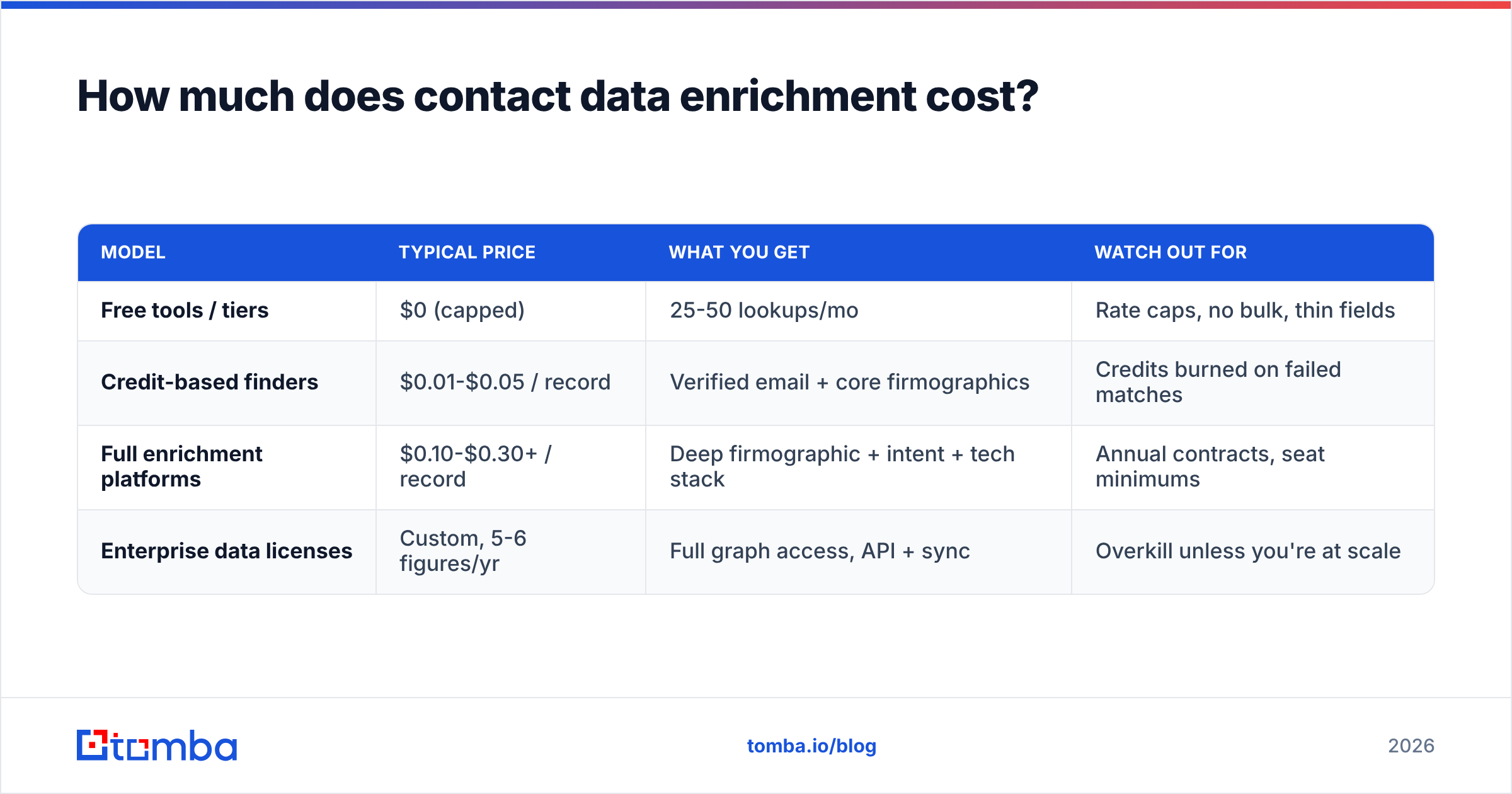
Costs swing wildly because you're really paying for two things: match rate and verified match rate. A provider can advertise a low per-record price and hit it by returning low-confidence guesses.
Rough market ranges as of 2026:
| Model | Typical price | What you get | Watch out for |
|---|---|---|---|
| Free tools / tiers | $0 (capped) | 25-50 lookups/mo | Rate caps, no bulk, thin fields |
| Credit-based finders | $0.01-$0.05 / record | Verified email + core firmographics | Credits burned on failed matches |
| Full enrichment platforms | $0.10-$0.30+ / record | Deep firmographic + intent + tech stack | Annual contracts, seat minimums |
| Enterprise data licenses | Custom, 5-6 figures/yr | Full graph access, API + sync | Overkill unless you're at scale |
Tomba sits in the credit-based tier: a free plan with 25 searches/month, then Starter at $49/mo, Growth at $99/mo, and Pro at $249/mo, with enterprise pricing on request. Full Tomba pricing is public, and unlike some platforms, verification is built in rather than a paid add-on.
The number that actually matters is cost per usable record, not cost per enriched record. If Vendor A charges $0.02 but 40% of its emails bounce, your real cost is $0.033 per deliverable contact — plus the deliverability damage. Vendor B at $0.04 with a 3% bounce rate is cheaper where it counts. Always benchmark on verified output, and check third-party reviews on G2 before committing to an annual deal.
Is contact data enrichment worth it, or just a nice-to-have?#
It's worth it when it changes a decision — routing, scoring, or whether a rep sends. It's waste when you enrich fields nobody uses.
Where enrichment clearly pays off:
- Lead routing — Firmographic fields let you auto-assign by territory, size, or industry the moment a lead arrives.
- Lead scoring — Seniority and company size are two of the strongest fit signals; you can't score on fields you don't have.
- Outbound efficiency — A verified email plus a direct dial is the difference between a rep sequencing 50 real prospects a day and chasing bounces.
- CRM hygiene — Enrichment catches job changes, which are among the best buying triggers in B2B.
Where it's overhyped:
- Enriching every field "just in case" inflates cost and clutters records.
- Intent data bolted onto enrichment is often noisy; validate it against real pipeline before you pay for it.
- Buying a static enriched list and never re-verifying — that list is decaying from the day you receive it.
HubSpot's own research on data decay puts CRM database degradation at roughly 22-30% per year. That's the honest case for enrichment: it's not a one-time cleanup, it's ongoing maintenance against a database that's always going stale.
How do you enrich data without wrecking deliverability?#
This is the section most enrichment guides skip, and it's the one that will save your domain.
Enriched emails are guesses until verified. If you push unverified enriched addresses straight into a cold sequence, you'll see bounce rates spike, and mailbox providers read high bounces as a spam signal. A few campaigns of that and your sender reputation — and everything you send, including to good addresses — suffers.
The safe enrichment-to-send workflow:
- Enrich to append candidate emails.
- Verify every appended email before it's eligible to send. Discard "invalid," treat "catch-all" as its own risk bucket, keep only "valid."
- Handle catch-all domains explicitly. Catch-all servers accept everything, so a standard SMTP check can't confirm the mailbox. Use a dedicated catch-all verifier and either segment these into a lower-priority tier or validate them further before sending.
- Warm up and ramp. Even with clean data, don't blast a freshly enriched list. Increase volume gradually.
- Monitor bounce rate as a gate. If a segment bounces above ~3%, stop and re-verify before continuing.
The rule: enrichment fills the field, verification earns the send. Skipping step 2 is the single most common way teams turn a data investment into a deliverability disaster.
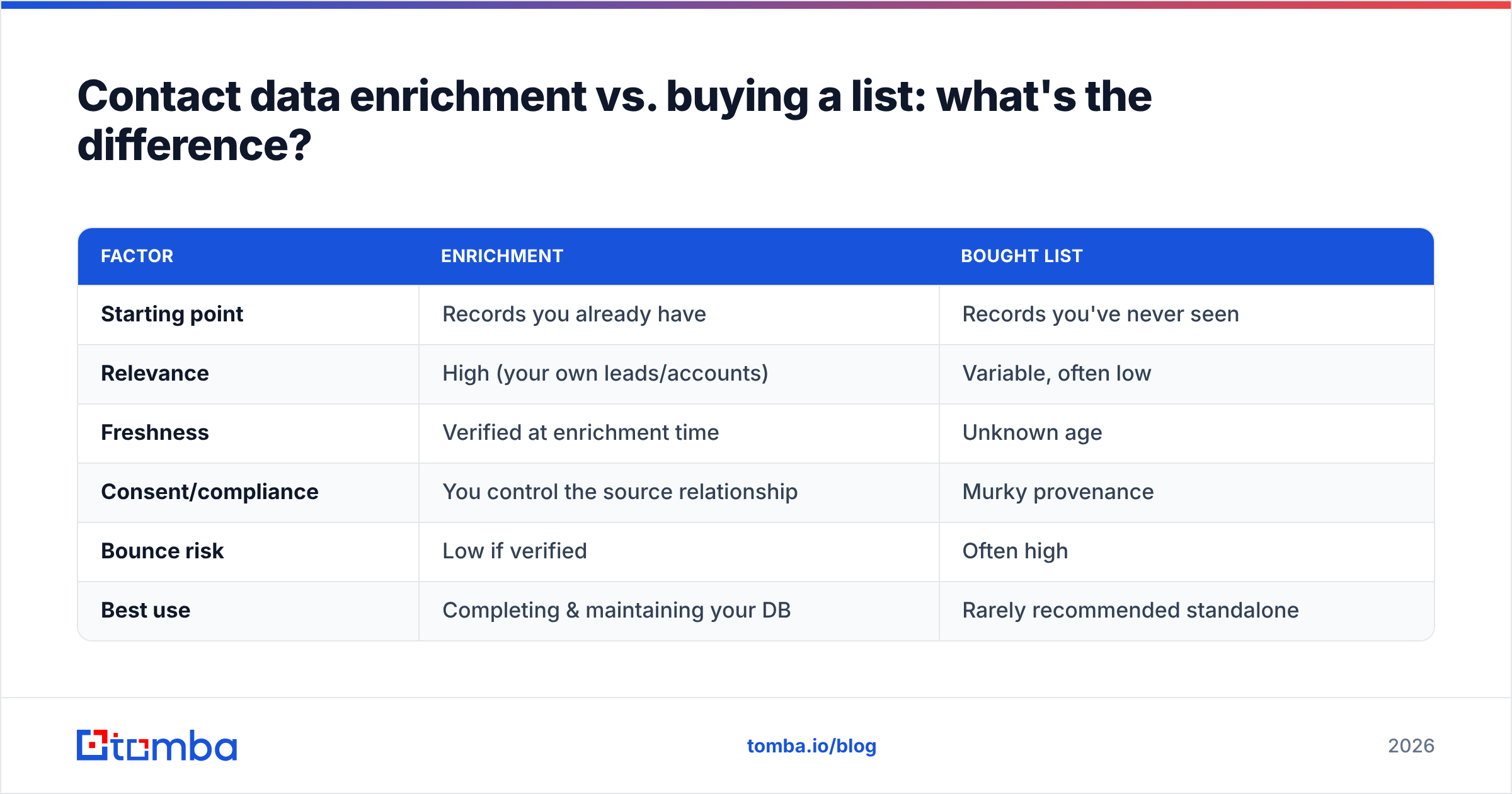
Contact data enrichment vs. buying a list: what's the difference?#
They feel similar — both end with more contacts — but the mechanics and risk profiles are opposite.
| Factor | Enrichment | Bought list |
|---|---|---|
| Starting point | Records you already have | Records you've never seen |
| Relevance | High (your own leads/accounts) | Variable, often low |
| Freshness | Verified at enrichment time | Unknown age |
| Consent/compliance | You control the source relationship | Murky provenance |
| Bounce risk | Low if verified | Often high |
| Best use | Completing & maintaining your DB | Rarely recommended standalone |
Enrichment improves data you have a reason to own. A purchased list is a bet on someone else's hygiene. If you do source external contacts, treat them like the weakest enrichment tier: verify aggressively before the first send, and lean on transparency about where the data comes from. Reputable providers — Tomba included — publish their sourcing and give you the verification tooling to prove it, rather than asking you to trust a match rate on faith.
How do you choose an enrichment provider?#
Cut through the marketing with five questions:
- What's your verified match rate on my ICP? Run a paid pilot on 500 of your own records and measure bounces yourself. Ignore the headline number.
- Is verification included or extra? Enrichment without built-in verification is half a product.
- Real-time API, batch, or both? Match the delivery model to your actual workflow.
- How is data sourced, and how fresh is it? Ask for recrawl frequency, not vague "billions of records" claims.
- How does it fit my stack? Native CRM sync and a clean API beat CSV round-trips. Tomba, for example, offers direct integrations plus bulk processing for the batch jobs.
Score providers on cost-per-usable-record and stack fit, not on the size of the database they advertise. The largest dataset with the worst freshness is a liability, not an asset.
Start with data you can trust#
Contact data enrichment only works when the contactable fields are real. The fastest way to prove that on your own list is to run names and domains through a finder that verifies as it appends, so what lands in your CRM is deliverable on day one — not a guess that bounces on day two.
Try the Tomba Email Finder to enrich records with verified professional emails, with a free tier of 25 searches to benchmark accuracy against your current data before you commit. Feed it a name and a domain, get back a verified address, and let your reps spend their time selling instead of scrubbing.
Related guides#
Ready to find emails that actually work?
Join 150,000+ professionals who stopped guessing and started sending. Free credits on signup — no credit card required.
Get the Tomba newsletter
Practical outbound tactics and product updates — once every two weeks.
About the author