Contact Database Software in 2026: How to Choose the Right One
A neutral, no-fluff guide to contact database software in 2026 — how the tools actually differ on data accuracy, pricing, coverage, and compliance, plus a build-vs-buy framework so you stop paying for records you never use.
Contact database software promises the same thing on every homepage: millions of verified contacts, one click away. The reality is messier. Two tools can both claim "200M+ contacts" and still hand you wildly different results on the same 500 target accounts — because the number that matters isn't how many records exist, it's how many are correct, reachable, and legal to use for your list today.
This guide is written for the person who has to choose. No vendor is perfect, and the right pick depends on how you actually run outbound. Let's break down what these tools do, where they quietly differ, and how to avoid paying for coverage you'll never touch.
TL;DR#
- Contact database software stores and serves B2B people/company records (emails, phones, titles, firmographics) that you query to build prospect lists — it's the fuel layer under your CRM and sequencer.
- The headline "total contacts" number is marketing. Match rate on your specific ICP and verified-at-time-of-export accuracy are what decide your bounce rate.
- Pricing models split into three camps: flat seat-based (Apollo, ZoomInfo), credit-based (Tomba, Hunter), and per-record data licensing (BookYourData, Cognism). Match the model to your volume pattern.
- Build vs. buy is a false binary. The best 2026 stacks buy a broad database, then build freshness on top with a real-time verification/finder API before every send.
- Check three non-negotiables before you sign: GDPR/CCPA handling, a free or trial tier to test your accounts, and an API so the data reaches your workflow without CSV gymnastics.
What is contact database software?#
Contact database software is a searchable repository of B2B contact and company records that you filter by criteria — industry, title, headcount, location, tech stack — and export into your outreach tools. Think of it as the difference between a phone book and a search engine: a static list versus a queryable system that returns exactly the segment you asked for, ideally verified the moment you export it.
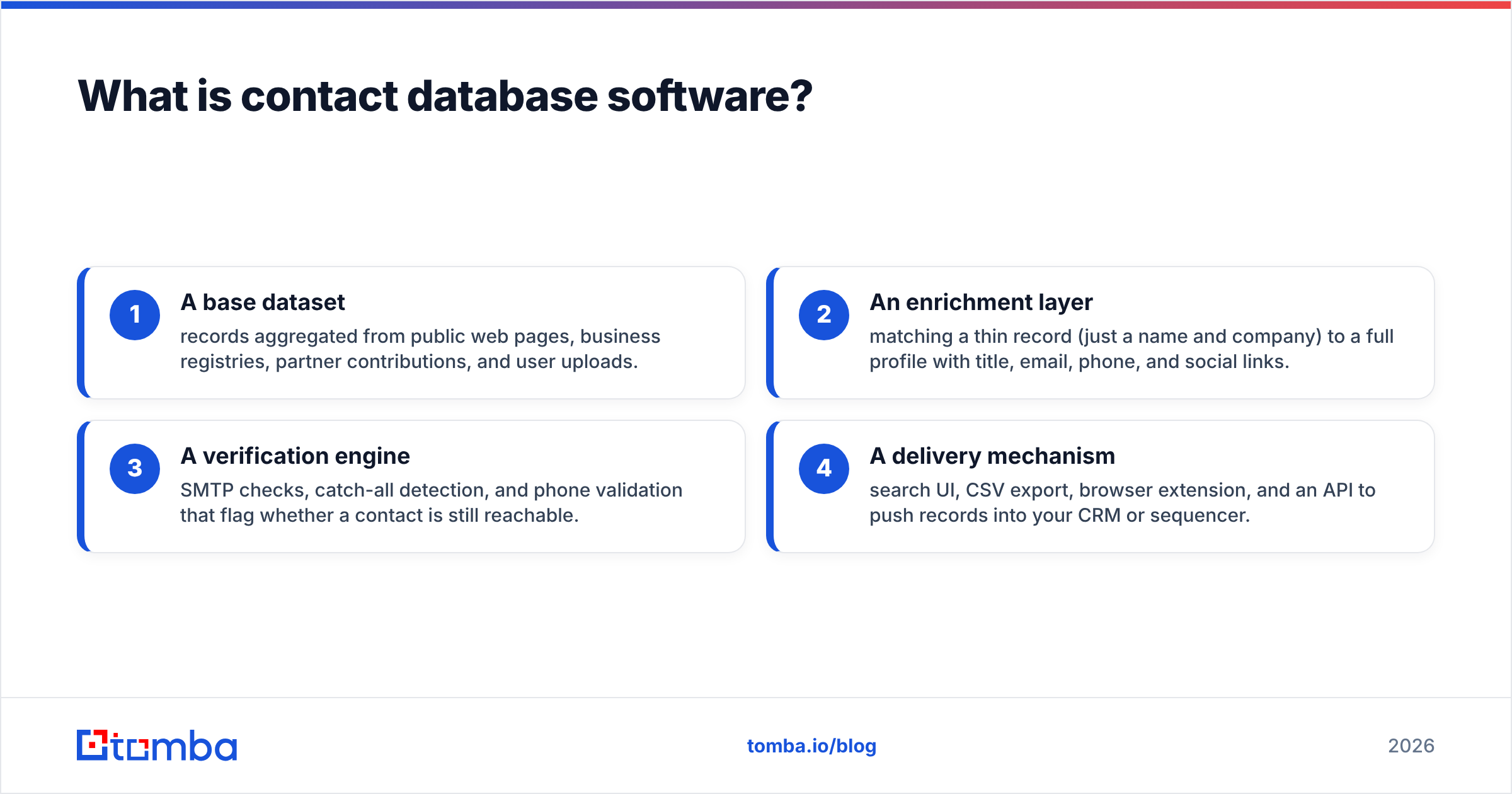
Under the hood, most platforms combine four ingredients:
- A base dataset — records aggregated from public web pages, business registries, partner contributions, and user uploads.
- An enrichment layer — matching a thin record (just a name and company) to a full profile with title, email, phone, and social links.
- A verification engine — SMTP checks, catch-all detection, and phone validation that flag whether a contact is still reachable.
- A delivery mechanism — search UI, CSV export, browser extension, and an API to push records into your CRM or sequencer.
The tools that win in 2026 are strong at ingredient 3. A giant database with stale ingredient-3 hygiene is just a large pile of bounces waiting to happen. That's why teams increasingly pair a broad database with a live finder such as the Tomba Email Finder, which resolves and checks an address at query time instead of trusting a record that was "verified" 14 months ago.
Why does data accuracy matter more than database size?#
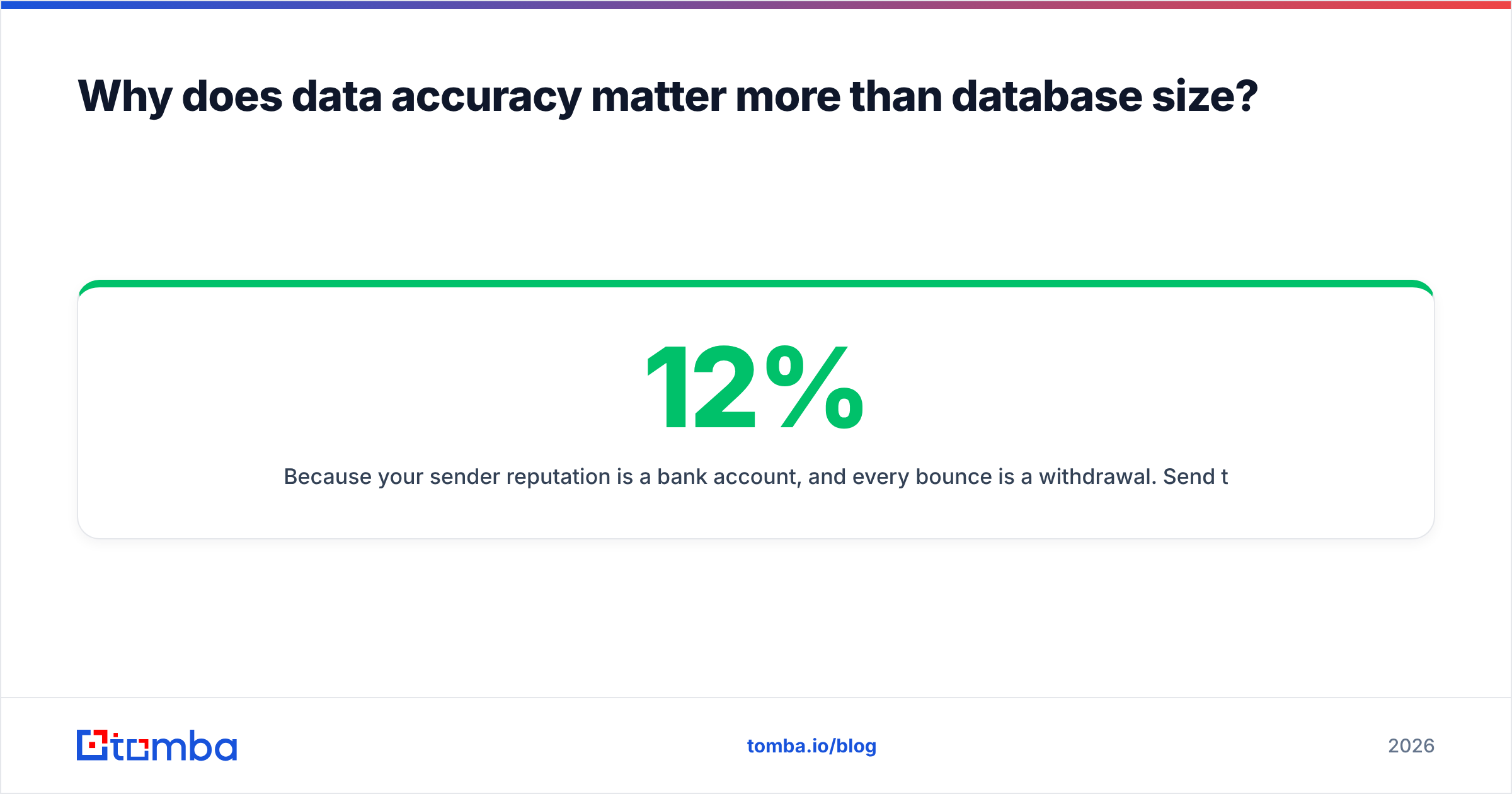
Because your sender reputation is a bank account, and every bounce is a withdrawal. Send to a list that's 12% invalid and mailbox providers start throttling you — which tanks deliverability for the good addresses too. A 200M-record database that's 78% accurate on your niche is worse than a 30M-record database that's 96% accurate on it.
Here's the trap: vendors report accuracy as a global average across their entire dataset. But you don't email their entire dataset. You email your ICP — maybe "VP Engineering at 50–500 person SaaS companies in DACH." Accuracy on that slice can be 20 points below the global number, especially outside the US where data decays faster and coverage is thinner.
Two habits protect you:
- Test on your accounts, not their demo. Any tool worth buying lets you run 25–50 of your target companies through a free tier before you pay. If it won't, that's the answer.
- Verify at export, not at ingestion. A record marked "valid" when it entered the database in 2024 tells you nothing about 2026. Run a fresh pass with a dedicated email verifier or a finder that checks live before you load the list into a sequencer.
For the mechanics of why bad lists wreck sending, the email deliverability fundamentals are worth a read — bounce rate and spam-trap hits feed directly into how providers score you.
What are the main types of contact database software?#
Not every tool is trying to be the same thing. Sorting them by primary strength helps you avoid buying a Ferrari to haul gravel.
- All-in-one sales platforms (Apollo, ZoomInfo) — database plus sequencing, dialer, and workflow in one seat. Great if you want a single pane; you pay for breadth you may not use.
- Precision email finders (Tomba, Hunter) — narrow, deep focus on resolving and verifying a correct email or phone from a name/domain. Best as the accuracy layer feeding everything else, and usually credit-priced so you pay for what you pull.
- Data-licensing providers (BookYourData, Cognism) — sell curated, compliance-checked records, often per-download, strong on specific geographies or verticals. Good when you need a clean, ready seed list.
- Enrichment/API-first tools (Clearbit-style) — less about browsing, more about programmatically filling gaps on records you already have.
Most mature teams end up with two of these, not one: a broad source plus a precision verifier. The mistake is buying two all-in-one platforms that overlap 80%.
How do the leading contact database tools compare?#
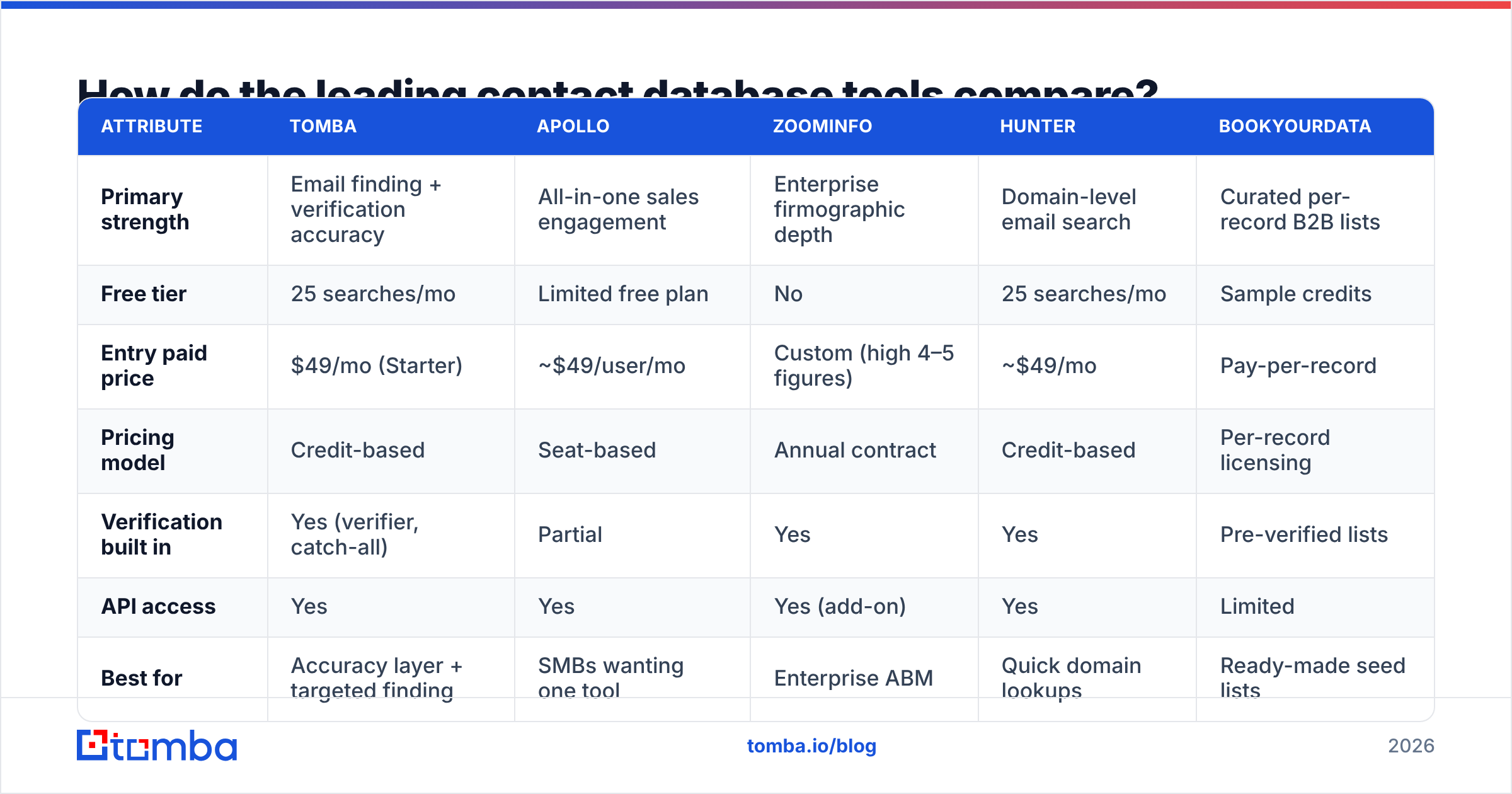
The table below compares representative options across the attributes that actually change your monthly bill and your bounce rate. Prices are entry paid tiers as commonly published; always confirm current Tomba pricing and each vendor's site, since plans shift.
| Attribute | Tomba | Apollo | ZoomInfo | Hunter | BookYourData |
|---|---|---|---|---|---|
| Primary strength | Email finding + verification accuracy | All-in-one sales engagement | Enterprise firmographic depth | Domain-level email search | Curated per-record B2B lists |
| Free tier | 25 searches/mo | Limited free plan | No | 25 searches/mo | Sample credits |
| Entry paid price | $49/mo (Starter) | ~$49/user/mo | Custom (high 4–5 figures) | ~$49/mo | Pay-per-record |
| Pricing model | Credit-based | Seat-based | Annual contract | Credit-based | Per-record licensing |
| Verification built in | Yes (verifier, catch-all) | Partial | Yes | Yes | Pre-verified lists |
| API access | Yes | Yes | Yes (add-on) | Yes | Limited |
| Best for | Accuracy layer + targeted finding | SMBs wanting one tool | Enterprise ABM | Quick domain lookups | Ready-made seed lists |
A few honest takeaways. ZoomInfo wins on enterprise depth and buying-intent signals, but the contract and price put it out of reach for most SMB teams. Apollo is the value all-rounder if you want database and sequencing in one login. BookYourData is a solid choice when you want a clean, compliance-checked list handed to you rather than a self-serve search tool. And Tomba and Hunter are the precision layer — cheaper, credit-based, and focused on returning a correct address, which is why they're often layered on top of a broader source rather than used as the whole stack.
There's no universal winner here. There's a best fit for your volume, geography, and whether you value one-tool simplicity or best-of-breed accuracy.
Should you build your own contact database or buy one?#
Buy the base, build the freshness. Building a raw B2B database from scratch — scraping, matching, verifying, and re-verifying at scale — is a multi-year data-engineering project, not a growth tactic. You will lose. But blindly trusting a bought database's staleness is the opposite failure.
The 2026 pattern that works:
- Buy breadth from a database or list provider to get your total addressable universe and firmographics.
- Build a freshness step using a finder/verifier API in your pipeline, so every record gets a live check right before it enters a sequence.
- Enrich the gaps — when a record is missing a direct dial or a decision-maker, fill it on demand rather than paying to store millions of fields you'll never query.
This is where an API-first approach earns its keep. Instead of exporting a 10,000-row CSV and hoping, you call data enrichment or a finder endpoint at the moment of need, and only pay for the records that actually get worked. Your effective cost-per-usable-contact drops, and your bounce rate stays low because nothing is more than minutes old.
What features actually matter when choosing contact database software?#
Ignore the feature-count arms race. These are the attributes that change outcomes:
- ICP match rate. Run a real test batch. How many of your 50 target accounts return a usable, verified contact? This single number beats every marketing claim.
- Verification transparency. Does the tool distinguish valid, invalid, catch-all, and unknown — or does it lump everything into a green checkmark? A catch-all verifier matters because catch-all domains are the silent bounce source in most lists.
- Coverage where you sell. US coverage is easy; EMEA and APAC separate the serious tools. If you sell into Europe, ask about GDPR-compliant sourcing specifically.
- Delivery that fits your workflow. A Chrome extension, Google Sheets add-on, and a real API mean the data reaches reps without manual re-formatting. CSV-only is a red flag in 2026.
- Compliance posture. GDPR, CCPA, and a documented opt-out/suppression process aren't optional. Reputable review platforms like G2 surface how vendors handle this in real customer reviews.
- Honest credit accounting. Do you get charged for "unknown" results or only for verified hits? The difference reshapes your monthly cost.
Notice what's not on the list: total record count, number of integrations you'll never use, and AI features that don't improve accuracy. Buy the fundamentals.
How much should contact database software cost?#
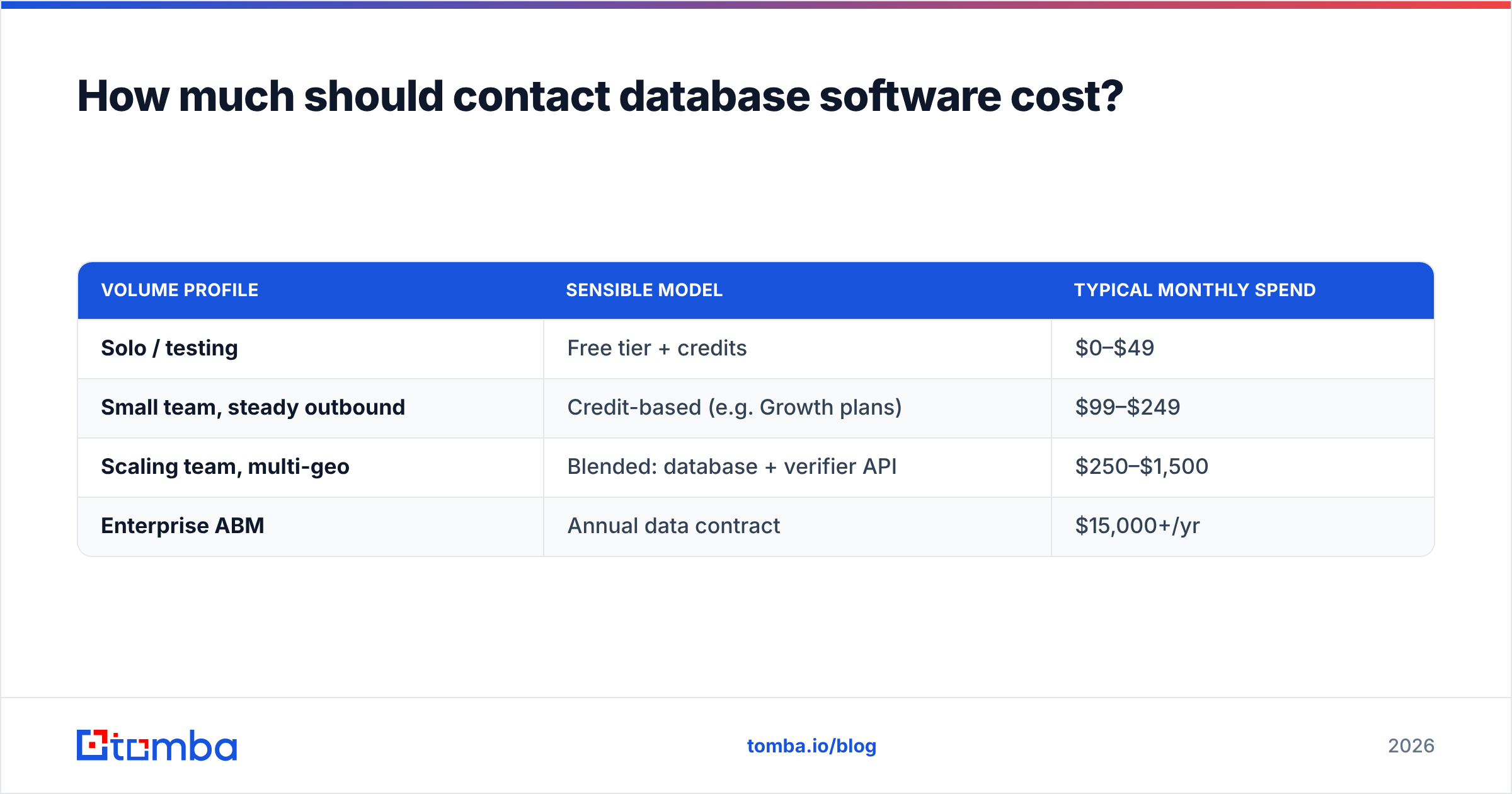
Budget by cost-per-usable-contact, not by sticker price. A $99/month plan that returns 900 verified, in-ICP contacts is cheaper per usable record than a "free" tool that returns 300 half-verified ones you then have to clean.
Rough 2026 market bands:
| Volume profile | Sensible model | Typical monthly spend |
|---|---|---|
| Solo / testing | Free tier + credits | $0–$49 |
| Small team, steady outbound | Credit-based (e.g. Growth plans) | $99–$249 |
| Scaling team, multi-geo | Blended: database + verifier API | $250–$1,500 |
| Enterprise ABM | Annual data contract | $15,000+/yr |
For most SMB and mid-market teams, a credit-based finder in the $49–$249 range — like Tomba's Starter ($49/mo), Growth ($99/mo), or Pro ($249/mo) tiers — covers real outbound volume without an annual lock-in. You scale credits with demand instead of pre-paying for a database you hope to use. Compare the full breakdown on the Tomba plans page against whatever enterprise quote you're weighing; the gap is often an order of magnitude for similar usable output at SMB scale.
One more cost trap: seat-based pricing punishes you for adding reps who each search occasionally. Credit-based pricing pools usage across the team. If your usage is spiky or spread thin, credits usually win.
How do you keep a contact database accurate over time?#
Treat data like milk, not wine — it does not improve with age. B2B contacts decay at roughly 25–30% per year as people change jobs, companies rebrand, and domains shift. A database you loaded in January is materially worse by July whether or not the vendor re-verified it.
Three maintenance habits keep a list healthy:
- Verify before every campaign, not once. Re-run your active segment through verification right before send. This is cheap insurance against the reputation hit that follows a bad batch.
- Suppress and dedupe continuously. Merge duplicates and honor unsubscribes across tools, not just in your sequencer. A bulk verify pass on your existing CRM export surfaces the rot you've accumulated.
- Enrich on trigger, not on schedule. When a lead engages, enrich then — with the freshest data — rather than mass-enriching a static list quarterly.
Sender reputation compounds. Protecting it with fresh verification isn't a nice-to-have; per HubSpot's deliverability research, list hygiene is one of the strongest levers on whether your mail reaches the inbox at all.
Which contact database software is right for you?#
Match the tool to the job, not the hype:
- You want one login for everything and sell mostly US SMB → an all-in-one like Apollo.
- You run enterprise ABM with budget and need intent signals → ZoomInfo, contract and all.
- You want a clean, ready-made list in a specific vertical or geo → a licensing provider like BookYourData.
- You want maximum accuracy per dollar and already have a sequencer/CRM → a precision finder + verifier as your data layer.
For that last, most common case, that's exactly where Tomba fits. If your problem is "I have target companies and names but I need correct, verified emails and phones that won't bounce," start with the Tomba Email Finder on the free tier — 25 searches a month, no card — and run your real target accounts through it. Layer in the email verifier and domain search as volume grows, and connect it to your stack via the Tomba API so fresh, checked data flows into outreach without a single manual CSV. Buy breadth elsewhere if you must — but build your freshness here, and your bounce rate will thank you.
Related guides#
Ready to find emails that actually work?
Join 150,000+ professionals who stopped guessing and started sending. Free credits on signup — no credit card required.
Get the Tomba newsletter
Practical outbound tactics and product updates — once every two weeks.
About the author