Contact Filtering in 2026: A Practical Guide for B2B Teams
Contact filtering turns a messy list into a targeted, high-converting one. Here's how to filter B2B contacts by fit, intent, and data quality without gutting your reach.
Most cold campaigns don't fail because of the copy. They fail because the list was never filtered. You bought or scraped 10,000 contacts, loaded them into a sequence, and hit send — then watched bounces climb, replies flatline, and your domain reputation take the hit.
Contact filtering is the fix. It's the deliberate process of narrowing a raw contact pool down to the people who actually match your ideal customer, have reachable data, and are worth your rep's time. Done right, it's the difference between a campaign that books meetings and one that gets you blacklisted.
TL;DR#
- Contact filtering = systematically removing contacts that don't fit your ICP, have bad data, or shouldn't be contacted (suppression, compliance) before you ever send.
- The three layers that matter: fit filtering (firmographics, role), quality filtering (valid, deliverable data), and intent/exclusion filtering (signals, suppression lists).
- Filtering before enrichment and sending protects email deliverability and slashes wasted credits.
- A 2,000-contact filtered list almost always beats a 20,000-contact raw one on pipeline generated.
- Tools like Tomba let you filter by domain, role, and verification status in one pass so you're only paying to reach real people.
What is contact filtering?#
Contact filtering is the practice of applying rules to a contact list so that only the records worth acting on survive. Think of it like airport security for your CRM: everyone lines up, but only the people with a valid ticket and no red flags get through to the gate.
A "contact" here is any record with a name, company, and some way to reach them — email, phone, LinkedIn. Filtering asks three questions of each one:
- Does this person fit who we sell to? (Right industry, size, seniority, geography.)
- Is the data actually usable? (Deliverable email, valid phone, not a role account.)
- Should we contact them at all? (Not on a suppression list, not a current customer, compliant to reach.)
If a record fails any of the three, it gets pulled out before it costs you a send, a call, or a reputation ding.

The mistake teams make is treating filtering as a one-time cleanup instead of a repeatable gate. Every new data source — a scrape, a purchased list, an event export — should pass through the same filters before it touches your outreach tools.
Why does contact filtering matter more in 2026?#
Because the cost of not filtering went up. Google and Yahoo tightened bulk-sender rules, spam complaint thresholds are enforced automatically, and a single spike in bounces can tank a sending domain for weeks. According to Google's Postmaster guidelines, keeping your spam complaint rate under 0.3% is effectively mandatory for bulk senders — and unfiltered lists blow past that fast.
Three forces make filtering non-negotiable now:
- Deliverability enforcement is automated. Mailbox providers no longer wait for a human review. Bounce and complaint spikes trigger throttling instantly.
- Data decays faster. Roughly 25–30% of B2B contact data goes stale every year as people change jobs. A list that was clean in January is partly rotten by summer.
- Buyers are noisier to reach. More sequences hit the same inboxes, so precision beats volume. A tightly filtered segment gets read; a broad blast gets ignored or reported.
Filtering isn't just hygiene anymore. It's the mechanism that keeps your primary sending channel alive.
What are the main types of contact filters?#
There are three filtering layers, and strong teams run all three in order. Skip a layer and the ones after it work harder for worse results.
1. Fit filters (is this the right person?)#
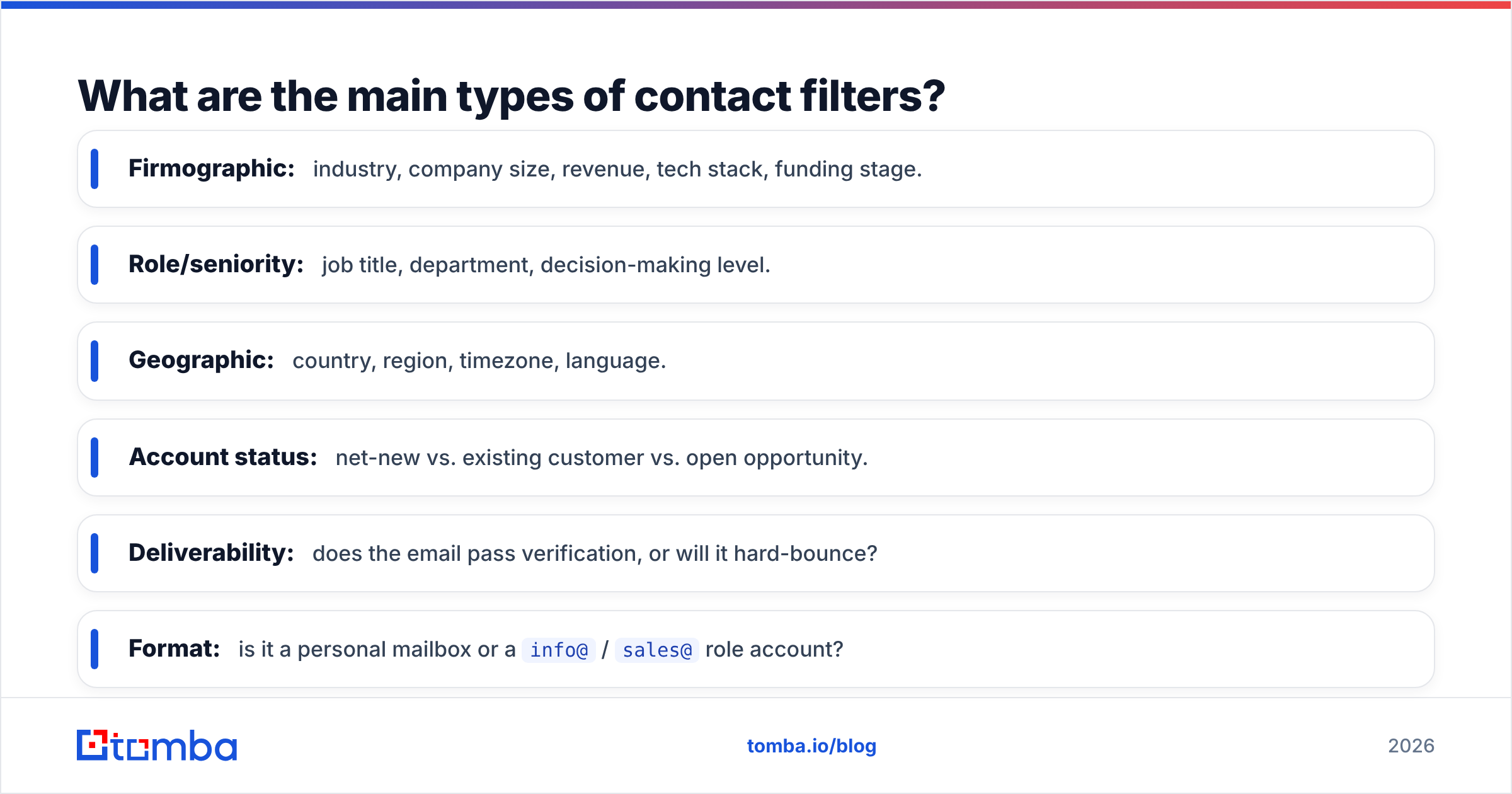
Fit filtering narrows on who the contact is:
- Firmographic: industry, company size, revenue, tech stack, funding stage.
- Role/seniority: job title, department, decision-making level.
- Geographic: country, region, timezone, language.
- Account status: net-new vs. existing customer vs. open opportunity.
This is where you enforce your ICP. If you sell RevOps software to Series B+ SaaS companies, a solo consultant at a 5-person agency gets filtered out no matter how clean their email is.
2. Quality filters (is the data usable?)#
Quality filtering checks whether you can actually reach the person:
- Deliverability: does the email pass verification, or will it hard-bounce?
- Format: is it a personal mailbox or a
info@/sales@role account? - Completeness: are the fields you need for personalization present?
- Duplicates: is this the same person you already have under a different domain?
This is where an email verifier earns its keep. Removing invalid and risky addresses before sending is the single highest-leverage filter you can run.
3. Intent and exclusion filters (should we reach out?)#
The final layer is about timing and permission:
- Intent signals: recent site visits, content downloads, job changes, hiring spikes.
- Suppression: unsubscribes, past complainers, do-not-contact lists.
- Compliance: GDPR/consent status, region-specific rules.
- Ownership: is another rep already working this account?
How is contact filtering different from lead scoring and segmentation?#
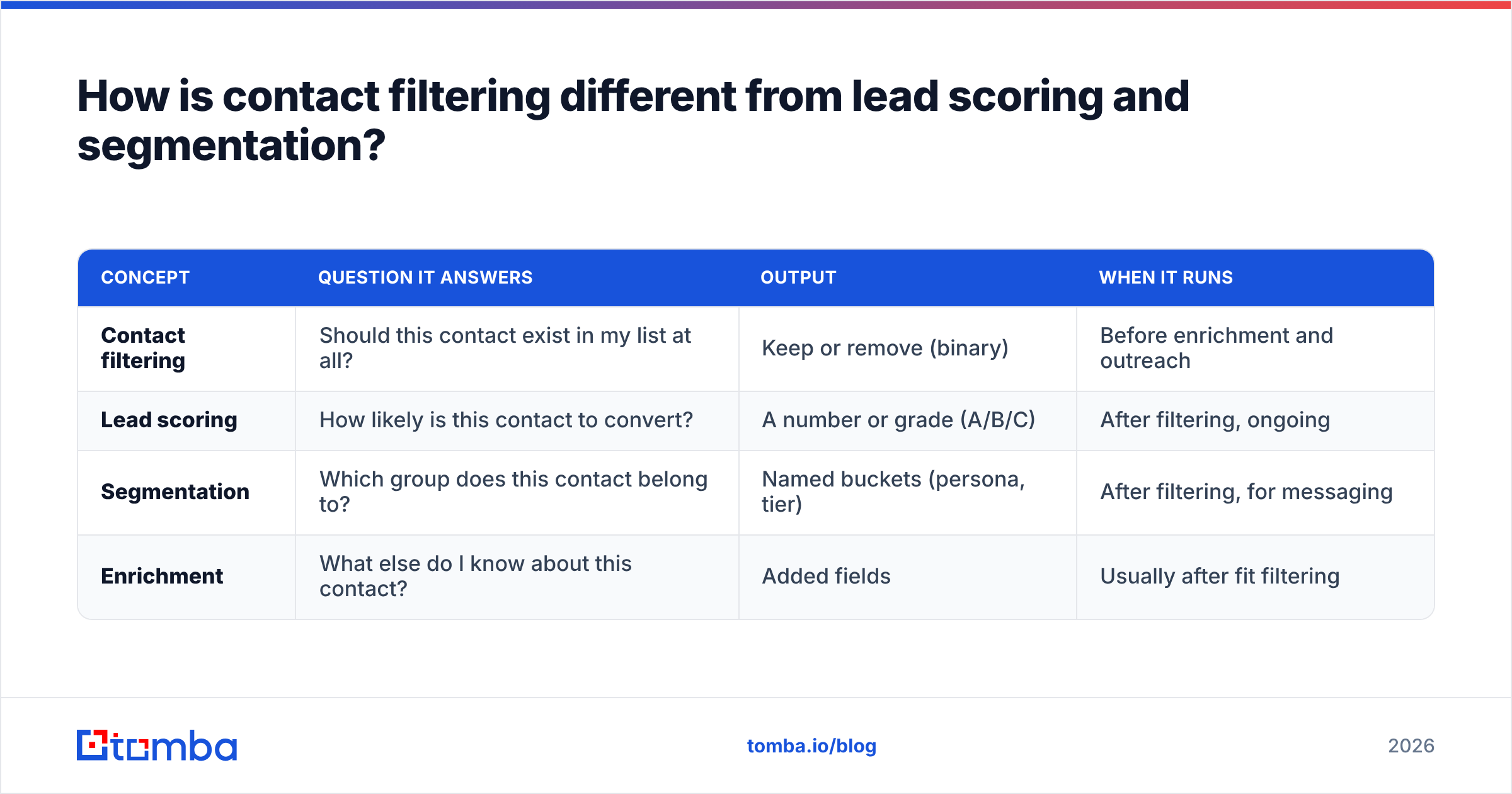
These three get blurred constantly, so here's a clean split. Filtering is binary (in or out). Scoring is a ranking (how good). Segmentation is grouping (which bucket).
| Concept | Question it answers | Output | When it runs |
|---|---|---|---|
| Contact filtering | Should this contact exist in my list at all? | Keep or remove (binary) | Before enrichment and outreach |
| Lead scoring | How likely is this contact to convert? | A number or grade (A/B/C) | After filtering, ongoing |
| Segmentation | Which group does this contact belong to? | Named buckets (persona, tier) | After filtering, for messaging |
| Enrichment | What else do I know about this contact? | Added fields | Usually after fit filtering |
The order matters. Filter first so you don't waste enrichment credits or scoring cycles on contacts that never should have made the cut. A quick primer on scoring lives in Tomba's guide to the marketing qualified lead if you want to layer scoring on top of a filtered list.
What does a good contact filtering workflow look like?#
Here's a repeatable seven-step flow you can apply to any incoming list, whether it's 500 rows or 50,000.
- Define the filter spec. Write down your ICP rules, required fields, and exclusion lists before you touch data. This is your rubric.
- Deduplicate. Collapse repeat records by email and by company domain so one person doesn't get three emails.
- Apply fit filters. Drop contacts outside your industry, size, role, and geo rules.
- Verify data quality. Run every remaining email through verification; flag catch-all domains for a separate track.
- Suppress and comply. Cross-check against unsubscribes, current customers, and consent status.
- Enrich the survivors. Only now spend credits adding phone numbers, LinkedIn URLs, and personalization fields.
- Segment and hand off. Bucket the clean list by persona and route to the right sequence or rep.

The catch-all step in #4 deserves attention. Catch-all domains accept every address at the SMTP level, so standard verification can't confirm a specific mailbox exists. Instead of guessing, route them through a dedicated catch-all verifier so you keep the reachable ones and quarantine the risky ones rather than deleting or blasting them blindly.
How do you filter contacts by domain and role at scale?#
When you're working from a company list rather than a name list, the fastest path is domain-first filtering. You start with a target account, pull the real people at that domain, and filter by role in one motion.
That's exactly what domain search is built for: give it company.com and it returns the verified email addresses tied to that domain, along with roles and departments, so you can keep the VP of Sales and drop the generic contact@ inbox. Pair it with a bulk email finder and you can process hundreds of target accounts at once instead of one at a time.
A practical role-filter hierarchy for most B2B outbound:
- Keep: individual decision-makers and their direct influencers (Director, VP, Head of, C-level in the relevant function).
- Track separately: champions and end users who can build an internal case but won't sign.
- Drop: role accounts (
info@,admin@), unrelated departments, and generic aliases.
Filtering by domain and role together means you're not just reaching real inboxes — you're reaching the right real inboxes, which is what actually moves reply rates.
What metrics prove your filtering is working?#
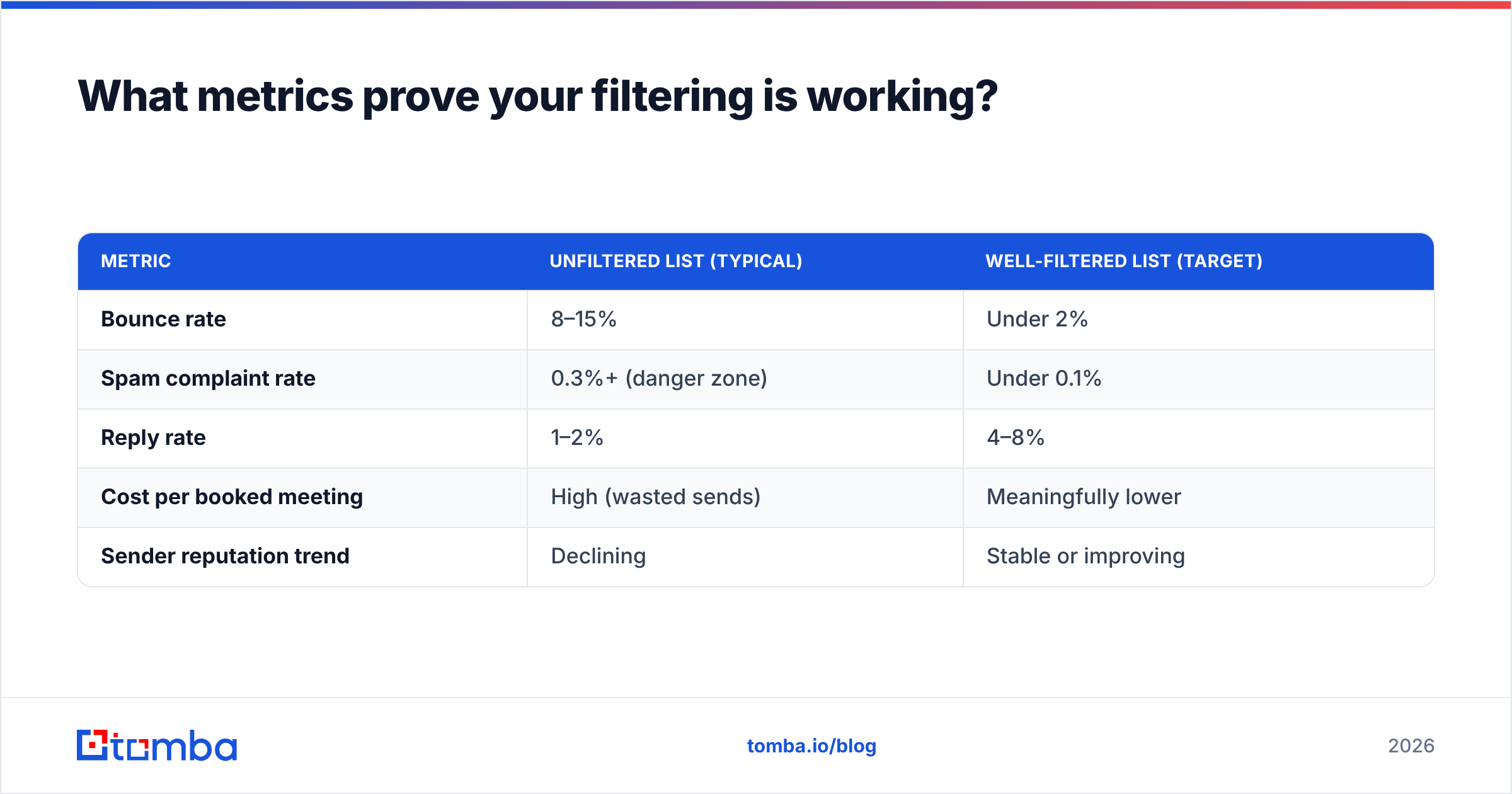
If you can't measure it, you can't defend cutting a list from 20,000 to 3,000. Track these before-and-after numbers on every filtered campaign:
| Metric | Unfiltered list (typical) | Well-filtered list (target) |
|---|---|---|
| Bounce rate | 8–15% | Under 2% |
| Spam complaint rate | 0.3%+ (danger zone) | Under 0.1% |
| Reply rate | 1–2% | 4–8% |
| Cost per booked meeting | High (wasted sends) | Meaningfully lower |
| Sender reputation trend | Declining | Stable or improving |
The bounce and complaint columns are the ones that keep your domain alive. A filtered list keeps you comfortably inside provider thresholds, which is worth more than the raw volume you gave up. If reputation is already shaky, Tomba's free sender reputation checker shows where you stand before you send another batch.
Vendors and review sites like G2 track many of these tools if you want to compare options, but the metric that matters is always your own pipeline per contact — not the size of the list you started with.
What are the most common contact filtering mistakes?#
Even experienced teams trip on these:
- Filtering after sending. Cleaning bounces from your CRM after a campaign is damage control, not filtering. The reputation hit already happened.
- Over-filtering into nothing. Stacking so many rules that you're left with 40 contacts. Fit filtering should tighten aim, not eliminate the market. If a segment is too small, loosen one firmographic rule, not the quality ones.
- Ignoring catch-all domains. Treating every unverifiable address as either safe or garbage. They need their own track.
- Skipping deduplication. Emailing the same person twice from two list sources reads as spam and burns trust.
- Never refreshing the spec. Your ICP evolves. A filter spec written 18 months ago is filtering for a company you no longer are.
The through-line: filtering is a gate you maintain, not a switch you flip once.
How does Tomba fit into contact filtering?#
Tomba collapses the fit and quality layers into a single pass. Instead of exporting to one tool to find emails, another to verify them, and a third to check catch-alls, you filter by domain and role, verify deliverability, and flag catch-alls in the same workflow — so the list that lands in your sequencer is already clean.
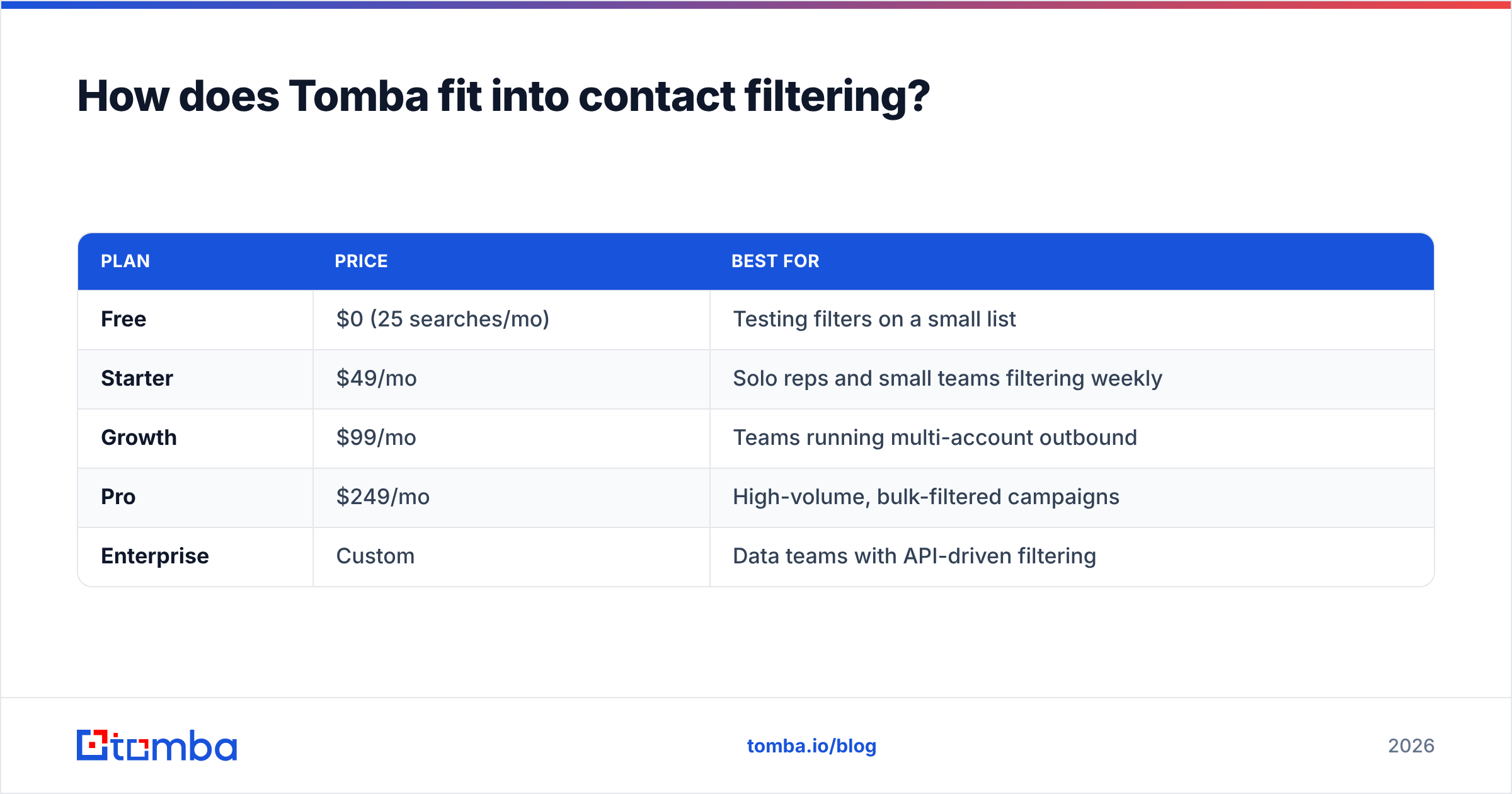
Here's how the pricing lines up against typical needs:
| Plan | Price | Best for |
|---|---|---|
| Free | $0 (25 searches/mo) | Testing filters on a small list |
| Starter | $49/mo | Solo reps and small teams filtering weekly |
| Growth | $99/mo | Teams running multi-account outbound |
| Pro | $249/mo | High-volume, bulk-filtered campaigns |
| Enterprise | Custom | Data teams with API-driven filtering |
Full Tomba pricing breaks down the credit limits per tier. The point isn't the price — it's that filtering and finding happen together, so you never pay to reach a mailbox that doesn't exist.
The bottom line#
Contact filtering is the highest-ROI habit in outbound that nobody brags about. It's not glamorous, but it's what stands between a campaign that generates pipeline and one that gets your domain throttled. Filter for fit, verify for quality, suppress for compliance — in that order, every time a new list comes in.
Ready to stop paying to email people who don't exist? Start with the Tomba Email Finder to pull verified, role-filtered contacts by domain, so the only records that reach your sequencer are the ones worth your time. Filter first, send second, and let your reply rate do the talking.
Related guides#
Ready to find emails that actually work?
Join 150,000+ professionals who stopped guessing and started sending. Free credits on signup — no credit card required.
Get the Tomba newsletter
Practical outbound tactics and product updates — once every two weeks.
About the author