Free Contact Management Software: The Honest 2026 Guide
Free contact management software can run a whole sales motion — until it can't. Here's what the top free tiers actually cover in 2026, where the limits bite, and how to pick one you won't outgrow in a month.
You want to organize your contacts without handing a credit card to a CRM vendor on day one. Reasonable. The good news: free contact management software in 2026 is genuinely usable, not a crippled demo. The catch: every free tier is a funnel, and the walls are placed exactly where a growing team hits them.
This guide breaks down what "free" really buys you, which tools lead each use case, and how to avoid picking a system you rip out three months later.
TL;DR#
- Free contact management software is real and usable — HubSpot, Zoho, Bitrix24, and others offer no-cost tiers that handle thousands of contacts.
- The limits are deliberate: record caps, missing automation, weak reporting, and per-seat fees that appear the moment you add teammates.
- A free CRM stores contacts; it does not find or enrich them. Pair it with a data tool so your records aren't half-empty.
- Pick by exit cost, not entry price — the real question is what the paid upgrade costs when you grow.
- Best all-rounder free tier: HubSpot. Most generous record limits: Bitrix24 and Zoho. Best for enriching those contacts: a dedicated finder like Tomba Email Finder.
What is contact management software?#
Think of contact management software as the address book your business actually runs on. A phone's contacts app stores a name and a number. Contact management software stores the name, the company, the deal history, the last email you sent, the notes from your last call, and who on your team owns the relationship — all searchable, all shared.
Technically, it's a lightweight CRM (customer relationship management) system focused on the "who" rather than the full sales pipeline. Full-blown CRM platforms add forecasting, quoting, and workflow automation on top. For a small team, the contact layer is often 80% of the value.
Free versions give you that core layer at no cost, betting you'll pay later for automation, seats, or reporting.

What do you actually get in a free tier?#
Here's the honest breakdown. Free tiers cluster into two shapes:
- Freemium loss-leaders (HubSpot, Zoho, Salesforce Starter-adjacent) — polished, well-supported, low record caps, aggressive upgrade prompts.
- Feature-heavy free plans (Bitrix24, some open-source options) — huge limits, but a steeper learning curve and busier interfaces.
What nearly every free plan includes:
- Contact and company records — store names, emails, phones, notes.
- Basic deal or task tracking — a simple pipeline view.
- Manual data entry and import — CSV upload from a spreadsheet.
- A mobile app — read and edit on the go.
What free plans almost always hold back:
- Automation and sequences — no auto-follow-ups, no workflows.
- Rich reporting and dashboards — you get counts, not insight.
- Team permissions and roles — fine solo, painful at five people.
- Data enrichment — records are only as complete as what you typed in.
That last point is the quiet killer. A free CRM will happily store 10,000 contacts and tell you nothing useful about any of them.
Which free contact management software is best in 2026?#
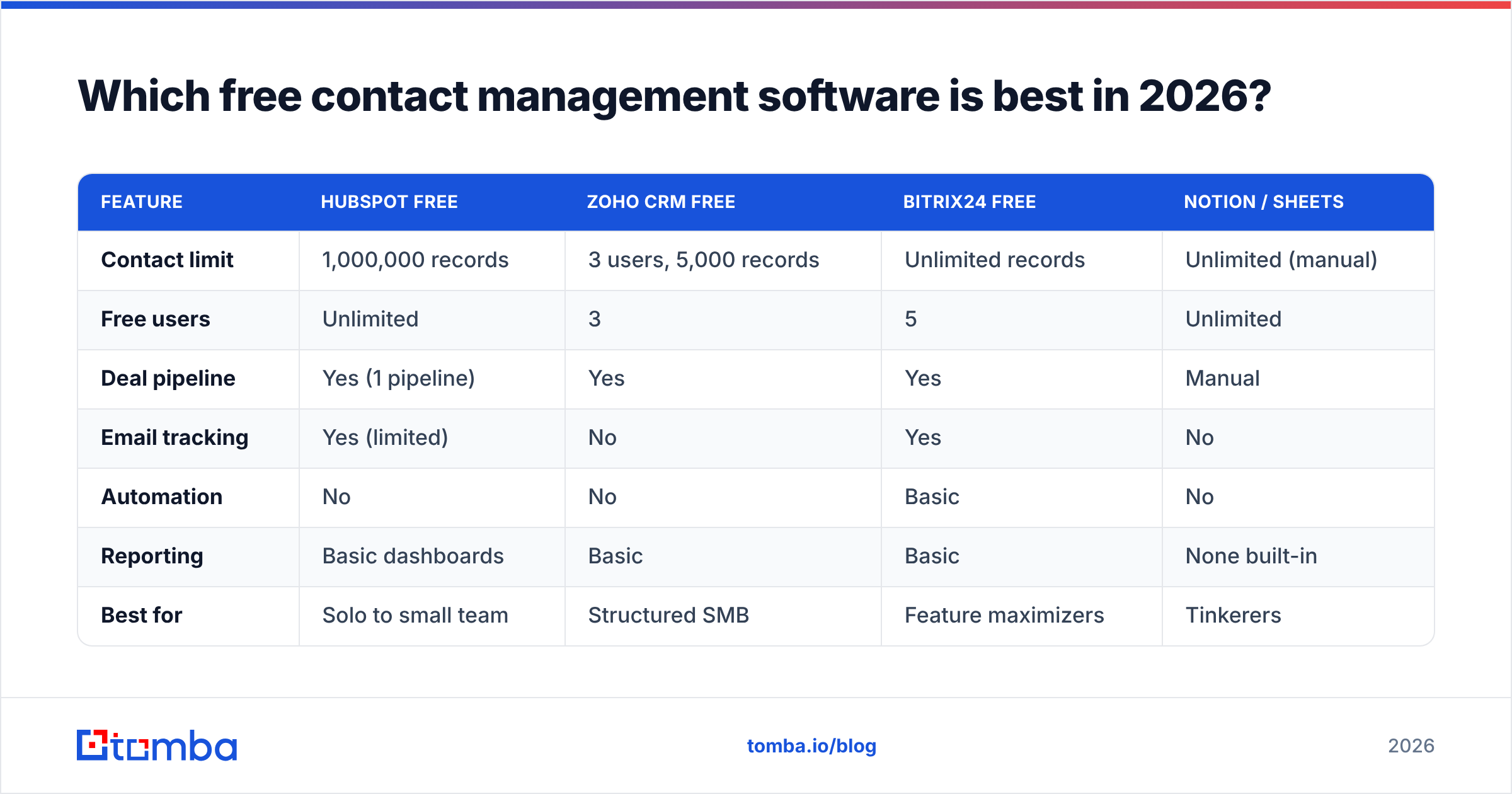
There's no universal winner — there's a best fit per situation. Below is a side-by-side of the leading free tiers, focused on the limits that actually matter.
| Feature | HubSpot Free | Zoho CRM Free | Bitrix24 Free | Notion / Sheets |
|---|---|---|---|---|
| Contact limit | 1,000,000 records | 3 users, 5,000 records | Unlimited records | Unlimited (manual) |
| Free users | Unlimited | 3 | 5 | Unlimited |
| Deal pipeline | Yes (1 pipeline) | Yes | Yes | Manual |
| Email tracking | Yes (limited) | No | Yes | No |
| Automation | No | No | Basic | No |
| Reporting | Basic dashboards | Basic | Basic | None built-in |
| Best for | Solo to small team | Structured SMB | Feature maximizers | Tinkerers |
| First paid tier | ~$15/seat/mo | ~$14/seat/mo | ~$49/mo flat | N/A |
A few reads on this table:
- HubSpot wins on polish and that eye-catching million-record cap, but the free tier deliberately withholds automation to push you toward paid Sales Hub. Verify current limits on the HubSpot pricing page before committing — freemium terms shift.
- Zoho is the most "real CRM" of the free options but caps you at three users fast.
- Bitrix24 gives the most for nothing, at the cost of a cluttered UI.
- Spreadsheets and Notion are free forever and infinitely flexible, but you're the automation engine, and they break down past a few hundred active contacts.
Cross-check any shortlist against real reviews on G2 or Capterra — pay attention to complaints about the upgrade path, not just the star rating.
Is free contact management software good enough for a real business?#
Yes — for a while, and for a specific profile. Free is the right call when:
- You're a solo founder, freelancer, or a team of two to three.
- Your contact list is under a few thousand and grows slowly.
- You need organization, not automation — you're fine sending emails manually.
- You want to learn a platform's habits before you pay for it.
Free stops being enough the moment you need to scale outreach, coordinate a team, or report on performance. Sending 200 personalized follow-ups by hand isn't a data-organization problem anymore; it's an automation problem, and free tiers don't solve it.
The trap is emotional, not technical: teams stay on free plans past the point of pain because switching feels like admitting the free ride is over. Decide your upgrade trigger in advance — "when we hit 5 users" or "when I'm doing 30 minutes of manual follow-up a day" — so the choice is a threshold, not a mood.
Why your free CRM is only half a system#
Here's the thing nobody mentions when they hand you a free CRM: a database is not a lead source.
Contact management software organizes contacts you already have. It doesn't find new ones, and it doesn't fill in the blanks on the half-finished records you import. You'll open your shiny free CRM and find rows with a name and a company but no email, no direct phone, no job title.
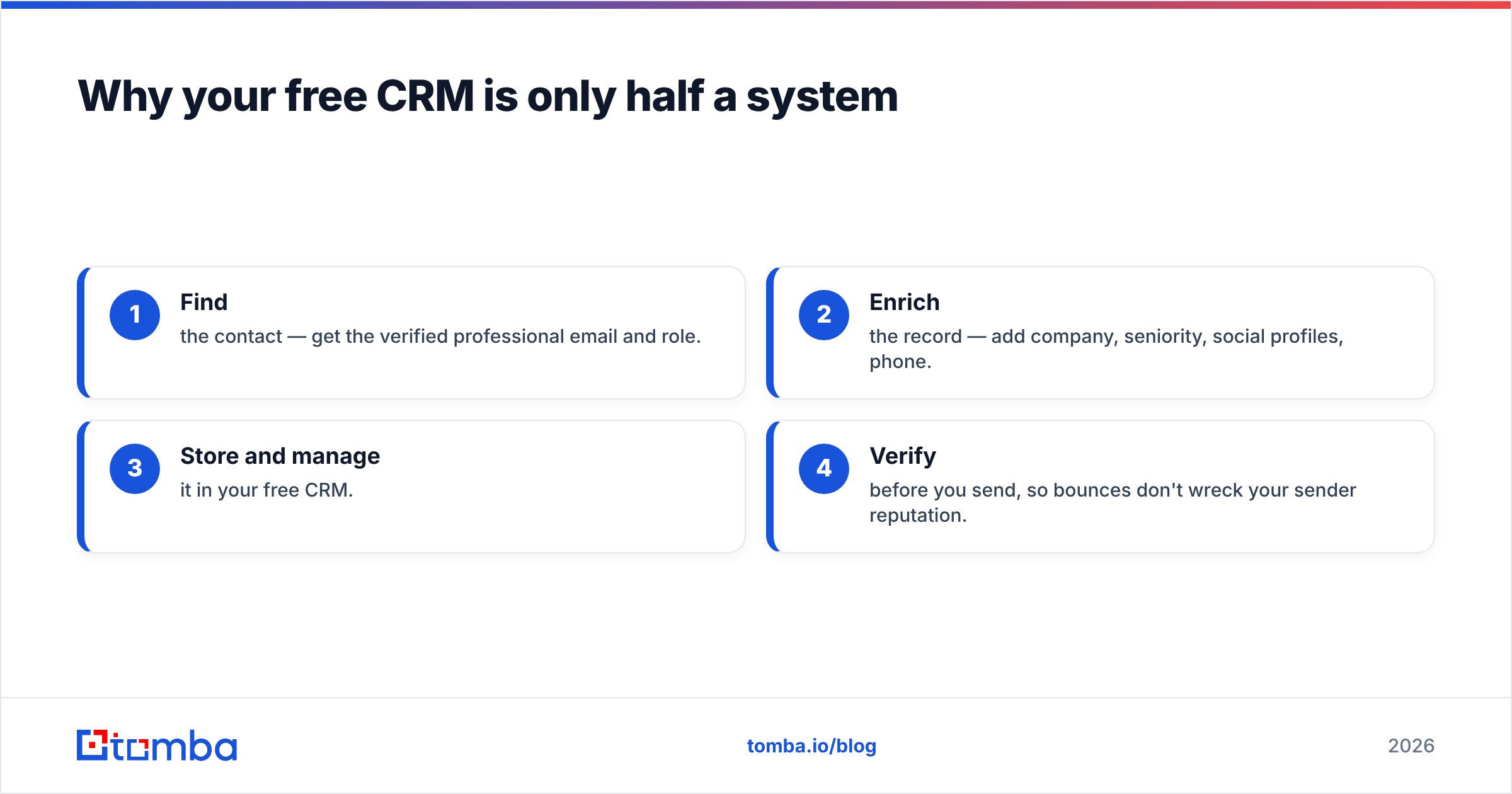
That's where a dedicated data layer earns its place. The workflow that actually works looks like this:
- Find the contact — get the verified professional email and role.
- Enrich the record — add company, seniority, social profiles, phone.
- Store and manage it in your free CRM.
- Verify before you send, so bounces don't wreck your sender reputation.
Tools like Tomba handle steps 1, 2, and 4 so your free CRM (step 3) isn't full of dead rows. You can pull contacts straight from a company website with domain search, enrich thin records with data enrichment, and validate everything with an email verifier before it ever touches your outreach. There's also a full B2B database when you need to build lists from scratch rather than wait for inbound.

Free CRM vs. free data tool: what's the difference?#
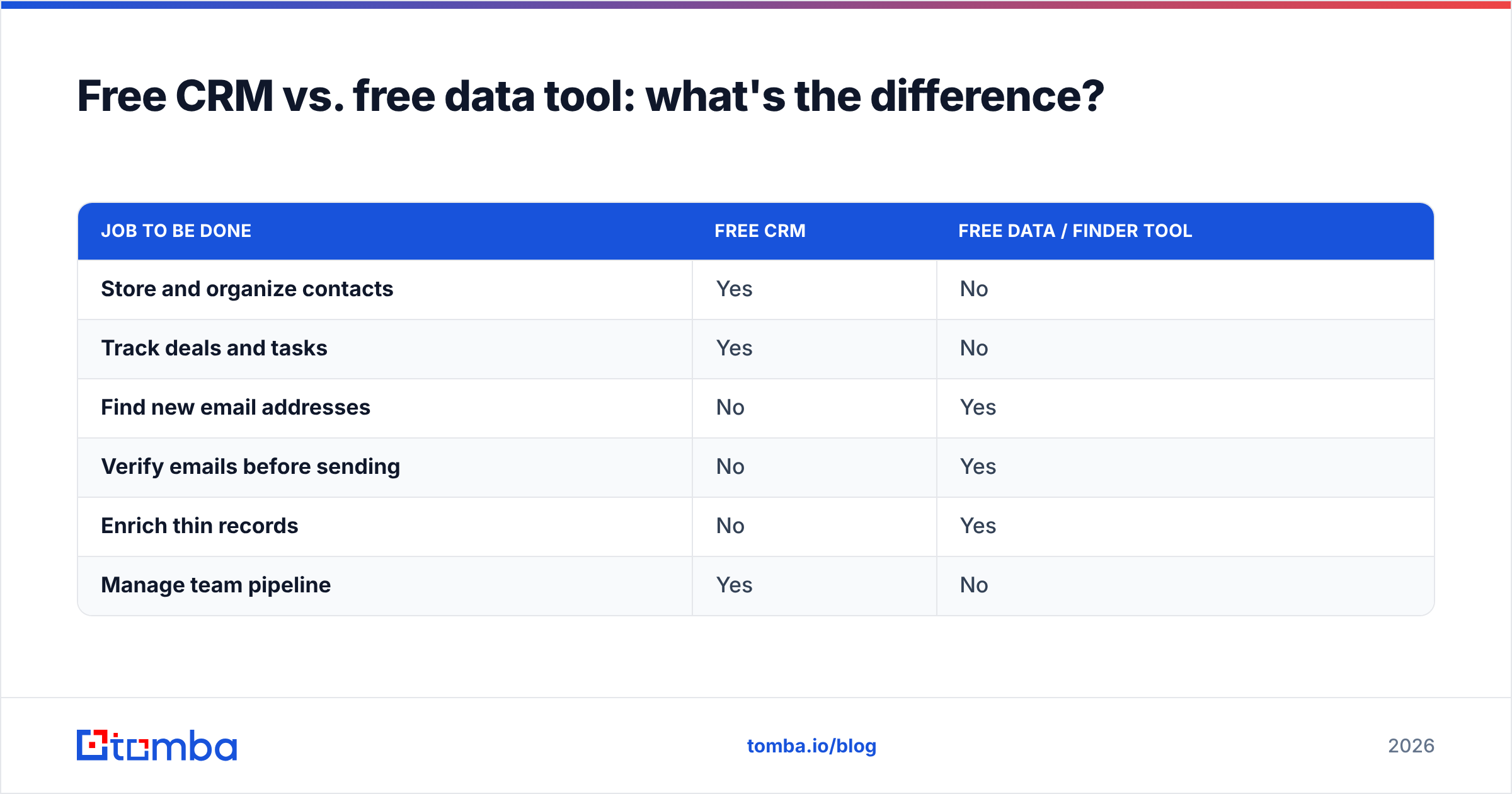
People conflate these constantly, then wonder why their "free stack" underperforms. They solve different problems.
| Job to be done | Free CRM | Free data / finder tool |
|---|---|---|
| Store and organize contacts | Yes | No |
| Track deals and tasks | Yes | No |
| Find new email addresses | No | Yes |
| Verify emails before sending | No | Yes |
| Enrich thin records | No | Yes |
| Manage team pipeline | Yes | No |
The two are complements, not competitors. Most free finder tools — Tomba included — offer a no-cost starter allowance (Tomba's free tier is 25 searches per month) so you can test the find-and-enrich half of the stack before paying for either side. When you do scale up, check the Tomba pricing tiers: Starter runs $49/mo, Growth $99/mo, and Pro $249/mo, which is often cheaper than adding paid automation seats to a CRM just to unlock enrichment.
How do you choose without regretting it later?#
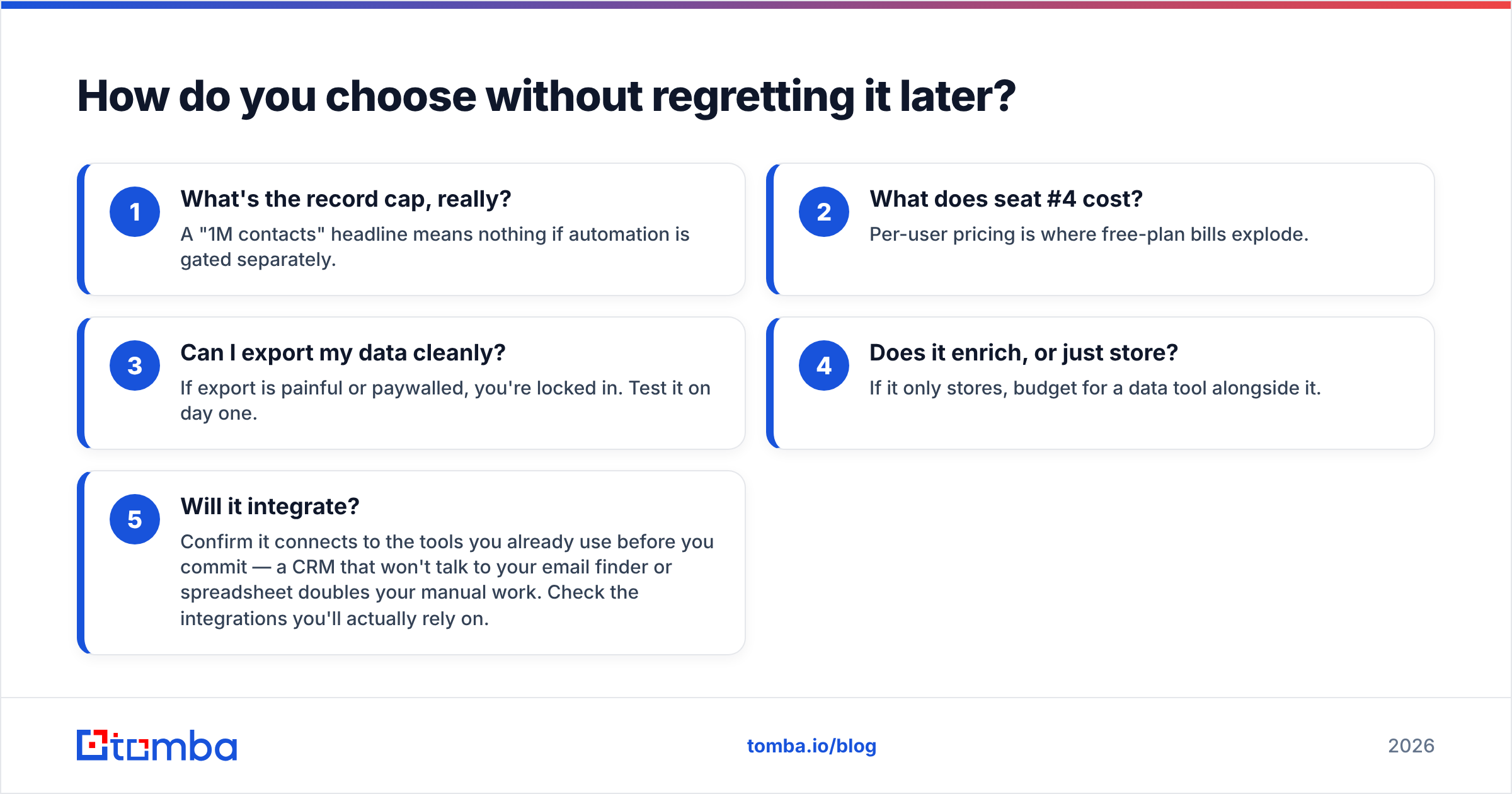
Score your options on exit cost, not entry price. A free tier that costs $50 per seat to upgrade is more expensive at scale than one with a $49 flat paid plan. Run every candidate through these five questions:
- What's the record cap, really? A "1M contacts" headline means nothing if automation is gated separately.
- What does seat #4 cost? Per-user pricing is where free-plan bills explode.
- Can I export my data cleanly? If export is painful or paywalled, you're locked in. Test it on day one.
- Does it enrich, or just store? If it only stores, budget for a data tool alongside it.
- Will it integrate? Confirm it connects to the tools you already use before you commit — a CRM that won't talk to your email finder or spreadsheet doubles your manual work. Check the integrations you'll actually rely on.
If you can answer all five, you've probably found a tool you won't rip out in a quarter.
What's the smartest free stack for a small team?#
Keep it to three layers and you cover the whole motion without a single invoice on day one:
- Storage layer — HubSpot Free or Zoho Free for organizing contacts and deals.
- Data layer — a free finder tier to source and verify contacts so records aren't empty.
- Spreadsheet layer — Google Sheets as the staging area for bulk imports and cleanup, using something like the Sheets email finder add-on to enrich in place before you push to the CRM.
This stack costs nothing to start, scales predictably, and — critically — each layer is independently replaceable. If HubSpot's upgrade price annoys you, you swap the storage layer without touching your data workflow.
Frequently asked questions#
Is free contact management software actually free forever? The core plans from HubSpot, Zoho, and Bitrix24 are free with no time limit. What's not free is scale — you pay when you exceed record caps, add users, or need automation. Read the upgrade terms before you build your whole process on a free tier.
Can free contact management software replace a paid CRM? For a solo user or a team of two to three with modest volume, yes. Once you need automation, team roles, or serious reporting, the free tier becomes the bottleneck rather than the solution.
What's the difference between contact management and CRM? Contact management is the "who" — organizing people and companies. A full CRM adds the "how much" and "when" — pipeline forecasting, quoting, and workflow automation. Contact management is the foundation layer of every CRM.
Do I still need an email finder if my CRM is free? Yes. A CRM stores contacts; it doesn't find or verify them. Without a finder and verifier, you're either buying stale lists or typing addresses by hand — and sending to unverified emails damages your deliverability.
The bottom line#
Free contact management software is a genuinely good starting point in 2026 — as long as you go in knowing it's a storage box, not a growth engine. Organize your contacts on a free CRM, decide your upgrade trigger before you feel the pain, and never confuse a place to store contacts with a way to find them.
That second half is where Tomba fits. Before a contact ever lands in your free CRM, use the Tomba Email Finder to source verified professional emails by name, company, or domain — so every record you manage is one you can actually act on. Start on the free tier, prove the workflow, and scale only when the results justify it.
Related guides#
Ready to find emails that actually work?
Join 150,000+ professionals who stopped guessing and started sending. Free credits on signup — no credit card required.
Get the Tomba newsletter
Practical outbound tactics and product updates — once every two weeks.
About the author