Contact Management System: The Complete 2026 Buyer's Guide
A contact management system keeps every lead, email, and deal detail in one searchable place. Here's how it works, what it costs, and how to pick one in 2026 without overpaying.
You have 4,000 contacts spread across a spreadsheet, three inboxes, a stack of business cards, and one rep's memory. When a deal stalls, nobody can say who last spoke to the buyer or what was promised. That is the exact problem a contact management system solves — and in 2026, doing it manually is a competitive disadvantage.
This guide explains what a contact management system actually is, how it differs from a full CRM, what the features and price tiers really look like, and how to pick one that fits your team instead of one that fits a sales rep's commission quota.
TL;DR#
- A contact management system (CMS) is software that stores, organizes, and tracks every interaction with your leads and customers in one searchable database.
- It is not the same as a full CRM — a CMS is the contact layer; a CRM adds pipeline, forecasting, and revenue workflows on top.
- Core features to demand: deduplication, activity history, custom fields, segmentation, and integrations with your email and calendar.
- Expect to pay $0–$25/user/month for contact management, and $25–$150+/user/month once you add full CRM and automation.
- Garbage in, garbage out: a CMS is only as good as the data you feed it, which is why enrichment and email verification matter more than the interface.
What is a contact management system?#
A contact management system is a single database that holds every person and company you do business with, plus a timeline of every interaction — emails, calls, meetings, notes, and deals. Think of it as the difference between a shoebox of receipts and a well-labeled filing cabinet: both technically "store" your data, but only one lets you find the March invoice in four seconds.
At minimum, a modern CMS gives you:
- A central contact record — name, title, company, email, phone, and social profiles in one place.
- Interaction history — a chronological log of every touchpoint so anyone on the team can pick up where the last person left off.
- Search and segmentation — filter contacts by industry, deal stage, region, or any custom attribute.
- Deduplication — merge the three copies of "John Smith" your team created independently.
- Integrations — two-way sync with email, calendar, and the other tools your reps live in.
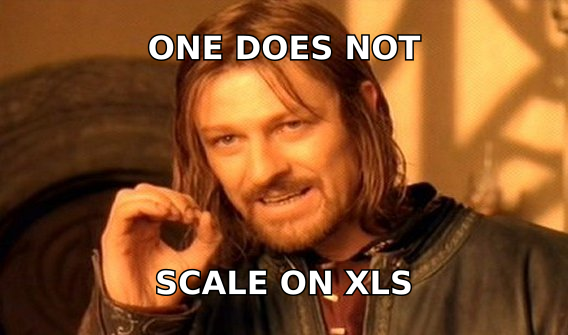
That structured-record shape is why teams outgrow spreadsheets fast. A spreadsheet cannot log an email automatically, warn you about a duplicate, or tell you a contact went cold 60 days ago. A contact management system does all three by default.

Is a contact management system the same as a CRM?#
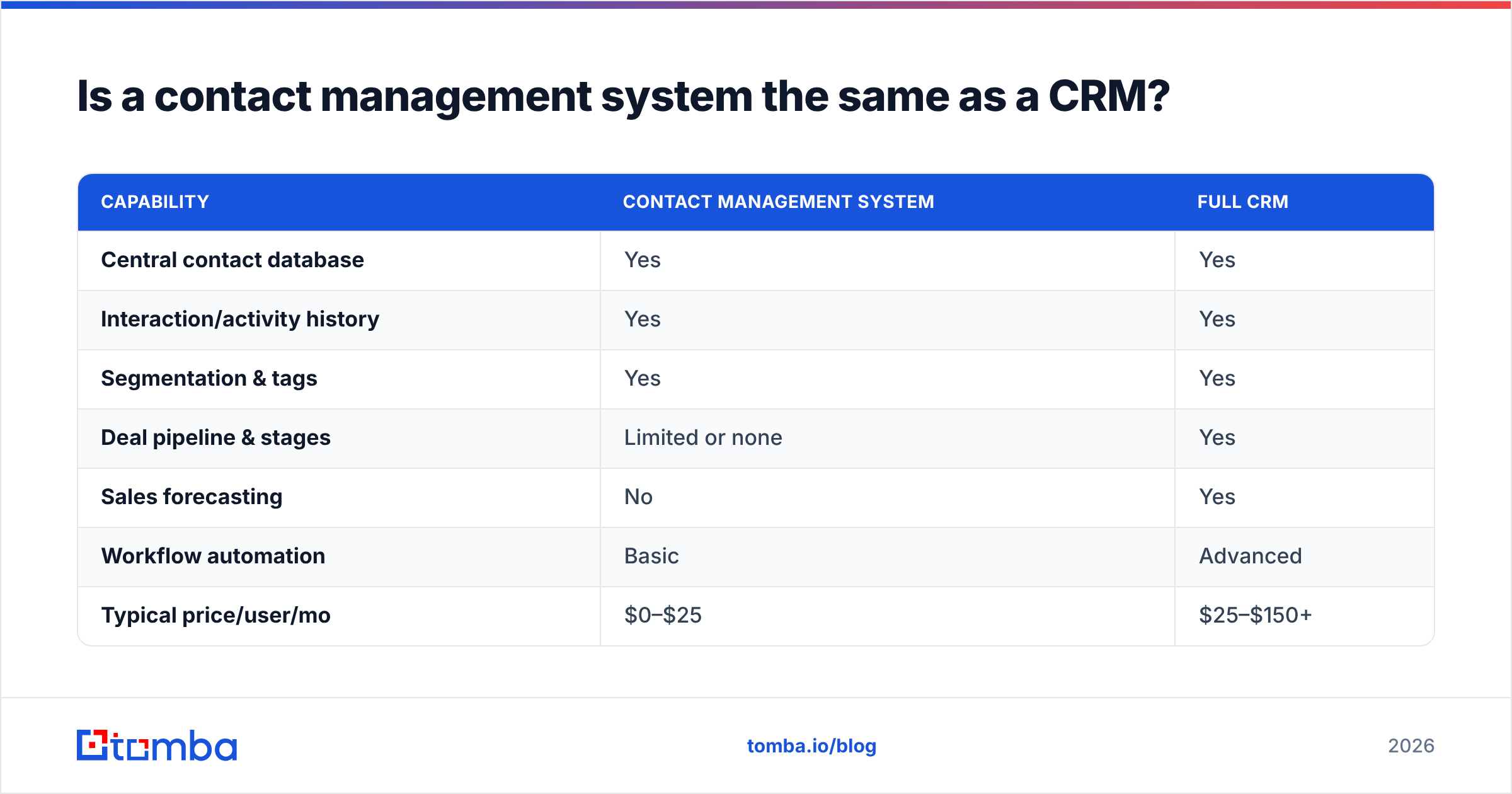
No — and confusing the two is how teams overbuy. A contact management system is the contact and interaction layer. A CRM (customer relationship management platform) wraps that layer in revenue machinery: pipeline stages, forecasting, quotes, automation, and reporting.
Put simply: every CRM contains a contact management system, but not every contact management system is a CRM. If your team just needs to stop losing track of people, a lightweight CMS is enough. If you need to forecast a quarter and route leads across five reps, you need the full CRM.
| Capability | Contact Management System | Full CRM |
|---|---|---|
| Central contact database | Yes | Yes |
| Interaction/activity history | Yes | Yes |
| Segmentation & tags | Yes | Yes |
| Deal pipeline & stages | Limited or none | Yes |
| Sales forecasting | No | Yes |
| Workflow automation | Basic | Advanced |
| Typical price/user/mo | $0–$25 | $25–$150+ |
| Best for | Solo, SMB, ops teams | Growing sales orgs |
The practical takeaway: don't pay CRM prices for contact management needs, and don't try to run a 15-rep pipeline on a glorified address book. Match the tool to the job.
What features actually matter in a contact management system?#
Vendors will sell you 200 features. Fewer than a dozen decide whether the system gets used or abandoned. Here are the ones worth scoring during a trial.
- Automatic activity capture. If reps have to log every email by hand, they won't. The system should sync email and calendar automatically so the timeline builds itself.
- Custom fields and objects. Your business is not generic. You need fields for the attributes that actually drive your deals — contract renewal date, tech stack, account tier.
- Deduplication and merge. Duplicate records are the number-one killer of trust in any contact database. Automatic dedupe is non-negotiable.
- Segmentation and saved views. The ability to slice contacts into lists ("SaaS CMOs in EMEA who opened last campaign") is what turns a database into a prospecting engine.
- Data enrichment. Records decay. A good system either enriches contacts automatically or plugs into a service that does — filling in missing titles, phone numbers, and company data.
- Integrations and API. Your CMS is a hub, not an island. It must connect to your email tool, your calendar, and ideally your marketing and support stacks.
Notice that half of that list is about data quality, not interface. That is deliberate. The prettiest contact management system in the world is useless if 30% of its email addresses bounce. This is where a tool like the Tomba Email Finder earns its place in the stack — you find and verify accurate contact data before it pollutes your system, then let the CMS keep it organized.
How much does a contact management system cost in 2026?#
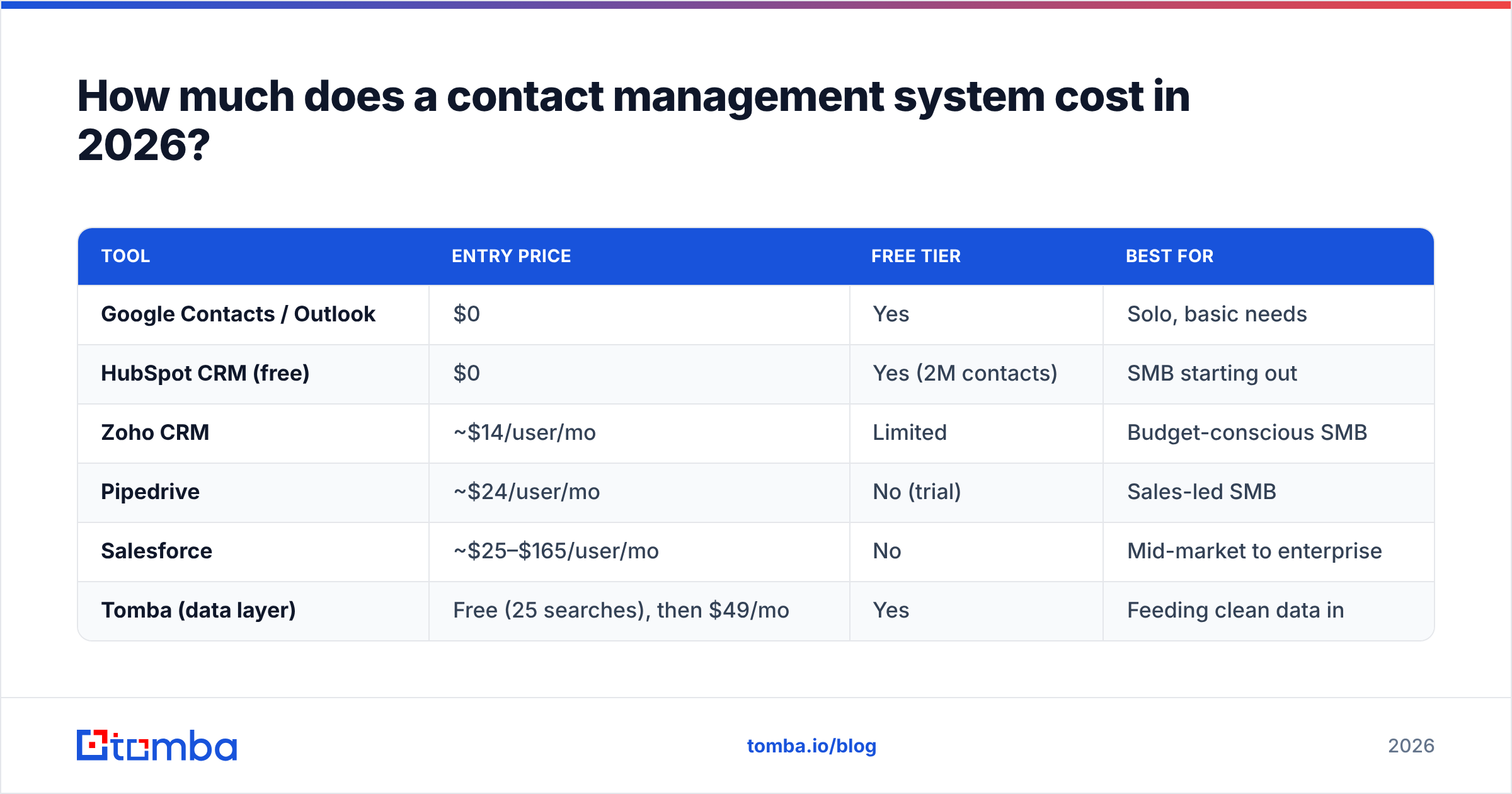
Pricing splits into three honest tiers, and the gap between "free contact manager" and "enterprise CRM" is enormous. Here's a realistic 2026 snapshot of representative options so you can benchmark quotes.
| Tool | Entry price | Free tier | Best for |
|---|---|---|---|
| Google Contacts / Outlook | $0 | Yes | Solo, basic needs |
| HubSpot CRM (free) | $0 | Yes (2M contacts) | SMB starting out |
| Zoho CRM | ~$14/user/mo | Limited | Budget-conscious SMB |
| Pipedrive | ~$24/user/mo | No (trial) | Sales-led SMB |
| Salesforce | ~$25–$165/user/mo | No | Mid-market to enterprise |
| Tomba (data layer) | Free (25 searches), then $49/mo | Yes | Feeding clean data in |
Two cost traps to watch. First, per-seat pricing scales brutally — a $25/user quote is $3,000/month at 100 reps, and premium tiers can hit $300/user once you add the "AI" and forecasting add-ons. Second, data costs are separate. Most CRMs charge extra (or a lot extra) for enrichment credits, so many teams pair a mid-tier CRM with a dedicated data tool and come out cheaper with better accuracy. Compare the full Tomba pricing against a CRM's enrichment add-on before you assume the all-in-one is the deal.
How do you choose the right contact management system?#
Work backward from your actual workflow, not from a feature checklist. Run every candidate through these five questions during a two-week trial with real data.
- Will reps actually use it? If logging activity takes more than a click, adoption dies. Test the daily workflow, not the demo.
- Does it keep data clean on its own? Look for built-in dedupe, validation, and enrichment — or an easy integration path to a tool that provides them.
- Does it fit your team size today and in 18 months? A five-person startup and a 50-person sales org need different tools. Don't buy for a headcount you don't have; don't buy something you'll rip out next year either.
- What does it integrate with? Map your current stack — email, calendar, marketing, support — and confirm native, two-way sync. A HubSpot integration or Salesforce integration that pushes verified contacts straight in saves hours of manual entry.
- Can you get your data back out? Vendor lock-in is real. Confirm a clean CSV/API export before you commit, so switching later is a migration, not a hostage negotiation.
Independent review sites like G2 and vendor documentation from HubSpot and Salesforce are useful for validating claims — but weight real trial results over star ratings. A tool that scores 4.7 stars and doesn't fit your workflow is still the wrong tool.
Why is data quality more important than the software itself?#
Because a contact management system is a container, and a container full of bad data is worse than useless — it actively misleads you. If a quarter of your contacts have outdated titles or dead email addresses, every campaign, forecast, and report built on that data inherits the error.
The fix is to treat data quality as a pipeline, not a one-time cleanup:
- Find accurate contacts at the source using a verified email finder rather than guessing formats.
- Verify every address with an email verifier before it enters the system, so bounces never touch your sender reputation.
- Enrich thin records with data enrichment to fill in missing firmographics and contact details.
- Deduplicate on entry so one person never becomes three records.
- Refresh on a schedule, because roughly 25–30% of B2B contact data decays every year.
Do this well and even a free contact manager outperforms an expensive CRM stuffed with stale records. Skip it and no amount of software polish will save you.
Contact management system: quick comparison of approaches#
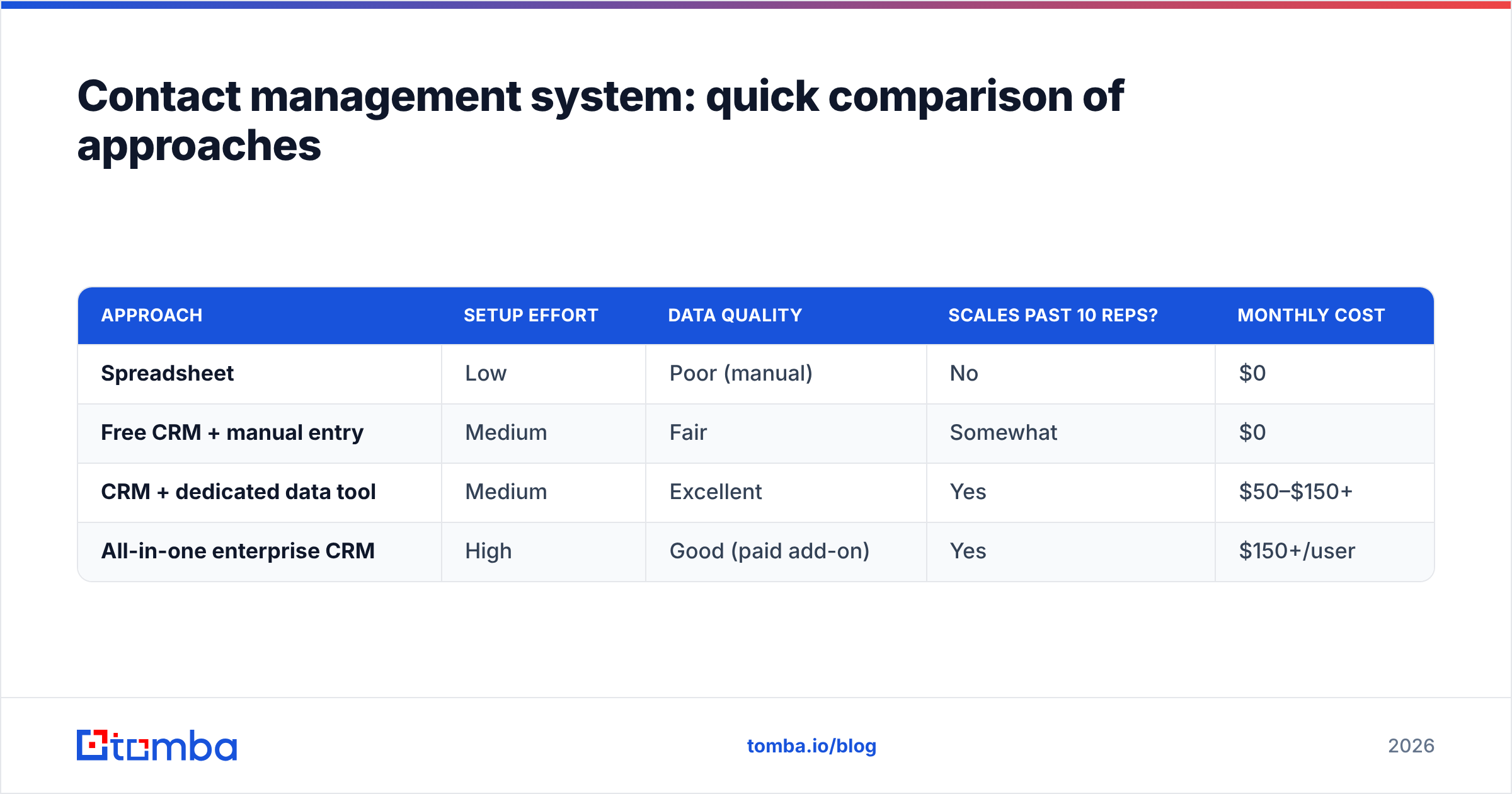
To wrap the decision into one view, here's how the three common approaches stack up for a growing B2B team.
| Approach | Setup effort | Data quality | Scales past 10 reps? | Monthly cost |
|---|---|---|---|---|
| Spreadsheet | Low | Poor (manual) | No | $0 |
| Free CRM + manual entry | Medium | Fair | Somewhat | $0 |
| CRM + dedicated data tool | Medium | Excellent | Yes | $50–$150+ |
| All-in-one enterprise CRM | High | Good (paid add-on) | Yes | $150+/user |
For most SMB and mid-market teams in 2026, the sweet spot is a solid CRM paired with a dedicated data layer that keeps contacts accurate. You get clean records without paying enterprise per-seat rates for enrichment you could source more cheaply and more accurately elsewhere.
Frequently asked questions#
Is a contact management system worth it for a small team? Yes. Even a two-person team loses deals to forgotten follow-ups and lost context. A free tier CMS pays for itself the first time it stops a dropped lead.
Can I use a spreadsheet instead? For under ~50 contacts, briefly. Beyond that, spreadsheets can't log activity, dedupe, or alert you to cold contacts — and they break the moment two people edit at once.
What's the difference between contact management and lead management? Contact management organizes who you know. Lead management scores and routes those contacts based on how likely they are to buy. Most CRMs do both.
How do I keep my contact data accurate over time? Verify addresses on entry, enrich thin records, and re-check the database quarterly. Automating this with a data tool beats manual cleanup every time.
The bottom line#
A contact management system turns scattered, decaying contact data into a single source of truth your whole team can act on. Choose based on adoption and data quality first, features second, and brand name last. And remember that the software is only half the equation — the other half is feeding it accurate, verified contacts.
That's where Tomba fits: use the Tomba Email Finder to source and verify accurate professional emails, then push them straight into whatever contact management system you choose. Start free with 25 searches a month, and stop letting bad data undermine good software. Clean contacts in, better decisions out.
Related guides#
Ready to find emails that actually work?
Join 150,000+ professionals who stopped guessing and started sending. Free credits on signup — no credit card required.
Get the Tomba newsletter
Practical outbound tactics and product updates — once every two weeks.
About the author