ContactOut vs Crustdata (2026): Which B2B Data Tool Wins?
ContactOut and Crustdata solve two different data problems. Here's an honest, side-by-side breakdown of accuracy, pricing, coverage, and which one actually fits your GTM stack in 2026.
Picking between ContactOut and Crustdata feels like a versus fight, but it's really a "which job are you hiring for" question. One is built to hand a recruiter or SDR a verified personal email in a browser tab. The other is a firehose of real-time company and people data you pipe into a dashboard or model. Get the mismatch wrong and you'll pay for capability you never touch.
This breakdown cuts through the marketing pages so you can pick fast — and shows where a leaner email-finding stack beats both on cost.
TL;DR: ContactOut vs Crustdata in 30 seconds#
- ContactOut is a contact-finder: a Chrome extension plus API that pulls personal and work emails and phone numbers, mostly off LinkedIn profiles. Best for recruiters and individual SDRs.
- Crustdata is a data API/platform: real-time company firmographics, headcount trends, funding, tech stack, and people signals. Best for RevOps, growth engineers, and data teams building workflows.
- They barely overlap. ContactOut answers "how do I reach this person?" Crustdata answers "which accounts should I care about and why?"
- Pricing works differently. ContactOut sells seats/credits for outreach; Crustdata sells API volume and datasets for pipelines. Crustdata skews more expensive at scale.
- If your core need is verified emails at a fair price, a dedicated email finder like Tomba (from $49/mo) often beats paying for either platform's broader bundle.

What is ContactOut?#
ContactOut is a contact-data tool aimed squarely at recruiters and salespeople who live inside LinkedIn. Its flagship surface is a browser extension that sits on a profile and surfaces the person's work email, personal email, and phone number in one click. It also ships a search portal, list-building tools, and an API for teams that want to automate lookups.
The pitch is coverage of personal emails — the Gmail/Outlook addresses that recruiters use to reach passive candidates who ignore corporate inboxes. ContactOut leans heavily on its claim of a large profile database and high email coverage. You can read their own positioning on contactout.com.
Where ContactOut fits:
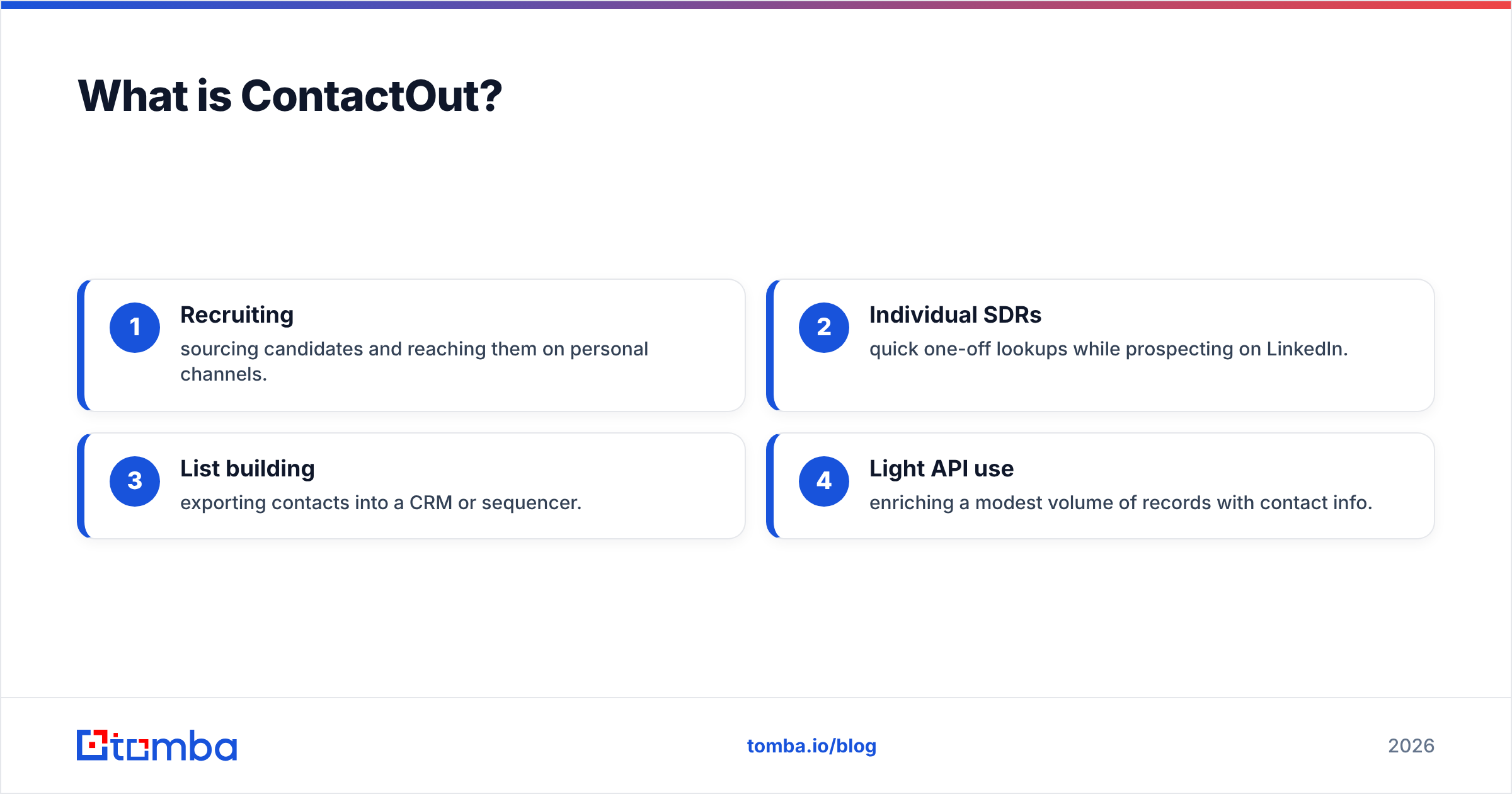
- Recruiting — sourcing candidates and reaching them on personal channels.
- Individual SDRs — quick one-off lookups while prospecting on LinkedIn.
- List building — exporting contacts into a CRM or sequencer.
- Light API use — enriching a modest volume of records with contact info.
What it is not: a source of deep company intelligence, headcount trends, or intent signals. It tells you how to reach someone, not whether that account is worth reaching.
What is Crustdata?#
Crustdata is a data infrastructure company, not an outreach tool. It delivers real-time company and people data through APIs and flat datasets: firmographics, employee headcount over time, hiring velocity, funding rounds, web traffic, tech stack, and social/growth metrics. Growth engineers and RevOps teams use it to power lead scoring, territory planning, competitive tracking, and custom "who's growing right now" workflows.
The key word is real-time. Crustdata's selling point is freshness — pulling signals as they change rather than serving a static database that ages. You can see their product framing on crustdata.com.
Where Crustdata fits:
- RevOps / GTM engineering building account-scoring models.
- Investors and analysts tracking company growth signals.
- Data teams that want a raw API to join against their own tables.
- Product-led teams enriching signups with firmographic context.
What it is not: a plug-and-play "find me this person's email" button for a non-technical SDR. Crustdata assumes you can consume an API or a dataset and do something with it. If you just want a verified email in a spreadsheet, it's overkill.
ContactOut vs Crustdata: the core difference#
Here's the analogy. ContactOut is a phone book with a highlighter — it helps you reach a specific person you've already identified. Crustdata is a research desk — it tells you which companies are heating up, hiring, raising money, or shipping new tech, so you know who to research in the first place.
That means the "winner" depends entirely on the job:
- Need to contact known people → ContactOut.
- Need to discover and prioritize accounts with rich signals → Crustdata.
- Need verified emails at volume, cheaply → a focused email finder (more on that below).
Trying to force one tool to do the other's job is where teams waste budget.
ContactOut vs Crustdata: feature and pricing comparison#
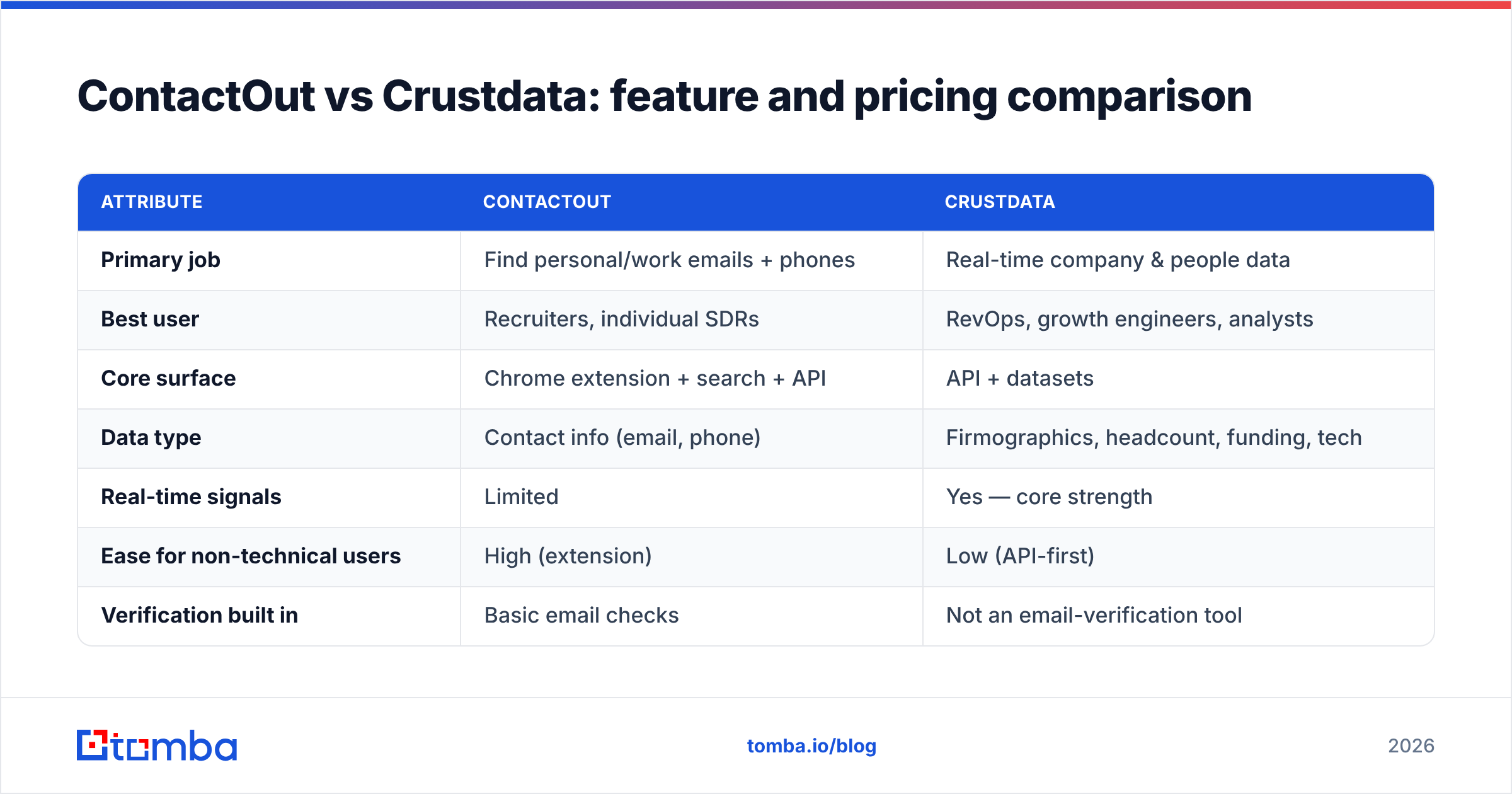
| Attribute | ContactOut | Crustdata |
|---|---|---|
| Primary job | Find personal/work emails + phones | Real-time company & people data |
| Best user | Recruiters, individual SDRs | RevOps, growth engineers, analysts |
| Core surface | Chrome extension + search + API | API + datasets |
| Data type | Contact info (email, phone) | Firmographics, headcount, funding, tech |
| Real-time signals | Limited | Yes — core strength |
| Ease for non-technical users | High (extension) | Low (API-first) |
| Verification built in | Basic email checks | Not an email-verification tool |
| Typical pricing model | Seats + credits | API volume / dataset licensing |
| Entry cost | Free tier, paid plans by seat | Higher; sales-led at scale |
| Overkill for "just emails"? | Sometimes | Almost always |
Two things stand out. First, these tools rarely compete for the same buyer — a recruiter isn't shopping for a headcount-trends API, and a GTM data engineer isn't buying a LinkedIn extension. Second, neither is optimized purely for cheap, accurate, high-volume email finding. ContactOut bundles phones and personal data you may not need; Crustdata bundles company intelligence you may not need.
If your actual bottleneck is verified email addresses, you're paying a bundle tax with both.
Which one has more accurate data?#
Accuracy is a moving target, and it depends on what you're measuring.
- Contact accuracy (does this email/phone work?): ContactOut is built for this and generally does well on personal-email coverage for LinkedIn-sourced profiles. But like every provider that scrapes and aggregates, coverage varies by region and seniority, and no tool is immune to stale records.
- Company-data accuracy (is this headcount/funding current?): Crustdata's real-time refresh is its edge. For fast-moving firmographic signals, fresher usually beats a static dump.
The honest catch: any email you get from a database should be verified before you send. Vendors quote impressive accuracy on their own pages, but deliverability is decided in your inbox, not their marketing. Independent reviews on G2 show the spread — the same tool praised for coverage gets dinged for the occasional bounce. That's normal. It's also why a dedicated email verifier belongs in the loop no matter which platform you choose. Push every list through verification and catch-all detection before it hits a sequencer.

When should you pick ContactOut?#
Choose ContactOut if most of these are true:
- You recruit or prospect inside LinkedIn all day and want emails/phones in-tab.
- Personal (non-work) emails matter for reaching passive candidates.
- Your team is non-technical and needs a click-not-code workflow.
- Volume is moderate — you're enriching profiles, not powering a data pipeline.
ContactOut earns its keep for recruiter-style, one-person-at-a-time outreach. Where it gets expensive is at scale, or when you only wanted emails and are paying for the phone/personal-data bundle on top.
When should you pick Crustdata?#
Choose Crustdata if:
- You're building workflows, not doing manual lookups — scoring, routing, dashboards, models.
- You need fresh company signals: hiring surges, funding, growth, tech changes.
- You have technical capacity to consume an API or dataset.
- Account prioritization is your bottleneck, not contact info.
Crustdata is the right call for RevOps and GTM-engineering teams who want to decide which accounts deserve attention. It's the wrong call if you hand it to an SDR expecting a magic "email this person" button.
Where does Tomba fit against both?#
Tomba isn't trying to be a recruiter extension or a real-time company-signals API. It's a focused, verification-first email-finding stack — and for a huge share of teams, that's the part they were actually paying ContactOut or Crustdata to do.
Here's how the three compare on the specific job of getting a verified email into your outreach:
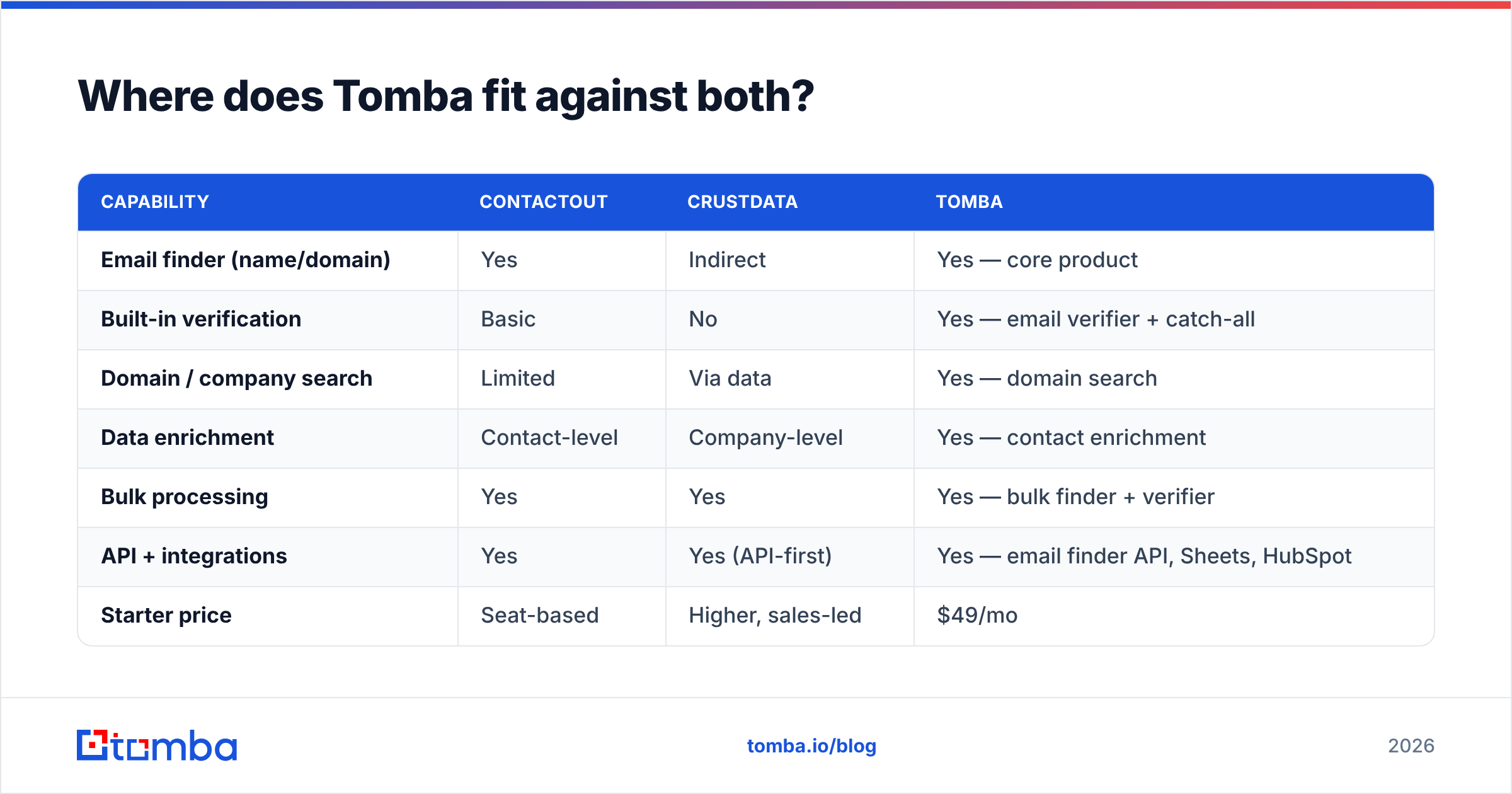
| Capability | ContactOut | Crustdata | Tomba |
|---|---|---|---|
| Email finder (name/domain) | Yes | Indirect | Yes — core product |
| Built-in verification | Basic | No | Yes — email verifier + catch-all |
| Domain / company search | Limited | Via data | Yes — domain search |
| Data enrichment | Contact-level | Company-level | Yes — contact enrichment |
| Bulk processing | Yes | Yes | Yes — bulk finder + verifier |
| API + integrations | Yes | Yes (API-first) | Yes — email finder API, Sheets, HubSpot |
| Starter price | Seat-based | Higher, sales-led | $49/mo |
| Free tier | Yes | Limited | 25 searches/mo |
The point isn't that Tomba does everything both tools do — it doesn't track funding rounds, and it isn't a LinkedIn recruiting suite. The point is that if your real need is accurate, verified emails at a predictable price, you can skip the bundle tax. Tomba's pricing starts at $49/mo (Starter), $99/mo (Growth), and $249/mo (Pro), with a free tier to test coverage before you commit.
Many teams end up with a clean split: Crustdata (or another data source) for account signals, and Tomba for finding and verifying the emails you'll actually send to. You pay each tool for the job it's best at instead of overpaying one platform to half-do two.
Can you use them together?#
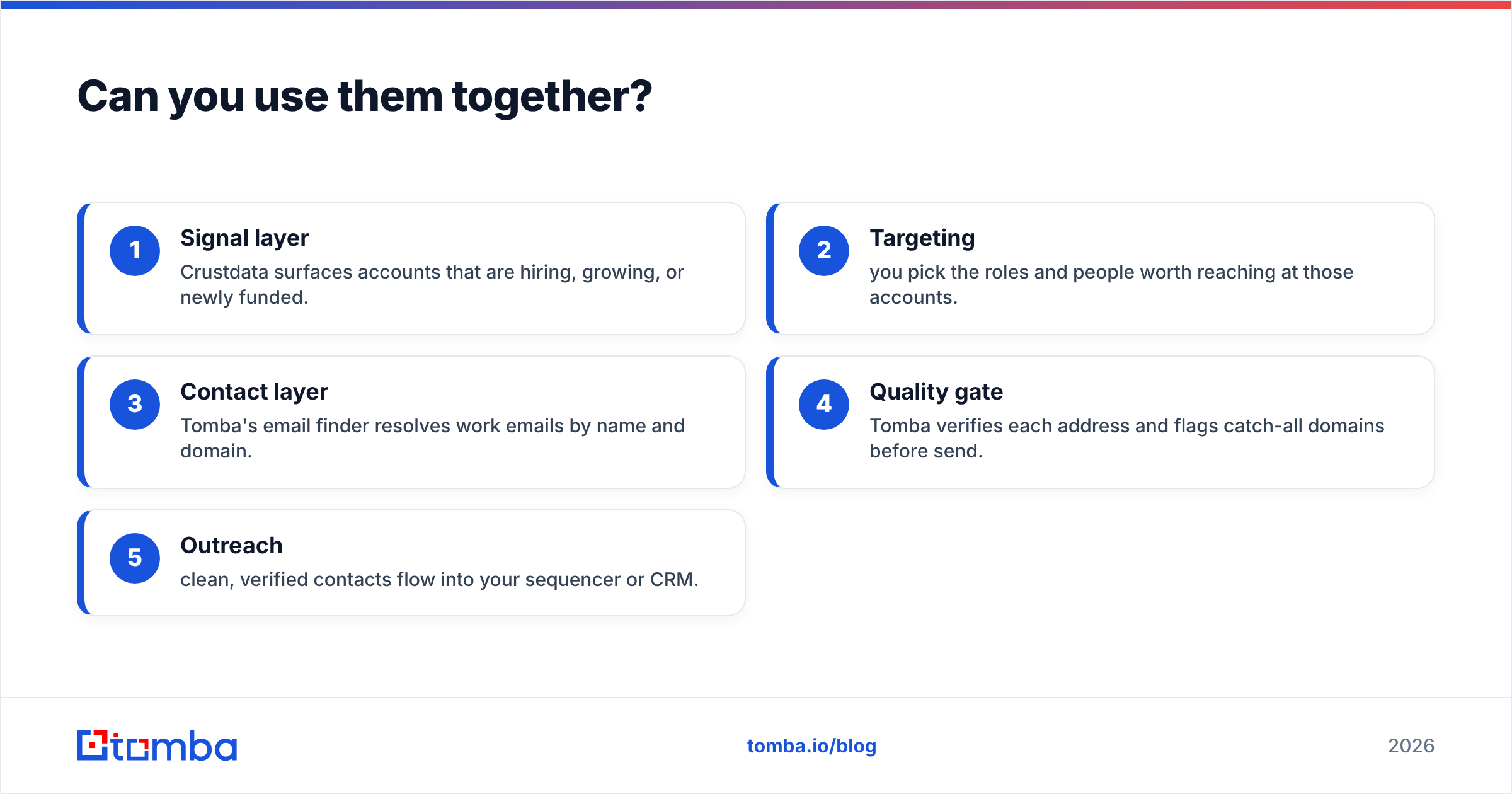
Yes, and often that's the smartest setup. A realistic 2026 stack looks like:
- Signal layer — Crustdata surfaces accounts that are hiring, growing, or newly funded.
- Targeting — you pick the roles and people worth reaching at those accounts.
- Contact layer — Tomba's email finder resolves work emails by name and domain.
- Quality gate — Tomba verifies each address and flags catch-all domains before send.
- Outreach — clean, verified contacts flow into your sequencer or CRM.
ContactOut can slot into step 3 for recruiting-heavy, LinkedIn-first teams. But for pure email finding at volume, a dedicated finder with verification baked in keeps cost and bounce rates down. If you're consolidating vendors, start by isolating the one job you can't compromise on — usually deliverable emails — and buy the best tool for that first.
The bottom line#
ContactOut vs Crustdata isn't really a duel; it's a fork in the road. ContactOut wins for recruiters and SDRs who need contact info inside LinkedIn. Crustdata wins for RevOps and data teams who need real-time company intelligence to prioritize accounts. Choosing "the better tool" without naming your job is how budgets leak.
And if the job you actually care about is verified emails — the raw fuel for any outbound motion — don't overpay for a bundle to get it. Start with the Tomba Email Finder: find professional emails by name, company, or domain, verify them in the same workflow, and export straight into your CRM. Test it free with 25 searches, then scale from $49/mo when it earns the upgrade — no seat math, no data-pipeline overhead, just accurate emails your inbox will thank you for.
Related guides#
Ready to find emails that actually work?
Join 150,000+ professionals who stopped guessing and started sending. Free credits on signup — no credit card required.
Get the Tomba newsletter
Practical outbound tactics and product updates — once every two weeks.
About the author