ContactOut vs CUFinder 2026: Accuracy, Pricing, and Best Pick
ContactOut and CUFinder both promise verified B2B contacts, but they solve different problems. Here's an honest breakdown of accuracy, pricing, and which one fits your outbound motion.
Choosing between ContactOut and CUFinder usually comes down to one question: do you need deep personal contact data on individual LinkedIn profiles, or broad company-level enrichment across a whole market? The two tools lean in opposite directions, and picking the wrong one wastes budget and inflates your bounce rate.
This is a neutral, hands-on comparison. Both platforms are competent, both have real gaps, and neither is the automatic winner for every team. Below you'll find where each one is strong, where each one struggles, and how to decide.
TL;DR: ContactOut vs CUFinder#
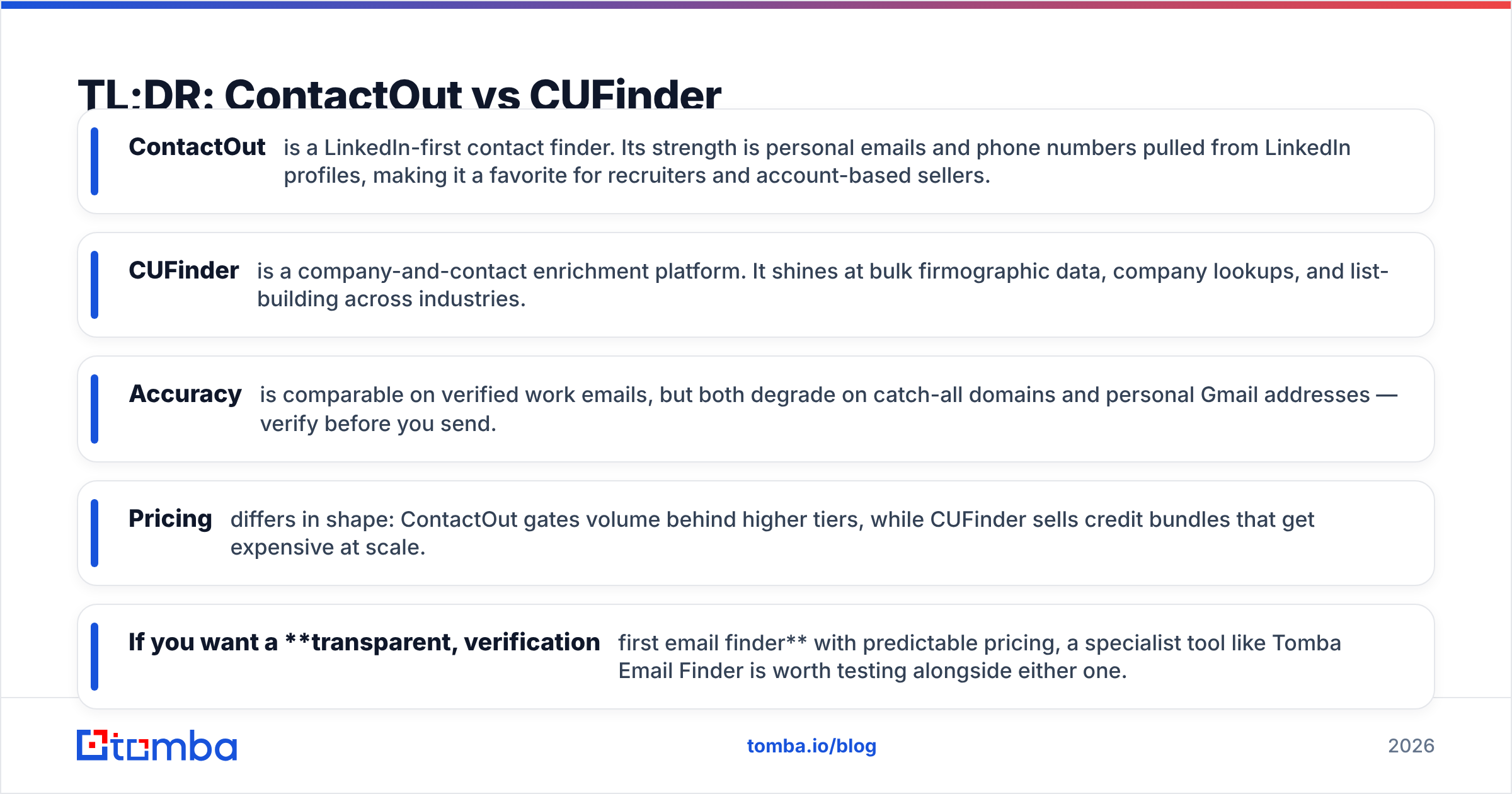
- ContactOut is a LinkedIn-first contact finder. Its strength is personal emails and phone numbers pulled from LinkedIn profiles, making it a favorite for recruiters and account-based sellers.
- CUFinder is a company-and-contact enrichment platform. It shines at bulk firmographic data, company lookups, and list-building across industries.
- Accuracy is comparable on verified work emails, but both degrade on catch-all domains and personal Gmail addresses — verify before you send.
- Pricing differs in shape: ContactOut gates volume behind higher tiers, while CUFinder sells credit bundles that get expensive at scale.
- If you want a transparent, verification-first email finder with predictable pricing, a specialist tool like Tomba Email Finder is worth testing alongside either one.
What is ContactOut?#
ContactOut is a contact-intelligence tool built primarily around LinkedIn. You install a Chrome extension, browse profiles, and it surfaces personal and work email addresses plus phone numbers. It also offers a searchable database and a recruiter-oriented workflow for building candidate or prospect lists.
Its core promise is coverage of personal contact details — the Gmail and mobile data that most B2B databases don't carry. Recruiters and founder-led sales teams gravitate to it for exactly that reason. You can read more about its positioning on the official ContactOut site.
The trade-off: ContactOut is only as useful as the LinkedIn profile in front of you. If your workflow is list-first (upload a domain list, get contacts back), it feels less natural than tools designed for bulk domain search.
What is CUFinder?#
CUFinder is an enrichment and lead-generation engine aimed at company data. Give it a company name or domain and it returns firmographics, contacts, technologies, social profiles, and more. It leans toward breadth — enriching thousands of company records at once — rather than deep personal detail on a single individual.
Teams use CUFinder for market mapping, TAM building, and CRM enrichment. Its API and bulk tools are the real draw. You can review its feature set on the official CUFinder site.
The trade-off: personal contact depth (direct dials, personal emails) is thinner than a LinkedIn-native tool, and credit consumption on enrichment-heavy workflows can climb fast.

How accurate is each tool?#
Accuracy is where comparisons get slippery, because "accuracy" means different things. A verified corporate email that lands in the inbox is one thing; a guessed personal Gmail that bounces is another.
Both ContactOut and CUFinder publish high accuracy claims, and on standard verified work emails at companies with clear MX records, both perform well. The gap widens in two situations:
- Catch-all domains — where the server accepts every address and neither tool can confirm a real mailbox without extra verification.
- Personal emails — where ContactOut has an edge in coverage but individual results still need checking.
No email finder should be trusted blindly. Whatever you use, run results through an email verifier before a campaign. That single step is the biggest lever on your bounce rate — bigger than which finder you picked.

For context on how top email finders stack up on verified-hit rate, the accuracy benchmark above is a useful reference point. The headline takeaway: the difference between a "90% accurate" and "95% accurate" tool is real, but it's dwarfed by whether you verify at all.
ContactOut vs CUFinder: feature comparison#
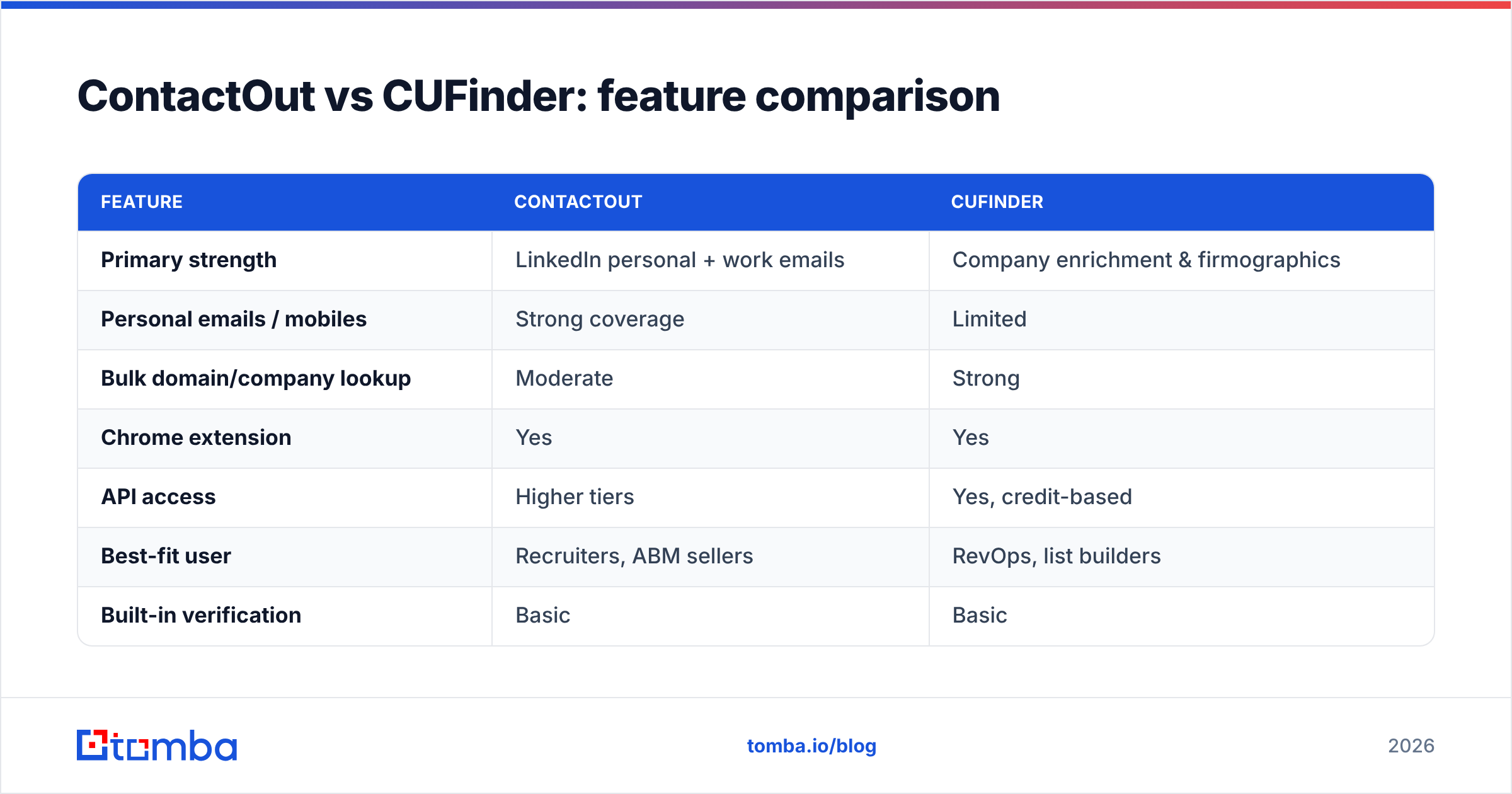
Here's how the two line up on the attributes that matter for an outbound or recruiting stack.
| Feature | ContactOut | CUFinder |
|---|---|---|
| Primary strength | LinkedIn personal + work emails | Company enrichment & firmographics |
| Personal emails / mobiles | Strong coverage | Limited |
| Bulk domain/company lookup | Moderate | Strong |
| Chrome extension | Yes | Yes |
| API access | Higher tiers | Yes, credit-based |
| Best-fit user | Recruiters, ABM sellers | RevOps, list builders |
| Built-in verification | Basic | Basic |
| Free trial | Limited credits | Limited credits |
Neither column is a knockout. If your daily motion is "open a LinkedIn profile, get a mobile number," ContactOut wins. If it's "enrich 5,000 accounts from a domain list," CUFinder wins. Cross-check any shortlist on a neutral review site like G2 to see how real users rate support and data freshness before committing.
How does pricing compare?#
Pricing is the area where teams get surprised, so read the fine print on both.
ContactOut structures plans around monthly email/phone credits, with the richest data and API access reserved for higher tiers. Solo users can start cheap, but scaling to team volume pushes you up the ladder quickly.
CUFinder sells credit bundles across its plans. Company enrichment is efficient, but enrichment workflows that touch many fields per record burn credits faster than a flat "one credit per email" model, so heavy users should model their actual usage before buying.
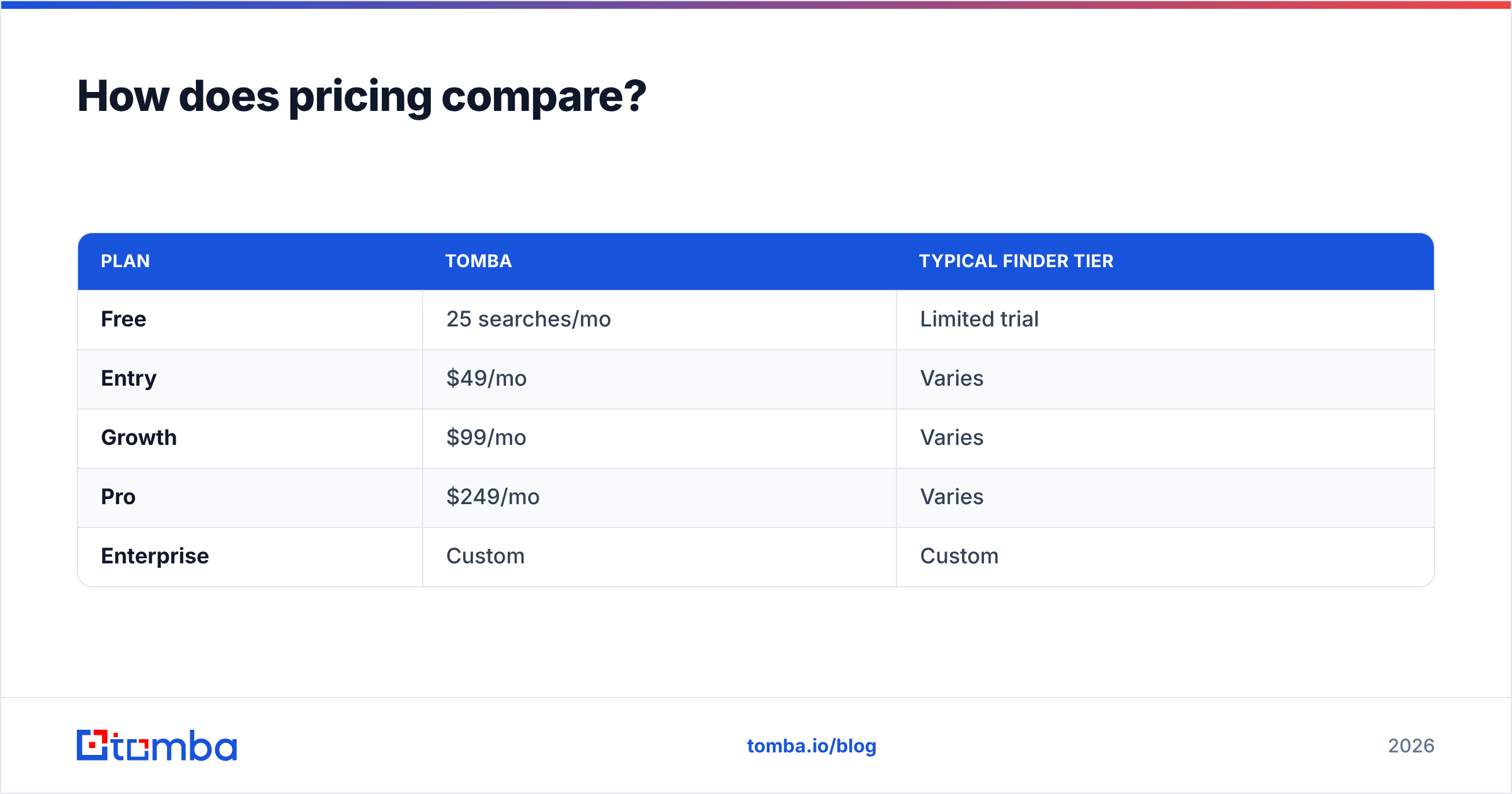
For comparison, here's how a verification-first specialist prices the same job:
| Plan | Tomba | Typical finder tier |
|---|---|---|
| Free | 25 searches/mo | Limited trial |
| Entry | $49/mo | Varies |
| Growth | $99/mo | Varies |
| Pro | $249/mo | Varies |
| Enterprise | Custom | Custom |
You can see the full breakdown on the Tomba pricing page. The point isn't that one is universally cheapest — it's that credit-based models hide their true cost until you run volume. Always price against your real monthly lookup count, not the sticker headline.

Which one should you choose?#
Pick based on your dominant workflow, not the marketing.
Choose ContactOut if:
- You live inside LinkedIn and need personal emails or mobile numbers.
- You're a recruiter or run account-based outreach to named individuals.
- Direct-dial phone coverage matters more than bulk company data.
Choose CUFinder if:
- You build large lists and enrich company records in bulk.
- Firmographics, tech stack, and market mapping drive your GTM.
- You want an API-first enrichment layer for your CRM.
Consider a dedicated email finder if:
- Your priority is verified, deliverable work emails at scale with predictable pricing.
- You want domain search to pull every address at a company in one pass.
- You want verification baked into the same platform, so you're not stitching two tools together.
That third path is where a specialist like Tomba fits. It focuses on the finding-and-verifying core rather than trying to be a full enrichment suite, and its per-search pricing avoids the credit-math surprises. If you're specifically weighing a switch, the ContactOut alternative breakdown covers the migration in detail.
What about data sourcing and compliance?#
Both tools aggregate data from public and licensed sources, and both operate in a space where privacy regulation (GDPR, CCPA) matters. Personal-email coverage — ContactOut's strength — is also the category most likely to raise compliance questions, so confirm your legal basis for outreach in your region.
Transparency about sourcing is a fair thing to demand from any vendor. If a provider won't explain where its data comes from, treat that as a signal. Tomba publishes its data sources openly, and you should expect the same clarity from whichever tool you shortlist.
The verdict#
ContactOut and CUFinder aren't really competitors so much as tools for different jobs. ContactOut is the better pick when you need depth on a person — personal emails and mobiles off LinkedIn. CUFinder is the better pick when you need breadth across companies — enrichment and list-building at volume.
If your core need is neither of those extremes but simply finding verified business emails you can actually send to, a focused email finder will often beat both on cost-per-good-contact. The winning move for most teams: match the tool to the workflow, and never skip verification regardless of which one you buy.
Ready to test a verification-first approach? Start free with Tomba Email Finder — 25 searches a month, transparent pricing, and built-in verification so the emails you find are emails you can send. Run the same prospect list through it alongside ContactOut or CUFinder and compare the deliverable-hit rate yourself. The tool that wins on your real data is the one worth paying for.
Related guides#
Ready to find emails that actually work?
Join 150,000+ professionals who stopped guessing and started sending. Free credits on signup — no credit card required.
Get the Tomba newsletter
Practical outbound tactics and product updates — once every two weeks.
About the author