ContactOut vs Data Marketers Group: B2B Data Compared 2026
One is a LinkedIn-native email finder, the other a managed B2B list provider. Here's how ContactOut and Data Marketers Group compare on accuracy, pricing, and workflow.
You're choosing between two very different ways to fill a pipeline: a self-serve contact finder you run yourself, or a done-for-you data vendor that hands you a list. ContactOut and Data Marketers Group sit on opposite ends of that spectrum, and picking wrong means either wasted seats or a spreadsheet full of dead addresses.
This comparison breaks down how the two actually differ — sourcing model, accuracy, pricing, and the workflow you'll live with day to day — so you can match the tool to how your team really prospects.
TL;DR: ContactOut vs Data Marketers Group at a glance#
- ContactOut is a LinkedIn-native email finder and Chrome extension. You pull contacts one profile (or one bulk export) at a time, so data is fetched close to when you use it.
- Data Marketers Group is a managed B2B data provider. You brief them on an audience, they deliver a static list — closer to a marketing agency than a software tool.
- Accuracy favors live-lookup tools: managed lists decay the moment they're built, while on-demand finders re-verify at query time.
- Pricing models don't compare cleanly — ContactOut is a per-seat subscription, Data Marketers Group quotes per project or per record.
- If you want live-verified emails through an API or extension at a predictable price, a dedicated finder like Tomba Email Finder is worth benchmarking against both before you commit.
What is ContactOut?#
ContactOut is a contact-intelligence platform built around LinkedIn. Its best-known product is a browser extension that reveals personal and work emails (plus phone numbers) as you browse profiles and recruiter searches. It also offers a searchable contact database, a bulk email finder, and a data-enrichment API for teams that want to work outside the extension.
The core promise is coverage of hard-to-reach personal emails, which makes it popular with recruiters and founders doing high-touch outreach. You buy seats, get a monthly credit allowance, and reveal contacts as you go. Because each reveal is a lookup, the data you pull reflects what the system knows at that moment rather than a snapshot cut months ago.
The trade-offs are the usual ones for LinkedIn-dependent tools: coverage is strongest for profiles with an active presence, credit limits gate heavy usage, and pricing climbs as you add seats and volume.
What is Data Marketers Group?#
Data Marketers Group is a B2B data and list-building service. Instead of a self-serve app, you tell them the audience you want — industry, title, company size, geography — and they compile and deliver a targeted contact list, often bundled with email or telemarketing campaign support. Think of it as ordering a custom cut of data rather than mining it yourself.
This model suits teams that don't want to run tooling in-house: agencies, event marketers, or companies launching into a new segment who need a list fast. You hand off the spec and get back records.
The catch is inherent to any list: the data is a snapshot. A B2B contact database goes stale fast — people change jobs, companies rebrand, inboxes get deactivated. By the time a compiled list reaches your CRM, a slice of it is already wrong, and you have no query-time re-check to catch it. That's the fundamental tension in this whole category, and it's worth understanding why B2B data decays before you buy any static file.

ContactOut vs Data Marketers Group: how do they compare?#
The honest headline: these aren't the same kind of product. One is software you operate; the other is a service you commission. That shapes everything downstream — cost structure, control, freshness, and speed.
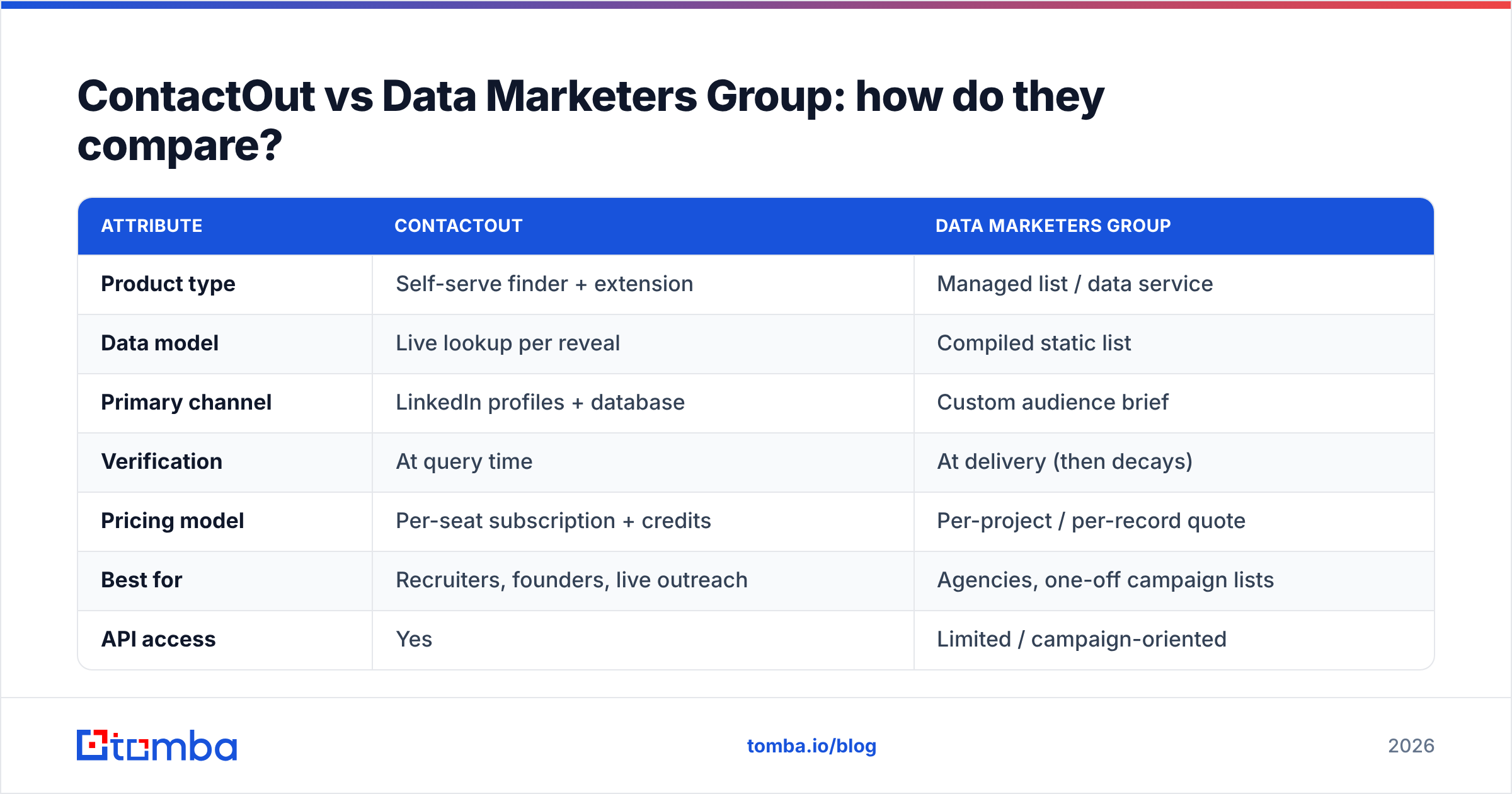
| Attribute | ContactOut | Data Marketers Group |
|---|---|---|
| Product type | Self-serve finder + extension | Managed list / data service |
| Data model | Live lookup per reveal | Compiled static list |
| Primary channel | LinkedIn profiles + database | Custom audience brief |
| Verification | At query time | At delivery (then decays) |
| Pricing model | Per-seat subscription + credits | Per-project / per-record quote |
| Best for | Recruiters, founders, live outreach | Agencies, one-off campaign lists |
| API access | Yes | Limited / campaign-oriented |
| Speed to first contact | Instant | Turnaround days |
If your motion is high-volume, repeatable prospecting where you want to control quality, a live tool wins. If you need a bulk audience for a single campaign and don't want to touch tooling, a managed list can be the faster path — accepting the freshness trade-off.
Which is more accurate for B2B email data?#
Accuracy comes down to when the data was checked. Here's the mechanic that decides it:
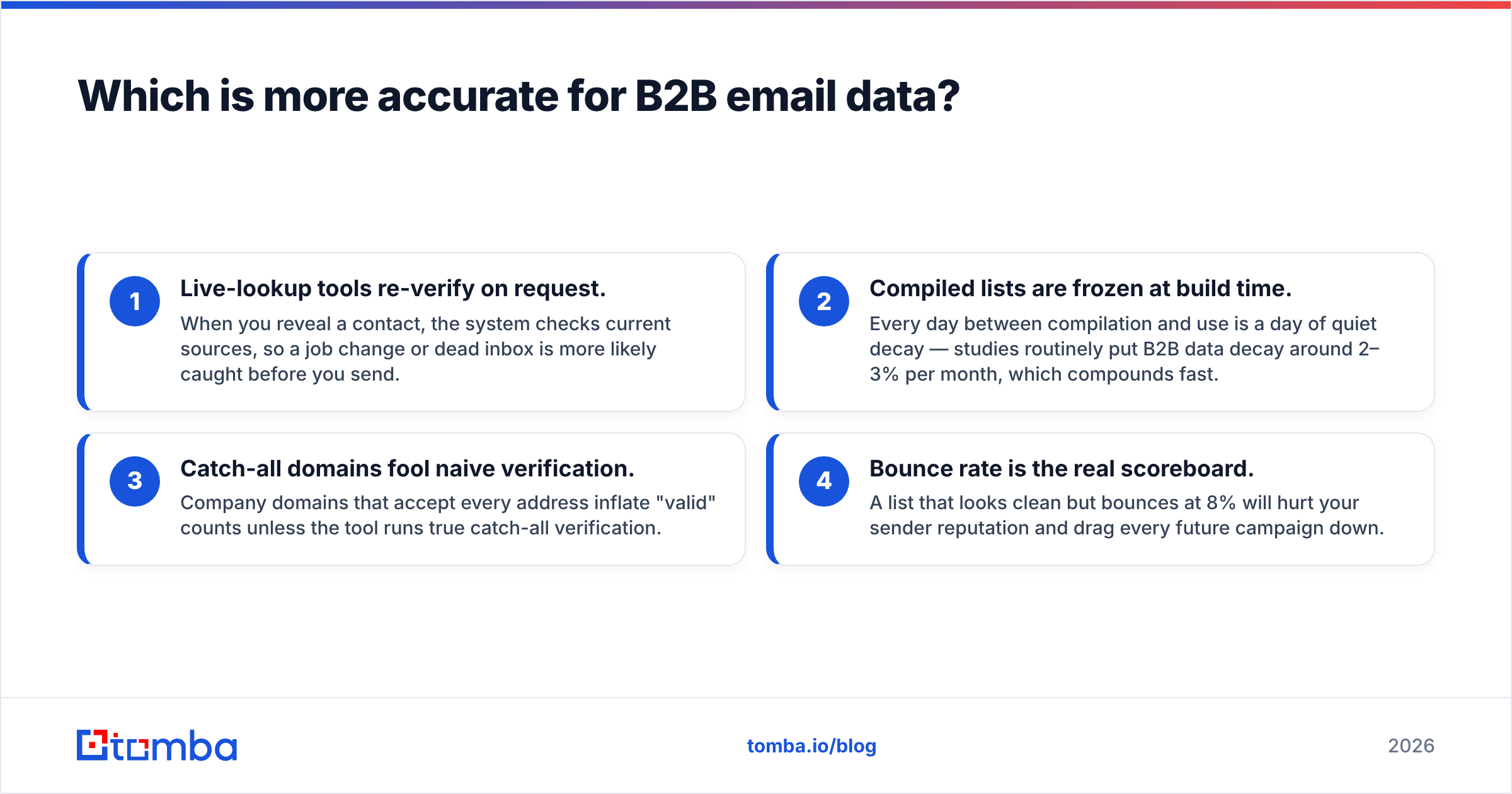
- Live-lookup tools re-verify on request. When you reveal a contact, the system checks current sources, so a job change or dead inbox is more likely caught before you send.
- Compiled lists are frozen at build time. Every day between compilation and use is a day of quiet decay — studies routinely put B2B data decay around 2–3% per month, which compounds fast.
- Catch-all domains fool naive verification. Company domains that accept every address inflate "valid" counts unless the tool runs true catch-all verification.
- Bounce rate is the real scoreboard. A list that looks clean but bounces at 8% will hurt your sender reputation and drag every future campaign down.
ContactOut's live model gives it a structural edge over any static list on freshness. But no single source is complete, which is why serious teams verify a purchased or exported list again through a dedicated email verifier before loading it into a sending platform — regardless of who supplied it.

How does pricing compare?#
This is where a clean side-by-side breaks down. ContactOut sells seats with monthly credit tiers; heavy users pay more as they add reveals and users. Data Marketers Group quotes by project — the price depends on list size, targeting complexity, and any campaign services attached, so two buyers rarely pay the same rate.
That opacity is the real cost. With a subscription finder you can forecast spend; with a per-project data buy you're negotiating each time and can't easily model cost per verified contact across the year.
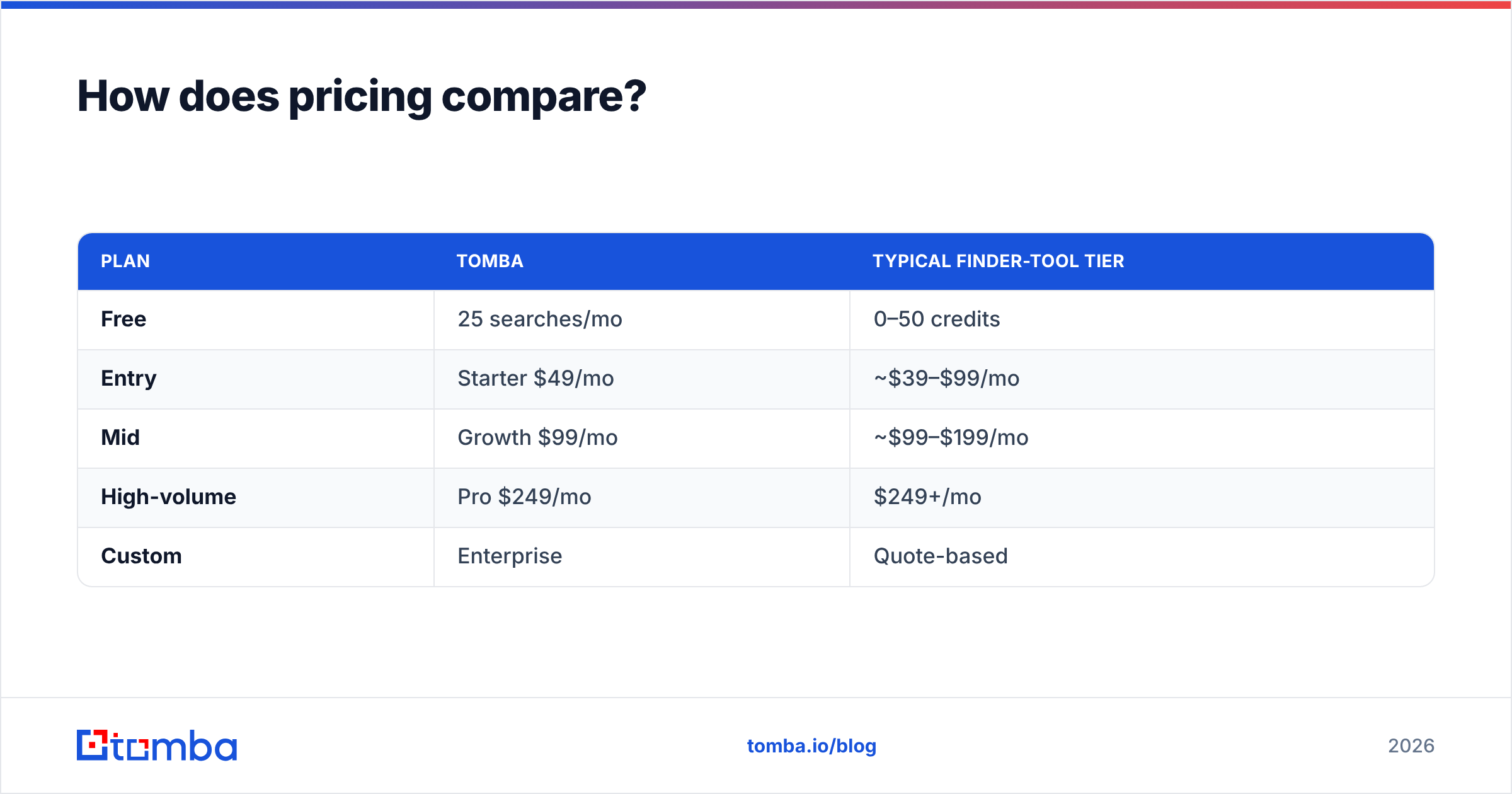
For comparison, a transparent self-serve finder makes budgeting simple. Here's how Tomba pricing is structured against a typical finder tier:
| Plan | Tomba | Typical finder-tool tier |
|---|---|---|
| Free | 25 searches/mo | 0–50 credits |
| Entry | Starter $49/mo | ~$39–$99/mo |
| Mid | Growth $99/mo | ~$99–$199/mo |
| High-volume | Pro $249/mo | $249+/mo |
| Custom | Enterprise | Quote-based |
The point isn't that one number beats another — it's that a published, per-seat model lets you calculate cost per contact in advance, while a per-project list buy rarely does.
Wait — that visual belongs with the workflow section below; treat the pricing takeaway as: predictable subscription beats bespoke quote when you prospect continuously.
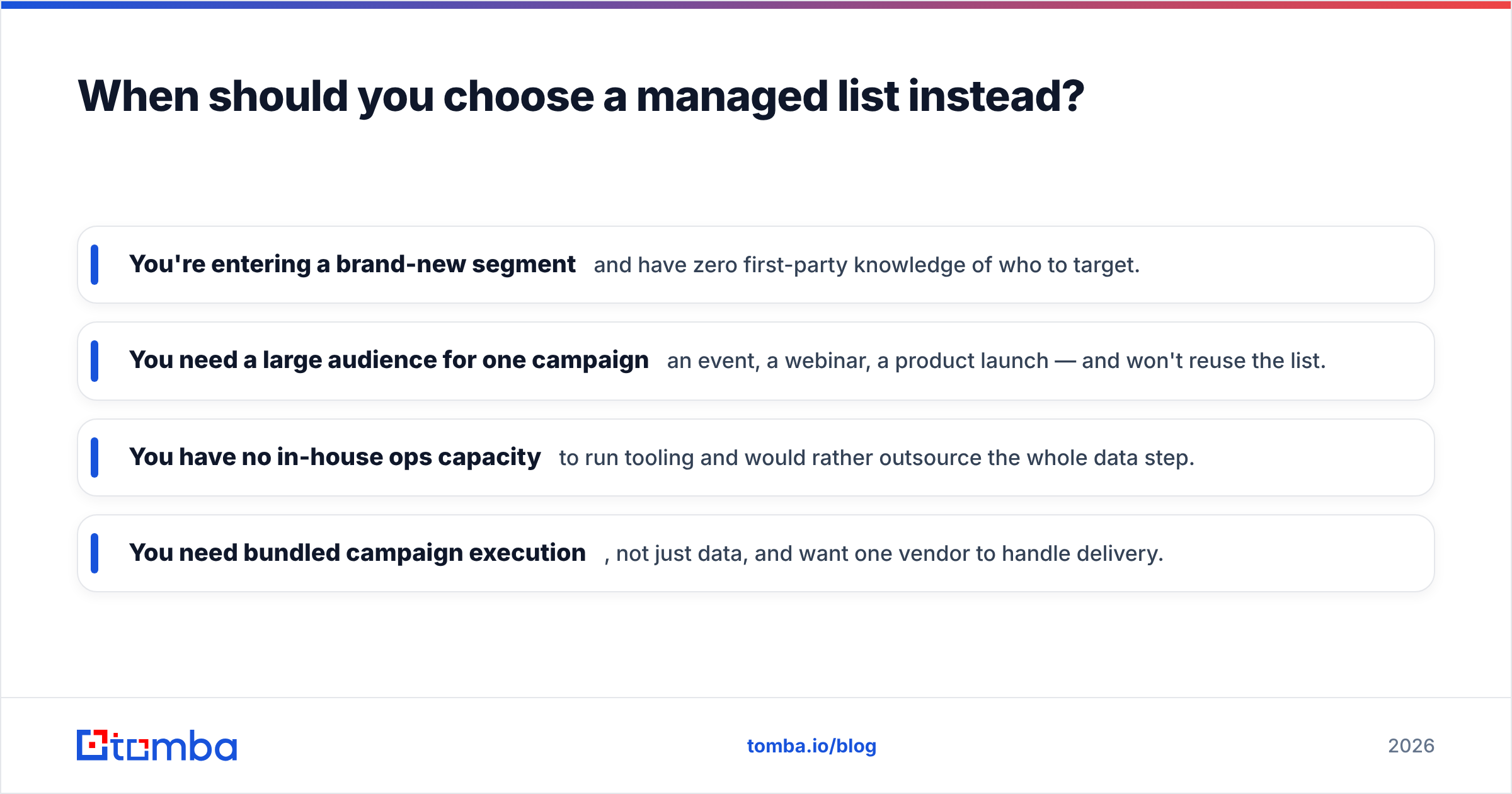
When should you choose a managed list instead?#
A done-for-you data vendor genuinely earns its place in a few scenarios, and it's worth being honest about them:
- You're entering a brand-new segment and have zero first-party knowledge of who to target.
- You need a large audience for one campaign — an event, a webinar, a product launch — and won't reuse the list.
- You have no in-house ops capacity to run tooling and would rather outsource the whole data step.
- You need bundled campaign execution, not just data, and want one vendor to handle delivery.
In those cases, a managed provider like Data Marketers Group is a reasonable, respected option — just plan to re-verify what you receive and treat the list as a decaying asset, not a permanent one.
Choose a live finder instead when prospecting is continuous, you want per-contact quality control, and you need data to flow into your CRM through an API or extension on your schedule rather than a vendor's turnaround.
How does the workflow differ day to day?#
With ContactOut, the loop is: open a profile or search, reveal, push to your outreach tool, repeat. It's hands-on and immediate, which recruiters love but which also means a human is in the loop for volume.
With Data Marketers Group, the loop is: brief, wait, receive, import. Less daily effort, but a slower cycle and less control over exactly which records you get.
A third pattern — the one most modern revenue teams are moving toward — is programmatic enrichment. Instead of manual reveals or waiting on a vendor, you pipe your existing records or lead flow through an API and get verified contacts back automatically. Tomba supports this through its email finder API, plus a bulk email finder for large lists and native HubSpot integration so verified contacts land straight in your CRM. That gives you the freshness of live lookups with the scale of a list — without the decay or the negotiation.
What do reviewers say?#
Both companies have public footprints you can vet before buying. Check independent review platforms like G2 and Capterra for verified user feedback on coverage, support, and billing surprises. For ContactOut, weigh reviews on LinkedIn coverage and credit limits; for Data Marketers Group, focus on list accuracy, deliverability, and how bounce complaints are handled. And whatever the marketing claims, run your own accuracy test on a sample — the only benchmark that matters is your bounce rate on your audience, which you can sanity-check against general email deliverability best practices.
The verdict: which should you pick?#
Pick ContactOut if your outreach is LinkedIn-driven, you value personal-email coverage, and you want live lookups you control — and you can live with per-seat credit limits.
Pick Data Marketers Group if you need a large, targeted list for a one-off campaign, lack in-house data ops, and would rather commission the work than run a tool — accepting that a compiled list decays and should be re-verified.
But if what you actually want is fresh, verified B2B emails at a predictable, transparent price — delivered through an extension, a spreadsheet add-on, or a clean API — a purpose-built finder is the option that splits the difference. Tomba Email Finder gives you live lookups by name, domain, or company, real catch-all verification, bulk processing, and native CRM integrations, starting free with 25 searches a month and scaling on published pricing rather than a bespoke quote. Run the same 100-contact sample through all three, compare the bounce rates, and let your own data decide. Start your free test at tomba.io/email-finder.
Related guides#
Ready to find emails that actually work?
Join 150,000+ professionals who stopped guessing and started sending. Free credits on signup — no credit card required.
Get the Tomba newsletter
Practical outbound tactics and product updates — once every two weeks.
About the author