ContactOut vs eGrabber (2026): Email Finder Comparison
ContactOut vs eGrabber compared on accuracy, pricing, data freshness, and workflow fit — plus where a leaner email finder beats both in 2026.
ContactOut vs eGrabber (2026): Email Finder Comparison
Choosing between ContactOut and eGrabber usually comes down to one question: do you live inside LinkedIn, or do you pull contacts from every corner of the web? Both tools promise verified emails and phone numbers, but they solve the problem from opposite ends. This comparison breaks down accuracy, pricing, data freshness, and workflow fit so you can pick the right one — or decide neither is worth the lock-in.
TL;DR#
- ContactOut is a LinkedIn-first email and phone finder with a Chrome extension, strong for recruiters and SDRs who prospect inside LinkedIn all day.
- eGrabber (eGrabber Email Finder / ListGrabber) is a desktop-heavy data-append and list-building tool aimed at high-volume, research-driven list building outside LinkedIn.
- On pricing, ContactOut leans toward per-seat SaaS with credit caps; eGrabber uses steeper annual licenses that surprise smaller teams.
- On data freshness, both can lag on niche or non-US contacts — always verify before you send.
- If you want pay-as-you-grow pricing, a real free tier, and an API-first workflow, a leaner email finder like Tomba often beats both on cost per verified email.
What is ContactOut?#
ContactOut is a contact-intelligence platform built around LinkedIn. Its Chrome extension overlays profiles and search results, surfacing personal and work emails plus phone numbers as you browse. The pitch is simple: recruiters and sales reps already spend their day on LinkedIn, so the tool meets them where they work.
Its strengths are the browser workflow and a large consumer-email dataset — useful when you need to reach someone at their personal address rather than a corporate inbox that filters cold mail. ContactOut also offers a web portal for search and bulk export, plus integrations with common ATS and CRM systems.
The trade-off: ContactOut is only as good as the LinkedIn profile it maps to. If a prospect isn't on LinkedIn, or their profile is thin, coverage drops. And personal-email matching, while a differentiator, raises compliance questions in stricter regions like the EU.

What is eGrabber?#
eGrabber is one of the older names in B2B list building. Its flagship products — eGrabber Email Finder and ListGrabber — focus on extracting and appending contact data from web pages, directories, and uploaded lists. Rather than sitting inside LinkedIn, eGrabber is designed for researchers who assemble targeted lists from many sources and want emails and phones appended in bulk.
eGrabber's engine guesses and pattern-matches business email addresses, then attempts real-time verification. For teams doing account-based research across association directories, conference attendee lists, and company sites, that flexibility matters. It's less about "one profile at a time" and more about "process this list of 500 names."
The catch is that eGrabber has historically been a Windows desktop application with annual license pricing, which feels dated next to cloud-native SaaS. Setup, updates, and seat management take more effort, and the UI shows its age.
How do ContactOut and eGrabber compare on features?#
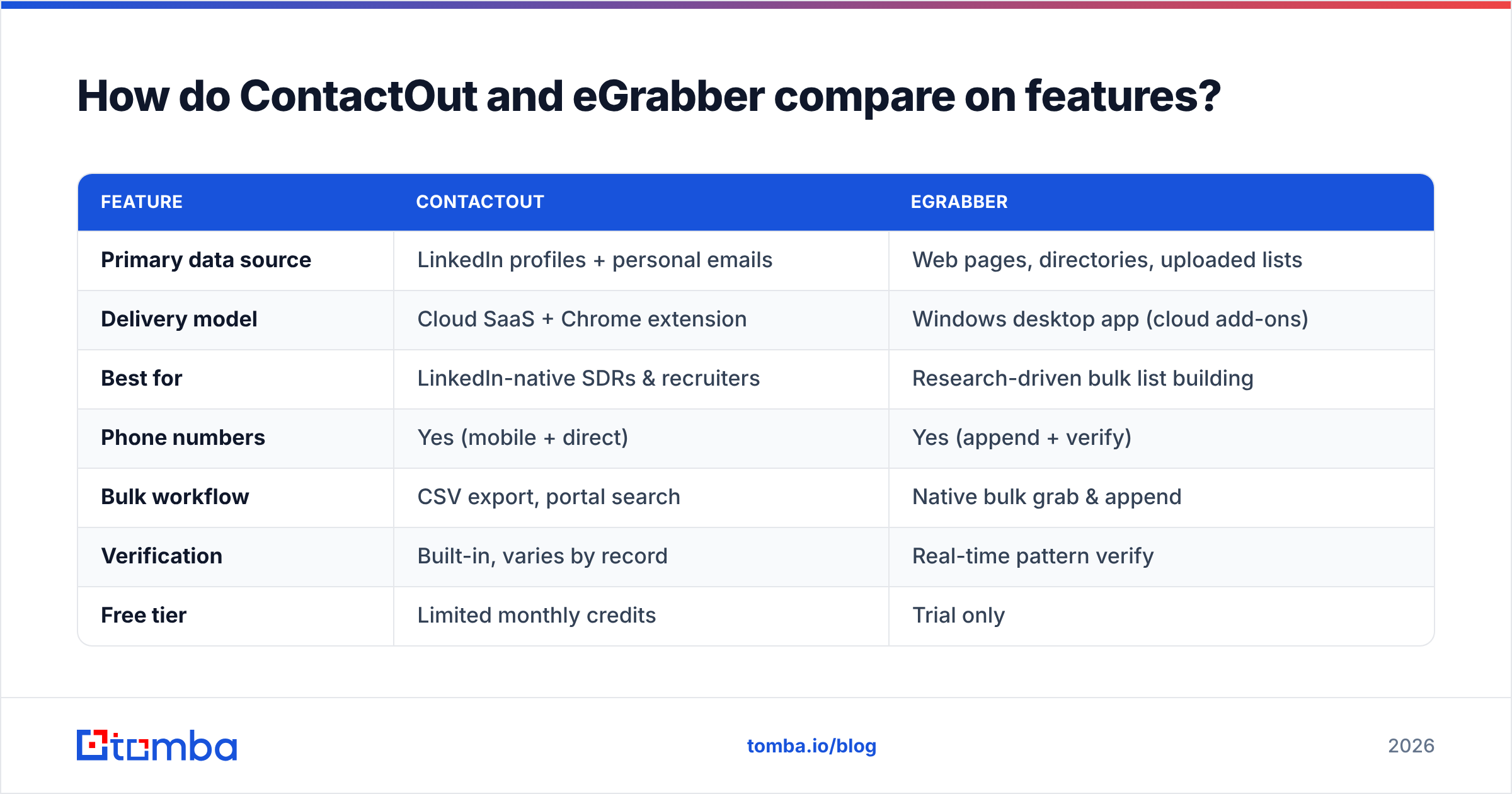
Here's a side-by-side on the attributes that actually change your outbound results.
| Feature | ContactOut | eGrabber |
|---|---|---|
| Primary data source | LinkedIn profiles + personal emails | Web pages, directories, uploaded lists |
| Delivery model | Cloud SaaS + Chrome extension | Windows desktop app (cloud add-ons) |
| Best for | LinkedIn-native SDRs & recruiters | Research-driven bulk list building |
| Phone numbers | Yes (mobile + direct) | Yes (append + verify) |
| Bulk workflow | CSV export, portal search | Native bulk grab & append |
| Verification | Built-in, varies by record | Real-time pattern verify |
| Free tier | Limited monthly credits | Trial only |
| Pricing style | Per-seat SaaS + credits | Annual license |
The pattern is clear: ContactOut wins on modern workflow and personal-email reach; eGrabber wins on flexible, source-agnostic list building. Neither is a universal winner — the right pick depends on where your prospects actually live.
Which tool is more accurate?#
Accuracy is where every email-finder comparison gets tense, because vendors quote their best-case numbers and real-world results depend on your target market. In practice, both tools do well on US-based, LinkedIn-active professionals at mid-to-large companies. Both degrade on non-US contacts, small businesses, and roles that don't maintain public profiles.

The honest takeaway: no finder is accurate enough to skip verification. A "found" email is a hypothesis until it clears an SMTP check. That's why serious outbound teams pair any finder with a dedicated email verifier before loading contacts into a sequencer. Sending to unverified addresses spikes bounce rates, and high bounces wreck your sender reputation and inbox placement.

If you rely on eGrabber's guess-and-verify engine or ContactOut's LinkedIn matching, run a separate verification pass on anything that will receive a cold email. It's the cheapest insurance in outbound.
How does pricing compare?#
Pricing is where the two diverge most, and where a lot of buyers get surprised.
ContactOut uses per-seat SaaS pricing with monthly or annual credit allocations. Entry plans look approachable, but heavy prospectors burn credits fast, and personal-email and phone reveals often cost more per record. Team pricing scales per user, so a five-rep team multiplies quickly.
eGrabber leans on annual licenses that are quoted per seat and typically land in the higher hundreds to low thousands per user per year, depending on the product bundle and append volume. That's a real commitment for a small team testing outbound, and the desktop model makes it harder to spin seats up and down.
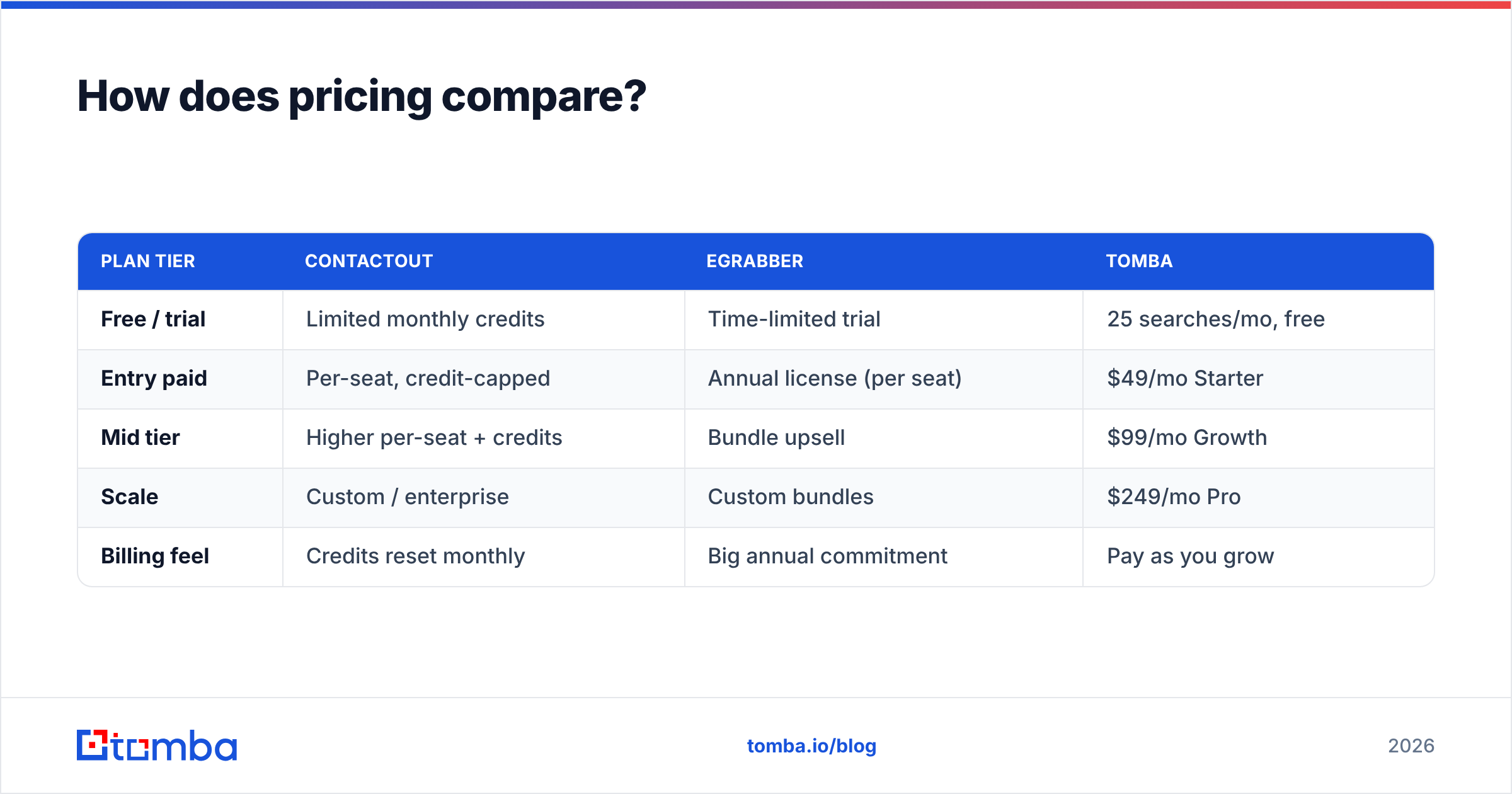
Here's how both stack against a modern usage-based finder like Tomba, whose Tomba pricing starts with a genuine free tier:
| Plan tier | ContactOut | eGrabber | Tomba |
|---|---|---|---|
| Free / trial | Limited monthly credits | Time-limited trial | 25 searches/mo, free |
| Entry paid | Per-seat, credit-capped | Annual license (per seat) | $49/mo Starter |
| Mid tier | Higher per-seat + credits | Bundle upsell | $99/mo Growth |
| Scale | Custom / enterprise | Custom bundles | $249/mo Pro |
| Billing feel | Credits reset monthly | Big annual commitment | Pay as you grow |
The structural difference: ContactOut and eGrabber both push you toward per-seat annual commitments, while a usage-based finder lets you pay for the volume you actually use. For teams that prospect in bursts — campaign, pause, campaign — usage pricing is far kinder to the budget.
When should you choose ContactOut?#
Pick ContactOut if your team practically lives inside LinkedIn. Recruiters sourcing candidates and SDRs doing manual, one-profile-at-a-time prospecting get real value from the extension overlay and the personal-email dataset. If reaching someone at a personal address is a legitimate part of your playbook — and you've cleared the compliance side — ContactOut's consumer coverage is a genuine edge.
It's also a reasonable fit if you want a modern, cloud-based tool with ATS/CRM integrations and don't want to babysit a desktop app. Just watch your credit consumption on phone and personal-email reveals, and confirm your use case is compliant with regional privacy law before you scale personal-email outreach.
When should you choose eGrabber?#
Choose eGrabber if your list building starts outside LinkedIn — association directories, event lists, niche industry sites, or spreadsheets a partner handed you. eGrabber's append-and-verify workflow shines when you already have names and companies and need emails and phones filled in at volume. Research-heavy ABM teams that assemble lists from many sources often prefer this source-agnostic approach.
The reality check: you're accepting a desktop-first tool and annual-license pricing. If your team is small, remote, or wants to test outbound before committing budget, that model fights you. But for an established research operation with steady volume, eGrabber's flexibility can justify the cost.
Is there a better alternative to both?#
For a lot of teams, yes — especially if your main need is finding and verifying business emails at a fair, predictable cost. This is where an API-first finder changes the math.
Tomba approaches the problem as infrastructure rather than a browser toy. You can find emails by name, by company, or across an entire domain with domain search, verify them in the same platform, and enrich records — then wire the whole thing into your stack through the Tomba API, a Chrome extension, Google Sheets, or native CRM integrations. Consider it against ContactOut and eGrabber like this:
- Real free tier — 25 searches a month, no trial clock, so you can test accuracy on your own list before paying.
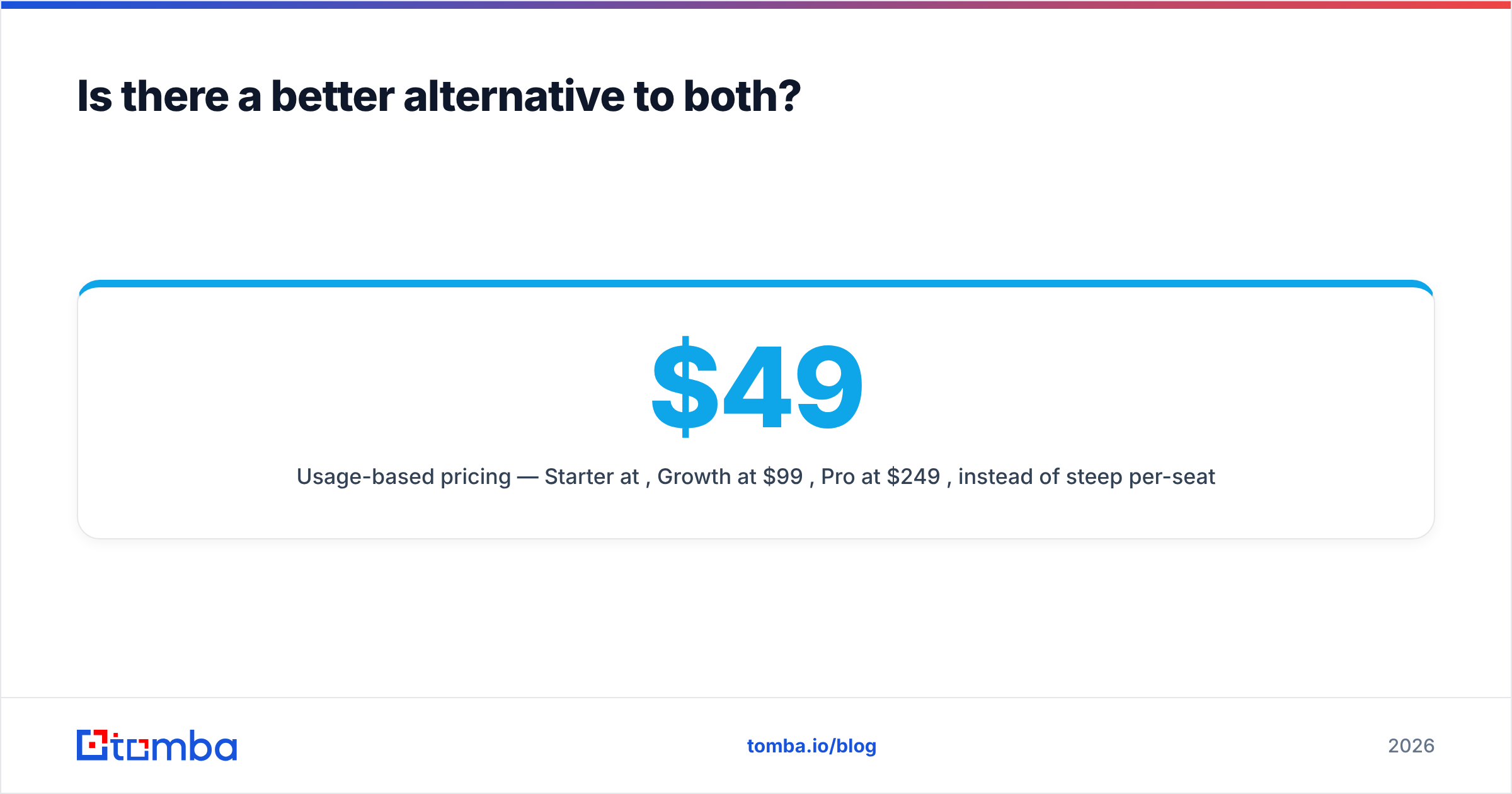
- Usage-based pricing — Starter at $49/mo, Growth at $99/mo, Pro at $249/mo, instead of steep per-seat annual licenses.
- Finder plus verifier in one — no bolting a second vendor onto your workflow just to keep bounce rates down.
- API and bulk built in — run a bulk email finder job or automate lookups instead of clicking profiles one at a time.
- Transparent data sourcing — see where Tomba gets data rather than trusting a black box.
That's not to say ContactOut and eGrabber are bad tools — they're strong at their specialties. But if you don't need ContactOut's personal-email reach or eGrabber's desktop research rig, you're often paying for capabilities you won't use. For a comparison of the broader field, see how independent reviewers rank finders on G2 before you commit.

What should you actually do next?#
Run a bake-off. Take 50 real target contacts from your ICP and push them through each tool you're considering. Measure three things: match rate (how many emails were found), verified rate (how many survive an SMTP check), and cost per verified email. The tool that wins on your list beats any vendor benchmark, because your niche is what matters — not a generic accuracy claim.
If your prospects are LinkedIn-heavy and you need personal emails, trial ContactOut. If you build lists from scattered web sources at volume, trial eGrabber. And if you want the lowest cost per verified business email with an API and a free tier to prove it, start with Tomba.
You can pressure-test all three without spending a dollar upfront: spin up the free tier on the Tomba Email Finder, find and verify your first 25 contacts, and compare the verified rate against whatever ContactOut and eGrabber return on the same list. Let the numbers on your own ICP make the decision — that's the only benchmark that actually predicts your reply rate.
Related guides#
Ready to find emails that actually work?
Join 150,000+ professionals who stopped guessing and started sending. Free credits on signup — no credit card required.
Get the Tomba newsletter
Practical outbound tactics and product updates — once every two weeks.
About the author