ContactOut vs EmailListVerify (2026): Which Tool Wins?
ContactOut finds emails; EmailListVerify cleans them. They solve opposite halves of the same problem, so which one do you actually need in 2026? Here's the honest breakdown.
ContactOut vs EmailListVerify (2026): Which Tool Wins?
Most "ContactOut vs EmailListVerify" comparisons get one thing wrong: they treat these as direct competitors. They aren't. One finds contact data; the other cleans it. Pick the wrong one and you either build a list you can't trust or verify a list you never had. This guide sorts out which job you're actually trying to do, and where a single platform can cover both.
TL;DR#
- ContactOut is a finder. It surfaces personal and work emails plus phone numbers, mostly from LinkedIn profiles. Its job is to get you contact data.
- EmailListVerify is a verifier. It checks whether the emails you already have are deliverable. Its job is to clean data you supply.
- They are not substitutes. A finder without verification ships bounces; a verifier with no source list has nothing to check.
- If you want both in one workflow, an all-in-one platform like Tomba covers finding and verifying without stitching two subscriptions together.
- Pricing is not comparable line-for-line because you pay per contact (ContactOut) versus per email checked (EmailListVerify). We normalize it below.
What is ContactOut and what does it actually do?#
ContactOut is a contact-intelligence tool built around LinkedIn. You install a browser extension, open a prospect's profile, and it reveals their work email, personal email, and often a phone number. It also offers a web search portal and an API for pulling records at scale.
Its main strength is coverage of hard-to-find personal emails. Recruiters love it for that reason: candidates change jobs, but personal Gmail addresses stick around. ContactOut leans into recruiting and sales use cases where reaching a specific individual matters more than blasting a broad list.
What ContactOut does not do well is guarantee that every address it returns is currently deliverable. Like every finder, it returns a best-guess based on its data sources. That's normal, but it means the output still needs a verification pass before you send at volume. You can read more about why finders and verifiers are separate steps in the domain search workflow.

What is EmailListVerify and what does it actually do?#
EmailListVerify sits at the other end of the pipeline. You upload a list of emails you already collected, and it runs each address through syntax checks, MX record lookups, SMTP pings, disposable-domain detection, and role-account flags. It returns each address labeled deliverable, risky, or invalid.
You use a verifier to protect your sender reputation and keep bounce rates low. Mailbox providers punish senders whose lists bounce; a clean list is the cheapest deliverability insurance you can buy. EmailListVerify is a solid, no-frills option focused on exactly this.
What it does not do is find anyone. If your CRM is empty, EmailListVerify has nothing to work with. It assumes you already sourced the addresses somewhere else, whether from a finder, a form, or an import.
ContactOut vs EmailListVerify: the core difference in one table#
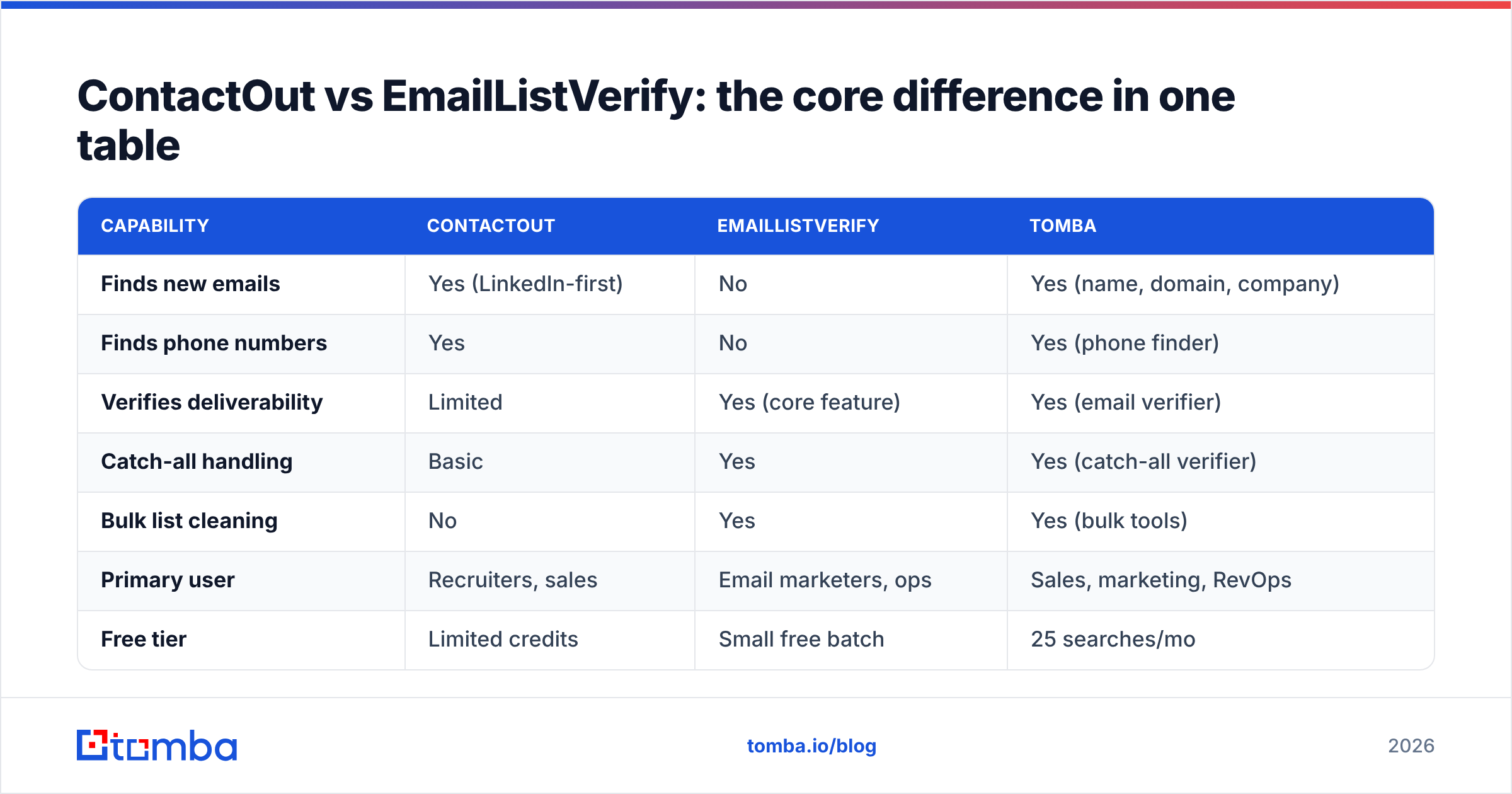
Here's the split laid out plainly. Notice the two tools barely overlap in the "does this" column.
| Capability | ContactOut | EmailListVerify | Tomba |
|---|---|---|---|
| Finds new emails | Yes (LinkedIn-first) | No | Yes (name, domain, company) |
| Finds phone numbers | Yes | No | Yes (phone finder) |
| Verifies deliverability | Limited | Yes (core feature) | Yes (email verifier) |
| Catch-all handling | Basic | Yes | Yes (catch-all verifier) |
| Bulk list cleaning | No | Yes | Yes (bulk tools) |
| Primary user | Recruiters, sales | Email marketers, ops | Sales, marketing, RevOps |
| Free tier | Limited credits | Small free batch | 25 searches/mo |
The honest takeaway: comparing them head-to-head is like comparing a fishing rod to a fish scaler. You likely need both functions, even if you don't need both brands.
Is ContactOut better than EmailListVerify?#
Wrong question. The right question is: which stage of your funnel is broken right now?
- If your list is thin or empty, a verifier can't help you. You need a finder like ContactOut (or a domain-based finder) to source contacts first. EmailListVerify would sit idle.
- If you already bought or exported a large list and bounce rates are climbing, ContactOut is overkill. You need EmailListVerify to scrub what you have.
- If you run a continuous outbound motion, you need both, in sequence: find, then verify, then send. This is where paying for two tools starts to feel wasteful.
That last scenario is the common one, and it's why "which is better" usually resolves to "why am I paying two vendors for one pipeline?"
How do ContactOut and EmailListVerify compare on pricing?#
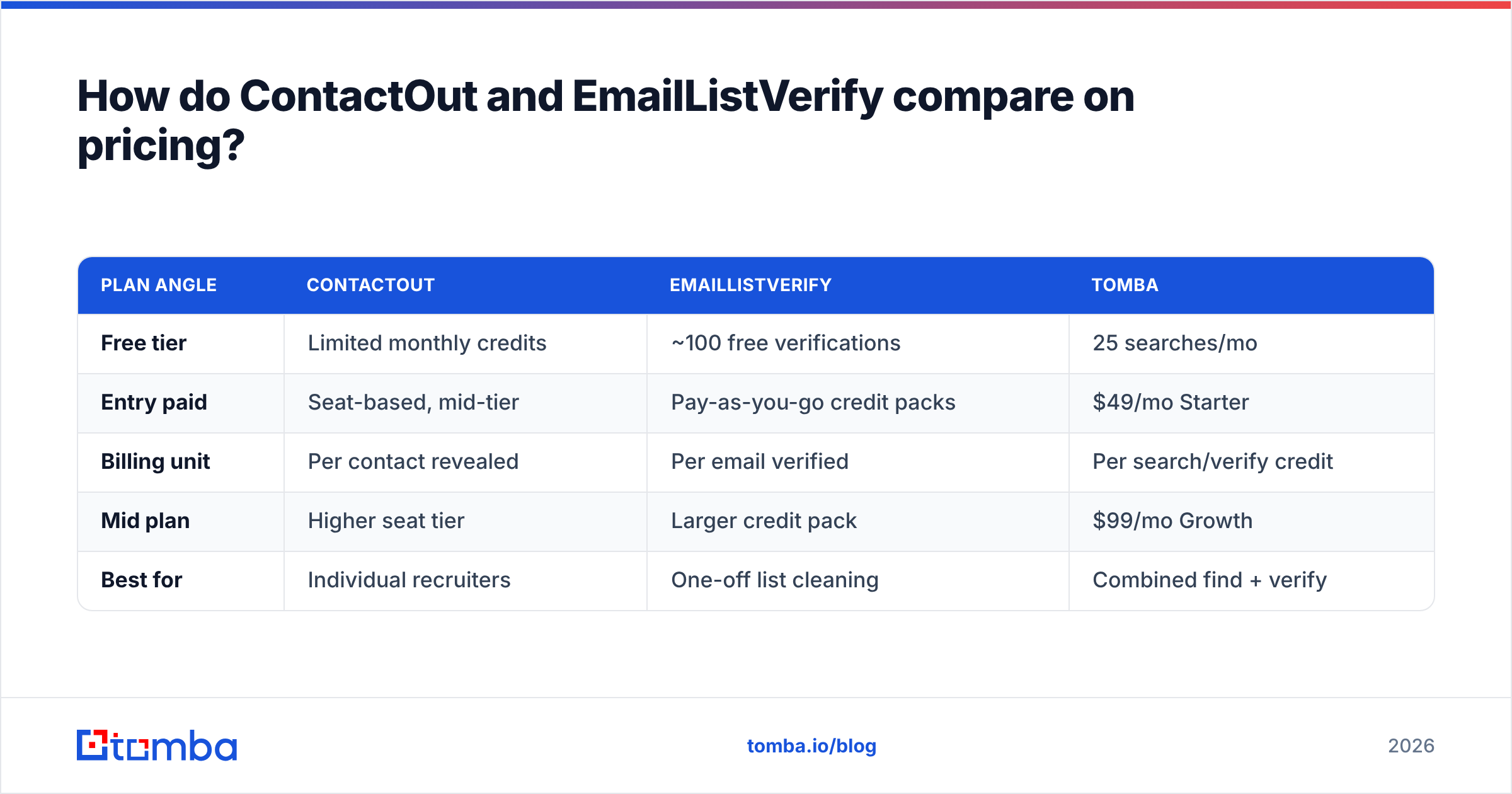
Pricing is the trickiest part because the two tools meter different things. ContactOut charges around contact reveals and seats; EmailListVerify charges per email verified, often with credit packs that don't expire. You can't put the numbers side by side without normalizing to a workflow.
| Plan angle | ContactOut | EmailListVerify | Tomba |
|---|---|---|---|
| Free tier | Limited monthly credits | ~100 free verifications | 25 searches/mo |
| Entry paid | Seat-based, mid-tier | Pay-as-you-go credit packs | $49/mo Starter |
| Billing unit | Per contact revealed | Per email verified | Per search/verify credit |
| Mid plan | Higher seat tier | Larger credit pack | $99/mo Growth |
| Best for | Individual recruiters | One-off list cleaning | Combined find + verify |
Two practical notes. First, ContactOut's public pricing is seat-heavy and skews toward recruiting budgets, so small sales teams often find it pricey per user. Second, EmailListVerify's non-expiring credits are genuinely nice for occasional cleaning, but you'll still need a separate finder subscription on top. When you add both, an all-in-one plan frequently lands cheaper. Compare against Tomba pricing before committing to two vendors.

What happens if you skip verification after finding emails?#
You bounce. And bounces are not a rounding error, they're a reputation tax.
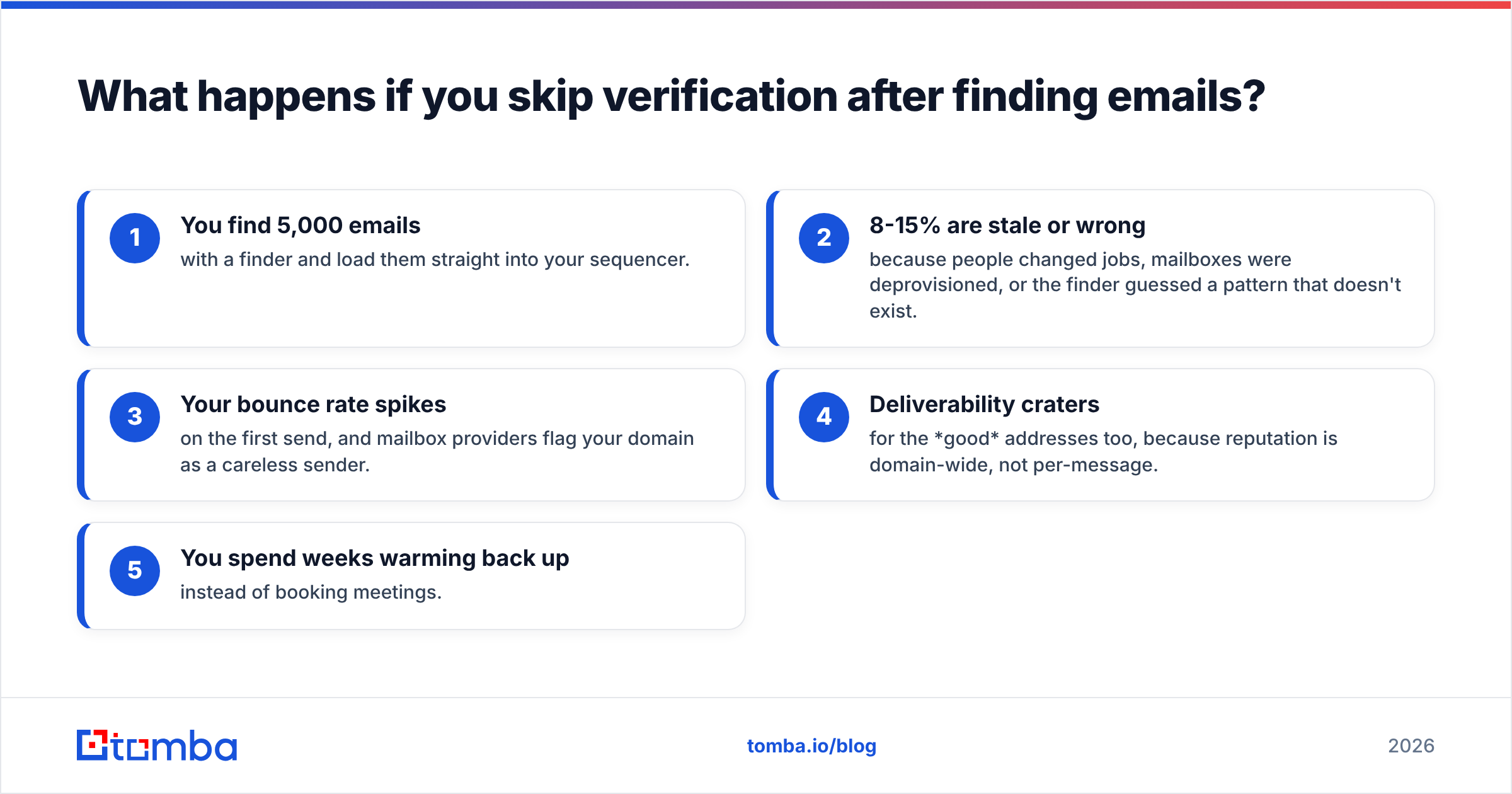
Here's the chain reaction most teams learn the hard way:
- You find 5,000 emails with a finder and load them straight into your sequencer.
- 8-15% are stale or wrong because people changed jobs, mailboxes were deprovisioned, or the finder guessed a pattern that doesn't exist.
- Your bounce rate spikes on the first send, and mailbox providers flag your domain as a careless sender.
- Deliverability craters for the good addresses too, because reputation is domain-wide, not per-message.
- You spend weeks warming back up instead of booking meetings.
This is why finding and verifying belong in the same breath. A finder gets you the address; a email verifier confirms it's safe to touch. Skipping step two to save a few cents per contact is the most expensive shortcut in outbound. If catch-all domains are common in your market, pair that with a catch-all check so you don't over-trust "accept-all" servers.
Where does Tomba fit in the ContactOut vs EmailListVerify debate?#
Tomba's angle is simple: do both jobs in one place. Instead of running ContactOut to source and EmailListVerify to clean, Tomba combines the email finder, verifier, domain search, catch-all verification, and phone lookup under one login and one credit balance.
That matters for three reasons:
- One workflow, not two. Find a contact and verify it in the same step, or run a full list through bulk tools that find and clean together.
- One bill. No juggling a per-seat finder against a per-credit verifier. Tomba's plans start at a Free tier (25 searches/mo), then $49/mo Starter, $99/mo Growth, and $249/mo Pro.
- One data standard. Sources are documented on the data sources page, so you know how addresses are found and scored rather than treating accuracy as a black box.
Tomba won't replace ContactOut for someone whose entire job is deep LinkedIn candidate sourcing, and it isn't trying to be a warmup or sequencing tool. But for the far more common "I need verified emails for outreach" job, it collapses two subscriptions into one.
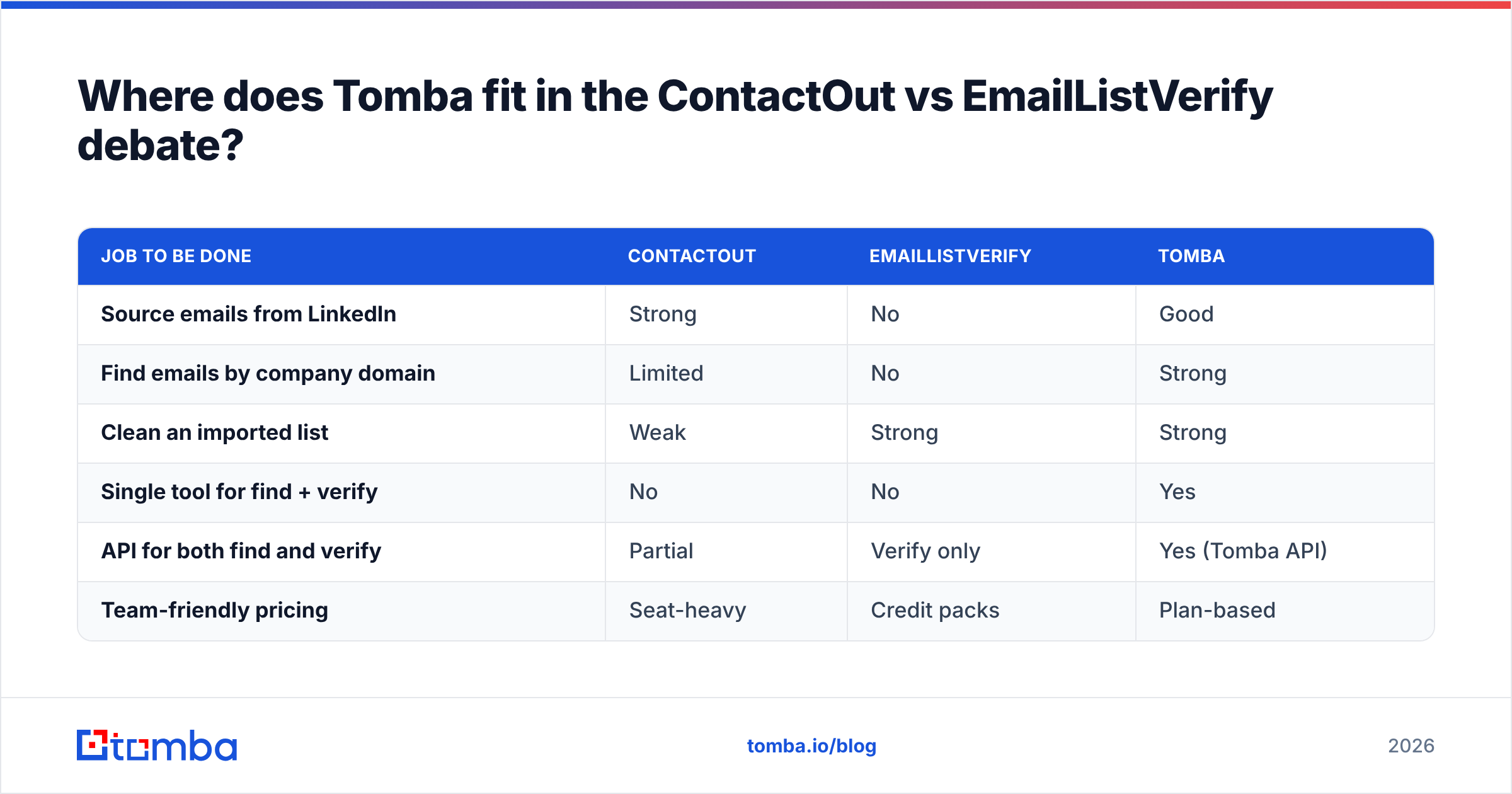
Here's how the three stack up on the job most buyers actually have:
| Job to be done | ContactOut | EmailListVerify | Tomba |
|---|---|---|---|
| Source emails from LinkedIn | Strong | No | Good |
| Find emails by company domain | Limited | No | Strong |
| Clean an imported list | Weak | Strong | Strong |
| Single tool for find + verify | No | No | Yes |
| API for both find and verify | Partial | Verify only | Yes (Tomba API) |
| Team-friendly pricing | Seat-heavy | Credit packs | Plan-based |
Which tool should you choose in 2026?#
Match the tool to the gap, not to the hype:
- Choose ContactOut if you're a recruiter or individual seller who lives inside LinkedIn and needs personal emails and phones for specific people. Its finder depth on individuals is its real edge. Verify the output before large sends.
- Choose EmailListVerify if you already have a big list from somewhere else and just need a clean, affordable, non-expiring way to scrub it. It does one thing well.
- Choose Tomba if you want the whole motion, finding and verifying, in one platform without paying two vendors or exporting CSVs between tools. Start on the free tier and only upgrade when volume demands it.
For a broader look at where each category tool fits, industry directories like G2 and Capterra list verified user reviews for all three, and vendor docs like ContactOut's own site spell out coverage claims worth checking against your own market.
Frequently asked questions#
Is ContactOut a replacement for EmailListVerify? No. ContactOut finds contact data; EmailListVerify checks whether emails are deliverable. They handle different stages, so most serious outbound teams end up needing both functions.
Can EmailListVerify find new email addresses? No. It only verifies addresses you already have. If you need to source contacts, you need a finder such as ContactOut or Tomba's email finder.
Does ContactOut verify the emails it finds? Only to a limited degree. Any finder's output should still pass through a dedicated email verifier before high-volume sends to protect deliverability.
What's the cheapest way to get find plus verify together? Bundling both into one platform usually beats paying a seat-based finder and a per-credit verifier separately. Compare Tomba pricing against the combined cost of two tools.
Which is better for cold email deliverability? Neither alone. Deliverability depends on verifying every address and sending responsibly. A clean, verified list from any of these tools plus proper email deliverability hygiene is what keeps you out of spam.
The bottom line#
ContactOut and EmailListVerify aren't rivals; they're two links in the same chain. ContactOut gets you the address, EmailListVerify keeps your list clean, and skipping either link breaks the outreach. The only real question is whether you want to manage two subscriptions or one.
If you'd rather find verified emails in a single workflow, start with the Tomba Email Finder. Find a contact, confirm it's deliverable, and export it without ever leaving the platform, on a free tier that lets you test the whole motion before you pay a cent.
Related guides#
Ready to find emails that actually work?
Join 150,000+ professionals who stopped guessing and started sending. Free credits on signup — no credit card required.
Get the Tomba newsletter
Practical outbound tactics and product updates — once every two weeks.
About the author