ContactOut vs Enrow (2026): Which Email Finder Wins?
ContactOut leans on a huge LinkedIn-sourced contact database, while Enrow bets on waterfall verification and low bounce rates. Here's how the two email finders actually compare on accuracy, pricing, and workflow — and where a third option beats both.
Choosing between ContactOut and Enrow usually comes down to one question: do you want a massive contact database bolted onto LinkedIn, or a leaner waterfall engine built to keep your bounce rate near zero? Both are legitimate email finders. They just optimize for different things — and the wrong pick will quietly cost you deliverability, credits, or both.
This is a neutral, hands-on comparison. No vendor wrote it, and we call out where each tool wins, where each one frustrates, and where a third option is honestly the smarter buy.
TL;DR — ContactOut vs Enrow at a glance#
- ContactOut is a database-first tool. Its strength is breadth: a large store of personal and work emails tied to LinkedIn profiles, plus a Chrome extension recruiters love.
- Enrow is a verification-first tool. It runs a waterfall across multiple data providers and focuses hard on delivering low-bounce, campaign-ready emails.
- On accuracy, Enrow tends to win on verified B2B work emails; ContactOut wins on coverage (personal emails, harder-to-find contacts).
- On price, both get expensive at scale. If cost-per-verified-email matters, neither is the cheapest option.
- The dark horse: Tomba Email Finder matches most of the coverage, adds a real verification layer, and starts at $49/mo — often the better value for outbound teams.
What is ContactOut, and who is it for?#
ContactOut is best known as a recruiter's tool. Its core asset is a large database of contact records — including personal Gmail-style addresses — mapped to LinkedIn and GitHub profiles. You install the Chrome extension, browse a profile, and pull emails and phone numbers without leaving the page.
That workflow is genuinely good for talent sourcing, where a candidate's personal email often matters more than a work address. ContactOut also offers a search portal and API for teams that want to pull lists in bulk.
The trade-off: ContactOut is coverage-first, not verification-first. You get a lot of data, but you're expected to run your own email verification before you send at volume. Personal emails also raise compliance questions for cold B2B outreach in some regions, so read your local rules before you lean on them.

What is Enrow, and who is it for?#
Enrow is a newer, deliverability-obsessed email finder. Instead of relying on a single owned database, it runs a waterfall enrichment process: it queries multiple providers for the same contact, then verifies the result before returning it. The pitch is simple — fewer bounces, cleaner lists, safer sender reputation.
That makes Enrow a natural fit for cold-email operators and agencies who live and die by email deliverability. If your domains keep getting burned by bad data, a verification-first tool is worth real money.
The trade-offs: Enrow's coverage depends on the providers it aggregates, so on niche or long-tail contacts it can come up empty where a big owned database would still return something. And waterfall enrichment can burn credits fast when you're processing large lists.
ContactOut vs Enrow: the core comparison#
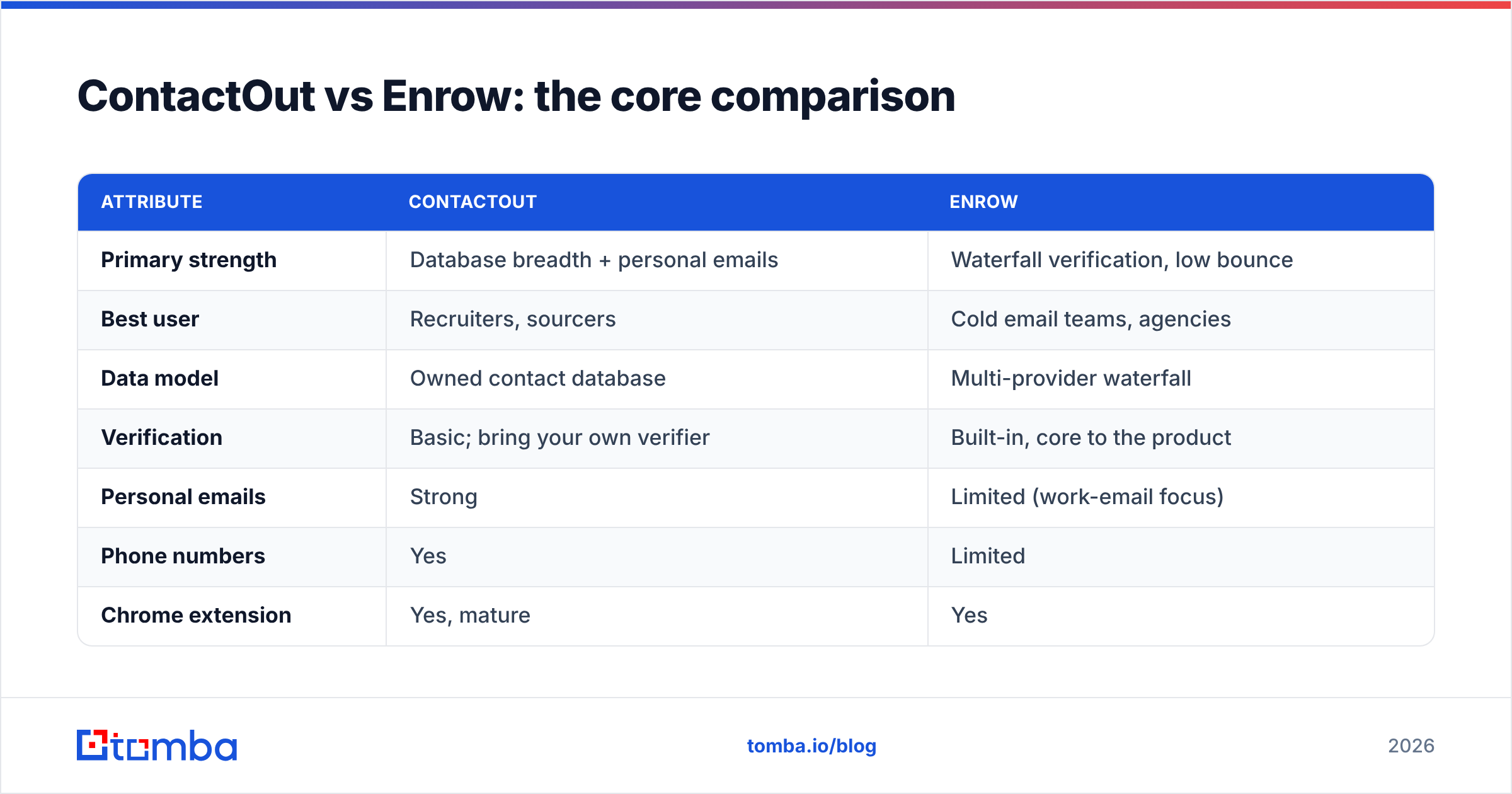
Here's the head-to-head on the attributes that actually change your results.
| Attribute | ContactOut | Enrow |
|---|---|---|
| Primary strength | Database breadth + personal emails | Waterfall verification, low bounce |
| Best user | Recruiters, sourcers | Cold email teams, agencies |
| Data model | Owned contact database | Multi-provider waterfall |
| Verification | Basic; bring your own verifier | Built-in, core to the product |
| Personal emails | Strong | Limited (work-email focus) |
| Phone numbers | Yes | Limited |
| Chrome extension | Yes, mature | Yes |
| Bulk / API | Yes | Yes |
| Pricing model | Seat + credit tiers, premium | Credit-based, verification-weighted |
| Free tier | Limited free credits | Trial credits |
The pattern is clear. ContactOut optimizes for "can I find this person at all?" while Enrow optimizes for "will this email actually land?" Neither is wrong — they're answers to different problems.
Which is more accurate: ContactOut or Enrow?#
Accuracy depends on what you're measuring, so split it in two.
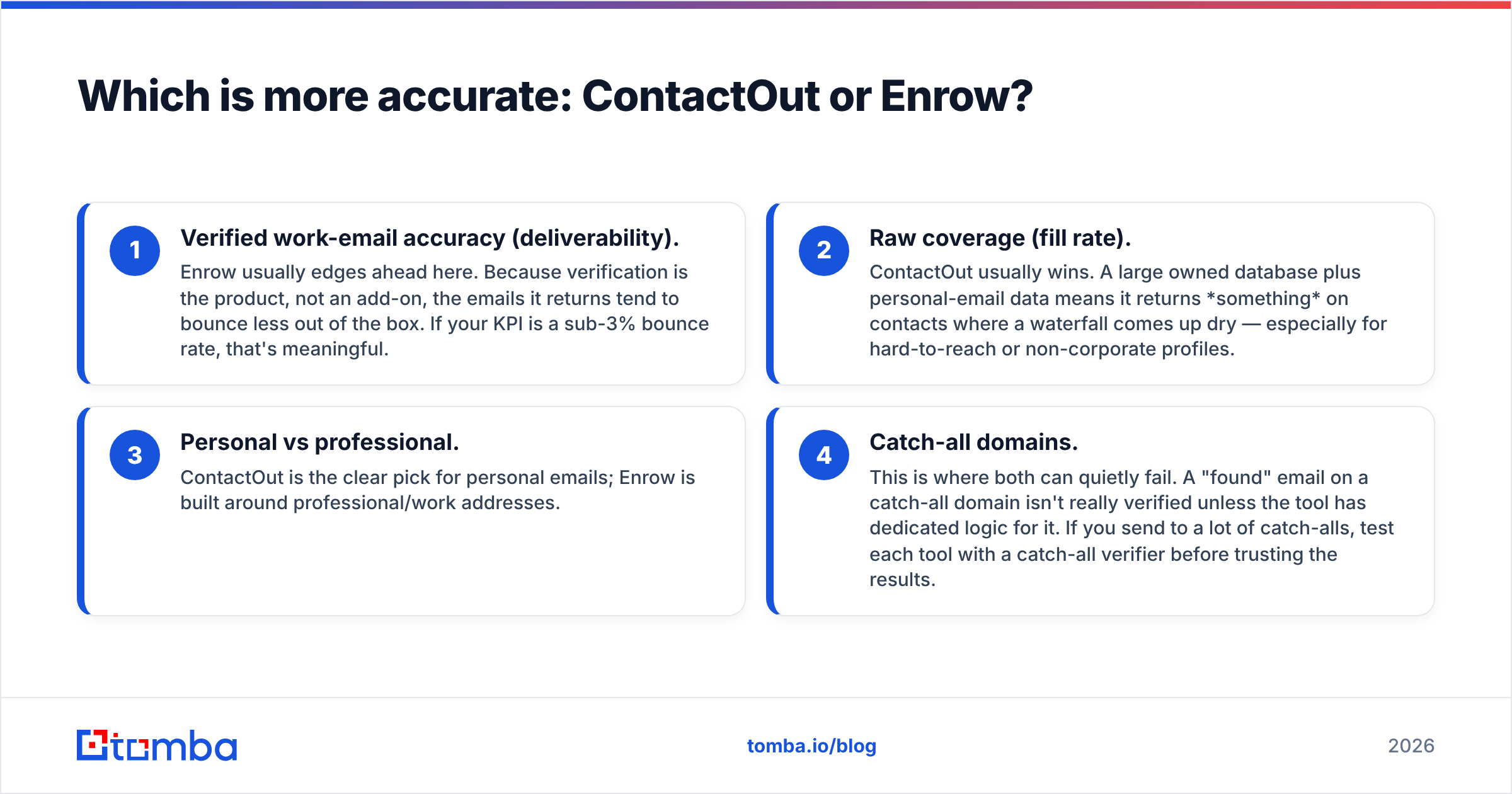
- Verified work-email accuracy (deliverability). Enrow usually edges ahead here. Because verification is the product, not an add-on, the emails it returns tend to bounce less out of the box. If your KPI is a sub-3% bounce rate, that's meaningful.
- Raw coverage (fill rate). ContactOut usually wins. A large owned database plus personal-email data means it returns something on contacts where a waterfall comes up dry — especially for hard-to-reach or non-corporate profiles.
- Personal vs professional. ContactOut is the clear pick for personal emails; Enrow is built around professional/work addresses.
- Catch-all domains. This is where both can quietly fail. A "found" email on a catch-all domain isn't really verified unless the tool has dedicated logic for it. If you send to a lot of catch-alls, test each tool with a catch-all verifier before trusting the results.

The honest takeaway: no email finder is 100% accurate, and published accuracy numbers are marketing until you test them on your list. Run 200 of your real target contacts through both tools, send to a seed inbox, and measure actual bounces. That test beats any vendor claim.
How do ContactOut and Enrow price out?#
Both tools get pricey once you scale, and both use credit-based models that make true cost-per-email hard to eyeball.
- ContactOut tends toward seat-based plans with tiered credit allowances, and personal-email/phone data often sits in higher tiers. Great data, premium price.
- Enrow is credit-based and weighted toward verification. Because waterfall enrichment can hit multiple providers per contact, heavy list-processing can consume credits faster than you expect.
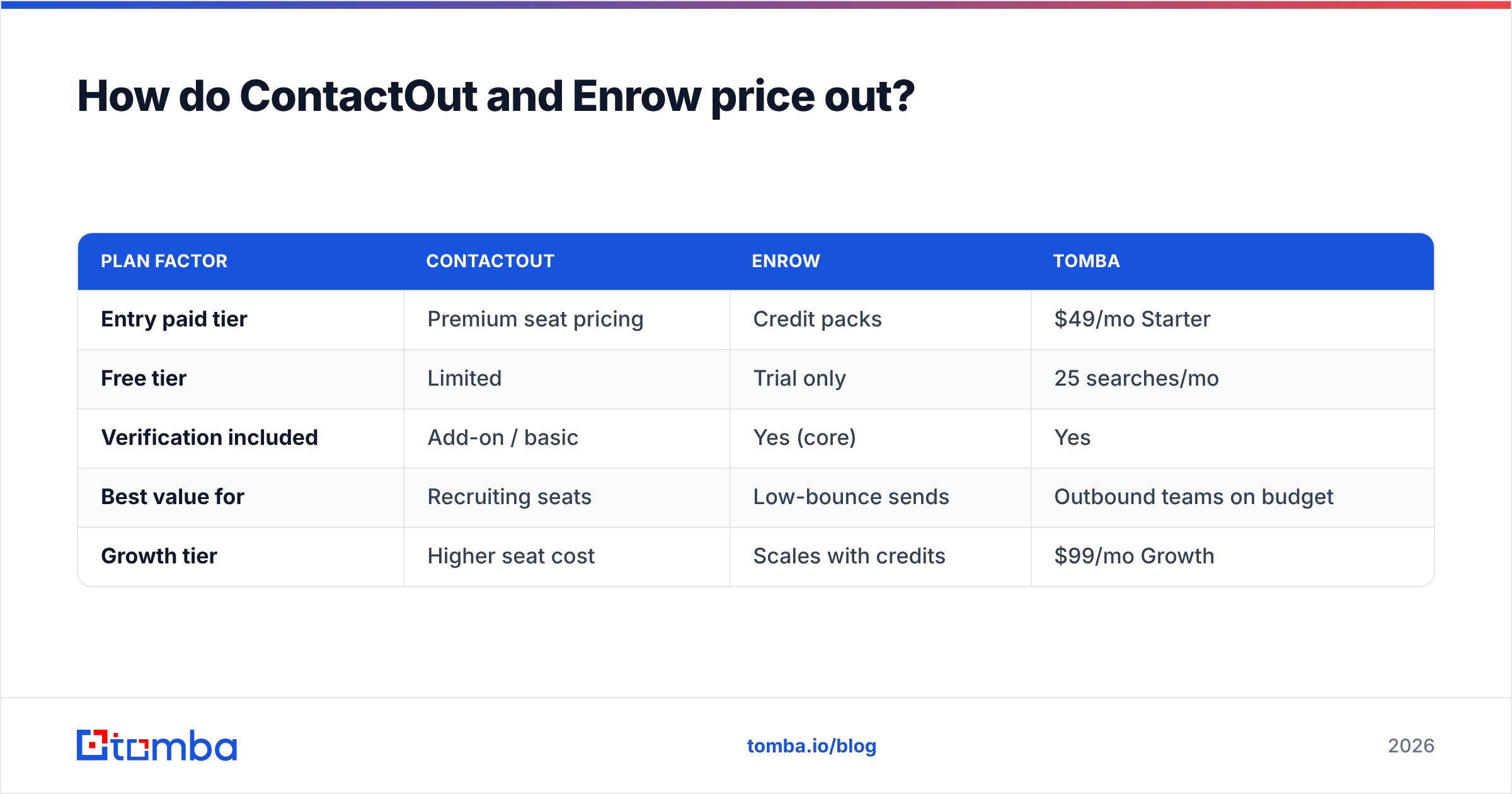
Here's a simplified cost-lens comparison, including Tomba as a reference point:
| Plan factor | ContactOut | Enrow | Tomba |
|---|---|---|---|
| Entry paid tier | Premium seat pricing | Credit packs | $49/mo Starter |
| Free tier | Limited | Trial only | 25 searches/mo |
| Verification included | Add-on / basic | Yes (core) | Yes |
| Best value for | Recruiting seats | Low-bounce sends | Outbound teams on budget |
| Growth tier | Higher seat cost | Scales with credits | $99/mo Growth |
If you want the exact numbers on the alternative, the Tomba pricing page lays out every tier — Free (25 searches/mo), Starter $49/mo, Growth $99/mo, Pro $249/mo, and Enterprise. For ContactOut and Enrow, confirm current pricing on their own sites, since credit costs shift.
Where does a third option beat both?#
Here's the part neither vendor will tell you: for most outbound sales teams, you don't have to choose between coverage and verification. You can get both, cheaper.
That's the gap Tomba fills. It pairs a large B2B data footprint with a native verification layer, so you find emails and clean them in one workflow instead of stitching ContactOut's data to a separate verifier or paying Enrow's per-contact waterfall premium.

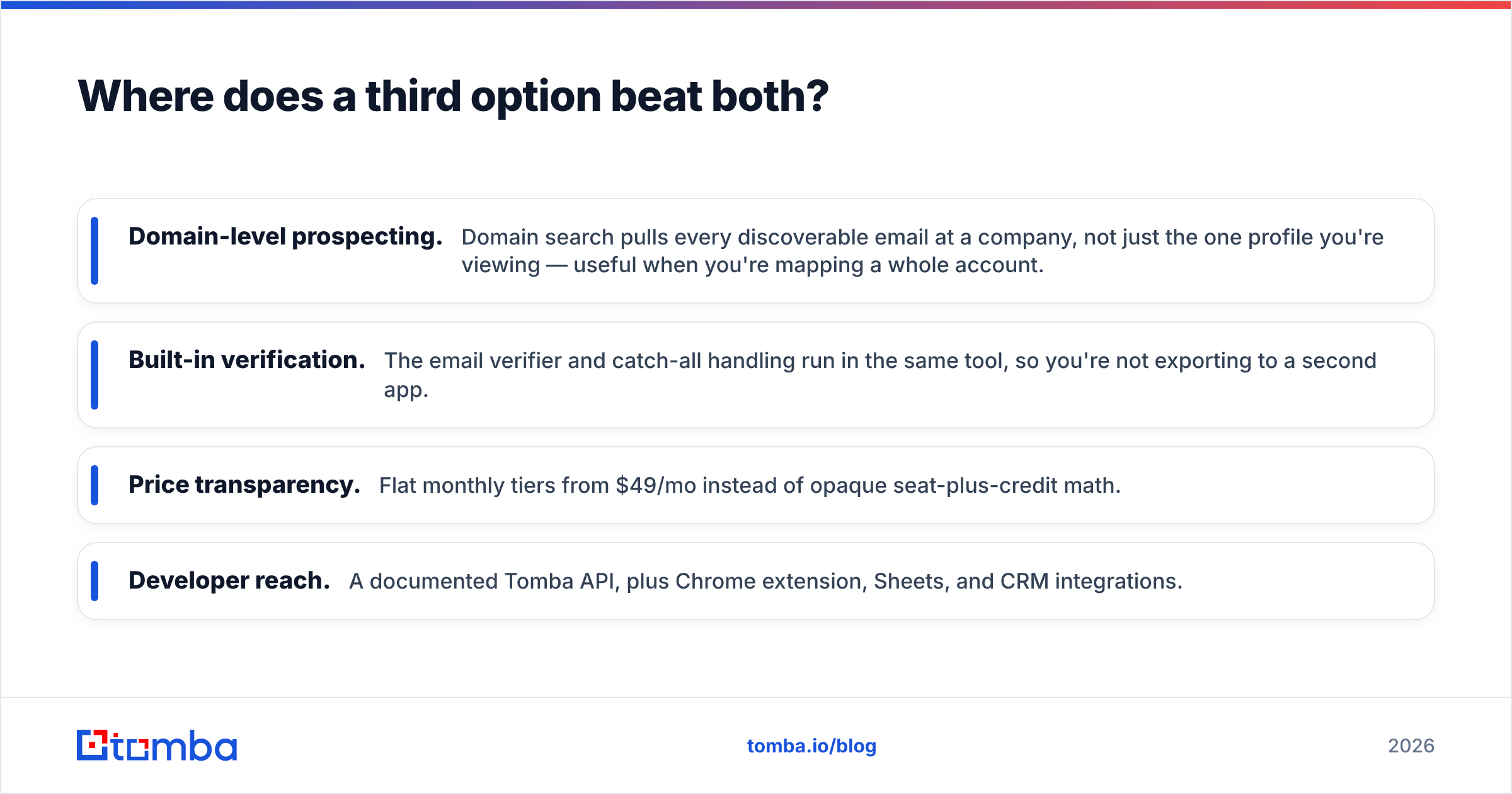
Where Tomba tends to win in this three-way:
- Domain-level prospecting. Domain search pulls every discoverable email at a company, not just the one profile you're viewing — useful when you're mapping a whole account.
- Built-in verification. The email verifier and catch-all handling run in the same tool, so you're not exporting to a second app.
- Price transparency. Flat monthly tiers from $49/mo instead of opaque seat-plus-credit math.
- Developer reach. A documented Tomba API, plus Chrome extension, Sheets, and CRM integrations.

None of this makes ContactOut or Enrow bad tools. If you're a pure recruiter who needs personal emails, ContactOut's database is hard to beat. If you're an agency whose only KPI is bounce rate, Enrow's verification-first design is a clean fit. But if you're a B2B team that needs find plus verify plus reasonable pricing, a combined tool usually wins on total cost of ownership.
ContactOut vs Enrow: pros and cons#
ContactOut — pros
- Large owned database with strong coverage
- Best-in-class personal-email and phone data
- Mature Chrome extension and recruiter workflow
ContactOut — cons
- Verification is basic; plan for a separate verifier
- Premium pricing, gated behind higher tiers
- Personal-email use raises compliance questions for cold B2B
Enrow — pros
- Verification-first, low bounce rates out of the box
- Waterfall enrichment across multiple providers
- Great fit for cold email and agencies
Enrow — cons
- Coverage limited to aggregated providers (weaker on long-tail)
- Credit burn can spike on large lists
- Fewer personal emails and phone numbers
How should you actually choose?#
Pick based on the job, not the brand.
- You're hiring / sourcing candidates → ContactOut. Personal emails and profile-level data are its home turf.
- You run high-volume cold email and guard sender reputation → Enrow. Its verification bias protects your domains. Also check your sender reputation regularly regardless of tool.
- You need find + verify + predictable pricing for outbound → test Tomba alongside both before committing budget.
Whatever you choose, run the same 200-contact bounce test across all candidates. The tool that returns the most verified, deliverable emails per dollar is your winner — and that ranking often surprises people who picked on brand reputation alone.
The bottom line#
ContactOut and Enrow solve two halves of the same problem. ContactOut finds the most people; Enrow makes sure the emails you send actually arrive. If your workflow already has a strong verifier, ContactOut's coverage is compelling. If you'd rather the tool handle deliverability for you, Enrow is the tighter fit.
But before you lock in either premium plan, put a combined finder-plus-verifier next to them. Start free with the Tomba Email Finder — 25 searches a month, built-in verification, domain search, and flat pricing from $49/mo — and let a real bounce test on your own list decide. That's the only comparison that spends your budget wisely.
Related guides#
Ready to find emails that actually work?
Join 150,000+ professionals who stopped guessing and started sending. Free credits on signup — no credit card required.
Get the Tomba newsletter
Practical outbound tactics and product updates — once every two weeks.
About the author