ContactOut vs Exact Data (2026): Which B2B Data Tool Wins?
ContactOut and Exact Data solve the same problem in opposite ways: one scrapes live contacts from LinkedIn, the other sells pre-built lists. Here's which one fits your outbound in 2026 — and where a verified email finder beats both.
ContactOut vs Exact Data is a choice between two eras of B2B data. One is a LinkedIn-native contact scraper built for reps who live in Sales Navigator. The other is a decades-old data broker. It sells you a list and sends you on your way. Both promise emails and phone numbers. But they deliver them in different shapes, at different prices, with different accuracy.
This ContactOut vs Exact Data comparison breaks down where each tool earns its keep. It also shows where a live, verified email finder quietly beats both for cold outbound in 2026.
TL;DR: ContactOut vs Exact Data#
- ContactOut is best if you prospect one contact at a time inside LinkedIn and want personal emails plus mobile numbers on demand.
- Exact Data is best if you want to buy a large, pre-segmented list of US B2B and consumer records for a direct-mail or broad email campaign.
- Accuracy favors ContactOut for real-time B2B emails. Exact Data lists decay fast because they are static snapshots.
- Pricing model is the real divide. ContactOut sells monthly credits. Exact Data sells the list outright, often thousands of dollars per pull.
- Neither verifies aggressively enough for cold email — pairing a real-time email finder with a email verifier protects your sender reputation better than either alone.
What is ContactOut?#
ContactOut is a contact-data platform built around a Chrome extension that overlays LinkedIn and GitHub profiles. You open a prospect's profile and click the ContactOut icon. It then surfaces personal and work emails plus phone numbers pulled from its cached index.
Its core audience is recruiters and SDRs who already do their targeting inside LinkedIn. The pitch is speed: you never leave the profile you are looking at. ContactOut also offers a search portal, a data enrichment API, and bulk export. But the browser extension is where 90% of its users spend their time.
Strengths worth naming:
- Personal email coverage — ContactOut leans hard into personal (Gmail/Yahoo) addresses, which recruiters value and most B2B tools ignore.
- LinkedIn-native workflow — no CSV round-trips for one-off prospecting.
- Mobile numbers — decent hit rate on direct dials for sales teams.
Where it gets thin: coverage outside the US and Western Europe drops off. Personal emails are useless, and risky, for B2B compliance in many regions. And credit limits on lower tiers burn fast if you prospect at volume.
What is Exact Data?#
Exact Data is a US-based data broker and list-compilation company. It is not a live lookup tool. Instead, it sells targeted marketing lists — B2B and consumer. You segment them by industry, title, geography, revenue, SIC code, and dozens of other filters, then license them for one-time or multi-use campaigns.
This is an older model. You tell a rep, or use the self-serve builder, what audience you want. Exact Data tells you the count and the price, and you buy the records. It is built for direct mail, telemarketing, and batch email blasts. You get thousands of contacts in one file rather than hunting them one profile at a time.
Strengths:
- Volume in a single pull — you can license tens of thousands of records at once.
- Deep firmographic and demographic filters — useful for niche audience definitions.
- Multi-channel data — postal addresses and phone alongside email, which list-driven direct marketers still need.
The catch is inherent to the model. A purchased list is a snapshot. The moment it is compiled, it starts decaying. People change jobs, companies fold, and emails get retired. By the time you send, a meaningful slice is stale.

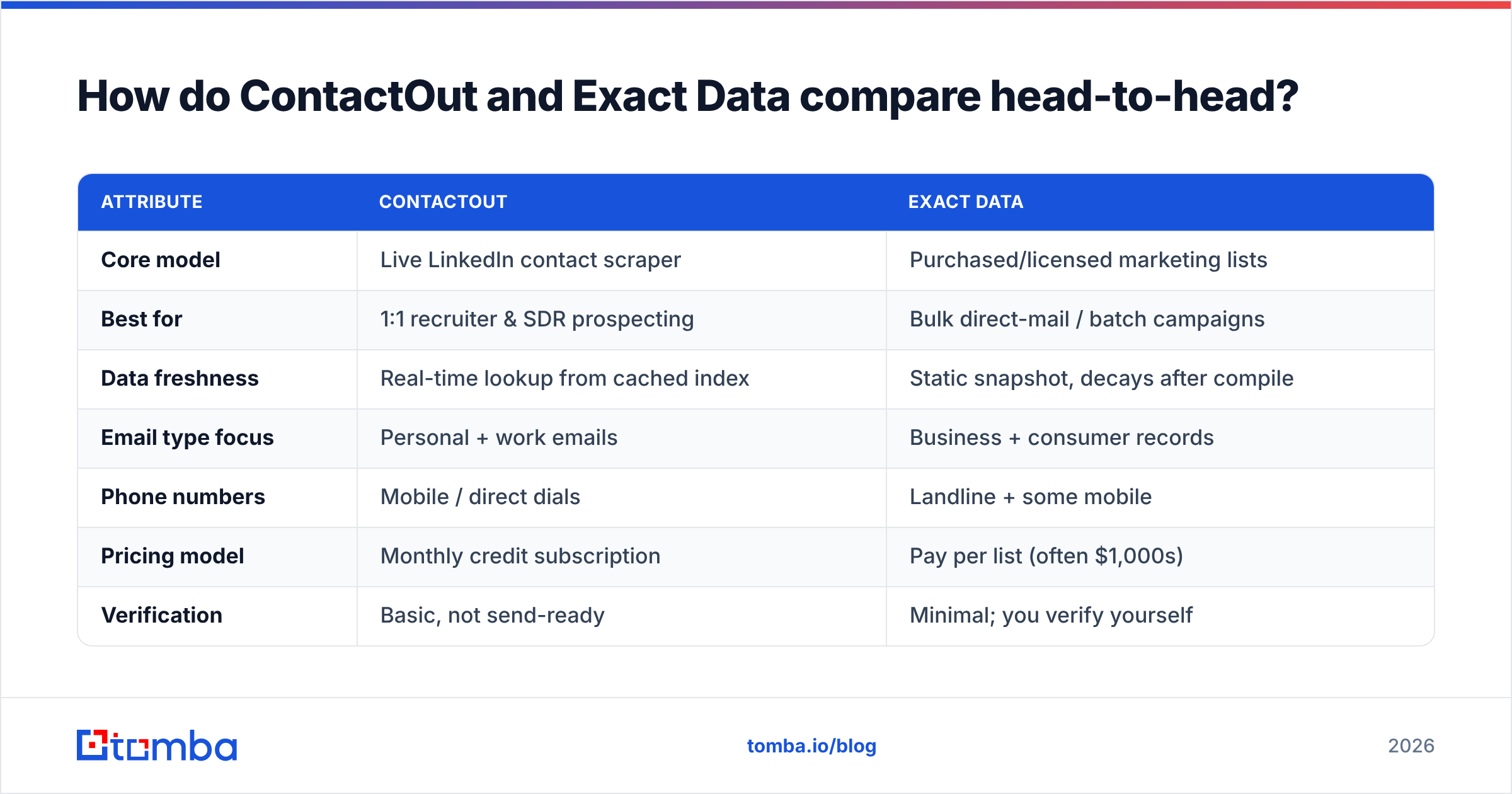
How do ContactOut and Exact Data compare head-to-head?#
| Attribute | ContactOut | Exact Data |
|---|---|---|
| Core model | Live LinkedIn contact scraper | Purchased/licensed marketing lists |
| Best for | 1:1 recruiter & SDR prospecting | Bulk direct-mail / batch campaigns |
| Data freshness | Real-time lookup from cached index | Static snapshot, decays after compile |
| Email type focus | Personal + work emails | Business + consumer records |
| Phone numbers | Mobile / direct dials | Landline + some mobile |
| Pricing model | Monthly credit subscription | Pay per list (often $1,000s) |
| Verification | Basic, not send-ready | Minimal; you verify yourself |
| Compliance risk | Personal-email gray area | List-buying gray area (CAN-SPAM/GDPR) |
| Geographic strength | US / Western Europe | Primarily US |
The pattern is clear. ContactOut is a precision tool. Exact Data is a volume tool. Neither is strictly better. They answer different questions. If your motion is "I found a specific person on LinkedIn and I need to reach them today," ContactOut wins. If it is "I need 15,000 CFOs in manufacturing for a mail drop," Exact Data is built for that.
Which one is more accurate?#
Accuracy depends on what you count as accurate. ContactOut's real-time lookups tend to reflect a person's current role, because the index is refreshed against LinkedIn activity. Exact Data's lists are accurate on the day they are compiled and then age like milk. B2B email data degrades roughly 22–30% per year as people switch jobs. That figure comes from widely cited industry churn estimates from firms like Gartner and validation vendors.
But here is the part both tools underplay: neither one is a verification engine. ContactOut gives you an email. It does not guarantee the mailbox accepts mail today. Exact Data hands you a file, and the freshness is your problem the moment you download it. Sending to unverified addresses is the fastest way to tank your sender reputation and land in spam folders.
That is why serious outbound teams treat any sourced email, from either tool, as a candidate, not a fact. Run the list through a dedicated email verifier and a catch-all verifier before the first send. A source without verification is a guess with good branding.

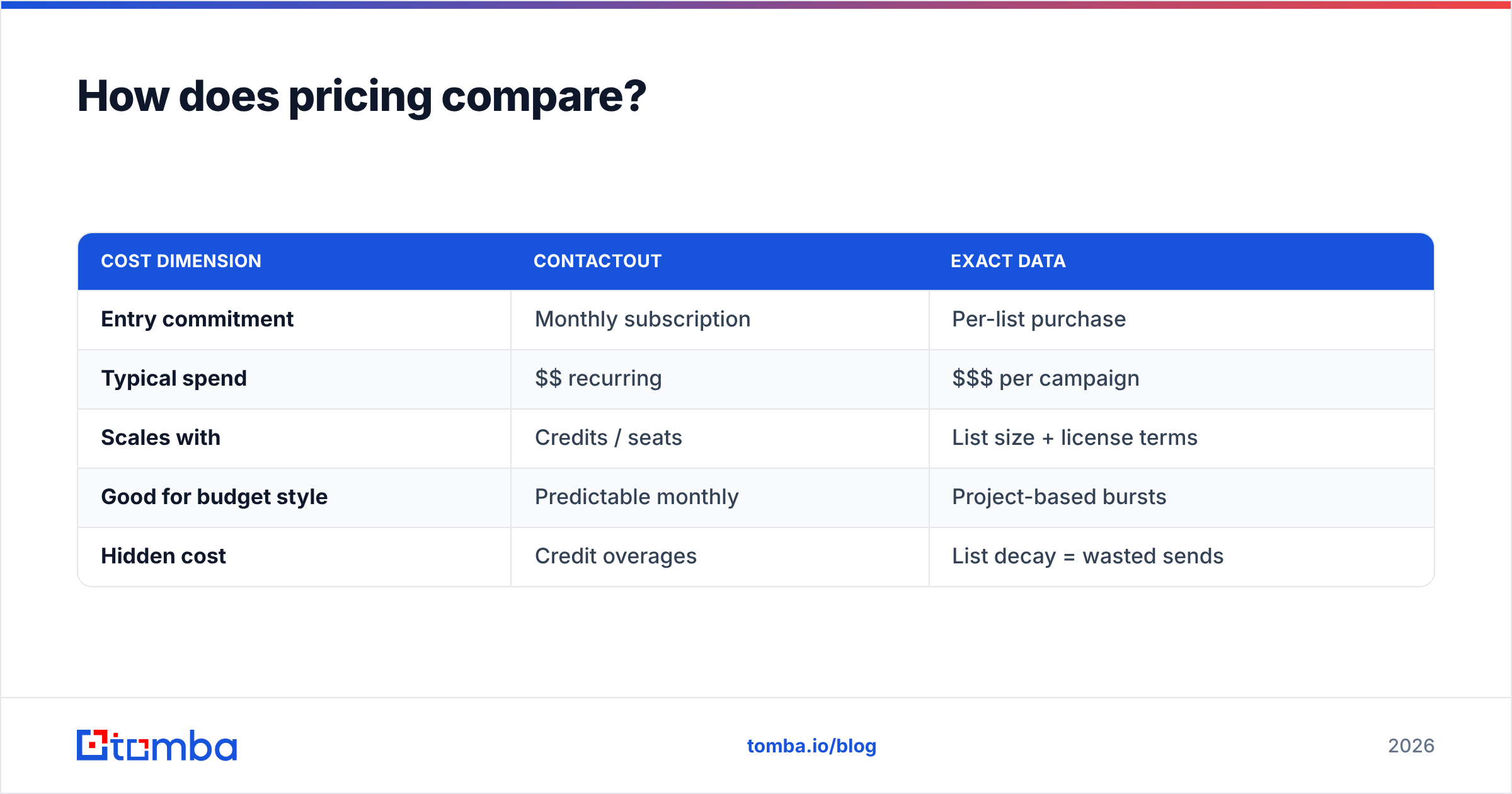
How does pricing compare?#
The pricing models are almost impossible to compare apples-to-apples, because they are structured differently.
- ContactOut runs on monthly subscriptions with credit caps. Individual plans start modest. But team and business tiers scale into the hundreds per month once you need higher export limits and API access. You are paying for access over time.
- Exact Data charges per list. A single targeted pull can run from a few hundred dollars for a small niche to several thousand for large, well-segmented audiences. You are paying for records, once, or under a multi-use license.
| Cost dimension | ContactOut | Exact Data |
|---|---|---|
| Entry commitment | Monthly subscription | Per-list purchase |
| Typical spend | $$ recurring | $$$ per campaign |
| Scales with | Credits / seats | List size + license terms |
| Good for budget style | Predictable monthly | Project-based bursts |
| Hidden cost | Credit overages | List decay = wasted sends |
If you prospect continuously, ContactOut's subscription is easier to reason about. If you run occasional big campaigns, Exact Data's one-time model can pencil out. Then you factor in the decay tax on every stale record you paid for and cannot reach.
Where does a verified email finder beat both?#
Here is the honest gap. Recruiters love ContactOut's personal emails. But personal Gmail addresses are a compliance minefield for B2B cold outreach. And Exact Data's bulk lists carry a double risk: staleness and list-buying scrutiny under CAN-SPAM and GDPR.
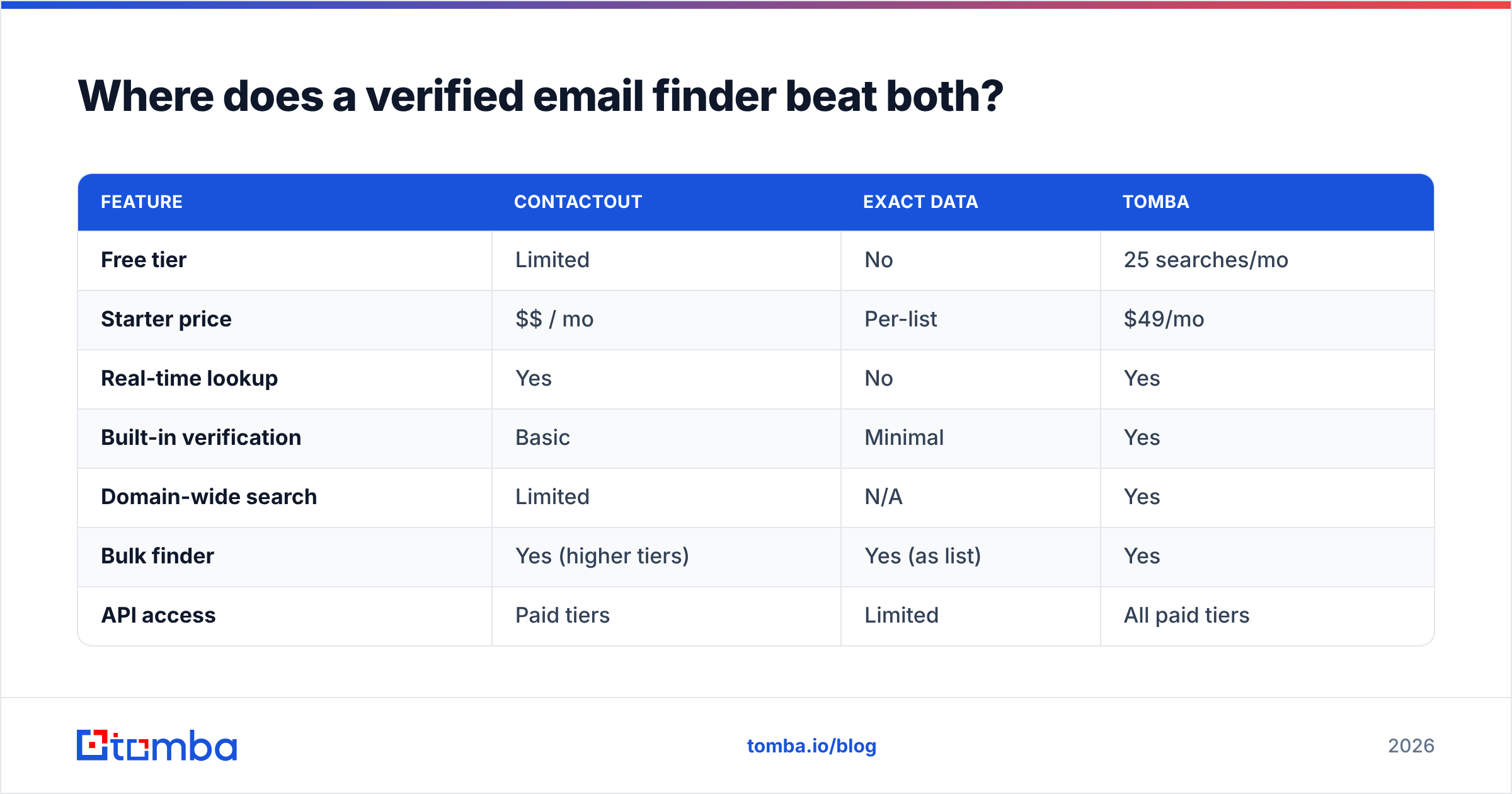
Sometimes the job is simpler. You need a decision-maker's current work email, and you need to know it is deliverable before you send. For that, a real-time, verification-first email finder is a cleaner fit. This is where Tomba sits. You search by name and company, or run a domain search to pull every public email pattern at a target account. Verification is baked into the workflow rather than sold separately.
| Feature | ContactOut | Exact Data | Tomba |
|---|---|---|---|
| Free tier | Limited | No | 25 searches/mo |
| Starter price | $$ / mo | Per-list | $49/mo |
| Real-time lookup | Yes | No | Yes |
| Built-in verification | Basic | Minimal | Yes |
| Domain-wide search | Limited | N/A | Yes |
| Bulk finder | Yes (higher tiers) | Yes (as list) | Yes |
| API access | Paid tiers | Limited | All paid tiers |
A few practical advantages of the finder-plus-verifier approach:
- You pay for verified emails, not raw records. No decay tax on a file you licensed six weeks ago.
- Domain search finds the whole buying committee, not just the one profile you happened to open in LinkedIn.
- Verification is native, so your email deliverability is protected at the source. See full Tomba pricing for how the free tier maps to paid volume.
None of this makes ContactOut or Exact Data bad tools. They are strong at their native jobs. It means "which is better" is the wrong question. The right one is "which model matches how I actually source and send."

Which tool should you pick?#
Match the tool to your motion:
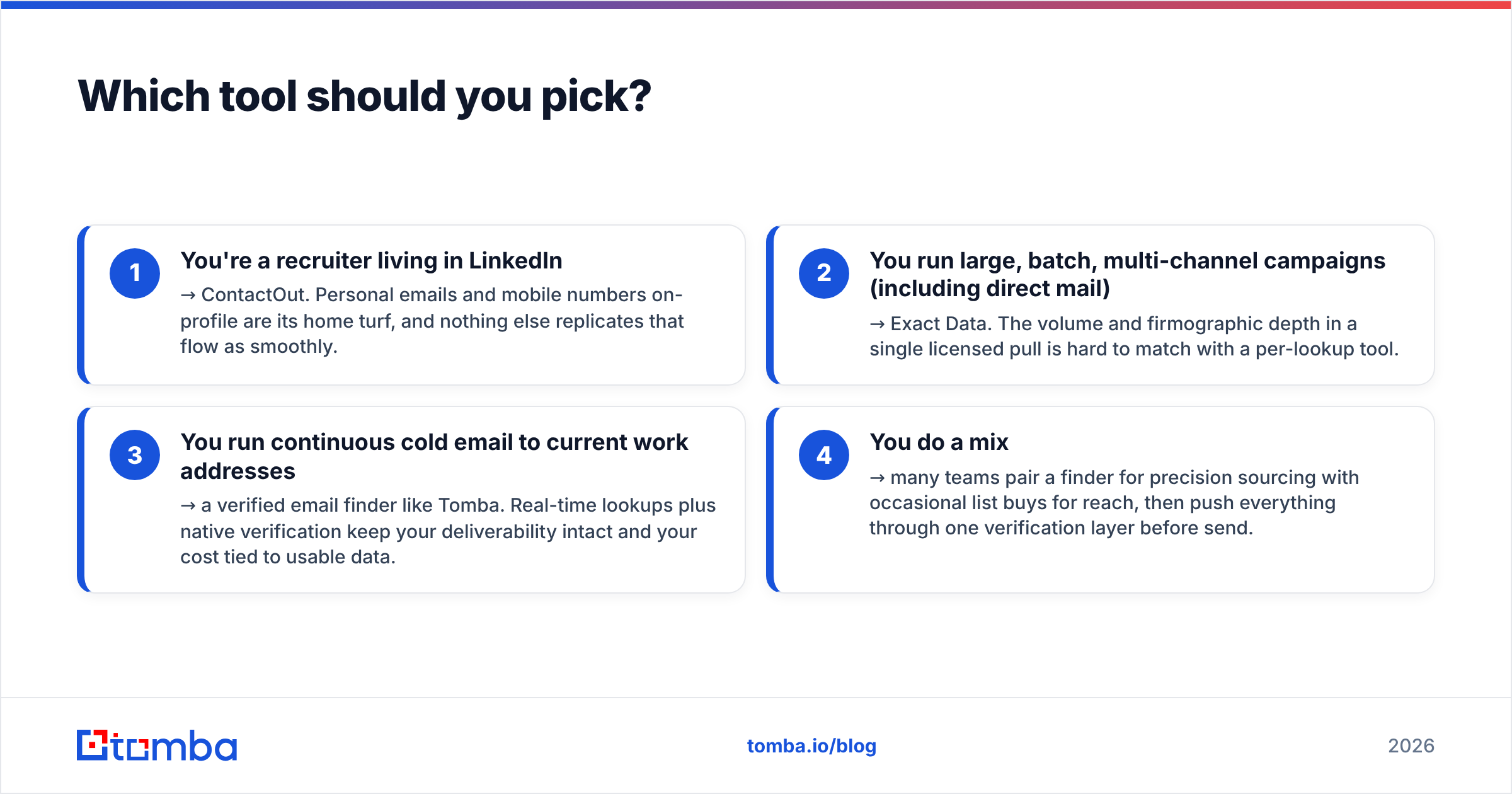
- You are a recruiter living in LinkedIn → ContactOut. Personal emails and mobile numbers on-profile are its home turf, and nothing else replicates that flow as smoothly.
- You run large, batch, multi-channel campaigns (including direct mail) → Exact Data. The volume and firmographic depth in a single licensed pull is hard to match with a per-lookup tool.
- You run continuous cold email to current work addresses → a verified email finder like Tomba. Real-time lookups plus native verification keep your deliverability intact and your cost tied to usable data.
- You do a mix → many teams pair a finder for precision sourcing with occasional list buys for reach, then push everything through one verification layer before send.
One rule spans all three: verify before you send. Whichever source you choose, an unverified email is a liability. Route ContactOut exports, Exact Data files, and finder results through the same verification gate. That neutralizes the biggest weakness each tool shares.
For a deeper look at how contact-data providers stack up on raw accuracy, this benchmark is a useful reference point:

The bottom line#
ContactOut vs Exact Data isn't a fight. It is two answers to two different questions. ContactOut is precision prospecting inside LinkedIn. Exact Data is volume list-buying for batch and direct-mail campaigns. Pick based on whether you source one contact at a time or thousands at once.
But if your real goal is cold email that lands in the inbox, the source is only half the equation. You need current work emails and proof they are deliverable. That is the case for a verification-first workflow.
Start with the Tomba Email Finder — find decision-makers by name, company, or domain, verify every address before it hits your sequence, and stop paying for data that decays before you can use it. The free tier gives you 25 searches a month to test it against your current stack. The $49/mo Starter plan scales it once the results speak for themselves.
Related guides#
Ready to find emails that actually work?
Join 150,000+ professionals who stopped guessing and started sending. Free credits on signup — no credit card required.
Get the Tomba newsletter
Practical outbound tactics and product updates — once every two weeks.
About the author