ContactOut vs FinalScout (2026): Which Email Finder Wins?
ContactOut vs FinalScout, tested head-to-head on accuracy, coverage, pricing, and workflow fit — plus where a leaner email finder beats both.
Picking between ContactOut and FinalScout usually comes down to one question you can't answer from a pricing page: which one actually returns a valid, deliverable email for the prospects you care about? Both are LinkedIn-first contact tools, both promise high accuracy, and both bury the limits that matter in the fine print. This comparison puts them side by side on the things that decide whether your outbound campaign lands or bounces.
TL;DR — ContactOut vs FinalScout at a glance#
- ContactOut is a mature, LinkedIn-native data provider with a large personal-email database and a Chrome extension SDRs have used for years. It skews expensive at scale.
- FinalScout leans on AI (including ChatGPT-assisted email writing) plus a LinkedIn email finder, positioning itself as an all-in-one prospect-and-write tool with a generous-looking free tier.
- Accuracy is comparable for common B2B roles; both degrade on catch-all domains and non-US regions, and neither publishes an independently audited number.
- Pricing favors FinalScout for solo users and light volume; ContactOut wins on personal/consumer emails but gets costly fast.
- If your core need is verified work emails at a predictable price, a dedicated email finder like Tomba often beats both on cost-per-valid-email — details below.
What are ContactOut and FinalScout?#
Both tools solve the same starting problem: you have a LinkedIn profile or a name and company, and you need a way to reach that person.
ContactOut started as a recruiter tool. Its strength is a deep store of personal email addresses and phone numbers scraped and aggregated over years, surfaced through a Chrome extension that overlays LinkedIn and GitHub. Recruiters like it because personal Gmail addresses don't churn when someone changes jobs.
FinalScout is newer and AI-forward. It combines a LinkedIn email finder with an AI writing layer that drafts outreach based on a prospect's profile. The pitch is "find and email in one place," aimed at founders and small teams who don't want to stitch a finder, a verifier, and a copy tool together.
The category matters here. These are contact-data tools, so accuracy and deliverability are the whole game. A slick UI doesn't help if 30% of the emails bounce and torch your sender reputation.

How do ContactOut and FinalScout compare on features?#
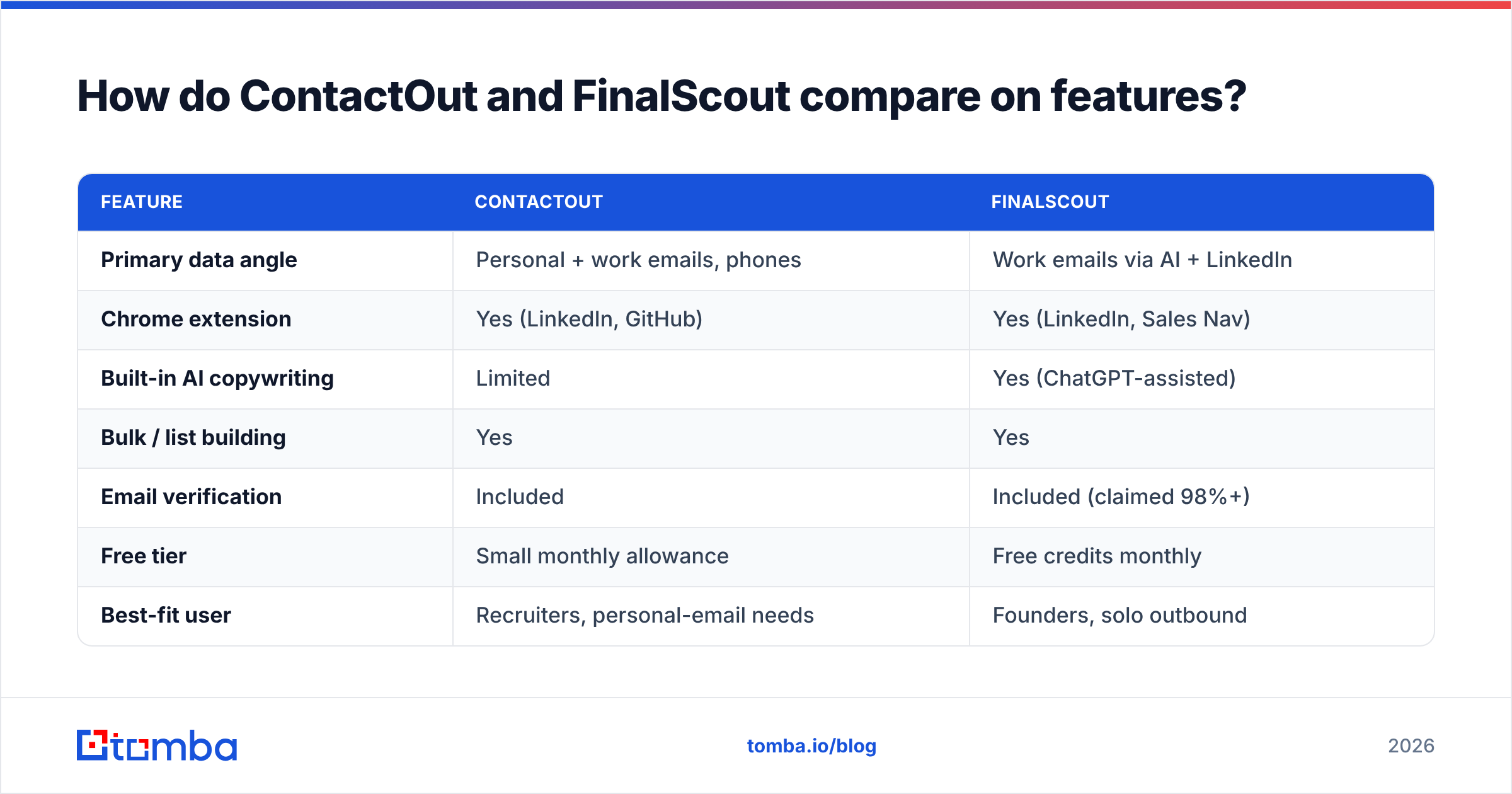
Here's the head-to-head on the attributes that actually change your day-to-day workflow.
| Feature | ContactOut | FinalScout |
|---|---|---|
| Primary data angle | Personal + work emails, phones | Work emails via AI + LinkedIn |
| Chrome extension | Yes (LinkedIn, GitHub) | Yes (LinkedIn, Sales Nav) |
| Built-in AI copywriting | Limited | Yes (ChatGPT-assisted) |
| Bulk / list building | Yes | Yes |
| Email verification | Included | Included (claimed 98%+) |
| Free tier | Small monthly allowance | Free credits monthly |
| Best-fit user | Recruiters, personal-email needs | Founders, solo outbound |
| API access | Yes (higher tiers) | Limited |
The honest read: ContactOut is the stronger data company, especially for personal emails and phone numbers. FinalScout is the stronger workflow product for a one-person outbound motion because the writing step is baked in. Neither is clearly dominant — it depends on whether you value raw data depth or an end-to-end flow.
Which is more accurate, ContactOut or FinalScout?#
Accuracy is where marketing claims and reality diverge, so treat both vendors' numbers as ceilings, not averages.
Both advertise high hit rates and verification in the high 90s. In practice, three factors move the real number far more than the brand:
- Role seniority — VPs and directors at mid-market companies resolve well on both. Frontline and non-English-market contacts drop off.
- Catch-all domains — when a domain accepts every address, no finder can truly confirm deliverability without a smart catch-all verifier. Both tools guess here, and both mislabel.
- Data freshness — personal emails (ContactOut's strength) age slowly; work emails churn as people switch jobs, so a "verified" result from last quarter may already be dead.
The practical takeaway: don't trust a single tool's internal "verified" flag as gospel. Re-verify any list before a big send with an independent email verifier, regardless of which finder produced it. This is the single highest-ROI habit in cold outreach and it's tool-agnostic.
ContactOut vs FinalScout pricing: which is cheaper?#
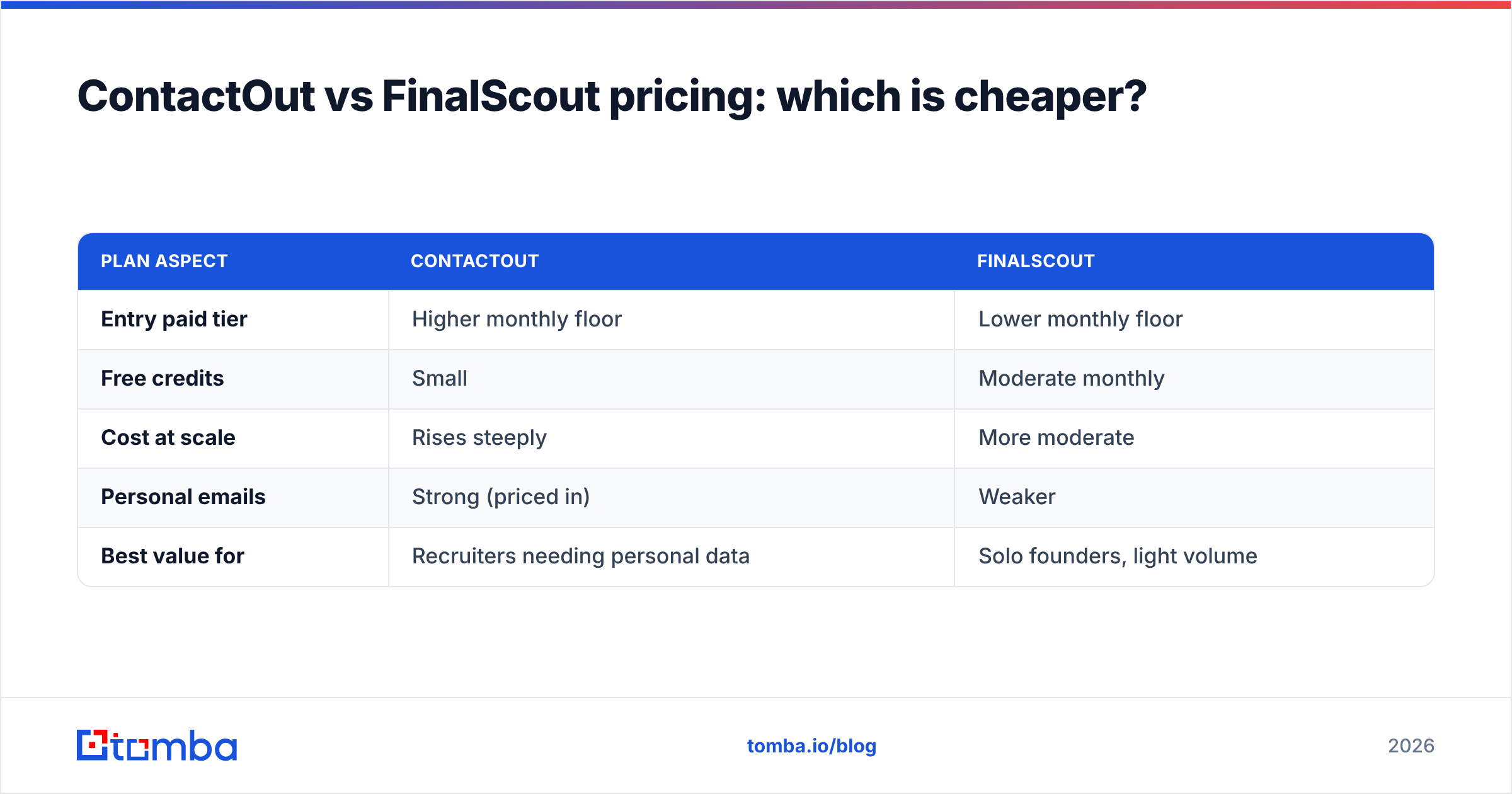
Pricing is the clearest differentiator, and it flips depending on volume.
| Plan aspect | ContactOut | FinalScout |
|---|---|---|
| Entry paid tier | Higher monthly floor | Lower monthly floor |
| Free credits | Small | Moderate monthly |
| Cost at scale | Rises steeply | More moderate |
| Personal emails | Strong (priced in) | Weaker |
| Best value for | Recruiters needing personal data | Solo founders, light volume |
FinalScout generally wins for individuals and light users thanks to a lower entry point and recurring free credits. ContactOut can be worth the premium if you specifically need personal emails and mobile numbers — recruiting, executive search, or consumer-adjacent outreach.
But if your job is straightforward B2B — verified work emails, in volume, at a price you can forecast — both can feel expensive per valid contact once you account for bounces and re-verification. That's the gap dedicated finders exploit. Compare the Tomba pricing structure: a free tier with 25 searches, Starter at $49/mo, Growth at $99/mo, and Pro at $249/mo, with verification bundled so you're not paying twice to confirm the same address.

When should you choose ContactOut?#
Choose ContactOut when your use case leans on data depth over workflow convenience:
- You're recruiting or doing executive search. Personal Gmail and mobile numbers survive job changes; work emails don't.
- You already live in the Chrome extension. If your team's habit is "browse LinkedIn, click to reveal," ContactOut's overlay is polished and fast.
- You need phones as often as emails. Its mobile coverage is a genuine strength; pair it with a phone validator to trim dead numbers.
- Budget isn't the binding constraint. You're paying a premium for the personal-data moat, and for the right team it's worth it.
Where it hurts: cost at scale, and B2B-only teams paying for consumer-data depth they never touch.
When should you choose FinalScout?#
Choose FinalScout when you're a small team that wants to compress find-and-write into one tab:
- You're a solo founder or one-person SDR function. The AI drafting removes a step you'd otherwise outsource to a separate tool.
- You want to test outbound cheaply. The free credits and low entry tier make experimentation low-risk.
- Your prospects are English-market, common roles. That's where the LinkedIn finder performs best.
- You value speed over data depth. "Good enough" emails written for you beats "perfect" emails you still have to draft.
Where it hurts: personal-email and phone coverage lag ContactOut, and the AI copy still needs human editing — treat it as a first draft, not a send-ready message. See FinalScout's own positioning on finalscout.com and cross-check reviews on G2 before committing annually.
Is there a better-value alternative to both?#
For most B2B teams whose real need is verified work emails at a predictable cost, a dedicated email finder is the more rational buy — and it's worth putting on the shortlist next to both tools.
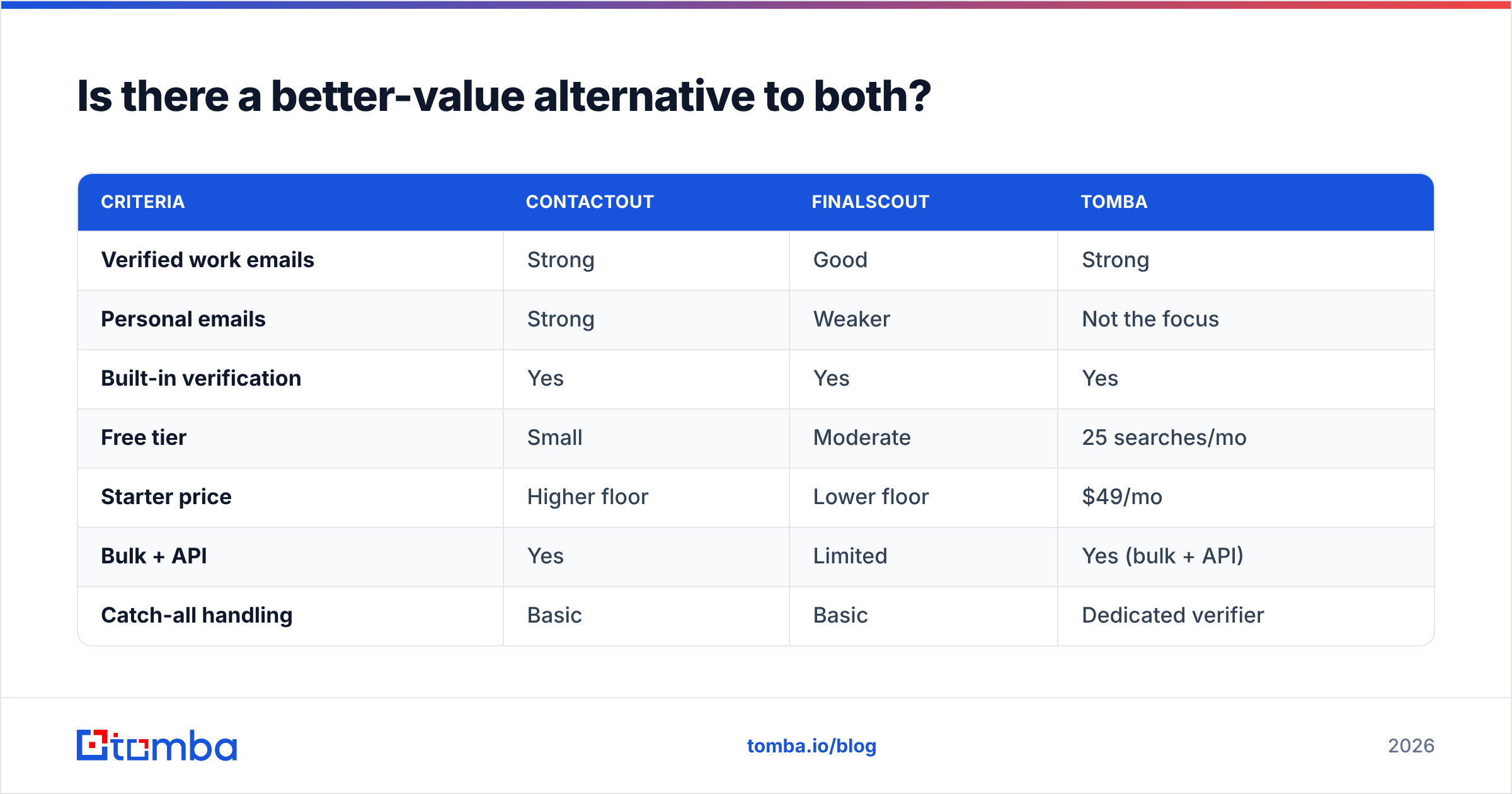
Here's how a purpose-built finder like Tomba stacks up against the two:
| Criteria | ContactOut | FinalScout | Tomba |
|---|---|---|---|
| Verified work emails | Strong | Good | Strong |
| Personal emails | Strong | Weaker | Not the focus |
| Built-in verification | Yes | Yes | Yes |
| Free tier | Small | Moderate | 25 searches/mo |
| Starter price | Higher floor | Lower floor | $49/mo |
| Bulk + API | Yes | Limited | Yes (bulk + API) |
| Catch-all handling | Basic | Basic | Dedicated verifier |
Tomba's model is narrower on purpose: it doesn't try to sell you consumer data or write your emails, so you're not subsidizing features you won't use. You get domain search to map every address at a company, a LinkedIn finder for profile-based lookups, bulk processing, and an email finder API for automation — with verification built into the same credit.
The honest caveat: if you specifically need personal emails and mobile numbers, ContactOut still leads, and if you want AI-written first drafts inside the finder, FinalScout's integration is genuinely convenient. Match the tool to the job. For pure B2B work-email volume, though, a focused finder usually wins on cost-per-valid-contact — which is the only unit that matters once campaigns are running.
How to actually decide (a 4-step test)#
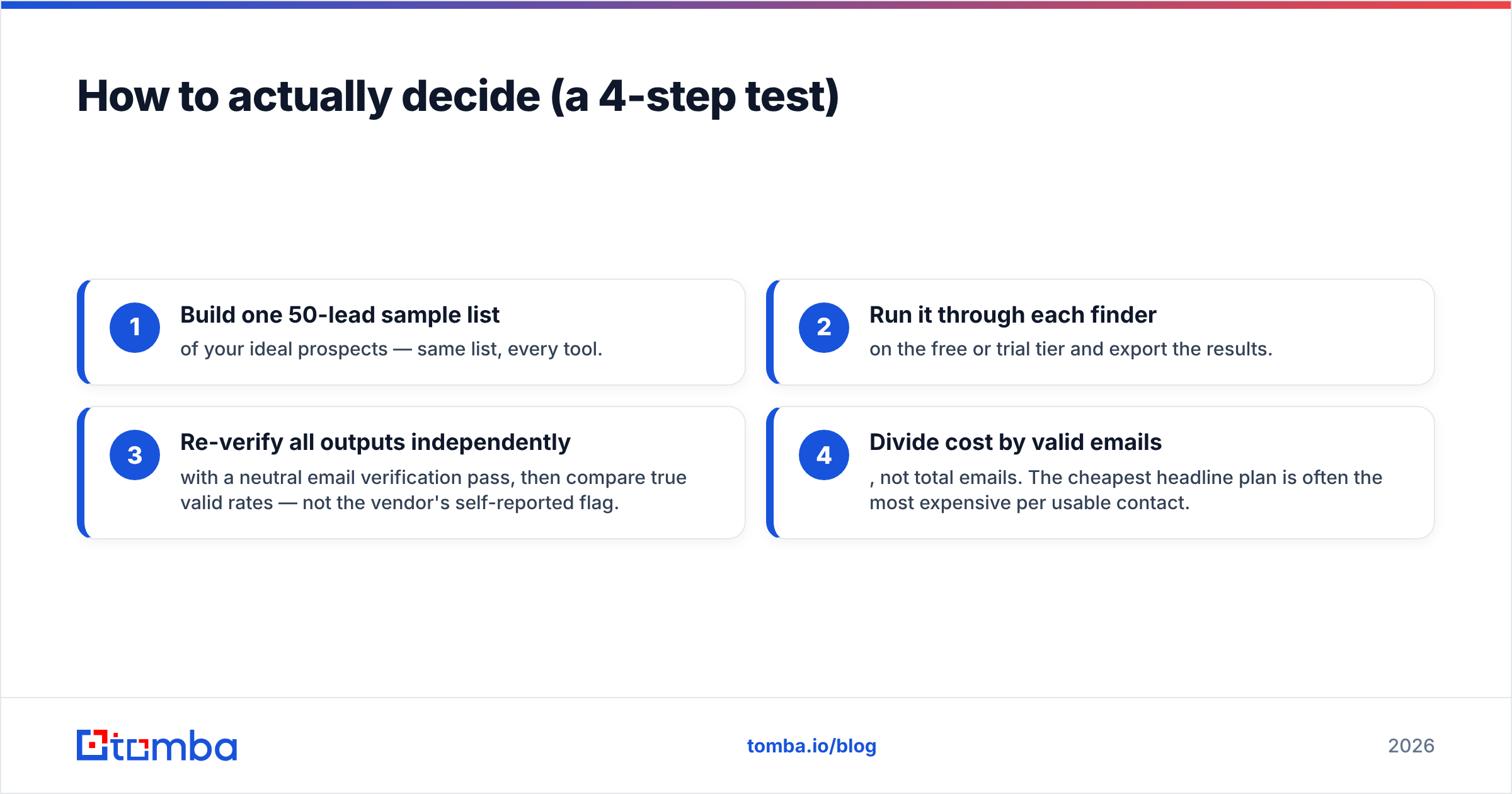
Don't decide on a pricing page. Run a real bake-off:
- Build one 50-lead sample list of your ideal prospects — same list, every tool.
- Run it through each finder on the free or trial tier and export the results.
- Re-verify all outputs independently with a neutral email verification pass, then compare true valid rates — not the vendor's self-reported flag.
- Divide cost by valid emails, not total emails. The cheapest headline plan is often the most expensive per usable contact.
Whichever tool wins your sample on cost-per-valid-email is the right answer for your ICP, region, and seniority mix. A comparison article can rank the field; only your own list can rank it for you.
The bottom line#
ContactOut and FinalScout are both credible, but they win different races. ContactOut is the data-depth pick — personal emails, phones, recruiter workflows — and you pay for that moat. FinalScout is the all-in-one solo-founder pick — cheaper entry, AI copy baked in, best on common English-market roles. Neither is a bad choice; they're just built for different buyers.
If your outbound is straightforward B2B and you want the lowest cost per verified work email without paying for features you won't touch, put a dedicated finder on the shortlist. Start free with the Tomba Email Finder — 25 searches a month, verification included, and Starter at $49/mo when you scale — and run the four-step bake-off above against both tools. Let the valid-email rate on your own list make the call.
Related guides#
Ready to find emails that actually work?
Join 150,000+ professionals who stopped guessing and started sending. Free credits on signup — no credit card required.
Get the Tomba newsletter
Practical outbound tactics and product updates — once every two weeks.
About the author