ContactOut vs FindEmails.com (Toofr): Which Wins in 2026?
ContactOut and FindEmails.com (formerly Toofr) both promise verified B2B emails, but they win at different jobs. Here's the honest 2026 breakdown on accuracy, pricing, and coverage — plus where a cheaper option beats both.
ContactOut vs FindEmails.com (Toofr) usually comes down to one question. Do you live inside LinkedIn all day? Or do you need to enrich lists in bulk without a browser tab open? Both tools find B2B email addresses. But they get there differently, price differently, and miss different kinds of contacts.
This is a neutral, hands-on comparison — no vendor spin. By the end, you'll know which tool fits your workflow. You'll also see whether either is the best value in 2026.
TL;DR — ContactOut vs FindEmails.com (Toofr) at a glance#
- ContactOut is a LinkedIn-first tool. Its Chrome extension shines when you prospect one profile at a time and want personal + work emails plus phone numbers.
- FindEmails.com (Toofr) is a bulk-and-database tool. It's built for uploading a list of names and companies and getting verified emails back, with a lower entry price.
- Accuracy is close, but neither publishes independently audited match rates. Expect real-world hit rates well below the "98%" marketing numbers on hard-to-find contacts.
- Pricing favors FindEmails.com at the entry level. ContactOut charges more per seat, but it bundles richer contact data like mobile numbers and personal emails.
- If cost-per-verified-email and API access matter most, a third option like Tomba Email Finder often beats both — more on that below.
What is ContactOut and who is it for?#
ContactOut is a contact-data platform. It's best known for its browser extension, which overlays on LinkedIn and surfaces a person's work email, personal email, and phone number as you view their profile. Recruiters adopted it first. That's why it leans hard into personal-email and mobile coverage — data that matters when you're trying to reach a passive candidate who won't answer a work address.
Its core strengths:
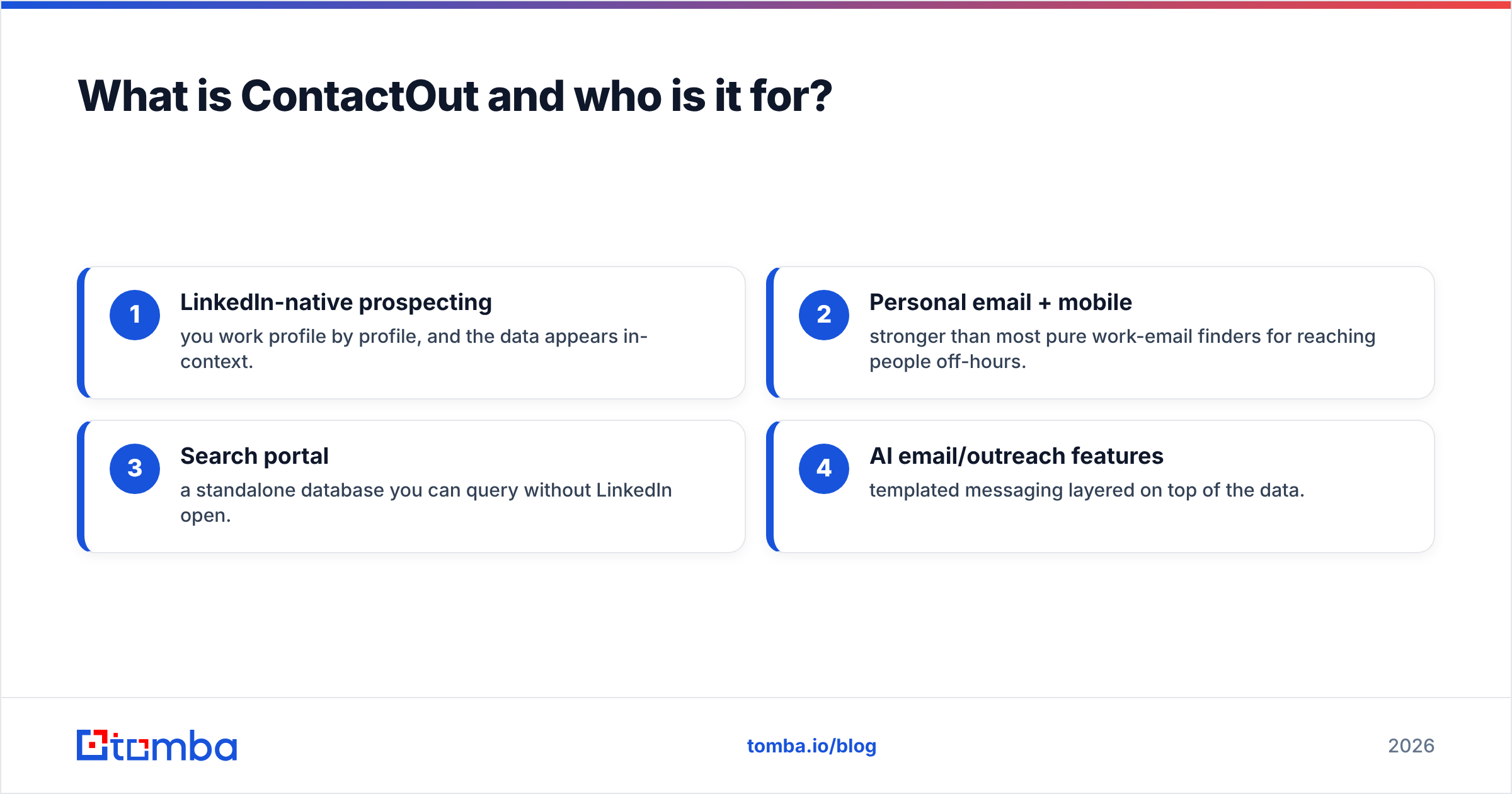
- LinkedIn-native prospecting — you work profile by profile, and the data appears in-context.
- Personal email + mobile — stronger than most pure work-email finders for reaching people off-hours.
- Search portal — a standalone database you can query without LinkedIn open.
- AI email/outreach features — templated messaging layered on top of the data.
The tradeoff: ContactOut is priced per seat and geared toward individual power users, not high-volume list enrichment. If your motion is "upload 5,000 rows and enrich," you'll feel the friction.

What is FindEmails.com (formerly Toofr)?#
FindEmails.com is the rebrand of Toofr, one of the older email-finding tools on the market. It's built around a different assumption than ContactOut. You already have a list of names and companies, and you want verified emails returned at low cost. You paste or upload contacts, it runs pattern detection plus verification, and you export.
Its core strengths:
- Bulk list processing — the workflow is designed for CSV in, verified emails out.
- Lower entry price — historically one of the cheapest per-credit options.
- Simplicity — fewer features than a full sales-intelligence suite, which some teams prefer.
- Email scoring — each result comes with a confidence score, so you can filter risky sends.
The tradeoff: FindEmails.com is thinner on phone numbers, personal emails, and the rich firmographic data that a recruiter or ABM team wants. It's a focused email tool, not an all-in-one intelligence platform.
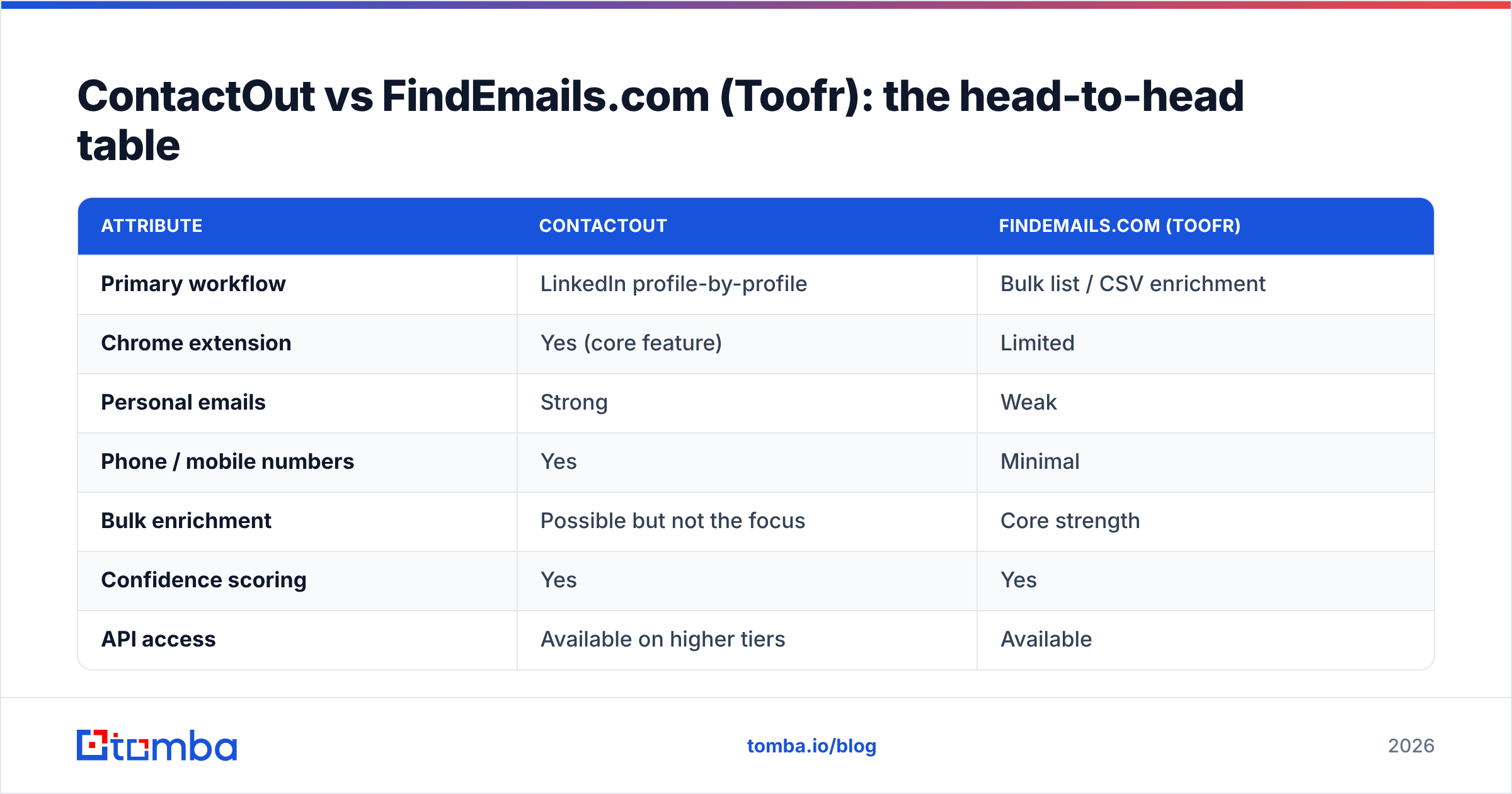
ContactOut vs FindEmails.com (Toofr): the head-to-head table#
Here's the core comparison. Prices and limits shift over time, so always confirm on each vendor's own pricing page before you buy.
| Attribute | ContactOut | FindEmails.com (Toofr) |
|---|---|---|
| Primary workflow | LinkedIn profile-by-profile | Bulk list / CSV enrichment |
| Chrome extension | Yes (core feature) | Limited |
| Personal emails | Strong | Weak |
| Phone / mobile numbers | Yes | Minimal |
| Bulk enrichment | Possible but not the focus | Core strength |
| Confidence scoring | Yes | Yes |
| API access | Available on higher tiers | Available |
| Entry price | Higher per seat | Lower per credit |
| Best for | Recruiters, 1:1 prospecting | List builders, ops teams |
The pattern is clear. ContactOut wins on depth per contact. FindEmails.com wins on cost per contact at scale. Neither is strictly "better" — it depends on whether your bottleneck is data richness or volume.
ContactOut vs FindEmails.com (Toofr): which is more accurate?#
Accuracy is the question everyone asks. It's also the one both vendors answer with round marketing numbers. The honest answer: real-world accuracy depends on the segment you're searching, not the logo on the tool.
For senior contacts at well-known companies, both tools do well. The email patterns are well documented, and the data is refreshed often. Where they diverge is on the hard cases: small companies, non-English regions, catch-all domains, and recently changed roles. ContactOut's LinkedIn-sourced data tends to stay fresher on job changes. FindEmails.com's pattern engine can guess formats, but it may return lower-confidence results on obscure domains.

Two things protect you regardless of which tool you pick:
- Always verify before you send. A confidence score is not the same as a live SMTP check. Run risky results through a dedicated email verifier to strip invalids before they hit your sequence.
- Treat catch-all domains carefully. Both tools will happily return an address on a catch-all domain that accepts everything. Use a catch-all verifier so you don't count a mailbox that may not exist.
Bounce rate is the metric that actually matters. And it's driven more by your verification discipline than by the finder's headline accuracy claim. Protecting email deliverability starts with a clean list, not a bigger match-rate number.
How do ContactOut and FindEmails.com price out?#
Pricing is where the two tools split most sharply. It's also where you should do the math on cost per verified email rather than sticker price.
ContactOut sits at the premium end. You pay per seat for richer data. Personal emails and phone numbers carry real acquisition cost, and the pricing reflects that. For a recruiter reaching 30 high-value candidates a week, that per-contact depth is worth it.
FindEmails.com competes on price. Its credit model is cheaper at entry. That suits teams enriching hundreds or thousands of rows, where you mostly need a valid work email and can live without mobile numbers.
But entry price hides the real cost. The number that sets your budget is simple: (monthly fee) ÷ (emails that pass verification). A cheap tool that returns unverified guesses can cost more per usable email than a pricier tool with clean data. Every bounce hurts your sender reputation. Every wasted credit is money gone.

This is exactly where a third contender enters the conversation.
Where does Tomba fit against both?#
Maybe your real goal is the lowest cost per verified email, plus clean Tomba pricing and a developer-friendly API. If so, it's worth weighing Tomba alongside these two rather than assuming it's ContactOut-or-Toofr.
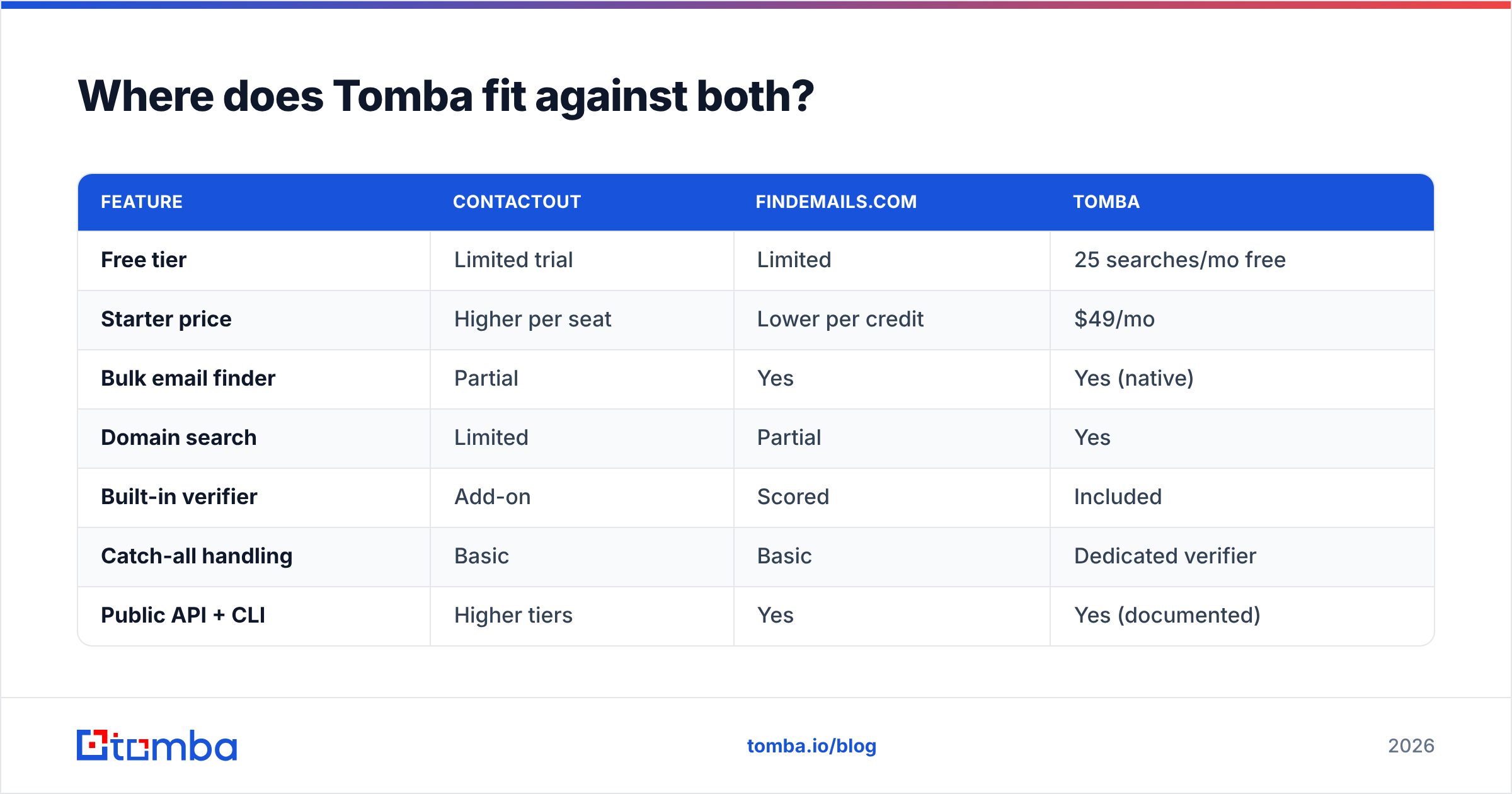
Here's how the three stack up on the dimensions that drive cost and outcomes:
| Feature | ContactOut | FindEmails.com | Tomba |
|---|---|---|---|
| Free tier | Limited trial | Limited | 25 searches/mo free |
| Starter price | Higher per seat | Lower per credit | $49/mo |
| Bulk email finder | Partial | Yes | Yes (native) |
| Domain search | Limited | Partial | Yes |
| Built-in verifier | Add-on | Scored | Included |
| Catch-all handling | Basic | Basic | Dedicated verifier |
| Public API + CLI | Higher tiers | Yes | Yes (documented) |
| Best-fit user | Recruiters | List builders | Ops + developers |
Tomba's angle is coverage plus verification in one place. You can run a domain search to pull every discoverable address at a company, find individual contacts, and verify them without stitching two vendors together. For teams that want to enrich programmatically, the Tomba API and bulk tools cover the list-building job that FindEmails.com does. And it starts at a transparent $49/mo, with a genuine free tier to test accuracy on your own segment before paying.
That last part matters. The only accuracy benchmark that counts is the one you run on your target list. Every vendor looks great on famous companies. Test all three on 50 of your actual prospects and compare verified hit rates.

Which should you choose in 2026?#
Match the tool to your motion, not to the marketing:
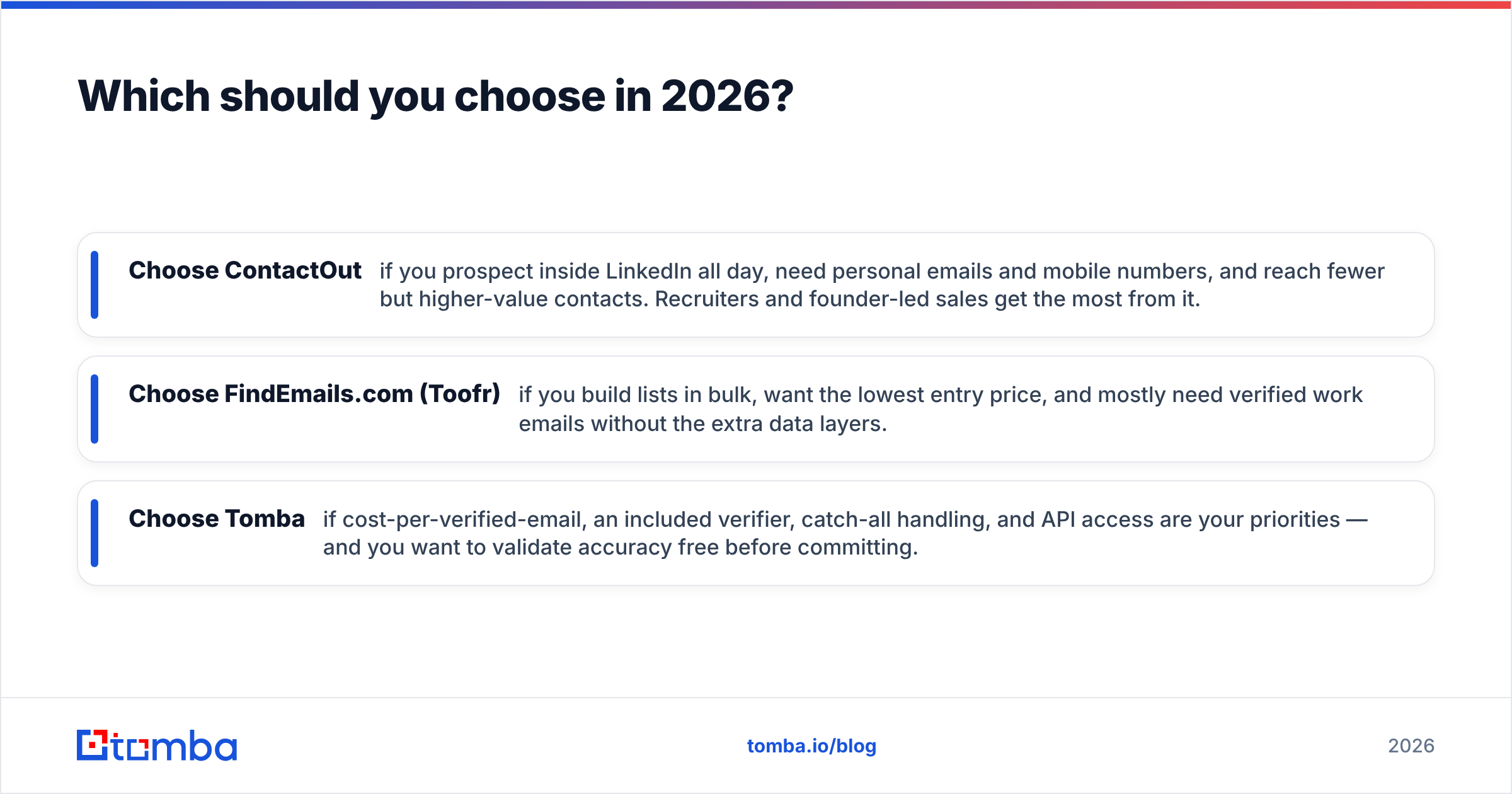
- Choose ContactOut if you prospect inside LinkedIn all day, need personal emails and mobile numbers, and reach fewer but higher-value contacts. Recruiters and founder-led sales get the most from it.
- Choose FindEmails.com (Toofr) if you build lists in bulk, want the lowest entry price, and mostly need verified work emails without the extra data layers.
- Choose Tomba if cost-per-verified-email, an included verifier, catch-all handling, and API access are your priorities — and you want to validate accuracy free before committing.
There's no universal winner in ContactOut vs FindEmails.com (Toofr). Both are legitimate tools that happen to be built for opposite ends of the same problem. The mistake is buying the one your competitor uses instead of the one your workflow needs.
Whichever you pick, keep two habits. Verify every address before it enters a sequence. And re-run the cost math on verified emails each quarter. Data vendors drift, prices change, and the tool that won last year isn't automatically this year's pick.
The bottom line#
ContactOut is the depth play. FindEmails.com is the volume-and-price play. Both work when matched to the right job. And both are worth testing against a free benchmark before you spend.
Want to find and verify professional emails in one place, without a per-seat premium or a separate verification bill? Start with the Tomba Email Finder. The free tier gives you 25 searches a month — enough to run the same list through all three tools. Let verified hit rate, not marketing copy, make the call. Test it on your real prospects, compare the bounce rates, and pick the winner with data instead of a logo.
Related guides#
Ready to find emails that actually work?
Join 150,000+ professionals who stopped guessing and started sending. Free credits on signup — no credit card required.
Get the Tomba newsletter
Practical outbound tactics and product updates — once every two weeks.
About the author