ContactOut vs Findymail (2026): Data-Backed Comparison
ContactOut vs Findymail: we compare accuracy, pricing, LinkedIn coverage, and bounce rates to help you pick the right email finder in 2026 — plus a cheaper third option.
Choosing between ContactOut and Findymail usually comes down to one question: are you a recruiter living inside LinkedIn, or a sales team pushing verified emails into cold outreach at volume? The two tools look similar on a feature grid, but they were built for different jobs — and picking the wrong one shows up fast in your bounce rate and your bill.
This is a neutral, hands-on comparison. We look at accuracy, pricing, coverage, verification, and workflow fit, then name a cheaper third option worth testing before you commit budget.
TL;DR — ContactOut vs Findymail at a glance#
- ContactOut is a LinkedIn-first contact finder. It shines for recruiters who want personal emails and phone numbers straight from a profile, backed by a large stored database.
- Findymail is a sales-first email finder built for cold email. It emphasizes verified work emails, list-building automations, and low bounce rates.
- Accuracy: both claim high hit rates, but Findymail leans on built-in verification, while ContactOut's edge is personal-email coverage. Real-world results vary by region and seniority.
- Pricing: neither is cheap at scale. ContactOut gates useful volume behind higher tiers; Findymail's credits burn quickly on large lists.
- The value pick: Tomba delivers domain search, a built-in email verifier, and an API from a $49/mo starter plan — often the better price-to-accuracy ratio for outbound teams.
What is ContactOut and who is it for?#
ContactOut is a contact-data platform best known for its Chrome extension that pulls emails and phone numbers directly from LinkedIn profiles. Its core promise is personal contact data — the Gmail or Outlook address a candidate actually reads — which is why recruiting and talent-sourcing teams are its heaviest users.
Under the hood, ContactOut relies on a large pre-collected database rather than live SMTP guessing for most lookups. That makes it fast inside a sourcing workflow: open a profile, click the extension, get an email and a phone number. It also offers a search portal, list exports, and an API for teams that want to pull data programmatically.
Where it gets less comfortable is high-volume B2B prospecting. Personal-email bias is great for recruiters and worse for sales reps who need role-based work emails that survive a company's spam filters. And meaningful monthly volume sits on the pricier plans.

What is Findymail and who is it for?#
Findymail is an email-finding tool built specifically for cold email and sales automation. Its pitch is simple: find verified work emails so your lists don't bounce, and automate the boring list-building steps. It integrates tightly with tools like Instantly and Smartlead, and it can auto-clean lists exported from LinkedIn Sales Navigator or Apollo.
The standout feature is verification baked into the find step. Findymail won't hand you an email it can't validate, which is a deliberate trade: fewer results, but the ones you get are less likely to hurt your sender reputation. For teams running high-volume outbound, protecting the domain matters more than raw match count.
The trade-offs: it's laser-focused on email (no deep phone-number play like ContactOut), and its credit model can feel tight once you're enriching thousands of rows a month.
ContactOut vs Findymail: the head-to-head table#
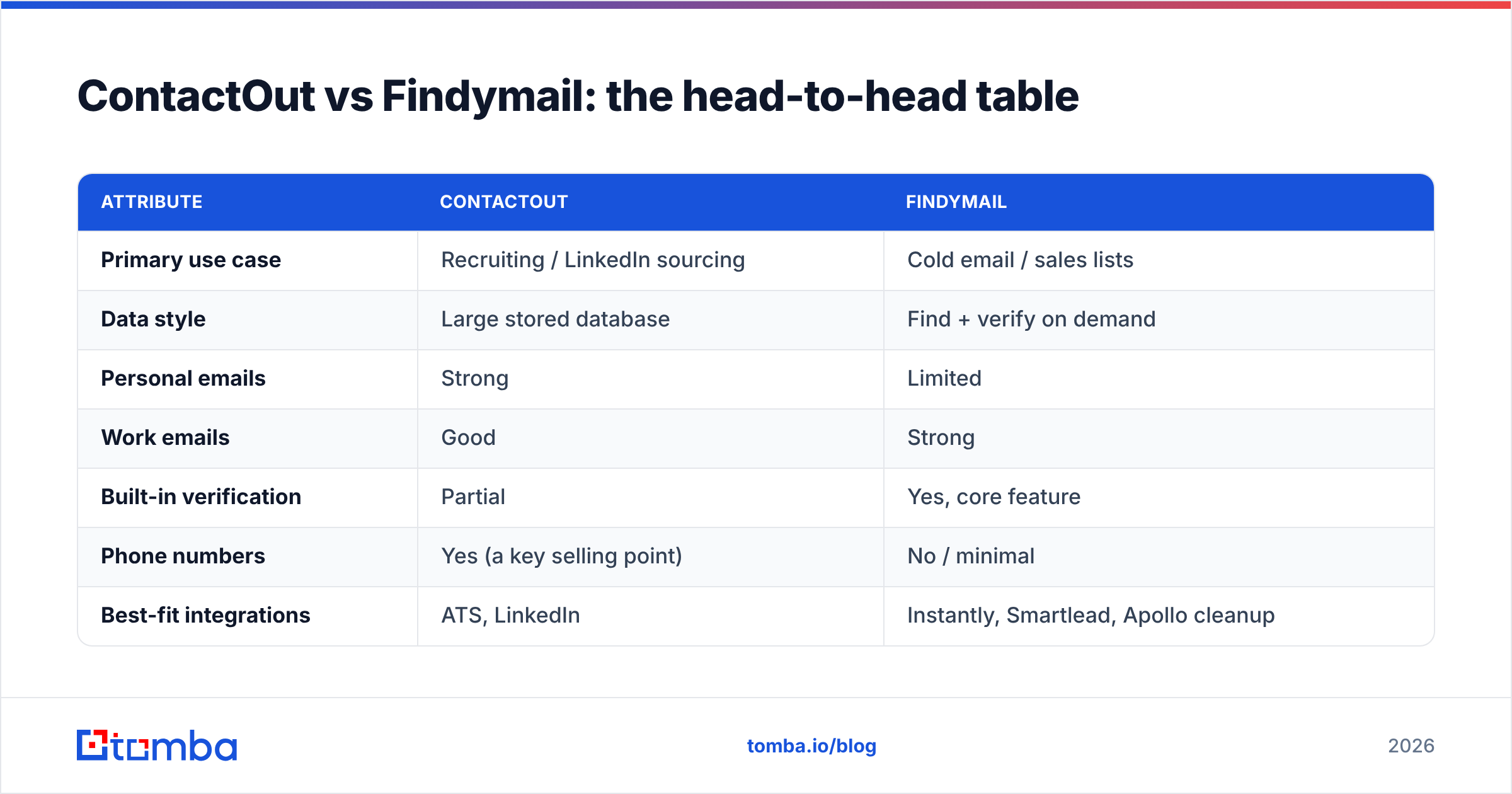
Here's how the two stack up on the attributes that actually change your results. Treat vendor accuracy claims as directional — always run your own sample before buying.
| Attribute | ContactOut | Findymail |
|---|---|---|
| Primary use case | Recruiting / LinkedIn sourcing | Cold email / sales lists |
| Data style | Large stored database | Find + verify on demand |
| Personal emails | Strong | Limited |
| Work emails | Good | Strong |
| Built-in verification | Partial | Yes, core feature |
| Phone numbers | Yes (a key selling point) | No / minimal |
| Best-fit integrations | ATS, LinkedIn | Instantly, Smartlead, Apollo cleanup |
| Free trial | Limited credits | Limited credits |
| Entry pricing | Higher tiers for real volume | Credit-based, burns fast at scale |
The pattern is clear: ContactOut wins for recruiters who need personal emails and phone numbers, and Findymail wins for cold-email senders who care most about not bouncing. Neither is a universal "best email finder" — they're specialists.
Is ContactOut or Findymail more accurate?#
Accuracy depends on what you're measuring. ContactOut's stored-database model gives it deep coverage on personal emails, especially for US-based profiles and senior professionals who have been in public datasets for years. Findymail's verify-on-find model gives it a lower bounce rate on the emails it returns, because it discards the risky ones before you ever see them.
That difference matters. A tool that returns 90 emails where 20 bounce is worse for cold email than a tool that returns 70 where 2 bounce — the second protects your email deliverability and keeps your domain out of spam folders. For recruiting, the math flips: you'd rather have the personal email and accept a slightly higher risk, because you're sending a handful of high-touch messages, not thousands.
The honest answer: run a 100-contact test on your actual ICP before you decide. Regional coverage, industry, and seniority swing accuracy more than any headline percentage. If your list is European mid-market, a tool that's great on US enterprise may disappoint.

How do ContactOut and Findymail pricing compare?#
Both tools are credit- or seat-based, and both get expensive as you scale. ContactOut reserves its higher email/phone quotas and API access for upper tiers, which suits well-funded recruiting teams but punishes lean startups. Findymail's credit packs are reasonable at small volume, but enriching several thousand rows a month adds up quickly, and unused credits create waste.
A few cost realities to plan around:
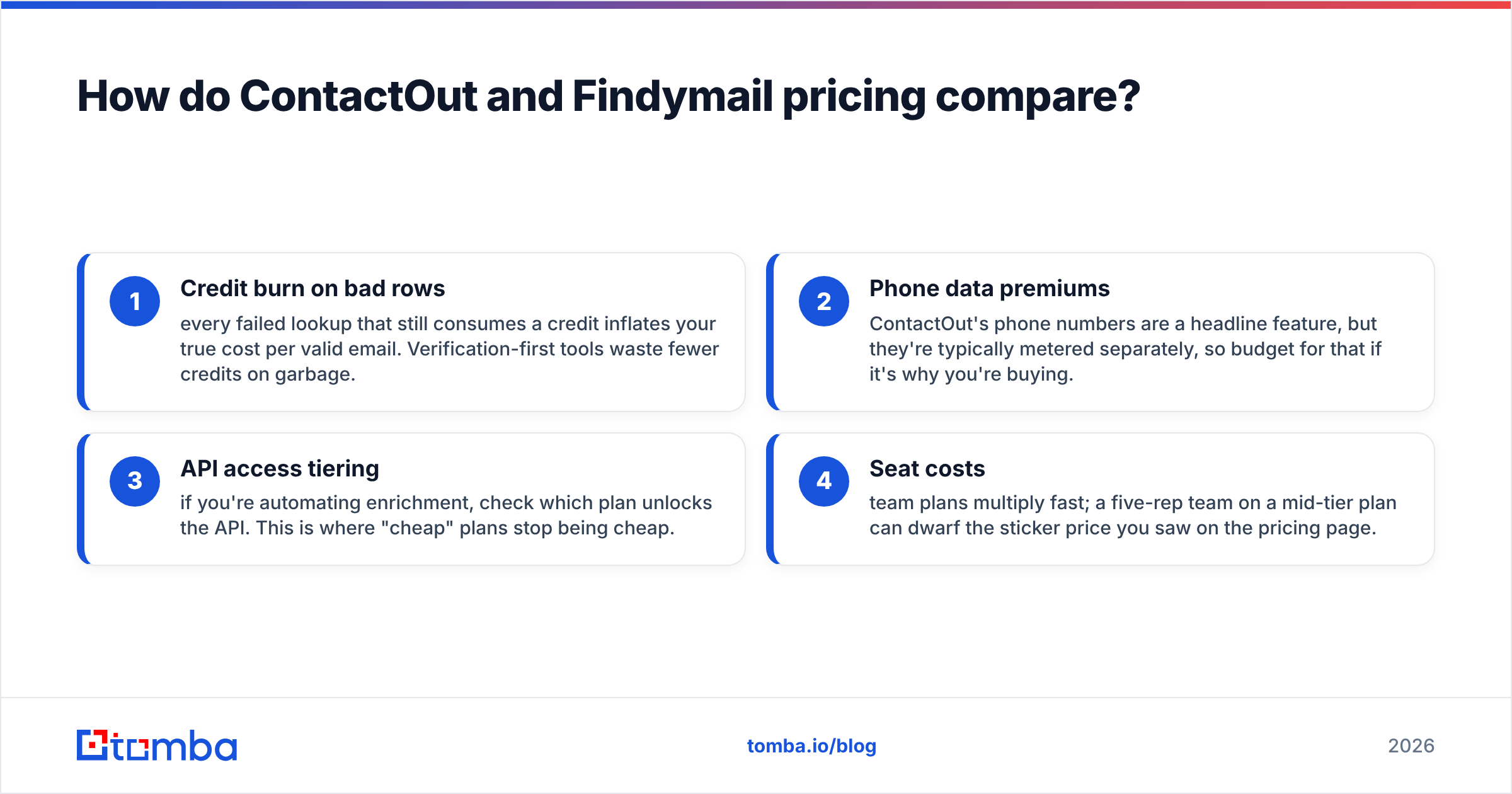
- Credit burn on bad rows — every failed lookup that still consumes a credit inflates your true cost per valid email. Verification-first tools waste fewer credits on garbage.
- Phone data premiums — ContactOut's phone numbers are a headline feature, but they're typically metered separately, so budget for that if it's why you're buying.
- API access tiering — if you're automating enrichment, check which plan unlocks the API. This is where "cheap" plans stop being cheap.
- Seat costs — team plans multiply fast; a five-rep team on a mid-tier plan can dwarf the sticker price you saw on the pricing page.
Before committing, model your cost per verified email, not the monthly sticker price. That single number reorders most vendor comparisons — and it's where a lower-priced, verification-included tool often wins.

Where does Tomba fit in the comparison?#
If your job is outbound and your priority is verified emails at a sane price, Tomba is the option most teams should sample before signing with either incumbent. It combines an email finder, a native email verifier, domain search, catch-all detection, and a developer-friendly email finder API — so you find and validate in one pass instead of stitching two tools together.
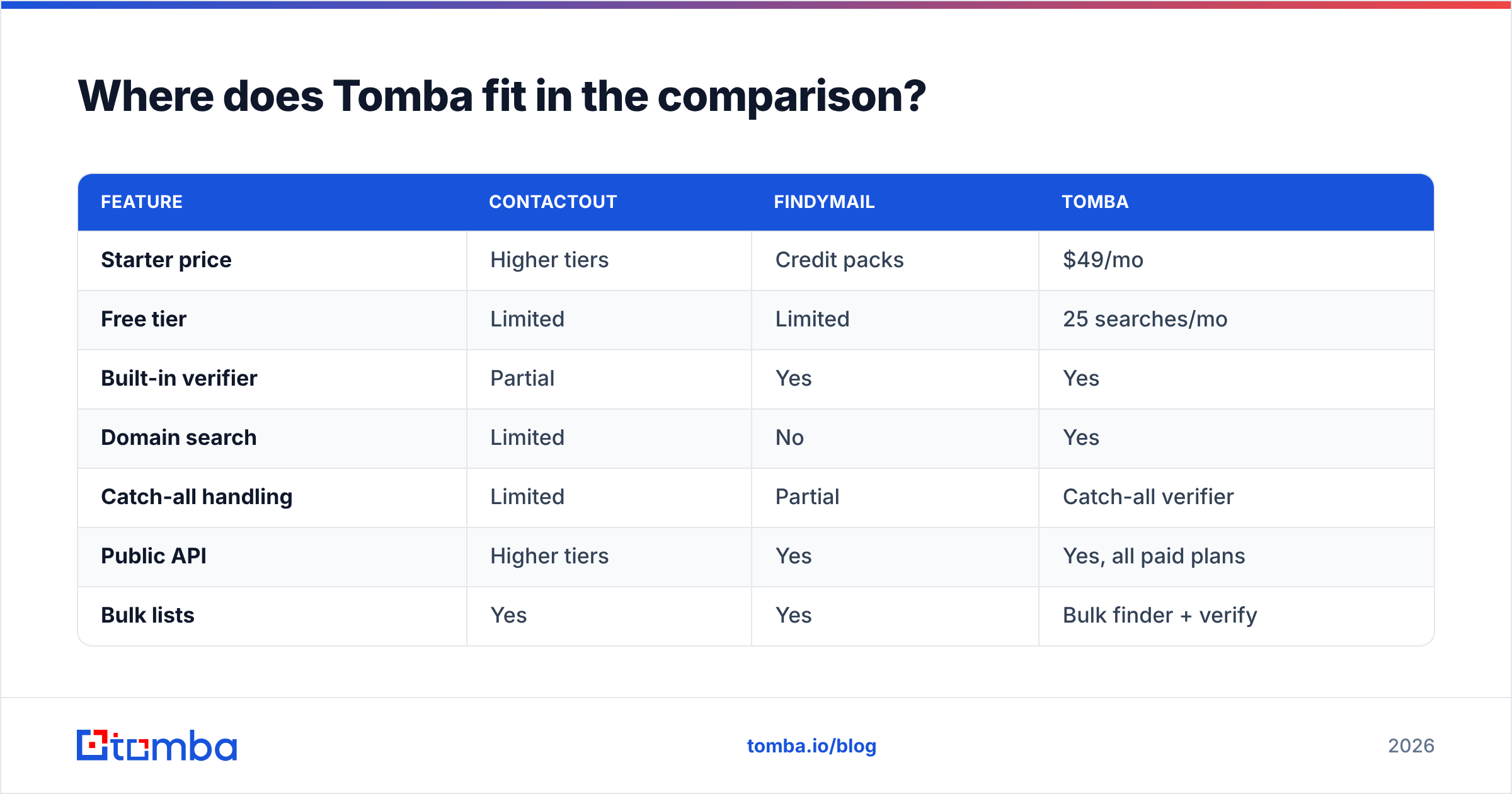
The pricing is the headline. Tomba's plans start with a free tier (25 searches/mo), then Starter at $49/mo, Growth at $99/mo, and Pro at $249/mo — with the verifier and domain search included rather than bolted on. For a sales team that would otherwise pay for Findymail plus a standalone verification tool, that consolidation is real savings.
| Feature | ContactOut | Findymail | Tomba |
|---|---|---|---|
| Starter price | Higher tiers | Credit packs | $49/mo |
| Free tier | Limited | Limited | 25 searches/mo |
| Built-in verifier | Partial | Yes | Yes |
| Domain search | Limited | No | Yes |
| Catch-all handling | Limited | Partial | Catch-all verifier |
| Public API | Higher tiers | Yes | Yes, all paid plans |
| Bulk lists | Yes | Yes | Bulk finder + verify |
Where Tomba won't replace ContactOut is deep personal-email and phone sourcing for recruiters — that's ContactOut's home turf. But for B2B work emails feeding cold campaigns, the find-plus-verify-in-one-place model is hard to beat on price.
Which tool should you choose?#
Match the tool to the job rather than the marketing:
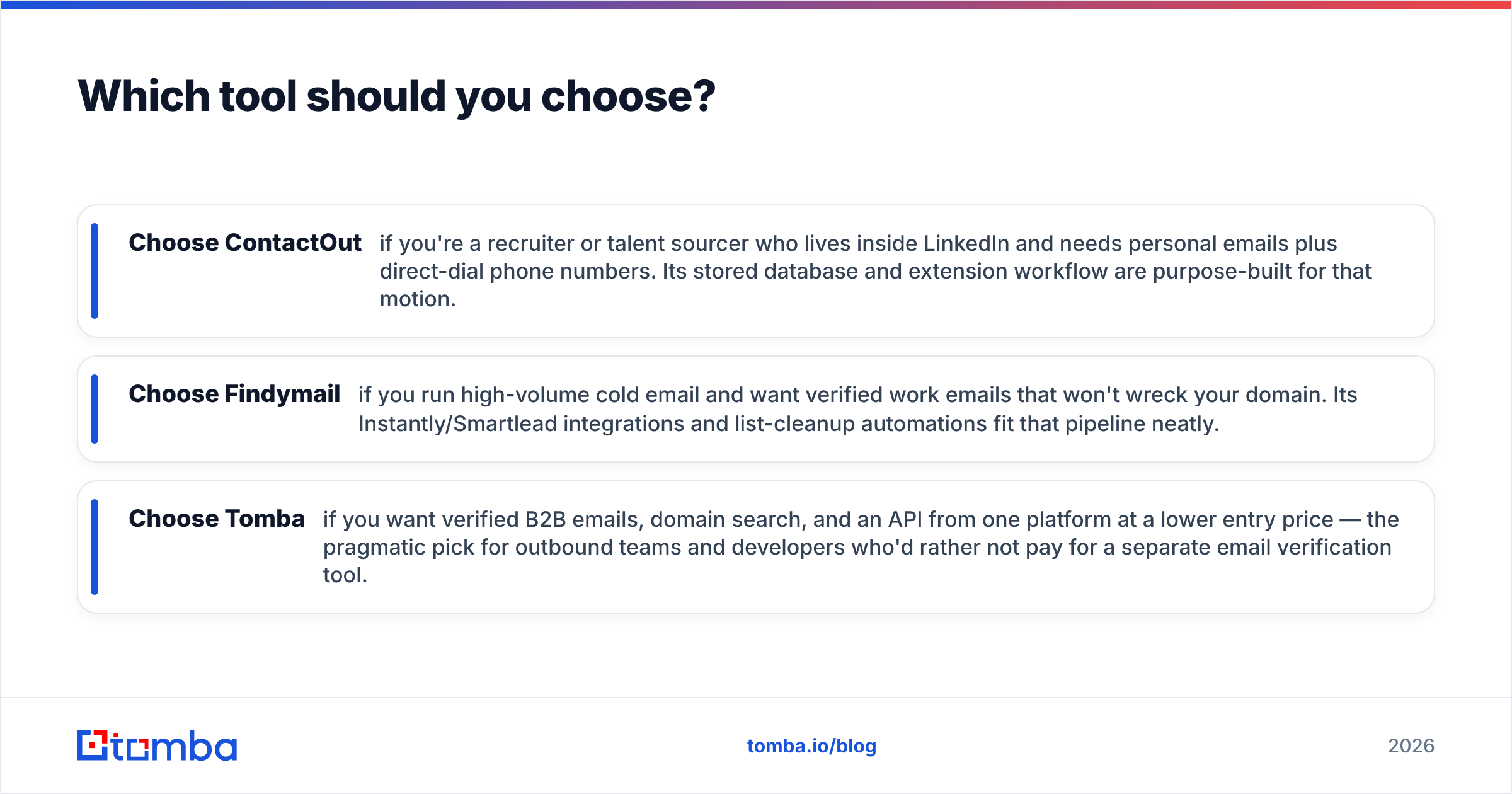
- Choose ContactOut if you're a recruiter or talent sourcer who lives inside LinkedIn and needs personal emails plus direct-dial phone numbers. Its stored database and extension workflow are purpose-built for that motion.
- Choose Findymail if you run high-volume cold email and want verified work emails that won't wreck your domain. Its Instantly/Smartlead integrations and list-cleanup automations fit that pipeline neatly.
- Choose Tomba if you want verified B2B emails, domain search, and an API from one platform at a lower entry price — the pragmatic pick for outbound teams and developers who'd rather not pay for a separate email verification tool.
A smart play many teams use: pair a LinkedIn-sourcing tool for the few high-value personal contacts with a cheaper, verification-first finder for the bulk work-email lists. You get ContactOut's coverage where it counts and controlled costs everywhere else.
For a broader field, see how the category shakes out below, and cross-check independent reviews on G2 before you buy — user-reported bounce rates tell you more than any vendor page.

Frequently asked questions#
Is ContactOut better than Findymail for cold email? Generally no. Findymail's verification-first model is designed to keep bounce rates low, which is exactly what cold email needs. ContactOut's strength is personal emails and phone numbers for recruiting, not high-volume outbound.
Does Findymail verify emails automatically? Yes — verification is a core part of how Findymail finds emails, so it tends to return fewer but more reliable results. That's the trade: less raw volume, lower bounce risk.
What's the cheapest reliable alternative? Tomba's Starter plan at $49/mo includes both finding and verification, plus domain search and API access, which often lands lower on cost-per-verified-email than either incumbent. There's a free tier to test first.
Can I use two tools together? Absolutely. Many teams use a LinkedIn-focused tool for personal contacts and a verification-first finder for bulk work-email lists. Just watch total spend and de-duplicate across sources.
Start with verified data, not guesswork#
The tool that wins is the one that puts deliverable emails in your sequencer without draining your budget on bounces. Before you renew ContactOut or scale Findymail credits, run the same 100-contact sample through Tomba's Email Finder — you'll get verified results, domain search, and catch-all detection in one pass, starting free and scaling from $49/mo. Test it against your real ICP, compare the bounce rates, and let the numbers pick your winner.
Related guides#
Ready to find emails that actually work?
Join 150,000+ professionals who stopped guessing and started sending. Free credits on signup — no credit card required.
Get the Tomba newsletter
Practical outbound tactics and product updates — once every two weeks.
About the author