ContactOut vs Forager: Email Finder Comparison for 2026
ContactOut and Forager both promise accurate B2B contacts, but they win at different jobs. Here's an honest, side-by-side breakdown of pricing, accuracy, and coverage — plus where a cheaper option beats both.
ContactOut vs Forager: which email finder should you actually pay for?#
If you're choosing between ContactOut and Forager, you're really asking one question: which tool puts more valid, reachable contacts into your sequences per dollar? Both market themselves as high-accuracy B2B data providers. Both have loyal users. But they're built around different workflows — and neither is automatically the right call for your team.
This is a neutral, side-by-side breakdown. No vendor spin. By the end you'll know which one fits your motion, where each one quietly costs more than the sticker price, and why a lot of teams end up running a leaner email finder alongside (or instead of) either.
TL;DR#
- ContactOut is a LinkedIn-first tool. It shines when your prospecting starts inside LinkedIn and Recruiter, and it's popular with recruiters chasing personal emails.
- Forager leans toward automated, API-driven B2B email enrichment and waterfall-style lookups aimed at RevOps and outbound teams.
- Accuracy is close on common domains but diverges on catch-all domains, non-US contacts, and personal emails — test both on your own list before committing.
- Pricing is the real differentiator: both get expensive at scale, and credits burn fast on bounced or unverified data.
- If you mostly need verified work emails by domain and name, a focused finder like Tomba Email Finder delivers comparable accuracy at a lower entry price — starting at $49/mo versus the higher tiers both of these push you toward.
What is ContactOut and who is it for?#
ContactOut is a contact-data platform best known for its Chrome extension that surfaces emails and phone numbers directly on LinkedIn profiles. Point it at a profile, and it tries to return both a work email and a personal email, plus a phone number where available.
Its center of gravity is recruiting and LinkedIn-heavy prospecting. If your day starts in LinkedIn Sales Navigator or Recruiter and you want contact details without leaving the tab, ContactOut is built for exactly that. It also offers a search portal and an API, but the extension is the hero.
Where ContactOut stands out:
- Personal email coverage — genuinely useful for recruiters who can't reach candidates on a corporate address.
- LinkedIn-native workflow — minimal context switching.
- Phone numbers bundled into the same lookup.
Where it frustrates people:
- Credits are split across email and phone, so heavy users burn through allowances fast.
- Pricing scales steeply once you leave the entry tier.
- Coverage outside North America and outside LinkedIn-active roles gets thin.
What is Forager and who is it for?#
Forager positions itself as a B2B data and email-enrichment engine aimed at outbound and RevOps teams who want to enrich lists and lookups programmatically. Rather than a "sit on top of LinkedIn" extension, the pitch is cleaner data pipelines: feed it identifiers, get back verified emails, and wire it into your stack.
That makes Forager attractive when you're running automated enrichment — think Clay-style waterfalls, CRM hygiene jobs, or a homegrown enrichment step before a sequence. It's less about one-off manual lookups and more about batch and API throughput.
Where Forager stands out:
- Enrichment and waterfall workflows — designed to slot into automated pipelines.
- Work-email focus with verification baked into the flow.
- API-first mindset for teams that build.
Where it frustrates people:
- Less useful for a rep who just wants to grab one email off a LinkedIn profile.
- Personal-email and phone coverage isn't the selling point.
- Real cost depends heavily on how you consume credits and how many providers you waterfall through.

Is ContactOut more accurate than Forager?#
Short answer: it depends on the segment you're testing. Accuracy claims from any data vendor are averages, and averages hide the cases that matter to you.
On common US corporate domains with standard email patterns (first.last@company.com), both tools land in a similar high range. The gaps open up in the hard cases:
- Catch-all domains — servers that accept any address make verification ambiguous. How each tool labels these (valid vs. risky vs. catch-all) affects your bounce rate more than headline accuracy does. Run suspect domains through a dedicated catch-all verifier before you trust a "valid" flag.
- Personal emails — ContactOut generally has the edge here, which matters for recruiters.
- Non-US / non-English contacts — coverage thins out for both; test your actual geography.
- Recently changed roles — job-change lag means stale emails slip through regardless of vendor.

The honest takeaway: don't buy on a published accuracy percentage. Take 100–200 real target contacts, run them through both trials, then verify the outputs with an independent email verifier and measure the true valid rate. That number — not the marketing claim — is what you're actually paying for.
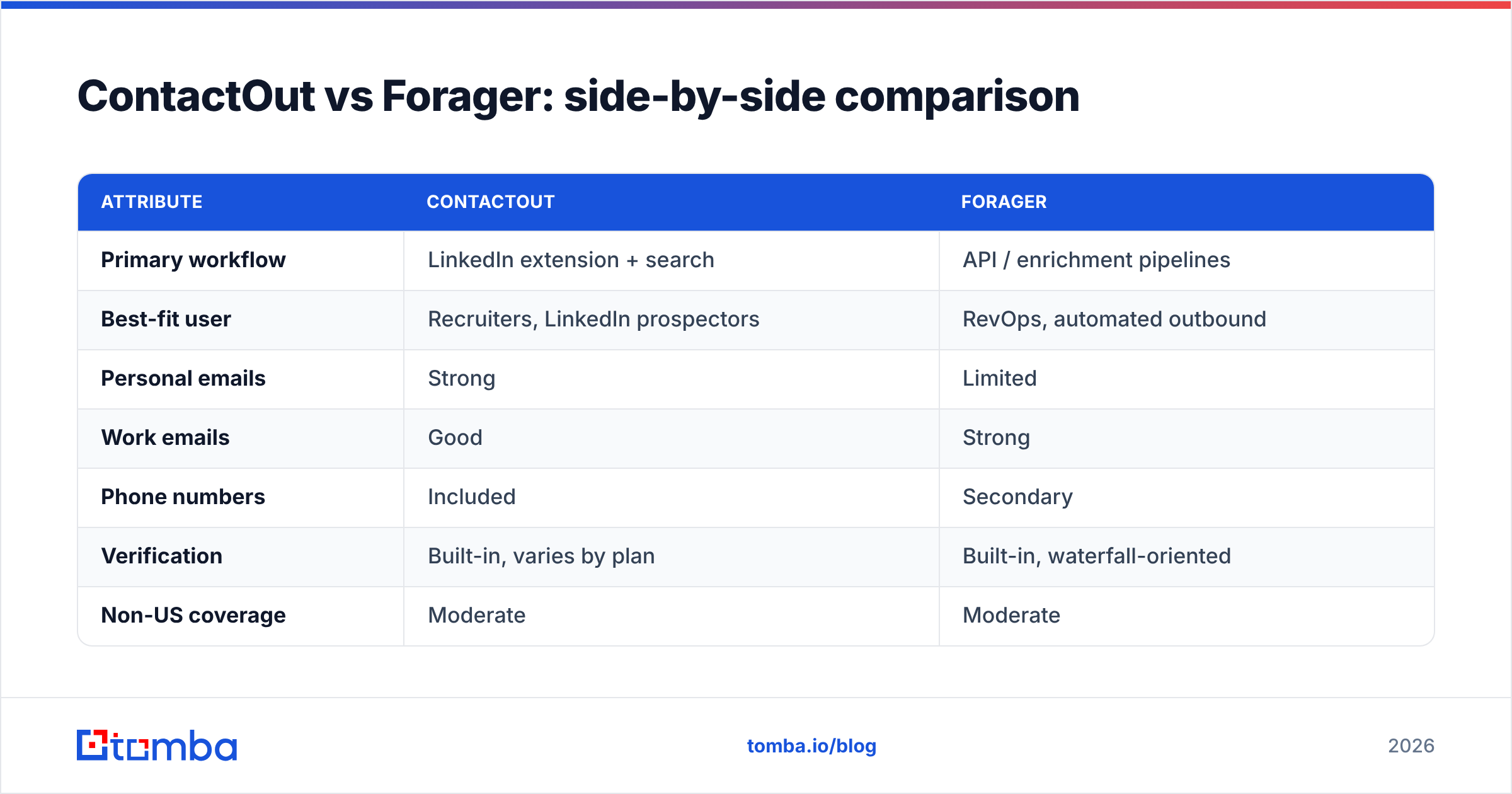
ContactOut vs Forager: side-by-side comparison#
Here's how the two stack up across the attributes that drive a buying decision. Treat pricing as directional — both vendors adjust plans and gate features behind sales calls.
| Attribute | ContactOut | Forager |
|---|---|---|
| Primary workflow | LinkedIn extension + search | API / enrichment pipelines |
| Best-fit user | Recruiters, LinkedIn prospectors | RevOps, automated outbound |
| Personal emails | Strong | Limited |
| Work emails | Good | Strong |
| Phone numbers | Included | Secondary |
| Verification | Built-in, varies by plan | Built-in, waterfall-oriented |
| Non-US coverage | Moderate | Moderate |
| Entry price | Higher, credit-limited | Quote / usage-based |
| Free option | Limited trial credits | Limited / trial |
Notice the pattern: these tools barely overlap in their sweet spots. ContactOut wins the manual, LinkedIn-first, recruiter use case. Forager wins the automated, pipeline-enrichment use case. If your need sits between them — a sales team that wants verified work emails by domain and name, in bulk, without a heavy build — neither is a clean fit, and you're often overpaying for a specialty you won't use.
How much do ContactOut and Forager really cost?#
The sticker price is never the real price with contact data. Three hidden costs inflate both:
- Wasted credits on bad data. A returned email that bounces still cost you a credit. If 8% of returns are invalid, your effective cost-per-valid-email jumps proportionally.
- Split allowances. ContactOut divides usage across emails and phones; if you only want emails, you're subsidizing a feature you don't use.
- Waterfall stacking. Forager-style enrichment can call multiple providers per contact. Great for hit rate, but each hop can consume budget.
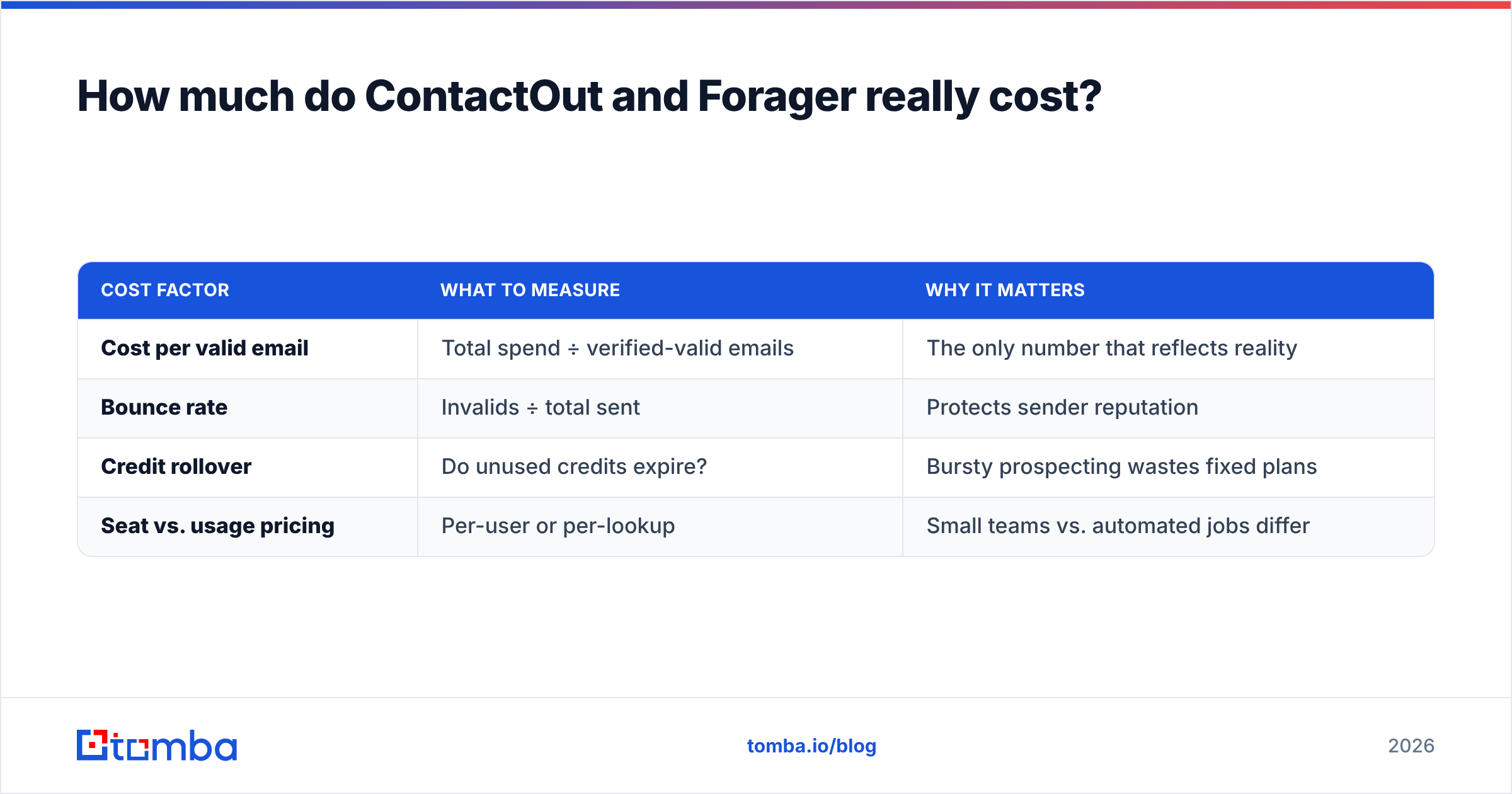
Here's a simplified way to compare true cost rather than headline cost:
| Cost factor | What to measure | Why it matters |
|---|---|---|
| Cost per valid email | Total spend ÷ verified-valid emails | The only number that reflects reality |
| Bounce rate | Invalids ÷ total sent | Protects sender reputation |
| Credit rollover | Do unused credits expire? | Bursty prospecting wastes fixed plans |
| Seat vs. usage pricing | Per-user or per-lookup | Small teams vs. automated jobs differ |
For teams that mainly need verified work emails, this is where a focused finder changes the math. Tomba's pricing starts at a Free tier with 25 searches/month, then Starter at $49/mo, Growth at $99/mo, and Pro at $249/mo — with the email verifier and domain search included rather than sold as a separate line item. If your use case is "find and verify business emails at scale," you often get the outcome you wanted from ContactOut or Forager for less.

When should you pick ContactOut over Forager?#
Choose ContactOut if most of these are true:
- Your prospecting or sourcing starts inside LinkedIn and you want an in-tab extension.
- You're a recruiter who needs personal emails and mobile numbers to reach candidates off corporate channels.
- You value manual, profile-by-profile lookups over batch enrichment.
- Phone coverage bundled with email is a real requirement, not a nice-to-have.
ContactOut is the more intuitive tool for an individual rep or recruiter who lives in LinkedIn all day. The trade-off is cost at volume and weaker fit for automated pipelines.
When should you pick Forager over ContactOut?#
Choose Forager if most of these are true:
- You're building automated enrichment — a Clay table, a CRM cleanup job, or a pre-sequence enrichment step.
- You care more about verified work emails than personal emails or phones.
- Your team is API-comfortable and wants data to flow into the stack, not sit behind an extension.
- You run batch jobs where waterfall hit-rate beats one-off convenience.
Forager fits the RevOps or growth engineer profile better than the solo SDR. The trade-off is that it's overkill — and awkward — for someone who just wants to grab one email now.
Is there a better ContactOut and Forager alternative?#
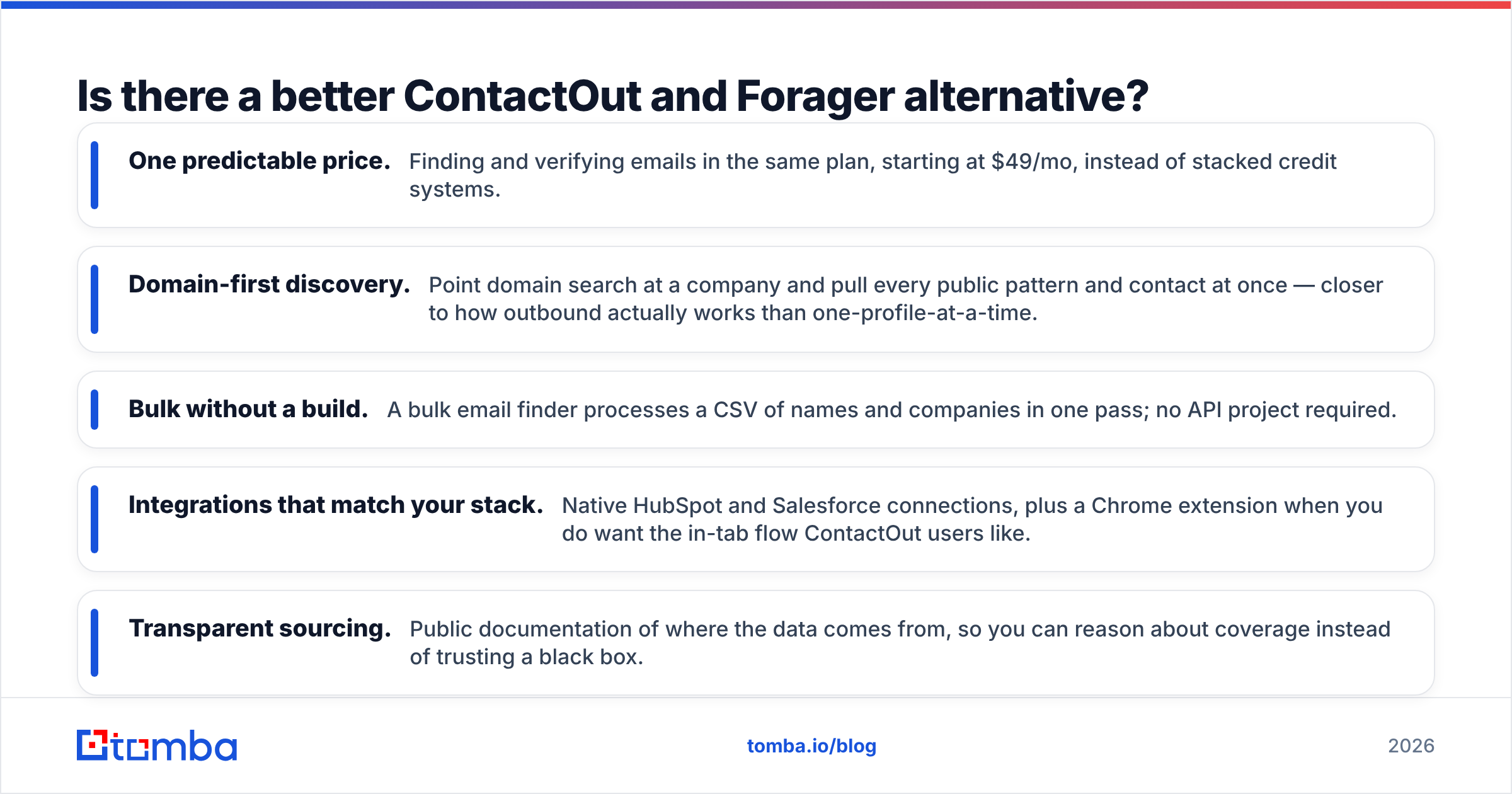
For a large share of teams, yes — because the honest answer is that many buyers don't need either tool's specialty. They need reliable, verified business emails by name and domain, in bulk, wired into the tools they already use, without paying the LinkedIn-extension premium or building an enrichment pipeline.
That's the gap a focused email finder fills. A few reasons teams consolidate onto one:
- One predictable price. Finding and verifying emails in the same plan, starting at $49/mo, instead of stacked credit systems.
- Domain-first discovery. Point domain search at a company and pull every public pattern and contact at once — closer to how outbound actually works than one-profile-at-a-time.
- Bulk without a build. A bulk email finder processes a CSV of names and companies in one pass; no API project required.
- Integrations that match your stack. Native HubSpot and Salesforce connections, plus a Chrome extension when you do want the in-tab flow ContactOut users like.
- Transparent sourcing. Public documentation of where the data comes from, so you can reason about coverage instead of trusting a black box.
None of this makes ContactOut or Forager bad — they're strong at their specialties. It means you should match the tool to your motion. If your motion is "reliably reach business inboxes at scale," a dedicated finder usually wins on cost-per-valid-email, which is the metric that actually moves pipeline.
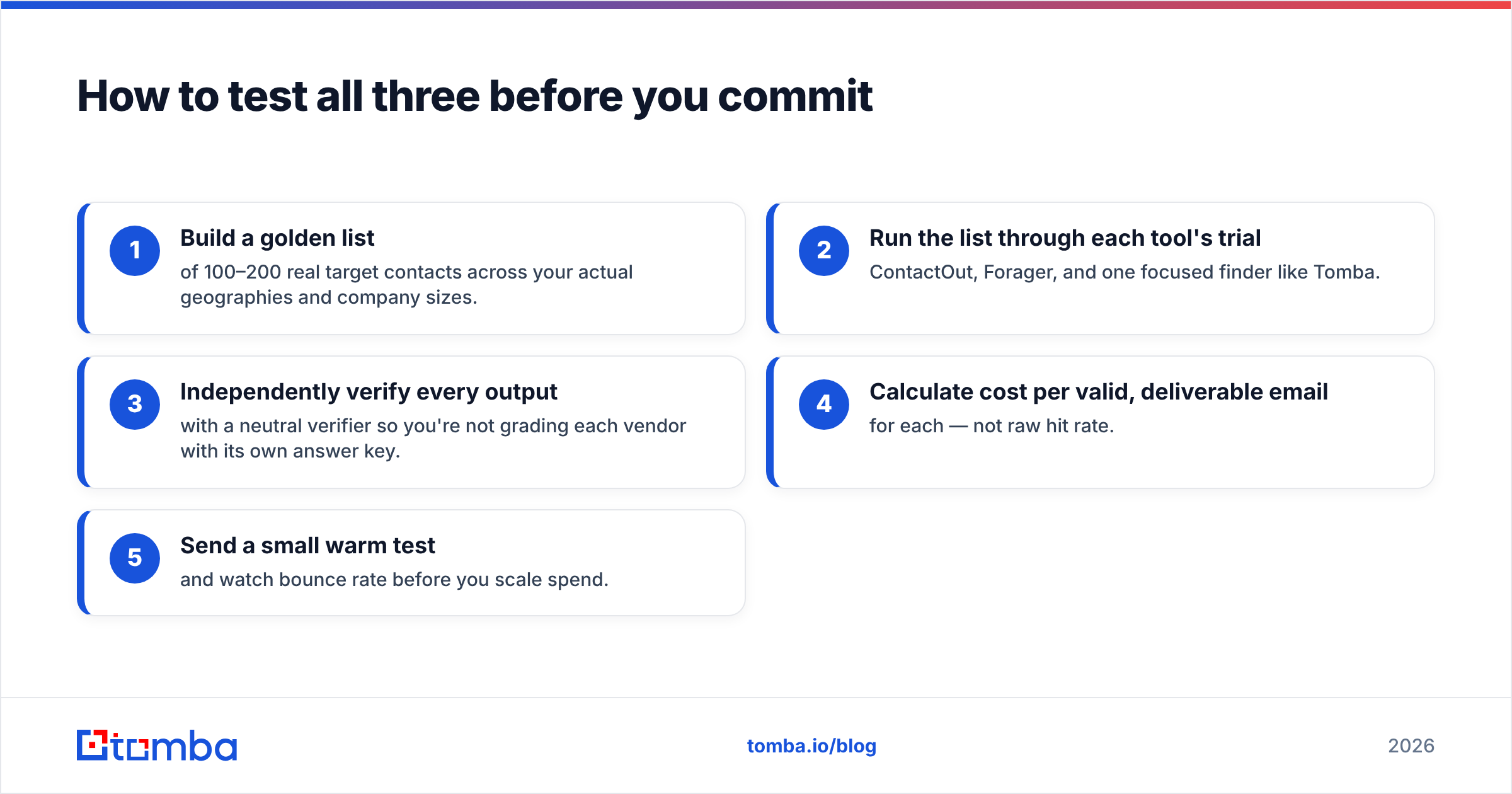
How to test all three before you commit#
Don't decide from a comparison table, including this one. Run a controlled trial:
- Build a golden list of 100–200 real target contacts across your actual geographies and company sizes.
- Run the list through each tool's trial — ContactOut, Forager, and one focused finder like Tomba.
- Independently verify every output with a neutral verifier so you're not grading each vendor with its own answer key.
- Calculate cost per valid, deliverable email for each — not raw hit rate.
- Send a small warm test and watch bounce rate before you scale spend.
Whichever tool wins that test on your data is your answer. Vendor-published accuracy stats are marketing; your golden-list valid rate is truth. For reference on evaluating providers objectively, industry review sites like G2 and Capterra aggregate real buyer feedback, and it's worth reading recruiter- versus RevOps-tagged reviews separately since the two audiences want different things.
The verdict#
ContactOut and Forager win different games. ContactOut is the recruiter's and LinkedIn-prospector's tool: personal emails, phones, in-tab lookups. Forager is the RevOps engineer's tool: API-driven, work-email enrichment for automated pipelines. Pick ContactOut for manual LinkedIn work, Forager for automated enrichment — and test both on your own list, because catch-all handling and non-US coverage vary more than the headline accuracy numbers suggest.
But if your real need is the common one — verified business emails by name and domain, in bulk, at a predictable price — you may be paying for a specialty you won't use. That's the case where a focused finder wins on the only metric that matters: cost per valid, deliverable email.
Want to see where you land? Start free with the Tomba Email Finder — 25 searches a month at no cost, verification built in, and no LinkedIn-extension or API-build premium. Run it against the same golden list you'd give ContactOut and Forager, compare cost per valid email, and let your own data pick the winner.
Related guides#
Ready to find emails that actually work?
Join 150,000+ professionals who stopped guessing and started sending. Free credits on signup — no credit card required.
Get the Tomba newsletter
Practical outbound tactics and product updates — once every two weeks.
About the author