ContactOut vs Gazelle (2026): Which Contact Finder Wins?
ContactOut vs Gazelle compared on data accuracy, coverage, pricing, and workflow fit — plus where a leaner email finder beats both for cold outbound.
ContactOut vs Gazelle (2026): Which Contact Finder Wins?
TL;DR
- ContactOut is a LinkedIn-first contact finder: its Chrome extension pulls personal and work emails plus phone numbers off profiles, best for recruiters and reps who live inside LinkedIn all day.
- Gazelle (Gazelle.ai) is a company-intelligence platform built around firmographic, growth-signal, and market data — it's an account-selection tool first, contact data second.
- They solve different halves of the same problem: ContactOut answers "how do I reach this person?" while Gazelle answers "which companies should I target?"
- On raw contact-finding cost and API access, both get expensive fast; a focused email finder like Tomba Email Finder often covers the outreach layer for less.
- Pick ContactOut for LinkedIn-driven prospecting, Gazelle for data-led account targeting, and read to the end for the hybrid stack that beats running either one alone.
What is ContactOut and who is it for?#
ContactOut started as a browser extension that surfaces email addresses and phone numbers directly on LinkedIn profiles. That origin still defines it. If your day is spent scrolling Sales Navigator or sourcing candidates, ContactOut sits on top of the workflow you already have and pulls contact details without breaking your flow.
Its strengths are concrete:
- LinkedIn-native capture — one click on a profile returns work email, personal email, and often a mobile number.
- Personal email coverage — ContactOut leans hard into personal (non-corporate) emails, which recruiters value when candidates ignore work inboxes.
- Bulk lists and exports — you can build lists from LinkedIn searches and push them to CSV or a CRM.
- A search portal beyond the extension, so you're not fully dependent on browsing profiles one at a time.
The tradeoff is that ContactOut is priced and packaged for individual seats and teams who value personal-email depth. According to reviews on G2, users praise the LinkedIn accuracy but flag that credits and seat costs climb quickly once you scale outbound volume. Its official site, contactout.com, positions it primarily around recruiting and sales sourcing.

What is Gazelle and who is it for?#
Gazelle is a different animal. Where ContactOut is a person-level lookup tool, Gazelle.ai is a company-intelligence and market-analysis platform. It aggregates firmographic data, growth signals, financials, and predictive indicators to help teams decide which accounts are worth pursuing — a job closer to account-based marketing and economic-development research than to raw email hunting.
That means Gazelle shines when your bottleneck is targeting, not reaching. Typical use cases:
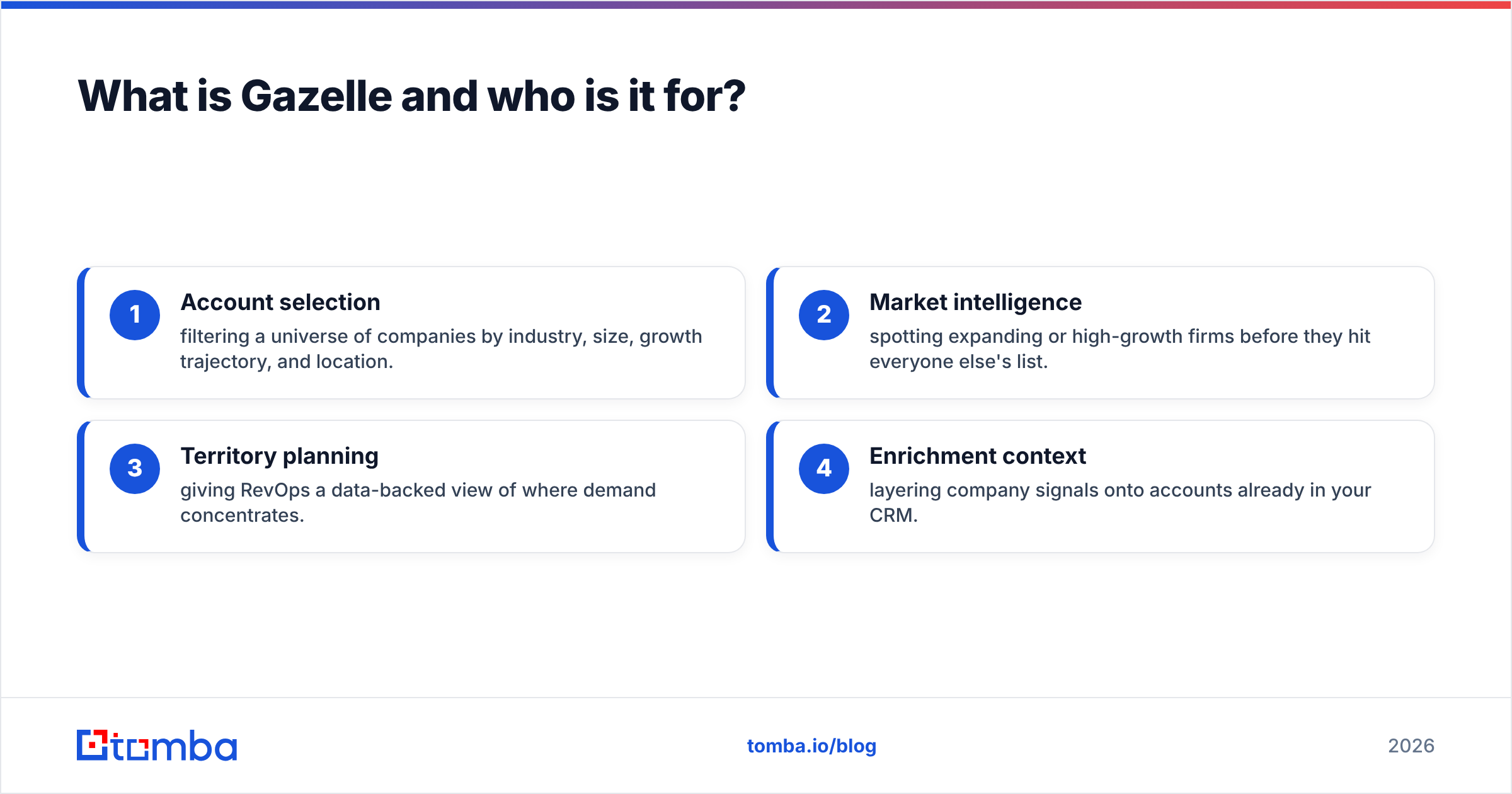
- Account selection — filtering a universe of companies by industry, size, growth trajectory, and location.
- Market intelligence — spotting expanding or high-growth firms before they hit everyone else's list.
- Territory planning — giving RevOps a data-backed view of where demand concentrates.
- Enrichment context — layering company signals onto accounts already in your CRM.
Gazelle can surface some contact-level data, but that isn't its center of gravity. If you buy Gazelle expecting a LinkedIn email-scraper, you'll be disappointed; if you buy it to build a smarter target list, it earns its keep. Think of it as the difference between a map that shows you which neighborhoods are growing (Gazelle) and a phone book for the houses on one street (ContactOut).
ContactOut vs Gazelle: how do they compare head-to-head?#
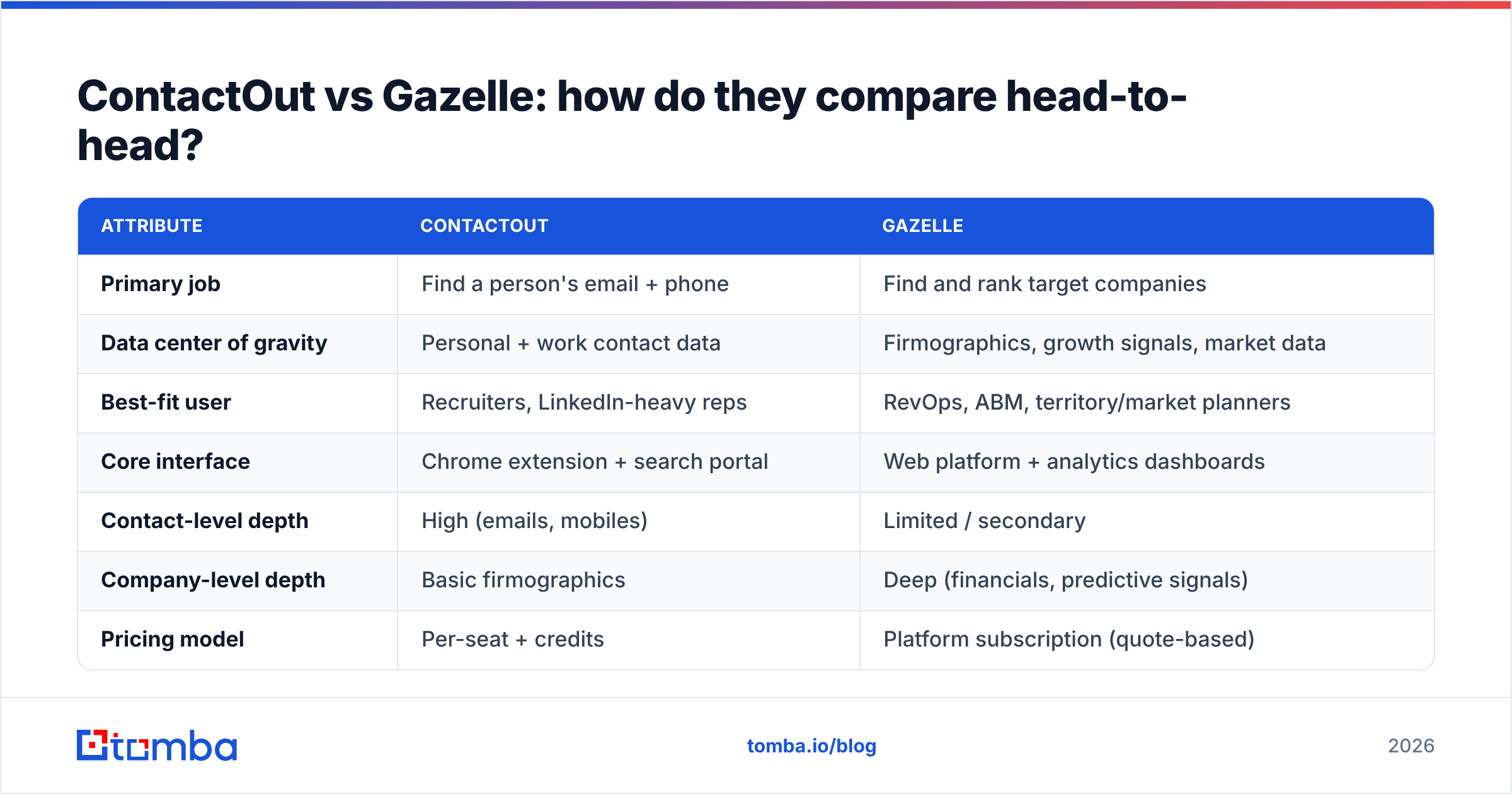
Here's the honest side-by-side. Pricing for both is seat- and volume-dependent and often quoted after a demo, so treat cost rows as directional rather than exact.
| Attribute | ContactOut | Gazelle |
|---|---|---|
| Primary job | Find a person's email + phone | Find and rank target companies |
| Data center of gravity | Personal + work contact data | Firmographics, growth signals, market data |
| Best-fit user | Recruiters, LinkedIn-heavy reps | RevOps, ABM, territory/market planners |
| Core interface | Chrome extension + search portal | Web platform + analytics dashboards |
| Contact-level depth | High (emails, mobiles) | Limited / secondary |
| Company-level depth | Basic firmographics | Deep (financials, predictive signals) |
| Pricing model | Per-seat + credits | Platform subscription (quote-based) |
| API access | Available on higher tiers | Available, enterprise-oriented |
| Free option | Limited free tier | Demo-led, no true free tier |
The pattern is clear: these tools rarely compete on the same line item. A team choosing "ContactOut or Gazelle" is usually asking the wrong question. The right one is "which layer of my funnel is actually broken — targeting or reaching?"

Which one is more accurate for outbound?#
Accuracy depends entirely on what you're measuring. For person-level email accuracy, ContactOut is the stronger of the two — it's built for exactly that, and its LinkedIn matching gives it an edge on personal emails competitors miss. For company-level signal accuracy (is this firm growing, hiring, expanding?), Gazelle leads, because that's the data it curates.
But there's a third accuracy question neither fully owns: deliverable, verified work emails at scale. A personal Gmail address ContactOut finds may be accurate yet useless for compliant B2B cold email. A growth signal Gazelle surfaces tells you nothing about whether the CFO's inbox will accept your message. This is the gap where a dedicated verification layer matters. Running finds through an email verifier before you send protects your sender reputation and keeps bounce rates low — something neither tool treats as its core promise.

If bounce rates are your pain, accuracy of finding isn't enough — you need accuracy of validating, and you need it built into the pipeline, not bolted on after a campaign already burned your domain.
What do ContactOut and Gazelle cost — and where do they get expensive?#
Neither tool is cheap once you leave the entry tier. ContactOut's costs scale with seats and credits, so a growing SDR team watches the monthly bill climb as volume rises. Gazelle is a platform subscription typically sold through a sales conversation, which suits enterprise buyers but is heavy for a small team that just needs contacts.
The hidden cost in both cases is paying for capability you won't use. A three-person outbound team rarely needs Gazelle's full market-intelligence suite, and it may not need ContactOut's personal-email depth if it only sends compliant work-email campaigns. That's why comparing sticker prices misses the point — you should compare cost per usable, verified contact.
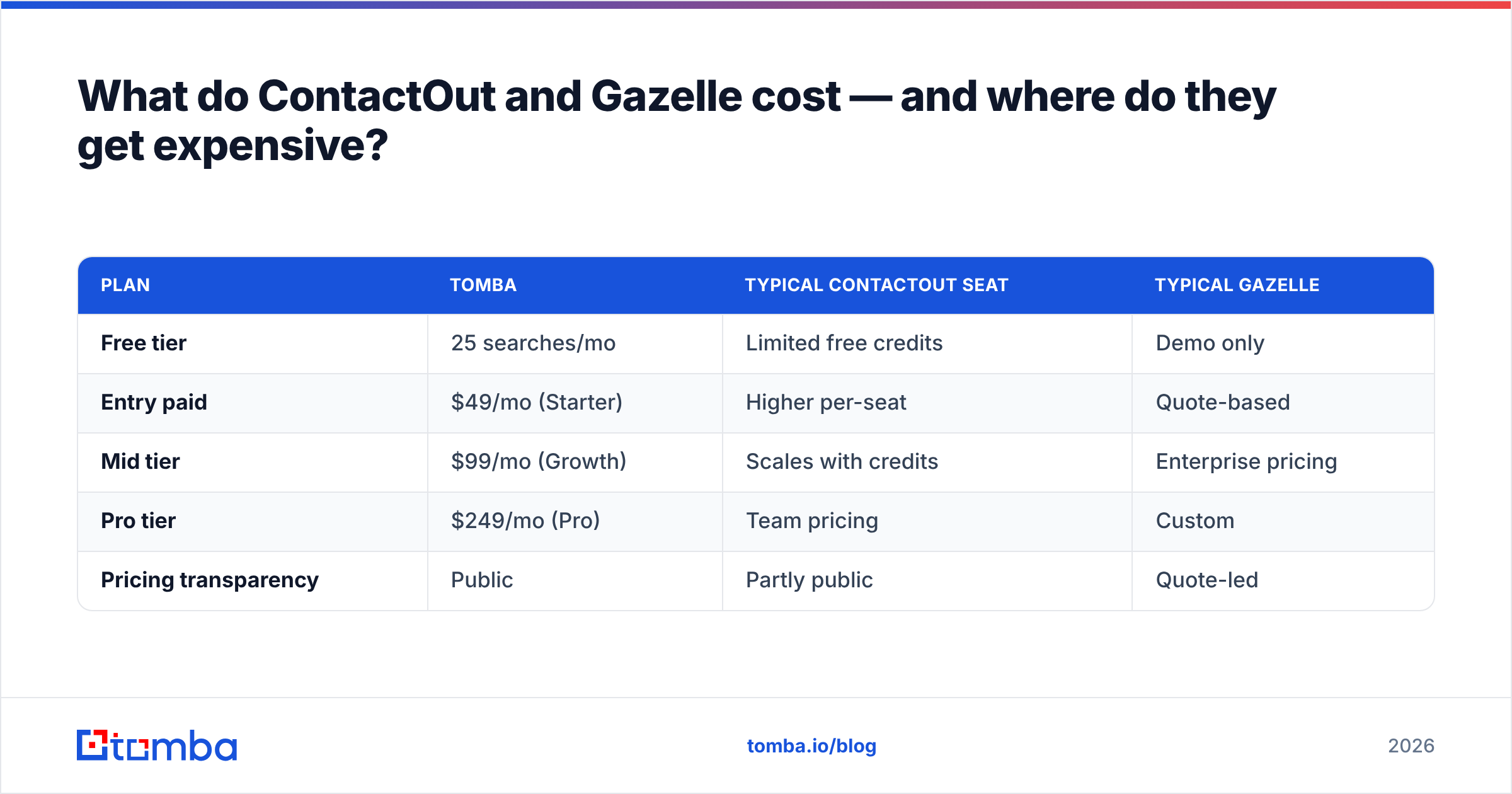
Here's how a lean email-finding stack stacks up on transparent, published pricing:
| Plan | Tomba | Typical ContactOut seat | Typical Gazelle |
|---|---|---|---|
| Free tier | 25 searches/mo | Limited free credits | Demo only |
| Entry paid | $49/mo (Starter) | Higher per-seat | Quote-based |
| Mid tier | $99/mo (Growth) | Scales with credits | Enterprise pricing |
| Pro tier | $249/mo (Pro) | Team pricing | Custom |
| Pricing transparency | Public | Partly public | Quote-led |
You can see full Tomba pricing without booking a call — which, for teams that just want to find and verify emails, removes a lot of friction. (BookYourData is another respected option if you prefer buying pre-built, verified lists outright rather than searching; different model, same goal of clean contact data.)
Where does a focused email finder fit in this comparison?#
Most teams don't need to choose between ContactOut and Gazelle — they need to fix the reaching layer cheaply and reliably, then decide whether targeting justifies a platform like Gazelle on top.
That's the case for a purpose-built email finder. Instead of paying for a LinkedIn scraper's personal-email depth or an intelligence platform's analytics, you get the specific job done: turn a name and domain into a verified, sendable address. A few ways that plays out in practice:
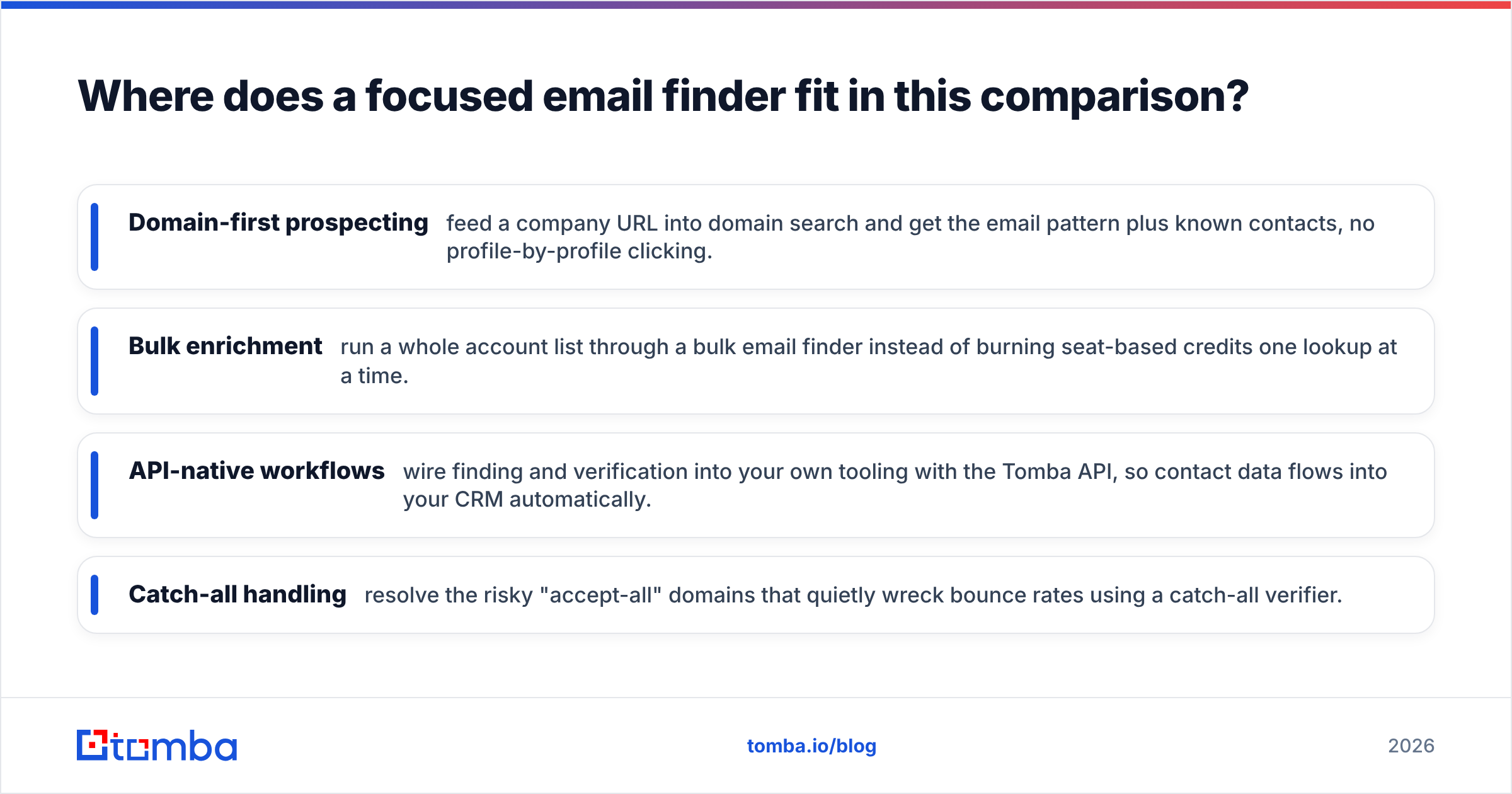
- Domain-first prospecting — feed a company URL into domain search and get the email pattern plus known contacts, no profile-by-profile clicking.
- Bulk enrichment — run a whole account list through a bulk email finder instead of burning seat-based credits one lookup at a time.
- API-native workflows — wire finding and verification into your own tooling with the Tomba API, so contact data flows into your CRM automatically.
- Catch-all handling — resolve the risky "accept-all" domains that quietly wreck bounce rates using a catch-all verifier.
The point isn't that one tool replaces both. It's that the outreach layer — find, verify, send — is where cost leaks fastest, and it's the layer a specialized tool does more cheaply than either a LinkedIn extension or a market-intelligence suite.
How do you choose the right stack in 2026?#
Work backward from your actual bottleneck, not from a feature list.
Choose ContactOut if:
- Your reps or recruiters live inside LinkedIn and Sales Navigator.
- You genuinely need personal (non-corporate) emails and mobile numbers.
- One-click, in-profile capture is worth a premium to your workflow.
Choose Gazelle if:
- Your problem is which accounts, not which contacts.
- You run ABM or territory planning and want growth signals and firmographics.
- You have the budget and volume to justify a full intelligence platform.
Add (or start with) a dedicated email finder if:
- Your bounce rate or email deliverability is the thing hurting pipeline.
- You want transparent, published pricing and a real free tier to test.
- You need find + verify in one flow, via extension, bulk upload, or API.
For a lot of teams the smartest 2026 stack is a targeting layer only if the data justifies it, plus a lean finding-and-verification layer underneath — rather than overpaying for one heavyweight tool to do a job it wasn't built for. If you're replacing a broad platform, it's worth checking a ContactOut alternative side by side before you renew.
The bottom line#
ContactOut and Gazelle aren't really rivals — they're specialists at opposite ends of the funnel. ContactOut wins the person-level, LinkedIn-native lookup. Gazelle wins the account-level, market-intelligence view. Neither is optimized for the unglamorous middle: finding a verified, deliverable work email at scale without paying for capability you don't use.
That middle is where most cold-outbound money leaks, and it's the cheapest layer to fix. If your real problem is turning target companies into clean, sendable contacts — with verification built in and pricing you can read without a sales call — start with the Tomba Email Finder. Test it on the free tier, run your list through verification, and see how many "found" emails were actually deliverable before you commit budget to a heavier platform on top.
Related guides#
Ready to find emails that actually work?
Join 150,000+ professionals who stopped guessing and started sending. Free credits on signup — no credit card required.
Get the Tomba newsletter
Practical outbound tactics and product updates — once every two weeks.
About the author