ContactOut vs Gigasheet: Data Enrichment Compared for 2026
ContactOut finds verified B2B emails and phone numbers. Gigasheet crunches huge lists in a browser spreadsheet. They solve different problems—here is exactly which one your team needs, and where each falls short.

People type "ContactOut vs Gigasheet" into Google expecting a straight fight between two contact databases. It isn't one. These tools sit on opposite ends of your data workflow, and picking the wrong one wastes a subscription you can't easily cancel.
This guide breaks down what each tool actually does, where they overlap, where they don't, and how to decide, so you stop comparing a wrench to a hammer.
TL;DR — ContactOut vs Gigasheet at a glance#
- ContactOut is a contact-finder: it pulls emails and phone numbers from LinkedIn profiles and a stored database. Use it to source leads.
- Gigasheet is a no-code, big-data spreadsheet in your browser: it opens, cleans, and analyzes files with millions of rows. Use it to process data you already have.
- They are complementary, not interchangeable. Many teams could use both, or neither, depending on the job.
- Neither is a true email-verification tool—ContactOut claims verification but real deliverability testing needs a dedicated email verifier.
- If your core need is finding accurate work emails at scale, a purpose-built email finder usually beats bolting the feature onto either platform.
What is ContactOut?#
ContactOut is a B2B contact-data platform built around LinkedIn. You install a Chrome extension, open a prospect's profile, and it surfaces personal and work emails plus phone numbers. It also ships a web-based search portal and an API for pulling contacts in bulk.
Recruiters are its loudest fan base—the tool leans hard into candidate sourcing—but sales and marketing teams use it for outbound too. Its pitch is coverage: a large stored database of profiles and multiple emails per person, including personal Gmail addresses that other tools miss.
The catch is that ContactOut's value is tied to LinkedIn workflows. Away from a profile page, its standalone search is thinner than dedicated prospecting databases, and personal-email coverage raises compliance questions for teams in strict GDPR or CAN-SPAM environments. You can read its own feature claims on the ContactOut site.

What is Gigasheet?#
Gigasheet is a spreadsheet that doesn't choke on big files. Think Excel or Google Sheets, but engineered to open CSVs with tens of millions of rows in a browser without crashing your laptop. You point it at a file, and it filters, groups, dedupes, and enriches without formulas or SQL.
Its sweet spot is the messy middle of data work: you exported 4 million rows from a warehouse, a data broker, or a scraper, and you need to clean and explore them fast. Analysts, ops teams, and investigators use it because it removes the "my machine can't handle this file" problem entirely.
Gigasheet also offers enrichment integrations, which is why it shows up in email-tool comparisons at all. But enrichment is a feature bolted onto an analysis platform, not the core engine. It doesn't crawl LinkedIn, and it doesn't generate net-new contacts on its own—you bring the data, it makes the data usable. See the specifics on the Gigasheet homepage.
ContactOut vs Gigasheet: how do they actually compare?#
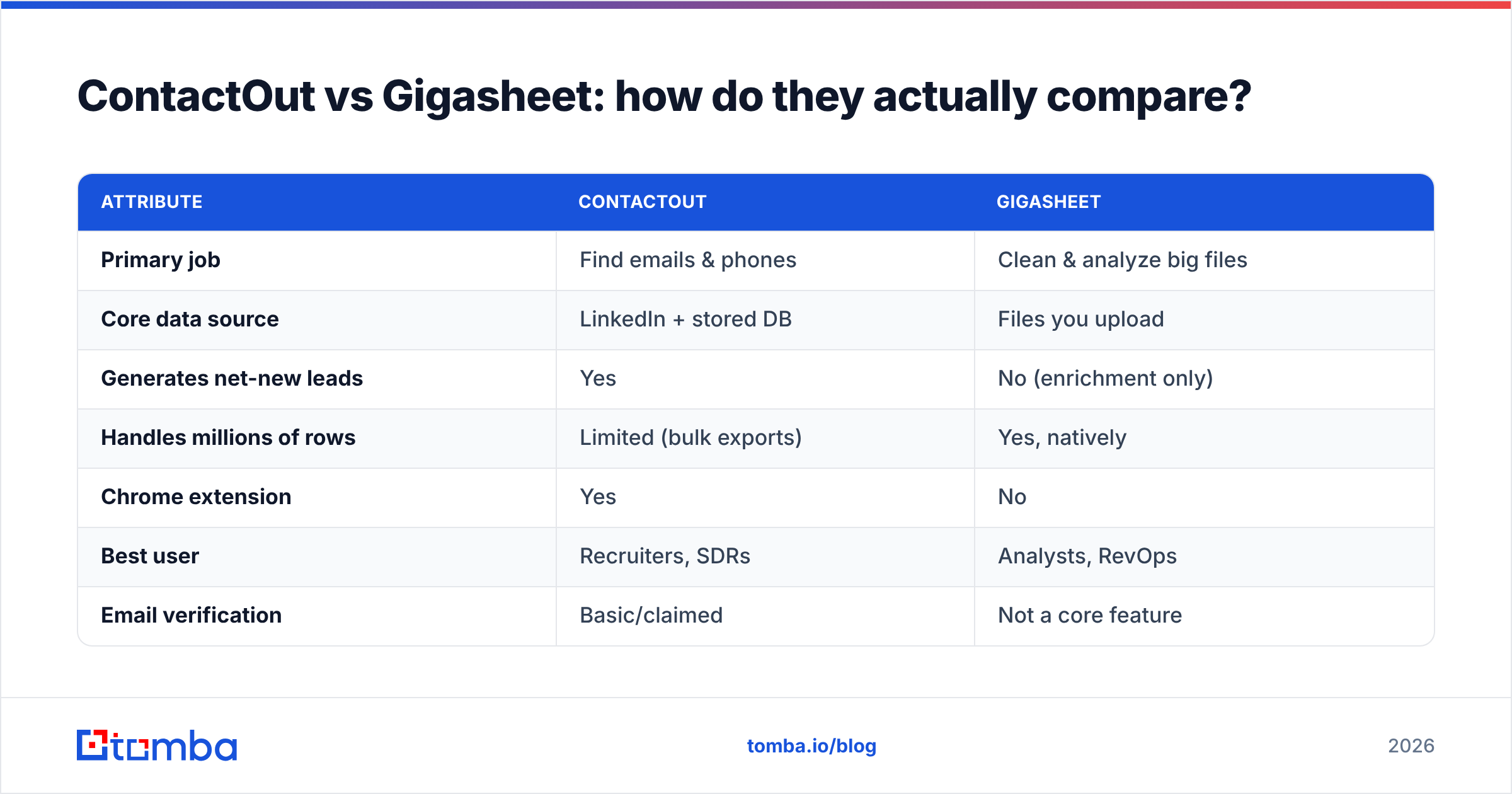
Here's the honest side-by-side. Notice how few rows are true head-to-head—that's the point.
| Attribute | ContactOut | Gigasheet |
|---|---|---|
| Primary job | Find emails & phones | Clean & analyze big files |
| Core data source | LinkedIn + stored DB | Files you upload |
| Generates net-new leads | Yes | No (enrichment only) |
| Handles millions of rows | Limited (bulk exports) | Yes, natively |
| Chrome extension | Yes | No |
| Best user | Recruiters, SDRs | Analysts, RevOps |
| Email verification | Basic/claimed | Not a core feature |
| Learning curve | Low | Low–medium |
| Free tier | Limited credits | Limited rows |
The table makes the mismatch obvious. ContactOut is an acquisition tool; Gigasheet is a processing tool. If you asked "which one finds me 500 CMO emails," only ContactOut answers. If you asked "help me dedupe and segment a 6-million-row list," only Gigasheet answers.
When should you pick ContactOut?#
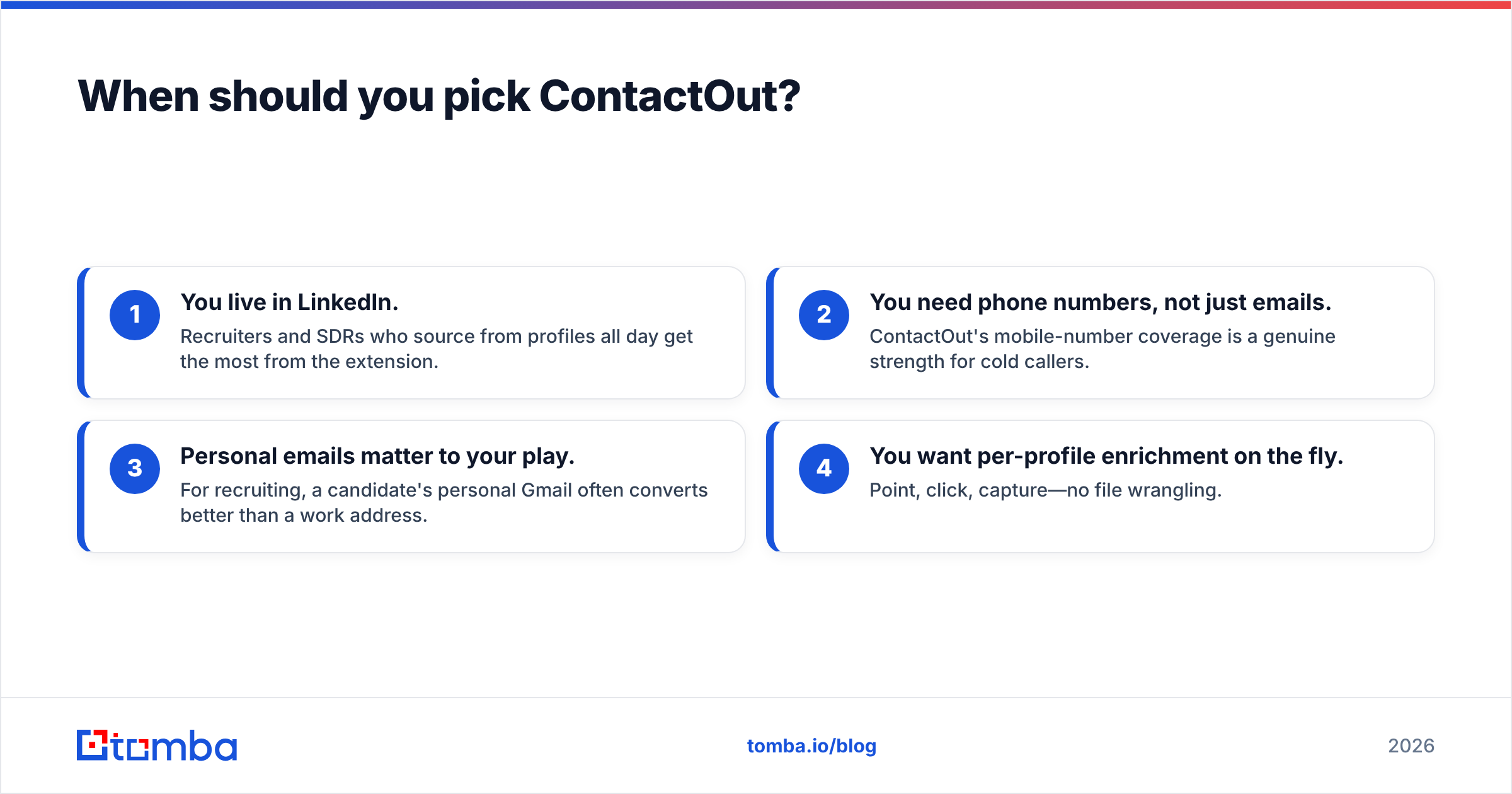
Choose ContactOut when your bottleneck is getting contact details in the first place. Signs it fits:
- You live in LinkedIn. Recruiters and SDRs who source from profiles all day get the most from the extension.
- You need phone numbers, not just emails. ContactOut's mobile-number coverage is a genuine strength for cold callers.
- Personal emails matter to your play. For recruiting, a candidate's personal Gmail often converts better than a work address.
- You want per-profile enrichment on the fly. Point, click, capture—no file wrangling.
Where it disappoints: standalone list-building outside LinkedIn, and deliverability. "Found" does not mean "verified." Before you send, run addresses through a real verification layer or you'll burn your domain reputation. That's a job for a dedicated email verifier, not a sourcing extension.
When should you pick Gigasheet?#
Choose Gigasheet when your bottleneck is making sense of data you already have. Signs it fits:
- Your files break Excel. Anything past ~1 million rows, and desktop spreadsheets fall over. Gigasheet doesn't.
- You need no-code cleanup. Dedupe, merge, filter, and pivot without writing SQL or Python.
- You're an analyst or ops person, not a prospector. The value is exploration and hygiene, not lead generation.
- You want a shareable, cloud-based workspace. Teams collaborate on the same massive dataset in a browser.
Where it disappoints: it won't build a lead list from scratch. If your CRM is empty, Gigasheet has nothing to chew on. It's the second step, never the first.

Is either one a real email finder?#
Short answer: ContactOut is, Gigasheet isn't—and neither is a complete pipeline.
ContactOut finds emails but treats verification as a checkbox rather than a science. Gigasheet enriches rows through integrations but originates nothing. So teams often stitch together three tools: one to find, one to verify, one to analyze. That stack works, but it's expensive and leaky.
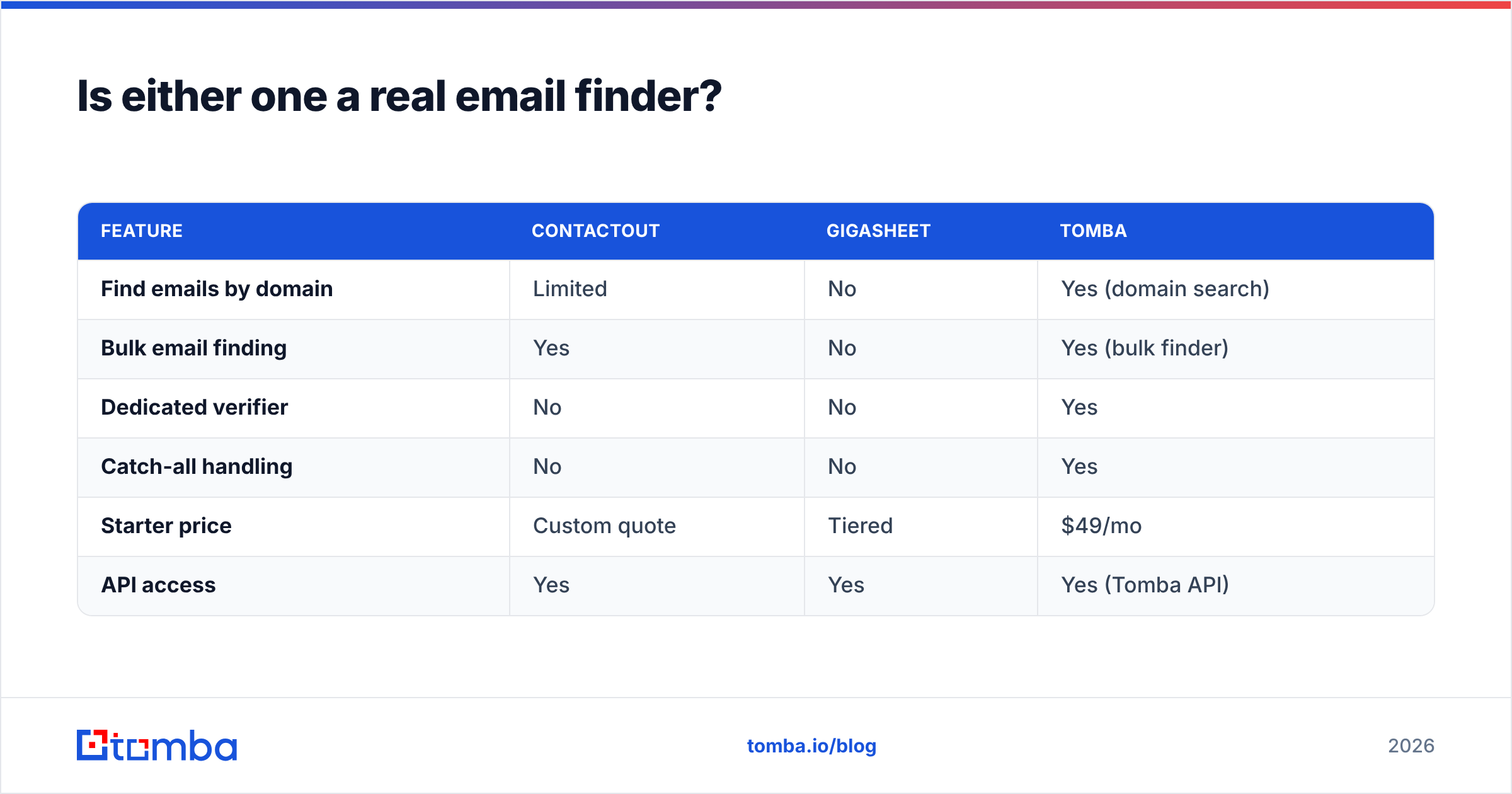
This is where a focused platform earns its place. Tomba was built for the find + verify half of that chain, so you're not paying for a spreadsheet you don't need:
| Feature | ContactOut | Gigasheet | Tomba |
|---|---|---|---|
| Find emails by domain | Limited | No | Yes (domain search) |
| Bulk email finding | Yes | No | Yes (bulk finder) |
| Dedicated verifier | No | No | Yes |
| Catch-all handling | No | No | Yes |
| Starter price | Custom quote | Tiered | $49/mo |
| API access | Yes | Yes | Yes (Tomba API) |
Tomba's data enrichment fills in company and role details, its verifier checks deliverability before you hit send, and its pricing starts at a flat $49/mo Starter (with a free tier of 25 searches to test first). You still bring Gigasheet for heavy analysis if you need it—but you stop overpaying ContactOut for coverage you can't trust.
What do reviewers say?#
Cross-referencing user reviews on G2 shows a consistent split. ContactOut earns praise for LinkedIn extension speed and phone coverage, with recurring complaints about email accuracy and credit costs. Gigasheet earns praise for raw file-handling power and ease of use, with the honest caveat that it's an analysis tool, not a data source.
Neither pattern is a knock—it's confirmation that these products aim at different buyers. The disappointment happens when someone buys one expecting the other's job.
How do the price models differ?#
The pricing philosophies tell you everything about the intended use.
- ContactOut sells credits and seats, priced around sourcing volume. Heavy prospecting gets expensive fast, and quotes are often custom, which slows down small teams.
- Gigasheet prices around data volume and storage—how many rows and files you process—not how many contacts you find.
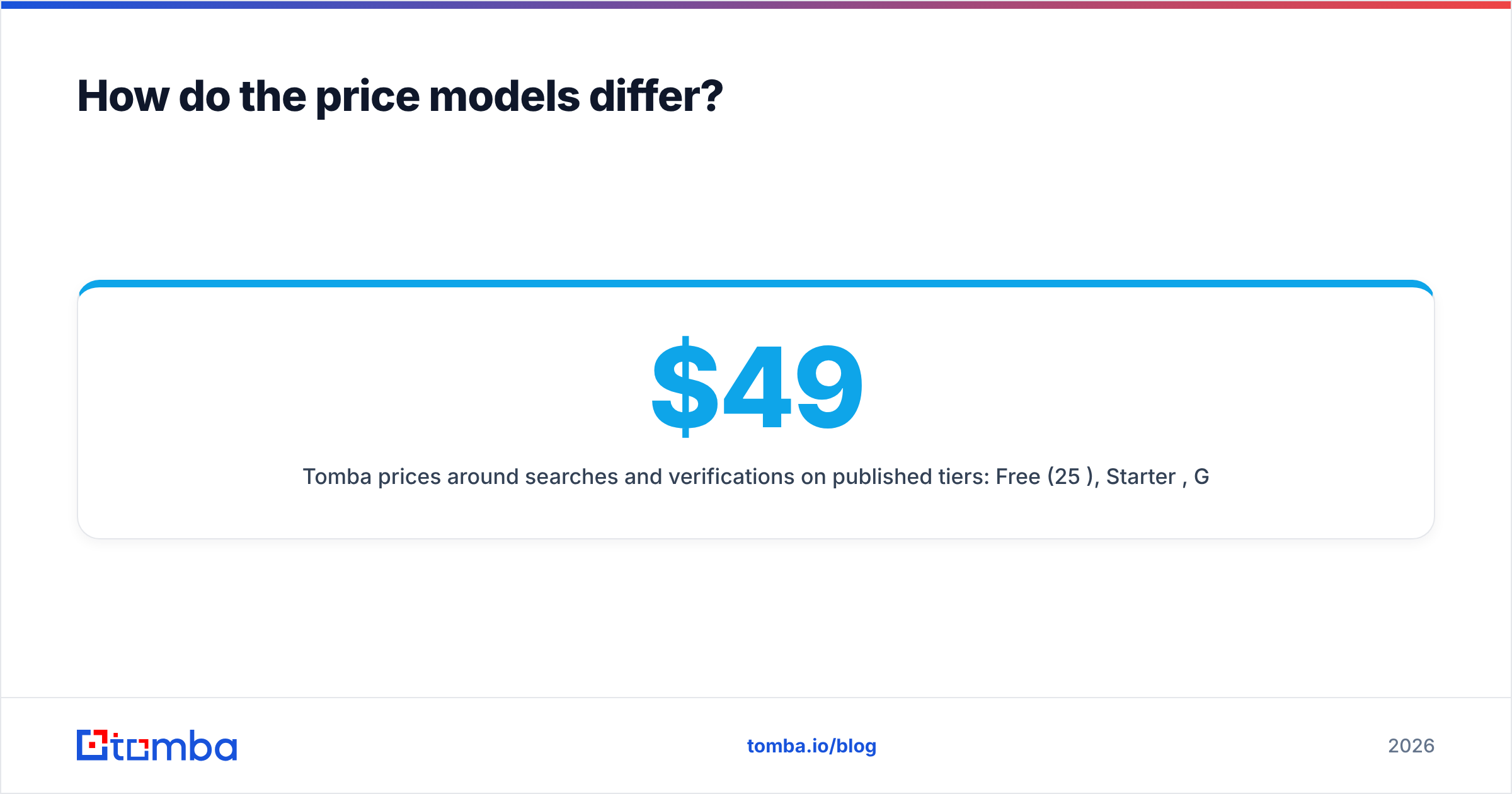
- Tomba prices around searches and verifications on published tiers: Free (25/mo), Starter $49/mo, Growth $99/mo, Pro $249/mo, Enterprise custom. You can see the full Tomba pricing without a sales call.
If predictable, published pricing matters to you, credit-and-quote models like ContactOut's are the ones to scrutinize hardest.
Can you use both together?#
Yes, and for some teams that's the right answer. A clean workflow looks like this:
- Source contacts from LinkedIn with ContactOut (or find them by domain with an email finder).
- Verify every address before it enters a sequence, so bounces stay low.
- Analyze and segment the combined list in Gigasheet when it grows past spreadsheet limits.
The mistake is forcing one tool to do all three. ContactOut can't analyze 5 million rows; Gigasheet can't originate a single lead. The verification step in the middle is the one people skip—and it's the one that protects your sender reputation.
The verdict: which should you buy?#
There's no universal winner because they answer different questions.
- Buy ContactOut if your problem is finding people, you work inside LinkedIn, and you need phone numbers. Just pair it with real verification.
- Buy Gigasheet if your problem is processing large datasets you already own, and you want spreadsheet simplicity at data-warehouse scale.
- Buy neither if what you actually need is accurate, verified work emails at predictable cost—in which case a dedicated finder-and-verifier is the leaner buy.
Match the tool to the bottleneck, and the "vs" question mostly answers itself.
Start with accurate contacts#
Whatever you use to analyze data later, the pipeline only works if the emails at the top are real. Skip the guesswork: Tomba's Email Finder locates verified professional addresses by name, company, or domain, and its built-in verifier confirms deliverability before you send—all on flat, published pricing that starts free. Find the right people first, then let ContactOut or Gigasheet do the parts they're actually built for.
Related guides#
Ready to find emails that actually work?
Join 150,000+ professionals who stopped guessing and started sending. Free credits on signup — no credit card required.
Get the Tomba newsletter
Practical outbound tactics and product updates — once every two weeks.
About the author