ContactOut vs Grata: Which B2B Data Tool Wins in 2026
ContactOut finds contacts; Grata finds companies. This honest 2026 breakdown shows which B2B data tool fits your workflow, what each costs, and where a leaner stack wins.
ContactOut vs Grata: Which B2B Data Tool Wins in 2026
Most "ContactOut vs Grata" comparisons treat these as rivals. They aren't really. One finds people; the other finds companies. Picking between them without understanding that split is how teams end up paying for the wrong tool — twice.
This breakdown gives you the honest version: what each does well, what each actually costs, where they overlap, and when a leaner contact-data stack beats both.
TL;DR — ContactOut vs Grata in 30 seconds#
- ContactOut is a contact-finder built on LinkedIn. It surfaces personal and work emails plus phone numbers for individual prospects. Best for recruiters and SDRs who work person-by-person.
- Grata is a private-company search engine for deal sourcing. It maps industries, ownership, headcount, and financial signals for M&A, private equity, and corp-dev teams. Best for finding companies, not people.
- They solve different problems. If you're building an outbound list of decision-makers, ContactOut is the closer match. If you're sourcing acquisition targets, Grata is.
- Both are premium-priced and quote-gated. If your core need is verified emails at volume, a focused tool like the Tomba Email Finder covers the prospecting job at a fraction of the seat cost.
- The smartest 2026 stacks don't choose one — they pair a company-intelligence layer with a cheaper, higher-accuracy contact-data layer.
What is ContactOut?#
ContactOut is a contact intelligence platform that started as a Chrome extension for LinkedIn and Gmail. You browse a profile, click the extension, and it returns the person's work email, personal email, and — on higher tiers — mobile numbers.
Its core strengths:
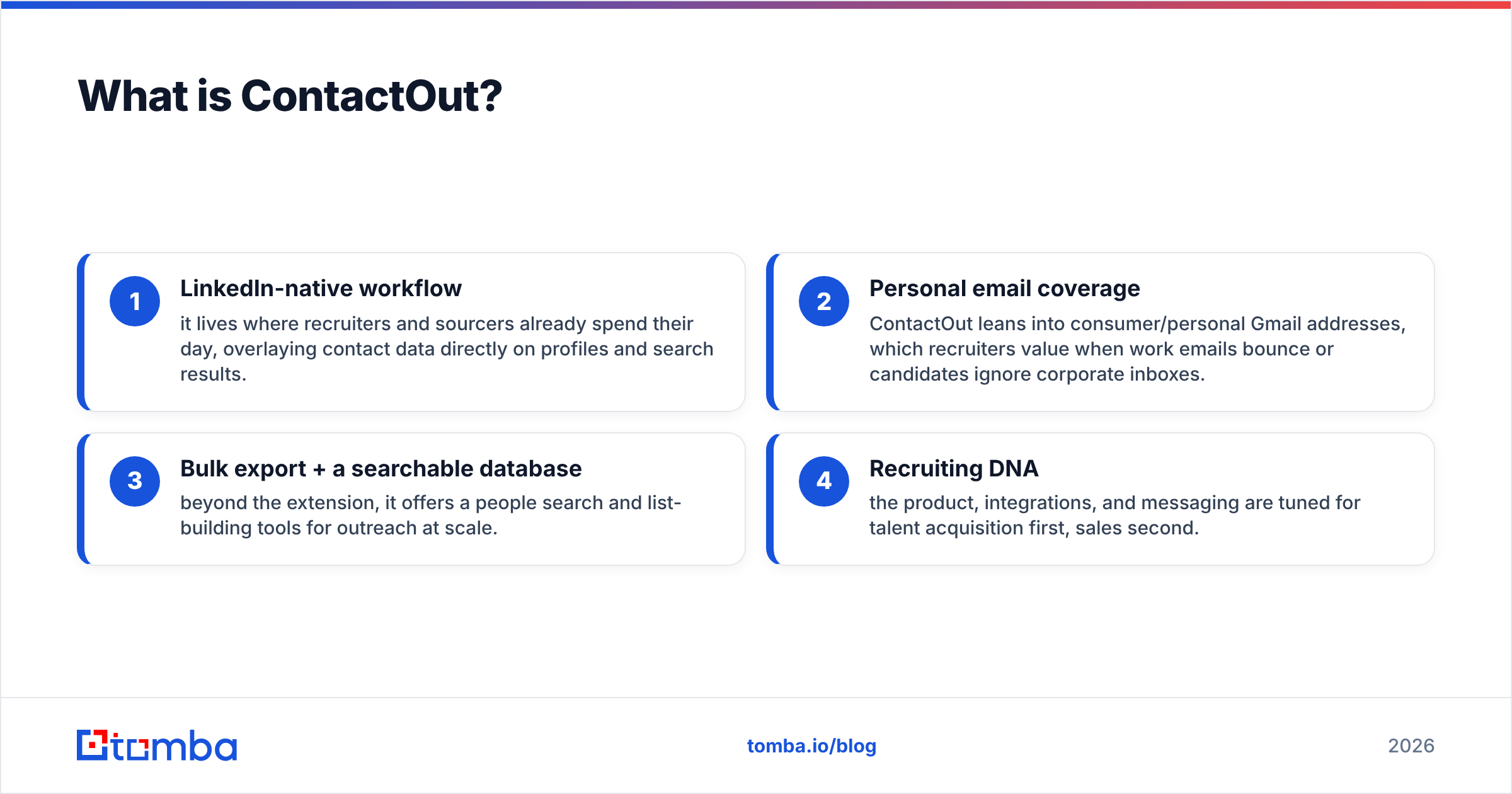
- LinkedIn-native workflow — it lives where recruiters and sourcers already spend their day, overlaying contact data directly on profiles and search results.
- Personal email coverage — ContactOut leans into consumer/personal Gmail addresses, which recruiters value when work emails bounce or candidates ignore corporate inboxes.
- Bulk export + a searchable database — beyond the extension, it offers a people search and list-building tools for outreach at scale.
- Recruiting DNA — the product, integrations, and messaging are tuned for talent acquisition first, sales second.
The tradeoff: personal-email focus and LinkedIn scraping create accuracy variance, and pricing climbs quickly once you need phone numbers and higher export limits. For teams that only need verified work emails, that's a lot of surface area you pay for but don't use.
What is Grata?#
Grata is a private-market deal-sourcing engine. It's not built to find a single person's email — it's built to help investors answer "which companies should we look at?"
Grata indexes millions of private companies and lets you search by what a business actually does — using descriptions, keywords, end markets, and similarity — rather than rigid SIC/NAICS codes. On top of that it layers:
- Ownership and funding signals (bootstrapped, PE-backed, VC-backed)
- Headcount, growth, and location filters
- Executive contacts attached to target companies
- Workflow tools for building and tracking a deal pipeline
Grata's audience is private equity, investment banking, M&A advisors, and corporate development. If your job is to build a defensible list of acquisition or partnership targets in a fragmented industry, this is a different — and genuinely powerful — category of tool.
The tradeoff: Grata is priced for institutional budgets, it's quote-only, and its contact data is a supporting feature, not the main event. Using Grata as your day-to-day email finder is like buying a delivery truck to commute to work.
ContactOut vs Grata: the core difference#
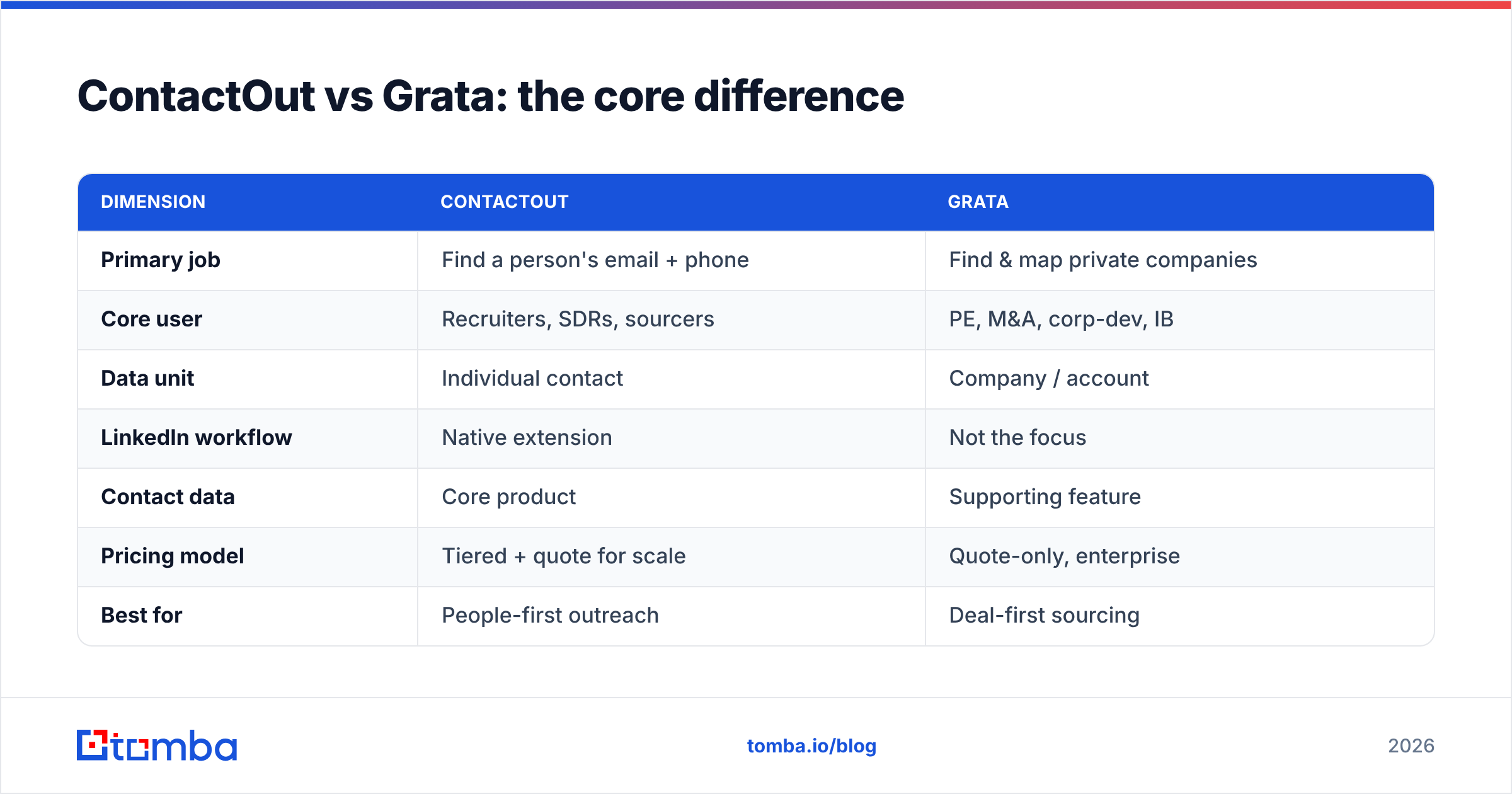
Here's the single distinction that should drive your decision: ContactOut answers "how do I reach this person?" and Grata answers "which companies exist that match my thesis?"
Think of it like a phone book versus a market map. A phone book (ContactOut) gets you the number once you know who you want. A market map (Grata) shows you the whole landscape so you can decide who is worth pursuing in the first place.
| Dimension | ContactOut | Grata |
|---|---|---|
| Primary job | Find a person's email + phone | Find & map private companies |
| Core user | Recruiters, SDRs, sourcers | PE, M&A, corp-dev, IB |
| Data unit | Individual contact | Company / account |
| LinkedIn workflow | Native extension | Not the focus |
| Contact data | Core product | Supporting feature |
| Pricing model | Tiered + quote for scale | Quote-only, enterprise |
| Best for | People-first outreach | Deal-first sourcing |
If you read that table and realized your actual need is "verified emails for a list of people," neither premium platform is the lean answer — a dedicated finder plus an email verifier does the job for less.
How do they compare on pricing?#
Pricing is where both tools get uncomfortable, because both push you toward sales calls before you see real numbers.
ContactOut publishes entry tiers but reserves its meaningful export limits, phone credits, and team features for higher and custom plans. Recruiters routinely hit credit ceilings mid-month and get nudged into an upgrade conversation.
Grata is quote-only and clearly enterprise-priced — annual contracts sized for firms that close deals worth millions. There is no self-serve "just let me try it for $49" path.
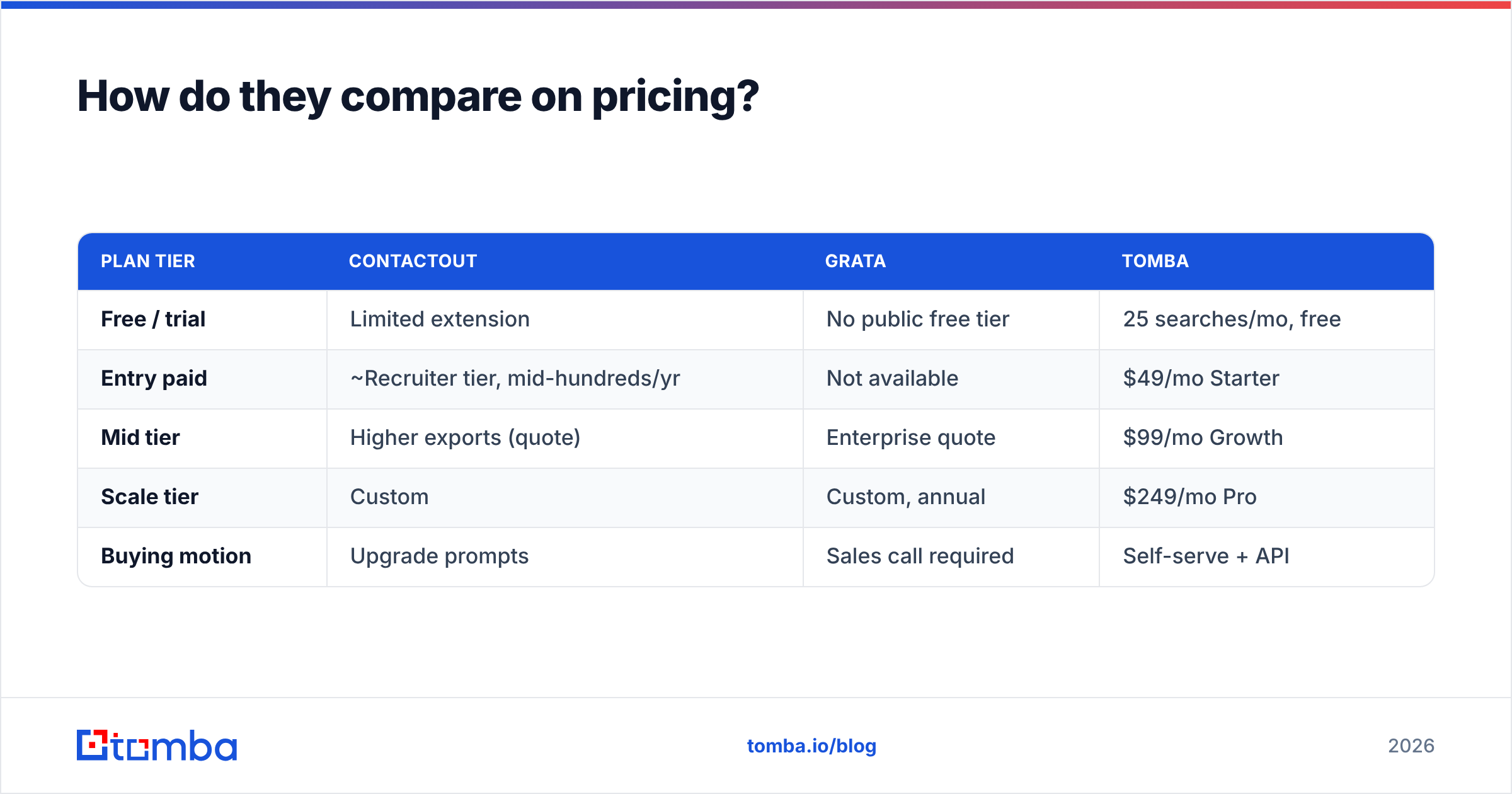
Here's how a focused contact-data budget compares against the premium platforms:
| Plan tier | ContactOut | Grata | Tomba |
|---|---|---|---|
| Free / trial | Limited extension | No public free tier | 25 searches/mo, free |
| Entry paid | ~Recruiter tier, mid-hundreds/yr | Not available | $49/mo Starter |
| Mid tier | Higher exports (quote) | Enterprise quote | $99/mo Growth |
| Scale tier | Custom | Custom, annual | $249/mo Pro |
| Buying motion | Upgrade prompts | Sales call required | Self-serve + API |
The takeaway isn't "Tomba is cheapest, done." It's that if the job is emails, you should not pay deal-sourcing prices for them. See full Tomba pricing if you want the exact tiers.
Which one is more accurate?#
Accuracy depends entirely on what you're measuring — and the two tools measure different things.
- ContactOut is judged on contact accuracy: is this the person's real, current email or phone? Its personal-email coverage is a strength for recruiting, but personal addresses and LinkedIn-derived data drift as people change jobs, so bounce rates vary by list.
- Grata is judged on company accuracy: is this the right target, correctly classified by industry, ownership, and size? That's a fundamentally different data quality problem, and Grata is strong at it.
The practical lesson for anyone doing outbound: never send to raw finder output. Whatever tool sources the address, run it through verification before your campaign so you protect email deliverability and sender reputation. A finder gives you candidates; a verifier confirms they're safe to send.

When should you choose ContactOut?#
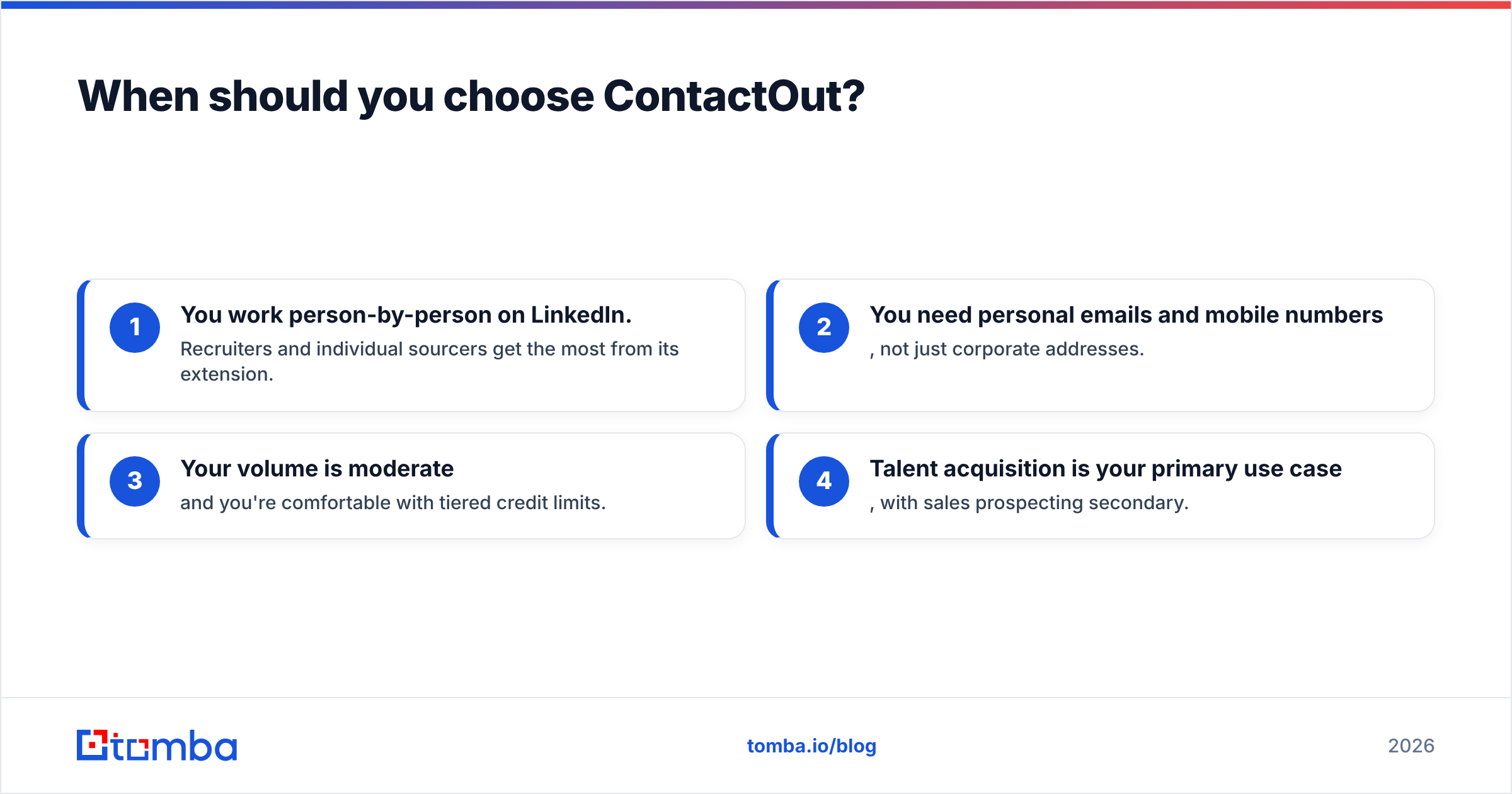
Pick ContactOut if most of these are true:
- You work person-by-person on LinkedIn. Recruiters and individual sourcers get the most from its extension.
- You need personal emails and mobile numbers, not just corporate addresses.
- Your volume is moderate and you're comfortable with tiered credit limits.
- Talent acquisition is your primary use case, with sales prospecting secondary.
Skip it if you need large export volumes cheaply, or if company-level market mapping is what you're actually after. If ContactOut's pricing or accuracy frustrates you, it's worth reviewing a dedicated ContactOut alternative built around verified work emails and a transparent API.
When should you choose Grata?#
Pick Grata if most of these are true:
- You source deals or partnerships, not individual sales conversations.
- You operate in fragmented industries where standard classification codes fail and thesis-driven search wins.
- You need to map ownership and funding signals to prioritize targets.
- You have enterprise budget and buy annual contracts.
Skip it if your day-to-day need is "reach 500 marketing directors this quarter." That's a contact-data problem, and Grata is expensive overkill for it.
Can one tool replace both?#
Not cleanly — because the two categories don't overlap enough. But most teams over-buy by assuming they need both premium platforms when they need one intelligence layer plus one contact layer.
A leaner, honest 2026 stack usually looks like this:
- Company sourcing: keep a market-mapping tool (Grata, or a lighter alternative) only if deal sourcing is core to the business.
- Contact data: use a focused finder for verified work emails and phones instead of paying platform prices per seat.
- Verification: confirm every address before send.
- Enrichment: fill in firmographic and role data on the records you keep.
That's where Tomba fits the prospecting half of the equation. The email finder and domain search cover the "reach this person" job, data enrichment fills the gaps, and the phone finder adds numbers — all through a self-serve API without a sales call. It won't replace Grata's deal-sourcing engine, and it isn't trying to. It replaces the overpriced contact-data portion of your stack.
ContactOut vs Grata: the verdict#
There's no universal winner, because they win different games:
- Choose ContactOut when your job is reaching individual people — especially candidates — inside LinkedIn.
- Choose Grata when your job is discovering and mapping private companies for deals.
- Choose a focused finder + verifier when your real need is verified emails at volume, and you don't want to fund a premium platform to get them.
Before you sign either annual contract, be honest about the unit of work: are you buying people or companies? Get that right and the tool choice becomes obvious. Cross-check current user sentiment on G2 and the vendors' own sites — ContactOut and Grata — then match spend to the job.
Start with the contact layer#
If your immediate goal is a clean, verified list of decision-makers to email this quarter, don't start by pricing enterprise platforms. Start with the finder that does that one job well.
Spin up the free tier of the Tomba Email Finder — 25 searches a month, no card, no sales call — and see how far verified work emails get your outreach before you commit budget anywhere else. When you're ready to scale, Starter is $49/mo and the API drops straight into your existing workflow. Reach the right people first; add the heavier intelligence tools only when the deal-sourcing job actually demands them.
Related guides#
Ready to find emails that actually work?
Join 150,000+ professionals who stopped guessing and started sending. Free credits on signup — no credit card required.
Get the Tomba newsletter
Practical outbound tactics and product updates — once every two weeks.
About the author