ContactOut vs Infofree (2026): Which B2B Data Tool Wins?
ContactOut finds emails and mobiles from LinkedIn; Infofree sells business and consumer lists. Here's how the two stack up on accuracy, pricing, and fit in 2026 — and where a leaner tool beats both.
ContactOut vs Infofree is a tricky pick. The two tools barely play the same sport. One scrapes contact details off LinkedIn profiles. The other resells a big fixed database of U.S. businesses and consumers. Pick by price alone and you'll get the wrong data for your motion. This guide breaks down what each tool does. It shows who each fits, and where a more focused email finder beats both.
TL;DR#
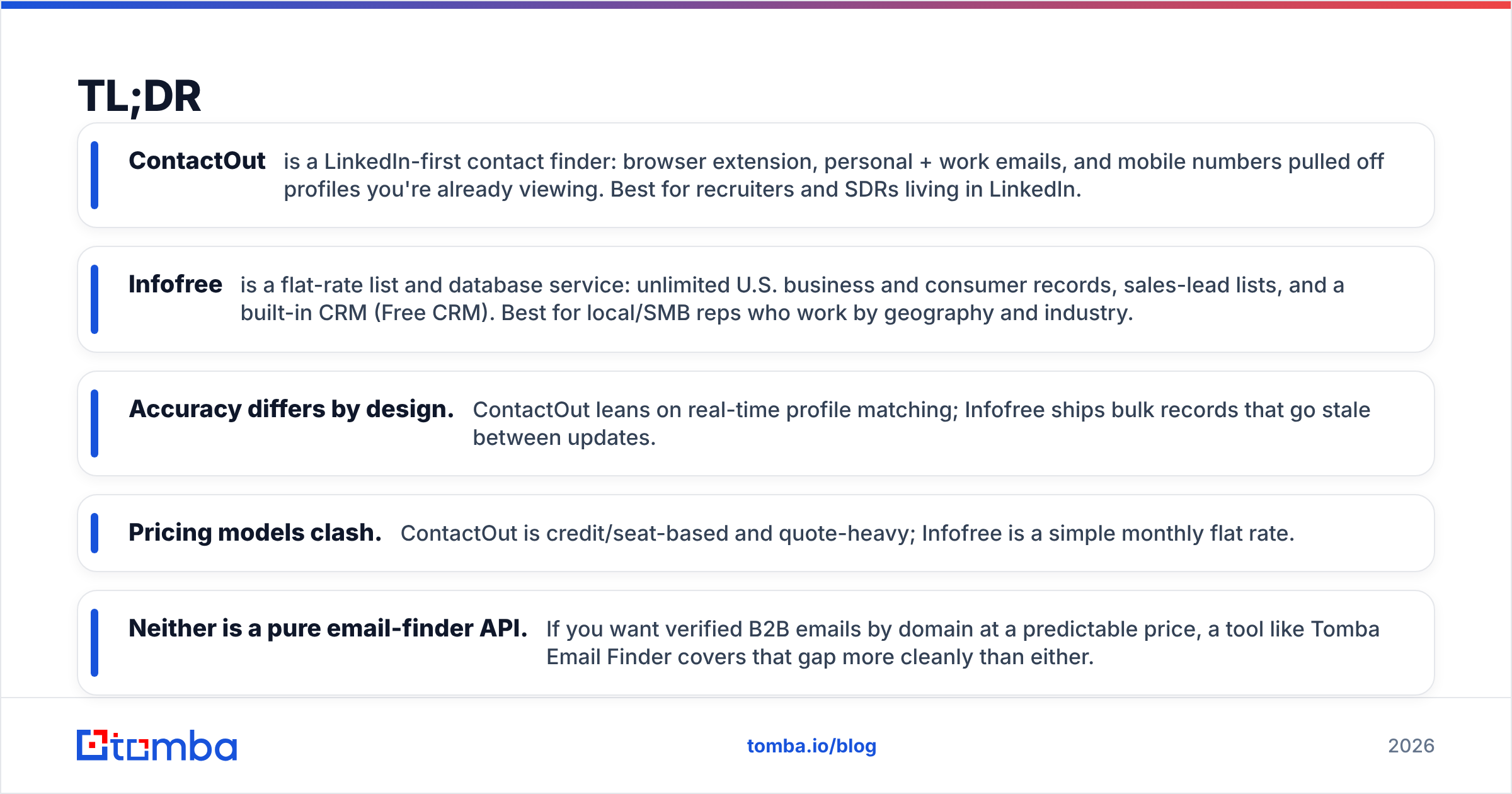
- ContactOut is a LinkedIn-first contact finder: browser extension, personal + work emails, and mobile numbers pulled off profiles you're already viewing. Best for recruiters and SDRs living in LinkedIn.
- Infofree is a flat-rate list and database service: unlimited U.S. business and consumer records, sales-lead lists, and a built-in CRM (Free CRM). Best for local/SMB reps who work by geography and industry.
- Accuracy differs by design. ContactOut leans on real-time profile matching; Infofree ships bulk records that go stale between updates.
- Pricing models clash. ContactOut is credit/seat-based and quote-heavy; Infofree is a simple monthly flat rate.
- Neither is a pure email-finder API. If you want verified B2B emails by domain at a predictable price, a tool like Tomba Email Finder covers that gap more cleanly than either.
What is ContactOut?#
ContactOut is a contact-intelligence tool. It runs as a Chrome extension that overlays LinkedIn and GitHub profiles. Open a prospect and it surfaces personal emails, work emails, and phone numbers. You can push them into lists or your CRM. It also offers a search portal and an API for teams that work outside the browser.
Its core use is recruiting and top-of-funnel sales. The workflow is simple. You find the person on LinkedIn, then you reach them. Coverage skews toward professionals with a LinkedIn profile. The standout feature is dual email capture. You get a personal Gmail next to a work address. Recruiters value this when someone changes jobs.
The tradeoffs are real. Pricing is opaque and seat-based. Free usage is thin. Results depend on how complete the target's public profile is. You match a person, not a whole company.

What is Infofree?#
Infofree is a sales-leads and mailing-list service. It targets small businesses, local reps, and marketers. One flat monthly fee unlocks a large database of U.S. businesses and consumers. You can build lists by SIC code, geography, revenue, and demographics. It also bundles a CRM called Free CRM. Infofree pitches itself as a cheap alternative to legacy list brokers like Data Axle, the old Salesgenie.
ContactOut answers one question: who is this person and how do I email them? Infofree answers another: give me every HVAC company within 25 miles doing over $1M in revenue. It builds lists by filter, not profile by profile. That makes it strong for cold calling, direct mail, and territory planning. It is weaker at finding a named decision-maker's verified work email on demand.
Every fixed database has one catch: freshness. Bulk records refresh on a cycle. So titles, phone numbers, and business status drift between updates. You trade real-time accuracy for volume and a steady bill.
ContactOut vs Infofree: how do they compare?#
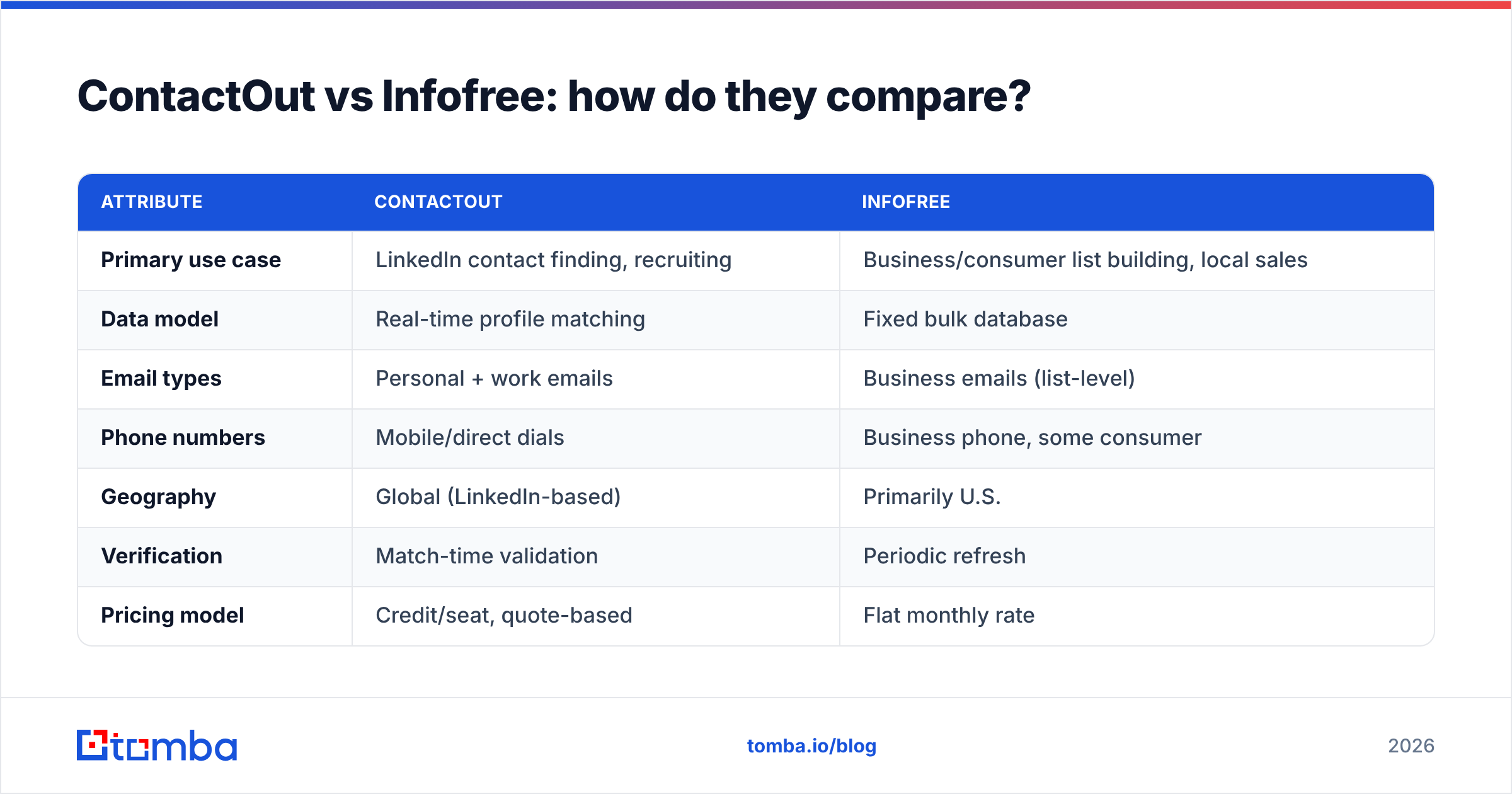
Here's the head-to-head on the attributes that actually change your results.
| Attribute | ContactOut | Infofree |
|---|---|---|
| Primary use case | LinkedIn contact finding, recruiting | Business/consumer list building, local sales |
| Data model | Real-time profile matching | Fixed bulk database |
| Email types | Personal + work emails | Business emails (list-level) |
| Phone numbers | Mobile/direct dials | Business phone, some consumer |
| Geography | Global (LinkedIn-based) | Primarily U.S. |
| Verification | Match-time validation | Periodic refresh |
| Pricing model | Credit/seat, quote-based | Flat monthly rate |
| Bundled CRM | No (integrations) | Yes (Free CRM) |
| Best fit | Recruiters, SDRs in LinkedIn | SMB, local, direct-mail teams |
Read the table as two different jobs. ContactOut gives precision at the person level. Infofree gives coverage at the segment level. Neither is better in a vacuum. They are better at different things. That is the heart of ContactOut vs Infofree.
Which one is more accurate?#
Accuracy depends on what you measure. For one named person on LinkedIn, ContactOut usually wins. It validates at the moment of match and often returns more than one email. For a broad list of regional businesses, Infofree gives you more raw records, faster. But a slice of them will be stale. Expect a wrong contact, a dead number, or a business that closed.
The honest framing is simple. Real-time matching wins on freshness. A static database wins on breadth. If your outreach lives or dies on bounce rate, freshness matters more. That is why teams run any list through an email verifier before sending. This applies to either tool. Bounces above roughly 3% start to hurt your sender reputation. No database is clean enough to skip that step.

Want a deeper look at how these databases source and refresh records? G2's category pages for lead intelligence software are a useful neutral reference before you commit.
How does pricing compare?#
The pricing philosophies are opposites, and that shapes who each tool suits.
- ContactOut uses seat and credit tiers. Its higher plans are quote-driven. You will often talk to sales past the entry level. Per-seat costs add up for a full team. It is great if you need depth per user. It is frustrating if you want a clear number up front.
- Infofree is refreshingly simple. You pay a flat monthly rate for near-unlimited lookups and list building within fair-use limits. That predictability is the whole pitch. You always know the bill.
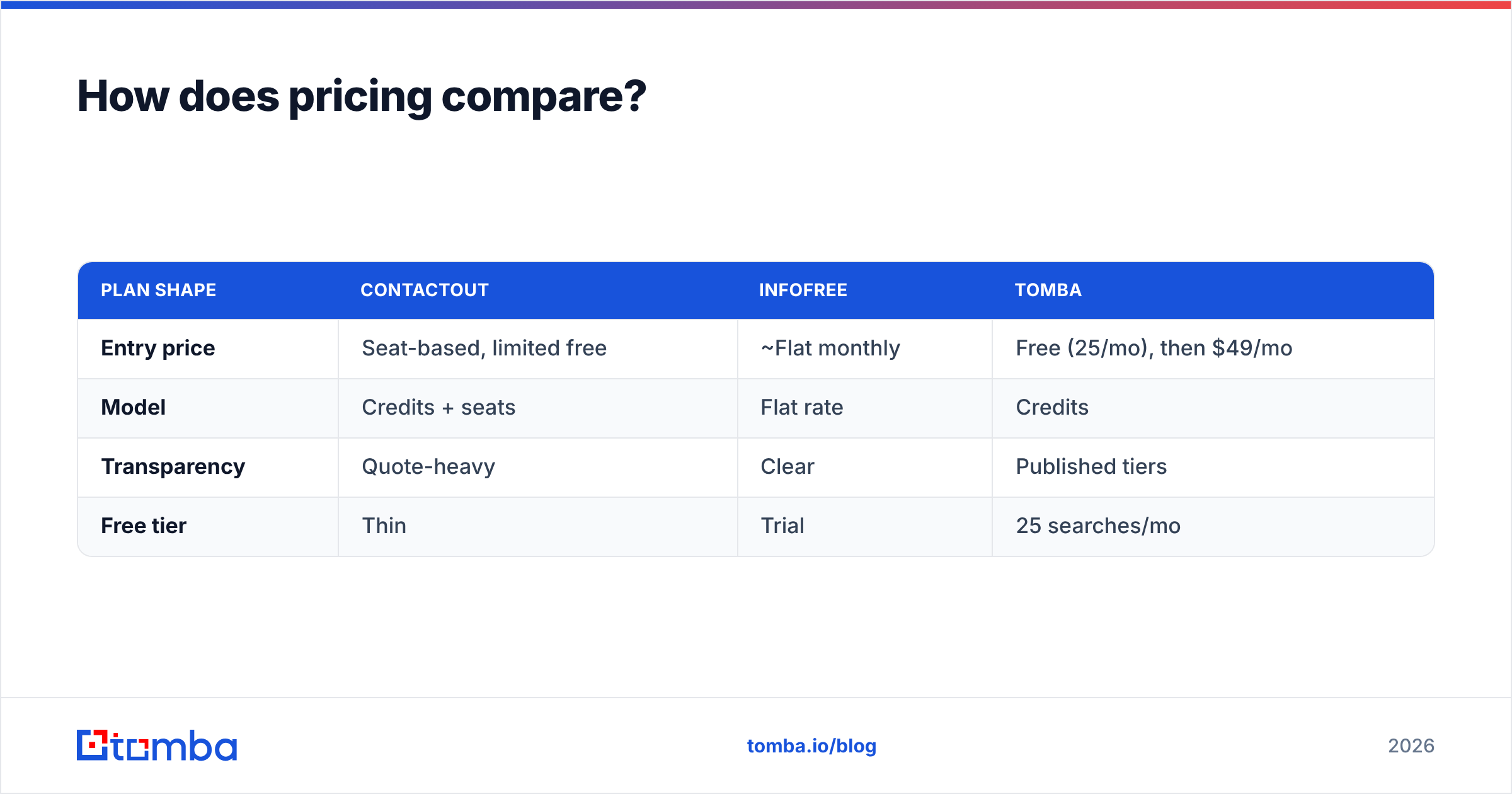
Neither model fits if you want pay-as-you-go verified emails by domain. There, a credit-based email finder with published tiers is easier to budget. For reference, Tomba pricing runs Free at 25 searches a month, Starter at $49, Growth at $99, and Pro at $249. There is no "contact us to see a number" wall.
| Plan shape | ContactOut | Infofree | Tomba |
|---|---|---|---|
| Entry price | Seat-based, limited free | ~Flat monthly | Free (25/mo), then $49/mo |
| Model | Credits + seats | Flat rate | Credits |
| Transparency | Quote-heavy | Clear | Published tiers |
| Free tier | Thin | Trial | 25 searches/mo |
Who should choose ContactOut?#
Pick ContactOut if you live inside LinkedIn and need individual reach. It suits recruiters chasing passive candidates. It suits SDRs booking meetings with named accounts. It suits founders doing hands-on prospecting. They all gain from its dual-email capture and mobile numbers. The browser overlay means no context switching. You find the person and their contact info in one place.
It is the weaker choice for whole-company mapping. It also falls short for non-LinkedIn segments like trades, local services, and consumers. And it is not built for a flat, predictable bill. If you plan to enrich thousands of contacts by API, the seat model gets pricey fast.

Who should choose Infofree?#
Pick Infofree if your sales motion is geographic and volume-driven. It fits local service businesses. It fits insurance and real estate reps. It fits direct-mail marketers. Anyone building call lists by SIC code and radius will gain more from a flat-rate database than from per-profile lookups. The bundled Free CRM also helps a solo rep who does not want a separate CRM.
It is the weaker choice if you sell into named enterprise accounts. It also struggles with global coverage. And it is risky if you need fresh email for cold outreach at scale. A static U.S. database is not built to find one exact VP's verified work email today.
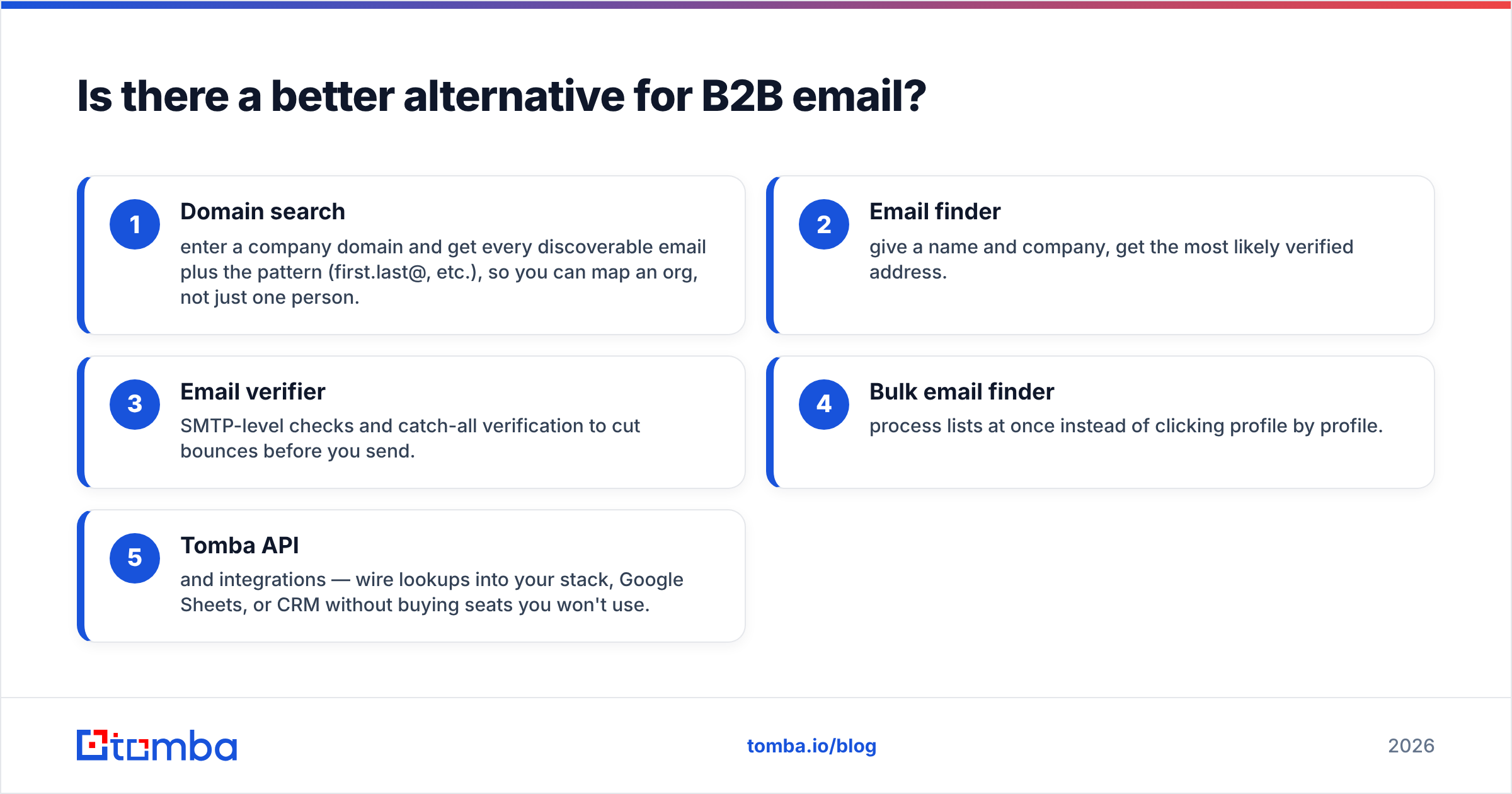
Is there a better alternative for B2B email?#
Maybe your real goal is verified professional emails. Not LinkedIn scraping. Not bulk mailing lists. Then a dedicated email finder is usually the cleaner fit than either tool. This is the gap in the ContactOut vs Infofree debate. ContactOut's per-seat pricing and Infofree's static lists both leave something on the table.
A focused platform like Tomba approaches it differently:
- Domain search — enter a domain and get every discoverable email plus the pattern, like first.last@. You map an org, not just one person.
- Email finder — give a name and company, get the most likely verified address.
- Email verifier — SMTP-level checks and catch-all verification to cut bounces before you send.
- Bulk email finder — process lists at once instead of clicking profile by profile.
- Tomba API and integrations — wire lookups into your stack, Google Sheets, or CRM without buying seats you won't use.
That mix is different. You get transparent credits, built-in verification, and domain-level coverage. That beats a LinkedIn overlay or a flat-rate list broker for one job. It will not replace Infofree for door-to-door local lists. It will not replace ContactOut's personal-Gmail trick for recruiters. But for core B2B email, it is the more direct route. The job is simple: reach the right person by email, without a bounce.

ContactOut vs Infofree: the verdict#
In ContactOut vs Infofree, there is no universal winner. There is only a fit for your motion:
- Choose ContactOut if you are recruiter- or SDR-heavy. You work mostly in LinkedIn. You value individual precision, like personal and work email plus mobile, over a flat bill.
- Choose Infofree if you sell locally or by segment. You want unlimited U.S. records at a fixed monthly price. You can live with periodic-refresh freshness.
- Choose a dedicated email finder if verified B2B email by domain is the real job. You get a transparent, credit-based price with verification baked in.
Most teams buy a tool for one killer feature. Then they pay for a lot they never use. Map the job first. Is it person-by-person reach, geographic list building, or verified email at scale? That answer picks the tool for you.
Start with verified emails, not stale lists#
Does your outreach depend on hitting real inboxes? Then begin where the data is cleanest. Tomba Email Finder turns a name and domain into a verified professional email. An email verifier protects your deliverability. It scales through bulk lookups and the Tomba API. All of it runs on published pricing that starts free. Test it against your next ContactOut vs Infofree list, compare bounce rates, and let the results decide.
Related guides#
Ready to find emails that actually work?
Join 150,000+ professionals who stopped guessing and started sending. Free credits on signup — no credit card required.
Get the Tomba newsletter
Practical outbound tactics and product updates — once every two weeks.
About the author