ContactOut vs Kaspr (2026): Which Finds Better Emails?
ContactOut and Kaspr both promise LinkedIn emails and phone numbers, but they win on different fronts. Here's an honest 2026 breakdown of accuracy, pricing, and the best-value alternative.
Both ContactOut and Kaspr sell the same dream: click a LinkedIn profile, get a work email and a mobile number. But they build that promise on different data, price it very differently, and fall down in different places. If you pick wrong, you either overpay for coverage you don't need or blow your sending reputation on emails that bounce.
This is an honest, spec-by-spec look at ContactOut vs Kaspr in 2026 — where each one is genuinely strong, where the marketing outruns the data, and which tool fits your motion. We'll also show where a dedicated email-finding engine beats both on the number that actually matters: how many contacts you can reach without bouncing.
TL;DR: ContactOut vs Kaspr#
- ContactOut wins on personal-email coverage and recruiting use cases. Its browser extension and 300M+ profile index are strong for sourcing candidates and hard-to-reach senior contacts.
- Kaspr wins on European (GDPR-region) phone numbers and tight LinkedIn + CRM workflows. It's built for SDRs who live in Sales Navigator.
- Pricing is close at the entry level, but both gate the useful volume behind higher tiers and per-credit math that gets expensive at scale.
- Accuracy is the real differentiator. Neither publishes an independently audited bounce rate, and catch-all domains trip both up.
- If your core job is finding and verifying work emails at scale, a purpose-built finder like Tomba Email Finder gives you higher verified coverage per dollar — with a real email verifier built in.
What are ContactOut and Kaspr?#
ContactOut is a contact-data platform best known among recruiters. It layers a Chrome extension over LinkedIn, GitHub, and other sites to surface personal and work emails plus phone numbers, and it ships a searchable database and an AES for bulk sourcing. Its selling point is personal email coverage — the gmail/outlook addresses that survive job changes.
Kaspr is a LinkedIn-first prospecting tool aimed at SDRs and founders doing outbound. You install its extension, open a profile or a Sales Navigator list, and it reveals emails and — its headline feature — direct mobile numbers, with a lean toward European data. It also has light CRM and workflow features (tasks, lead lists, enrichment).
Same category, different center of gravity: ContactOut leans recruiting and personal contact, Kaspr leans B2B sales and phone.

ContactOut vs Kaspr: side-by-side comparison#
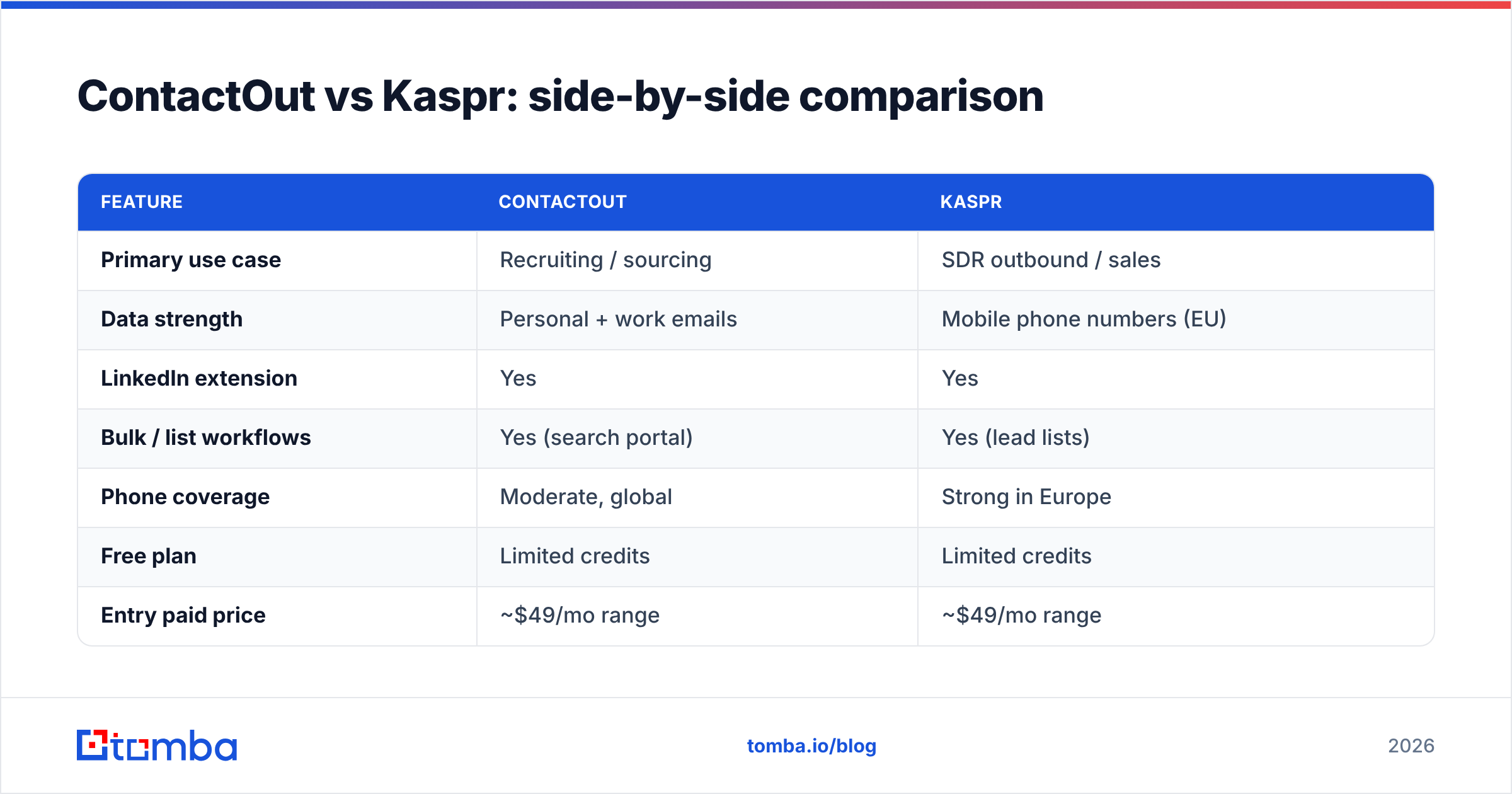
| Feature | ContactOut | Kaspr |
|---|---|---|
| Primary use case | Recruiting / sourcing | SDR outbound / sales |
| Data strength | Personal + work emails | Mobile phone numbers (EU) |
| LinkedIn extension | Yes | Yes |
| Bulk / list workflows | Yes (search portal) | Yes (lead lists) |
| Phone coverage | Moderate, global | Strong in Europe |
| Free plan | Limited credits | Limited credits |
| Entry paid price | ~$49/mo range | ~$49/mo range |
| CRM sync | HubSpot, Lever, others | HubSpot, Pipedrive, Salesforce |
| Best for | Talent teams | European B2B sales |
Read this table as "who is it built for," not "who has more features." Both tools do the LinkedIn-reveal trick. The question is which data pool they draw from and how clean it is when it lands in your sequence.
Is ContactOut or Kaspr more accurate?#
Accuracy is where the marketing gets slippery. Both vendors quote high numbers ("98% accurate," "verified") but neither publishes a third-party audited bounce rate you can hold them to. In practice, accuracy depends on three things:
- How fresh the underlying data is — job changes rot email fields fast.
- Whether the tool actually verifies at reveal time or just returns a guessed pattern.
- How it handles catch-all domains, where a server accepts every address and standard checks can't confirm a real inbox.
ContactOut tends to do well on personal emails because those change less often than work addresses. Kaspr does well on European mobile numbers because that's where it sources most aggressively. But for work email deliverability at scale, both leave gaps — you'll still want a verification pass before you hit send.

This is the trap: a tool can show you a plausible email and still let it bounce. Bounces above roughly 2-3% drag your sender reputation down and land future mail in spam. So "coverage" without confirmed verification is a liability, not a feature. If you're comparing on accuracy, insist on a tool that separates found from verified — and ideally runs a catch-all verifier so you know which risky domains are actually safe.
How do ContactOut and Kaspr price out?#
Both start in a similar entry band (roughly the $49/mo neighborhood for an individual seat), and both scale by credits — one credit roughly equals one revealed contact. That model is fine until you do volume, at which point per-credit pricing quietly becomes the biggest line item in your prospecting stack.
Things to watch on both:
- Credit rollover — do unused credits expire monthly? Usually yes.
- Phone credits vs email credits — Kaspr often meters these separately.
- Team seats — per-seat costs stack fast for a full SDR pod.
- Export limits — bulk export is frequently gated to higher tiers.
Here's how the value math tends to shake out for a small outbound team:
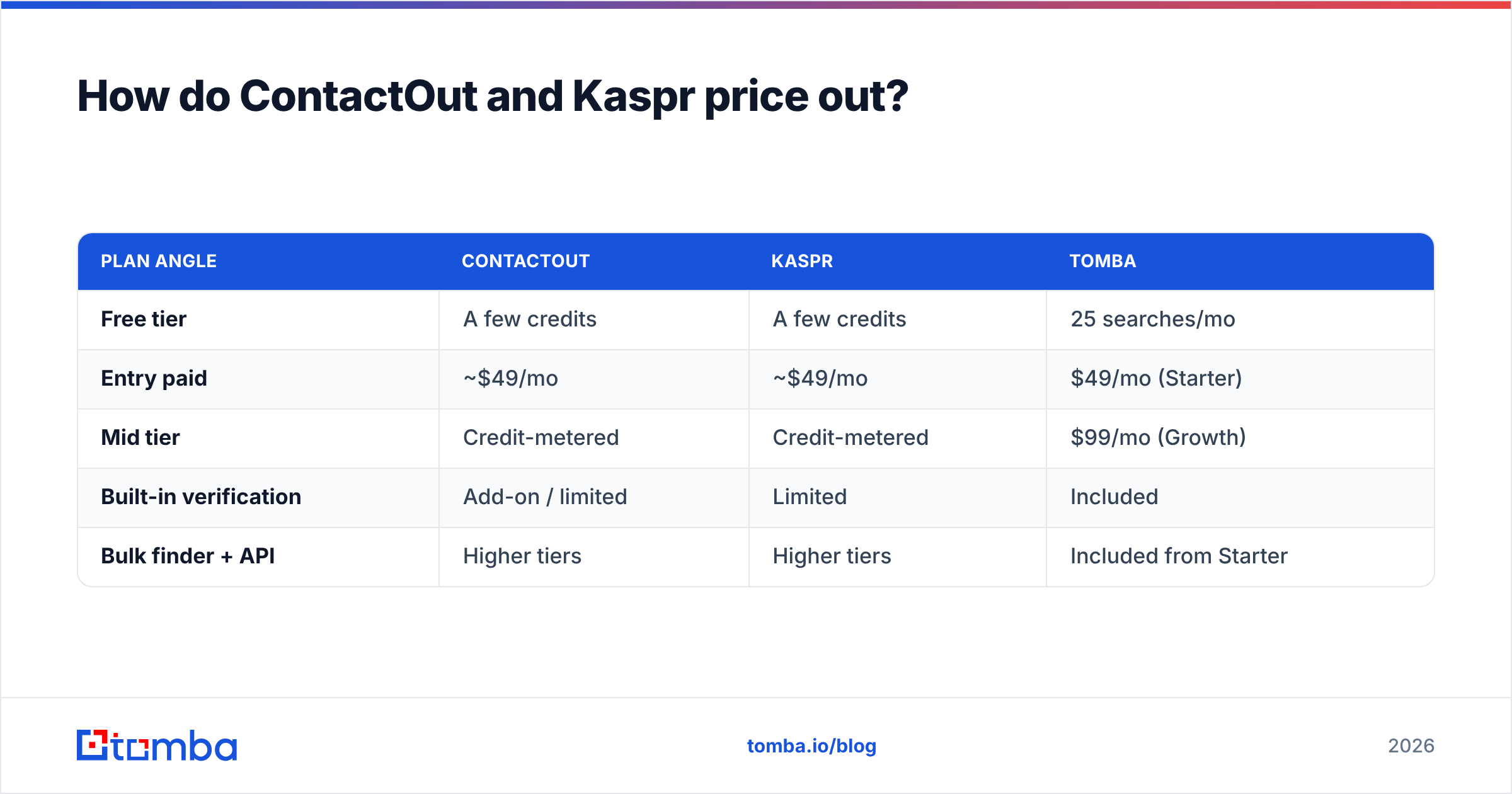
| Plan angle | ContactOut | Kaspr | Tomba |
|---|---|---|---|
| Free tier | A few credits | A few credits | 25 searches/mo |
| Entry paid | ~$49/mo | ~$49/mo | $49/mo (Starter) |
| Mid tier | Credit-metered | Credit-metered | $99/mo (Growth) |
| Built-in verification | Add-on / limited | Limited | Included |
| Bulk finder + API | Higher tiers | Higher tiers | Included from Starter |
Tomba's tiers — Free (25 searches), Starter $49, Growth $99, Pro $249, and Enterprise — are laid out on the Tomba pricing page, and verification is part of the product rather than a separate meter. That matters because with ContactOut or Kaspr you can end up paying twice: once to find a contact, again to verify it elsewhere before you trust it.

Which one should you choose?#
Pick based on your actual motion, not the shiniest demo:
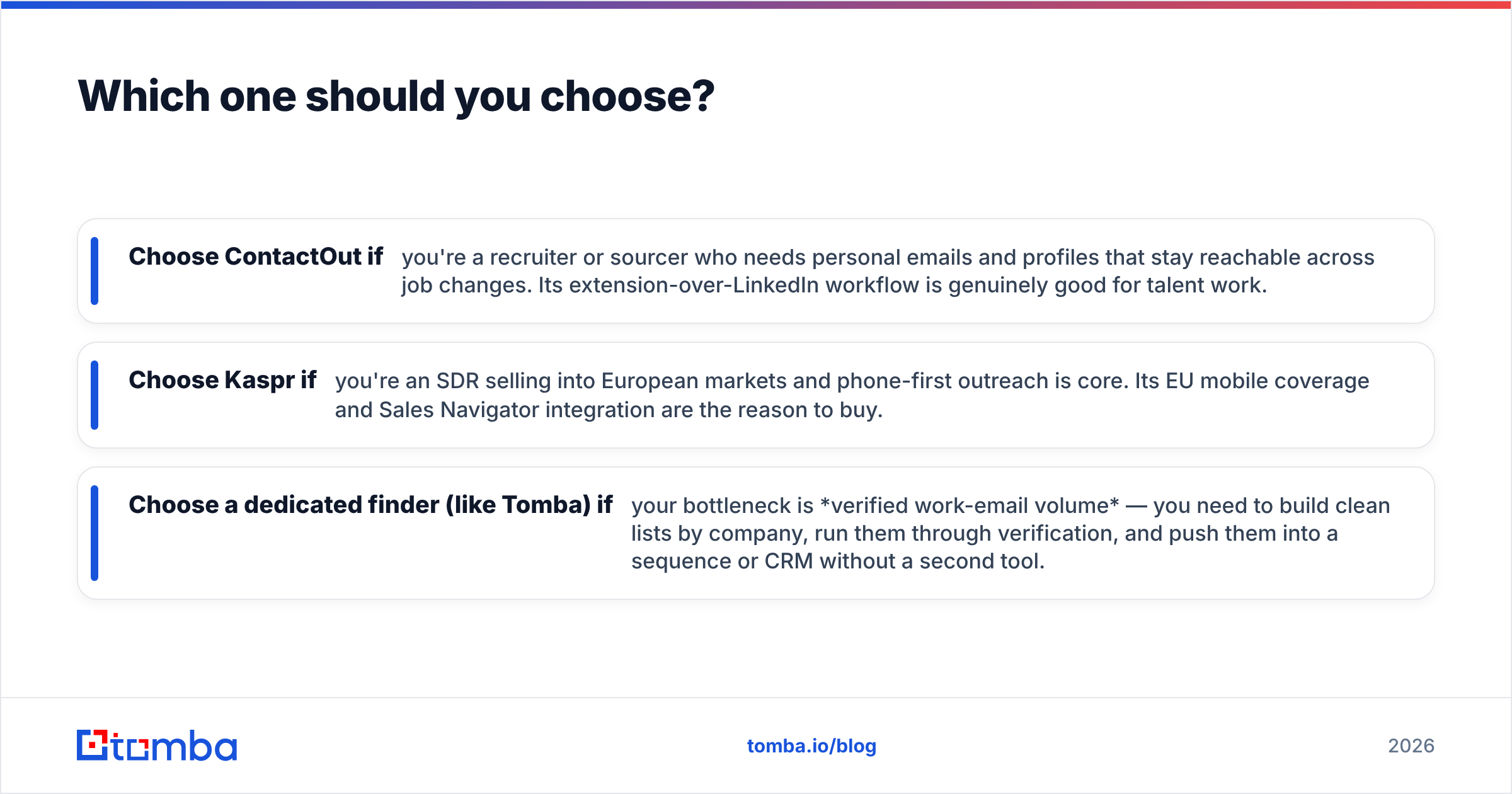
- Choose ContactOut if you're a recruiter or sourcer who needs personal emails and profiles that stay reachable across job changes. Its extension-over-LinkedIn workflow is genuinely good for talent work.
- Choose Kaspr if you're an SDR selling into European markets and phone-first outreach is core. Its EU mobile coverage and Sales Navigator integration are the reason to buy.
- Choose a dedicated finder (like Tomba) if your bottleneck is verified work-email volume — you need to build clean lists by company, run them through verification, and push them into a sequence or CRM without a second tool.
For that third case, the workflow is different. Instead of clicking profiles one at a time, you run a domain search to pull every reachable address at a target company, enrich and verify in bulk, and export. That's a fundamentally cheaper motion than per-profile credit reveals when you're prospecting hundreds of accounts.
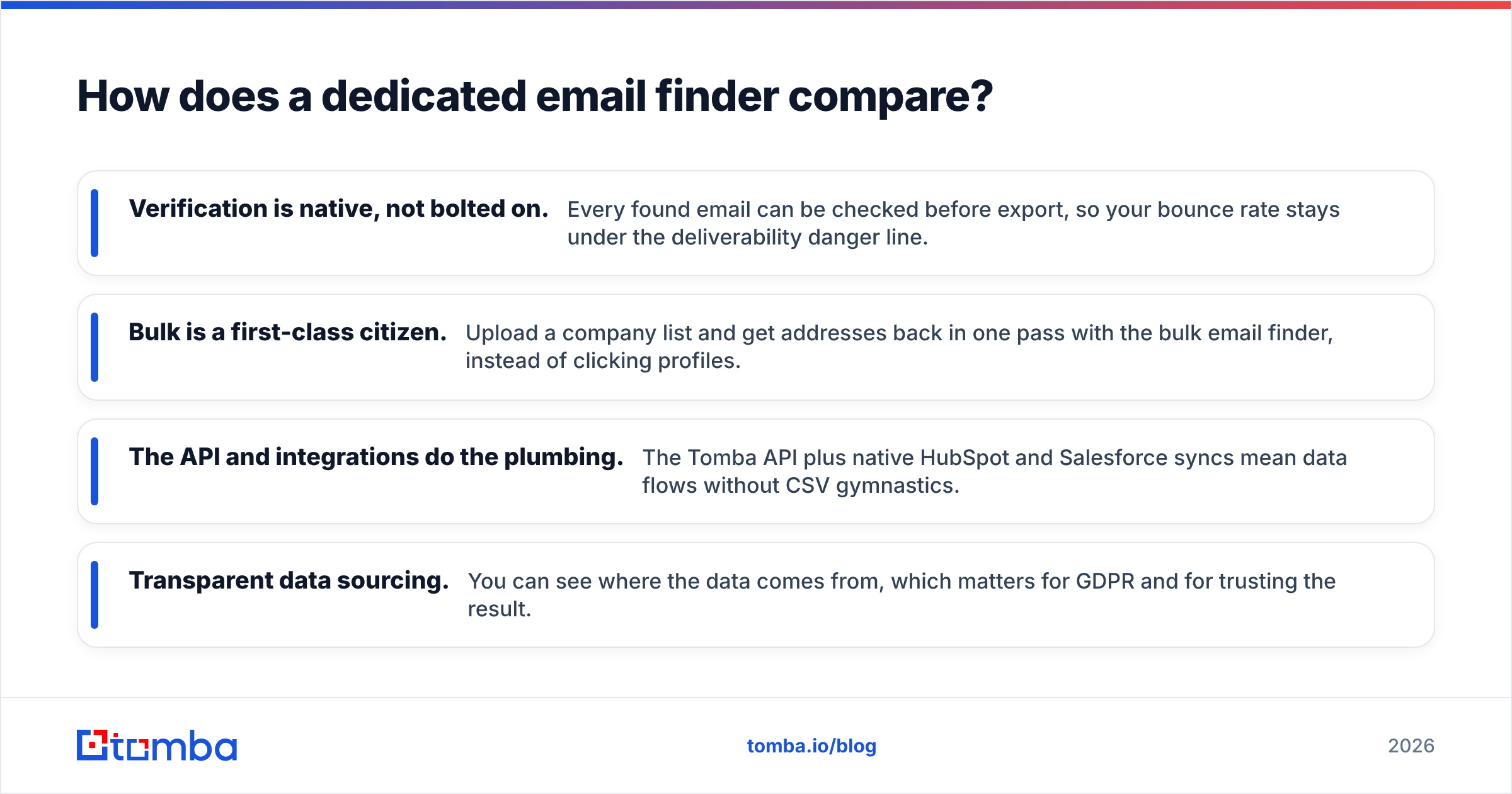
How does a dedicated email finder compare?#
Contact finders like ContactOut and Kaspr are optimized for the LinkedIn moment — one profile, one reveal. A dedicated email platform is optimized for the list. The difference shows up most on catch-all domains and on bulk jobs, which is exactly where cold-email bounce rates get decided.

Where a purpose-built finder pulls ahead:
- Verification is native, not bolted on. Every found email can be checked before export, so your bounce rate stays under the deliverability danger line.
- Bulk is a first-class citizen. Upload a company list and get addresses back in one pass with the bulk email finder, instead of clicking profiles.
- The API and integrations do the plumbing. The Tomba API plus native HubSpot and Salesforce syncs mean data flows without CSV gymnastics.
- Transparent data sourcing. You can see where the data comes from, which matters for GDPR and for trusting the result.
None of this makes ContactOut or Kaspr bad — for recruiting and EU phone respectively, they're strong picks. It means "which is more accurate" often has a third answer: the tool built specifically to find and verify email at scale.
Frequently asked questions#
Is ContactOut better than Kaspr for phone numbers? Kaspr generally has stronger direct-dial mobile coverage in Europe, while ContactOut's phone data is broader but thinner per region. If phone-first outreach in EU markets is your motion, Kaspr usually edges it. For a dedicated dial-building workflow, a specialized phone finder is worth comparing too.
Do ContactOut and Kaspr integrate with my CRM? Yes — both connect to HubSpot and common CRMs, with Kaspr leaning toward Pipedrive and Salesforce workflows. Always confirm that verified status transfers, not just the raw email, so you don't sequence unverified addresses.
What's the biggest hidden cost? Credits. Both meter reveals, and volume prospecting burns credits fast — sometimes with separate email and phone pools. Model your monthly reveal count before committing, and factor in a separate verification tool if the finder doesn't include one.
Is there a cheaper ContactOut or Kaspr alternative? If your priority is verified work email at volume rather than personal emails or EU phones, a dedicated finder with built-in verification typically delivers more usable contacts per dollar. See the full Tomba pricing tiers to compare directly.
The bottom line#
ContactOut and Kaspr solve real but different problems: ContactOut for recruiters chasing personal, change-proof emails, and Kaspr for European SDRs who need direct mobiles inside their LinkedIn flow. Neither is a general-purpose bounce-proof email engine, and both make you think in credits.
If the number you care about is verified work emails delivered to your sequence without wrecking your reputation, start with a tool built for exactly that. Try Tomba Email Finder — search by name, domain, or company, verify in the same pass, and export clean lists your outbound can actually trust. Run your first 25 searches free and compare the verified-hit rate against whatever you're using today.
Related guides#
Ready to find emails that actually work?
Join 150,000+ professionals who stopped guessing and started sending. Free credits on signup — no credit card required.
Get the Tomba newsletter
Practical outbound tactics and product updates — once every two weeks.
About the author