ContactOut vs LeadGibbon: Email Finder Comparison for 2026
ContactOut and LeadGibbon both promise verified B2B emails, but they win at very different jobs. Here's an honest, side-by-side breakdown of accuracy, pricing, and fit — plus where each one quietly falls short.
You need verified B2B emails, you've narrowed it to ContactOut and LeadGibbon, and now you're stuck. Both claim high accuracy. Both plug into your outreach. Both cost real money. The difference only shows up once you're 500 contacts deep and your bounce rate starts talking.
This is the honest comparison: where each tool actually wins, where it quietly falls short, and what it really costs once you're running volume.
TL;DR — ContactOut vs LeadGibbon in 30 seconds#
- ContactOut is a LinkedIn-first prospecting tool. Its Chrome extension shines when you live inside LinkedIn Recruiter or Sales Navigator and want personal + work emails one profile at a time.
- LeadGibbon is a list-building tool. It leans toward exporting bulk lead lists with company and contact data, better suited to reps who build a target account list and pull it in one batch.
- Accuracy is comparable on common corporate domains; both degrade on catch-all domains and smaller companies. Neither publishes an independently audited match rate.
- Pricing is where buyers get surprised — both gate volume behind credits, and per-email cost climbs fast once you leave the entry tier.
- If cost-per-verified-email and API access matter more than a LinkedIn overlay, a dedicated email finder like Tomba usually beats both on unit economics.
What is ContactOut and who is it for?#
ContactOut is built around one core motion: you're browsing LinkedIn, you hit a profile you want, and the extension surfaces that person's work email, personal email, and phone. Think of it as a contact-reveal layer that sits on top of LinkedIn rather than a standalone database you query.
That design makes it strong for recruiters and individual SDRs who prospect person-by-person. The extension is fast, the personal-email coverage is genuinely a differentiator (useful when corporate inboxes are locked down), and the workflow feels native to how sourcers already work.
The trade-offs show up at scale. Because the primary motion is profile-by-profile, building a 2,000-row list is slower than a true bulk tool. Credit consumption is easy to lose track of, and personal-email data — while a selling point — is exactly the kind of data you want to be careful with under GDPR and CAN-SPAM. You own the compliance risk, not the vendor.

What is LeadGibbon and who is it for?#
LeadGibbon approaches the same problem from the list side. Instead of revealing one contact at a time, it's oriented toward pulling structured lead lists — name, title, company, verified email — and dropping them into a spreadsheet or your CRM. If your process starts with "build me a list of VP Marketing at 300 SaaS companies," LeadGibbon fits that shape.
It also has a LinkedIn extension, but the center of gravity is the exportable list. For a rep or a small team running batch outbound, that's a cleaner mental model than harvesting profiles individually.
Where LeadGibbon gets thinner: the total database and enrichment depth don't match the biggest players, coverage outside North America and standard corporate roles gets patchy, and — like almost every tool in this category — verification quality on catch-all domains is inconsistent. A domain that accepts every address will happily report "valid" for an address that goes nowhere. That's not unique to LeadGibbon, but it's the failure mode that inflates your bounce rate.
ContactOut vs LeadGibbon: the head-to-head table#
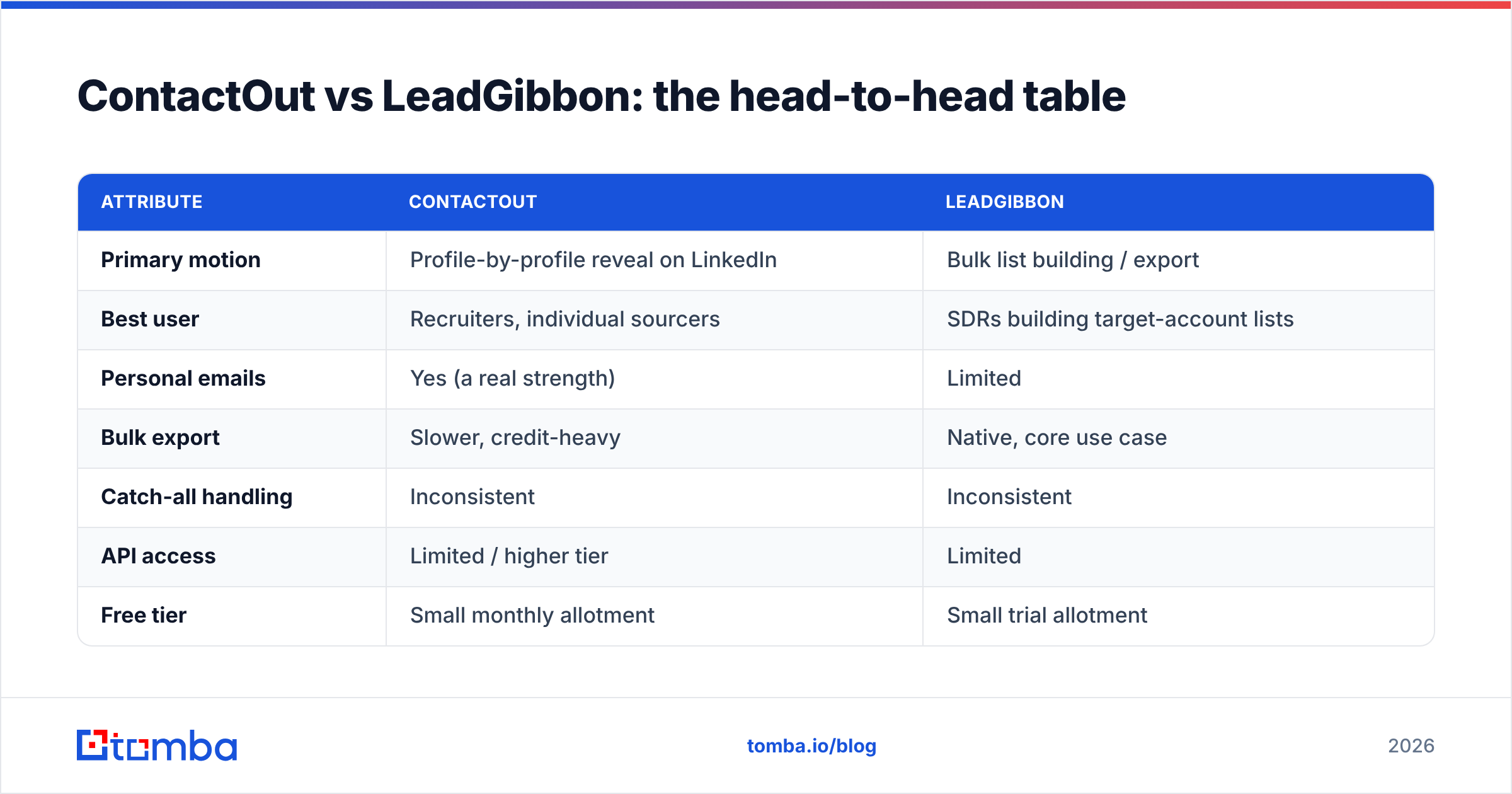
Here's the core comparison. Treat exact credit counts as directional — both vendors adjust packaging — but the shape of the trade-off is stable.
| Attribute | ContactOut | LeadGibbon |
|---|---|---|
| Primary motion | Profile-by-profile reveal on LinkedIn | Bulk list building / export |
| Best user | Recruiters, individual sourcers | SDRs building target-account lists |
| Personal emails | Yes (a real strength) | Limited |
| Bulk export | Slower, credit-heavy | Native, core use case |
| Catch-all handling | Inconsistent | Inconsistent |
| API access | Limited / higher tier | Limited |
| Free tier | Small monthly allotment | Small trial allotment |
| Compliance burden | On you (personal data) | On you |
Notice what's missing from both columns: a transparent, independently verified accuracy number. Every vendor in this space quotes its own internal match rate. The only number that matters is your bounce rate on your list — which is why running a sample through an independent email verifier before you send is non-negotiable regardless of which tool you pick.

Is ContactOut or LeadGibbon more accurate?#
Short answer: on standard corporate domains, they're close enough that the difference is noise. On the hard cases, both stumble in the same places.
Accuracy in email finding really breaks into three buckets:
- Standard corporate domains (
firstname.last@company.com) — both tools do well here because the pattern is discoverable and verifiable via SMTP. This is 60-70% of most B2B lists. - Catch-all domains — the server accepts everything, so neither tool can truly confirm deliverability. You need a dedicated catch-all verifier or a confidence score, not a binary valid/invalid.
- Small companies, non-US roles, and rare formats — coverage thins out for everyone, and this is where reported accuracy and real accuracy diverge most.
The practical takeaway: don't buy on the headline accuracy claim. Buy on how the tool handles bucket #2 and #3, because bucket #1 is a solved problem. ContactOut's edge is personal emails as a fallback; LeadGibbon's edge is that its list-first flow makes it easy to bulk-verify before you export.
How do ContactOut and LeadGibbon price out at volume?#
This is where most buyers get the surprised-Pikachu moment. Both tools look affordable at the entry tier, then the per-email math changes the story once you scale.

The pattern to watch:
- Credits reset monthly and usually don't roll over. If you build lists in bursts, you pay for capacity you don't use in slow months.
- Personal-data reveals (ContactOut) can cost more per contact than a plain work email.
- Overage pricing is where the real cost lives — the entry plan's per-email rate is not the rate you'll actually pay at 5,000+ contacts/month.
- API access, if you want to wire finding into your own stack, typically sits on a higher tier or isn't a first-class product at all.
If unit economics are your deciding factor, it's worth putting all three side by side, including a pure-play finder. Tomba's pricing runs a Free tier (25 searches/month), Starter at $49/month, Growth at $99/month, and Pro at $249/month — with the email finder, verifier, domain search, and bulk email finder included rather than sold as separate add-ons. For a team that mainly needs verified emails at predictable cost, bundling those functions changes the per-email math more than any single accuracy claim.
Where does a dedicated email finder fit?#
Both ContactOut and LeadGibbon are, at heart, LinkedIn-adjacent prospecting tools. That's a feature if LinkedIn is your entire sourcing motion. It's a limitation if your inputs are domains, company lists, or an existing CRM you want to enrich.
A dedicated finder attacks the problem from the domain and pattern side:
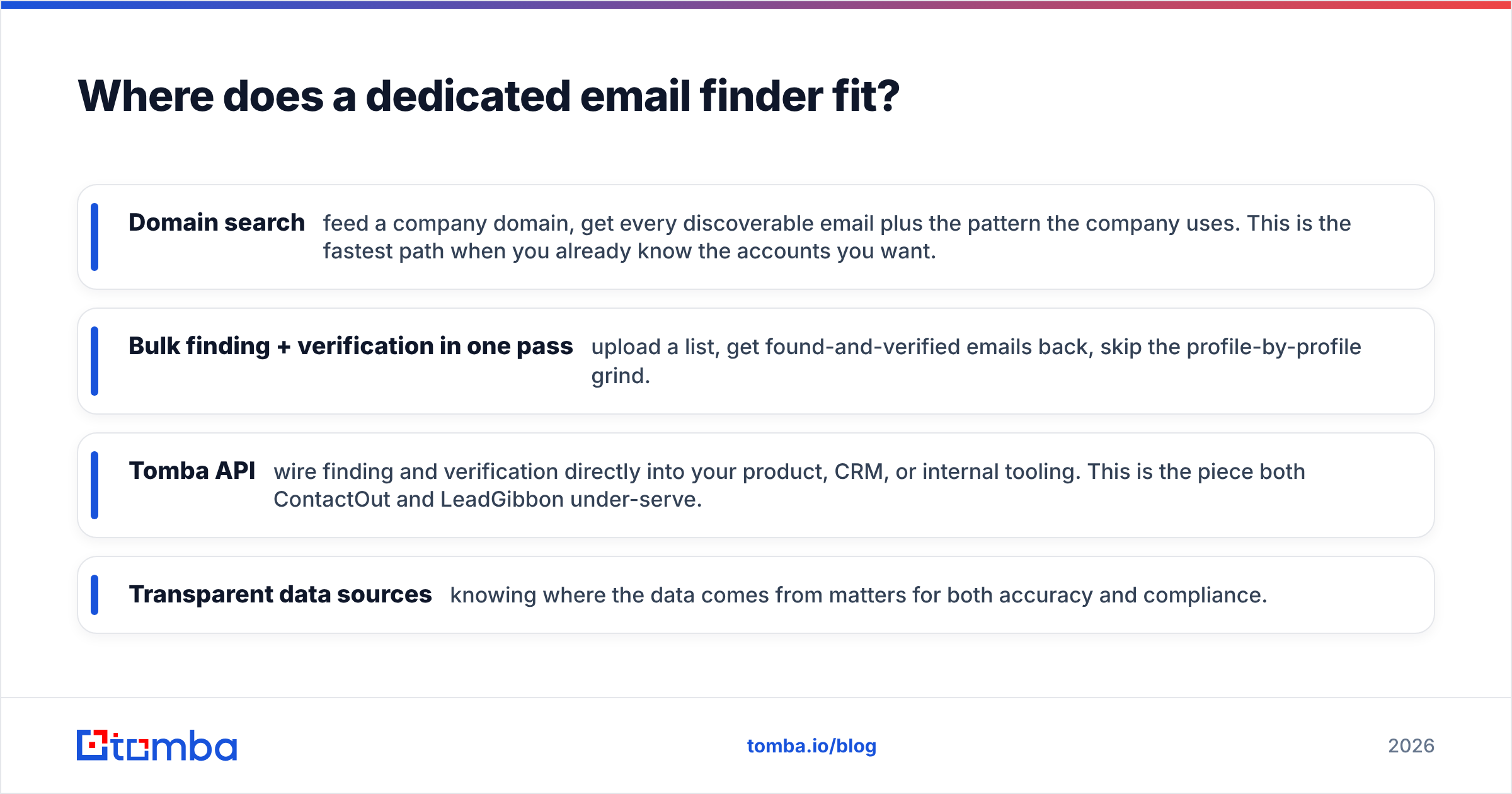
- Domain search — feed a company domain, get every discoverable email plus the pattern the company uses. This is the fastest path when you already know the accounts you want.
- Bulk finding + verification in one pass — upload a list, get found-and-verified emails back, skip the profile-by-profile grind.
- Tomba API — wire finding and verification directly into your product, CRM, or internal tooling. This is the piece both ContactOut and LeadGibbon under-serve.
- Transparent data sources — knowing where the data comes from matters for both accuracy and compliance.
The honest framing: if you're a recruiter who lives in LinkedIn Recruiter and needs personal emails, ContactOut's overlay is a genuine strength and a finder won't replicate that motion. If you're building lists from a known set of accounts and care about cost-per-verified-email and automation, a finder usually wins.
ContactOut vs LeadGibbon vs Tomba: quick decision guide#
| Your situation | Best fit |
|---|---|
| Live inside LinkedIn Recruiter, need personal emails | ContactOut |
| Build target-account lists, export to CRM in batches | LeadGibbon |
| Start from domains/company lists, want lowest cost-per-email | Tomba (email finder + domain search) |
| Need finding + verification via API in your own stack | Tomba API |
| Prospect one profile at a time, occasionally | ContactOut free tier |
| Verify a list you already bought before sending | Any dedicated verifier |
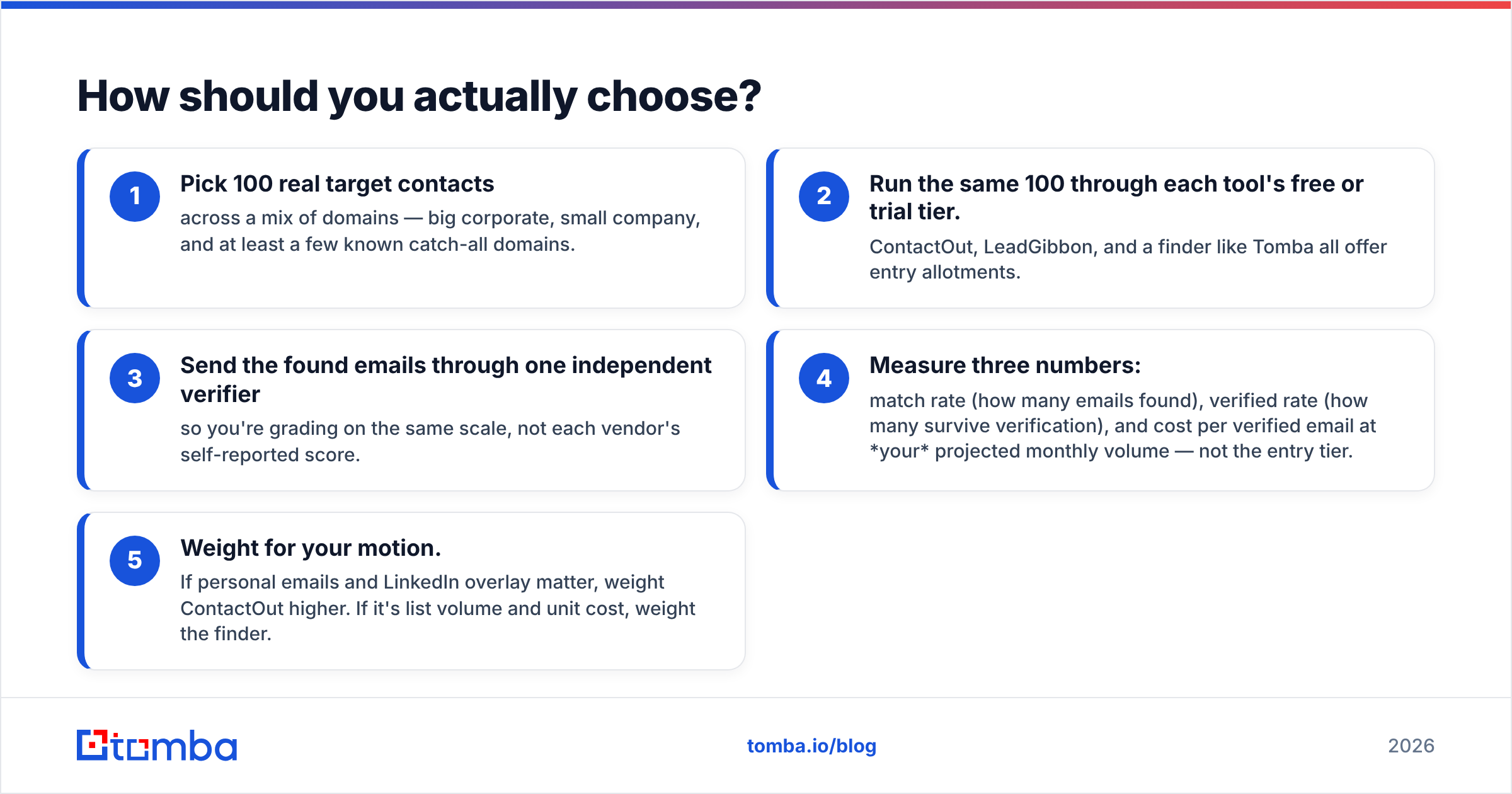
How should you actually choose?#
Skip the feature checklist and run a bake-off. It takes an afternoon and beats any vendor's marketing.
- Pick 100 real target contacts across a mix of domains — big corporate, small company, and at least a few known catch-all domains.
- Run the same 100 through each tool's free or trial tier. ContactOut, LeadGibbon, and a finder like Tomba all offer entry allotments.
- Send the found emails through one independent verifier so you're grading on the same scale, not each vendor's self-reported score.
- Measure three numbers: match rate (how many emails found), verified rate (how many survive verification), and cost per verified email at your projected monthly volume — not the entry tier.
- Weight for your motion. If personal emails and LinkedIn overlay matter, weight ContactOut higher. If it's list volume and unit cost, weight the finder.
The tool that wins your 100-contact test on verified rate and cost-per-verified-email is the one to buy. Everything else — UI polish, integrations count, brand — is a tiebreaker, not a deciding factor.
The verdict#
There's no universal winner, and any post that declares one is selling you something. ContactOut wins the LinkedIn-native, personal-email use case. LeadGibbon wins the simple bulk-list-export use case for North American corporate roles. Both charge more per verified email than a pure-play finder once you scale, and both put the compliance burden on you.
If your real requirement is "verified B2B emails at predictable cost, from domains and company lists, with an API when I need it," neither LinkedIn overlay is the most efficient answer.
That's the gap Tomba's Email Finder is built for: find emails by domain, name, or company; verify them in the same workflow; and wire the whole thing into your stack through the Tomba API — starting free with 25 searches a month, no credit card. Run your 100-contact bake-off against ContactOut and LeadGibbon, grade on verified rate and cost-per-email, and let the numbers pick the winner.
Related guides#
Ready to find emails that actually work?
Join 150,000+ professionals who stopped guessing and started sending. Free credits on signup — no credit card required.
Get the Tomba newsletter
Practical outbound tactics and product updates — once every two weeks.
About the author