ContactOut vs LeadIQ (2026): Which B2B Data Tool Wins?
ContactOut and LeadIQ both promise clean B2B contact data, but they win at different jobs. Here's an honest, side-by-side breakdown of pricing, accuracy, and workflow fit — plus a cheaper pick.
Choosing between ContactOut and LeadIQ usually comes down to one question: are you a LinkedIn-first recruiter/founder who wants emails on demand, or a sales team that needs data pushed straight into a sequenced CRM workflow? They overlap, but they are not the same product.
This is a neutral, hands-on comparison — pricing, data accuracy, coverage, integrations, and the hidden costs each vendor is quiet about. At the end, we cover where a flat-rate alternative like Tomba fits, because for many teams the "big two" are overkill for the actual job to be done.
TL;DR: ContactOut vs LeadIQ in 30 seconds#
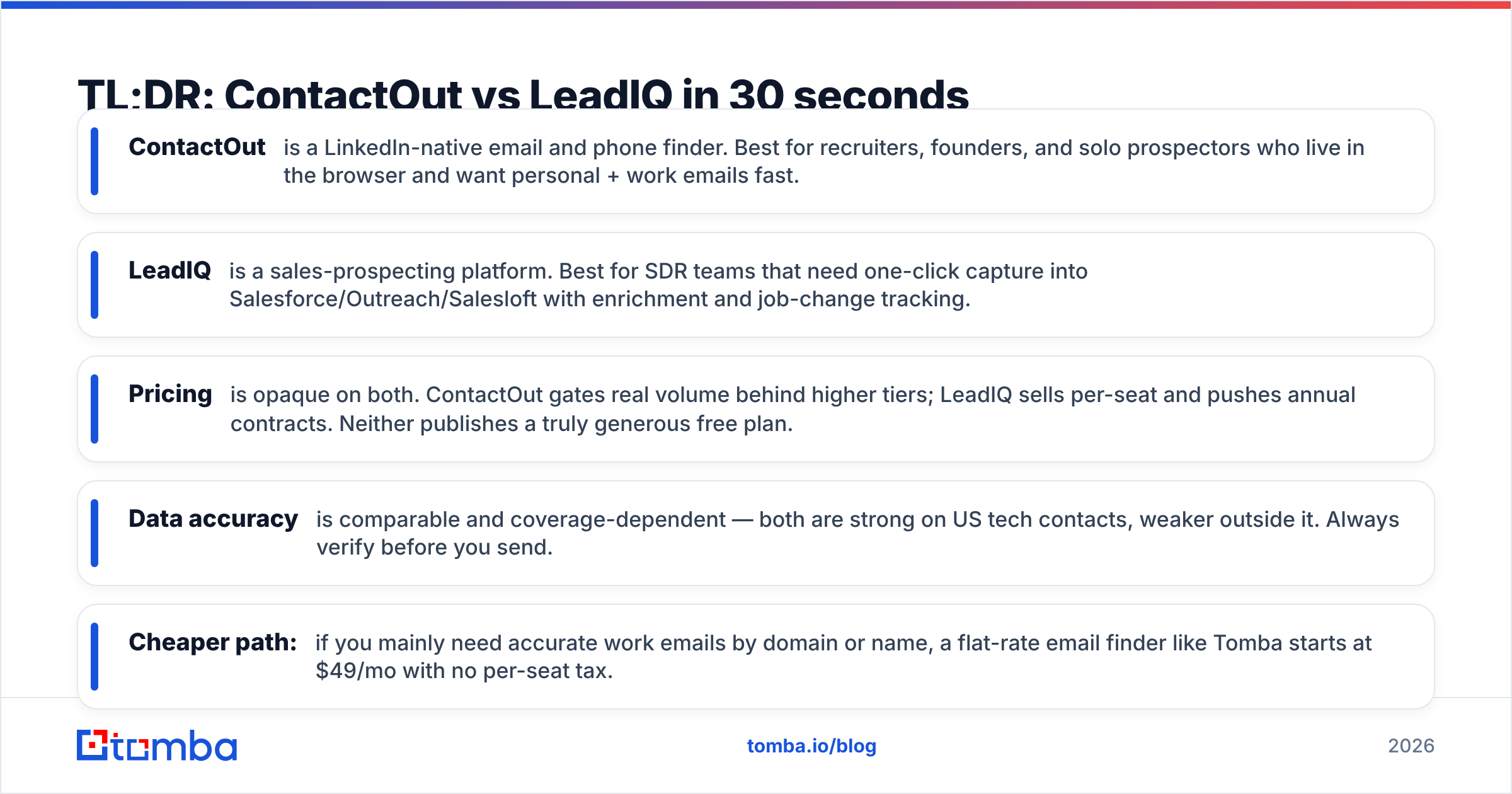
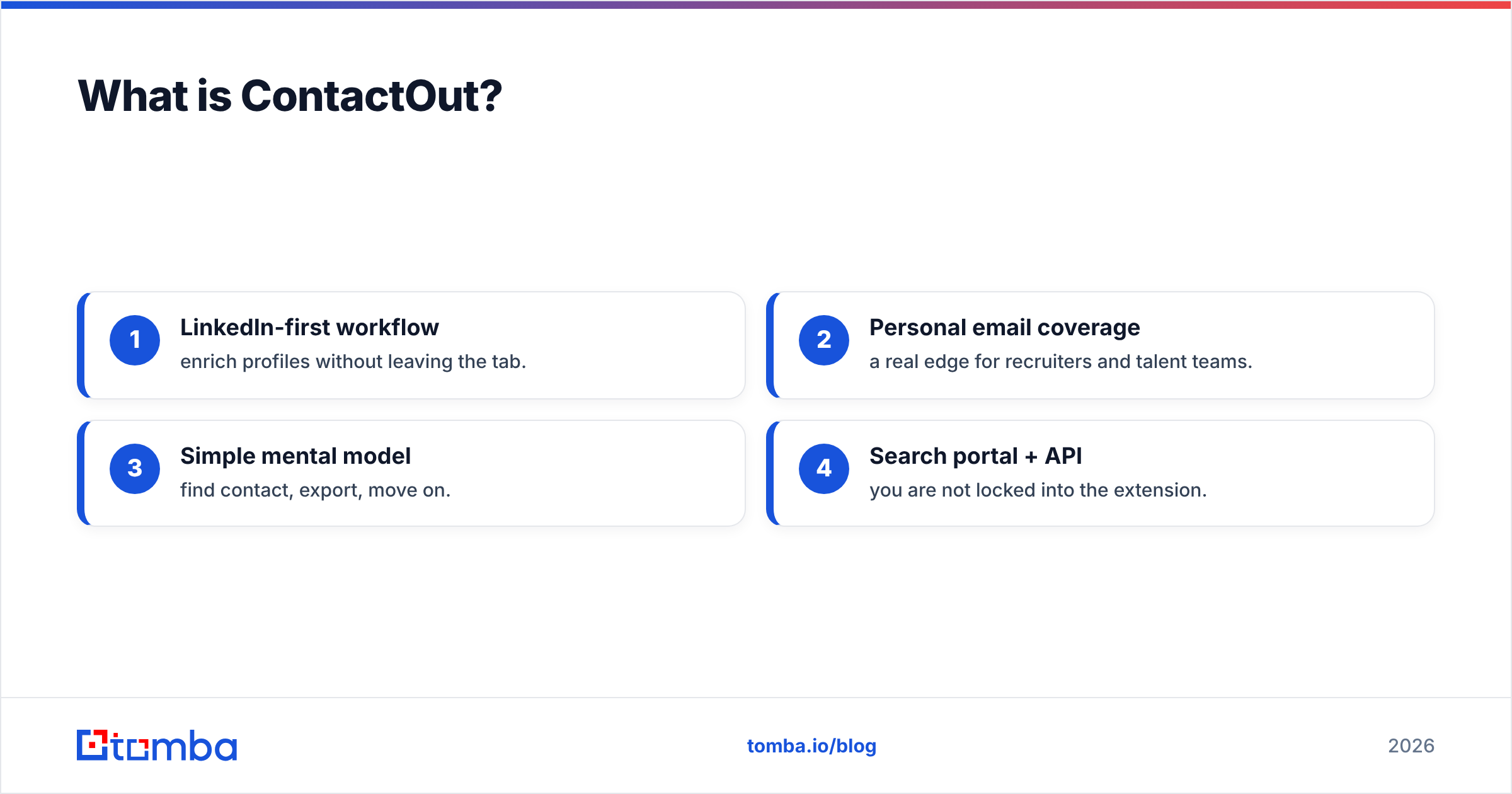
- ContactOut is a LinkedIn-native email and phone finder. Best for recruiters, founders, and solo prospectors who live in the browser and want personal + work emails fast.
- LeadIQ is a sales-prospecting platform. Best for SDR teams that need one-click capture into Salesforce/Outreach/Salesloft with enrichment and job-change tracking.
- Pricing is opaque on both. ContactOut gates real volume behind higher tiers; LeadIQ sells per-seat and pushes annual contracts. Neither publishes a truly generous free plan.
- Data accuracy is comparable and coverage-dependent — both are strong on US tech contacts, weaker outside it. Always verify before you send.
- Cheaper path: if you mainly need accurate work emails by domain or name, a flat-rate email finder like Tomba starts at $49/mo with no per-seat tax.
What is ContactOut?#
ContactOut is a contact-data tool built around LinkedIn. Its core promise is a Chrome extension that surfaces personal and work email addresses (and phone numbers) directly on a prospect's profile, plus a web-based search portal and an API. It markets a large contact database and leans hard on the "we find personal emails others miss" angle — which is genuinely useful for recruiting, where candidates ignore work inboxes.
Where ContactOut shines:
- LinkedIn-first workflow — enrich profiles without leaving the tab.
- Personal email coverage — a real edge for recruiters and talent teams.
- Simple mental model — find contact, export, move on.
- Search portal + API — you are not locked into the extension.
Where it frustrates people: usable monthly volume sits behind pricier tiers, exports can feel capped on lower plans, and pricing is not transparent until you talk to them. You can read the official positioning on contactout.com, but expect to request a quote for anything beyond light use.

What is LeadIQ?#
LeadIQ is a B2B sales-prospecting platform, not just a finder. The pitch is capture-to-CRM: grab a prospect from LinkedIn or a company page, enrich the record, and push it — cleanly, without duplicates — into Salesforce, HubSpot, Outreach, or Salesloft. It adds job-change tracking, list building, and (increasingly) AI-assisted message generation.
That workflow orientation is the whole point. LeadIQ is designed for a team of SDRs running structured outbound, where the bottleneck isn't finding one email — it's getting hundreds of verified contacts into a sequence without polluting the CRM. You can see the platform framing on leadiq.com and read verified user reviews on G2.
The trade-off: LeadIQ is priced and packaged for teams. Per-seat licensing, credit systems for "verified work emails," and a strong nudge toward annual contracts mean the sticker price climbs quickly once you add reps. For a solo user or a small team that just needs emails, a lot of that platform value goes unused.
ContactOut vs LeadIQ: the core differences#
The cleanest way to think about it: ContactOut sells access to contact data; LeadIQ sells a prospecting workflow that happens to include contact data.
- Primary user — ContactOut: recruiter, founder, solo prospector. LeadIQ: SDR/AE team inside a CRM.
- Center of gravity — ContactOut: the LinkedIn profile + search portal. LeadIQ: the CRM/sequencer.
- Standout data — ContactOut: personal emails and phone numbers. LeadIQ: verified work emails with dedup-safe CRM sync.
- Buying motion — ContactOut: self-serve to a point, then sales. LeadIQ: sales-led, seat-based, annual-leaning.
- AI features — Both are adding AI messaging; LeadIQ's is more embedded in the outbound flow.
- Best skipped when — ContactOut: you need tight CRM hygiene at scale. LeadIQ: you're one person who just wants emails.
How do ContactOut and LeadIQ compare on features and pricing?#
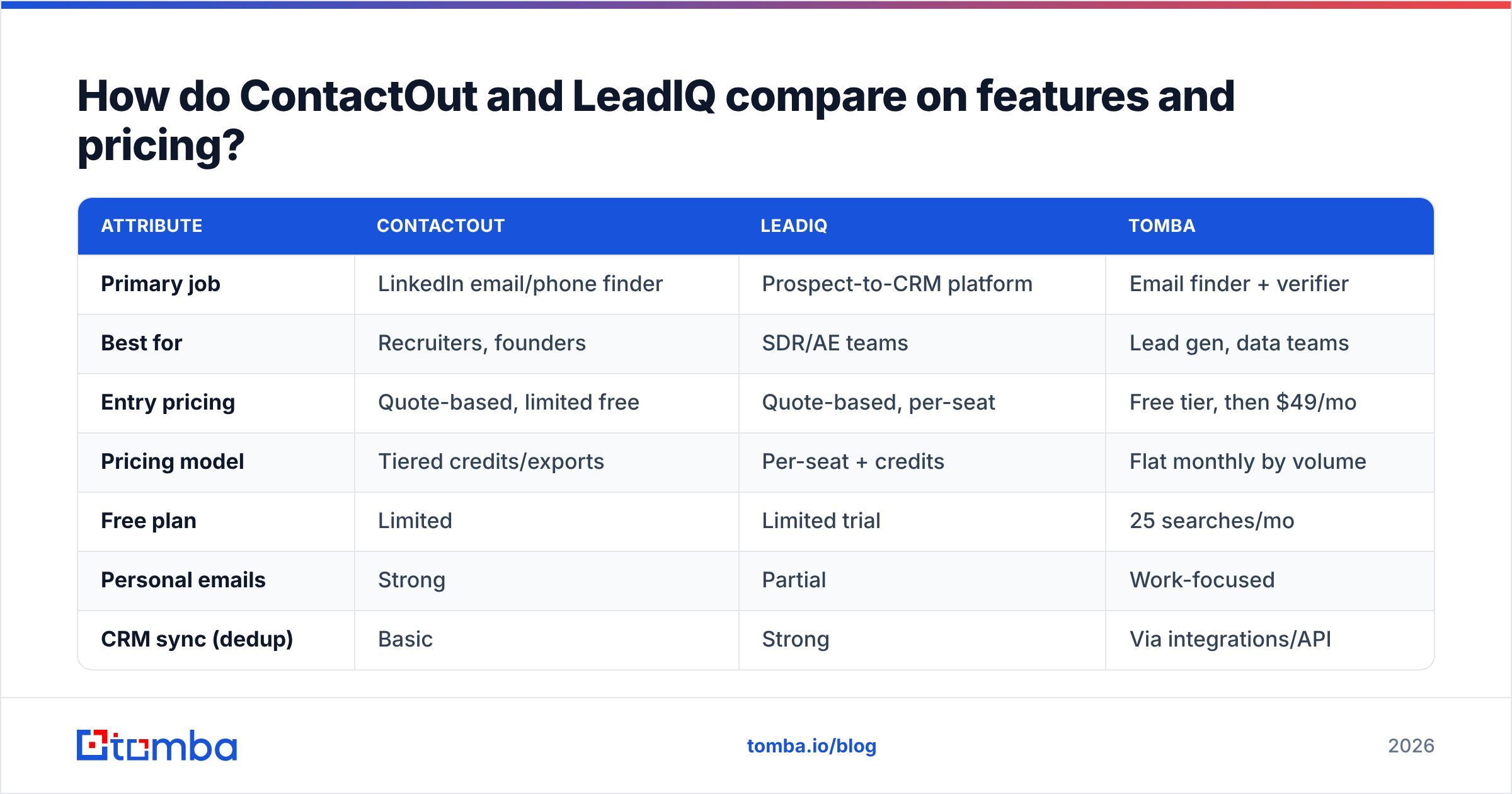
Neither vendor publishes fully transparent, apples-to-apples pricing, so treat the table below as directional — confirm current numbers with each vendor before you buy. What matters more than the exact dollar figure is the shape of the cost: ContactOut and LeadIQ both meter the thing you actually need (verified emails, exports, seats), while a flat-rate tool charges by search volume regardless of headcount.
| Attribute | ContactOut | LeadIQ | Tomba |
|---|---|---|---|
| Primary job | LinkedIn email/phone finder | Prospect-to-CRM platform | Email finder + verifier |
| Best for | Recruiters, founders | SDR/AE teams | Lead gen, data teams |
| Entry pricing | Quote-based, limited free | Quote-based, per-seat | Free tier, then $49/mo |
| Pricing model | Tiered credits/exports | Per-seat + credits | Flat monthly by volume |
| Free plan | Limited | Limited trial | 25 searches/mo |
| Personal emails | Strong | Partial | Work-focused |
| CRM sync (dedup) | Basic | Strong | Via integrations/API |
| Email verification | Included | Included | Dedicated verifier |
| Bulk processing | Higher tiers | Team plans | Bulk on all paid plans |
| API access | Yes | Yes | Yes |
A few honest caveats on that table:
- "Limited free" means enough to evaluate, not enough to run a campaign. Budget for a paid tier from day one.
- Per-seat is the line item that surprises teams. Ten reps on LeadIQ is a very different invoice than one rep — and unlike volume-based Tomba pricing, your cost scales with headcount, not usage.
- Credits reset monthly. If your prospecting is spiky (big push in Q1, quiet in Q3), you pay for the peak all year.
Which tool has better data accuracy?#
Neither wins outright — accuracy is a function of coverage for your specific ICP, not a single global number. Both ContactOut and LeadIQ are strong on US-based technology and mid-market contacts, and both get thinner outside North America, in non-tech verticals, and for very small companies. Any vendor claiming "98% accuracy" is quoting a lab number, not your list.
Three rules hold regardless of which you pick:
- Verify before you send. Bounces wreck your sender reputation faster than any single tool can protect it. Run every list through an email verifier, no matter the source.
- Catch-all domains lie. A "valid" catch-all isn't a real inbox. Use a dedicated catch-all verifier before trusting those addresses.
- Cross-check sources. For high-value accounts, pull the same contact from two tools. Agreement is your cheapest confidence signal.

This is also where the "platform vs finder" distinction stops mattering. Once data leaves ContactOut or LeadIQ, its quality is identical whether it flowed through a slick CRM sync or a CSV — the address is either deliverable or it isn't. Verification is not optional overhead; it's the step that determines whether your outbound lands.
Which should you choose?#
Pick based on the job, not the marketing.
Choose ContactOut if you're a recruiter or founder who works out of LinkedIn, values personal-email coverage, and wants a fast find-and-export loop without a heavy CRM behind it. Its browser-first design fits solo and small-team workflows, and personal emails are a genuine differentiator for talent sourcing.
Choose LeadIQ if you run a structured outbound team where clean CRM data is the bottleneck. The dedup-safe capture into Salesforce/Outreach/Salesloft, job-change tracking, and list workflows earn their keep once you have several reps and a defined sequence engine. For a lone SDR, that value is largely wasted.
Choose a flat-rate finder (like Tomba) if your real need is "accurate work emails, by name or by domain, at a predictable price." Not every team needs a full prospecting suite — many just need to turn a company list into verified contacts.

Where does Tomba fit against ContactOut and LeadIQ?#
Tomba is deliberately narrower — and that's the point. It's an email-finding and verification tool, not a per-seat sales platform, which changes the economics for a lot of buyers who don't need everything ContactOut or LeadIQ bundle in.
Practical reasons teams add or swap to Tomba:
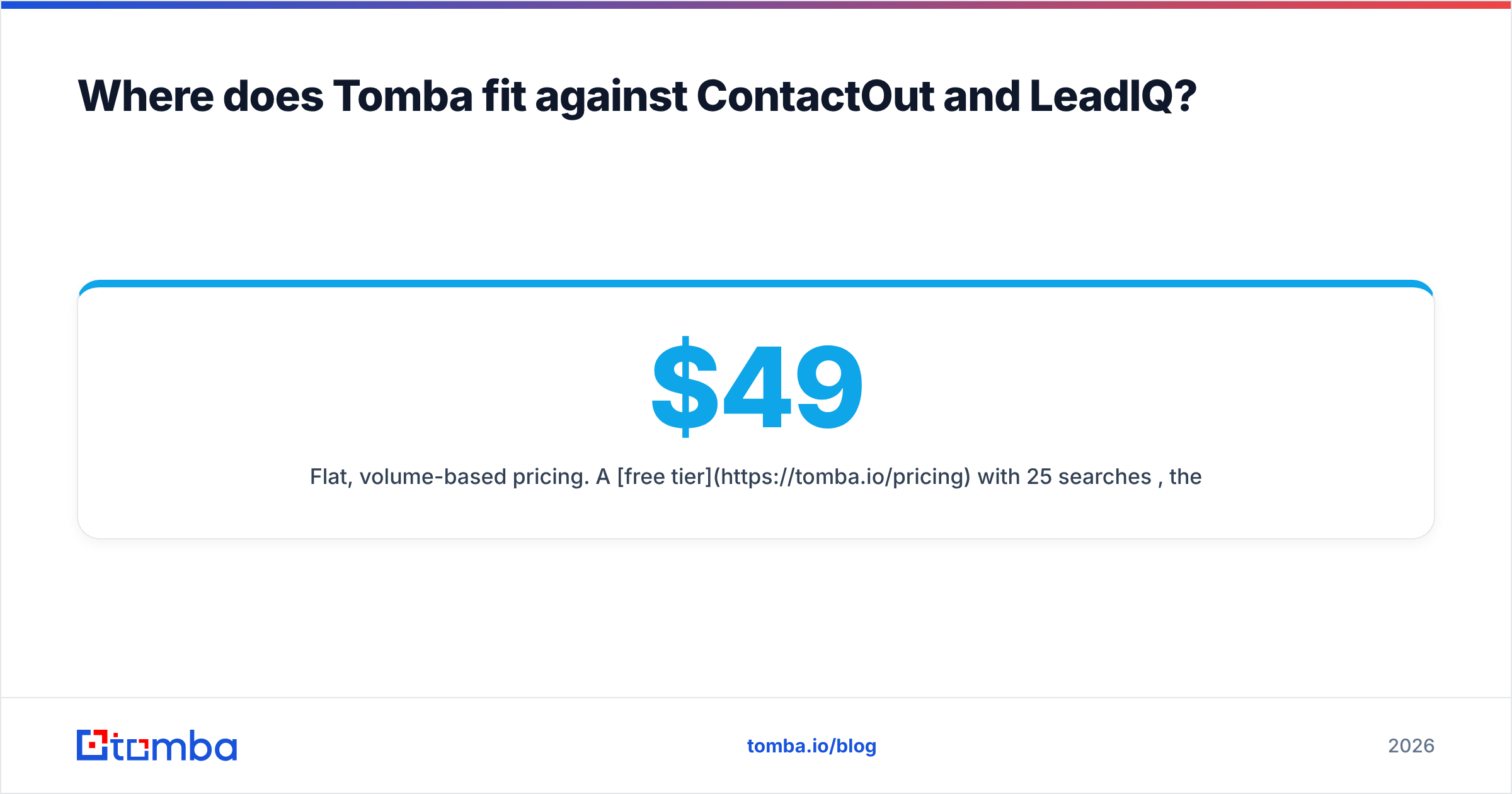
- Flat, volume-based pricing. A free tier with 25 searches/mo, then Starter at $49/mo, Growth at $99/mo, and Pro at $249/mo. No per-seat multiplier as your team grows.
- Find by domain, not just LinkedIn. Domain search pulls every email pattern for a company at once — ideal for account-based lists where you don't have individual profiles yet.
- Verification built in. The email verifier and catch-all checks live in the same tool, so you're not stitching a second vendor onto your finder.
- Bulk + API from the start. Bulk lead generation and the Tomba API are available on paid plans, not gated to enterprise-only tiers.
Here's how the three shake out on fit:
| Scenario | Best pick |
|---|---|
| LinkedIn sourcing + personal emails | ContactOut |
| Team outbound with CRM sync at scale | LeadIQ |
| Predictable-cost email finding by domain | Tomba |
| Verify a list you already have | Tomba |
| Solo prospector on a budget | Tomba or ContactOut |
To be clear: ContactOut and LeadIQ are strong at what they're built for. If personal-email recruiting or dedup-safe CRM outbound is your core motion, they're worth their price. Tomba isn't trying to replace a full sales-engagement platform — it's the better answer when the job is simpler than the tool you were about to buy.
The bottom line#
ContactOut vs LeadIQ isn't a "which is better" question — it's a "which job are you hiring for" question. ContactOut wins for LinkedIn-native, personal-email sourcing. LeadIQ wins for team-scale outbound with clean CRM sync. Both are opaque on price and both require you to verify before you send.
If you strip the question down to "I need accurate, verified work emails without paying per seat," that's exactly the gap a focused tool fills. Start free with the Tomba Email Finder, find emails by name or domain, and verify them in the same place — then decide whether you actually need a heavier platform on top. Test it against your own ICP with 25 free searches and let the bounce rate settle the debate.
Related guides#
Ready to find emails that actually work?
Join 150,000+ professionals who stopped guessing and started sending. Free credits on signup — no credit card required.
Get the Tomba newsletter
Practical outbound tactics and product updates — once every two weeks.
About the author