ContactOut vs LetsExtract: Which Email Tool Wins in 2026?
One is a LinkedIn-native Chrome extension. The other is a desktop scraper you buy once and run forever. They solve different problems — and only one of them belongs in a modern outbound stack. Here's the honest breakdown.
TL;DR — ContactOut vs LetsExtract in one screen#
- ContactOut is a LinkedIn-native Chrome extension. You browse a profile, it reveals a personal/work email and sometimes a phone. Subscription pricing, credit-metered, strongest on people you can already find on LinkedIn.
- LetsExtract is Windows desktop software. It harvests email addresses from search engines, websites, and local files, and ships with a bulk verifier and a mail sender. Mostly one-time license pricing, no per-lead credits.
- They are not the same category. ContactOut answers "what is this person's email?" LetsExtract answers "what emails exist on this page / in this search result?"
- Data quality is the split. ContactOut returns identity-matched contacts. LetsExtract returns whatever a crawler scraped — heavy on
info@,support@, and long-dead addresses. Expect to verify aggressively before you send. - If you need role-matched, verified B2B emails at API scale, neither tool is the natural fit. A dedicated email finder with a built-in verifier and a real API (Tomba's free tier gives you 25 searches/month, Starter is $49/mo) usually lands closer to what an outbound team actually runs.
What is ContactOut and who is it for?#
ContactOut is a contact-data tool built around the LinkedIn browsing experience. Install the Chrome extension, open a profile or a LinkedIn search results page, and a sidebar surfaces work emails, personal emails, and phone numbers for the people you're looking at. It also offers a web search portal, a Recruiter/Sales Navigator integration, a saved-lists feature, and an API on higher tiers.
The user it was designed for is a recruiter. That shows in the product: personal Gmail addresses are a first-class result (recruiters need to reach people outside work inboxes), the lists are candidate-shaped, and the integrations skew toward ATS platforms. Sales teams use it too, and it works — but you feel the recruiting DNA.
The core mechanic is credits. Every reveal burns one. Your monthly ceiling is the real constraint, not the interface.
Where ContactOut is strong:
- Identity match. You clicked a specific human. The email you get back is attached to that human, not scraped off a footer.
- Personal email coverage. Genuinely one of the better tools if you need to reach someone off their corporate domain.
- Zero setup. Extension installs in a minute, no proxies, no crawl configs.
- Phone numbers. Coverage is spotty across industries, but when it hits, it hits.
Where it gets frustrating:
- You must be on LinkedIn. No profile, no data. Manufacturing, trades, local services, and non-Western markets are thin.
- Credits are the meter. Prospecting at volume means either upgrading or rationing.
- Not a domain-first tool. "Give me everyone in engineering at Stripe" is not its natural query shape — that's a domain search job.
What is LetsExtract and how is it different?#
LetsExtract — usually sold as LetsExtract Email Studio — is old-school in the honest sense. It's a Windows desktop application (there's a Mac path, but Windows is the real product) that does three things: extract, verify, send.
The extractor pulls email addresses from search engine results, from a list of URLs you feed it, from whole website crawls, and from local files. You give it a keyword like "dental clinic" Chicago, it queries search engines, spiders the results, and dumps every mailto: and text-pattern email it finds into a grid. Then it can SMTP-verify that grid, and then it can email the grid from your own server.
It's a harvester, not a people-finder. That distinction determines everything downstream.
Where LetsExtract is strong:
- No credit meter. Buy the license, run it as long as you like. If you have infinite patience and cheap proxies, marginal cost per email approaches zero.
- Local-first. Your data never sits on a vendor's server. Some legal and IT teams love that.
- Long-tail, non-LinkedIn targets. Local businesses, directories, forums, conference sites — places where B2B databases genuinely have nothing.
- All-in-one. Extract → verify → send inside one binary.
Where it breaks down:
- Role-blind output. You get
contact@,info@,admin@,webmaster@, plus a few personal addresses if they happen to be published. You almost never get "VP of Engineering, by name." - Freshness is whatever the page says. A 2019 team page yields 2019 emails.
- Deliverability risk. Scraped generic inboxes are exactly the addresses that feed spam traps and hard bounces. Blasting them from your own SMTP is how a sending domain dies.
- Consent posture. Bulk-harvesting published addresses and cold-mailing them is on shakier ground under GDPR and similar regimes than sourcing from a compliance-managed B2B dataset. Talk to counsel, not to a blog post.
- Windows-only, single-machine, no real API. It does not fit into a modern RevOps automation stack.
How do ContactOut and LetsExtract compare head-to-head?#
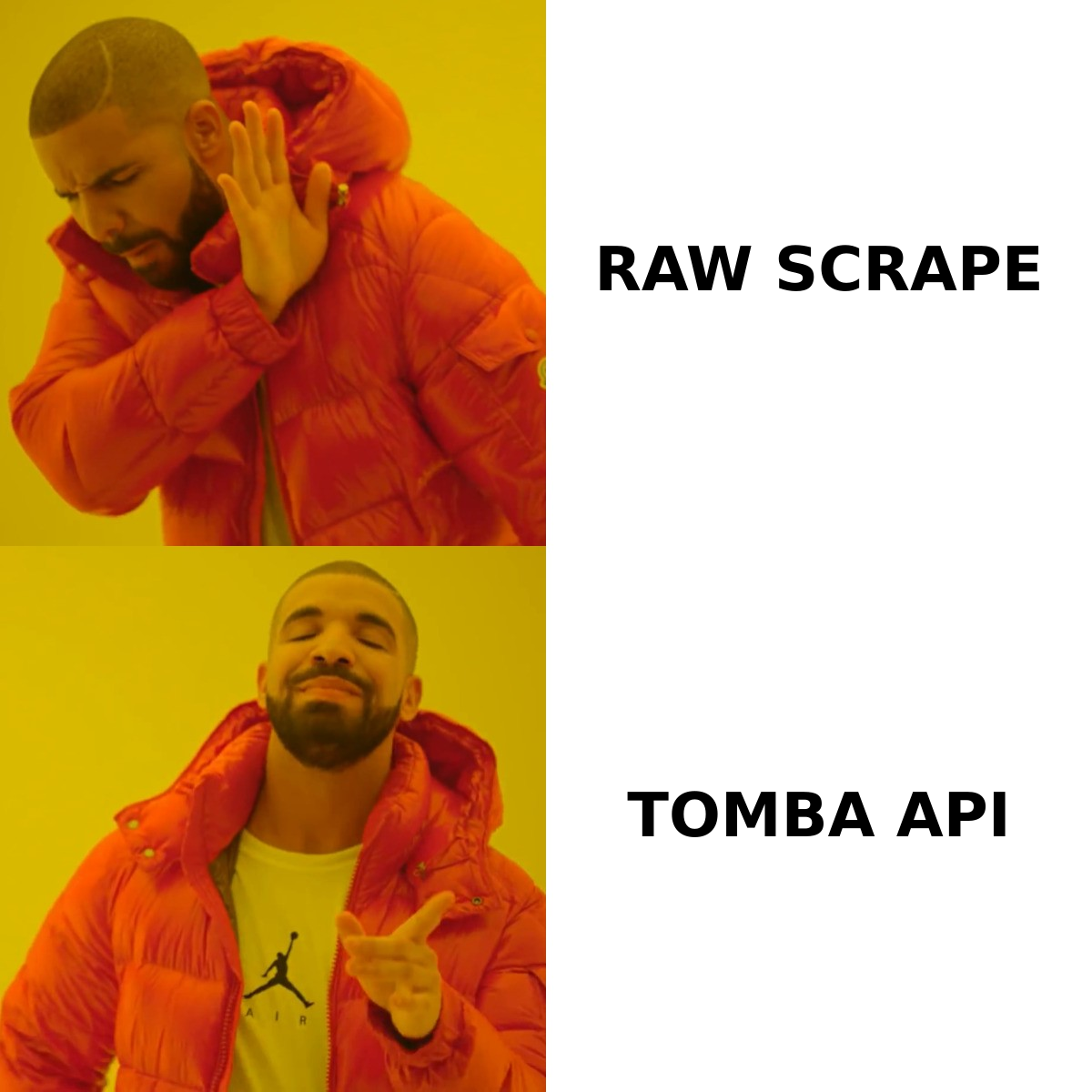
Here is the honest side-by-side. Pricing moves — check both vendors before you buy — but the structural differences are stable.
| Dimension | ContactOut | LetsExtract | Tomba |
|---|---|---|---|
| Product type | Chrome extension + web app | Windows desktop app | Web app + API + extensions |
| Primary source | LinkedIn profiles + contact DB | Search engines, websites, files | Public web crawl + pattern engine + verification |
| Query shape | "This person's email" | "Emails on these pages" | "This person at this domain" / "Everyone at this domain" |
| Role-level targeting | Yes (via LinkedIn title) | No | Yes (name, role, department) |
| Personal emails | Strong | Incidental | Business-focused |
| Generic inboxes (info@) | Rare | Very common | Filtered / flagged |
| Built-in verification | Basic | SMTP verifier included | Email verifier + catch-all handling |
| Catch-all handling | Limited | None meaningful | Dedicated catch-all verifier |
| API | Higher tiers | No practical API | Yes, on all paid plans |
| Bulk mode | List exports | Native, unlimited | Bulk email finder + CSV |
| Pricing model | Subscription, credit-metered | Mostly one-time license | Free (25/mo), $49, $99, $249, custom |
| Best for | Recruiters, LinkedIn-first sellers | Local/SMB harvesting, OSINT | B2B outbound + engineering teams |
The pricing question, honestly#
ContactOut sells subscription tiers — a limited free plan, then a personal tier in the tens of dollars per month, then sales/team plans that climb quickly, then enterprise pricing on request. The number on the page is rarely the number you pay, because the credit allocation is what actually gates you. Read the credit line, not the headline.
LetsExtract sells perpetual licenses per module, with a bundle for the full Studio. It looks dramatically cheaper on a spreadsheet — and it is, until you price in the hours spent cleaning lists, the proxies, the bounces, and the domain reputation you burn. Software cost is not the same as total cost.
Tomba sits in the middle deliberately: a free tier at 25 searches/month for testing, Starter at $49/mo, Growth at $99/mo, Pro at $249/mo, and custom enterprise. Full Tomba pricing is public, and every tier includes API access rather than reserving it for the top of the ladder.

Which tool is more accurate?#
Accuracy means two different things here, and conflating them is how teams end up with a 38% bounce rate.
ContactOut's accuracy question is: "is this the right email for this person?" It's a matching problem. The tool has an identity (a LinkedIn profile) and needs to attach the correct address. Its published accuracy claims sit in the high-90s; independent user reports on G2 are more mixed — strong on tech/SaaS in North America and Western Europe, weaker on SMB, non-English markets, and anyone with a stale profile. That's typical for the whole category, not a ContactOut-specific flaw.
LetsExtract's accuracy question is: "does this address exist?" It's a validity problem. The tool has no identity to match against — it found a string that looks like an email on a page. Its SMTP verifier can tell you whether the mailbox accepts mail. It cannot tell you whether info@acme.com reaches the CFO, whether the address is a spam trap, or whether that domain is catch-all and therefore accepts everything, valid or not.
That last one is the killer. A catch-all domain answers "yes" to every SMTP probe. A basic verifier reads that as valid. You send. It bounces or vanishes. This is precisely why catch-all handling exists as a separate discipline — see how a catch-all verifier treats those domains differently from a naive SMTP ping.
So: ContactOut is more accurate at the thing outbound teams actually need (reaching a named decision-maker). LetsExtract can be perfectly accurate at the thing it does (this string is a live mailbox) while still handing you a list that destroys your sender reputation.

When should you actually use each one?#
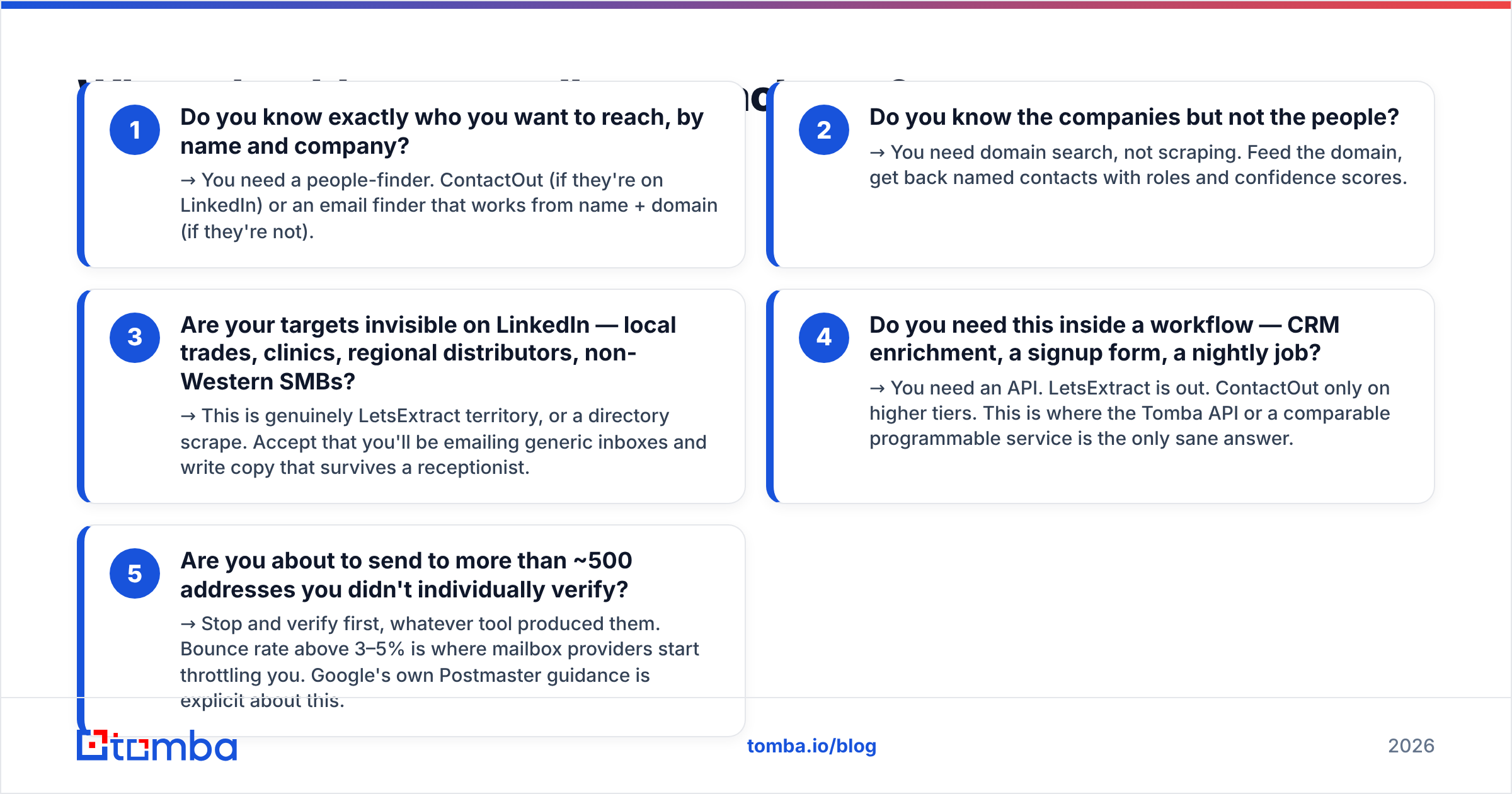
A decision tree beats a feature grid. Ask these in order:
- Do you know exactly who you want to reach, by name and company? → You need a people-finder. ContactOut (if they're on LinkedIn) or an email finder that works from name + domain (if they're not).
- Do you know the companies but not the people? → You need domain search, not scraping. Feed the domain, get back named contacts with roles and confidence scores.
- Are your targets invisible on LinkedIn — local trades, clinics, regional distributors, non-Western SMBs? → This is genuinely LetsExtract territory, or a directory scrape. Accept that you'll be emailing generic inboxes and write copy that survives a receptionist.
- Do you need this inside a workflow — CRM enrichment, a signup form, a nightly job? → You need an API. LetsExtract is out. ContactOut only on higher tiers. This is where the Tomba API or a comparable programmable service is the only sane answer.
- Are you about to send to more than ~500 addresses you didn't individually verify? → Stop and verify first, whatever tool produced them. Bounce rate above 3–5% is where mailbox providers start throttling you. Google's own Postmaster guidance is explicit about this.
What are the alternatives to both?#
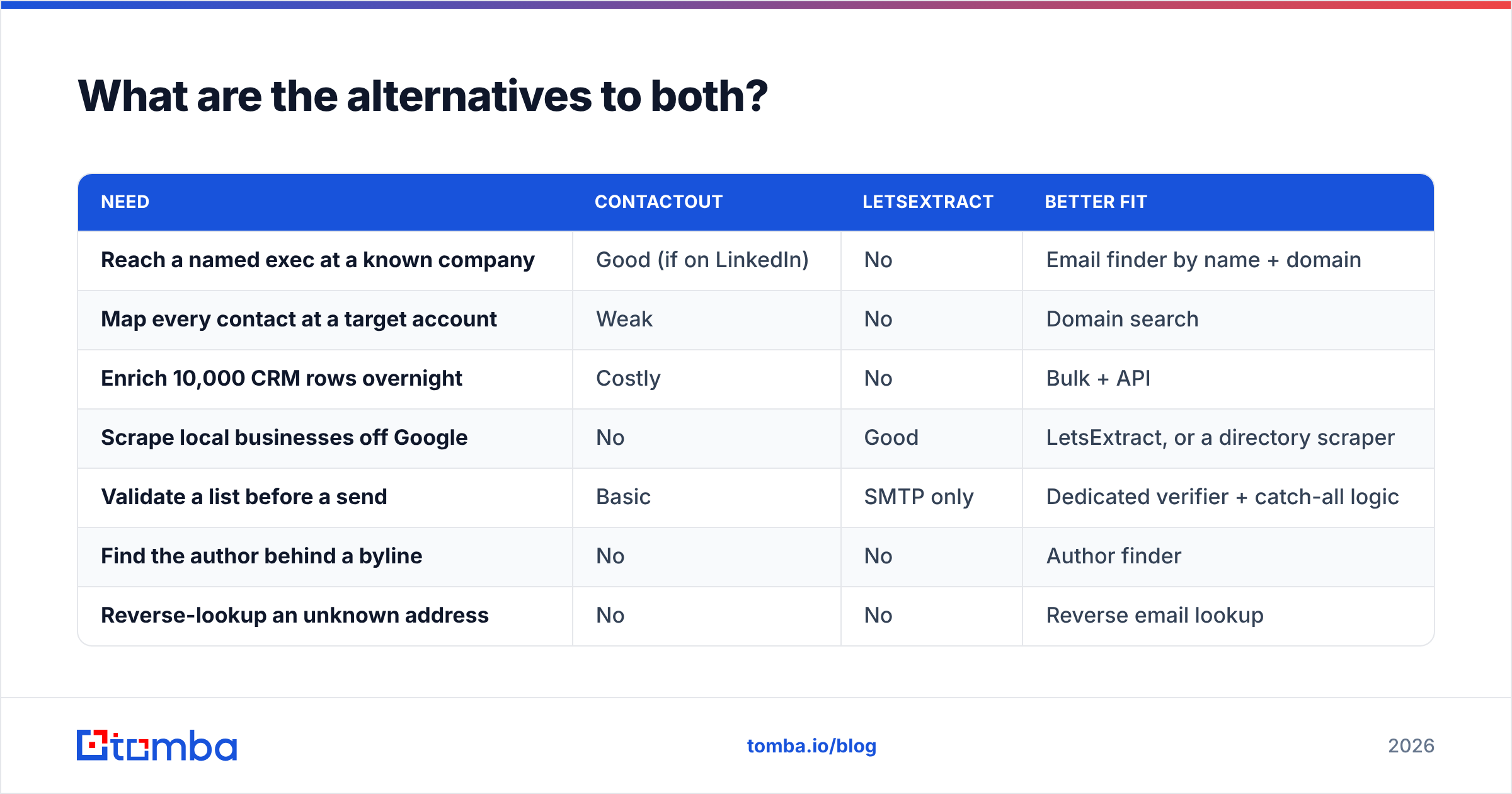
Neither tool is bad. Both are narrow. The gap in the middle — role-matched, domain-driven, verified, API-accessible B2B contact data — is where most outbound teams actually live, and it's the reason so many people search "ContactOut vs LetsExtract" and end up buying a third thing.
| Need | ContactOut | LetsExtract | Better fit |
|---|---|---|---|
| Reach a named exec at a known company | Good (if on LinkedIn) | No | Email finder by name + domain |
| Map every contact at a target account | Weak | No | Domain search |
| Enrich 10,000 CRM rows overnight | Costly | No | Bulk + API |
| Scrape local businesses off Google | No | Good | LetsExtract, or a directory scraper |
| Validate a list before a send | Basic | SMTP only | Dedicated verifier + catch-all logic |
| Find the author behind a byline | No | No | Author finder |
| Reverse-lookup an unknown address | No | No | Reverse email lookup |
For a hybrid approach that plenty of teams run: use ContactOut when you're already inside LinkedIn and want one specific person; use a domain-first email finder for account-based lists and CRM enrichment; use a scraper only for the long tail LinkedIn genuinely doesn't cover — and route everything, from every source, through a verifier before it touches your sending domain. That last step is not optional. It's the entire difference between a campaign and an incident.

Is ContactOut or LetsExtract better for cold outbound in 2026?#
For cold B2B outbound, ContactOut wins — but not by beating LetsExtract at its own game. It wins because outbound is a targeting problem before it's a volume problem, and LetsExtract has no concept of targeting. A thousand info@ addresses harvested from a keyword search is not a prospect list; it's a liability with a CSV extension.
That said, ContactOut's ceiling is LinkedIn's ceiling. If your ICP lives outside LinkedIn, or if you need contact data inside an automated pipeline rather than inside a browser tab, you'll hit the wall fast. Credit metering on a per-reveal basis also makes large-scale account mapping expensive in a way that domain-based pricing doesn't.
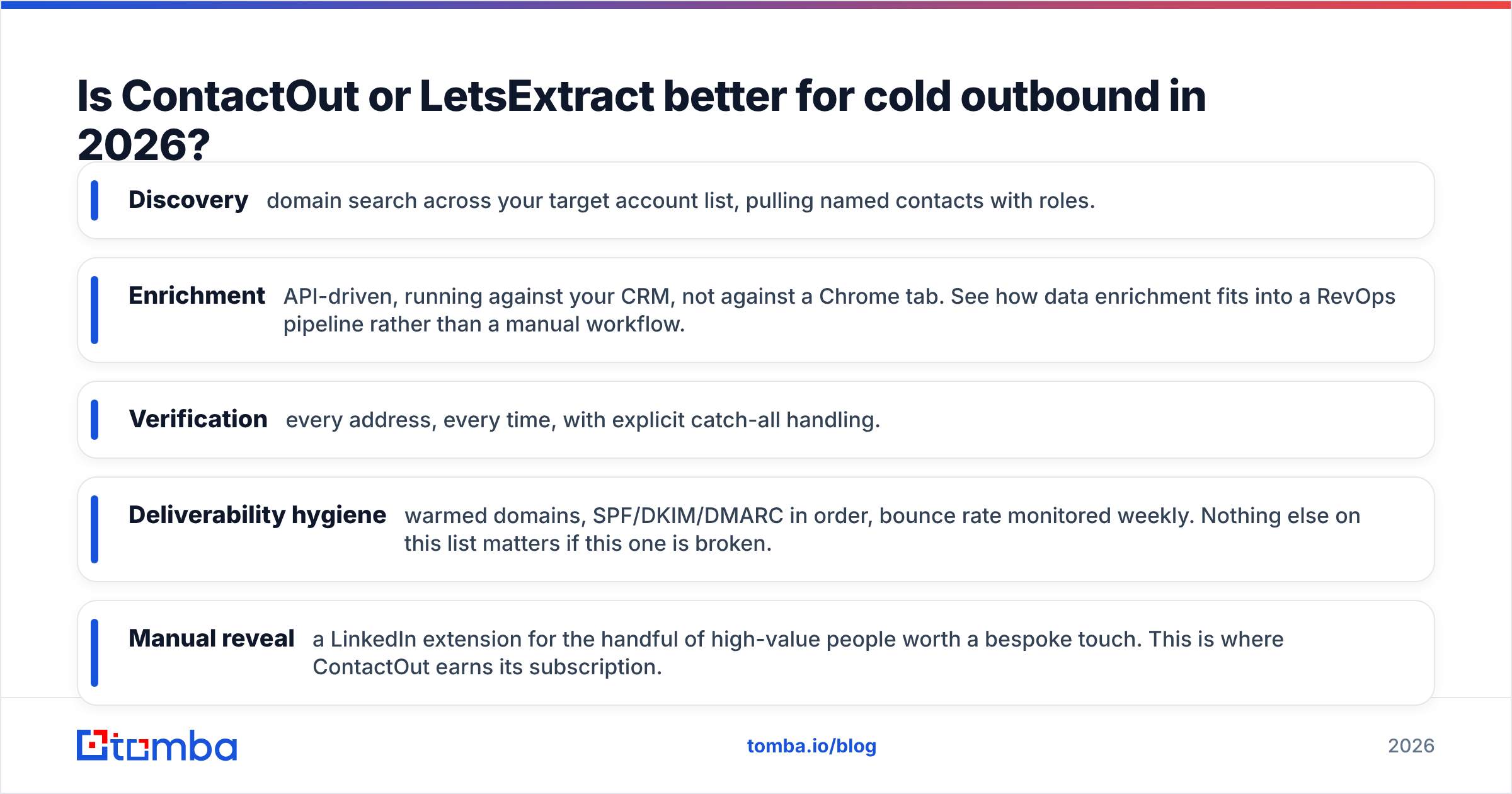
The mature 2026 stack looks less like "pick one tool" and more like:
- Discovery — domain search across your target account list, pulling named contacts with roles.
- Enrichment — API-driven, running against your CRM, not against a Chrome tab. See how data enrichment fits into a RevOps pipeline rather than a manual workflow.
- Verification — every address, every time, with explicit catch-all handling.
- Deliverability hygiene — warmed domains, SPF/DKIM/DMARC in order, bounce rate monitored weekly. Nothing else on this list matters if this one is broken.
- Manual reveal — a LinkedIn extension for the handful of high-value people worth a bespoke touch. This is where ContactOut earns its subscription.
The bottom line#
Choose ContactOut if you're a recruiter or a LinkedIn-first seller who needs personal emails and phone numbers for specific, findable people, and you're comfortable with credit-metered subscription pricing.
Choose LetsExtract if you're harvesting a long tail that no B2B database covers, you have the patience to clean what comes out, and you fully understand the deliverability and compliance risk of mailing scraped generic inboxes.
Choose neither if what you actually need is verified, role-matched B2B email data that shows up in your CRM without a human clicking anything — because that's a different product category, and buying the wrong one costs you a quarter.
If option three is you: start with the Tomba Email Finder. The free tier gives you 25 searches a month — enough to test accuracy against your own known-good contacts before you spend a dollar. Paid plans start at $49/mo, every tier ships with API access, and verification is built in rather than bolted on. Run it against twenty prospects you already have emails for, and let the hit rate decide.
Related guides#
Ready to find emails that actually work?
Join 150,000+ professionals who stopped guessing and started sending. Free credits on signup — no credit card required.
Get the Tomba newsletter
Practical outbound tactics and product updates — once every two weeks.
About the author