ContactOut vs Mail Merge for Gmail: Honest 2026 Comparison
ContactOut finds the contacts. Mail Merge for Gmail sends to them. Comparing the two head-to-head only makes sense once you know which half of the outbound stack you're actually missing — here's the breakdown.
TL;DR
- ContactOut and Mail Merge for Gmail are not competitors. ContactOut is a contact discovery tool (find an email from a LinkedIn profile). Mail Merge for Gmail is a sending layer (blast a personalized template from your Gmail account).
- If you compare them feature-for-feature, both look terrible. ContactOut can't send campaigns. Mail merge tools can't find a single email address.
- The real question is: which half of your outbound stack is broken? No leads → you need a finder. Leads sitting in a spreadsheet with nowhere to go → you need a sender.
- The expensive failure mode is running a mail merge on unverified data. Gmail's ~500/day cap plus a 6% bounce rate is how new domains get throttled.
- Cheapest working stack in 2026: a finder with real verification (Tomba starts free, $49/mo Starter) + a Gmail merge tool ($0–$25/mo). Under $75/mo total.
Why are people comparing ContactOut vs Mail Merge for Gmail at all?#
Because both show up when you search "how do I email 200 prospects from Gmail." That's it. That's the whole overlap.
Think of it like comparing a fishing rod to a frying pan. Both appear when you search "how do I eat fish tonight," and you genuinely need both — but asking which one is better is a category error. ContactOut catches the fish. Mail Merge for Gmail cooks it.
The confusion is understandable. Modern sales tools have blurred the lines — Apollo, Instantly, and Amplemarket all bundle finding and sending into one subscription. So when a buyer lands on ContactOut (a Chrome extension that reveals emails and phone numbers on LinkedIn) and then lands on Mail Merge for Gmail (Google's own merge feature, or third-party tools like GMass, Mailmeteor, and YAMM), they assume they're picking one.
You're not picking one. You're building a two-stage pipeline, and this post is about how to build it without overpaying for either stage.
What is ContactOut, actually?#
ContactOut is a browser-extension-first email finder. You browse LinkedIn, click the extension, and it surfaces a work email, a personal email, and often a mobile number. It also has a search portal and a Recruiter-focused workflow — it's popular with talent teams, not just sales.
What it does well:
- LinkedIn-native workflow. The extension sits right on the profile. No tab-switching, no CSV round trip.
- Personal email coverage. ContactOut leans harder into personal (Gmail/Yahoo) addresses than most B2B finders, which recruiters love and sales teams sometimes don't need.
- Phone numbers. Mobile coverage is a real differentiator versus pure email tools.
- Recruiting fit. ATS integrations and candidate-list workflows are first-class, not bolted on.
Where it falls short for outbound sales:
- No sending. Zero. It's a data tool. You export and go elsewhere.
- Credit model burns fast. Reveals consume credits whether or not the email is deliverable, and free-tier limits are tight.
- Verification is thin. You get an address and a confidence label. What you don't get is a hard SMTP-level verdict on catch-all domains — which is exactly where bounces hide.
- Pricing scales with seats. Multi-rep teams feel it quickly.
If your bottleneck is "I have a LinkedIn Sales Navigator list and no emails," ContactOut solves that. It does not solve anything downstream of that.
What is Mail Merge for Gmail, actually?#
"Mail Merge for Gmail" is a category, not a single product. It covers:
- Google Workspace's native mail merge — built into Gmail on Workspace Business Standard and up. Pull recipients from Sheets or Contacts, use
@firstnamemerge tags, hit send. - GMass — the heavyweight. Sends from your Gmail, supports sequences, auto follow-ups, open/click tracking, and list-building from Gmail search.
- Mailmeteor / YAMM (Yet Another Mail Merge) — Sheets add-ons. Lightweight, cheap, great for one-off sends.
What mail merge does well:
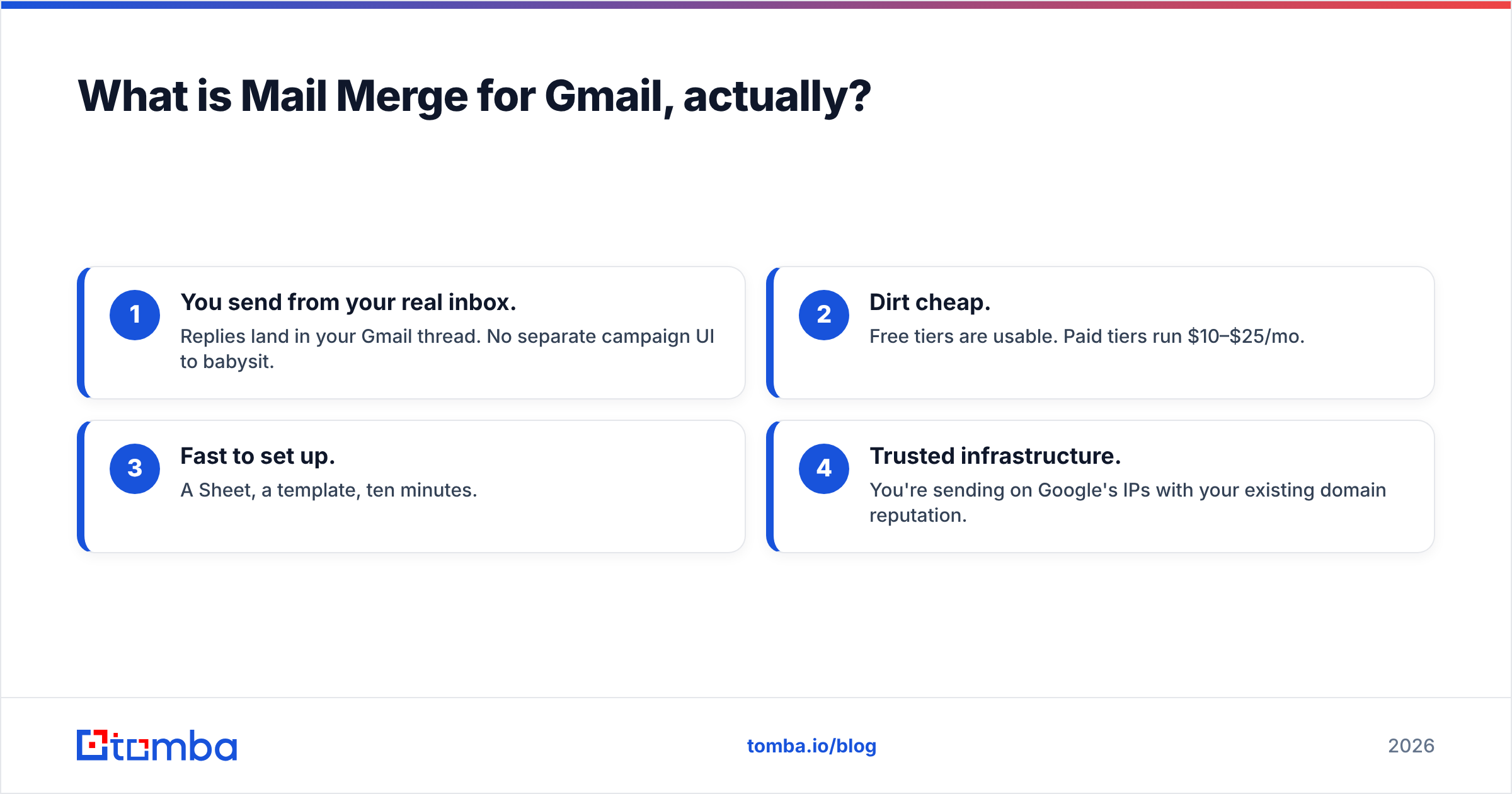
- You send from your real inbox. Replies land in your Gmail thread. No separate campaign UI to babysit.
- Dirt cheap. Free tiers are usable. Paid tiers run $10–$25/mo.
- Fast to set up. A Sheet, a template, ten minutes.
- Trusted infrastructure. You're sending on Google's IPs with your existing domain reputation.
Where it falls short:
- No contact data. At all. You supply the list. Mail merge tools do not find, guess, or enrich a single address.
- Hard sending caps. Google Workspace limits external recipients per day (roughly 2,000 for Workspace accounts, and far lower — around 500 — for free Gmail and new/trial accounts). See Google's own sending limits documentation for the current numbers.
- No bounce protection. Merge tools send exactly what you give them. Feed them 400 guessed addresses and they will happily torch your domain.
- Weak deduplication and list hygiene. A Google Sheet is not a CRM.

ContactOut vs Mail Merge for Gmail: how do they compare side by side?#
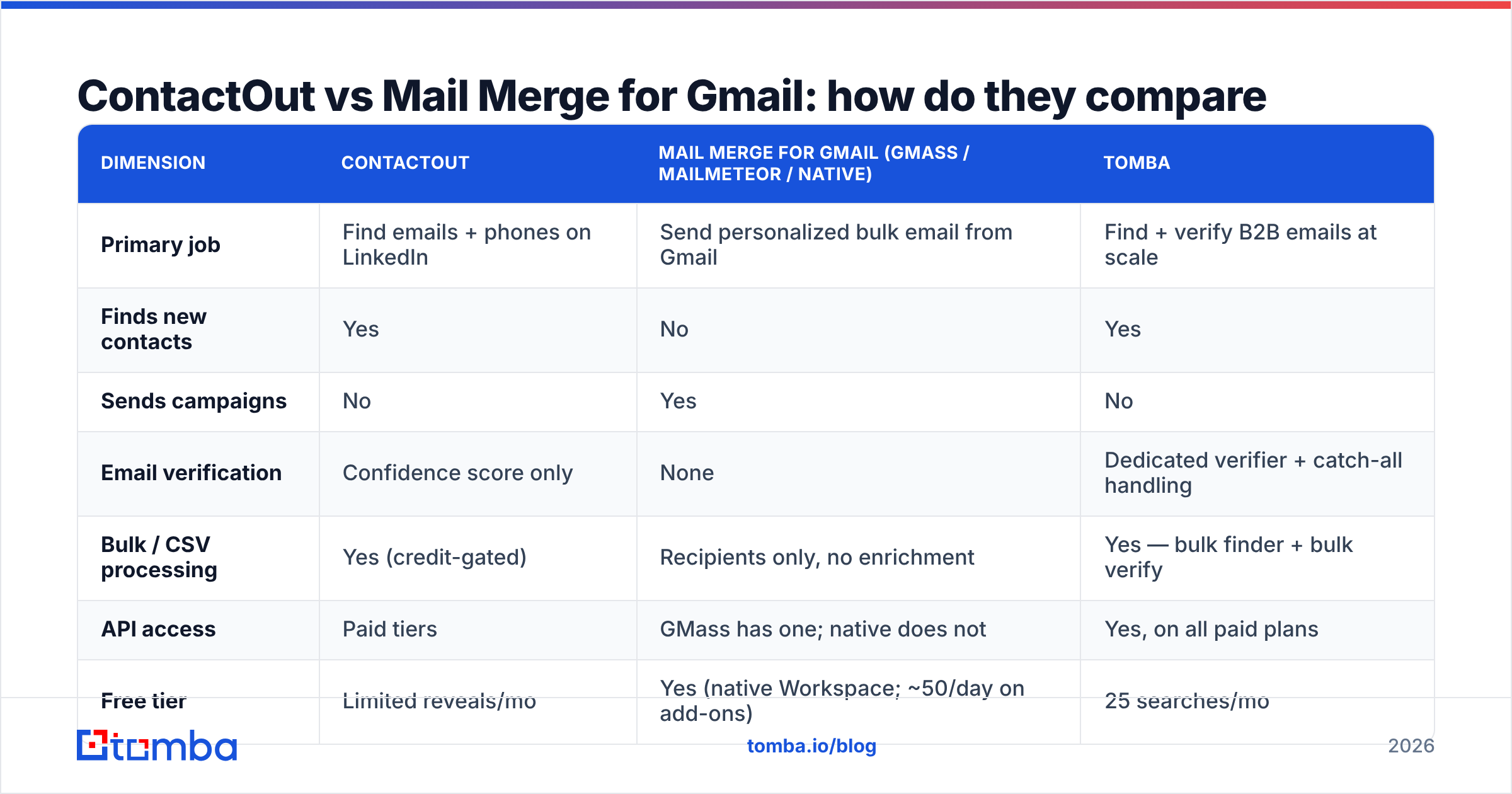
Here's the honest head-to-head, plus where a dedicated finder like Tomba sits in the same picture.
| Dimension | ContactOut | Mail Merge for Gmail (GMass / Mailmeteor / native) | Tomba |
|---|---|---|---|
| Primary job | Find emails + phones on LinkedIn | Send personalized bulk email from Gmail | Find + verify B2B emails at scale |
| Finds new contacts | Yes | No | Yes |
| Sends campaigns | No | Yes | No |
| Email verification | Confidence score only | None | Dedicated verifier + catch-all handling |
| Bulk / CSV processing | Yes (credit-gated) | Recipients only, no enrichment | Yes — bulk finder + bulk verify |
| API access | Paid tiers | GMass has one; native does not | Yes, on all paid plans |
| Free tier | Limited reveals/mo | Yes (native Workspace; ~50/day on add-ons) | 25 searches/mo |
| Entry paid price | ~$29–$99/mo per seat | $0–$25/mo | $49/mo Starter |
| Sending limits | N/A | ~500/day free Gmail, ~2,000/day Workspace | N/A |
| Best for | Recruiters, LinkedIn-first sourcing | Solo founders, low-volume personalized sends | Teams who need clean, verified lists |
| Worst for | Anyone who needs to actually send | Anyone without a list | Anyone who wants a built-in sender |
Notice the pattern: the columns are almost perfectly complementary. Only one row — verification — is a genuine gap that neither ContactOut nor a mail merge tool closes properly. That gap is where campaigns die.
Which one do you actually need?#
Answer three questions honestly.
1. Do you have a list of real, verified email addresses right now? If no → your bottleneck is data. A mail merge tool will not help you. Start with a finder.
2. Are your prospects reachable on LinkedIn, or defined by company? ContactOut is profile-first: you need to be on a LinkedIn profile (or in its search portal) to reveal a contact. If your ICP is "every VP of Engineering at 400 named companies," a domain search approach is faster — you feed a company domain and get the pattern plus the people. If your ICP is "these 60 specific individuals I found on LinkedIn," a LinkedIn finder or ContactOut extension is the right shape.
3. Are you sending 50 emails a week or 500 a day? Under ~200/day from a warmed Workspace domain, a Gmail mail merge is genuinely fine and dramatically cheaper than a sales-engagement platform. Above that, Gmail's caps and reputation risk push you toward a dedicated sender (Instantly, Saleshandy, Smartlead) with rotating inboxes.
If the answer set is "no list, LinkedIn-defined ICP, low volume," you need a finder plus a mail merge — and your budget should skew toward the finder, because that's where accuracy compounds.
Why does verification decide whether either tool works?#
Because bounces are the tax that eats the whole stack.
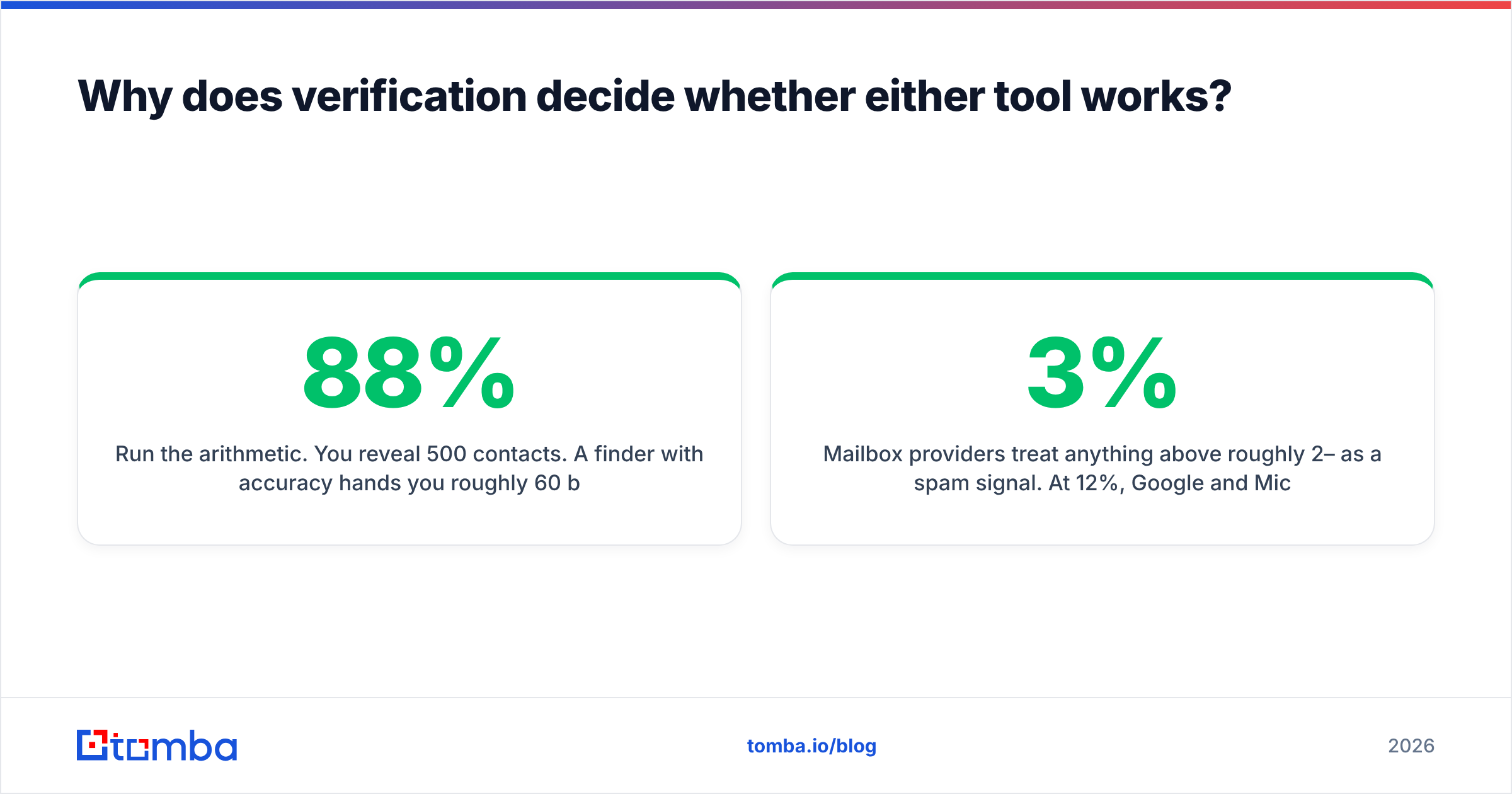
Run the arithmetic. You reveal 500 contacts. A finder with 88% accuracy hands you roughly 60 bad addresses. You load them into a mail merge and send from your primary domain over three days. That's a ~12% bounce rate.
Mailbox providers treat anything above roughly 2–3% as a spam signal. At 12%, Google and Microsoft start filtering your good mail. You didn't lose 60 prospects — you lost the domain you send from, and you won't notice for two weeks because merge tools report "sent," not "delivered to inbox."
This is the single most important thing this comparison surfaces: ContactOut gives you a confidence label, and mail merge gives you no safety net at all. Nothing in that pipeline stops a bad address from reaching a mailbox provider.
The fix is a hard verification step between find and send:
- SMTP-level checks — does the mailbox actually accept mail?
- Catch-all detection — a domain that accepts everything is not a validated address. A catch-all verifier is the only way to grade these instead of guessing.
- Role-account filtering — strip
info@,sales@,support@. They bounce less but convert near zero and hurt engagement metrics. - Deduplication — the same person across two spreadsheets is a double-send, and double-sends get reported as spam.
An email verifier is not an upsell here. It's the load-bearing wall between your finder and your sender.
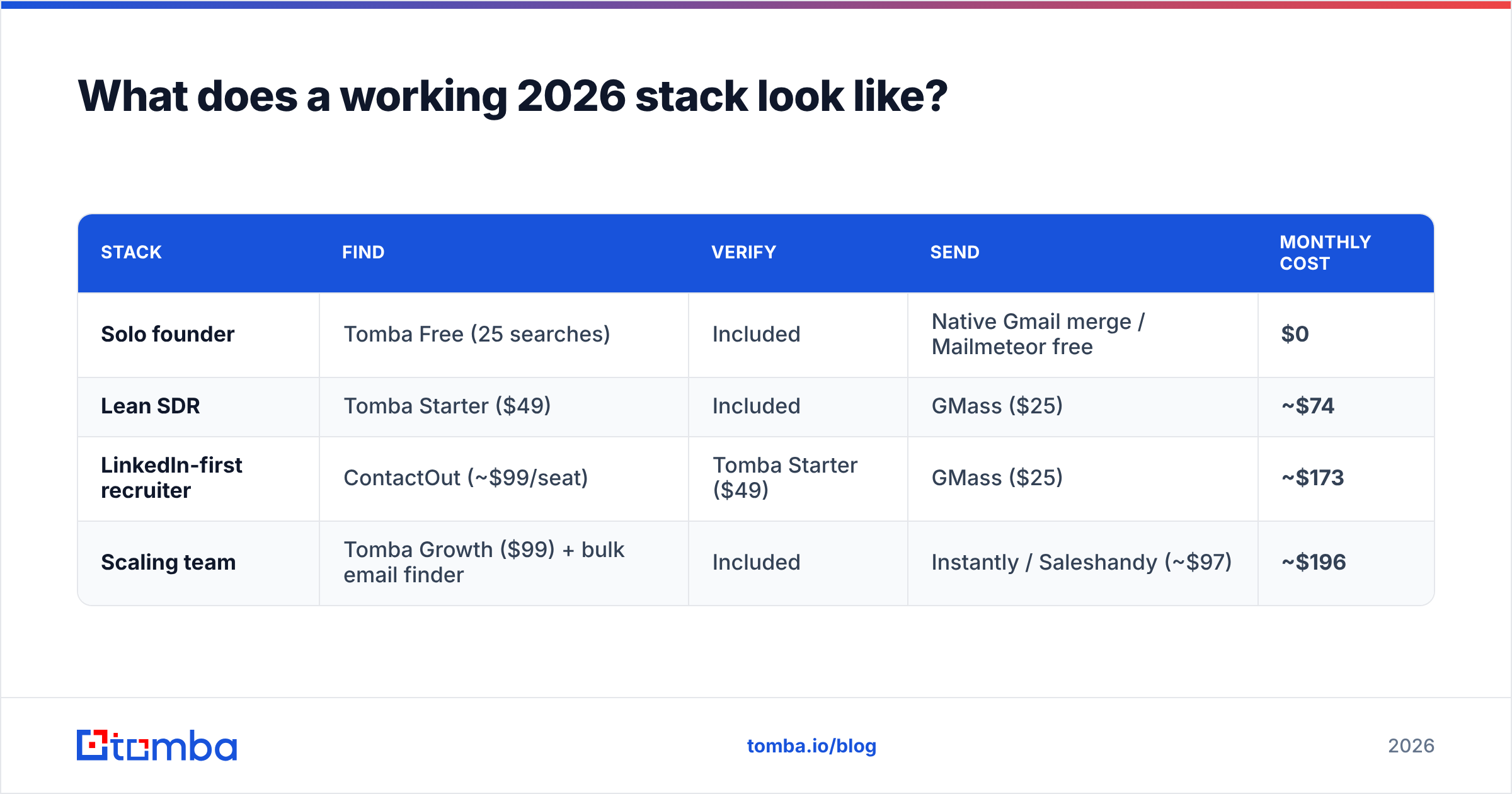
What does a working 2026 stack look like?#
Three tiers, priced honestly.
| Stack | Find | Verify | Send | Monthly cost |
|---|---|---|---|---|
| Solo founder | Tomba Free (25 searches) | Included | Native Gmail merge / Mailmeteor free | $0 |
| Lean SDR | Tomba Starter ($49) | Included | GMass ($25) | ~$74 |
| LinkedIn-first recruiter | ContactOut (~$99/seat) | Tomba Starter ($49) | GMass ($25) | ~$173 |
| Scaling team | Tomba Growth ($99) + bulk email finder | Included | Instantly / Saleshandy (~$97) | ~$196 |
The middle row is where most people should land. Note that the recruiter stack still needs a verifier bolted on — ContactOut's phone coverage is worth paying for if you're sourcing candidates, but it doesn't remove the verification requirement.
Full Tomba pricing runs Free (25 searches/mo), Starter $49/mo, Growth $99/mo, Pro $249/mo, and Enterprise custom — and verification is bundled rather than sold as a separate credit pool, which is the detail that changes the math against per-seat finders.

Is ContactOut worth it if you already have a mail merge tool?#
Sometimes. It depends on whether your prospecting is profile-driven or company-driven.
ContactOut earns its price when:
- You live inside LinkedIn Recruiter or Sales Navigator all day.
- You need mobile numbers, not just emails.
- Personal (non-work) email addresses matter — recruiting, exec search, founder outreach.
ContactOut is the wrong tool when:
- You work from a target-account list, not a people list. Feeding domains into a finder is 10x faster than clicking through 400 profiles.
- You need programmatic access. If you're enriching a CRM or a product signup flow, you want an email finder API, not a browser extension.
- You're seat-constrained. Per-seat pricing on a data tool scales badly across a 6-person team.
Check current user sentiment on G2 before you commit — ContactOut's ratings on data accuracy and its ratings on credit-value tend to tell two different stories, and which one matters depends entirely on your volume.
Is Mail Merge for Gmail enough, or do you need a real sequencer?#
Mail merge is enough longer than most vendors admit.
Stick with Gmail mail merge if:
- You send fewer than ~200 emails/day.
- Your sequences are 1–2 touches, not 7.
- You want replies in your normal inbox with normal threading.
- Your total addressable market is small enough that every email is genuinely personalized.
Graduate to a sequencer when:
- You need inbox rotation to exceed Gmail's per-domain caps safely.
- You want automatic follow-up stops on reply, meeting-booked detection, and multi-inbox warmup.
- You need per-step reply-rate reporting to know which touch is working.
- Two or more reps are sending to overlapping accounts and you need collision detection.
Most teams jump to a $97/mo sequencer three months before they need it, while still sending to a list that never got verified. That's backwards. Fix the data first — the sending problem is the easier and cheaper of the two to solve later.
The verdict#
There is no winner, because there is no fight. ContactOut and Mail Merge for Gmail occupy different halves of the same pipeline, and buying either one alone leaves you with a stack that cannot function.
If you're forced to sequence your spending:
- Buy the finder first. A sending tool with no list does nothing. A list with no sending tool can at least be worked manually.
- Insist on verification in the same tool. Splitting find and verify across two vendors doubles your cost and your latency, and it's the step everyone skips.
- Add the mail merge last, and keep it cheap. GMass or native Workspace merge covers you until you're genuinely over Gmail's ceiling.
- Only then consider a full sequencer. Volume justifies it. Ambition doesn't.
The tool most people are actually missing isn't ContactOut and it isn't GMass — it's the verification layer between them, quietly deciding whether any of it lands.
Start with the half that gates everything else. Tomba Email Finder finds professional emails by domain, name, or company — with SMTP-level verification and catch-all grading built into the same workflow, so what lands in your Google Sheet is already safe to merge. The free tier gives you 25 searches a month to test it against your real ICP, and Starter is $49/mo when you're ready to run volume. Find them clean, then let Gmail do the sending.
Related guides#
Ready to find emails that actually work?
Join 150,000+ professionals who stopped guessing and started sending. Free credits on signup — no credit card required.
Get the Tomba newsletter
Practical outbound tactics and product updates — once every two weeks.
About the author