ContactOut vs Mailarrow: Full 2026 Comparison and Verdict
ContactOut finds the contacts. Mailarrow sends the emails. Comparing them head-to-head only makes sense once you know which half of the outbound stack you're actually missing — here's the breakdown.
TL;DR
- ContactOut is a contact data tool — a LinkedIn-first Chrome extension that surfaces personal and work emails plus phone numbers. Mailarrow is a cold email sending tool — sequences, inbox rotation, warmup, reply detection.
- They are not competitors in any strict sense. Most teams running outbound end up paying for one of each, or for a platform that folds both jobs together.
- If your reply rate is bad because your list is full of bounced or guessed addresses, ContactOut (or a cheaper finder + verifier) fixes that. If your reply rate is bad because you're sending manually from one Gmail account, Mailarrow fixes that.
- ContactOut's per-seat pricing gets expensive fast for teams; credit-based finders like Tomba start at $49/mo and expose the same lookups through an API you can wire into any sender.
- The realistic 2026 stack: a data layer (finder + verifier), a sending layer (sequencer + warmup), and glue between them. Buying one and expecting it to do both is where most outbound programs quietly fail.
What are ContactOut and Mailarrow, exactly?#
ContactOut (contactout.com) is a contact-finding platform built around a browser extension. You open a LinkedIn profile, click the extension, and it returns work emails, personal emails, and — on higher tiers — phone numbers. It also ships a web search app, list-building features, and a data API. Recruiters were the original audience; sales teams adopted it because LinkedIn is where their ICP lives.
Mailarrow (mailarrow.com) is a cold email outreach platform. You connect mailboxes, build multi-step sequences, and it handles sending, throttling, warmup, personalization variables, reply detection, and stop-on-reply logic. It does not build your list. It assumes you arrive with a CSV.
That distinction is the entire article, and most "ContactOut vs Mailarrow" pages skip past it because a head-to-head framing gets clicks. Here's the honest version: comparing them is like comparing a grocery store to an oven. You need both to eat.
Is "ContactOut vs Mailarrow" even a fair fight?#
Not in the way people usually mean it. But the question people are actually asking when they search this is legitimate: "I have limited budget. Which one moves the needle first?"
The answer depends on which half of your outbound is broken. Diagnose it in about five minutes:
- Check your bounce rate. Over 3–4%? Your data layer is broken. A sending tool will not save you — it will just help you bounce faster and torch your sender reputation at scale.
- Check your sending volume ceiling. Stuck at 30–50 emails a day out of one mailbox, doing it by hand? Your sending layer is broken. Better data won't help if you can only reach ten people a week.
- Check your reply-to-open ratio. Opens fine, replies dead? Neither tool fixes that. That's a copy and targeting problem, and no amount of software substitutes for a better offer.
- Check whether you're following up at all. If the answer is "one email, then I move on," a sequencer pays for itself before a data tool does.
Most teams find #1 first. Bad data is the silent killer — it inflates bounce rates, poisons domain reputation, and makes every downstream metric look like a copywriting problem when it's really a list problem.
How do ContactOut and Mailarrow compare feature by feature?#
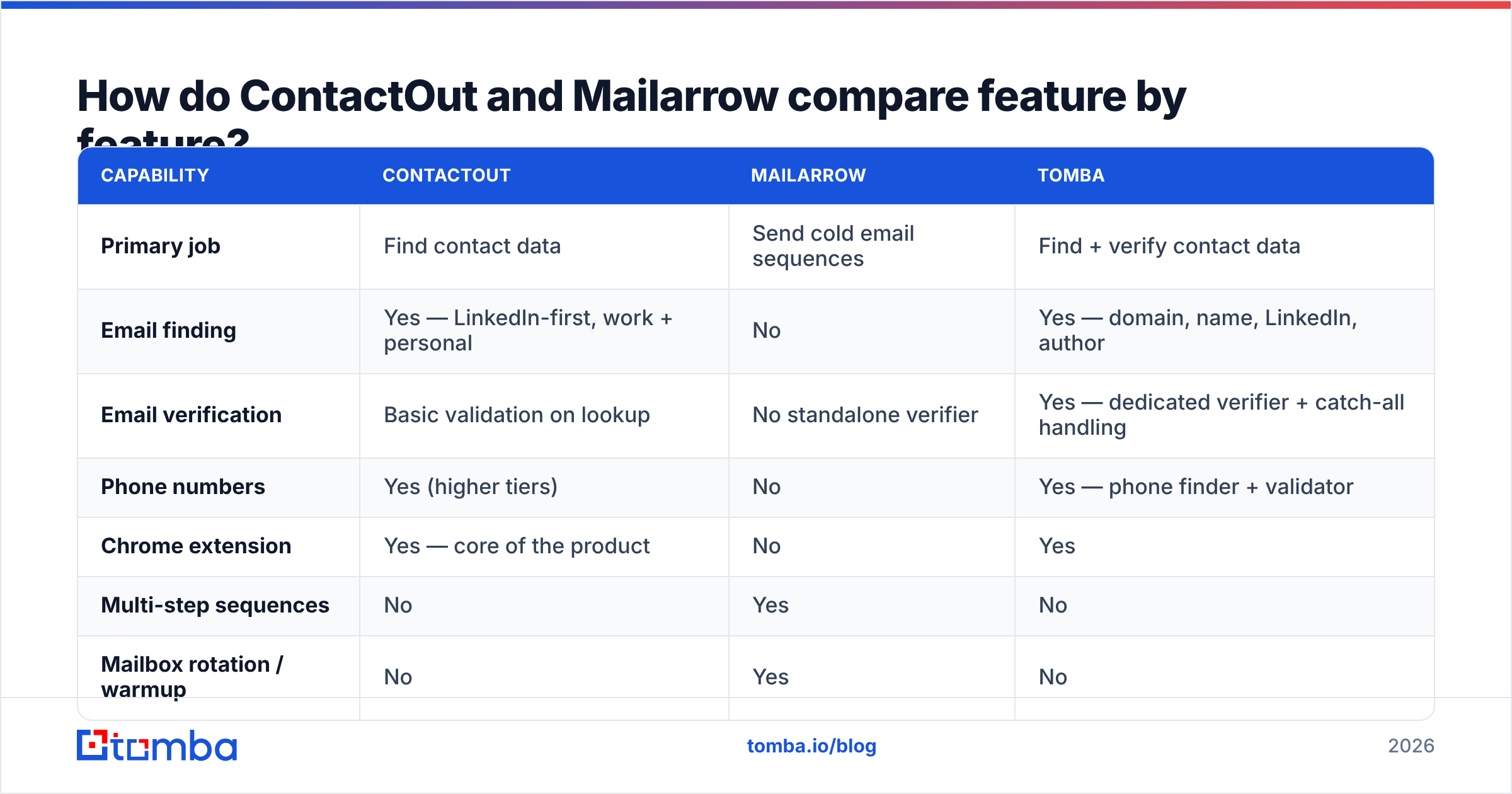
| Capability | ContactOut | Mailarrow | Tomba |
|---|---|---|---|
| Primary job | Find contact data | Send cold email sequences | Find + verify contact data |
| Email finding | Yes — LinkedIn-first, work + personal | No | Yes — domain, name, LinkedIn, author |
| Email verification | Basic validation on lookup | No standalone verifier | Yes — dedicated verifier + catch-all handling |
| Phone numbers | Yes (higher tiers) | No | Yes — phone finder + validator |
| Chrome extension | Yes — core of the product | No | Yes |
| Multi-step sequences | No | Yes | No |
| Mailbox rotation / warmup | No | Yes | No |
| Reply detection | No | Yes | No |
| Bulk list building | Yes | Import only | Yes — bulk finder + enrichment |
| API access | Yes (paid tiers) | Yes | Yes — full REST API, CLI, MCP |
| Free tier | Limited credits | Trial | 25 searches/mo, no card |
| Pricing model | Per seat, per month | Per mailbox / contact volume | Credit-based, $49/mo entry |
Read that table twice and the "versus" collapses. There is almost no row where both tools compete. ContactOut owns the left column of the outbound workflow; Mailarrow owns the right.
How accurate is ContactOut's data — and does Mailarrow have any?#
Mailarrow has none. It is a delivery mechanism. Whatever accuracy your CSV has is the accuracy your campaign has.
ContactOut markets high accuracy — the number usually quoted is in the high 90s for work emails — and in practice it does well on LinkedIn-sourced profiles at mid-market and enterprise companies. Where it gets shakier, like every provider, is:
- Small companies and startups with no crawlable email footprint
- Catch-all domains, where SMTP validation returns "accept all" and nobody can confirm the inbox exists without a paid probe
- Recently-changed roles, where the profile updated but the underlying record didn't
- Non-US/EU regions, where coverage thins considerably
The vendor-quoted accuracy figure is close to meaningless on its own, because every provider measures it differently — some exclude catch-alls from the denominator, some count "risky" as valid. What matters is your verified deliverable rate on your own ICP. Take 100 target accounts, run them through any two tools, and compare bounce rates on a real send. That number is the only benchmark that counts.
Whichever finder you pick, the non-negotiable step is running results through an email verifier before they enter a sequence. Google and Yahoo's bulk-sender requirements have hardened since 2024, and a spam complaint rate above 0.3% now gets you throttled rather than warned. A clean list isn't a nice-to-have anymore — it's a delivery prerequisite. Vendor documentation from both Google Postmaster Tools and major ESPs now says this plainly.
[Screenshot placeholder: ContactOut Chrome extension panel open on a LinkedIn profile, showing revealed work email, personal email, and phone number fields]
What do ContactOut and Mailarrow cost in 2026?#
Both vendors change plans regularly, so treat these as directional and confirm on their pricing pages before you buy. The shape of the pricing matters more than the exact number anyway.
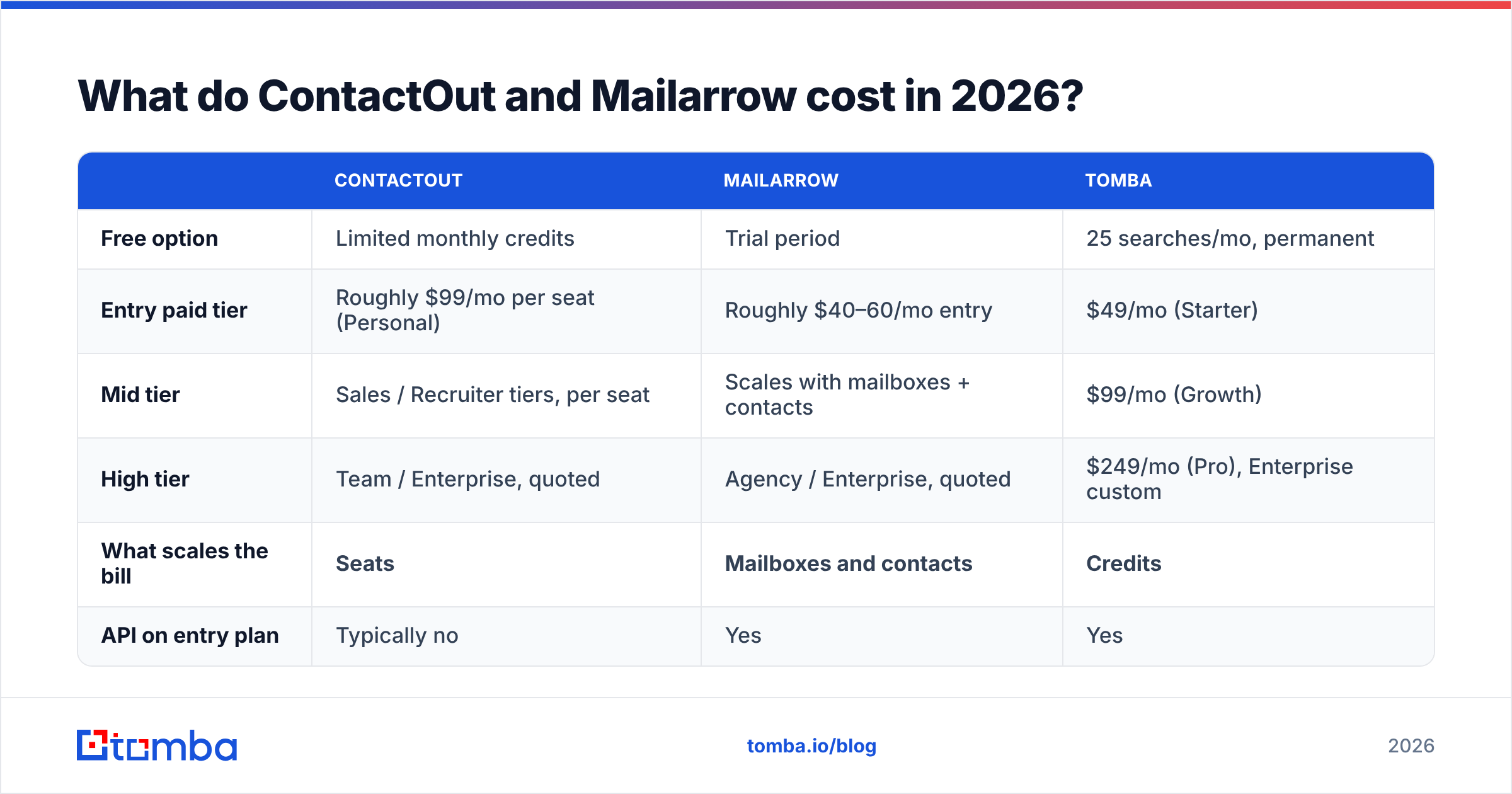
| ContactOut | Mailarrow | Tomba | |
|---|---|---|---|
| Free option | Limited monthly credits | Trial period | 25 searches/mo, permanent |
| Entry paid tier | Roughly $99/mo per seat (Personal) | Roughly $40–60/mo entry | $49/mo (Starter) |
| Mid tier | Sales / Recruiter tiers, per seat | Scales with mailboxes + contacts | $99/mo (Growth) |
| High tier | Team / Enterprise, quoted | Agency / Enterprise, quoted | $249/mo (Pro), Enterprise custom |
| What scales the bill | Seats | Mailboxes and contacts | Credits |
| API on entry plan | Typically no | Yes | Yes |
The structural difference is the one to internalize:
- ContactOut charges per seat. Five reps who each need lookups means five licenses. Data cost scales with headcount, not with how much data you actually pull.
- Mailarrow charges by sending footprint. More mailboxes and more contacts, higher bill. That's fair — it maps to the resource being consumed.
- Credit-based finders charge by usage. One Tomba account with an API key can serve an entire team, a Clay table, an n8n workflow, or a nightly enrichment job. Nobody buys a seat to run a script.
For a solo founder or single recruiter, per-seat is fine. For a five-person SDR team, per-seat data pricing is the line item that quietly triples. That's the real reason people search for a ContactOut alternative — not because the data is bad, but because the pricing model doesn't match how teams consume data.
Which one should you buy for your use case?#
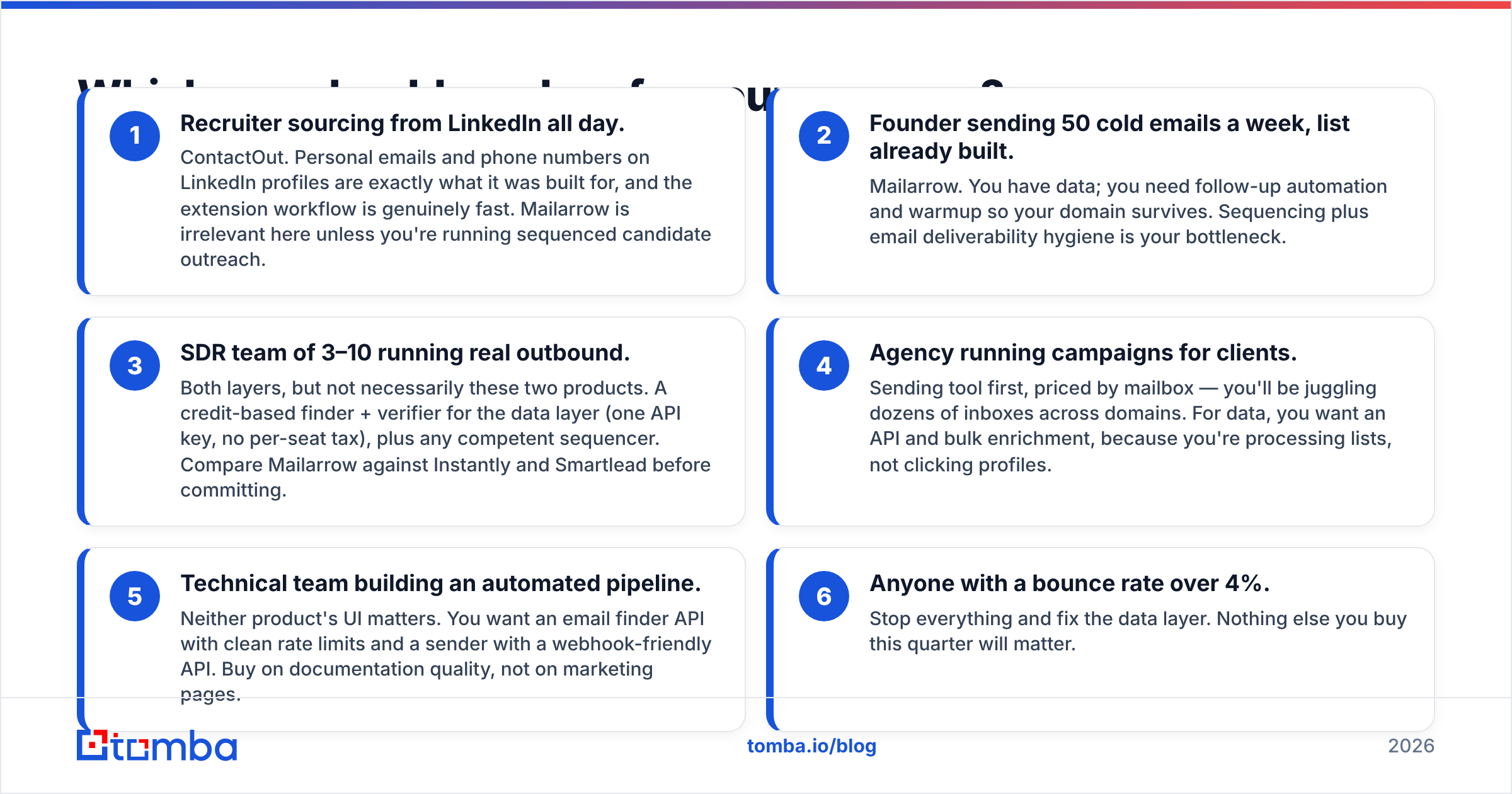
- Recruiter sourcing from LinkedIn all day. ContactOut. Personal emails and phone numbers on LinkedIn profiles are exactly what it was built for, and the extension workflow is genuinely fast. Mailarrow is irrelevant here unless you're running sequenced candidate outreach.
- Founder sending 50 cold emails a week, list already built. Mailarrow. You have data; you need follow-up automation and warmup so your domain survives. Sequencing plus email deliverability hygiene is your bottleneck.
- SDR team of 3–10 running real outbound. Both layers, but not necessarily these two products. A credit-based finder + verifier for the data layer (one API key, no per-seat tax), plus any competent sequencer. Compare Mailarrow against Instantly and Smartlead before committing.
- Agency running campaigns for clients. Sending tool first, priced by mailbox — you'll be juggling dozens of inboxes across domains. For data, you want an API and bulk enrichment, because you're processing lists, not clicking profiles.
- Technical team building an automated pipeline. Neither product's UI matters. You want an email finder API with clean rate limits and a sender with a webhook-friendly API. Buy on documentation quality, not on marketing pages.
- Anyone with a bounce rate over 4%. Stop everything and fix the data layer. Nothing else you buy this quarter will matter.

Are there better options than either one?#
Depends which layer you're replacing.
On the data side, the market has fragmented usefully. LinkedIn-extension tools (ContactOut, Wiza, Lusha) win on individual-profile workflows. API-first finders (Tomba, Findymail) win on volume and automation. Database plays like BookYourData take a different route entirely — a pre-built, pay-as-you-go B2B contact database with verification baked in, which suits teams who'd rather buy a list than build one. That's a legitimately different purchase, and for some GTM motions it's the faster path.
On the sending side, Mailarrow competes in a crowded field — Instantly, Smartlead, Lemlist, Saleshandy, Reply.io. The differences come down to inbox rotation quality, warmup network size, and how the pricing scales with mailboxes. Check current G2 reviews before committing to any of them; this category churns fast and last year's leader is often this year's support-ticket backlog.
The one thing that hasn't changed: the data layer is the leveraged one. A great sequencer with a bad list produces bounces. A mediocre sequencer with a great list produces meetings. If you have to pick an order of operations, fix the list.
What's the honest verdict on ContactOut vs Mailarrow?#
Neither tool loses, because they never played the same game.
- Buy ContactOut if your workflow lives inside LinkedIn, you're one or two seats, and you need personal emails and mobile numbers on individual profiles. It's good at that. Its weakness is per-seat pricing that punishes teams, and a data model that assumes a human is clicking.
- Buy Mailarrow if you already have contacts and you're bottlenecked on sending — no sequences, no warmup, no follow-up discipline. It's a competent sender in a competitive category, and it does not pretend to be a data tool.
- Buy neither if what you actually needed was to stop guessing email formats and start verifying them. That's a $49/mo problem, not a $99/seat problem.
The mistake to avoid is buying a sending tool to fix a data problem, or a data tool to fix a follow-up problem. Diagnose before you spend.
[Screenshot placeholder: Mailarrow sequence builder showing a 4-step cadence with delay settings and stop-on-reply toggle]
Where does Tomba fit into this stack?#
Tomba sits squarely on the data layer, and it's built for the shape of the problem most teams actually have: they need reliable emails at volume, across a team, without paying a license fee per person who happens to need a lookup.
The Tomba Email Finder finds professional email addresses by domain, name, or company — through the web app, a Chrome extension, Google Sheets, Excel, the CLI, or the REST API. Results flow through the verifier, catch-all handling included, so what lands in your sequencer is deliverable rather than hopeful. The free tier gives you 25 searches a month with no card, Starter is $49/mo, Growth $99/mo, and Pro $249/mo — credit-based, so one account serves the whole team.
Pair it with whatever sender you like — Mailarrow, Instantly, Smartlead, your own SMTP script. That's the point of an API-first data layer: it doesn't lock you into anyone's sending stack. Start with the free tier, run 25 of your hardest target accounts through it, compare the bounce rate against whatever you're using now, and let the numbers decide.
Try the Tomba Email Finder free →
Related guides#
Ready to find emails that actually work?
Join 150,000+ professionals who stopped guessing and started sending. Free credits on signup — no credit card required.
Get the Tomba newsletter
Practical outbound tactics and product updates — once every two weeks.
About the author