ContactOut vs Mattermark (2026): Which Data Tool Wins?
ContactOut finds the person. Mattermark tracks the company. They get compared constantly, but they solve opposite halves of prospecting — here's which one your pipeline actually needs, and what it costs.

TL;DR#
- They are not really competitors. ContactOut is a contact-data tool (emails and phone numbers for individual people, mostly sourced off LinkedIn profiles). Mattermark is a company-intelligence tool (funding rounds, headcount growth, signals about accounts). Comparing them head-to-head is like comparing a phone book to a stock screener.
- Pick ContactOut if your bottleneck is "I know who to email, I just don't have their address."
- Pick Mattermark if your bottleneck is "I don't know which 200 companies to target this quarter."
- Seat-based pricing is the hidden cost. Both tools charge per user, which gets ugly the moment you have four SDRs and a RevOps analyst who all need occasional access.
- Most teams need both layers, which is why an API-first email finder plus a target-account list often beats paying two seat-priced subscriptions.
What is ContactOut, actually?#
ContactOut is a contact-finding tool built around a Chrome extension. You open a LinkedIn profile, click the extension, and it surfaces work emails, personal emails, and — on the higher tiers — phone numbers. It also ships a web search app where you filter by title, company, location, and industry, plus bulk enrichment and a lightweight recruiter workflow (lists, exports, an ATS-friendly CSV).
Its center of gravity is recruiting. Talent teams love it because it reliably surfaces personal emails, which is exactly what you want when you're pitching a candidate who ignores their work inbox. Sales teams use it too, but they're borrowing a tool that was designed for a different job.
What ContactOut is good at:
- Personal-email coverage. Gmail, Outlook, Yahoo addresses that most B2B databases don't index.
- Profile-by-profile workflow. Fast when you're doing manual, high-touch sourcing.
- LinkedIn-native UX. The extension does what you expect, where you expect it.
What it is not: a market-intelligence platform. It will never tell you that a Series B just closed, that headcount jumped 40% in two quarters, or that a company started hiring three DevOps engineers.
What is Mattermark, actually?#
Mattermark went the other direction. Launched in 2012, it built a database of company signals — funding rounds, investors, employee counts, web traffic trends, and its own "Growth Score" and "Mindshare Score" — and sold it to VCs, corp-dev teams, and outbound teams doing account-based targeting. FullContact acquired it in 2017; it changed hands again afterward and has run as a smaller, more focused company-data product since.
Mattermark answers questions like:
- Which SaaS companies in the US raised a Series A in the last 90 days?
- Which companies in my ICP grew headcount 25%+ this year?
- Who invested, how much, and when?
It does not answer: what is the VP of Engineering's email address at any of those companies. It'll give you the company. The human is your problem.
That distinction is the entire post. Everything below is detail.

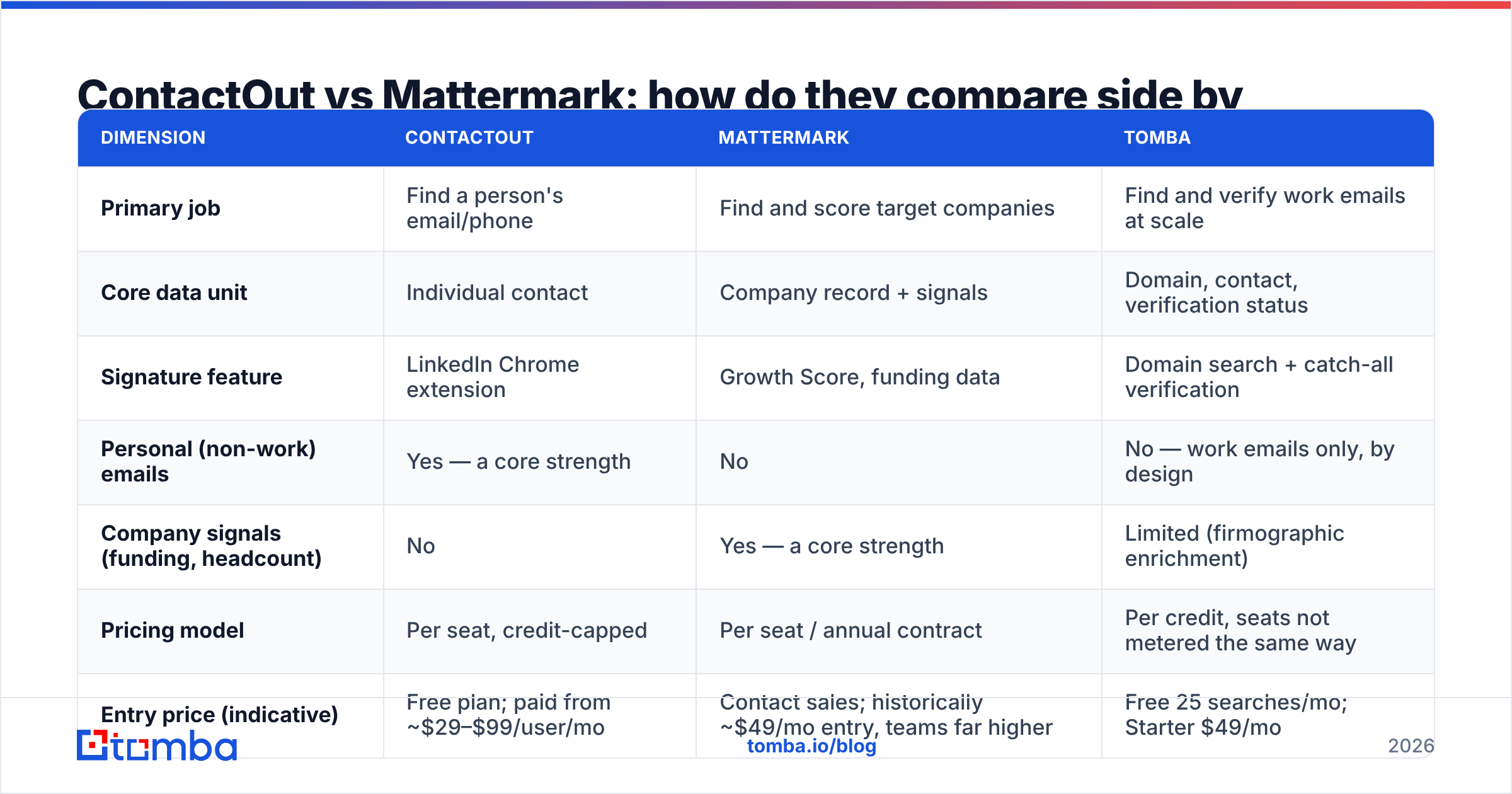
ContactOut vs Mattermark: how do they compare side by side?#
Pricing on both tools moves, and both gate their real numbers behind a demo or an annual-billing toggle. Treat the figures below as a directional snapshot from early 2026 and confirm on the vendor's page before you buy — the structure of the pricing matters more than the exact digit anyway.
| Dimension | ContactOut | Mattermark | Tomba |
|---|---|---|---|
| Primary job | Find a person's email/phone | Find and score target companies | Find and verify work emails at scale |
| Core data unit | Individual contact | Company record + signals | Domain, contact, verification status |
| Signature feature | LinkedIn Chrome extension | Growth Score, funding data | Domain search + catch-all verification |
| Personal (non-work) emails | Yes — a core strength | No | No — work emails only, by design |
| Company signals (funding, headcount) | No | Yes — a core strength | Limited (firmographic enrichment) |
| Pricing model | Per seat, credit-capped | Per seat / annual contract | Per credit, seats not metered the same way |
| Entry price (indicative) | Free plan; paid from ~$29–$99/user/mo | Contact sales; historically ~$49/mo entry, teams far higher | Free 25 searches/mo; Starter $49/mo |
| Bulk / API access | Available on higher tiers | Available on higher tiers | API on every paid plan |
| Best for | Recruiters, 1:1 sourcing | ABM targeting, VC/corp-dev research | Outbound teams needing verified emails at volume |
| Weak spot | No account intelligence; seat costs | No person-level contact data | Not a company-signal platform |
The row that decides most purchases is pricing model. ContactOut and Mattermark both meter by seat. If you have one power user, seats are fine. If you have a five-person outbound pod where two people prospect heavily and three dip in occasionally, you're paying full freight for part-time usage. Credit-based tools like Tomba pricing — Free (25 searches/mo), Starter $49/mo, Growth $99/mo, Pro $249/mo — decouple cost from headcount, which is usually the cheaper shape once a team grows past two.
Which one is more accurate?#
Wrong question, and it's the question most comparison posts get lazy about. "Accuracy" means something different in each product.
For ContactOut, accuracy = does this email belong to this person, and will it bounce? Its LinkedIn-anchored sourcing gives it a real edge on identity resolution — the profile is the identifier, so you rarely get the wrong Sarah Chen. Where it gets shakier is freshness on work emails after someone changes jobs, and on companies with catch-all mail servers, where no provider can confirm deliverability without extra work. If you're pushing volume, you still want an independent email verifier pass before the list touches your sending domain. Bouncing 6% of a 3,000-contact send will cost you more in sender reputation than the verification would have cost in credits.
For Mattermark, accuracy = is this funding round real, is the headcount current, is the Growth Score predictive? Company data decays more slowly than contact data — a Series B from March is still a Series B in July — but headcount and traffic estimates are modeled, not measured. Treat them as a ranking signal, not a fact. Nobody should be quoting a Mattermark employee count to a prospect.
The practical read: ContactOut's failure mode is a bounce. Mattermark's failure mode is a mistargeted account. The first one is measurable and fixable with verification. The second one wastes an entire sequence.
Do you actually need both?#
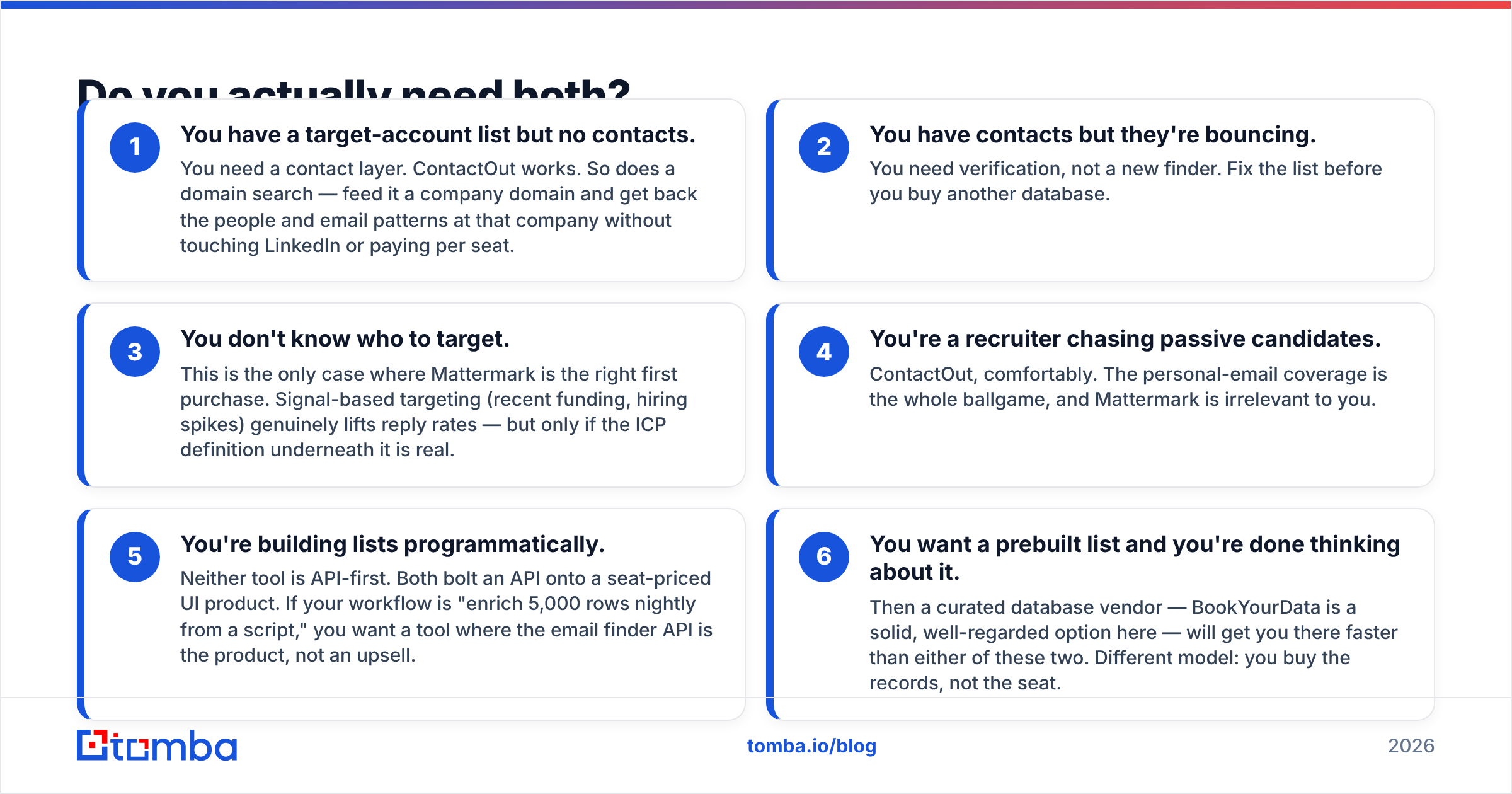
Here's the honest workflow map. Cross-reference where your pipeline is leaking.
- You have a target-account list but no contacts. You need a contact layer. ContactOut works. So does a domain search — feed it a company domain and get back the people and email patterns at that company without touching LinkedIn or paying per seat.
- You have contacts but they're bouncing. You need verification, not a new finder. Fix the list before you buy another database.
- You don't know who to target. This is the only case where Mattermark is the right first purchase. Signal-based targeting (recent funding, hiring spikes) genuinely lifts reply rates — but only if the ICP definition underneath it is real.
- You're a recruiter chasing passive candidates. ContactOut, comfortably. The personal-email coverage is the whole ballgame, and Mattermark is irrelevant to you.
- You're building lists programmatically. Neither tool is API-first. Both bolt an API onto a seat-priced UI product. If your workflow is "enrich 5,000 rows nightly from a script," you want a tool where the email finder API is the product, not an upsell.
- You want a prebuilt list and you're done thinking about it. Then a curated database vendor — BookYourData is a solid, well-regarded option here — will get you there faster than either of these two. Different model: you buy the records, not the seat.
Most teams that seriously evaluate ContactOut vs Mattermark discover mid-evaluation that they were shopping for two different things and only had budget for one. That's the moment to stop and ask what your actual constraint is.

What does each one cost when your team grows?#
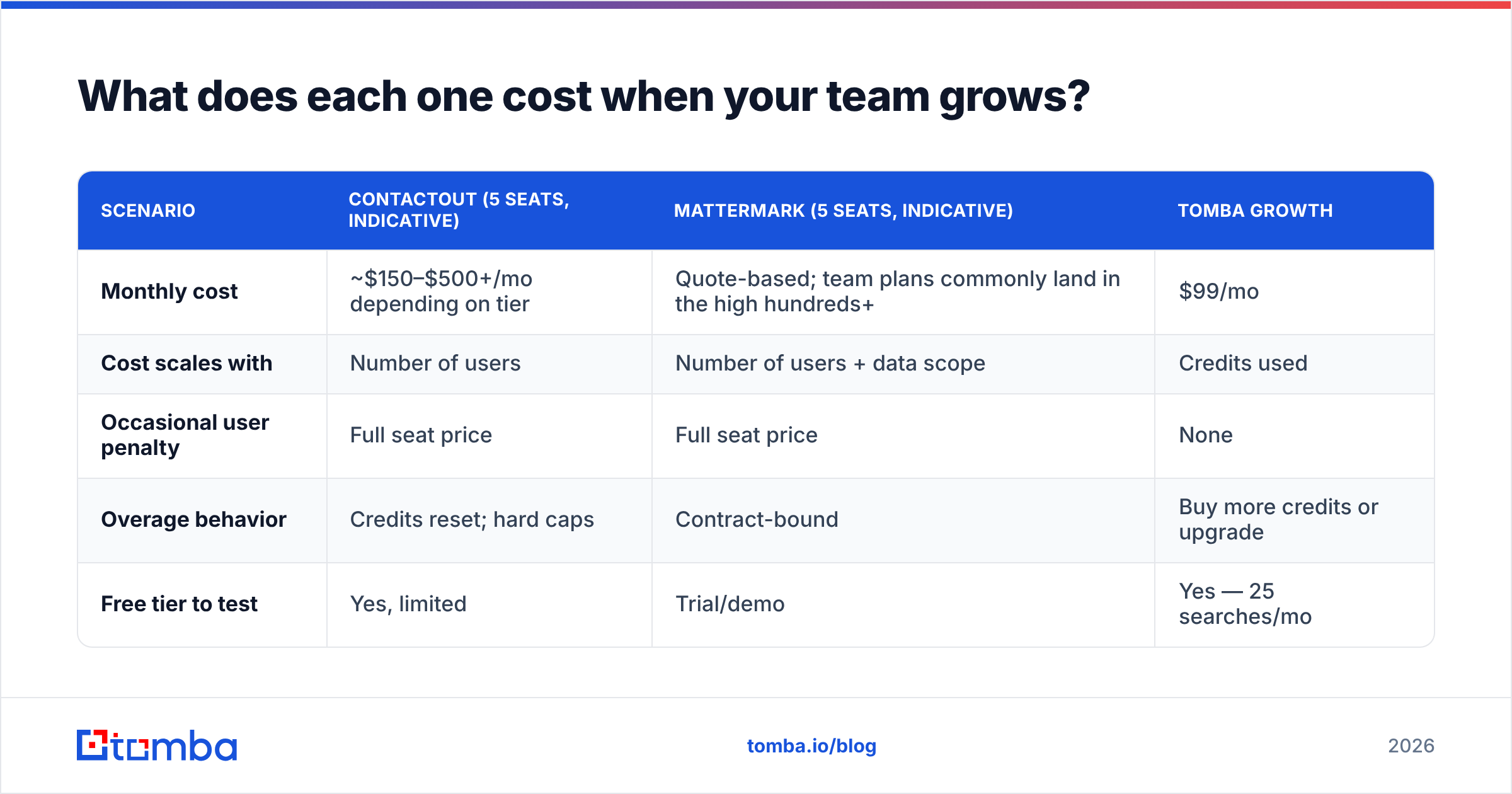
Run the math with five people, because that's where seat pricing bites.
| Scenario | ContactOut (5 seats, indicative) | Mattermark (5 seats, indicative) | Tomba Growth |
|---|---|---|---|
| Monthly cost | ~$150–$500+/mo depending on tier | Quote-based; team plans commonly land in the high hundreds+ | $99/mo |
| Cost scales with | Number of users | Number of users + data scope | Credits used |
| Occasional user penalty | Full seat price | Full seat price | None |
| Overage behavior | Credits reset; hard caps | Contract-bound | Buy more credits or upgrade |
| Free tier to test | Yes, limited | Trial/demo | Yes — 25 searches/mo |
Two caveats so you don't quote me to a vendor: ContactOut publishes plans that vary sharply between monthly and annual billing, and Mattermark's team pricing is quote-driven and depends on which data scopes you license. Check both directly. What won't change is the shape: their cost curve tracks headcount, and a credit model's tracks usage. If your usage is bursty — a big Q1 push, a quiet summer — seats are the expensive choice, because you pay for the quiet months too.
Where does Tomba fit in this comparison?#
Straight answer: Tomba competes with ContactOut, not with Mattermark. It is a contact-data layer, not a market-intelligence platform. If you need funding rounds and growth scores, Tomba isn't the tool and I won't pretend otherwise — go look at Mattermark or a competitor in that category.
Where Tomba is the stronger pick against ContactOut specifically:
- Volume and automation. The email finder, verifier, domain search, and enrichment endpoints are all API-callable on paid plans. You build once and it runs nightly. ContactOut is fundamentally a human-in-the-loop extension with an API attached.
- Verification built in. Catch-all handling, SMTP checks, and confidence scoring are part of the same product, so you're not stitching a finder to a separate verifier and reconciling two credit balances.
- Cost predictability. $49/mo Starter, $99/mo Growth, $249/mo Pro, priced on credits rather than seats. Adding a sixth SDR doesn't change the bill.
Where ContactOut is the stronger pick:
- Personal emails. If your outreach depends on reaching people at their Gmail — recruiting, executive search, founder-to-founder — ContactOut's coverage there is genuinely better, and Tomba doesn't try to compete on it.
- Manual LinkedIn sourcing. If your motion is a human scrolling profiles and picking targets one at a time, the extension experience is hard to beat.
If you're already deep in an evaluation, our breakdown of ContactOut alternatives puts the full field side by side, and G2's category pages are worth ten minutes for unfiltered user reviews on both vendors — the review volume tells you a lot about who actually renews.
How should you decide?#
Answer three questions in order and the choice makes itself.
1. What's your actual bottleneck? Not knowing which companies to hit is a Mattermark problem. Not having addresses for people at companies you've already picked is a ContactOut (or Tomba) problem. Bouncing 8% of your sends is a verification problem, and buying either tool won't fix it.
2. Is your workflow human or automated? A human clicking through profiles gets more value from an extension. A pipeline enriching rows on a schedule gets more value from an API and credits. Be honest about which one you're actually building, not which one you aspire to.
3. How many people need access? One or two, seat pricing is fine. Five or more, seat pricing is a tax on team growth, and you should model the credit-based alternatives before signing an annual contract. This is where a lot of teams quietly overspend for eighteen months.
There's no universal winner in ContactOut vs Mattermark because they were never in the same race. The teams that get this wrong buy Mattermark hoping for contact data, or buy ContactOut hoping for account signals, and then blame the tool.
Ready to fix the contact layer?#
If your problem is the one most outbound teams actually have — you know who to email and you can't get verified addresses at the volume and price you need — start with the Tomba Email Finder. Free tier gives you 25 searches a month to test coverage on your own ICP before you spend anything, and Starter is $49/mo with API access included, not gated behind an enterprise call. Run the same 50 names through Tomba and through whatever you're evaluating, measure the bounce rate on both, and let the numbers pick the winner.
Related guides#
Ready to find emails that actually work?
Join 150,000+ professionals who stopped guessing and started sending. Free credits on signup — no credit card required.
Get the Tomba newsletter
Practical outbound tactics and product updates — once every two weeks.
About the author