ContactOut vs MergeMail (2026): Which One Do You Actually Need?
ContactOut finds the contact. MergeMail sends the email. Most teams compare them as rivals, then buy the wrong one. Here's the honest breakdown of what each tool does, what it costs, and where the real gap in your stack is.
TL;DR — what you actually need to know#
- These two tools are not competitors. ContactOut is a contact-data tool (find emails and phone numbers, mostly from LinkedIn profiles). MergeMail is a Gmail mail-merge tool (send templated bulk email from your own inbox). One fills the list, the other empties it.
- If you're choosing between them, you've mis-scoped the problem. The real question is: do you lack contacts or do you lack a way to send? Answer that first, and the "vs" evaporates.
- ContactOut's strength is LinkedIn-native workflow. Its weakness is that you're locked to browsing profiles one at a time, and credits burn fast on a per-seat plan.
- MergeMail's strength is simplicity and cost. Its weakness is that it inherits every limit of Gmail — daily send caps, no independent sending domain, and no data hygiene of its own.
- Most teams end up paying for both, plus a verifier. A single find-and-verify layer like Tomba (free tier, then $49/mo) usually collapses the data half of that stack into one line item.
What is ContactOut?#
ContactOut is a B2B contact-data platform best known for its Chrome extension. You open a LinkedIn profile, click the extension, and it surfaces the person's work email, personal email, and sometimes a mobile number. It also ships a web search portal, a bulk list-builder, and an API for teams that want to pipe data into a CRM.
Its natural audience is recruiters and LinkedIn-first sellers. If your prospecting motion literally is scrolling LinkedIn Sales Navigator or LinkedIn Recruiter, ContactOut sits exactly where your eyeballs already are. That's a real advantage — workflow friction is the silent killer of prospecting throughput.
What ContactOut does not do: it does not send email. There's no sequencer, no drip logic, no inbox rotation, no reply detection. It hands you a row of data and waves goodbye.
What is MergeMail?#
MergeMail is a mail-merge tool that lives inside Gmail. You write one template with {{first_name}}-style variables, point it at a Google Sheet or a CSV, and it sends personalised copies from your own Gmail or Google Workspace address. It adds open tracking, click tracking, basic templates, scheduling, and simple follow-up logic on top of what Gmail gives you for free.
Its natural audience is founders, solo consultants, small agencies, and anyone whose "sales stack" is a spreadsheet and a strong opinion. The pitch is speed and price: you're up and sending in fifteen minutes for a fraction of what a full sequencer costs.
What MergeMail does not do: it does not find or verify a single email address. It assumes you already have a clean list. If your Sheet is full of guesses, MergeMail will cheerfully mail every one of them and let your bounce rate take the hit. That's not a knock on the tool — it's a knock on how people use it.
Are ContactOut and MergeMail even competitors?#
No — and that's the single most useful thing to understand before you spend money.
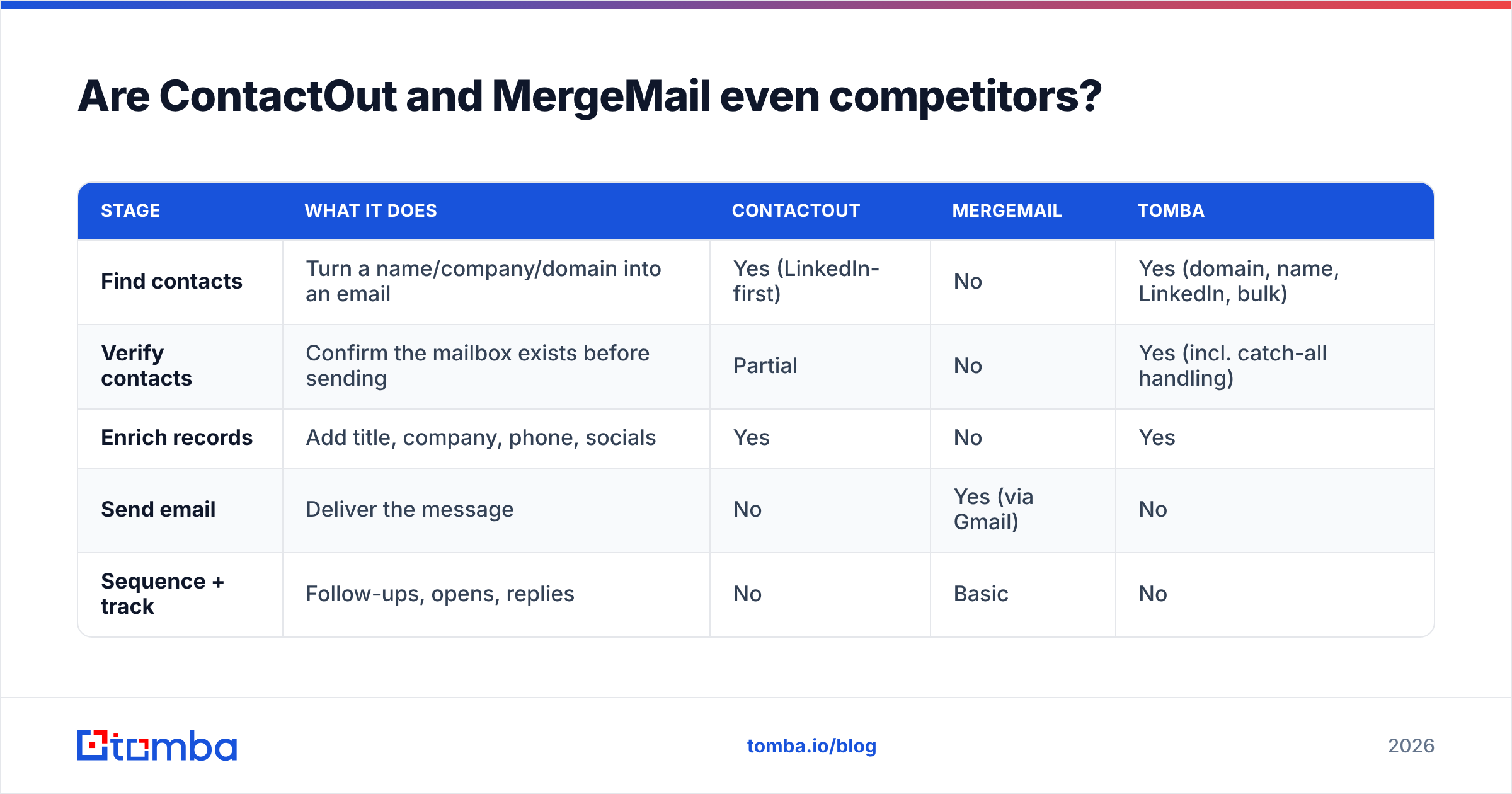
Think of outbound as a factory line. Data acquisition is raw material. Data hygiene is quality control. Sending is the assembly line. Sequencing and reply handling is packaging and shipping.
| Stage | What it does | ContactOut | MergeMail | Tomba |
|---|---|---|---|---|
| Find contacts | Turn a name/company/domain into an email | Yes (LinkedIn-first) | No | Yes (domain, name, LinkedIn, bulk) |
| Verify contacts | Confirm the mailbox exists before sending | Partial | No | Yes (incl. catch-all handling) |
| Enrich records | Add title, company, phone, socials | Yes | No | Yes |
| Send email | Deliver the message | No | Yes (via Gmail) | No |
| Sequence + track | Follow-ups, opens, replies | No | Basic | No |
Read that table honestly and the conclusion writes itself: ContactOut and MergeMail sit in different columns. Comparing them is like comparing a quarry to a cement mixer. The interesting question isn't "which one wins" — it's "which column is currently empty in my stack, and what's the cheapest credible way to fill it?"

How do ContactOut and MergeMail compare head-to-head?#
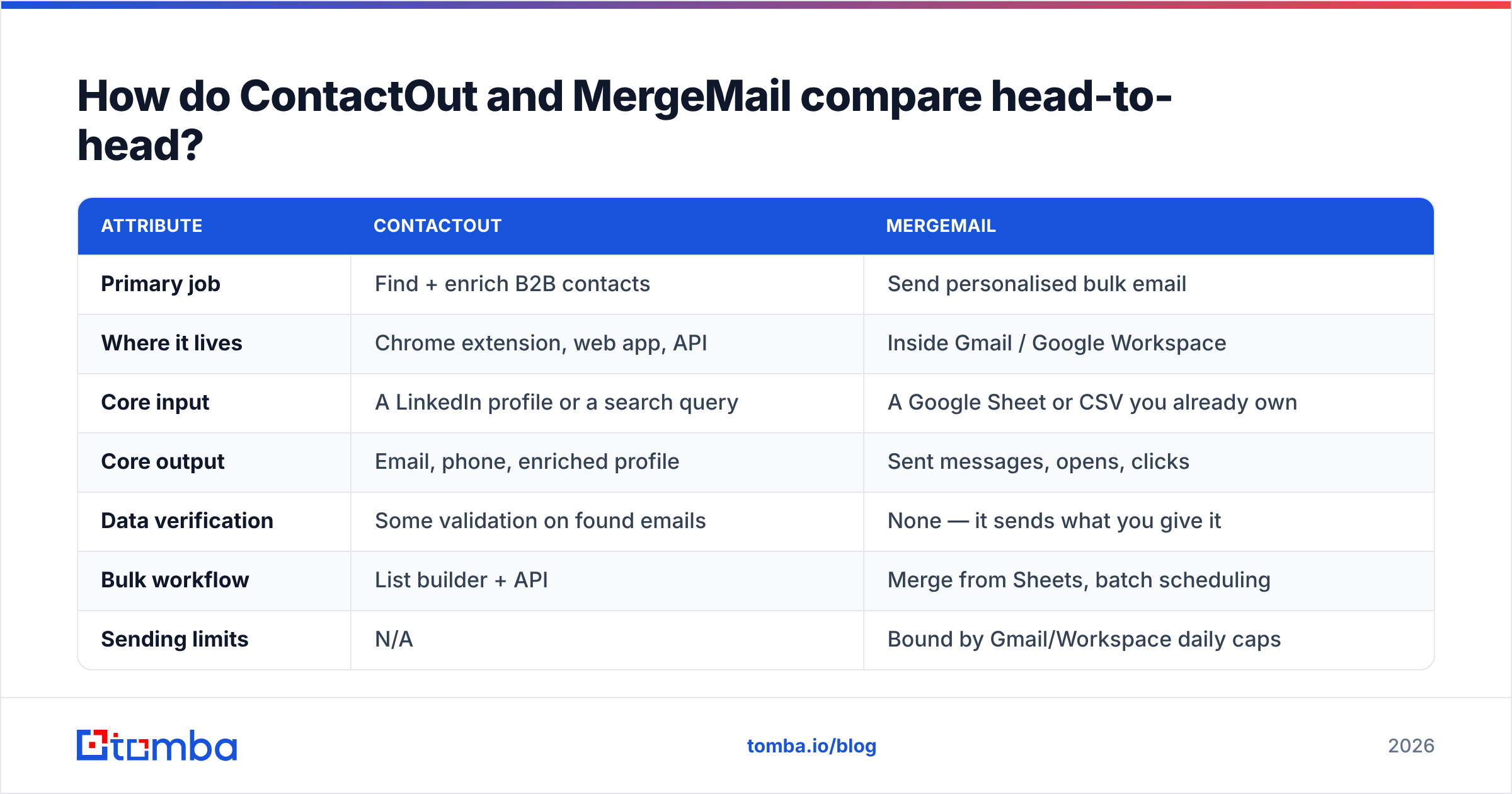
If you insist on a direct scorecard — and plenty of people land on this page because a colleague literally said "should we get ContactOut or MergeMail?" — here it is, with the caveat that a low score in a category the tool never claimed is not a failing.
| Attribute | ContactOut | MergeMail |
|---|---|---|
| Primary job | Find + enrich B2B contacts | Send personalised bulk email |
| Where it lives | Chrome extension, web app, API | Inside Gmail / Google Workspace |
| Core input | A LinkedIn profile or a search query | A Google Sheet or CSV you already own |
| Core output | Email, phone, enriched profile | Sent messages, opens, clicks |
| Data verification | Some validation on found emails | None — it sends what you give it |
| Bulk workflow | List builder + API | Merge from Sheets, batch scheduling |
| Sending limits | N/A | Bound by Gmail/Workspace daily caps |
| Deliverability control | N/A | Limited — your Gmail domain is the sender |
| Typical buyer | Recruiter, SDR, LinkedIn-heavy seller | Founder, consultant, small agency |
| Realistic monthly spend | Mid-tier SaaS pricing, per seat | Low — often free to double digits |
| Biggest risk | Credit burn and per-seat cost creep | Mailing an unverified list from your main domain |
The last row is the one that costs people money. MergeMail's low price is genuinely attractive — right up until you blast 800 scraped addresses from the same Google Workspace domain you use for customer email, watch 14% of them hard bounce, and spend the next three weeks repairing your sender reputation. Cheap sending on dirty data is the most expensive line item in outbound, and it never shows up on an invoice.
What does each one cost in 2026?#
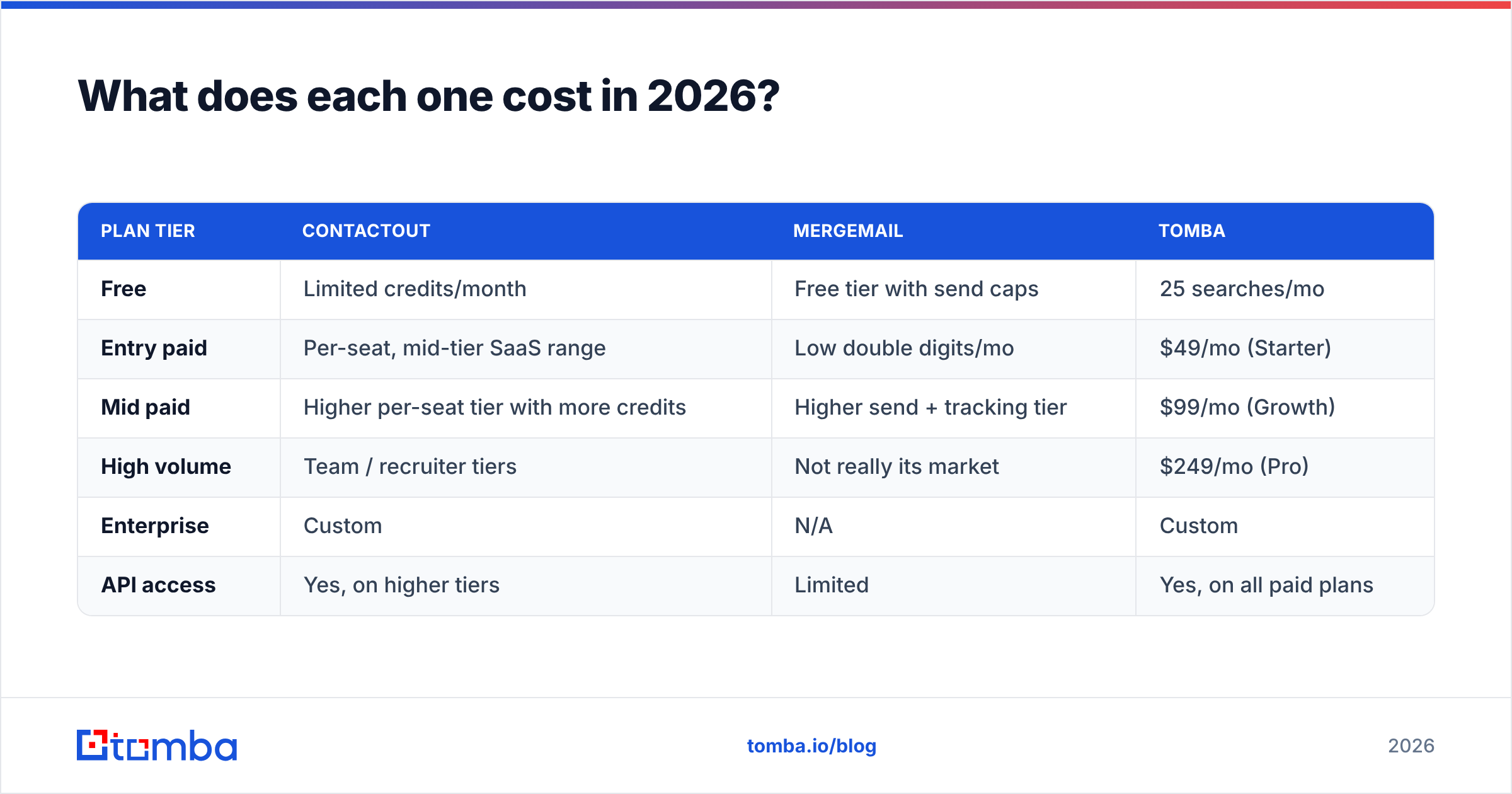
Pricing on both tools moves, and both publish current numbers on their own sites — always check before you buy. Directionally, here's the shape of the market:
| Plan tier | ContactOut | MergeMail | Tomba |
|---|---|---|---|
| Free | Limited credits/month | Free tier with send caps | 25 searches/mo |
| Entry paid | Per-seat, mid-tier SaaS range | Low double digits/mo | $49/mo (Starter) |
| Mid paid | Higher per-seat tier with more credits | Higher send + tracking tier | $99/mo (Growth) |
| High volume | Team / recruiter tiers | Not really its market | $249/mo (Pro) |
| Enterprise | Custom | N/A | Custom |
| API access | Yes, on higher tiers | Limited | Yes, on all paid plans |
Two structural points matter more than the exact figures:
- ContactOut prices per seat. Add a second SDR and you add a second bill. That's normal for LinkedIn-extension tooling, but it means cost scales with headcount, not with the amount of data you actually need.
- MergeMail prices per sender, cheaply — because Gmail does the hard part. You're paying for a merge layer, not for infrastructure. Which is fine, as long as you accept that your deliverability ceiling is Gmail's ceiling.
Compare that with a credit-based data layer, where a single Tomba plan covers the whole team's lookups and the API is included from the first paid tier. Different pricing philosophy, and for data specifically it usually works out cheaper once more than one person is prospecting.
How accurate is the data, and why does it decide everything?#
Here's the uncomfortable truth about every contact-data vendor, ContactOut included: accuracy is a range, not a number. It varies wildly by region, by company size, and by how recently the person changed jobs. A vendor quoting a single blanket accuracy figure across their entire database is quoting a marketing number.
What actually moves your bounce rate:
- Recency of the source. A record scraped 18 months ago from a company that has since restructured is a coin flip. B2B contact data decays at roughly 2–3% per month — that's 25–30% of your list dead within a year.
- Whether the address was verified at the SMTP level, not just pattern-matched. Guessing
first.last@company.comfrom an email format is a hypothesis, not a contact. - How the tool handles catch-all domains. Catch-all servers accept every address, so naive verification returns "valid" for garbage. A catch-all verifier that actually probes the domain is the difference between a 2% bounce rate and a 12% one.
- Whether you re-verify before every send, not just at import. This is the step nearly everyone skips, and it's the one with the highest ROI.
MergeMail has no opinion on any of this — by design. It's a sender. So if MergeMail is your send layer, the verification step has to live somewhere else, and it has to happen before the merge, every time. Running your Sheet through an email verifier takes minutes and is the single cheapest insurance policy in your stack.
For a deeper read on how much a bad list actually costs you, G2's reviews across the email-verification category are a reasonable starting point — the recurring complaint in low-star reviews is almost always the same: "the data was stale."
Which tool should you pick for your use case?#
Match the tool to the job. In practice, four scenarios cover most readers:
You're a recruiter living in LinkedIn Recruiter all day. ContactOut earns its price here. The extension is right where you work, and personal-email coverage matters for candidate outreach in a way it doesn't for B2B sales. Pair it with a verifier and you're set.
You're a founder with 200 hand-picked target accounts and a Google Sheet. MergeMail is genuinely the right call for sending — it's cheap, it's fast, and at 200 contacts you don't need a sequencer. But do not skip verification, and do not send from your primary customer-facing domain.
You're an SDR team running domain-first prospecting. Neither tool is the centre of gravity. You want a domain search to pull every relevant contact at a target company in one call, bulk verification, and then a real sequencer. LinkedIn-by-profile is too slow at team scale.
You're building data into a product or an internal workflow. You want an API and predictable credits, not a Chrome extension. The Tomba API or ContactOut's API tier are the relevant comparison — MergeMail isn't in this conversation at all.

Where does Tomba fit in a ContactOut vs MergeMail stack?#
Honestly: Tomba replaces the ContactOut half, not the MergeMail half. We don't send email, and we're not going to pretend otherwise.
What Tomba does differently on the data side:
- Domain-first, not profile-first. Give it a company domain and it returns the contacts with titles and confidence scores — no clicking through profiles one by one. When you need LinkedIn coverage specifically, the LinkedIn finder handles that path.
- Find and verify in one place. Every found address can be verified, including on catch-all domains, before it ever reaches your Sheet or your sequencer.
- Credit-based, not seat-based. One plan covers the team. $49/mo Starter, $99/mo Growth, $249/mo Pro, and a free tier at 25 searches/month if you want to test the data quality against a list you already know the answers to (which is exactly how you should test any vendor).
- Bulk and API from the start, so a 5,000-row list is a job, not an afternoon.
If you're comparing directly, the ContactOut alternative breakdown goes into the feature-by-feature detail. And if you want a genuinely fair test: take 100 contacts you already have verified emails for, run them through both tools, and count the hits. Vendor-published accuracy stats are marketing. Your own bake-off is data.
What's the right stack, then?#
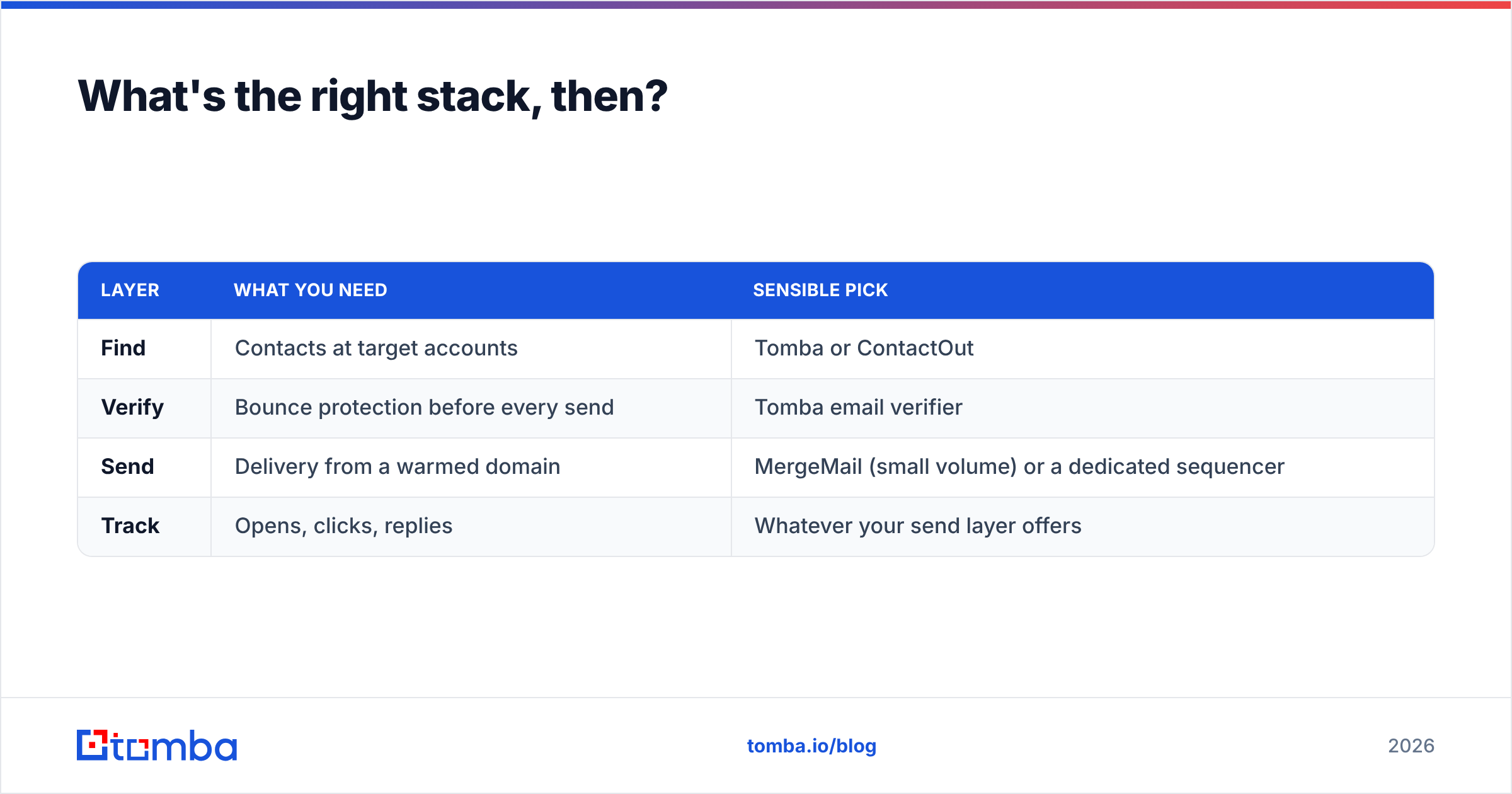
For most B2B teams sending fewer than a few thousand emails a month, the shape looks like this:
| Layer | What you need | Sensible pick |
|---|---|---|
| Find | Contacts at target accounts | Tomba or ContactOut |
| Verify | Bounce protection before every send | Tomba email verifier |
| Send | Delivery from a warmed domain | MergeMail (small volume) or a dedicated sequencer |
| Track | Opens, clicks, replies | Whatever your send layer offers |
Note that the "find" and "verify" rows collapse into one tool, and the "send" and "track" rows collapse into another. That's a two-tool stack, not a four-tool one — and it's why framing this as "ContactOut vs MergeMail" leads people astray. They're two different rows in the same table. You almost certainly need something in both.
One more thing worth internalising: email deliverability is a property of your whole stack, not of your send tool. Clean data upstream is worth more than any tracking feature downstream. A mail merge is only as good as the list it merges from.
Frequently asked questions#
Can I use ContactOut and MergeMail together? Yes, and plenty of small teams do exactly that: pull contacts with ContactOut, dump them into a Google Sheet, merge and send with MergeMail. Insert a verification step between the two and it's a perfectly workable low-budget stack.
Is MergeMail safe for cold email? It's safe for small, well-targeted cold email from a domain you've warmed. It is not built for high-volume cold outreach — you inherit Gmail's daily sending limits, and you're sending from your real domain, so a bad list damages the inbox you actually rely on. Use a separate sending domain and verify everything first.
Does ContactOut verify the emails it finds? It applies validation to the addresses it returns, but as with every provider, re-verifying immediately before you send is still the correct habit. Data decays after it leaves the vendor's database.
Which is cheaper? MergeMail, by a wide margin — but they're not buying you the same thing. Cheaper sending on unverified data is not a saving.
Start with the data layer#
Sending is a solved problem. Finding the right person and knowing the address actually works is the part that decides whether your campaign lands or bounces.
If your list is the weak link — and for most teams comparing ContactOut and MergeMail, it is — start there. The Tomba Email Finder gives you 25 free searches a month with no card, enough to run a real accuracy bake-off against whatever you're using today. Find the contacts, verify them, then let whichever send tool you like do the easy half.
Related guides#
Ready to find emails that actually work?
Join 150,000+ professionals who stopped guessing and started sending. Free credits on signup — no credit card required.
Get the Tomba newsletter
Practical outbound tactics and product updates — once every two weeks.
About the author