ContactOut vs Minelead (2026): Which Email Finder Wins?
ContactOut is a LinkedIn-first contact revealer. Minelead is a cheap domain-search tool. They solve different problems — and one of them will quietly wreck your bounce rate. Here's the honest breakdown.
TL;DR
- ContactOut is a LinkedIn-first contact revealer. Its strength is personal emails and phone numbers scraped alongside a LinkedIn profile. Its weakness is price and workflow lock-in — it wants you living inside LinkedIn.
- Minelead is a budget domain-search tool. It's cheap (there's a genuinely usable free tier), it's simple, and its coverage outside common Western B2B domains gets thin fast.
- Neither tool is primarily a verifier. Both hand you addresses; neither meaningfully guarantees they'll land. That's where bounce rates come from.
- If your motion is LinkedIn-native recruiting or exec search, ContactOut is the better fit. If it's high-volume domain-based prospecting, Minelead is the cheaper starting point — but you'll outgrow it.
- If you need find and verify in one pipeline with an API you can actually build on, a dedicated platform like Tomba covers both at $49/mo instead of stacking two subscriptions.
What are ContactOut and Minelead, actually?#
They get compared because they both output email addresses. That's about where the similarity ends.
ContactOut (contactout.com) is built around the LinkedIn profile. You install the Chrome extension, browse a profile or a Sales Navigator list, and ContactOut surfaces work emails, personal emails, and often a mobile number in a side panel. It's popular with recruiters for exactly this reason: candidates change jobs, and a personal Gmail survives the change while a work address does not. ContactOut also sells a searchable people database and an ATS/CRM push, but the extension is the product people actually pay for.
Minelead (minelead.io) is a domain-first email finder. You give it acme.com, it returns the addresses it knows at that domain plus the inferred email pattern. There's a browser extension, a Google Sheets add-on, and a straightforward API. The pitch is price: a free tier that's actually usable, and paid plans that undercut nearly everyone in the category.
So the real question isn't "which tool is better." It's which shape of prospecting are you doing — profile-by-profile, or domain-by-domain?
Which one is more accurate?#
Accuracy in this category has two separate numbers, and vendors love to blur them.
- Hit rate (coverage) — of 100 people you look up, how many return any address?
- Deliverability (validity) — of the addresses returned, how many actually accept mail?
A tool can look great on the first and be a disaster on the second. Pattern-guessing engines are the classic offender: they infer first.last@domain.com, return it with a confidence badge, and never touch an SMTP server to confirm it exists. You get 90% "coverage" and a 15% bounce rate.

In practice, on B2B lookups where the person has a public LinkedIn presence, ContactOut tends to have the better hit rate — it's pulling from profile-linked data rather than inferring from a pattern. Where it gets shakier is which email it hands you first. Recruiters want the personal address; SDRs emailing about a procurement decision usually don't, and a cold pitch landing in someone's personal Gmail reads as a boundary violation.
Minelead's hit rate is respectable on well-indexed domains — mid-size SaaS, agencies, anything with a public team page — and degrades noticeably on smaller companies, non-English domains, and firms with hardened DNS. It's an honest tradeoff for the price, but you should expect a chunk of your list to come back empty.
Both tools ship results with confidence scores. Treat those as hints, not guarantees. Run anything you're about to email through a real email verifier before it touches your sequence — a $10 verification pass is cheaper than a domain reputation rebuild.

How do ContactOut and Minelead compare head to head?#
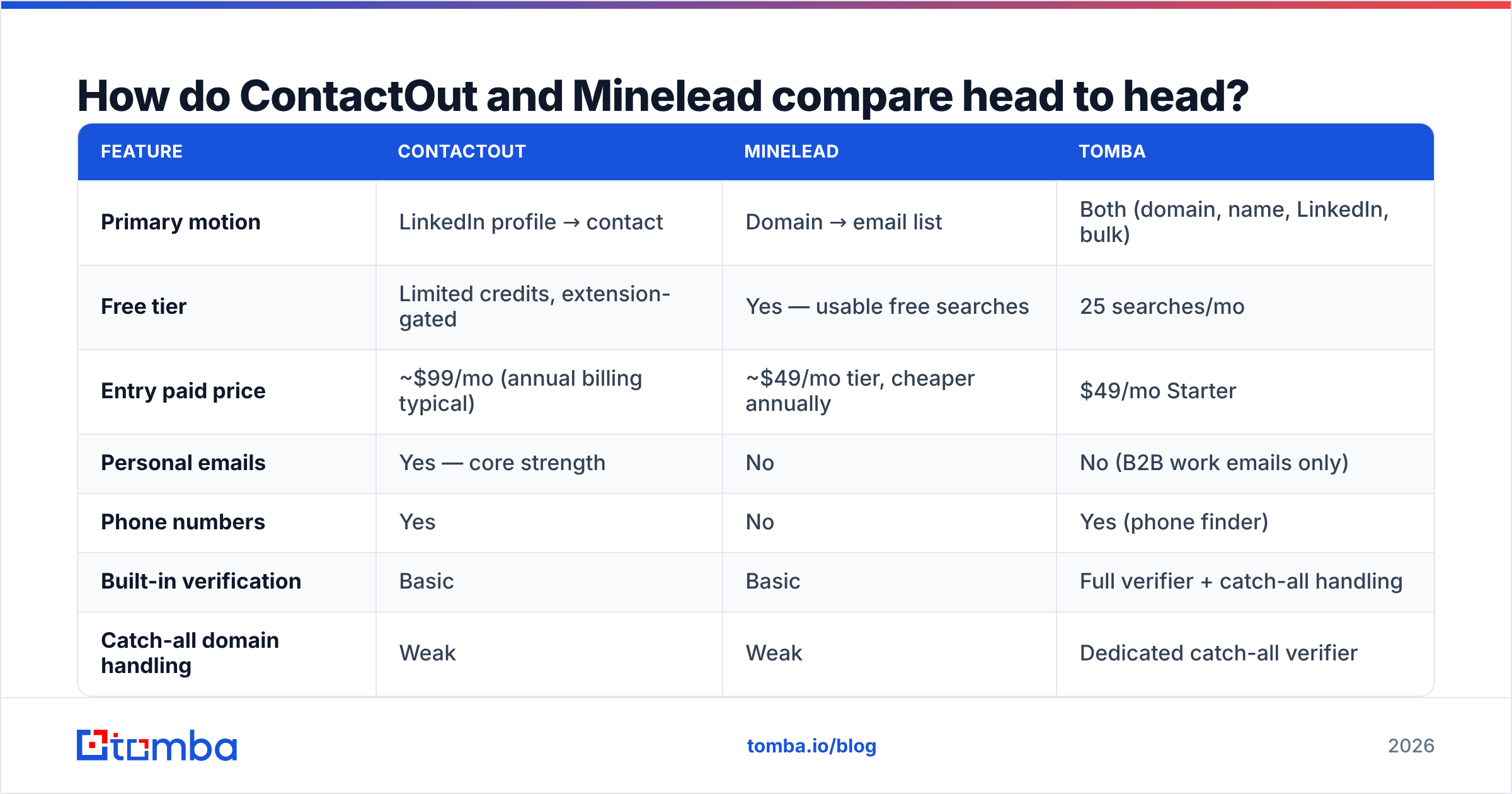
Here's the side-by-side, with a dedicated find-and-verify platform in the third column so you can see where the category actually sits.
| Feature | ContactOut | Minelead | Tomba |
|---|---|---|---|
| Primary motion | LinkedIn profile → contact | Domain → email list | Both (domain, name, LinkedIn, bulk) |
| Free tier | Limited credits, extension-gated | Yes — usable free searches | 25 searches/mo |
| Entry paid price | ~$99/mo (annual billing typical) | ~$49/mo tier, cheaper annually | $49/mo Starter |
| Personal emails | Yes — core strength | No | No (B2B work emails only) |
| Phone numbers | Yes | No | Yes (phone finder) |
| Built-in verification | Basic | Basic | Full verifier + catch-all handling |
| Catch-all domain handling | Weak | Weak | Dedicated catch-all verifier |
| API quality | Available, priced up | Simple REST, generous limits | Full REST + CLI + MCP |
| Bulk enrichment | CSV upload | CSV / Sheets add-on | Bulk email finder + enrichment |
| Best for | Recruiters, exec search | Budget domain prospecting | Outbound teams needing find + verify |

Two things jump out of that grid.
First, ContactOut's premium is real and it's paying for personal contact data. If you don't need personal emails and mobile numbers, you're subsidizing a feature you'll never use. Recruiters need it. A B2B SaaS SDR emailing a VP of Engineering about an infra tool does not.
Second, Minelead's price is real too — and so is what's missing at that price. No phone data, thin enrichment, and verification that's more of a syntax-and-MX check than a genuine SMTP conversation. It's a finder, not a data platform.
What does each tool cost in practice?#
Sticker price and effective price are different numbers in this category, because everything is credit-metered and credits burn on attempts, not successes.
Work through the arithmetic for a typical month of outbound — say you're targeting 2,000 net-new prospects:
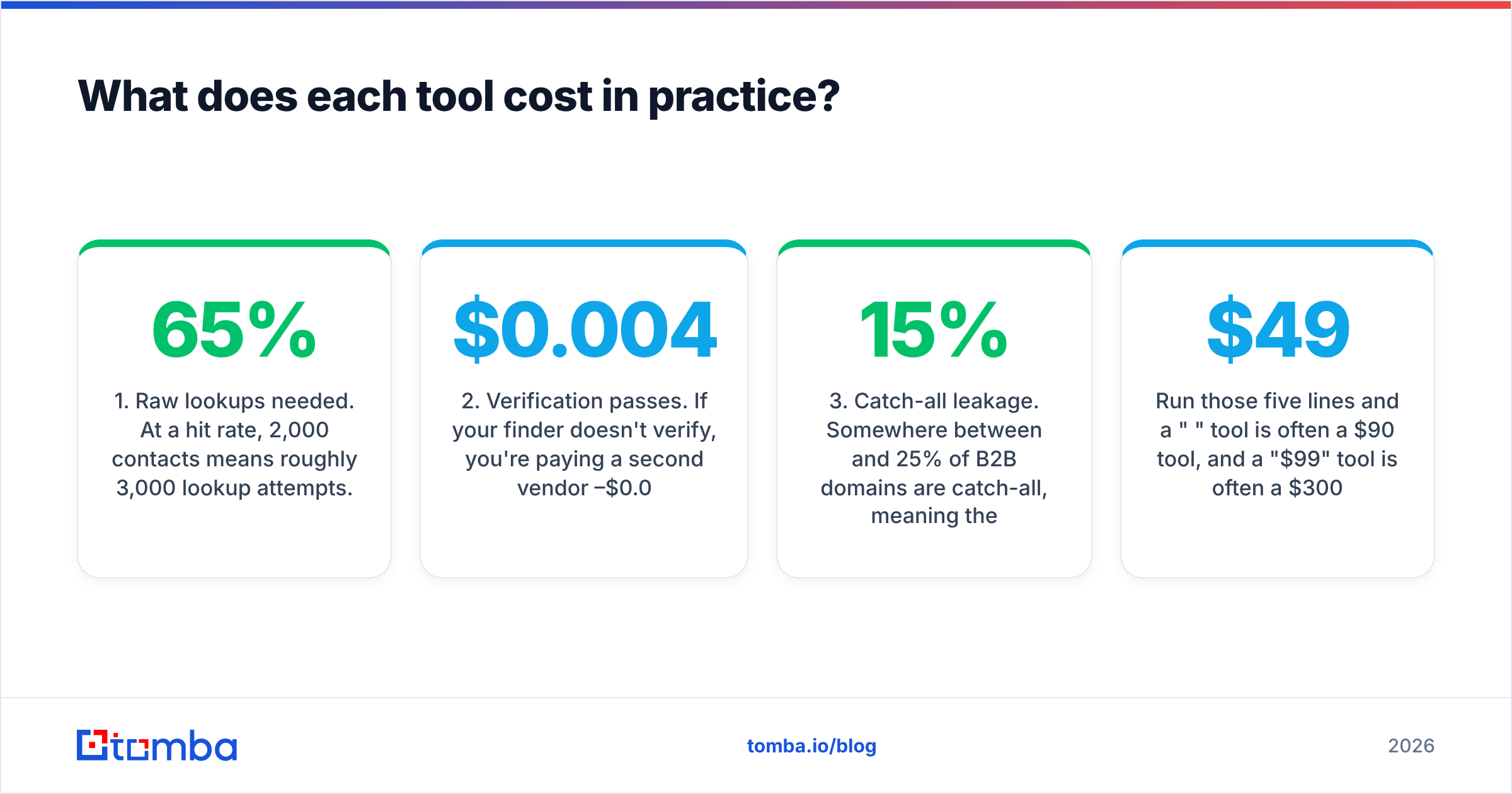
- Raw lookups needed. At a 65% hit rate, 2,000 contacts means roughly 3,000 lookup attempts. Some tools charge for the misses. Read the credit policy before you read the price.
- Verification passes. If your finder doesn't verify, you're paying a second vendor $0.004–$0.01 per verification. On 2,000 addresses that's $8–$20/mo — small, until you add the second login, the second CSV export, and the second thing to debug.
- Catch-all leakage. Somewhere between 15% and 25% of B2B domains are catch-all, meaning the mail server accepts everything and tells you nothing. Neither ContactOut nor Minelead resolves these well. They land in your list as "valid," and they're the single biggest hidden source of soft bounces.
- Seat multiplication. ContactOut in particular is priced per seat with credits per seat. A three-person SDR pod triples the bill, and unused credits generally don't pool.
- Annual lock-in. Both tools discount hard for annual. That discount is only a discount if the tool still fits in month nine.
Run those five lines and a "$49" tool is often a $90 tool, and a "$99" tool is often a $300 tool. The number that matters is cost per verified, deliverable contact — not cost per credit.
Is ContactOut better than Minelead for cold email?#
For cold email specifically, the answer is: ContactOut gives you more contactable people, Minelead gives you more contacts per dollar, and neither gives you a clean list.
Cold email lives or dies on email deliverability, and deliverability lives or dies on bounce rate. Google and Microsoft both tightened bulk-sender enforcement in 2024 and have kept tightening since; a sustained bounce rate above ~2% is enough to start eating your inbox placement, and the damage compounds across every domain you send from.
Here's the failure mode that kills teams using a finder-only tool:
- You scrape 1,000 addresses. 850 come back with a "high confidence" badge.
- You skip verification because the tool implied it already did it.
- 120 of them bounce. That's a 14% bounce rate on your first send.
- Your sending domain gets throttled. Now the 730 good addresses don't land either.
- You blame the copy. You rewrite the subject line. It doesn't help, because the problem was never the copy.

This is why the find-vs-verify split matters more than the ContactOut-vs-Minelead split. Whichever finder you pick, budget for a verification layer. If you'd rather not run two vendors, pick a platform where the email finder and the verifier are the same pipeline and catch-all domains get resolved rather than shrugged at.
Who should pick ContactOut?#
Pick ContactOut if two or more of these are true:
- You're recruiting. Personal emails and mobile numbers are non-negotiable for candidate outreach, and no domain-search tool will ever give you them. This is ContactOut's home turf and it wins it.
- Your ICP lives on LinkedIn. If you're already working Sales Navigator lists daily, an extension that overlays contact data on the profile you're looking at removes real friction.
- Volume is low, value is high. Exec search, enterprise ABM, 20 accounts a quarter — the per-contact cost stops mattering when one placement or one deal covers the annual bill.
- You need phones as much as emails. Multi-threading a deal across email and cold call is a legitimate reason to pay the premium.
Skip it if you're doing high-volume, domain-driven prospecting where you already know the companies and just need the right person at each one. You'll pay LinkedIn-data prices for a job a domain-search tool does for a fifth of the cost. If you've already priced it and flinched, the ContactOut alternative comparison is worth ten minutes.
Who should pick Minelead?#
Pick Minelead if:
- You're bootstrapping. The free tier is genuinely useful for validating an outbound motion before you commit budget to it. That's rarer than it should be in this category.
- Your workflow starts with a company list, not a person list. You have 300 target domains and need the head of ops at each. Domain search is exactly the right shape.
- You want a simple API and nothing else. Minelead's REST API is easy to wire into a script without a sales call. For a developer building an internal enrichment step, that counts.
- Your ICP is mainstream Western B2B. Coverage holds up. Push into APAC, EU mid-market, or small local businesses and it thins out quickly.
Skip it if you need phone numbers, deep firmographic enrichment, or reliable catch-all resolution. Those aren't roadmap gaps — they're outside the product's scope, and pretending otherwise leads to a bad quarter.
What's the third option most teams end up at?#
Most teams that start on either tool land in the same place after two quarters: they need one pipeline that finds, verifies, and enriches, with an API their RevOps person can automate against.
That's the gap both ContactOut and Minelead leave open. ContactOut is a data source with a great extension. Minelead is a lookup endpoint with a great price. Neither is an outbound data platform.
What a platform layer adds:
- Find by any input. Domain, first/last + company, or a LinkedIn URL — a LinkedIn finder and a domain search hitting the same underlying data, so you don't switch tools mid-workflow.
- Verification in the same call. No second vendor, no second CSV, no "did I remember to verify this batch?"
- Catch-all resolution. The single biggest quality lever nobody markets, because it's unglamorous and hard.
- Real automation surface. A documented Tomba API, a CLI, Sheets and Excel add-ins, and native pushes into HubSpot and Salesforce — so enrichment happens on record creation, not in a Tuesday CSV ritual.
- Predictable pricing. Tomba pricing runs Free (25 searches/mo), Starter $49/mo, Growth $99/mo, Pro $249/mo — one bill instead of a finder subscription plus a verifier subscription plus an enrichment subscription.
Worth saying plainly, because the internet is bad at this: ContactOut is not a bad tool and Minelead is not a scam. They're both good at a narrow thing. The mistake is buying either one expecting it to be the whole data stack, then blaming the tool when your bounce rate says otherwise.
How should you actually decide?#
Run a 100-contact bake-off. It takes an afternoon and it beats every review site, including this post.
- Pull 100 real prospects from your actual ICP — not a clean test list, your messy real one.
- Run all 100 through each tool. Record hit rate: how many returned an address at all.
- Verify every returned address with an independent verifier. Record validity: how many are actually deliverable.
- Compute cost per valid contact. Total spend ÷ deliverable addresses. This is the only number that matters.
- Check the catch-alls separately. How many came back "accept-all"? That's your hidden risk pool.
Whichever tool wins your bake-off on cost-per-valid-contact wins, full stop. Cross-check the vendor claims against real user reviews on G2 while you're at it — the pattern in the one-star reviews tells you more than the feature grid.
Get a list that actually lands#
If the bake-off tells you what most teams find — that the finder isn't the bottleneck, the verified finder is — start with the Tomba Email Finder. Find by domain, name, or LinkedIn URL; every result runs through the verifier and the catch-all check before it reaches your CSV. The free tier gives you 25 searches a month to test it against your own list, and Starter is $49/mo when you're ready to scale. Run your 100-contact bake-off against it and compare the only number that counts: cost per contact that actually gets delivered.
Related guides#
Ready to find emails that actually work?
Join 150,000+ professionals who stopped guessing and started sending. Free credits on signup — no credit card required.
Get the Tomba newsletter
Practical outbound tactics and product updates — once every two weeks.
About the author