ContactOut vs MorphyMail: Which Email Finder Wins in 2026?
ContactOut is a LinkedIn-first contact extractor. MorphyMail is a budget desktop-era email tool. They solve different problems badly if you pick wrong — here is the honest breakdown, plus where an API-first finder beats both.
TL;DR#
- ContactOut is a LinkedIn-first contact extractor. Its strength is scraping a profile you are already looking at; its weakness is that everything routes through a browser and a seat license.
- MorphyMail sits at the opposite end: a low-cost, bulk-oriented email utility with a desktop/legacy feel. Cheap per record, but thin on verification depth, enrichment, and modern API tooling.
- Neither tool is a great fit if your workflow starts from a domain or a company list rather than a LinkedIn tab.
- The decision that actually matters is not "which brand," it is where your prospecting starts — profile, domain, or CSV — and who verifies before send.
- If you need programmatic lookups, catch-all handling, and predictable per-credit pricing, an API-first finder like Tomba (Free tier at 25 searches/mo, Starter $49/mo) closes gaps both tools leave open.
What is ContactOut and who actually uses it?#
ContactOut is a browser-extension-driven contact lookup tool built around LinkedIn. You open a profile, the extension panel appears, and it surfaces personal and work emails plus phone numbers. There is a web app with search filters and a "recruiter dashboard" layer, but the gravitational center of the product is the extension. That design is deliberate: ContactOut built its reputation with recruiting teams who live inside LinkedIn Recruiter all day.
The people who get the most out of it are:
- Recruiters sourcing individual candidates one profile at a time, where personal Gmail addresses matter as much as work emails.
- Founder-led sales teams doing sub-100-touch campaigns off a hand-curated LinkedIn list.
- Agency researchers who need names, titles, and contact data captured while browsing, not after.
Where it strains is at scale and in automation. If your motion is "give me every marketing decision-maker at these 400 domains," a profile-by-profile extension is the wrong shape of tool. You end up paying seat-based prices for a workflow that should be a single API call.
What is MorphyMail and what problem does it actually solve?#
MorphyMail is the budget end of the market — an email finding and list-building utility that leans toward bulk processing and low cost per record rather than deep enrichment. It is the kind of tool people find when they search "cheap email finder" rather than "email data platform."
The honest framing: MorphyMail is optimized for volume economics, not for data confidence. You get email discovery and basic list handling at a price that makes spraying a large list feel affordable. What you generally do not get is the layer that keeps a modern sending domain alive — SMTP-level verification depth, catch-all classification, role-account flagging, deliverability signals, and clean CRM sync.
That trade-off used to be survivable. In 2026 it is not. Google and Microsoft bulk-sender rules made bounce rate a hard gate, not a soft metric. A cheap list that bounces at 8% does not save money — it burns the domain you spent months warming.
Correction on the syntax — here is the visual:
ContactOut vs MorphyMail: how do they compare head-to-head?#
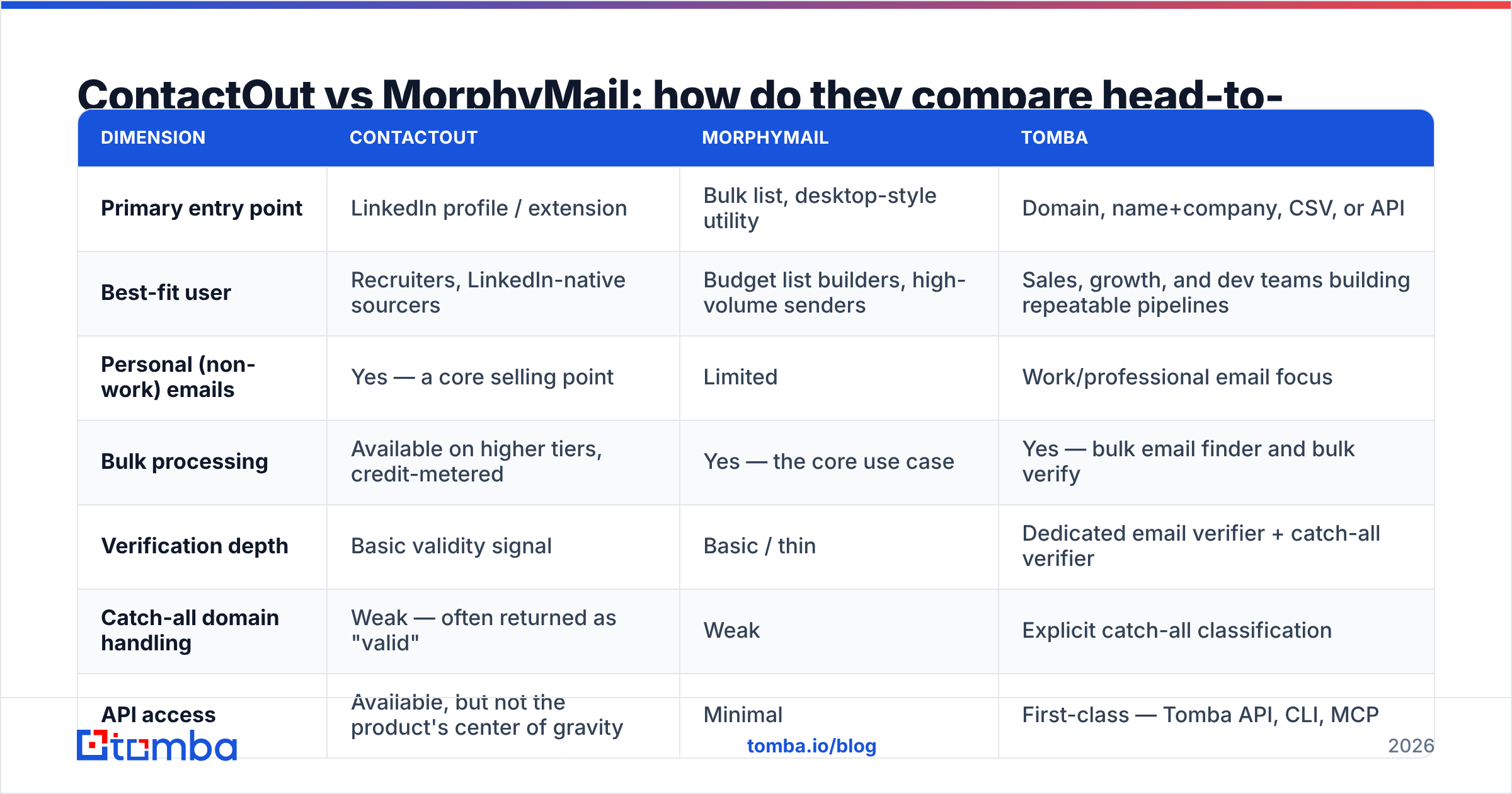
Here is the comparison that matters. Pricing for third-party tools moves constantly and is often gated behind annual-billing math, so treat the figures below as directional and confirm on each vendor's page before you buy. Tomba's numbers are exact.

| Dimension | ContactOut | MorphyMail | Tomba |
|---|---|---|---|
| Primary entry point | LinkedIn profile / extension | Bulk list, desktop-style utility | Domain, name+company, CSV, or API |
| Best-fit user | Recruiters, LinkedIn-native sourcers | Budget list builders, high-volume senders | Sales, growth, and dev teams building repeatable pipelines |
| Personal (non-work) emails | Yes — a core selling point | Limited | Work/professional email focus |
| Bulk processing | Available on higher tiers, credit-metered | Yes — the core use case | Yes — bulk email finder and bulk verify |
| Verification depth | Basic validity signal | Basic / thin | Dedicated email verifier + catch-all verifier |
| Catch-all domain handling | Weak — often returned as "valid" | Weak | Explicit catch-all classification |
| API access | Available, but not the product's center of gravity | Minimal | First-class — Tomba API, CLI, MCP |
| Entry price | Free tier with tight caps; paid tiers commonly in the $29–$99/seat range | Low, positioned as a budget option | Free (25 searches/mo), Starter $49/mo, Growth $99/mo, Pro $249/mo |
| Pricing model | Seat-based, credit-metered | Volume/licence-oriented | Credit-based, no seat tax |
| Where it breaks | Anything that starts outside LinkedIn | Anything that requires data confidence | Not built for personal Gmail sourcing of candidates |
Read the table by column, not by row. ContactOut loses points for automation and gains them for candidate sourcing. MorphyMail loses points for confidence and gains them for cost. Neither is "bad" — they are pointed at different jobs, and most buyers get burned by picking on price and discovering the shape mismatch in week three.
How accurate is each one, really?#
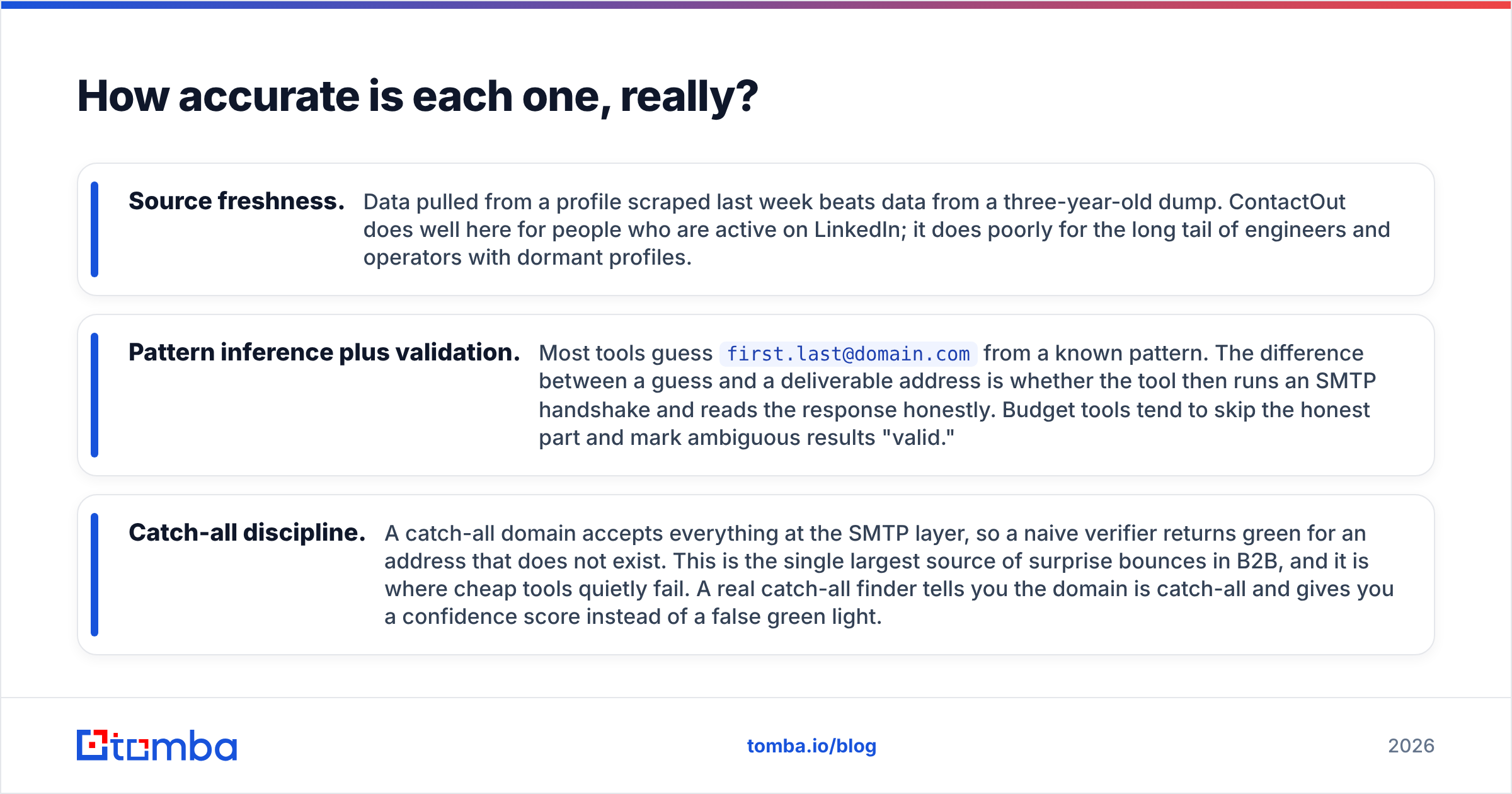
Accuracy is where every email-finder comparison gets fuzzy, because vendors quote their own hit rates against their own test sets. Ignore the marketing numbers and reason about mechanism instead. Three things determine whether a returned email actually lands:
- Source freshness. Data pulled from a profile scraped last week beats data from a three-year-old dump. ContactOut does well here for people who are active on LinkedIn; it does poorly for the long tail of engineers and operators with dormant profiles.
- Pattern inference plus validation. Most tools guess
first.last@domain.comfrom a known pattern. The difference between a guess and a deliverable address is whether the tool then runs an SMTP handshake and reads the response honestly. Budget tools tend to skip the honest part and mark ambiguous results "valid." - Catch-all discipline. A catch-all domain accepts everything at the SMTP layer, so a naive verifier returns green for an address that does not exist. This is the single largest source of surprise bounces in B2B, and it is where cheap tools quietly fail. A real catch-all finder tells you the domain is catch-all and gives you a confidence score instead of a false green light.

The practical test costs you nothing: take 100 contacts you already know are deliverable, strip the emails, and run the names through each tool. Count three buckets — correct, wrong, and not found. A tool that returns "not found" is being honest with you. A tool that returns a confidently wrong address is charging you a credit to damage your sender reputation.
In our own testing pattern, ContactOut performs well on LinkedIn-active white-collar profiles and falls off sharply outside that set. MorphyMail's coverage is broad but its confidence signal is weak, which means you must run every export through an independent verifier before it touches a sequence. Budget for that second tool when you compare total cost.
Which one should you pick for your use case?#
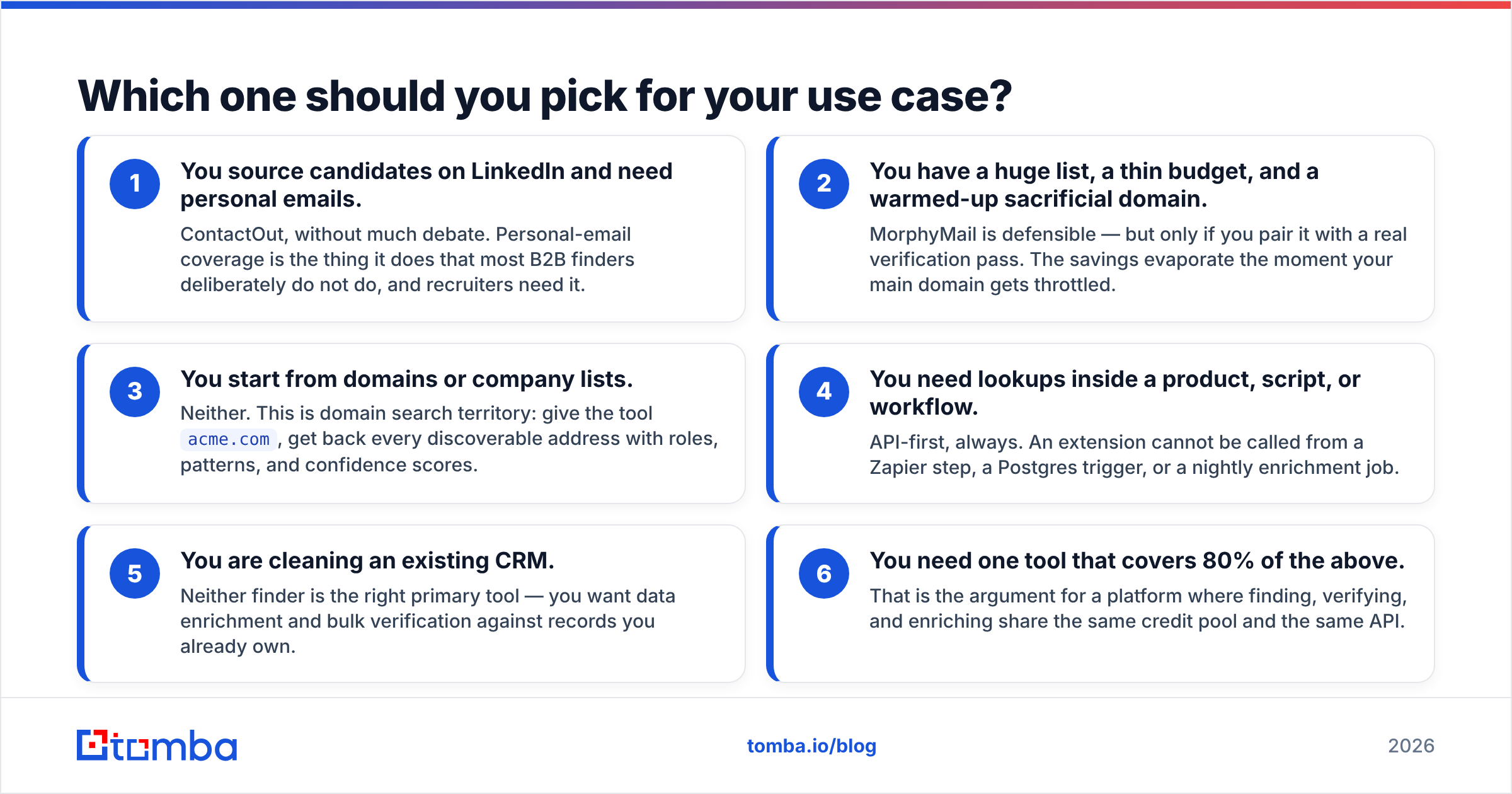
Skip the feature checklists. Match the tool to where your prospecting actually begins:
- You source candidates on LinkedIn and need personal emails. ContactOut, without much debate. Personal-email coverage is the thing it does that most B2B finders deliberately do not do, and recruiters need it.
- You have a huge list, a thin budget, and a warmed-up sacrificial domain. MorphyMail is defensible — but only if you pair it with a real verification pass. The savings evaporate the moment your main domain gets throttled.
- You start from domains or company lists. Neither. This is domain search territory: give the tool
acme.com, get back every discoverable address with roles, patterns, and confidence scores. - You need lookups inside a product, script, or workflow. API-first, always. An extension cannot be called from a Zapier step, a Postgres trigger, or a nightly enrichment job.
- You are cleaning an existing CRM. Neither finder is the right primary tool — you want data enrichment and bulk verification against records you already own.
- You need one tool that covers 80% of the above. That is the argument for a platform where finding, verifying, and enriching share the same credit pool and the same API.
What do these tools cost when you count the hidden fees?#
The sticker price is rarely the real price. Three costs get left out of every comparison post:
Seat tax. ContactOut's model is seat-based. Three SDRs means three licences, even if each one runs forty lookups a week. Credit-based pricing decouples cost from headcount — one API key, one pool, everyone draws from it. That difference compounds fast on a growing team.
The verification tool you were going to need anyway. If your finder does not verify honestly, you buy a verifier. That is a second subscription, a second integration, and a second place for your list to get out of sync. Bundle it or pay twice.
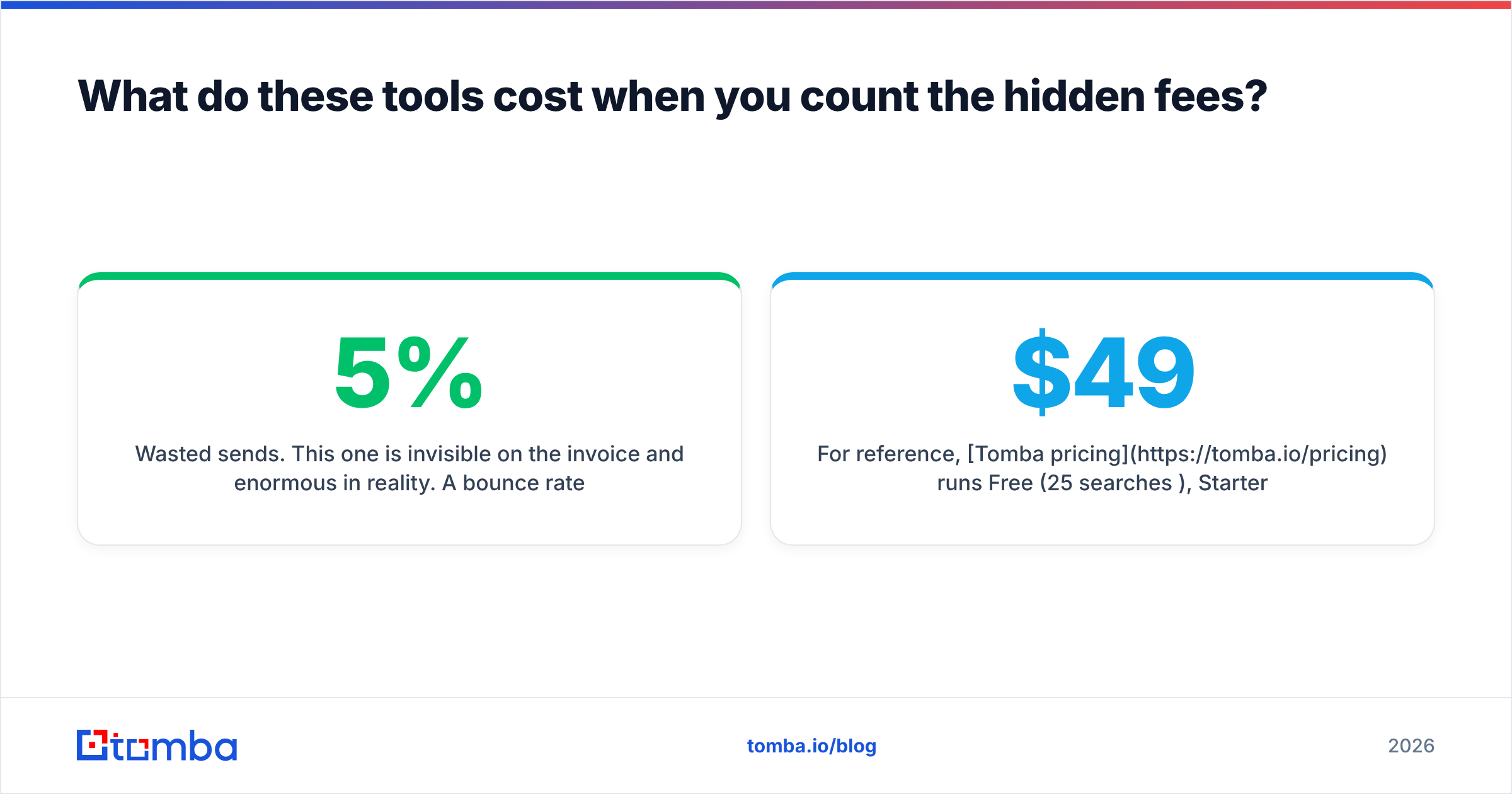
Wasted sends. This one is invisible on the invoice and enormous in reality. A 5% bounce rate on 2,000 sends is 100 hard bounces — enough to trigger throttling at the mailbox providers and to depress your email deliverability for weeks afterward. The cheapest data in the world is expensive when it costs you a domain.
For reference, Tomba pricing runs Free (25 searches/mo), Starter at $49/mo, Growth at $99/mo, Pro at $249/mo, and custom Enterprise — with finding, verification, catch-all checks, and enrichment drawing from the same pool. No per-seat multiplier. If you want to sanity-check the category more broadly before committing, the lead intelligence category on G2 is a reasonable neutral starting point for user reviews.

Is there a better third option than either?#
For most B2B revenue teams in 2026, yes — and it is not a loyalty argument, it is a workflow argument.
ContactOut wins a narrow, real job: LinkedIn-native candidate sourcing with personal emails. If that is your job, buy it and stop reading. MorphyMail wins on raw price if you are volume-first and already own a verification step. If that is your setup, fine.
But most teams are neither. Most teams have a target account list, a CRM full of half-empty records, an outbound sequence, and an engineer who would rather call an endpoint than click an extension 300 times. For that team, the requirements are:
- Find by domain, not just by profile — because your ICP is defined by company, not by who happens to post on LinkedIn.
- Verify in the same system, including catch-all classification, so bounces are caught before send rather than after.
- Programmatic access — a real API, plus integrations into HubSpot, Salesforce, Sheets, and Zapier so the data lands where the work happens.
- Credit-based pricing so cost tracks usage, not headcount.
That is the gap. ContactOut is built around a browser tab. MorphyMail is built around a cheap bulk run. Neither was designed for a repeatable, verified, API-driven pipeline — and that is exactly the shape most outbound and RevOps teams need now that mailbox providers enforce list hygiene at the gate.
The bottom line#
Pick ContactOut if you recruit on LinkedIn and personal emails are the deliverable. Pick MorphyMail if cost per record is the only variable you are optimizing and you have a verifier bolted on. But if your prospecting starts with a domain, a company list, or a CRM export — and if you want the address to be correct before it costs you a send — start with the Tomba Email Finder. Run the free tier's 25 searches against your own known-good list, count the three buckets, and let the numbers decide. That is a cheaper way to settle the ContactOut vs MorphyMail question than a month of bounced sequences.
Related guides#
Ready to find emails that actually work?
Join 150,000+ professionals who stopped guessing and started sending. Free credits on signup — no credit card required.
Get the Tomba newsletter
Practical outbound tactics and product updates — once every two weeks.
About the author