ContactOut vs MyEmailVerifier: Honest 2026 Comparison
ContactOut finds emails. MyEmailVerifier cleans them. They solve different halves of the same problem — and most teams pay for both without realizing one platform covers it. Here's the honest breakdown.
TL;DR
- These tools are not competitors. ContactOut is a contact finder (mostly LinkedIn-driven). MyEmailVerifier is an email verifier. Comparing them head-to-head is like comparing a fishing rod to a filleting knife.
- ContactOut wins if your entire prospecting motion happens inside LinkedIn and you want emails plus phone numbers scraped from profiles you're already viewing.
- MyEmailVerifier wins if you already have a list — from a scraper, a CSV, a CRM export — and you just need bounce risk under 2% before you press send.
- Buying both means two vendors, two bills, two APIs, and two sets of credits to forecast. For most sub-100-seat teams that's the wrong architecture.
- The honest third option: a platform that does discovery and verification in one pipeline. Tomba's email finder and email verifier run on the same credits and the same API, starting at $49/mo.
What problem is each tool actually solving?#
Start here, because the "vs" framing in this post is the thing most buyers get wrong.
A prospecting pipeline has two distinct jobs:
- Discovery — you know who you want to reach (a person, a title, a company) and you need their work email address.
- Validation — you have an address string and you need to know whether sending to it will bounce, hit a spam trap, or land.
ContactOut sits in job one. It's a Chrome extension plus a search platform that pulls work emails, personal emails, and phone numbers off LinkedIn profiles, GitHub, and its own database. You browse, you click, you get contact data.
MyEmailVerifier sits in job two. You upload a list or hit the API, and it runs syntax checks, MX record lookups, SMTP handshakes, disposable-domain detection, and role-account flagging. It returns Valid / Invalid / Catch-all / Unknown. It will never find you an address.
So the real question isn't "which is better." It's which half of the problem is your bottleneck — and are you paying two vendors to fix a problem one platform handles?

How do ContactOut and MyEmailVerifier compare feature by feature?#
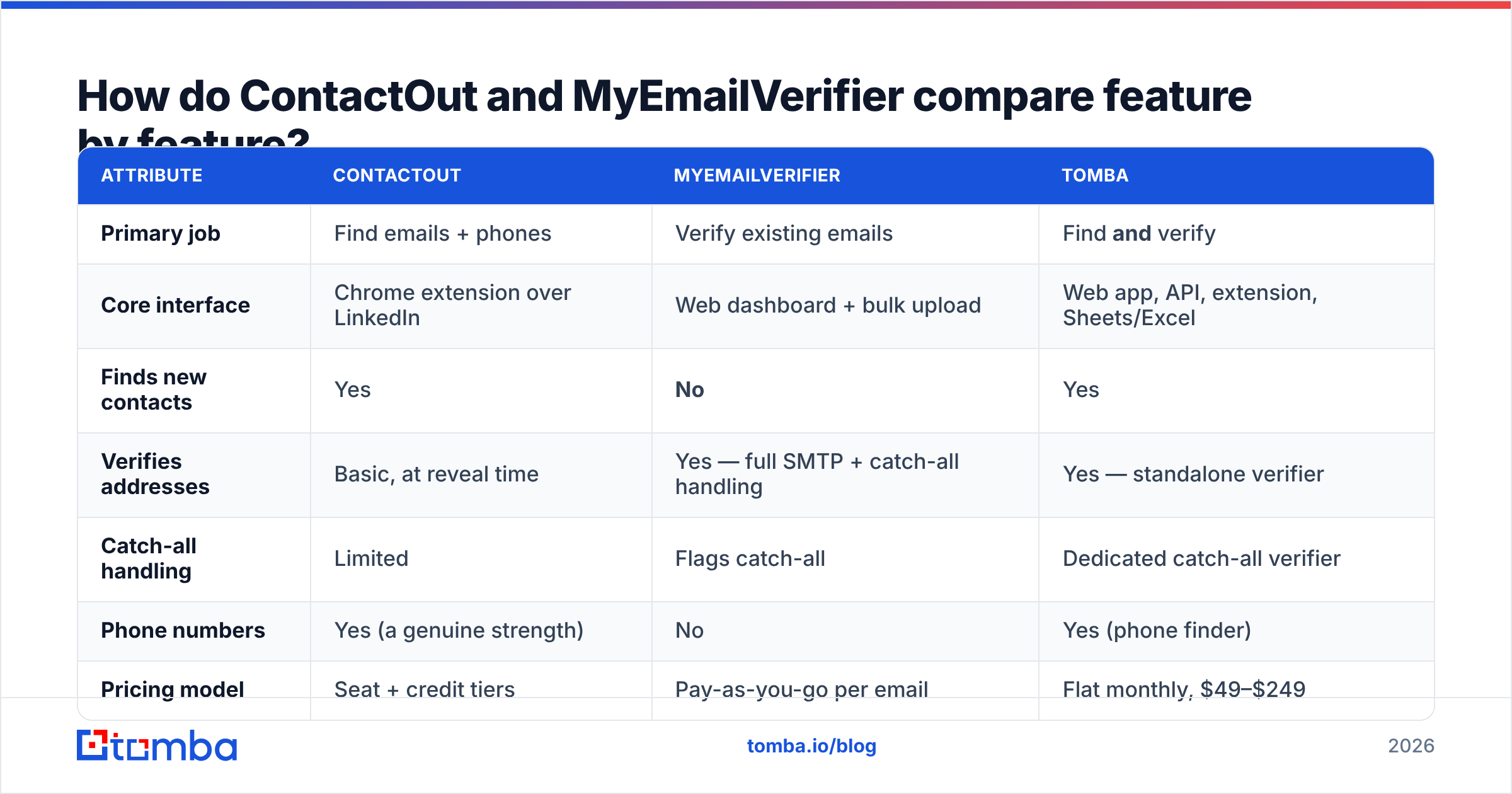
Here's the structural difference laid out. (Vendor pricing shifts — treat figures as directional and confirm on the vendor pages before you buy.)
| Attribute | ContactOut | MyEmailVerifier | Tomba |
|---|---|---|---|
| Primary job | Find emails + phones | Verify existing emails | Find and verify |
| Core interface | Chrome extension over LinkedIn | Web dashboard + bulk upload | Web app, API, extension, Sheets/Excel |
| Finds new contacts | Yes | No | Yes |
| Verifies addresses | Basic, at reveal time | Yes — full SMTP + catch-all handling | Yes — standalone verifier |
| Catch-all handling | Limited | Flags catch-all | Dedicated catch-all verifier |
| Phone numbers | Yes (a genuine strength) | No | Yes (phone finder) |
| Pricing model | Seat + credit tiers | Pay-as-you-go per email | Flat monthly, $49–$249 |
| Free tier | Limited monthly credits | Small trial credit pack | 25 searches/mo |
| API | Yes (higher tiers) | Yes | Yes, all paid plans |
| Best for | LinkedIn-native SDRs | Cleaning lists you already own | Teams who need one pipeline |
The row that matters most: ContactOut can't clean a list you got somewhere else, and MyEmailVerifier can't build one. If you run outbound at any real volume, you need both capabilities. The only open question is whether you buy them from two vendors or one.
Is ContactOut worth it in 2026?#
For a specific buyer, yes.
Where ContactOut is strong:
- LinkedIn-native workflow. If your SDRs live in Sales Navigator all day, the extension is genuinely frictionless. Profile open, sidebar populated, contact captured, no tab switching.
- Phone number coverage. ContactOut's phone data is one of the better sets in the LinkedIn-extension category. If you run a multi-channel motion — email plus dials — this is a real reason to pay.
- Personal email addresses. For recruiting especially, a personal Gmail often outperforms a work address that routes through corporate filters. ContactOut is built around recruiting workflows and it shows.
- Search + list building inside the platform. You can filter by title, company, headcount and export, not just enrich profiles one by one.
Where ContactOut costs you:
- Price per seat climbs fast. It's structured around seats and credits. A five-rep team on a mid tier is not a cheap line item, and credits expire.
- LinkedIn dependency. The tool's value is highest where LinkedIn coverage is highest. Prospecting into industries with thin LinkedIn presence — regional manufacturing, trades, parts of APAC — gets patchy.
- Verification is not its job. Revealed emails come with a confidence signal, not a full SMTP verification with catch-all resolution. Which is exactly why so many ContactOut users also buy a verifier — and why this comparison exists in the first place.
You can see the community's read on both tools on G2, and ContactOut's own feature list at contactout.com. Read the negative reviews first; they're where the credit-expiry and coverage complaints live. If you're evaluating replacements, our ContactOut alternative breakdown goes deeper on the swap math.
Is MyEmailVerifier accurate enough to protect your domain?#
Mostly, yes — and that's the whole product, so it had better be.
MyEmailVerifier does the standard stack properly: syntax validation, domain and MX checks, SMTP handshake, disposable-address detection, role-account flags (info@, sales@, support@), and a catch-all classification. Its pay-as-you-go pricing is genuinely attractive when you verify sporadically — you're not carrying a subscription for a list you clean once a quarter.
Two things to understand before you rely on it:
Catch-all domains are the hard part. Roughly 20–30% of B2B domains accept every address at the SMTP layer and sort it out internally. No verifier — MyEmailVerifier, ZeroBounce, Tomba, anyone — can give you a clean Valid/Invalid on those with a simple handshake. Vendors differ in how honestly they report this. Some label catch-alls "risky" and hand you the decision. Some quietly bucket them as valid to make their accuracy stat look better. Check how your candidate reports catch-alls, because on a typical B2B list that's a quarter of your data.
Verification is a point-in-time snapshot. A list verified in January is meaningfully decayed by July — B2B email data rots at roughly 2–3% per month as people change jobs. Buying a verifier doesn't solve data freshness. It measures it.

The practical takeaway: verification is table stakes, not a differentiator. Every serious vendor in this category runs the same protocol checks. What differs is where verification sits in your pipeline — bolted on at the end, or built into the moment of discovery.
What does the two-vendor stack actually cost you?#
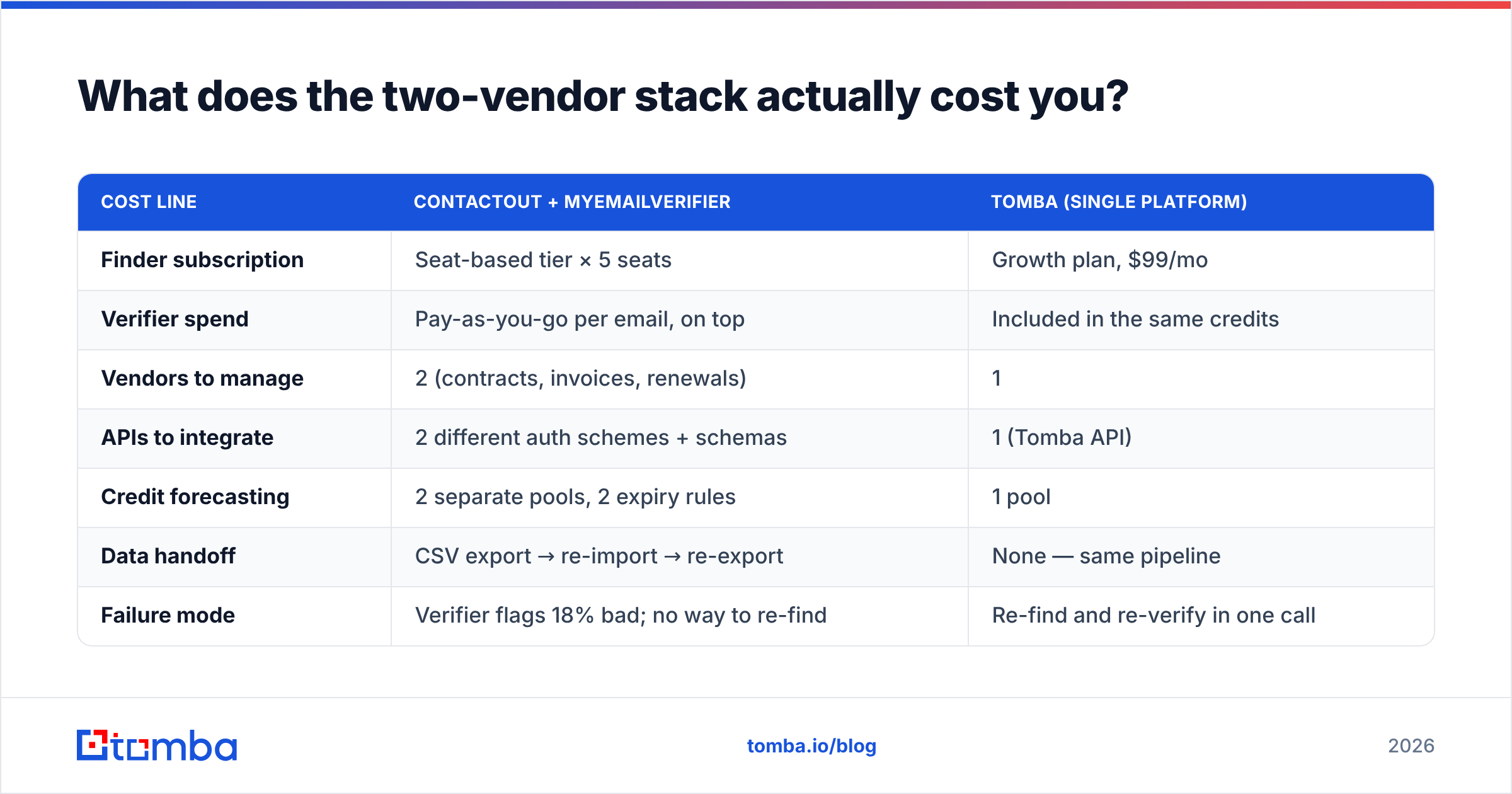
Let's run the honest math for a five-person outbound team doing 3,000 new contacts a month.
| Cost line | ContactOut + MyEmailVerifier | Tomba (single platform) |
|---|---|---|
| Finder subscription | Seat-based tier × 5 seats | Growth plan, $99/mo |
| Verifier spend | Pay-as-you-go per email, on top | Included in the same credits |
| Vendors to manage | 2 (contracts, invoices, renewals) | 1 |
| APIs to integrate | 2 different auth schemes + schemas | 1 (Tomba API) |
| Credit forecasting | 2 separate pools, 2 expiry rules | 1 pool |
| Data handoff | CSV export → re-import → re-export | None — same pipeline |
| Failure mode | Verifier flags 18% bad; no way to re-find | Re-find and re-verify in one call |
That last row is the one nobody prices in. When your verifier tells you 18% of a list is invalid, you now have 540 contacts you found, paid for, and cannot email. In a two-vendor stack, recovering them means going back to the finder, burning more credits, and running the whole loop again. In a single-platform stack, the finder already knows the address failed verification and can return the next-best pattern candidate in the same request.

There's also the boring operational tax: two procurement cycles, two security reviews, two renewal dates, two support queues. For a large enterprise with a dedicated RevOps function, that's absorbable. For a 12-person GTM team, it's a real drag on the one person who understands the stack.
Worth noting: the two-vendor approach isn't wrong. Specialist tools like MyEmailVerifier exist because some teams genuinely want a best-in-class verifier decoupled from wherever their data came from — an agency verifying client-supplied lists, for instance, has no finder in the loop at all. Providers like BookYourData serve a similar decoupled need on the data side, and pairing a purchased list with an independent verifier is a perfectly rational architecture. The question is whether your motion looks like that. Most outbound teams' doesn't.
Which one should you buy — and when should you buy neither?#
Pick by your actual bottleneck, not by the tool you saw in a LinkedIn ad.
Buy ContactOut if:
- Your reps prospect exclusively inside LinkedIn and Sales Navigator.
- Phone numbers are as important to you as emails.
- You're in recruiting, where personal emails outperform work addresses.
- Seat-based pricing is fine because you have few, high-output reps.
Buy MyEmailVerifier if:
- You already have lists and no discovery problem.
- You verify in bursts — quarterly list cleans, pre-campaign scrubs — and want pay-as-you-go rather than a subscription.
- You need a verifier decoupled from your data source (agency model, purchased lists).
Buy neither — buy a unified platform — if:
- You need discovery and verification, which describes most outbound teams.
- Your sources are mixed: LinkedIn, plus conference lists, plus website scrapes, plus a CRM full of stale records.
- You want one API in your enrichment job instead of a two-step ETL between vendors.
- You'd rather forecast one credit pool than two.

How do you build the pipeline properly?#
Whatever you buy, the sequence is the same. Get this order wrong and you'll pay for it in sender reputation.
- Define the account list first. Not the contact list. Firmographics, then people. Building contacts before accounts is how you end up verifying 5,000 addresses you had no reason to email.
- Discover the pattern, not just the person. Once you know a company uses
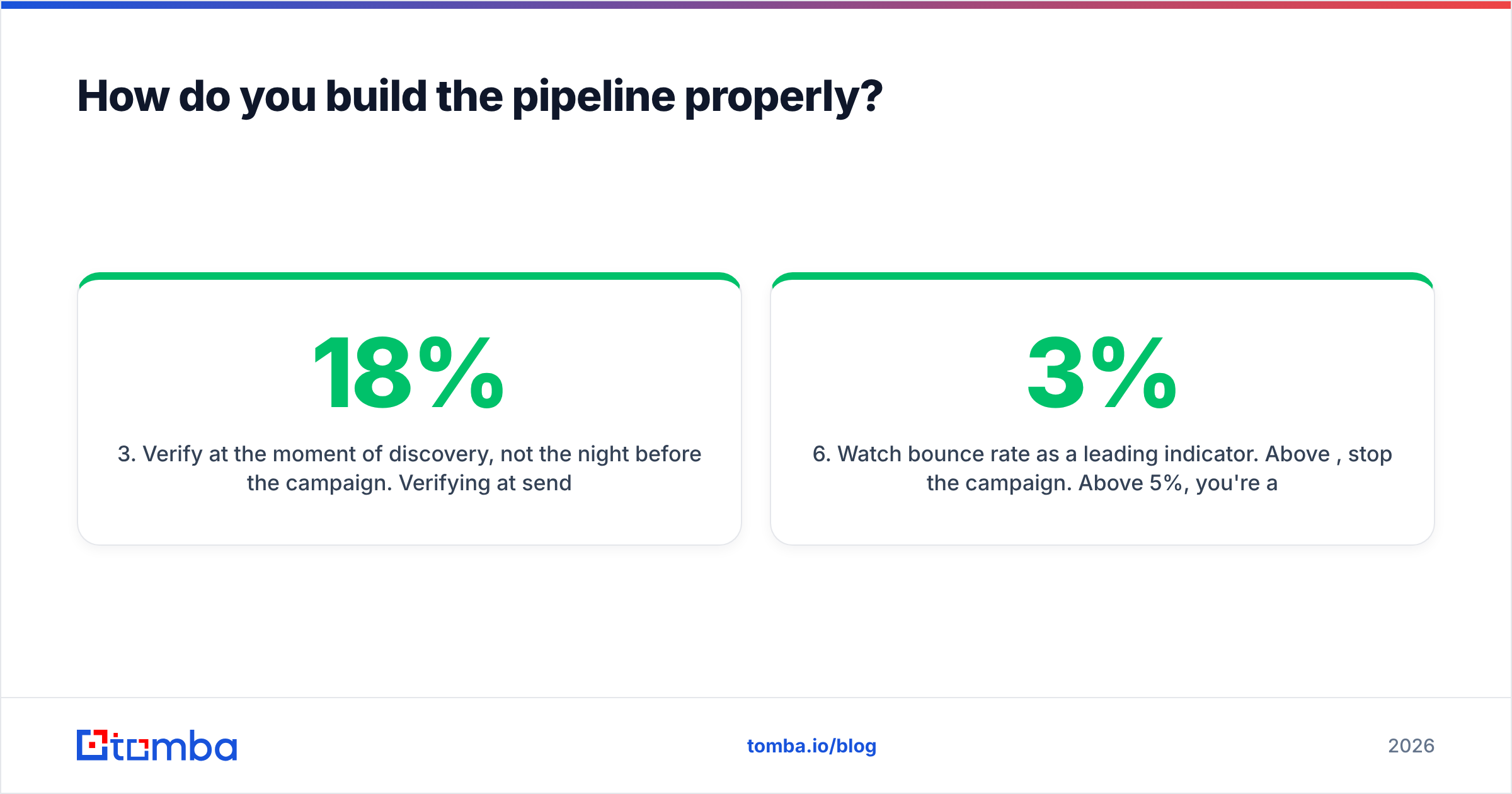
first.last@, you can construct and verify the rest of the org without paying per-profile lookup fees. Domain search does exactly this — hand it a domain, get the pattern and the known addresses. - Verify at the moment of discovery, not the night before the campaign. Verifying at send time means you find out about your 18% bounce risk when you have no time to fix it. Verify on ingest, and the bad rows never enter the sequence.
- Treat catch-alls as a separate bucket. Don't mix them into your main send. Route them through a dedicated catch-all check or send them at low volume from a secondary domain.
- Re-verify anything older than 90 days. Data decay is a physical constant of B2B. A list is a perishable good.
- Watch bounce rate as a leading indicator. Above 3%, stop the campaign. Above 5%, you're actively burning your domain and no amount of warmup will out-run it.
That pipeline is easier to run when discovery and verification share a system. When they don't — when step 2 lives in ContactOut and step 3 lives in MyEmailVerifier — every loop between them is a CSV export, a column mapping, and a chance to send to the wrong file.
What's the verdict on ContactOut vs MyEmailVerifier?#
They're not rivals, and framing them as one is the mistake. ContactOut is a strong LinkedIn-native finder with real phone data. MyEmailVerifier is a competent, fairly-priced verifier. Buying both gets you a working pipeline — and two invoices, two APIs, two credit pools, and a CSV handoff in the middle of your most important workflow.
If you're a recruiter who lives on LinkedIn, ContactOut earns its price. If you're an agency cleaning client lists with no discovery step, MyEmailVerifier earns its price. If you're a B2B team that needs to find contacts and trust them — which is most teams reading this — you're buying two tools to do one job.
Consolidate the pipeline. The Tomba Email Finder finds work emails by name, domain, or company, verifies them in the same request, and hands them off through one API to your CRM or sequencer. Same credits, one bill, no export-reimport loop. Start on the free tier at 25 searches a month, or move to Starter at $49/mo — full Tomba pricing is public, with no seat minimums and no credits that vanish at month-end. Run one campaign through it and compare the bounce rate against your current two-vendor stack. That number will make the decision for you.
Related guides#
Ready to find emails that actually work?
Join 150,000+ professionals who stopped guessing and started sending. Free credits on signup — no credit card required.
Get the Tomba newsletter
Practical outbound tactics and product updates — once every two weeks.
About the author