ContactOut vs Nymeria (2026): Which Email Finder Wins?
ContactOut is a LinkedIn-first contact revealer. Nymeria is a people-data engine with a public API. We compare accuracy, coverage, pricing, and export limits — and name the workflow each one actually wins.
ContactOut vs Nymeria is an easy call once you know how you work. ContactOut lives inside LinkedIn. Nymeria lives inside your code. This guide scores both on accuracy, price, and coverage, then names the winner for each job.
TL;DR
- ContactOut is a LinkedIn-first contact revealer. Open a profile, click once, get a work email and a personal email. The catch: the work starts and ends inside LinkedIn.
- Nymeria is a people-data platform with a real API. It shines when you already have a list of names, domains, or LinkedIn URLs and want it filled in by script.
- In ContactOut vs Nymeria, accuracy is close on big-company domains and splits apart everywhere else. Small firms, non-US firms, and catch-all domains are where the two tools part ways.
- Neither tool is a full verification stack. Both hand you emails. Neither replaces a real SMTP-level check before you send.
- Pick by workflow, not by brand. Recruiters lean ContactOut. RevOps teams lean Nymeria. Teams that want domain search plus verification in one API often pick a third option.
ContactOut vs Nymeria: what each tool actually does#
Both sell "find anyone's email." That is where the likeness stops.
ContactOut grew up as a Chrome extension. Open a LinkedIn profile and the sidebar shows a work email, a personal email, and often a phone number. Recruiters found it first. The product still shows that heritage: ATS links, candidate search, and strong personal-email coverage. Its headline hit rate is a marketing number. Treat it as one until you test it on your own list.
Nymeria starts from the data side. It keeps a people database and opens it through a web app, an extension, and a REST API with bulk endpoints. Developers and RevOps teams like that. You can wire it into a pipeline instead of clicking profiles one by one.
So the honest frame for ContactOut vs Nymeria is simple. One is a manual reveal anchored to LinkedIn. The other is a scripted fill anchored to a list. Picking the wrong shape costs you far more than a few points of accuracy.

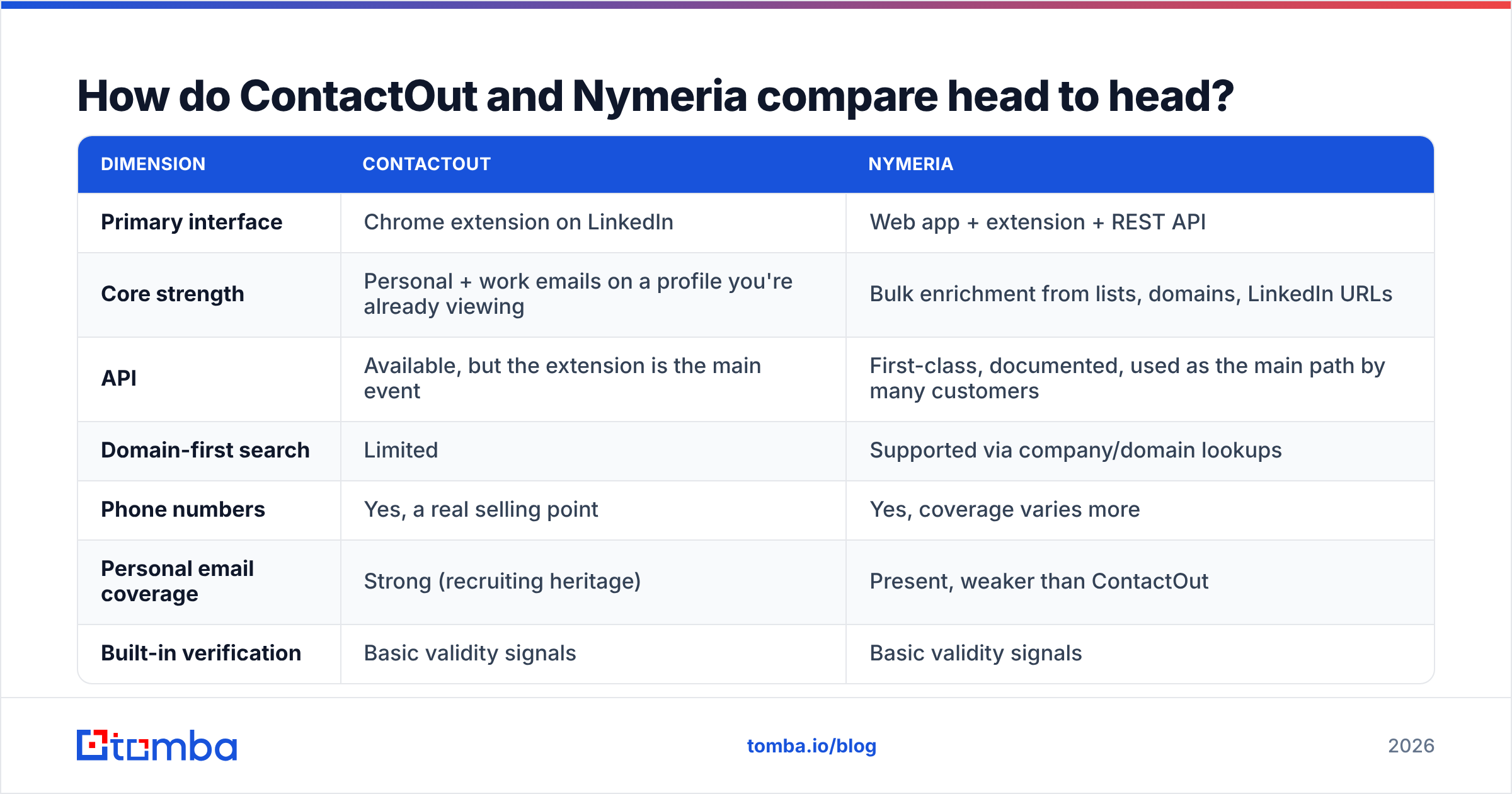
ContactOut vs Nymeria: head-to-head comparison#
| Dimension | ContactOut | Nymeria |
|---|---|---|
| Primary interface | Chrome extension on LinkedIn | Web app + extension + REST API |
| Core strength | Personal + work emails on a profile you're already viewing | Bulk enrichment from lists, domains, LinkedIn URLs |
| API | Available, but the extension is the main event | First-class, documented, used as the main path by many customers |
| Domain-first search | Limited | Supported via company/domain lookups |
| Phone numbers | Yes, a real selling point | Yes, coverage varies more |
| Personal email coverage | Strong (recruiting heritage) | Present, weaker than ContactOut |
| Built-in verification | Basic validity signals | Basic validity signals |
| Free tier | Small monthly credit allowance | Small monthly credit allowance |
| Typical entry paid plan | Roughly $29–$49/mo for individual use | Roughly $39–$49/mo for individual use |
| Best for | Recruiters, agency sourcers, founder-led hiring | RevOps, growth engineers, data teams |
Prices move often on both sides. Both vendors also lock the big volume behind yearly deals. So treat those rows as a start, and check each vendor's page before you buy. The shape of each tool does not move. One wants you in a browser tab. The other wants you in a script.
Which one is more accurate?#
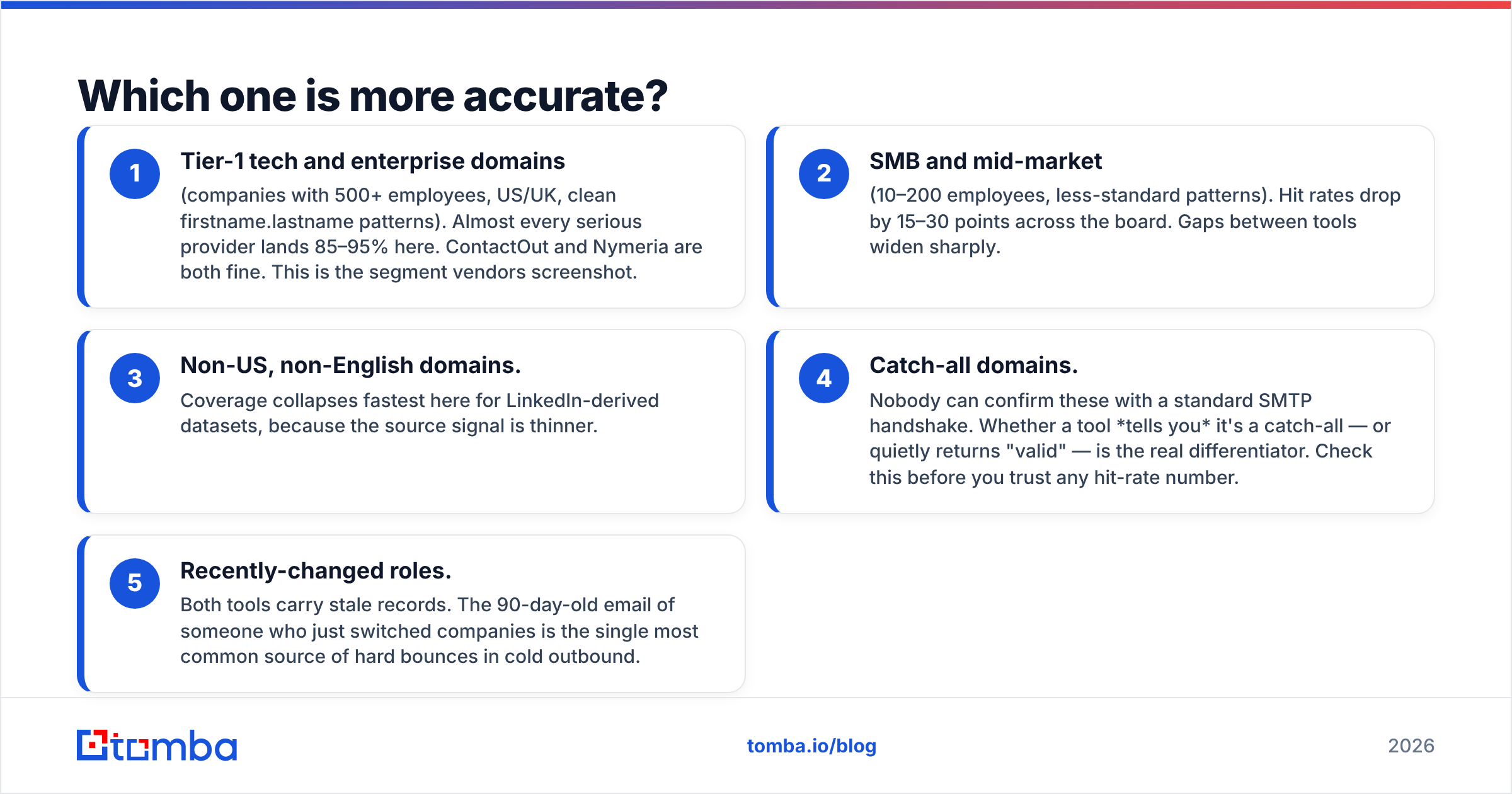
Here is the answer no vendor likes to give. It depends on the segment you sell into. Both tools look great on the segment they were built for.
Run the same 500 contacts through both tools on the same day. Then bounce-test the results in a real inbox. A clear pattern shows up:
- Big tech and enterprise domains. Think 500+ staff, US or UK, clean firstname.lastname patterns. Most serious tools land 85–95% here. In ContactOut vs Nymeria, this tier is a tie. It is also the tier vendors screenshot.
- Small and mid-market firms. Think 10–200 staff and odd email patterns. Hit rates drop 15–30 points across the board. The gap between tools grows fast.
- Non-US, non-English domains. Coverage falls off a cliff for LinkedIn-based data, because the source signal is thin.
- Catch-all domains. Nobody can confirm these with a normal SMTP check. The real test is whether a tool tells you it is a catch-all, or just says "valid." Check this before you trust any hit rate.
- People who just changed jobs. Both tools carry stale rows. A 90-day-old email for a job switcher is the top cause of hard bounces in cold email.

So don't buy on a published accuracy number. Take 100 real contacts from your own list. Run them through both free tiers. Then measure two things. First, coverage: how many came back with an email at all. Second, bounce rate: how many survived a real check. Those two numbers beat any vendor benchmark.
Test with a proper email verifier in the loop. Do not lean on the tool's own score. A vendor grading its own homework is not a control group.
What does each tool cost in practice?#
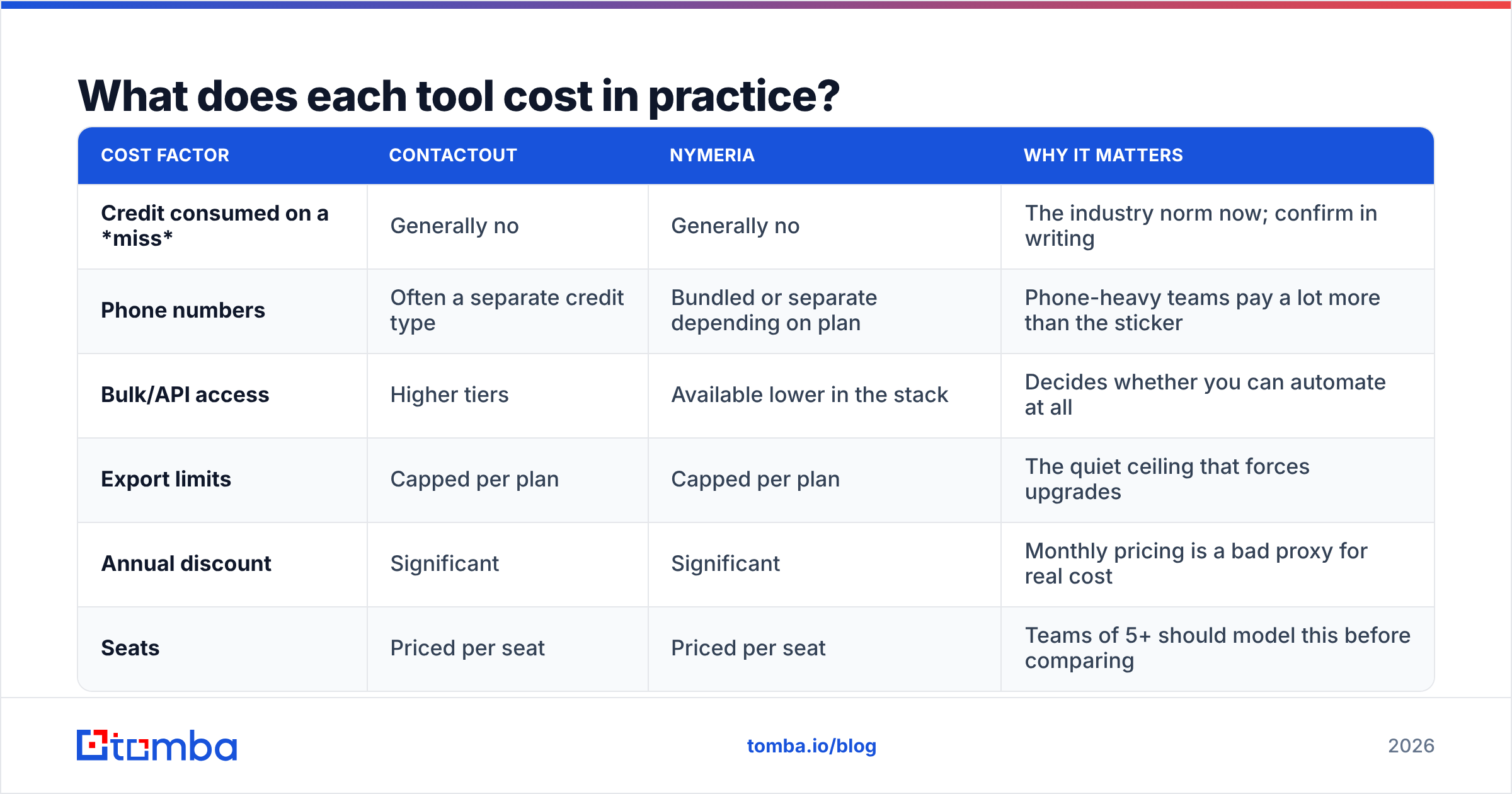
Credits are where price shopping falls apart. A "credit" is not a standard unit. One tool burns a credit on a failed lookup. Another does not. One charges extra for a phone number. Another bundles it.
| Cost factor | ContactOut | Nymeria | Why it matters |
|---|---|---|---|
| Credit consumed on a miss | Generally no | Generally no | The industry norm now; confirm in writing |
| Phone numbers | Often a separate credit type | Bundled or separate depending on plan | Phone-heavy teams pay a lot more than the sticker |
| Bulk/API access | Higher tiers | Available lower in the stack | Decides whether you can automate at all |
| Export limits | Capped per plan | Capped per plan | The quiet ceiling that forces upgrades |
| Annual discount | Significant | Significant | Monthly pricing is a bad proxy for real cost |
| Seats | Priced per seat | Priced per seat | Teams of 5+ should model this before comparing |
One number settles ContactOut vs Nymeria on price: cost per verified email that does not bounce. Cost per credit is noise. A $39 plan with a 60% usable-hit rate costs more than a $49 plan with an 85% rate. It is not close. Do the math this way and credit-pack marketing stops working on you.
For a reference point, Tomba pricing is a free tier at 25 searches a month, Starter at $49, Growth at $99, and Pro at $249. The API, verification, and bulk tools come with the plan. They are not locked behind an enterprise tier. Ask for that same structure wherever you buy. Search, verify, and export should not be three separate upsells.
Is ContactOut better than Nymeria for recruiting?#
Mostly yes. This is the clearest verdict in the whole comparison.
Recruiting needs one thing most sales tools ignore: personal email addresses. Candidates do not read work inboxes for job offers. Many of them cannot safely reply from one either. ContactOut built its data around that need. The extension puts a personal email one click from the profile you were already reading.
Nymeria returns personal emails too. But coverage is thinner, and the flow assumes you are building a list. If your day is "scroll LinkedIn, spot someone good, reach out," the extension wins on pure friction.
Flip the job and the verdict flips too. If your day is "here are 4,000 CRM rows, fill in the emails by Friday," ContactOut fights you. Nymeria's API does not.
Is Nymeria better than ContactOut for RevOps and API workflows?#
Yes, with one caveat.
The API is why Nymeria is in this comparison at all. You can enrich by LinkedIn URL, by name and company, or by domain. Then you drop the results into a pipeline: CRM writeback, lead scoring, dedupe, whatever your stack does. That is a different product from a sidebar.
Now the caveat. An enrichment API is only half of a data pipeline. The other half is validation. Enriched rows that go straight into a sequence will burn your sending domain. An automated path needs five steps:
- Enrichment. Turn a partial row into an email address.
- Syntax and MX checks. Kill the obvious garbage early. It costs nothing.
- SMTP-level verification. Confirm the mailbox really accepts mail.
- Catch-all handling. This is its own call. A catch-all verifier is the only honest way to grade domains that accept everything.
- Suppression and dedupe. Never send twice to a row that already bounced.
Neither tool gives you all five. Both give you step one and wave at step two. Budget for the rest.

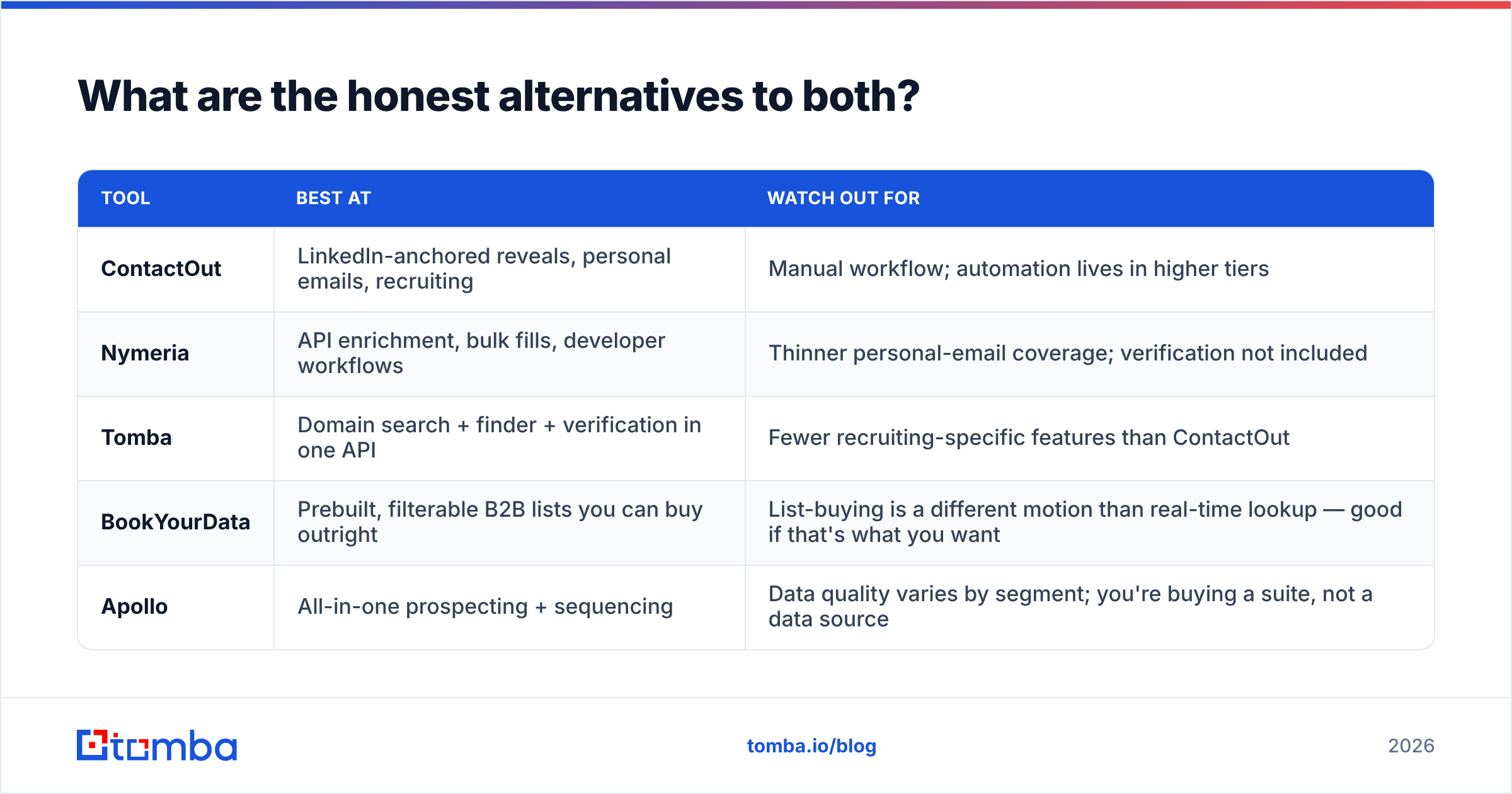
What are the honest alternatives to both?#
Most people are not really asking ContactOut vs Nymeria. They are asking what they should use at all.
| Tool | Best at | Watch out for |
|---|---|---|
| ContactOut | LinkedIn-anchored reveals, personal emails, recruiting | Manual workflow; automation lives in higher tiers |
| Nymeria | API enrichment, bulk fills, developer workflows | Thinner personal-email coverage; verification not included |
| Tomba | Domain search + finder + verification in one API | Fewer recruiting-specific features than ContactOut |
| BookYourData | Prebuilt, filterable B2B lists you can buy outright | List-buying is a different motion than real-time lookup |
| Apollo | All-in-one prospecting + sequencing | Data quality varies by segment; you buy a suite, not a data source |
BookYourData earns a fair mention. Say your problem is "I need 5,000 verified contacts in one niche, and I don't want to build a pipeline." A curated list vendor solves that faster than either tool here. It is a different answer to a different question.
Is your real bottleneck company-first prospecting? You know the accounts and you need the people. Then a domain search beats profile-by-profile reveals by a mile on throughput. And if you are building anything automated, use an email finder API that returns a confidence score and a verification status in the same response. That saves you from stitching two vendors together.

How should you actually run the bake-off?#
Do this before you spend a dollar. It takes one afternoon.
- Build a 100-row list from your real ICP. Mix the segments on purpose: half enterprise, half small business. Add at least 20 non-US domains.
- Run it through every free tier. ContactOut, Nymeria, and one alternative. Record coverage per tool.
- Verify every returned email on its own. Do not use the tool that found it. Flag catch-alls apart. They are neither pass nor fail.
- Send a small warm test from a throwaway subdomain. Record the real bounces. This is the only number nobody can spin.
- Work out cost per usable email. Total spend divided by the emails that survived step 4. Rank the tools on that alone.
- Check the export path. Can you pull your data into a CSV, your CRM, and your sequencer without a paid connector? If not, add that cost.
Teams that run this test rarely pick the tool they walked in expecting. That is the point. Reviews on G2 help you spot billing and support gripes. They will not tell you which tool covers your segment. Only your own test does that.
ContactOut vs Nymeria: the verdict#
ContactOut vs Nymeria comes down to one question. Are you clicking, or are you scripting?
Are you a recruiter who lives in LinkedIn and needs personal emails and phone numbers on demand? Then ContactOut fits better, and it is not close. Are you a RevOps or growth engineer who enriches lists, writes back to a CRM, and thinks in endpoints? Then Nymeria's API-first design will still make sense in six months.
Most B2B teams do both. And neither tool covers domain search, verification, and enrichment under one roof. That gap is why teams end up consolidating. Two contact-data vendors plus a separate verifier is a tax you pay every month in credits, integrations, and cleanup work.
Start with the Tomba Email Finder. Search by domain, name, or company. Get a confidence score and a verification status in the same call. Test it on 25 real contacts free before you commit a dollar. Run it beside whichever tool you are leaning toward. Score both on cost per non-bouncing email, and let the data pick. That is the only comparison that has ever mattered.
Related guides#
Ready to find emails that actually work?
Join 150,000+ professionals who stopped guessing and started sending. Free credits on signup — no credit card required.
Get the Tomba newsletter
Practical outbound tactics and product updates — once every two weeks.
About the author