ContactOut vs Postaga (2026): Which Tool Should You Pick?
ContactOut finds the contact. Postaga sends the campaign. They overlap just enough to confuse buyers — here's the honest breakdown of accuracy, pricing, workflows, and which one actually belongs in your stack.
TL;DR — ContactOut vs Postaga in 30 seconds#
- They are not really the same product. ContactOut is a contact-data tool (emails and phone numbers, mostly sourced off LinkedIn profiles). Postaga is an outreach and link-building platform that happens to include a lightweight contact finder.
- Pick ContactOut if your bottleneck is finding the person — recruiting, LinkedIn-heavy prospecting, or enriching a list of profiles one at a time.
- Pick Postaga if your bottleneck is running the campaign — especially content promotion, guest posting, podcast pitches, and link outreach where the prospect list comes from Google, not LinkedIn.
- Neither is a great single-vendor stack. ContactOut can't send sequences well; Postaga's data layer is thin compared to a dedicated finder.
- The cheapest correct answer for most teams is a dedicated data layer (a real email finder plus verification) feeding whatever sender you already pay for.
What is ContactOut, exactly?#
ContactOut is a contact-data company. Its best-known surface is a Chrome extension that sits on top of LinkedIn: you open a profile, the sidebar pops out, and it shows personal emails, work emails, and sometimes a mobile number. Around that extension sit a search portal, a bulk enrichment flow, a CRM-ish "lists" feature, and an API.
Its origin story matters for how you should evaluate it. ContactOut grew up serving recruiters, which is why it leans harder on personal emails and mobile numbers than most B2B sales tools do. Recruiters need to reach someone at their Gmail, not at the company address they'll abandon in six weeks. That focus is a genuine differentiator — and also the reason its work-email coverage on non-LinkedIn-active prospects can feel thinner than a domain-first tool.
What ContactOut does not do well: multi-step campaigns. There's basic email sending and templating, but nobody buys ContactOut because they wanted a sequencer.
What is Postaga, exactly?#
Postaga is an outreach platform built around a different core assumption: you don't have a prospect list yet, and the list should be generated from content, not from a LinkedIn filter.
You give it a campaign type — link building, guest post pitch, podcast outreach, skyscraper, product review — and its "Opportunity Finder" crawls the web for relevant sites, pulls contact details from those sites, and drafts personalized emails using an AI assistant that references the specific article or page it found. Then it sends, follows up, and tracks replies from a built-in CRM.
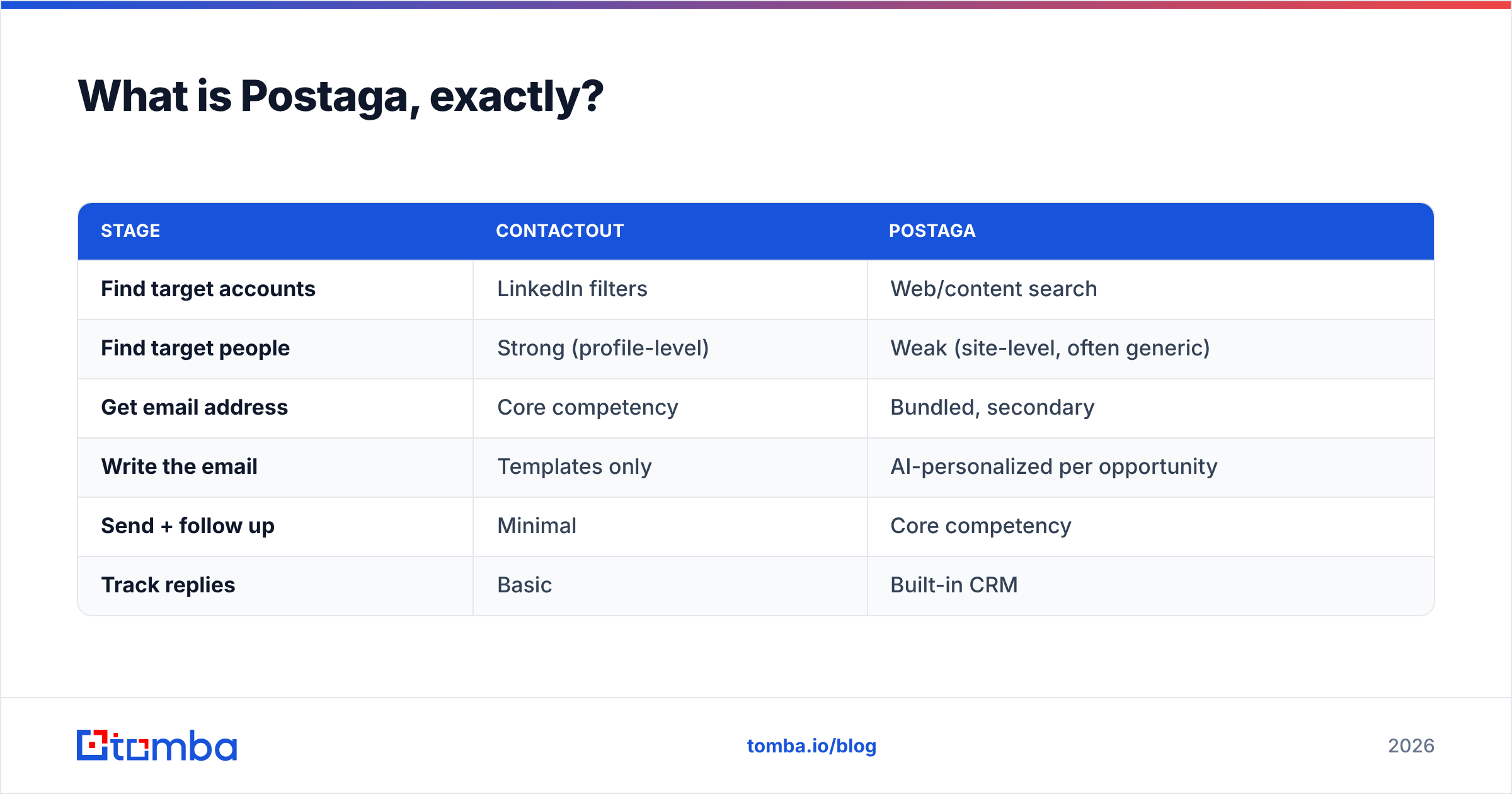
So the two tools sit on opposite ends of the same pipeline:
| Stage | ContactOut | Postaga |
|---|---|---|
| Find target accounts | LinkedIn filters | Web/content search |
| Find target people | Strong (profile-level) | Weak (site-level, often generic) |
| Get email address | Core competency | Bundled, secondary |
| Write the email | Templates only | AI-personalized per opportunity |
| Send + follow up | Minimal | Core competency |
| Track replies | Basic | Built-in CRM |
If you read that table and thought "so I need both," you're not wrong — and that's exactly the trap that makes this comparison expensive.

How do ContactOut and Postaga compare head-to-head?#
Here's the full feature comparison. Prices move — treat these as directional and confirm on each vendor's own pricing page before you buy.
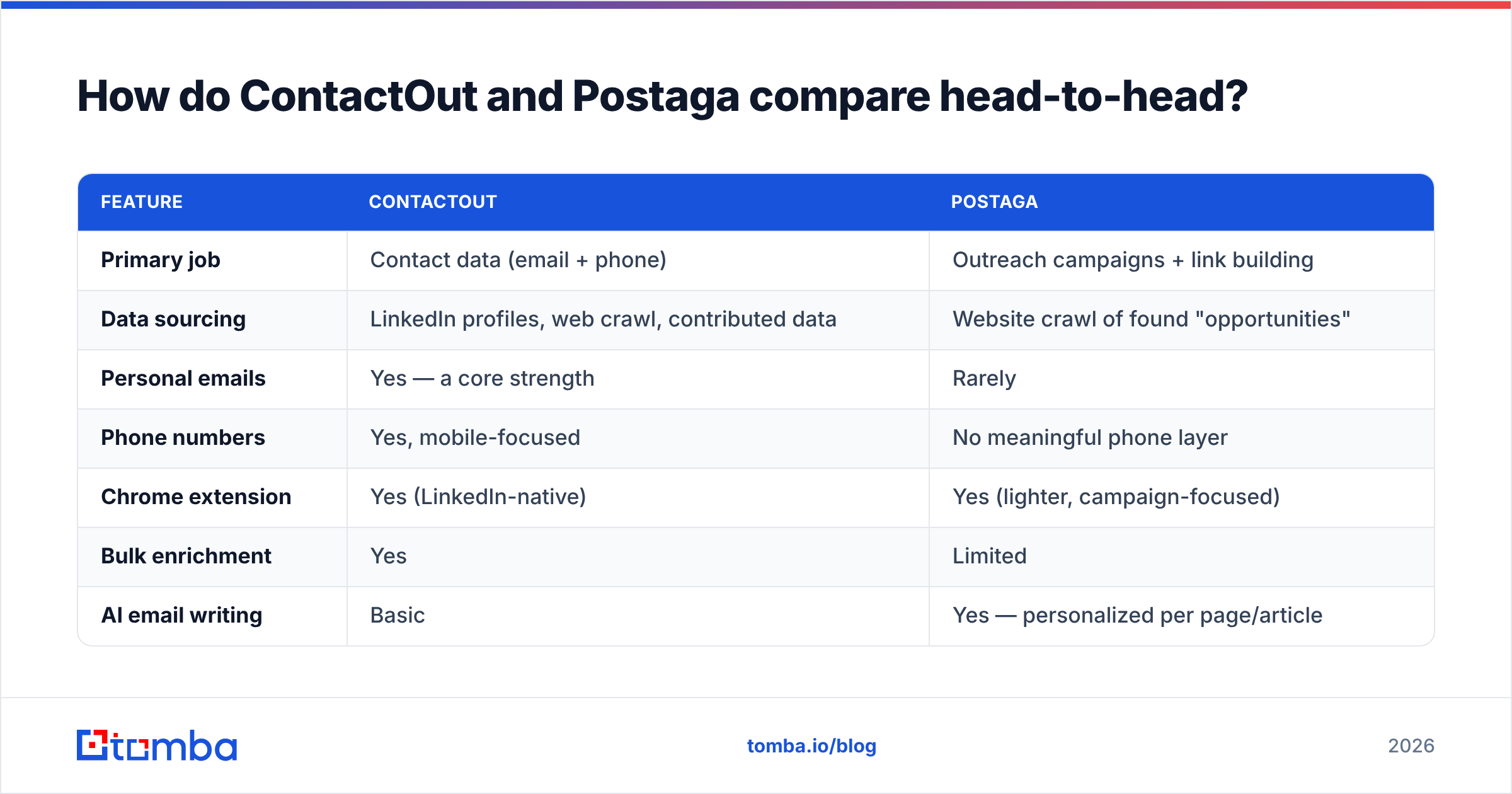
| Feature | ContactOut | Postaga |
|---|---|---|
| Primary job | Contact data (email + phone) | Outreach campaigns + link building |
| Data sourcing | LinkedIn profiles, web crawl, contributed data | Website crawl of found "opportunities" |
| Personal emails | Yes — a core strength | Rarely |
| Phone numbers | Yes, mobile-focused | No meaningful phone layer |
| Chrome extension | Yes (LinkedIn-native) | Yes (lighter, campaign-focused) |
| Bulk enrichment | Yes | Limited |
| AI email writing | Basic | Yes — personalized per page/article |
| Sequences + follow-ups | Minimal | Yes, multi-step |
| Built-in CRM | Lists only | Yes |
| Email verification | Included, claimed high accuracy | Basic |
| API access | Yes (higher tiers) | Limited |
| Best-fit user | Recruiters, LinkedIn-first SDRs | SEOs, agencies, content marketers |
| Typical entry price | Free tier, then roughly $30–$50/mo | Roughly $80–$100/mo for the working tier |
| Seat-based pricing | Yes, sales/recruiter seats add up fast | Yes, plus campaign/credit limits |
The honest read: these tools rarely lose deals to each other. A recruiter evaluating ContactOut is not also demoing Postaga. If you're comparing them, you're probably a founder or a small agency owner trying to cover the whole outbound motion with one subscription — and that's the decision this post is really about.
Which one has better contact data?#
ContactOut, and it isn't close — for people.
The distinction that matters is person-level vs. site-level data. ContactOut resolves a specific human: "Priya Raman, VP Engineering, works at Acme, here is her work email, here is her Gmail, here is her mobile." Postaga typically resolves a page: "this article about SaaS onboarding was published on acme.com, and here is a contact form or an editor@ address."
For link building, site-level is often fine — you want anyone who can approve a backlink. For sales, site-level is close to worthless. info@ and editor@ addresses are role accounts: low reply rates, high spam-complaint risk, and they poison your sender reputation faster than almost anything else you can do.
Three things to test in any trial, regardless of vendor:
- Hit rate on your actual ICP — not the vendor's demo list. Pull 100 real prospects, run them through, and count how many resolve to a named work email.
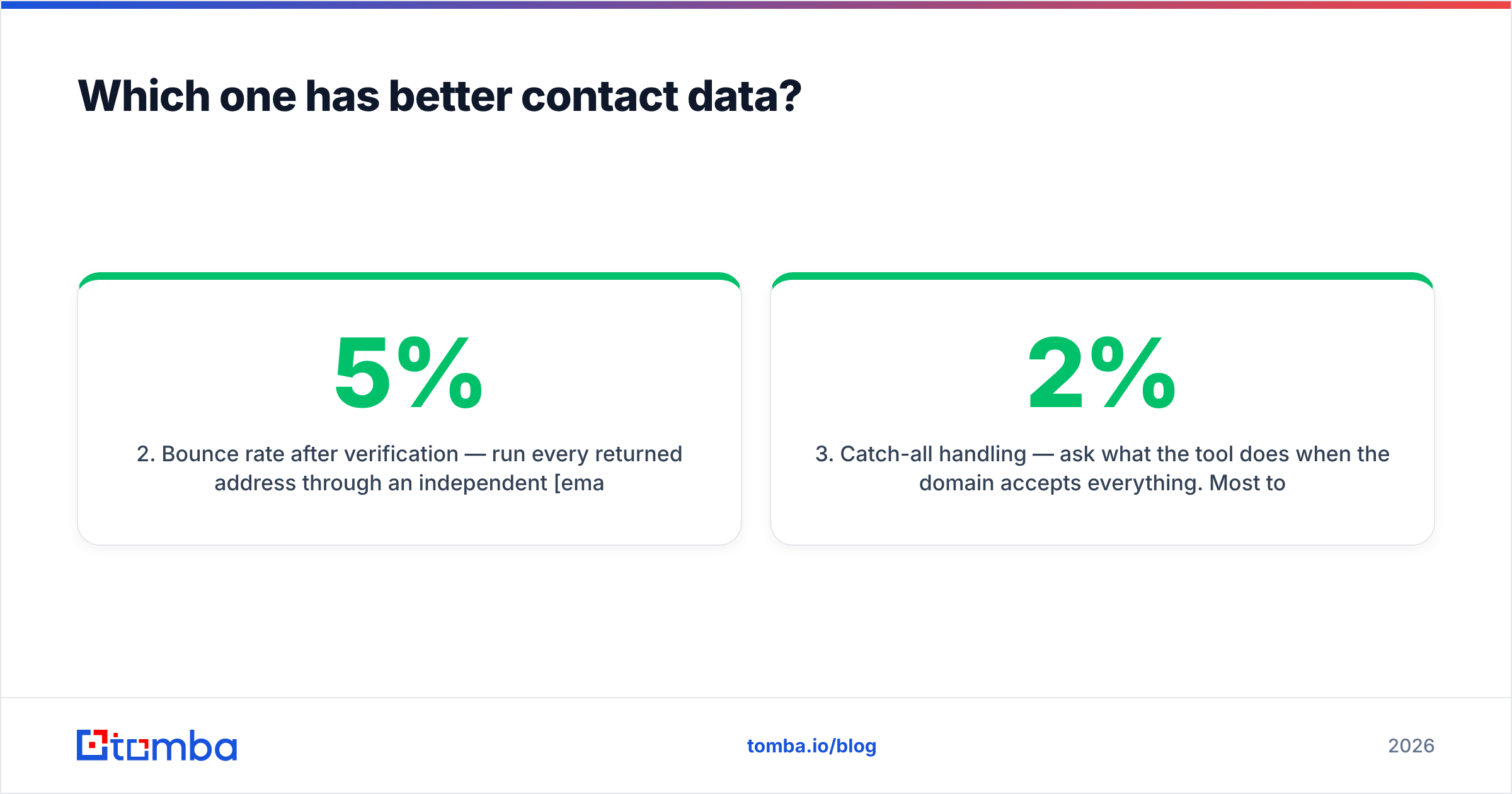
- Bounce rate after verification — run every returned address through an independent email verifier. If a "verified" address from either tool bounces above 3–5%, that number is marketing, not measurement.
- Catch-all handling — ask what the tool does when the domain accepts everything. Most tools quietly mark catch-alls as "valid." A catch-all verifier that actually scores deliverability risk is the difference between a 2% bounce rate and a 12% one.
That third point is where most head-to-head accuracy claims fall apart. Vendors report accuracy on the emails they're confident about and quietly exclude the ambiguous ones. Your inbox provider doesn't grade on that curve.
Which one is better for actually running campaigns?#
Postaga, by a wide margin — but only for the campaigns it was designed for.
Postaga's real innovation is that campaign type drives the whole workflow. Choose "guest post outreach," and it finds sites accepting guest posts, identifies who to pitch, and drafts an email that references a real article on their site. That's meaningfully better than a mail-merge {{first_name}} token, and it's why SEO agencies like it.
Where Postaga struggles:
- Sales sequences. If you want branching logic, LinkedIn steps, call tasks, and A/B tests across thousands of prospects, you want a purpose-built sequencer — an Instantly alternative, Reply.io, Smartlead, or similar — not Postaga.
- Deliverability infrastructure. Postaga sends through your mailbox but doesn't replace the domain warmup, SPF/DKIM/DMARC hygiene, and inbox rotation that modern cold email demands. Check your SPF record before you blame any tool for low reply rates.
- List scale. The Opportunity Finder is a discovery engine, not a database. If you need 5,000 CFOs at 200–1,000 employee SaaS companies, it's the wrong instrument entirely.
ContactOut's sending features exist, but treat them as a convenience layer for one-off recruiter emails — not a campaign engine.
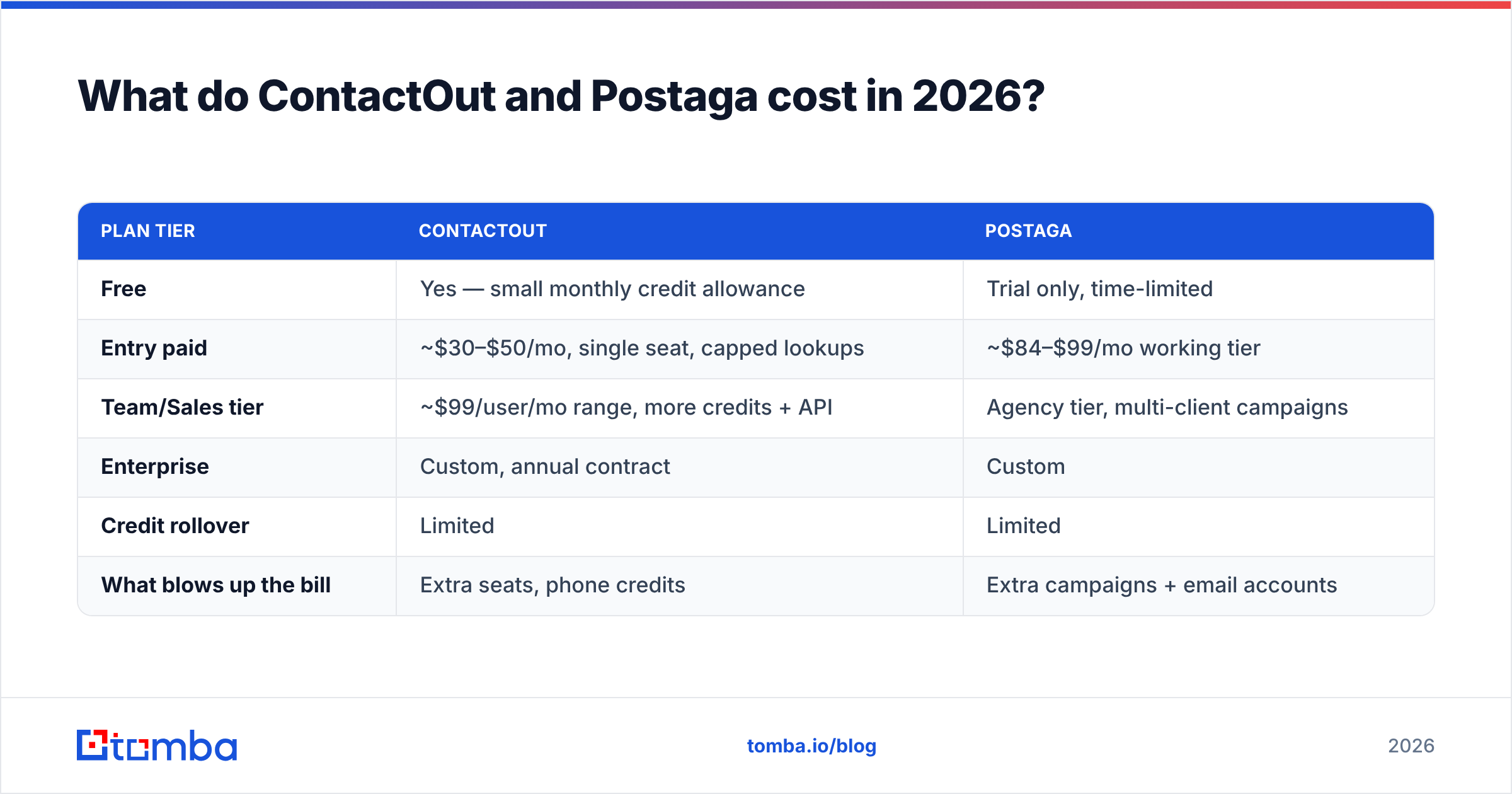
What do ContactOut and Postaga cost in 2026?#
Both use the same pricing psychology: a usable free tier, then a step change once you need volume or seats.
| Plan tier | ContactOut | Postaga |
|---|---|---|
| Free | Yes — small monthly credit allowance | Trial only, time-limited |
| Entry paid | ~$30–$50/mo, single seat, capped lookups | ~$84–$99/mo working tier |
| Team/Sales tier | ~$99/user/mo range, more credits + API | Agency tier, multi-client campaigns |
| Enterprise | Custom, annual contract | Custom |
| Credit rollover | Limited | Limited |
| What blows up the bill | Extra seats, phone credits | Extra campaigns + email accounts |
The number that matters isn't the sticker price — it's cost per verified, named, deliverable contact. A $49/mo tool with a 70% hit rate and a 2% bounce rate is dramatically cheaper than a $39/mo tool with a 45% hit rate and an 8% bounce rate, even before you count the reputation damage. Run that math on your own ICP with a 100-lead sample; it takes an afternoon and it settles most tool arguments.
For reference, mid-market pricing across the category clusters tightly: Tomba's plans start free at 25 searches/month, with Starter at $49/mo, Growth at $99/mo, and Pro at $249/mo. Most dedicated finders land in the same band. Pay attention to what a "credit" buys — a search, a verification, and an enrichment are frequently billed as three separate credits, and that detail is buried in the docs, never the pricing page.
Who should choose ContactOut?#
Choose ContactOut if three or more of these describe you:
- You live in LinkedIn. Your prospecting starts with Sales Navigator filters, not a Google search.
- You need personal emails or mobiles. Recruiting, executive search, or founder-led sales to people who ignore their work inbox.
- You already have a sender. You pay for Instantly, Smartlead, Outreach, Salesloft, or HubSpot Sequences, and you only need a data layer.
- Your volume is moderate. A few hundred lookups a month, done manually by a person, not a script.
- Phone matters. Cold calling is part of the motion, and a mobile number is worth a real premium to you.
Where it disappoints: bulk workflows, non-LinkedIn ICPs (local businesses, e-commerce stores, niche manufacturers with no exec LinkedIn presence), and any team that needs a documented, high-throughput API without an enterprise contract. If those are your constraints, a ContactOut alternative with domain-first search and a real API will fit better.
Who should choose Postaga?#
Choose Postaga if you're doing content-driven outreach at agency scale:
- Link building and digital PR. This is the use case Postaga was built for and it does it well.
- Podcast, guest post, and roundup pitching. The opportunity finder genuinely saves hours of manual Googling.
- You want AI personalization tied to a real page. Referencing an actual article beats a merge tag.
- Your prospects aren't on LinkedIn. Bloggers, site owners, and editors often are — but not in a way a LinkedIn scraper can monetize.
- You want one tool, not three. Discovery, writing, sending, and tracking in a single subscription is a real benefit for a small team.
Where it disappoints: anyone running a classic B2B sales motion into a defined account list. Postaga's data will not carry a sales team.

Is there a better way to structure the stack?#
Yes — and it's the recommendation this comparison keeps circling back to. Separate your data layer from your sending layer.
Bundled tools are convenient right up until one half of the bundle is mediocre, at which point you're paying full price for half a product and you can't swap the bad half. That's the structural problem with both of these tools: ContactOut's sender is an afterthought, and Postaga's data is an afterthought.
A layered stack looks like this:
- Data layer — a dedicated finder + verifier. Domain search to map a company's people, an email finder to resolve names to addresses, a verifier and catch-all check before anything enters a campaign, and bulk lead generation when you need volume. This is where Tomba fits: it's built as infrastructure, with a Tomba API, CLI, Sheets/Excel add-ins, and CRM integrations, rather than a UI you're forced to work inside.
- Sending layer — whatever sequencer you already trust, with proper warmup, domain rotation, and DMARC in place.
- Discovery layer — Sales Navigator for people-led ICPs, or Postaga (or plain SERP research) for content-led ICPs.
The reason to prefer this shape isn't ideological. It's that each layer fails differently, and you want to be able to replace the broken one. When bounce rates spike, you swap the verifier — not the entire outbound stack. When deliverability tanks, you fix DNS and warmup — not the data vendor. Bundles make that diagnosis harder, because every failure looks like the same failure.
One caveat, stated plainly: layering costs more in subscriptions and less in wasted sends. If you're sending 200 emails a month, the bundle wins on simplicity. Past a few thousand, the layered stack wins on every metric that matters. Independent review sites like G2 are useful for sanity-checking which vendors are actually retaining customers at your scale — read the reviews from companies your size, ignore the aggregate score.
Frequently asked questions#
Is ContactOut better than Postaga? For finding people, yes. For running content-outreach campaigns, no. They solve adjacent problems and neither is a full replacement for the other.
Can Postaga find work emails like ContactOut? It finds some — usually site-level or role-based addresses discovered during crawling. It is not a substitute for a person-level email finder, and role addresses carry real deliverability risk.
Do I need an email verifier if my tool says "verified"? Yes. Vendor-side verification is measured on the vendor's terms. Independent verification before send is the only number your inbox provider cares about, and it's cheap insurance against a burned domain.
Which is cheaper? ContactOut's entry tier is cheaper on paper. Postaga replaces more tools. Cost per deliverable named contact is the only comparison that survives contact with reality.
The bottom line#
ContactOut vs Postaga isn't a fair fight — it's a category mismatch. ContactOut wins on contact data and phone coverage. Postaga wins on content-led campaign execution. If you buy one expecting it to do the other's job, you'll be disappointed within a month.
What most teams actually need is a clean data layer they can point at whichever sender they already run. That's the piece both of these tools treat as secondary — and the piece that quietly determines your bounce rate, your sender reputation, and whether your campaign lands in the inbox at all.
Start there. Run 100 of your real prospects through the Tomba Email Finder on the free tier, verify every result, and compare the hit rate and bounce rate against whatever you're paying for today. If the numbers are better, you've found your data layer — and you can pick your sender on its own merits instead of settling for a bundled compromise.
Related guides#
Ready to find emails that actually work?
Join 150,000+ professionals who stopped guessing and started sending. Free credits on signup — no credit card required.
Get the Tomba newsletter
Practical outbound tactics and product updates — once every two weeks.
About the author