ContactOut vs Power Almanac: Which B2B Data Tool Wins in 2026?
One tool scrapes LinkedIn profiles for personal emails. The other sells hand-verified US local-government contacts by the record. They are not competitors — and picking the wrong one wastes an entire quarter of outbound.
TL;DR
- ContactOut vs Power Almanac is not a fair fight. The two tools serve different buyers.
- ContactOut is a LinkedIn-first contact finder. It is a Chrome extension plus a search app. It pulls work and personal emails from public profiles. You pay per seat.
- Power Almanac is a database of US local-government officials. Think mayors, city managers, clerks, and public-works directors. You buy a list and pay per record.
- They barely overlap. Do you sell to a "VP of Engineering at a Series B SaaS"? ContactOut is in the running. Do you sell snow plows to a town of 12,000? Only Power Almanac can help.
- Both share one gap. Neither is a domain-level email finder you can wire into a CRM. That is where Tomba fits under either one.
- Verify every list before you send. Data decays. A bounce on a
.govmailbox costs more than a bounce on a startup domain.
What are ContactOut and Power Almanac, exactly?#
They solve two different problems. From far away, the problems look the same.
ContactOut is a contact tool built on top of LinkedIn. You install the Chrome extension and open a profile. It reveals what it has: work email, personal email, sometimes a mobile number.
There is also a search app. You filter by title, company, headcount, and location, then export the results. The pitch is broad coverage of professional profiles and a high accuracy claim. Recruiters came first, since personal Gmail addresses matter when you poach engineers. Sales teams followed.
Power Almanac is a database, not an extension. It covers officials in US local government — roughly 40,000+ cities, townships, and counties. You build a list by state, population, government type, and job role.
People, not bots, compile and re-check the records. That is slow and costly, and the price model shows it. You pay per record for a CSV. There is no monthly seat.
Do you sell to city halls? Fleet, waste, GIS, public safety, grants? Then this data is hard to build on your own. Staff turnover is high, and few of these people post on LinkedIn.
So the real question in ContactOut vs Power Almanac is not "which tool is better." It is: which buyers do you sell to?
ContactOut vs Power Almanac: how do they compare?#
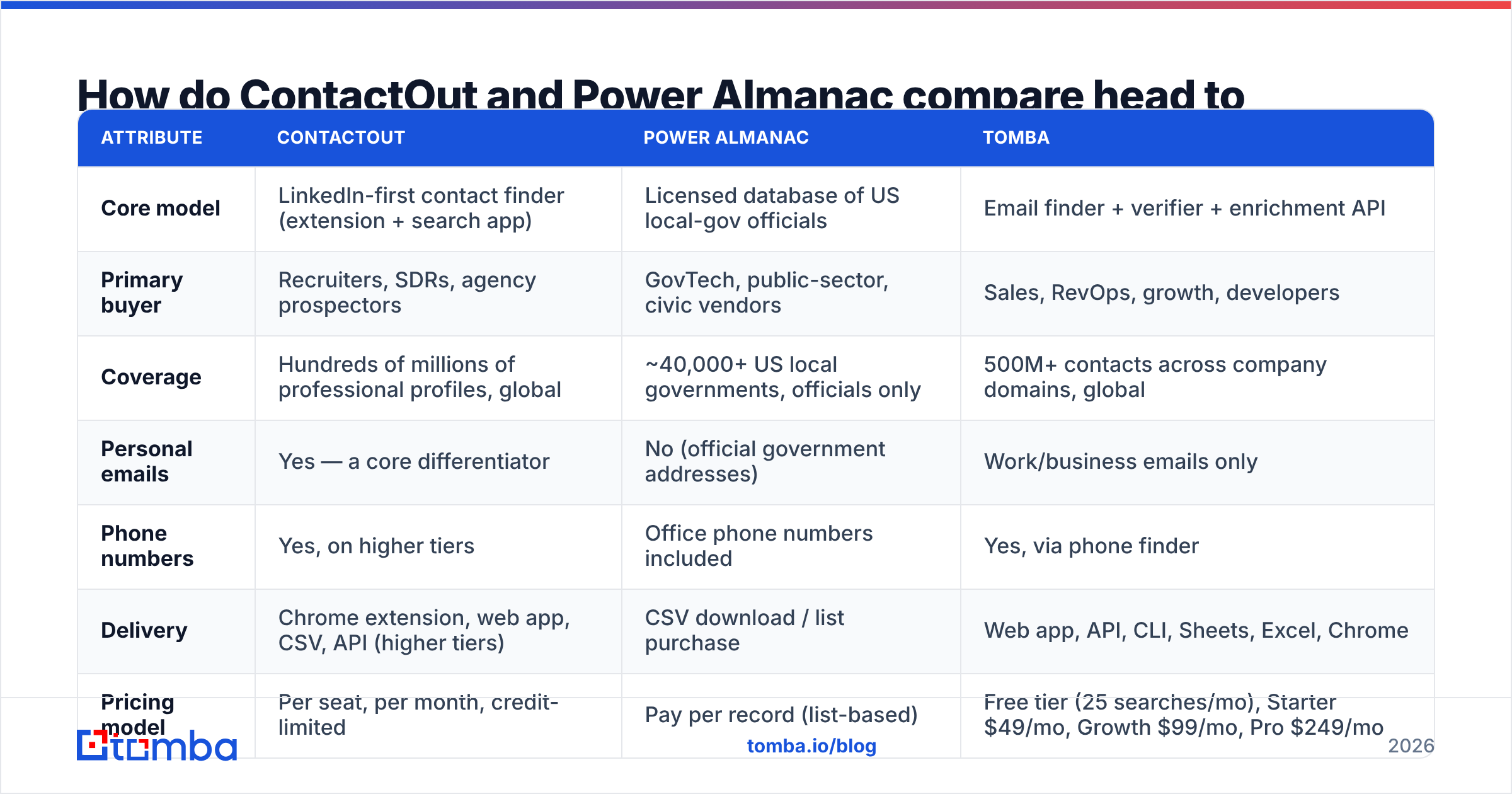
Here is the ContactOut vs Power Almanac split, side by side, with Tomba as a third lens.
| Attribute | ContactOut | Power Almanac | Tomba |
|---|---|---|---|
| Core model | LinkedIn-first contact finder (extension + search app) | Licensed database of US local-gov officials | Email finder + verifier + enrichment API |
| Primary buyer | Recruiters, SDRs, agency prospectors | GovTech, public-sector, civic vendors | Sales, RevOps, growth, developers |
| Coverage | Hundreds of millions of professional profiles, global | ~40,000+ US local governments, officials only | 500M+ contacts across company domains, global |
| Personal emails | Yes — a core differentiator | No (official government addresses) | Work/business emails only |
| Phone numbers | Yes, on higher tiers | Office phone numbers included | Yes, via phone finder |
| Delivery | Chrome extension, web app, CSV, API (higher tiers) | CSV download / list purchase | Web app, API, CLI, Sheets, Excel, Chrome |
| Pricing model | Per seat, per month, credit-limited | Pay per record (list-based) | Free tier (25 searches/mo), Starter $49/mo, Growth $99/mo, Pro $249/mo |
| Free entry point | Limited free credits | No true free tier — sample records only | Yes, 25 searches/mo |
| Built-in verification | Limited | Human re-verification cycle | Yes — email verifier + catch-all handling |
| Best at | Finding one specific person fast | Reaching an entire vertical you can't scrape | Finding + verifying emails at a domain, at scale |
Pricing and coverage figures reflect public vendor information at the time of writing. Both vendors change plans. Check their sites before you buy.
The table makes the split clear. ContactOut is a person-level tool. Power Almanac is a market-level tool. One answers "what is Sarah's email?" The other answers "give me every parks director in Ohio."

ContactOut vs Power Almanac: where does the data come from?#
Most comparison posts skip this. It is the part that predicts your bounce rate.
ContactOut pulls from public web and profile sources, shared data, and pattern guessing. Breadth is strong. If a person has a LinkedIn profile, the odds of a hit are good.
But quality tracks how fresh that profile is. Personal emails are the headline feature. They are also the risky one. Do you sell into the EU, or in a regulated space? Ask your legal team how you may use personal addresses first. That is true of every personal-email vendor, not just this one.
Power Almanac sits at the other end. The universe is small on purpose. Humans call the offices and refresh the records. The data is narrow but deep. The emails are official government addresses that follow set patterns.
The failure mode is not scraping noise. It is staleness. An elected official can be gone the week after a November vote.
The rule of thumb: broad datasets fail on freshness. Deep datasets fail on scope. Pick the failure you can live with.
Neither tool removes the need to verify. Every vendor quotes an accuracy number. The only number that counts is what your own SMTP log says after a send.
Run every list through an email verifier before it hits your sequencer. This matters even more on .gov and .edu domains. Those servers are often catch-all, so a naive check marks junk as "valid." A catch-all verifier is what stands between a clean list and a domain reputation problem.
ContactOut vs Power Almanac for outbound sales#
Which one wins? It depends on your segment. Here is the short version.
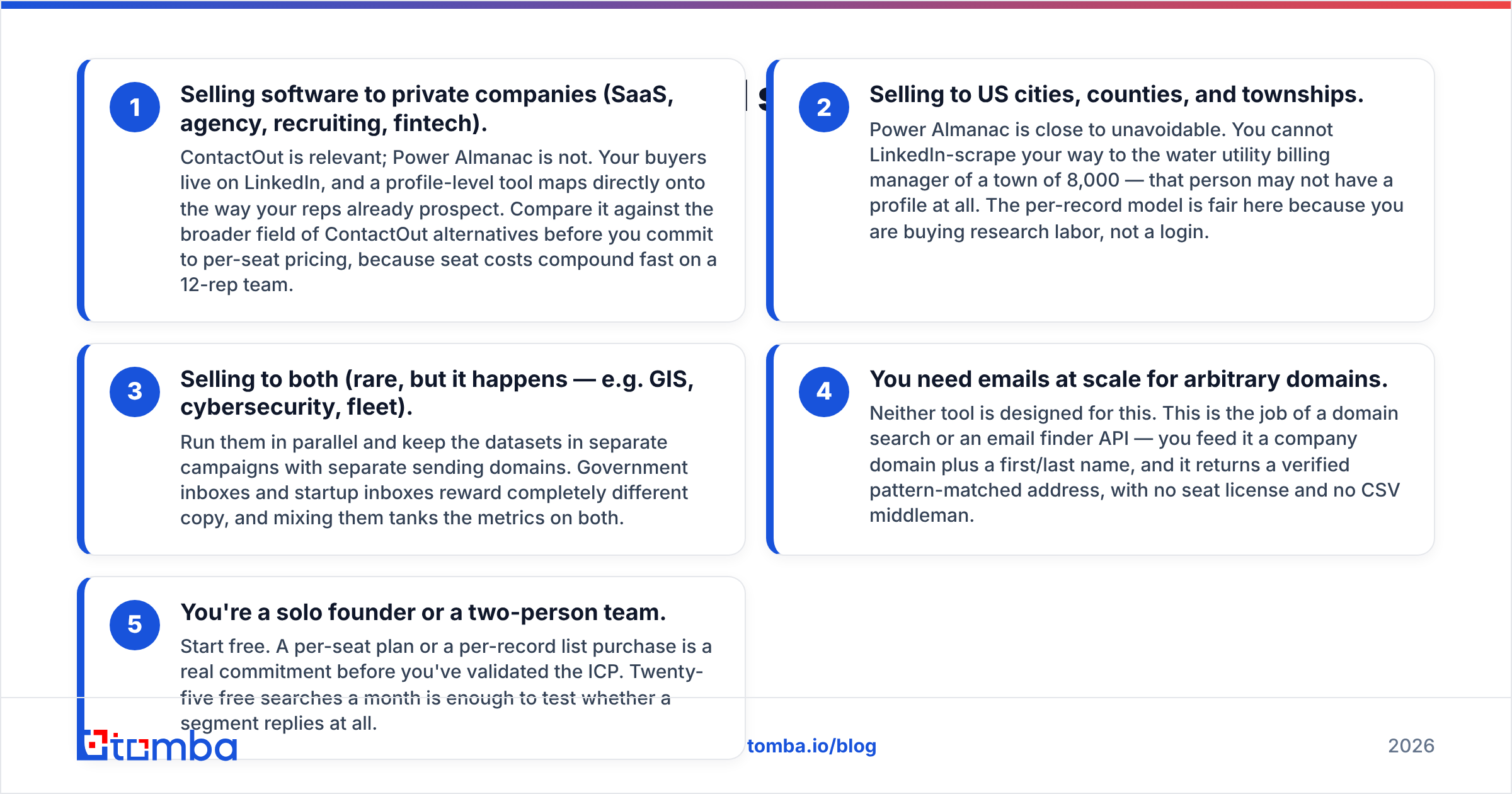
- You sell software to private companies. (SaaS, agency, recruiting, fintech.) ContactOut is in play. Power Almanac is not. Your buyers live on LinkedIn. Scan the wider field of ContactOut alternatives before you lock in per-seat pricing. Seat costs add up fast on a 12-rep team.
- You sell to US cities, counties, and towns. Power Almanac is hard to skip. You cannot scrape your way to the water billing manager of a town of 8,000. That person may have no profile at all. Paying per record is fair here. You buy research hours, not a login.
- You sell to both. (Rare, but it happens: GIS, security, fleet.) Run them side by side. Keep each dataset in its own campaign, on its own sending domain. Government inboxes and startup inboxes reward very different copy.
- You need emails at scale, on any domain. Neither tool is built for that. That is the job of a domain search or an email finder API. Feed it a domain and a name. Get back a verified address. No seat, no CSV.
- You are a solo founder or a team of two. Start free. A seat plan or a record purchase is a big bet before you know your ICP. Twenty-five free searches a month is enough to test one segment.

ContactOut vs Power Almanac pricing: what do they cost?#
ContactOut charges per user, per month, with credit caps by tier. That is kind to one recruiter and rough on a growing team. More heads mean more seats, and credits rarely pool the way you want.
Reviews on G2 praise the accuracy. They also flag the price pressure at team scale. That pattern is worth taking seriously.
Power Almanac charges per record. You define a list — say, every city manager in five states, in cities above 25,000 people. You pay for the count you pull.
There is no monthly bill to defend to finance. Some teams love that. But there is no ongoing right to the data either. What you bought is what you have, and it starts aging the day you download it. Budget for a refresh, not a purchase.
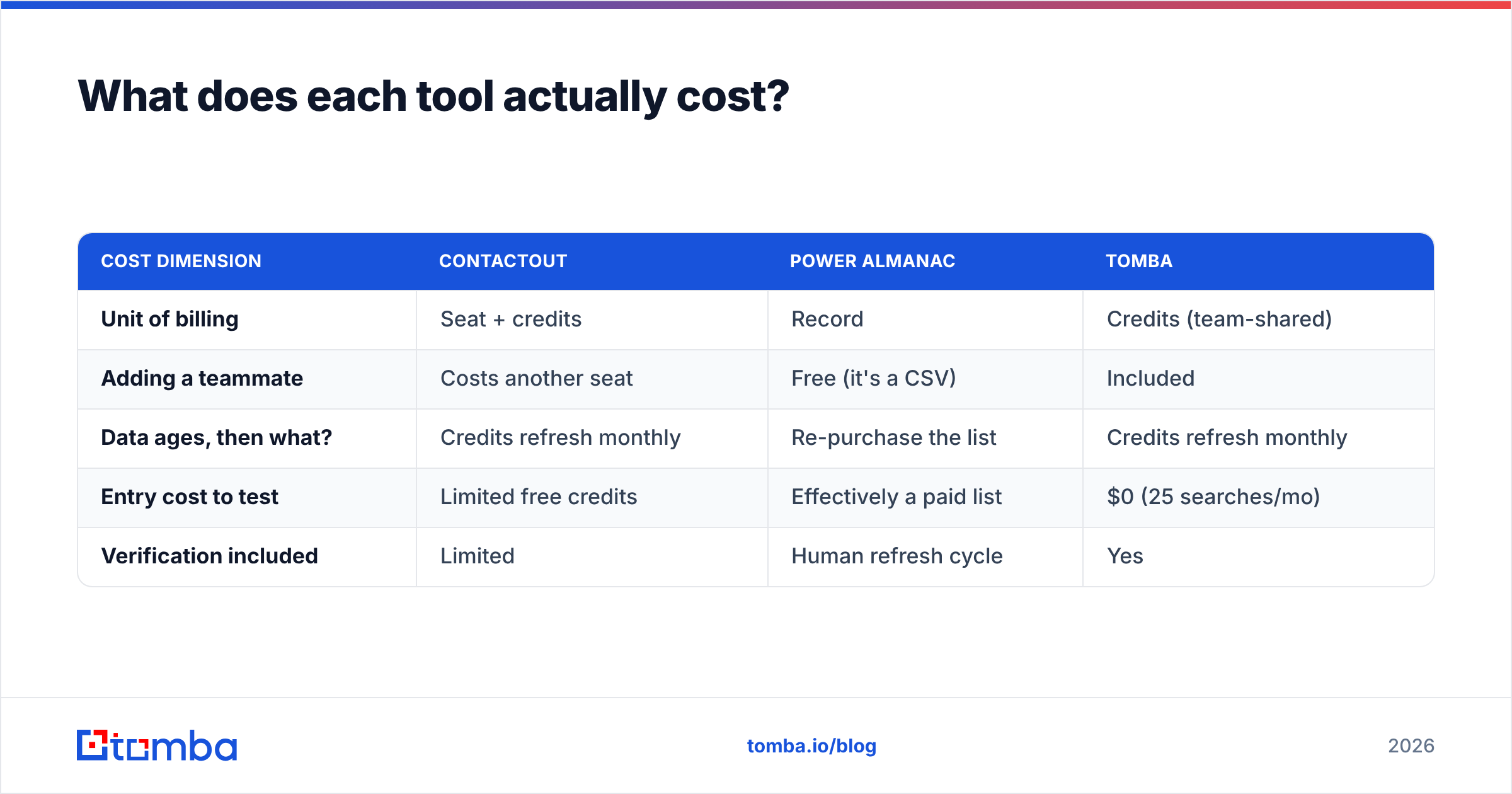
Tomba pricing works a third way: flat and credit-based, not seat-based. Free at 25 searches a month. Starter at $49. Growth at $99. Pro at $249. Enterprise is custom. Your whole team shares one plan. There is no login per rep — and that is the biggest hidden cost in the seat model.
| Cost dimension | ContactOut | Power Almanac | Tomba |
|---|---|---|---|
| Unit of billing | Seat + credits | Record | Credits (team-shared) |
| Adding a teammate | Costs another seat | Free (it's a CSV) | Included |
| Data ages, then what? | Credits refresh monthly | Re-purchase the list | Credits refresh monthly |
| Entry cost to test | Limited free credits | Effectively a paid list | $0 (25 searches/mo) |
| Verification included | Limited | Human refresh cycle | Yes |
Where do both tools leave a gap?#
Three gaps. They show up whether you picked the extension or the CSV.
Gap 1: no API. A Chrome extension does not scale to 4,000 accounts. A CSV does not update itself. Does your motion enrich a CRM, look up a lead at signup, or fill blanks in a nightly job? Then you need an API, not a UI. That is what the Tomba API is for. Plenty of teams run ContactOut and a finder API side by side.
Gap 2: verification. Google and Yahoo tightened the rules for bulk senders. Spam limits are now enforced, not suggested. HubSpot makes the same point every year in its work on email deliverability: list hygiene beats copy. A bounce rate above 3% is a reputation problem. Neither a LinkedIn scraper nor a static CSV shields you from it.
Gap 3: the rest of the record. The email is table stakes. Company size, tech stack, and catch-all status are what make a sequence land. Data enrichment closes that loop, no matter where the record came from.
Is there a single winner in ContactOut vs Power Almanac?#
No. Any post that names one is selling you something.
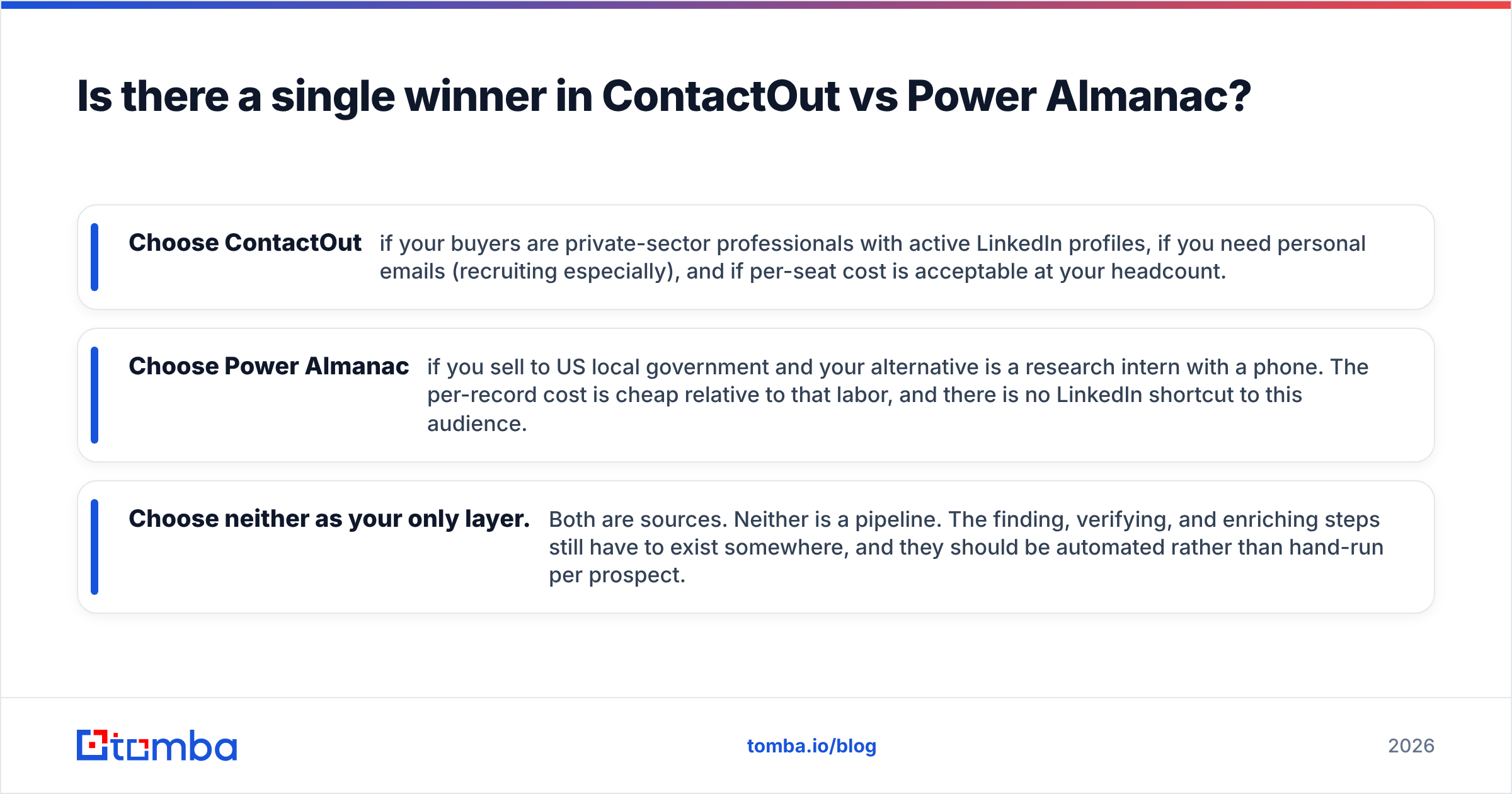
- Pick ContactOut if your buyers are private-sector pros with live LinkedIn profiles, if you need personal emails, and if seat cost works at your headcount.
- Pick Power Almanac if you sell to US local government. Your other option is an intern with a phone. The per-record cost is cheap next to that. There is no LinkedIn shortcut here.
- Pick neither as your only layer. Both are sources. Neither is a pipeline. You still have to find, verify, and enrich. Those steps should run on their own, not by hand.
The 2026 stack for most teams looks like this. One specialist source for your hardest segment. One general finder and verifier API doing the volume work underneath. That costs less than two seat-based platforms. It also beats trusting one vendor's accuracy claim.
Ready to fill the gap under either tool?#
Do you own ContactOut, or a Power Almanac list? The fastest win is a verified email layer beneath it. Then every domain you touch resolves to a real address, not a guess.
Start with the Tomba Email Finder. Find emails by domain, name, or company. Verify them in the same pass. Pull it all through an API or a Chrome extension, with no seat per rep. The free tier gives you 25 searches a month. That is enough to run one segment end to end and see the bounce rate for yourself.
Related guides#
Ready to find emails that actually work?
Join 150,000+ professionals who stopped guessing and started sending. Free credits on signup — no credit card required.
Get the Tomba newsletter
Practical outbound tactics and product updates — once every two weeks.
About the author