ContactOut vs ReachInbox (2026): Which Tool Should You Buy?
ContactOut finds contact data. ReachInbox sends the emails. They solve different halves of outbound — here's how the pricing, accuracy, and workflows actually compare in 2026.
TL;DR
- ContactOut and ReachInbox are not really competitors. ContactOut is a contact-data tool (LinkedIn emails and phone numbers). ReachInbox is a cold email sending platform (inboxes, sequences, warmup, unified inbox).
- If you already have a list and can't get replies, you need ReachInbox (or a sending tool like it). If you have a sending stack and can't build a list, you need ContactOut (or a data tool like it).
- Most teams end up paying for both, plus a verifier — which is why the total cost is usually 2-3x what either landing page implies.
- ContactOut's strength is LinkedIn-native personal emails. Its weakness is credit pricing that scales badly past a few thousand lookups a month.
- ReachInbox's strength is unlimited-ish inbox connections and an AI-assisted unified inbox. Its weakness is that it has no first-party data layer — garbage list in, bounces out.
What are ContactOut and ReachInbox, exactly?#
They sit on opposite ends of the outbound pipeline, and the fact that people compare them at all is a symptom of how confusing this category has become.
ContactOut is a data provider. It lives primarily as a Chrome extension over LinkedIn: you open a profile, click the icon, and it surfaces a work email, a personal email, and sometimes a mobile number. It also ships a search portal, a bulk enrichment flow, and an API. Its pitch is coverage of personal emails — the Gmail addresses that survive job changes — which is genuinely differentiated. You can see the details on contactout.com.
ReachInbox is a sending platform. It connects your mailboxes (Google Workspace, Outlook, SMTP), warms them, rotates sends across them, runs multi-step sequences, and pulls every reply into a unified inbox with AI-assisted categorization. Its pitch is volume: connect a lot of inboxes, send a lot of email, don't drown in the replies. See reachinbox.ai.
So the honest framing is not "which is better." It's: which half of the problem are you actually stuck on?
Here's the pipeline, and where each tool touches it:
- Define the ICP — neither tool does this for you. This is a spreadsheet and a conversation with your best customers.
- Build the list — ContactOut (LinkedIn-native), or a domain search tool if you're working company-first rather than person-first.
- Verify the list — neither tool is a serious verifier. This is a gap both of them leave open, and it's the gap that eats your domain.
- Write the sequence — ReachInbox (templates, spintax, AI variants).
- Send and warm — ReachInbox (inbox rotation, warmup pool, sending caps).
- Handle replies — ReachInbox (unified inbox, lead categorization).
- Push to CRM — both, via native integrations or Zapier.
Steps 2 and 3 are ContactOut's territory. Steps 4-6 are ReachInbox's. There is almost no overlap, which is why "ContactOut vs ReachInbox" is a question that usually means "I have a budget for one tool and I don't know which end of my funnel is broken."

How do ContactOut and ReachInbox compare head to head?#
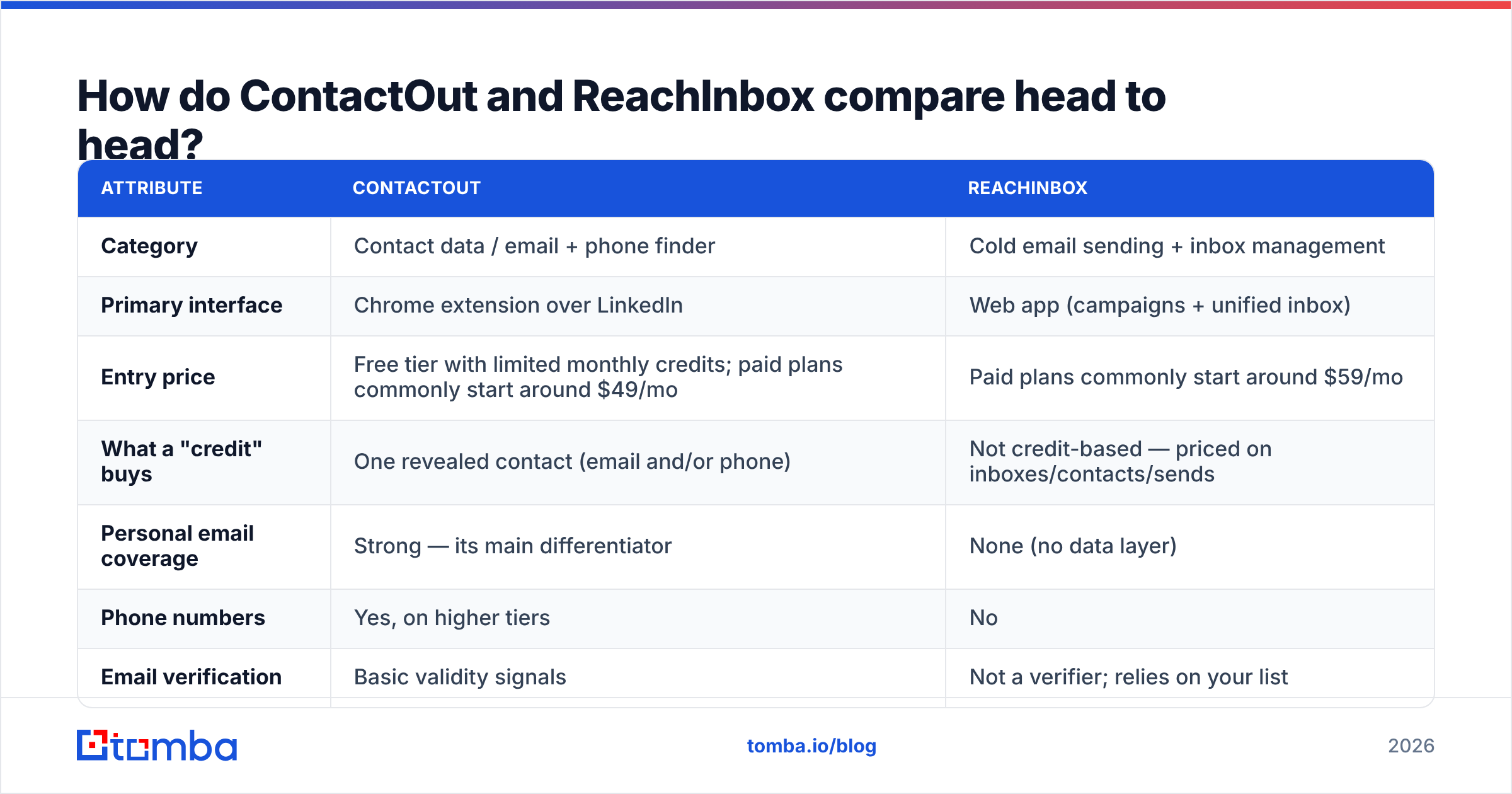
| Attribute | ContactOut | ReachInbox |
|---|---|---|
| Category | Contact data / email + phone finder | Cold email sending + inbox management |
| Primary interface | Chrome extension over LinkedIn | Web app (campaigns + unified inbox) |
| Entry price | Free tier with limited monthly credits; paid plans commonly start around $49/mo | Paid plans commonly start around $59/mo |
| What a "credit" buys | One revealed contact (email and/or phone) | Not credit-based — priced on inboxes/contacts/sends |
| Personal email coverage | Strong — its main differentiator | None (no data layer) |
| Phone numbers | Yes, on higher tiers | No |
| Email verification | Basic validity signals | Not a verifier; relies on your list |
| Inbox warmup | No | Yes, included |
| Multi-inbox rotation | No | Yes — the core feature |
| Unified reply inbox | No | Yes, with AI categorization |
| Sequences / follow-ups | No | Yes |
| API | Yes | Yes |
| Best for | SDRs and recruiters sourcing from LinkedIn | Agencies and teams sending at volume |
| Biggest weakness | Credit costs scale poorly; LinkedIn-dependent | No data — quality is entirely your problem |
Pricing on both products moves regularly, so treat the entry prices above as directional and check the vendors' own pages before you commit. What doesn't move is the structural difference: ContactOut charges you per contact revealed; ReachInbox charges you per unit of sending capacity. Those two pricing models fail in different ways. ContactOut gets expensive when your list is big. ReachInbox gets expensive when you scale inboxes — and it gets painful, not just expensive, when your list is bad, because you pay in domain reputation rather than dollars.
Is ContactOut worth it for finding emails?#
For LinkedIn-first sourcing, yes — with two caveats.
ContactOut's real edge is personal email coverage. If you're a recruiter, or you're selling to people who change jobs often, a Gmail address is more durable than a work address that dies the moment someone leaves. Most email finders are work-email-only. ContactOut isn't, and that's a legitimate reason to pay for it.
Caveat one: it's LinkedIn-shaped. The workflow assumes you're browsing profiles or working from a Sales Navigator list. If your motion is "here are 4,000 domains, find me the head of RevOps at each," you're fighting the tool. That's a domain-first job, and a company email search or bulk email finder is a better fit — you feed it domains and roles, it returns contacts, no browsing required.
Caveat two: credit math. Per-reveal pricing feels cheap at 200 lookups a month and stops feeling cheap somewhere around 3,000. Run the numbers on your actual monthly volume, not the volume on the pricing page's example. Then compare against alternatives on a cost-per-verified-contact basis — not cost-per-credit, because a credit spent on a bounced address is a credit you burned twice (once in cash, once in deliverability).
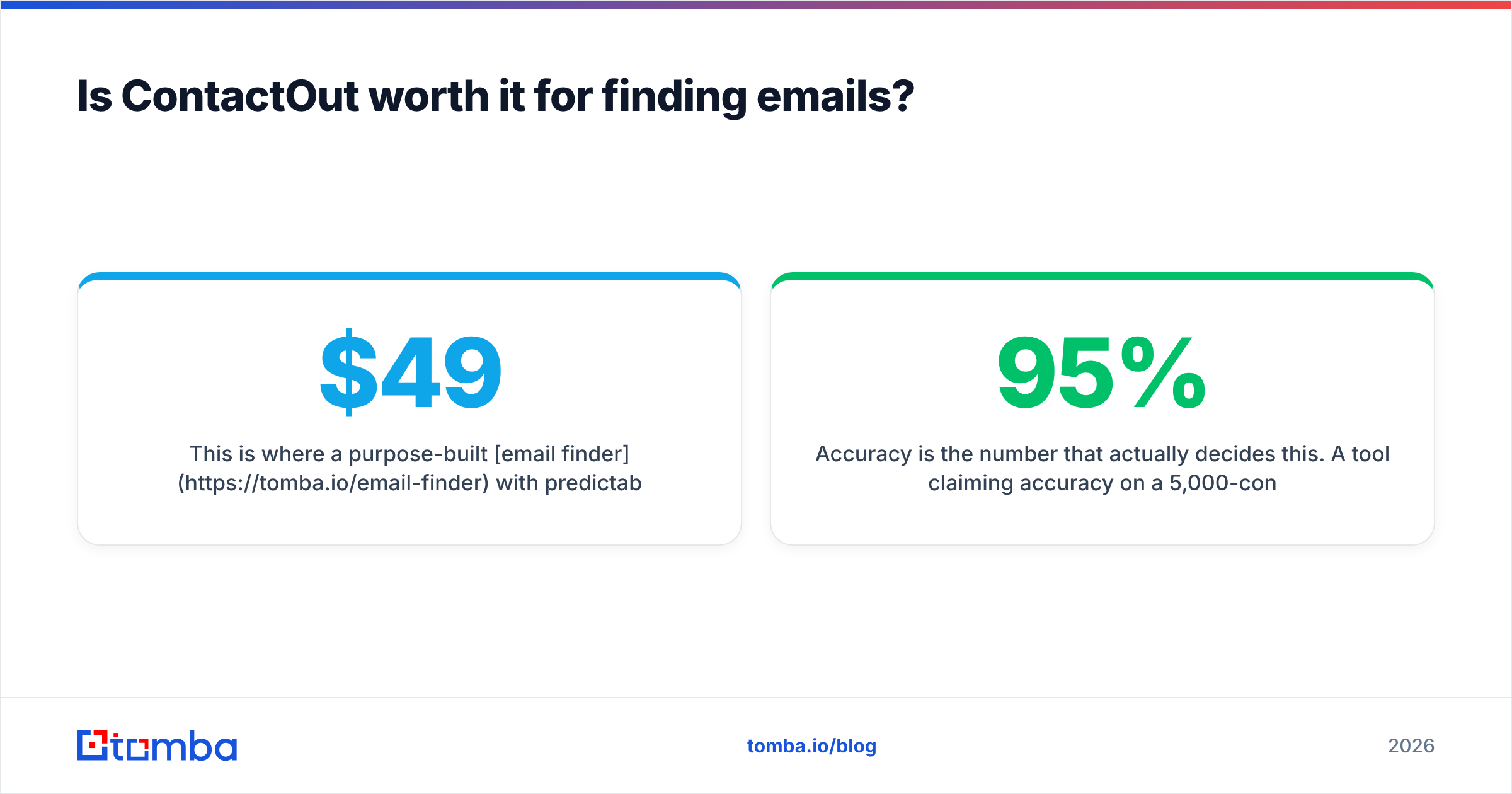
This is where a purpose-built email finder with predictable per-search economics tends to win on unit cost. Tomba pricing runs a free tier at 25 searches/mo, Starter at $49/mo, Growth at $99/mo, and Pro at $249/mo — with the verifier bundled rather than sold as a separate line item, which matters more than it sounds like it should.

Accuracy is the number that actually decides this. A tool claiming 95% accuracy on a 5,000-contact list leaves 250 bounces. At a 3% bounce threshold you're already in the yellow, and at 5% Google and Microsoft start quietly throttling you. So the question isn't "does ContactOut find emails" — it does — it's "what percentage of what it finds survives a verifier?" Run any data tool's output through an independent email verifier before you send. Every time. That includes ContactOut's output, and it includes Tomba's.
Is ReachInbox worth it for cold email sending?#
If you're sending real volume across multiple domains, it's a credible choice.
The core value is mundane and important: connecting many inboxes, rotating sends across them so no single mailbox gets cooked, warming them continuously, and then giving you one place to read the replies instead of fifteen browser tabs. Agencies running outbound for multiple clients feel this pain acutely, and ReachInbox is clearly built for them.
The AI-assisted inbox — auto-categorizing replies into interested / not interested / out of office — is the feature people actually mention in reviews. It's not magic, and you'll still read everything at first, but it front-loads the ones worth reading. You can sanity-check the sentiment yourself on G2, where the sending-tool category is crowded enough that reviews are genuinely comparative.
Where it doesn't help you:
- It won't fix a bad list. Warmup and inbox rotation slow down the damage from a high bounce rate. They don't prevent it. If 8% of your addresses are dead, no amount of rotation saves the domain.
- It won't find contacts. There's no data layer. You bring the CSV.
- It won't write anything that works. AI variants generate copy; they don't generate a reason for someone to reply.
Deliverability is a discipline, not a feature. Authenticate properly (check your SPF record, get DKIM and DMARC right), keep bounce rates under 2%, and monitor sender reputation rather than assuming warmup handles it. Google's own postmaster guidance is still the single most useful free document on this topic and most senders have never read it.

Which one should you buy for your use case?#
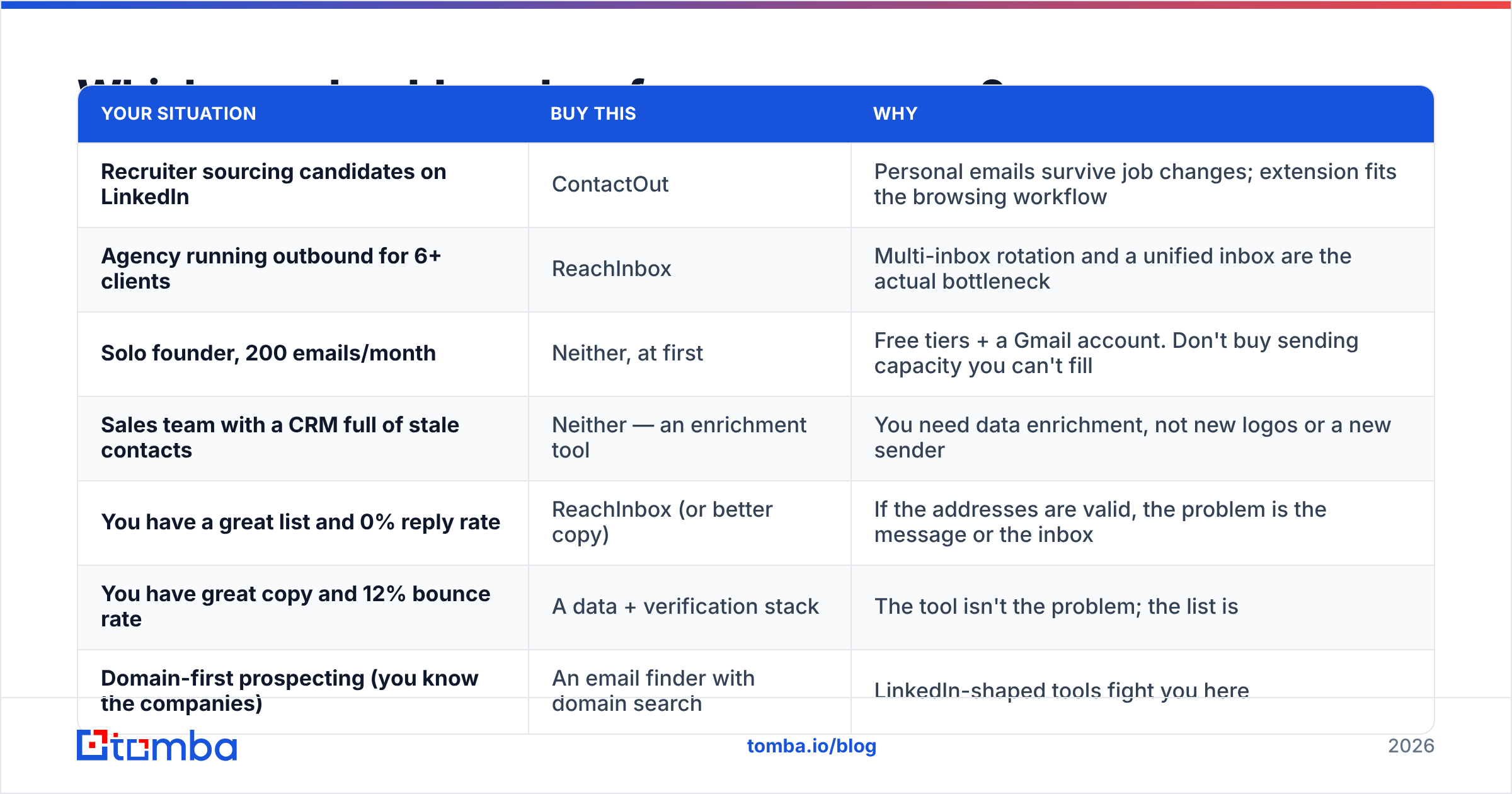
| Your situation | Buy this | Why |
|---|---|---|
| Recruiter sourcing candidates on LinkedIn | ContactOut | Personal emails survive job changes; extension fits the browsing workflow |
| Agency running outbound for 6+ clients | ReachInbox | Multi-inbox rotation and a unified inbox are the actual bottleneck |
| Solo founder, 200 emails/month | Neither, at first | Free tiers + a Gmail account. Don't buy sending capacity you can't fill |
| Sales team with a CRM full of stale contacts | Neither — an enrichment tool | You need data enrichment, not new logos or a new sender |
| You have a great list and 0% reply rate | ReachInbox (or better copy) | If the addresses are valid, the problem is the message or the inbox |
| You have great copy and 12% bounce rate | A data + verification stack | The tool isn't the problem; the list is |
| Domain-first prospecting (you know the companies) | An email finder with domain search | LinkedIn-shaped tools fight you here |
The pattern that shows up over and over: teams buy a sending tool because sending feels like the active, controllable part of outbound, and then blame the copy when nothing lands. Meanwhile the actual failure is upstream — a list assembled from three scraping tools, never deduplicated, never verified, half of it catch-all domains nobody checked.
If your bounce rate is above 3%, no sending platform on earth will save your campaign. Fix the list first. That means a real finder, a real verifier, and a catch-all verifier for the domains that accept everything and tell you nothing.
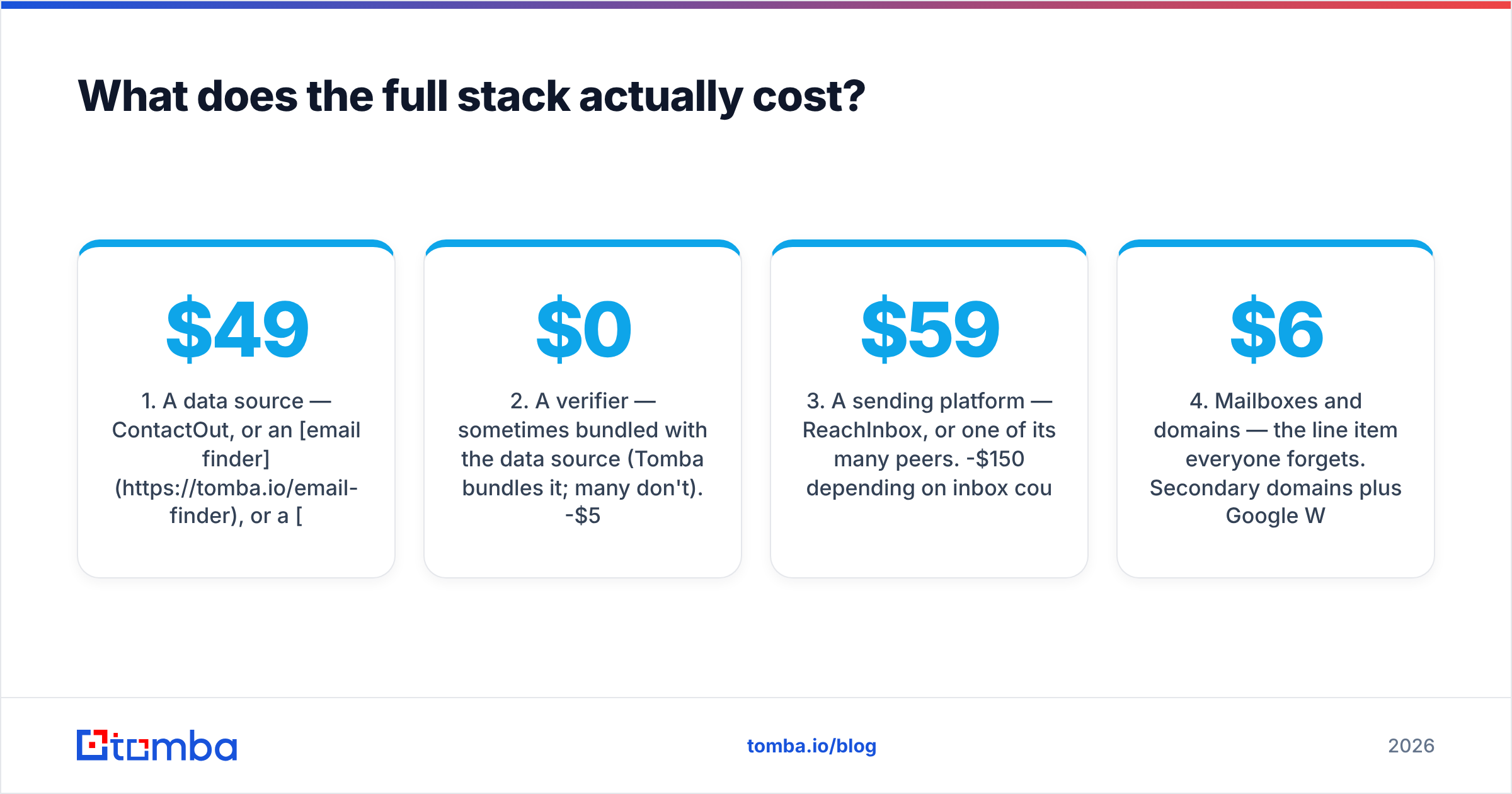
What does the full stack actually cost?#
Here's the uncomfortable arithmetic nobody puts on a pricing page. A functioning outbound stack for a small team typically needs:
- A data source — ContactOut, or an email finder, or a B2B database. Roughly $49-$99/mo at small-team volume.
- A verifier — sometimes bundled with the data source (Tomba bundles it; many don't). $0-$50/mo depending on whether you're paying twice.
- A sending platform — ReachInbox, or one of its many peers. $59-$150/mo depending on inbox count.
- Mailboxes and domains — the line item everyone forgets. Secondary domains plus Google Workspace seats. Call it $6-$12 per inbox per month, and serious senders run 10+.
- A CRM — you already have one, or you're using a spreadsheet and telling yourself it's fine.
Total: $200-$400/mo for a small team, of which the headline tool prices are maybe half. Budget accordingly, and be suspicious of any comparison — including comparisons of this pair — that quotes you one number and stops.
There are cheaper paths. If your volume is genuinely low, free tiers plus a free email checker will carry you further than you'd expect. If your volume is high, the per-contact cost of your data source dominates everything else, and that's the number to optimize.
Are there better alternatives to either tool?#
Depends which half you're replacing.
Replacing ContactOut (data side): the honest options are other finders with different strengths. Some are LinkedIn-first like ContactOut. Some are domain-first. Some are database-first, selling you access to a pre-built corpus — BookYourData, for instance, takes the prebuilt-database approach with a pay-as-you-go model and per-contact accuracy guarantees, which suits teams who want a list now rather than an API to build one. Tomba sits on the finder side: domain search, pattern detection, verification, and an email finder API for teams who want it in their own pipeline rather than in a browser tab. If personal Gmail coverage is your specific requirement, ContactOut still leads — be honest with yourself about whether you actually need that or just like the idea of it. A ContactOut alternative comparison is worth reading before you renew.
Replacing ReachInbox (sending side): the sending-tool market is the most crowded corner of martech. Instantly, Smartlead, Saleshandy, Lemlist, Apollo's sequencer — they all do inbox rotation, warmup, and sequences, and they differ mostly in inbox pricing, reply-inbox UX, and how aggressively they upsell you data you shouldn't buy from a sending tool. Pick on price per inbox and how the unified inbox feels after ten minutes of clicking.
The strategic point: never buy your data from your sending tool. Bundled data is almost always the weakest part of a sending platform, it's stale more often than not, and it creates a switching cost that has nothing to do with quality. Keep the layers separate. Verify at the boundary between them.
What should you actually do next?#
Diagnose before you buy. Take your last 500 sent emails and pull three numbers:
- Bounce rate. Above 3% → your problem is data. No sending tool fixes this.
- Open rate. Below 30% with a clean list → your problem is deliverability (authentication, warmup, domain reputation).
- Reply rate. Below 1% with good opens → your problem is copy and targeting. Neither tool helps.
Only one of those three failures is a ReachInbox problem. Two of them are data problems.
If you land on "my list is the issue" — which most teams do once they measure it honestly — start upstream. Use Tomba Email Finder to build contacts from domains, names, or company records, with verification built into the same workflow rather than bolted on afterward. The free tier gives you 25 searches a month to test accuracy against a list you already know the answers for, and Starter is $49/mo when you're ready to run volume. Feed clean, verified addresses into whatever sending platform you choose — ReachInbox included — and the sending tool finally gets to do the job it's good at.
Related guides#
Ready to find emails that actually work?
Join 150,000+ professionals who stopped guessing and started sending. Free credits on signup — no credit card required.
Get the Tomba newsletter
Practical outbound tactics and product updates — once every two weeks.
About the author