ContactOut vs SafetyMails (2026): Finder vs Verifier Test
ContactOut finds contacts from LinkedIn. SafetyMails verifies whether emails are safe to send. They solve different halves of the same problem — here's which one you actually need, and what it costs to run both.
TL;DR
- ContactOut and SafetyMails are not really competitors. ContactOut is a contact finder built around LinkedIn; SafetyMails is an email verifier built around list hygiene. Comparing them head-to-head only makes sense if you're deciding which half of the outbound problem to solve first.
- If you have names but no emails, you need a finder. If you have emails but no confidence, you need a verifier. Most teams eventually need both — which is why the stack cost, not the sticker price, is the number that matters.
- ContactOut's strength is recruiter-style, one-profile-at-a-time sourcing inside the LinkedIn UI. Its weakness is credit-based pricing that gets expensive at volume and a workflow that assumes you live in a browser tab.
- SafetyMails' strength is cheap pay-as-you-go verification with catch-all detection and a real-time API. Its weakness is that it produces zero new contacts — it can only grade what you already have.
- A combined finder + verifier platform (Tomba, at $49/mo Starter) covers both jobs from one credit pool and one API, which is usually cheaper and less brittle than gluing two point tools together.
What problem is each tool actually solving?#
Think of outbound like cooking. A finder is the grocery run — it gets ingredients into your kitchen. A verifier is the smell test — it tells you which ingredients will make people sick. You can't cook with only one of them.
ContactOut is a sourcing tool. You open a LinkedIn profile, the Chrome extension surfaces personal and work email addresses plus phone numbers, and you push the contact to your ATS or CRM. It grew up in recruiting, and it still shows: the UX is optimised for a human evaluating one person at a time, then another, then another. It also ships a search portal and an API, but the extension is the product most people are paying for.
SafetyMails is a hygiene tool. You upload a list (or hit the API), and it grades each address: valid, invalid, catch-all, disposable, role-based, spam trap risk. It doesn't know who your prospects are and doesn't care. It answers exactly one question — will this address bounce? — and it answers it for a fraction of a cent.
So when you search "contactout vs safetymails," you're usually asking one of two real questions:
- "I only have budget for one — which do I buy?" Answer: buy the one that fixes your current bottleneck. Empty pipeline → finder. High bounce rate → verifier.
- "Do I need both, and what does that cost?" Answer: probably yes, and more than you think. Keep reading.
How do ContactOut and SafetyMails compare on paper?#
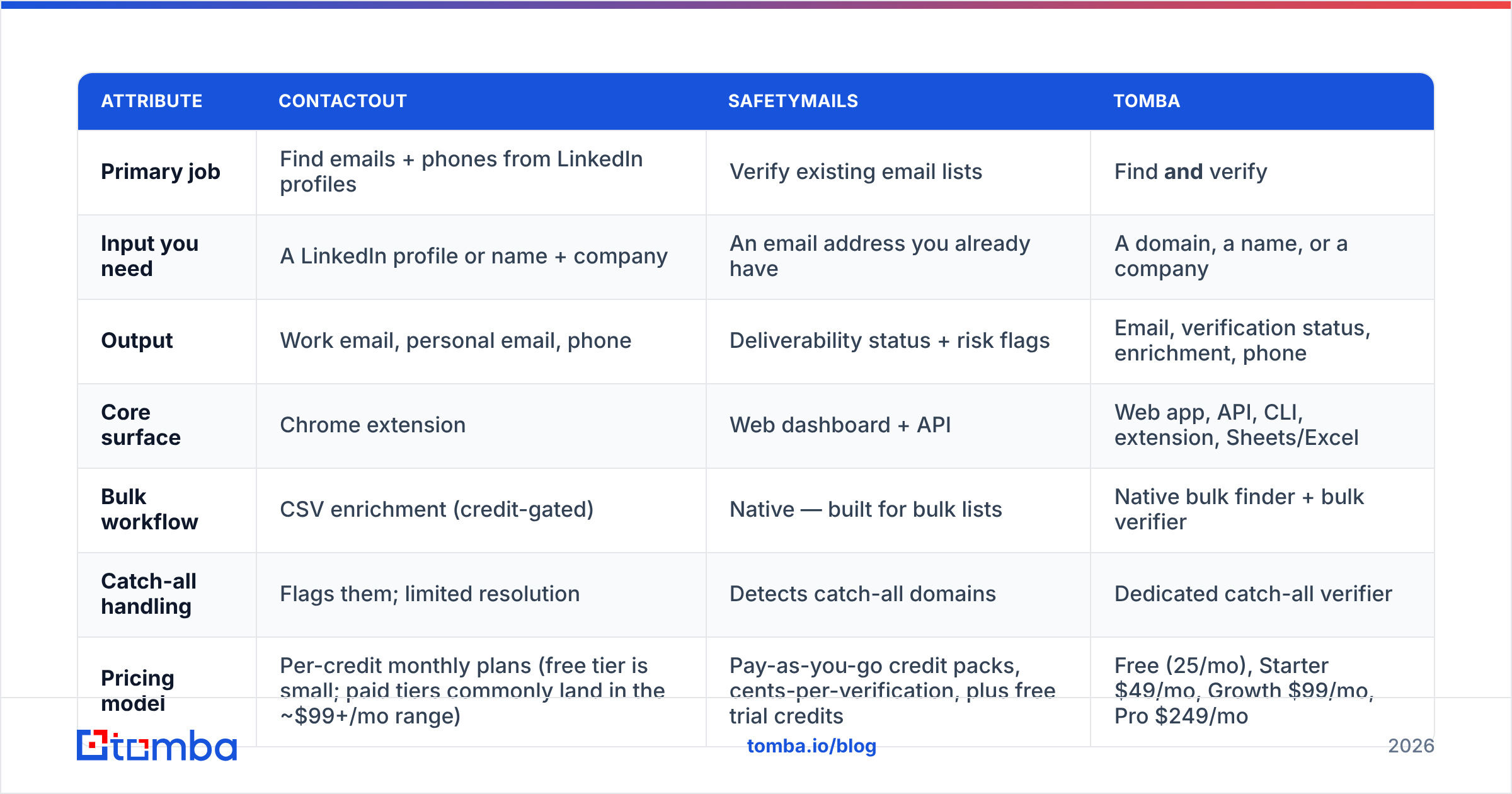
Here's the honest side-by-side. Pricing moves — treat these as the shape of the model, not a quote, and confirm on each vendor's own page before you buy.
| Attribute | ContactOut | SafetyMails | Tomba |
|---|---|---|---|
| Primary job | Find emails + phones from LinkedIn profiles | Verify existing email lists | Find and verify |
| Input you need | A LinkedIn profile or name + company | An email address you already have | A domain, a name, or a company |
| Output | Work email, personal email, phone | Deliverability status + risk flags | Email, verification status, enrichment, phone |
| Core surface | Chrome extension | Web dashboard + API | Web app, API, CLI, extension, Sheets/Excel |
| Bulk workflow | CSV enrichment (credit-gated) | Native — built for bulk lists | Native bulk finder + bulk verifier |
| Catch-all handling | Flags them; limited resolution | Detects catch-all domains | Dedicated catch-all verifier |
| Pricing model | Per-credit monthly plans (free tier is small; paid tiers commonly land in the ~$99+/mo range) | Pay-as-you-go credit packs, cents-per-verification, plus free trial credits | Free (25/mo), Starter $49/mo, Growth $99/mo, Pro $249/mo |
| Best for | Recruiters and 1:1 sourcing inside LinkedIn | Marketers cleaning a big list before a send | Sales teams that need both halves in one pipeline |
| Weakest at | Volume economics, non-LinkedIn sourcing | Producing any new contact whatsoever | Deep LinkedIn-native recruiter workflows |
The table makes the strategic point better than any paragraph: the row that says "produces new contacts" and the row that says "prevents bounces" are never both filled by the same product unless you buy a platform that does both.

Which one is more accurate — and what does "accuracy" even mean here?#
This is where most comparison posts get sloppy, because the two tools report accuracy on completely different axes.
ContactOut's accuracy question is coverage plus correctness. Given 100 LinkedIn profiles, how many return an email at all (coverage/hit rate), and of those, how many actually belong to that person and accept mail (correctness)? ContactOut markets high accuracy on both, and in practice it does well on tech, US-heavy, and heavily-indexed profiles. It degrades — as every finder does — on small companies, non-English markets, and people whose employer changed last month.
SafetyMails' accuracy question is classification quality. Given 100 addresses, how many does it correctly label valid/invalid, and how many does it dump into the "unknown/catch-all" bucket? A verifier that returns 30% "unknown" is technically never wrong and practically useless. The real quality signal is how few addresses land in the grey zone, and how well the tool resolves catch-all domains — which is exactly the hard part, because catch-all servers accept everything at SMTP time and tell you nothing.
Two things follow from that:
- A finder's hit rate is meaningless without verification. If a tool "finds" 90 emails out of 100 but 20 of them bounce, your usable yield is 70 — and your sender reputation ate the damage for the other 20.
- A verifier's precision is meaningless without volume. Perfect grading of a 200-row list you scraped by hand doesn't build a pipeline.
That's the trap. Each tool's marketing metric looks great in isolation and neither one, alone, tells you what you actually want to know: how many people can I safely email tomorrow?
Wait — that's not right. Here's the actual visual:

What does the real workflow look like if you run both?#
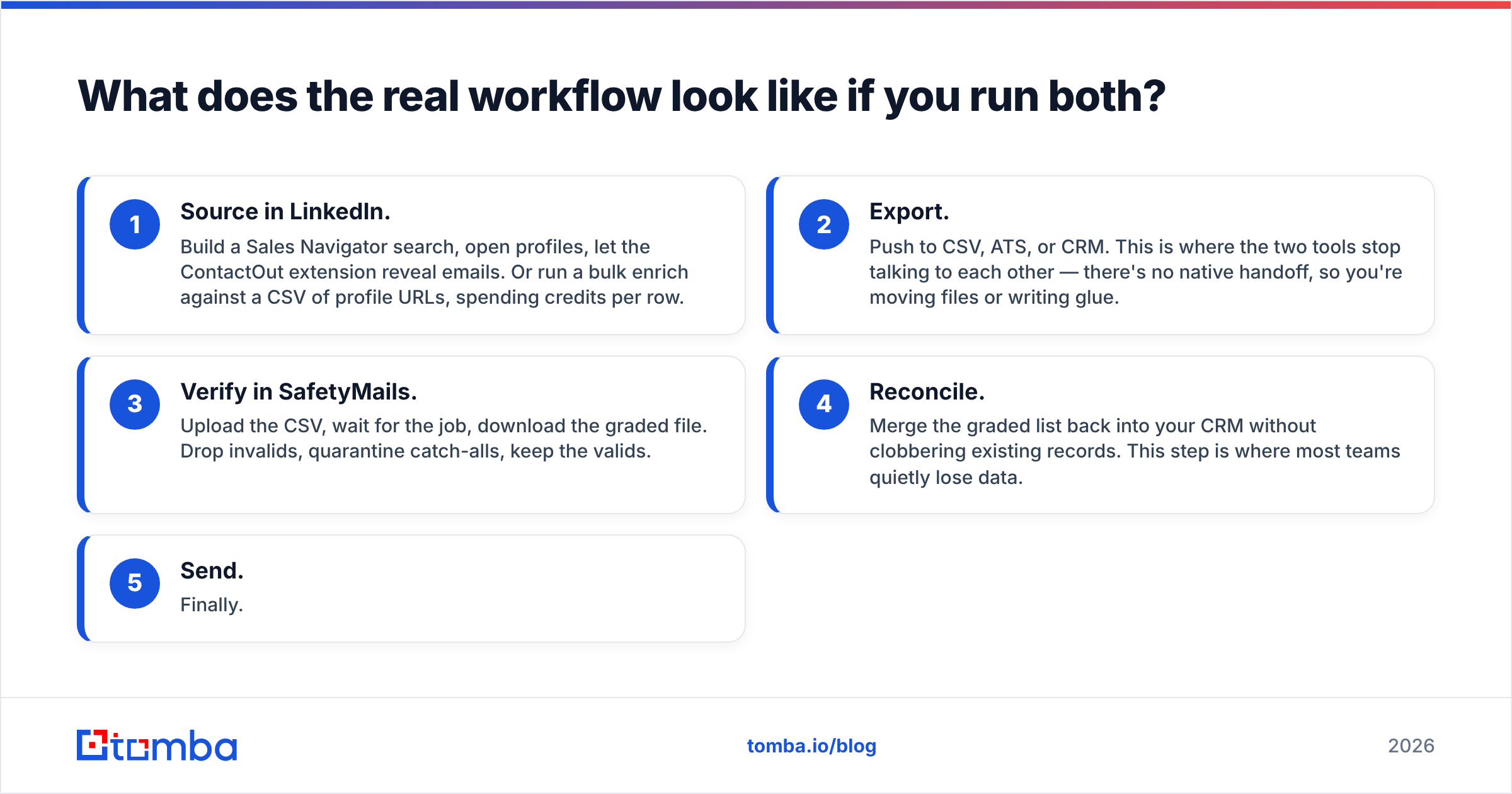
Concretely, a "ContactOut + SafetyMails" stack looks like this:
- Source in LinkedIn. Build a Sales Navigator search, open profiles, let the ContactOut extension reveal emails. Or run a bulk enrich against a CSV of profile URLs, spending credits per row.
- Export. Push to CSV, ATS, or CRM. This is where the two tools stop talking to each other — there's no native handoff, so you're moving files or writing glue.
- Verify in SafetyMails. Upload the CSV, wait for the job, download the graded file. Drop invalids, quarantine catch-alls, keep the valids.
- Reconcile. Merge the graded list back into your CRM without clobbering existing records. This step is where most teams quietly lose data.
- Send. Finally.
That's five steps, two vendors, two billing relationships, two credit pools that expire on different schedules, and one manual file handoff that has to happen every single time. It works. It's just friction you're paying for.
The alternative is a single platform where find-then-verify is one call. With Tomba, the email finder returns a confidence score and verification status in the same response, the email verifier runs on the same credits, and the catch-all verifier handles the grey-zone domains that would otherwise sit in your "unknown" bucket forever. One API key, one export, no CSV ping-pong.

What does each tool actually cost at real volume?#
Sticker price is the wrong comparison. Run the math on 5,000 contacts a month — a modest SDR-team number.
- ContactOut: credit-based. Personal-tier plans are sized for individual sourcers, not teams, so 5,000 reveals a month pushes you into higher tiers or team seats. Budget realistically in the high-hundreds-per-month range once you're past a couple of seats, and check whether phone reveals burn extra credits (they usually do).
- SafetyMails: cheap by comparison. Verification is a commodity priced in fractions of a cent; 5,000 verifications is a rounding error, and pay-as-you-go credits mean you're not on the hook monthly.
- Combined: you're paying premium-finder money plus verifier money, and you're absorbing the integration cost in headcount time.
Now compare against a single-vendor path. Tomba's pricing runs Free (25 searches/mo), Starter at $49/mo, Growth at $99/mo, and Pro at $249/mo, with finder, verifier, domain search, and enrichment drawing from the same pool. For most teams doing four-figure monthly volume, that's a materially smaller line item than a specialist finder plus a specialist verifier — and it collapses steps 2, 3, and 4 of the workflow above into nothing.
Three things worth checking before you commit to any of them:
- Do unused credits roll over? Pay-as-you-go models (SafetyMails) usually let credits sit. Monthly subscriptions (most finders) usually don't.
- Are phone reveals billed separately from email reveals? Almost always yes. If you need B2B phone numbers, price that line separately.
- Does the API cost the same as the UI? Some vendors charge a premium for programmatic access. If you're building automation, that gap compounds fast.
Who should buy ContactOut, and who should buy SafetyMails?#
Buy ContactOut if:
- You're a recruiter or founder-sourcer who lives inside LinkedIn and evaluates candidates one profile at a time.
- Personal emails matter to you — ContactOut is genuinely strong here, and that's a real differentiator for recruiting where work addresses get you filtered.
- Your volume is low and high-value (dozens of contacts a week, each worth a lot), so per-credit cost barely registers.
Buy SafetyMails if:
- You already have a list — from a CRM export, a webinar, a partner, a scraper — and your only problem is bounce risk.
- You need cheap, on-demand verification with no monthly commitment.
- You're a marketer protecting sender reputation before an ESP send, where a 5% bounce rate can get a domain throttled. (If you're not sure how bad your exposure is, run the numbers on email deliverability first.)
Buy neither — buy a combined platform — if:
- You're a sales or growth team running repeatable outbound where new contacts arrive weekly and every one of them needs to be verified before it touches a sequence.
- You want API-first automation rather than a browser extension and a CSV upload.
- You're doing domain-level prospecting ("give me every relevant contact at these 200 companies") rather than profile-level sourcing — that's a domain search job, and neither tool above is built for it.
If ContactOut is on your shortlist mainly for the LinkedIn extension, it's worth comparing against a ContactOut alternative that offers the same browser workflow plus native verification, so you're not maintaining two subscriptions to complete one job.
What's the verdict?#
They're not rivals — they're two halves of the same sentence, and buying only one leaves you with a fragment.
ContactOut wins the sourcing half, especially for recruiting and personal-email discovery inside LinkedIn. SafetyMails wins the hygiene half, cheaply and without a subscription. Neither one is wrong; both are incomplete.
The question worth asking isn't "ContactOut or SafetyMails." It's "how many vendors do I want in the path between a name and a sent email?" Every extra vendor is another export, another credit pool, another integration to babysit, and another invoice. For a solo recruiter, two tools is fine. For a team running outbound at any real cadence, it's a tax.
Do your own due diligence — read live reviews on G2 rather than trusting any vendor's own claims (including ours), and check current plans directly at contactout.com and safetymails.com. Then price the whole workflow, not the cheapest box in it.
Want to skip the handoff entirely? Tomba's Email Finder returns a verified, confidence-scored address in a single call — finder and verifier on the same credits, the same API, and the same export. Start free with 25 searches a month, then scale to Starter at $49/mo when the pipeline demands it. No CSV ping-pong, no second invoice, no bounces you didn't see coming.
Related guides#
Ready to find emails that actually work?
Join 150,000+ professionals who stopped guessing and started sending. Free credits on signup — no credit card required.
Get the Tomba newsletter
Practical outbound tactics and product updates — once every two weeks.
About the author