ContactOut vs SecureMailMerge (2026): Honest Comparison
One tool finds the email address. The other sends the email securely. Here is where ContactOut and SecureMailMerge actually overlap, where they don't, and which one your outbound stack is missing.
Most "ContactOut vs SecureMailMerge" searches start from a false premise: that these two tools compete. They don't. One is a contact-data tool that pulls email addresses and phone numbers off LinkedIn profiles. The other is a Gmail add-on that sends encrypted, personalized mail merges. Put them side by side and you get a workflow, not a duel.
But the question still deserves a real answer, because budget is finite and both tools bill you monthly. This breakdown covers what each product actually does, where the overlap is thin, what you're really choosing between, and how to decide when you can only fund one.
TL;DR#
- ContactOut is a data tool. It finds work emails, personal emails, and phone numbers from LinkedIn profiles and company pages. It does not send campaigns at scale with encryption.
- SecureMailMerge is a sending tool. It's a Gmail/Outlook add-on for personalized mail merges with a privacy-first, end-to-end-encrypted posture. It does not find contacts for you.
- They are complementary, not competitive. The overlap is roughly 10% (both touch outbound email), and choosing "one or the other" usually means you've misdiagnosed your bottleneck.
- Your real question is: is my bottleneck data or delivery? Empty CRM fields and bounced sends mean you need a finder. Deliverable-but-generic blasts mean you need a better sender.
- A finder with verification built in (Tomba, ContactOut, or similar) is the higher-leverage buy for most teams, because bad data poisons every downstream tool including a perfectly configured mail merge.
What is ContactOut and who is it for?#
ContactOut is a contact-enrichment platform best known for its Chrome extension. You browse a LinkedIn profile, click the extension, and it surfaces the person's work email, personal email, and often a phone number. It also ships a searchable B2B database, a data-enrichment API, and bulk CSV export.
The buyer profile is clear: recruiters and SDRs who live inside LinkedIn Sales Navigator or Recruiter all day. If your prospecting motion is "find humans on LinkedIn, get their contact details, push to CRM," ContactOut is built for that exact loop. Its personal-email coverage is genuinely strong, which matters more in recruiting than in B2B sales.
What it is not: a sending platform. There's basic email-sending functionality bolted on, but nobody buys ContactOut to run a 5,000-contact sequence. And it says nothing about encryption, GDPR-grade privacy in transit, or protecting the content of what you send.
What is SecureMailMerge and who is it for?#
SecureMailMerge sits at the opposite end of the pipeline. It's an add-on that lives inside Gmail (and Outlook) and turns a spreadsheet plus a template into a batch of personalized, individually sent emails. The differentiator in its name is the point: it markets itself on privacy — your contact list and message content are encrypted, and the vendor positions itself as not storing or mining your data on external servers the way many mail-merge SaaS tools do.
That posture attracts a specific buyer: legal, healthcare, finance, education, and EU-based orgs where a compliance officer will ask, "where does this list physically go, and who can read it?" If your answer needs to be "nowhere, and nobody," most mainstream sequencers are disqualified and SecureMailMerge becomes interesting.
What it is not: a source of contacts. You supply the list. If your list is stale or unverified, SecureMailMerge will faithfully, privately, and encryptedly send 300 emails into the void.

ContactOut vs SecureMailMerge: how do they actually compare?#
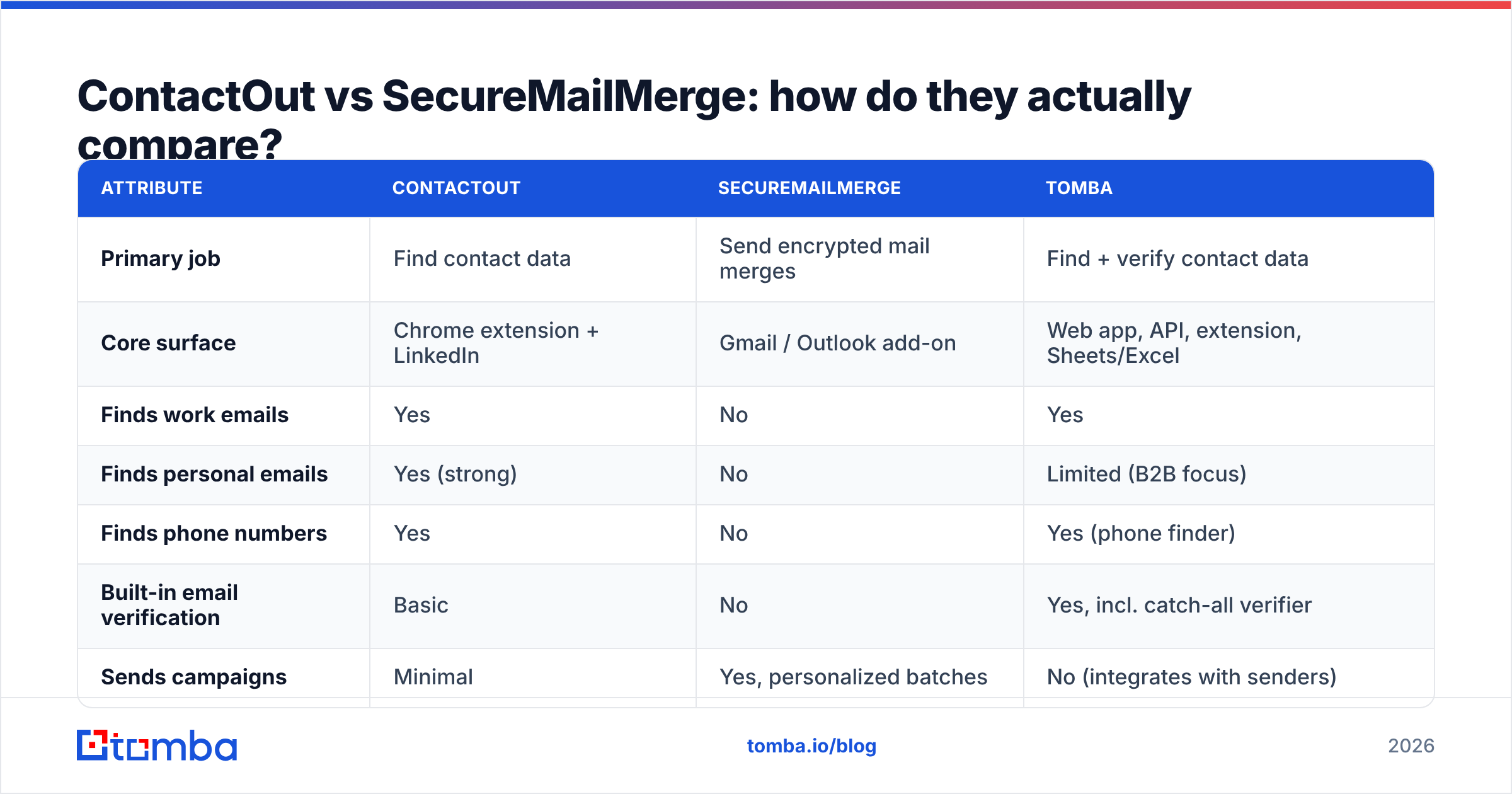
Here's the head-to-head on the attributes that decide the purchase.
| Attribute | ContactOut | SecureMailMerge | Tomba |
|---|---|---|---|
| Primary job | Find contact data | Send encrypted mail merges | Find + verify contact data |
| Core surface | Chrome extension + LinkedIn | Gmail / Outlook add-on | Web app, API, extension, Sheets/Excel |
| Finds work emails | Yes | No | Yes |
| Finds personal emails | Yes (strong) | No | Limited (B2B focus) |
| Finds phone numbers | Yes | No | Yes (phone finder) |
| Built-in email verification | Basic | No | Yes, incl. catch-all verifier |
| Sends campaigns | Minimal | Yes, personalized batches | No (integrates with senders) |
| End-to-end encryption | Not a focus | Core selling point | N/A for sending |
| API access | Yes, paid tiers | No meaningful API | Yes, on all paid tiers |
| Free tier | Limited credits | Limited sends/day | 25 searches/mo |
| Entry paid price | ~$29–$99/mo (varies by plan/seat) | ~€10–€30/mo per user | $49/mo (Starter) |
| Best for | LinkedIn-native recruiters and SDRs | Privacy-bound teams sending from Gmail | Teams needing verified B2B emails at volume |
Two things fall out of that table. First, there is exactly one row where these tools genuinely collide — "sends campaigns" — and it's ContactOut's weakest column. Second, the buying decision most people are actually facing isn't ContactOut vs SecureMailMerge at all. It's "which half of my pipeline is broken."
Is one of them better than the other?#
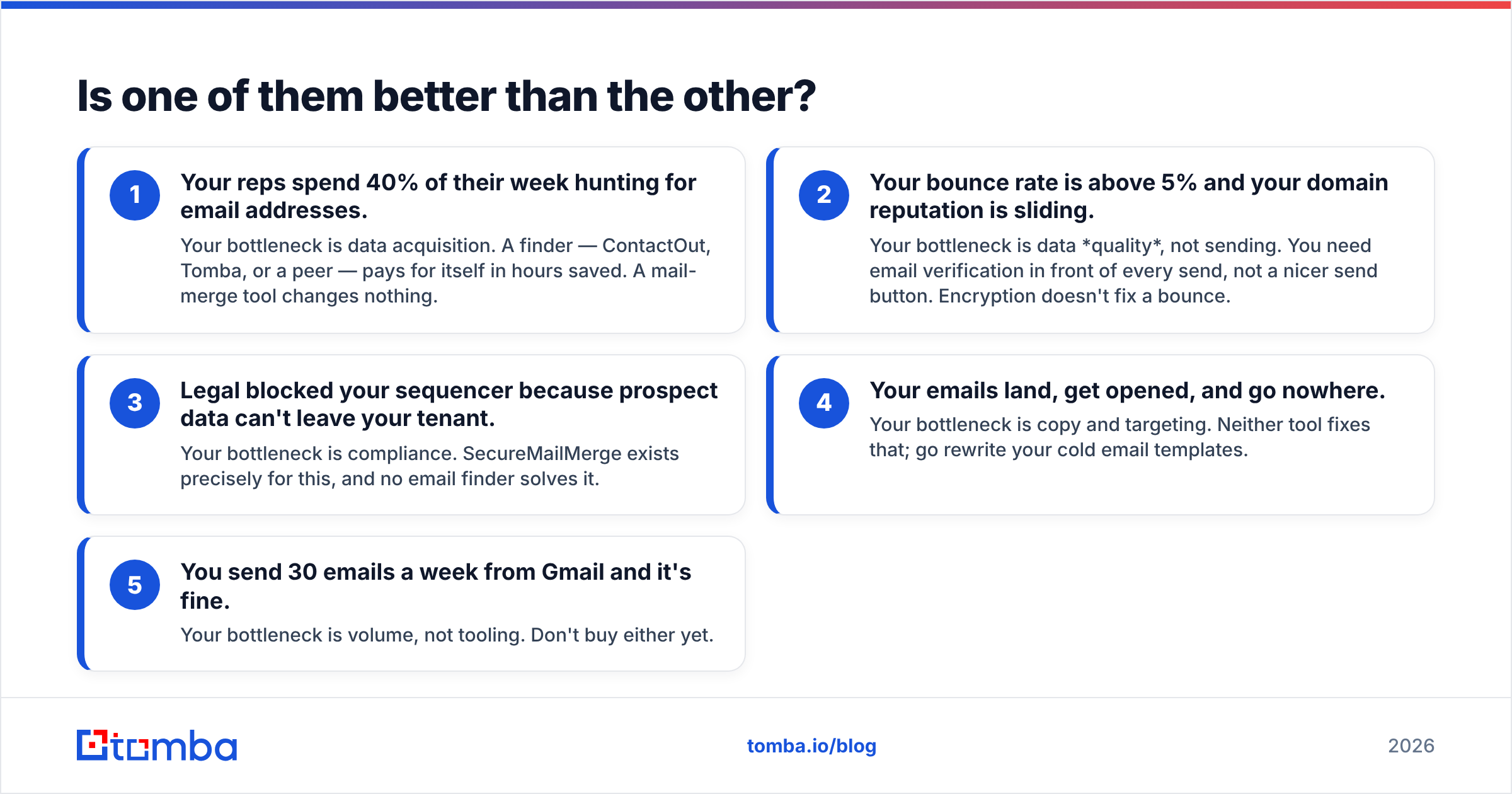
No, and any post that declares a winner here is comparing a hammer to a screwdriver. The useful question is which failure mode you're currently living with.
- Your reps spend 40% of their week hunting for email addresses. Your bottleneck is data acquisition. A finder — ContactOut, Tomba, or a peer — pays for itself in hours saved. A mail-merge tool changes nothing.
- Your bounce rate is above 5% and your domain reputation is sliding. Your bottleneck is data quality, not sending. You need email verification in front of every send, not a nicer send button. Encryption doesn't fix a bounce.
- Legal blocked your sequencer because prospect data can't leave your tenant. Your bottleneck is compliance. SecureMailMerge exists precisely for this, and no email finder solves it.
- Your emails land, get opened, and go nowhere. Your bottleneck is copy and targeting. Neither tool fixes that; go rewrite your cold email templates.
- You send 30 emails a week from Gmail and it's fine. Your bottleneck is volume, not tooling. Don't buy either yet.
Diagnose before you buy. Most teams that ask this question in 2026 are in bucket 1 or 2 — which means the data side is where the money should go first.
What does the pricing really look like?#
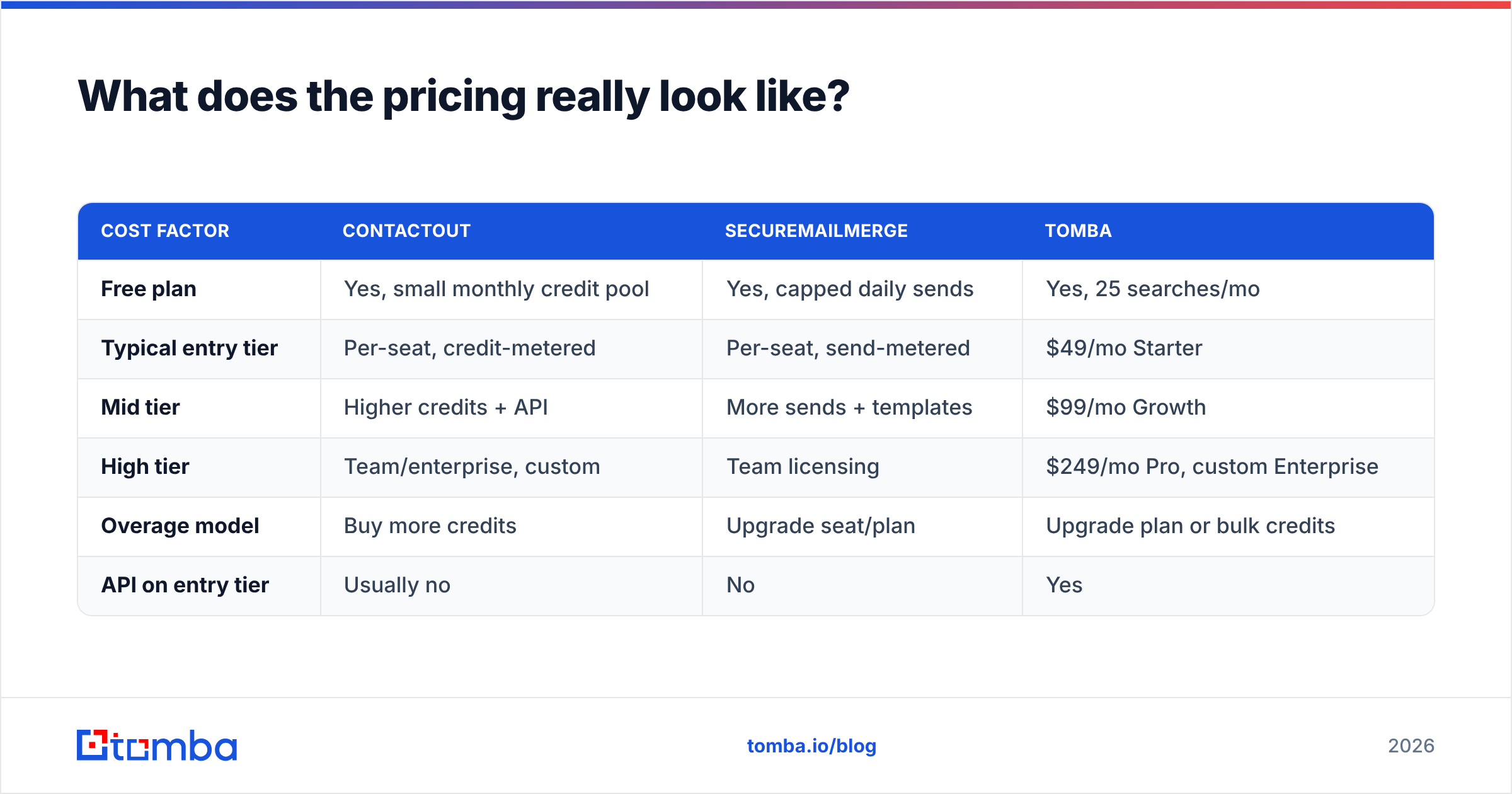
Both vendors price per seat, and both have the classic add-on gotcha: the number that gets you in the door is not the number you end up paying.
| Cost factor | ContactOut | SecureMailMerge | Tomba |
|---|---|---|---|
| Free plan | Yes, small monthly credit pool | Yes, capped daily sends | Yes, 25 searches/mo |
| Typical entry tier | Per-seat, credit-metered | Per-seat, send-metered | $49/mo Starter |
| Mid tier | Higher credits + API | More sends + templates | $99/mo Growth |
| High tier | Team/enterprise, custom | Team licensing | $249/mo Pro, custom Enterprise |
| Overage model | Buy more credits | Upgrade seat/plan | Upgrade plan or bulk credits |
| API on entry tier | Usually no | No | Yes |
Two practical notes. First, credit-metered data tools punish exploration — every failed lookup on a stale profile burns budget, which is why verification quality matters more than headline credit counts. Second, seat-based send tools punish growth: adding three SDRs triples the bill regardless of volume. Check the current Tomba pricing and both vendors' own pages before you model anything; all three move their tiers more often than their marketing pages suggest.
Where does an email finder like Tomba fit into this?#
If you strip the branding away, an outbound motion has four stages: source → verify → enrich → send. ContactOut covers source and part of enrich. SecureMailMerge covers send. Nothing in this comparison covers verify well, and verify is where most campaigns quietly die.
That's the gap Tomba is built for. It's a dedicated email finder with verification as a first-class step rather than an afterthought: find the address by name and domain, run it through the verifier, flag catch-all domains explicitly instead of silently passing them through, and only then hand the list to whatever you send with — SecureMailMerge, Instantly, Smartlead, or plain Gmail.
The practical difference shows up in three places:
- Catch-all handling. Most finders return catch-all domains as "valid" because the mail server accepts everything. A dedicated catch-all finder marks them separately, so you can route them to a lower-risk send or skip them.
- Bulk and API access. Bulk email finder runs and the Tomba API are available on paid tiers rather than reserved for enterprise, which matters if you're wiring data into a CRM or a spreadsheet workflow.
- Domain-level discovery. Domain search returns every discoverable address at a company plus the org's email pattern — useful when you know the account but not the person, which is the normal state of ABM.
None of that competes with SecureMailMerge. It feeds it.

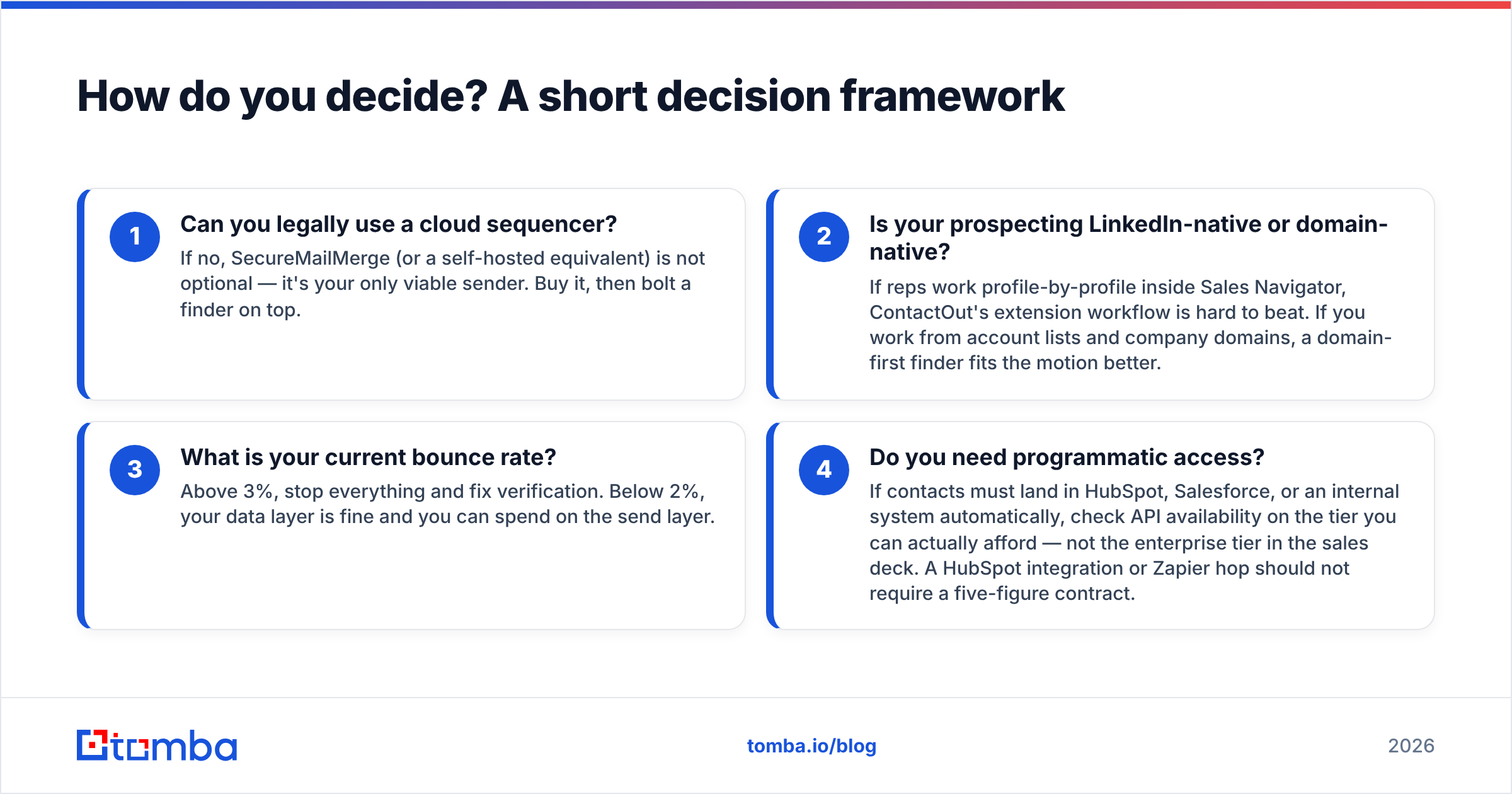
How do you decide? A short decision framework#
Run these four questions in order.
- Can you legally use a cloud sequencer? If no, SecureMailMerge (or a self-hosted equivalent) is not optional — it's your only viable sender. Buy it, then bolt a finder on top.
- Is your prospecting LinkedIn-native or domain-native? If reps work profile-by-profile inside Sales Navigator, ContactOut's extension workflow is hard to beat. If you work from account lists and company domains, a domain-first finder fits the motion better.
- What is your current bounce rate? Above 3%, stop everything and fix verification. Below 2%, your data layer is fine and you can spend on the send layer.
- Do you need programmatic access? If contacts must land in HubSpot, Salesforce, or an internal system automatically, check API availability on the tier you can actually afford — not the enterprise tier in the sales deck. A HubSpot integration or Zapier hop should not require a five-figure contract.
If you're comparing more broadly, third-party review sites like G2 are useful for spotting recurring complaints (support latency, credit rollover, extension breakage after LinkedIn UI changes) that vendor sites will never surface. Read the 3-star reviews, not the 5-star ones.
What about the alternatives to both?#
Neither of these tools is the only option in its lane, and the honest advice is to shortlist inside the correct lane.
| If you need... | Look at |
|---|---|
| LinkedIn-first contact extraction | ContactOut, Wiza, ContactOut alternatives |
| Domain-first email finding + verification | Tomba, Hunter, Findymail |
| Privacy-hard sending from Gmail | SecureMailMerge, self-hosted mail merge |
| High-volume sequencing (privacy not a blocker) | Instantly, Smartlead, Lemlist |
| Pure verification of an existing list | Tomba email verifier, ZeroBounce, NeverBounce |
| Curated, human-verified B2B lists | BookYourData |
Note the last row. If your problem is that you don't have a list at all and don't want to build one profile by profile, a purpose-built B2B list vendor like BookYourData solves a different problem than either tool in this comparison — you buy the contacts outright rather than mining them. It's a legitimate third path, especially for teams without the headcount to run enrichment workflows.
What's the verdict?#
ContactOut wins if your job is finding people on LinkedIn. Its extension workflow is fast, personal-email coverage is above average, and recruiters in particular get real leverage from it. The tradeoffs are credit-metered pricing and a sending story that isn't a story.
SecureMailMerge wins if your job is sending safely from Gmail. It's the right answer to a compliance question, and a bad answer to a data question. If legal is in the room, this is your tool.
Neither wins if your bottleneck is data quality, which — based on how often "why is my bounce rate 8%" shows up in outbound teardowns — is the most common bottleneck of the three. A tool that finds and verifies in the same pass removes the failure mode that both of these products leave on the table.
Start with the Tomba Email Finder if that's you. The free tier gives you 25 searches a month to test accuracy against a list you already know the answers to — run 25 known-good contacts through it, check the hit rate, then decide. Paid plans start at $49/mo with API access included, so you can wire verified contacts straight into ContactOut's CRM push, SecureMailMerge's spreadsheet, or whatever sender you land on. Fix the data first; the sending layer gets easier from there.
Related guides#
Ready to find emails that actually work?
Join 150,000+ professionals who stopped guessing and started sending. Free credits on signup — no credit card required.
Get the Tomba newsletter
Practical outbound tactics and product updates — once every two weeks.
About the author