ContactOut vs Sendigram (2026): Which One Actually Wins?
ContactOut and Sendigram get compared constantly, but they solve different halves of the outbound problem. Here's an honest breakdown of accuracy, pricing, LinkedIn coverage, and which one belongs in your stack in 2026.
TL;DR#
- ContactOut is a contact-data tool. It lives in your browser, sits on top of LinkedIn, and its job is to reveal personal and work emails plus phone numbers for the profiles you're already looking at. Recruiters are its core audience.
- Sendigram sits closer to the sending side. It's positioned around outbound infrastructure — inboxes, deliverability, and getting cold email actually delivered — rather than around a deep, queryable B2B contact graph.
- That means they are not clean substitutes. Most teams comparing "ContactOut vs Sendigram" are really asking "do I need better data or better delivery?" The honest answer is usually both, and the two products only overlap at the edges.
- Per-seat pricing is the hidden cost. ContactOut's model scales with headcount, which hurts once you add SDRs or want programmatic access. Volume-based pricing (like Tomba pricing at $49/mo Starter) is cheaper per verified contact once you go past manual sourcing.
- If you want one tool to both source and verify at scale via API, neither is the natural pick. A dedicated email finder with a verification layer is.
What is ContactOut, and who is it really built for?#
ContactOut is a contact-enrichment tool best known for its Chrome extension. You open a LinkedIn profile, click the extension, and it surfaces work email, personal email, and phone number — pulled from a large aggregated contact database and cross-referenced against the profile you're viewing.
Its DNA is recruiting. The marketing, the feature set, and the search filters on ContactOut's site all point at talent sourcing: find the candidate, get the personal Gmail, reach them outside their work inbox. That focus is a genuine strength. Personal-email coverage is where ContactOut consistently outperforms sales-first data tools, because sales tools rarely bother with a candidate's private address.
The knock-on effects matter for sales teams, though:
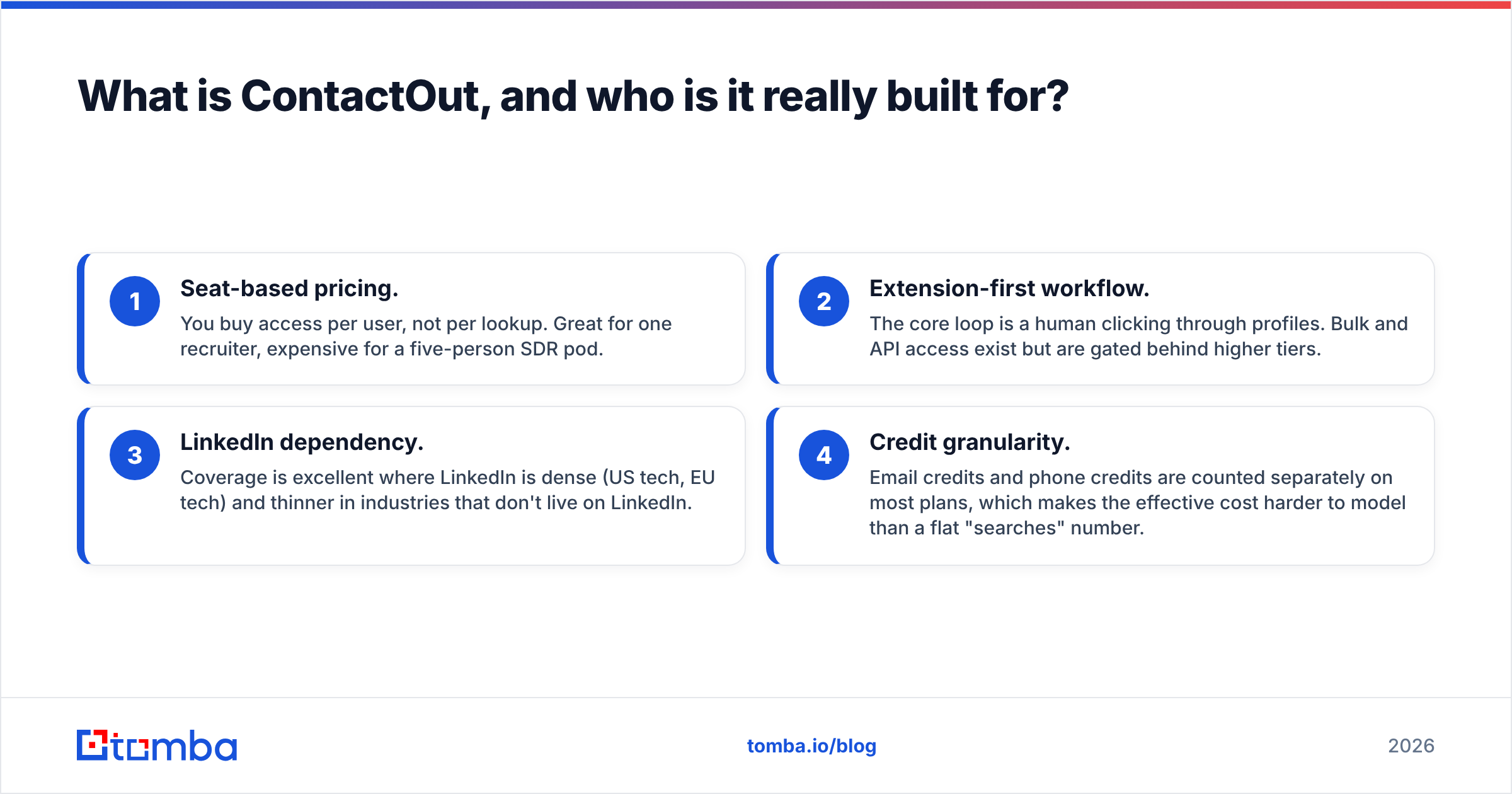
- Seat-based pricing. You buy access per user, not per lookup. Great for one recruiter, expensive for a five-person SDR pod.
- Extension-first workflow. The core loop is a human clicking through profiles. Bulk and API access exist but are gated behind higher tiers.
- LinkedIn dependency. Coverage is excellent where LinkedIn is dense (US tech, EU tech) and thinner in industries that don't live on LinkedIn.
- Credit granularity. Email credits and phone credits are counted separately on most plans, which makes the effective cost harder to model than a flat "searches" number.
If your job is "reach 40 senior engineers this week," ContactOut is a strong tool. If your job is "enrich 40,000 rows in a CRM tonight," it isn't the shape of tool you want.

What is Sendigram, and how is it different?#
Sendigram is the newer and less-documented of the two, and it's worth being precise rather than confident. Based on its own positioning, Sendigram is built around the sending side of cold outreach — the infrastructure that determines whether the email you send actually lands: inboxes, domains, warmup, sending reputation, and campaign throughput.
That's a fundamentally different problem than "who is this person and what is their email address."
The confusion is understandable. Both products show up when you search for cold-outreach tooling, both talk about "getting more replies," and both live in the same buying conversation. But the mechanism is different:
- ContactOut answers: Do I have a correct, reachable address for this specific human?
- Sendigram answers: When I send to that address, does it land in the inbox or the spam folder?
You can have perfect data and terrible email deliverability. You can also have a pristine sending setup that burns itself down because 22% of your list bounces. Those are two separate failure modes, and buying the wrong tool for your actual failure mode is the most common mistake in this category.
A caveat, stated plainly: Sendigram is a smaller, faster-moving vendor than ContactOut, and its feature set and pricing have changed more than once. Verify the current plan structure on their site before you commit to anything below — the shape of the comparison holds, but the numbers move.
How do ContactOut and Sendigram compare head-to-head?#
Here's the practical comparison, with Tomba included as the volume/API reference point because that's the third option most buyers end up evaluating.

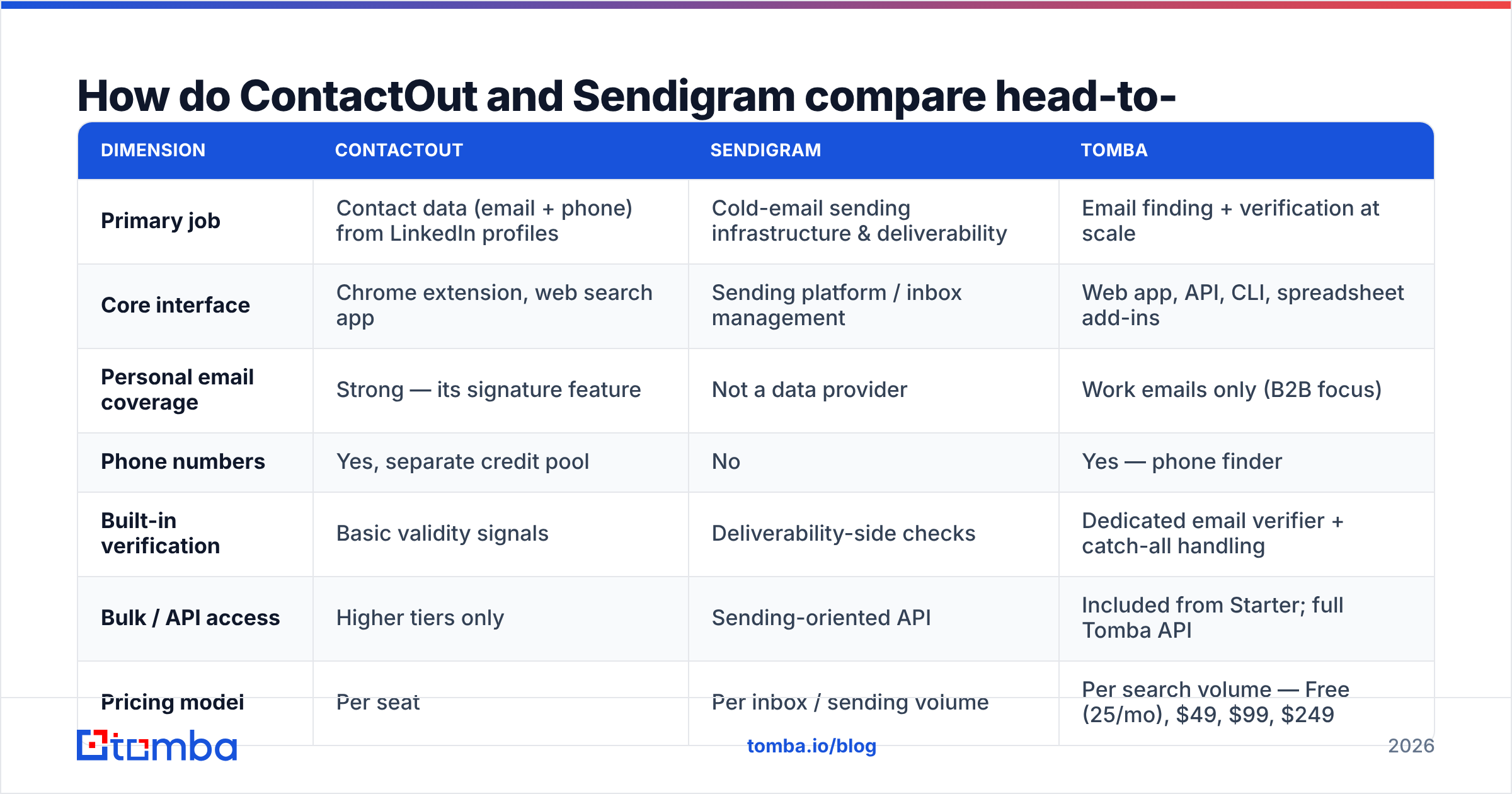
| Dimension | ContactOut | Sendigram | Tomba |
|---|---|---|---|
| Primary job | Contact data (email + phone) from LinkedIn profiles | Cold-email sending infrastructure & deliverability | Email finding + verification at scale |
| Core interface | Chrome extension, web search app | Sending platform / inbox management | Web app, API, CLI, spreadsheet add-ins |
| Personal email coverage | Strong — its signature feature | Not a data provider | Work emails only (B2B focus) |
| Phone numbers | Yes, separate credit pool | No | Yes — phone finder |
| Built-in verification | Basic validity signals | Deliverability-side checks | Dedicated email verifier + catch-all handling |
| Bulk / API access | Higher tiers only | Sending-oriented API | Included from Starter; full Tomba API |
| Pricing model | Per seat | Per inbox / sending volume | Per search volume — Free (25/mo), $49, $99, $249 |
| Best for | Recruiters, executive search, founder-led sourcing | Teams whose emails are landing in spam | SDR teams, RevOps, developers enriching at scale |
| Weakest at | Cost at team scale, non-LinkedIn industries | Doesn't find contacts for you | No personal/consumer emails by design |
The row that decides most purchases is the last-but-one: pricing model. Per-seat pricing is a tax on team growth. Per-search pricing is a tax on volume. Which one hurts less depends entirely on whether your bottleneck is people or records.
Which one finds more accurate emails?#
This is a slightly unfair question, because only one of them is a data provider. But the underlying anxiety — will my list bounce? — is the right anxiety, so let's take it seriously.
Accuracy in this category is three separate things that vendors love to blur together:
- Coverage / hit rate — of 1,000 target contacts, how many does the tool return any address for?
- Precision — of the addresses it returns, how many are actually deliverable?
- Confidence honesty — does the tool tell you when it's guessing? A pattern-generated
first.last@company.comwith no verification signal is a guess wearing a suit.
ContactOut scores well on (1) for LinkedIn-visible professionals and reasonably on (2), particularly for personal addresses where mailbox-level checks are harder for competitors to run. Where it gets shakier is (3) — like most extension-first tools, the UI presents results with more certainty than the underlying signal warrants.
Sendigram doesn't compete on this axis at all. If your list is bad, a sending platform will faithfully deliver your bad list into a bounce wall and take your domain reputation with it. That's not a flaw in Sendigram; it's a category boundary.

The practical move, whichever tool you buy: never send to an unverified address. Run the list through a verifier that distinguishes valid, invalid, risky, and catch-all before it touches a sequence. A catch-all verifier matters more than most people realise — catch-all domains accept everything at SMTP time and then silently discard, which is how a "0% bounce" campaign still produces zero replies.

How does the pricing actually work out?#
Prices move, so treat these as shapes rather than quotes — check each vendor's page before you buy.
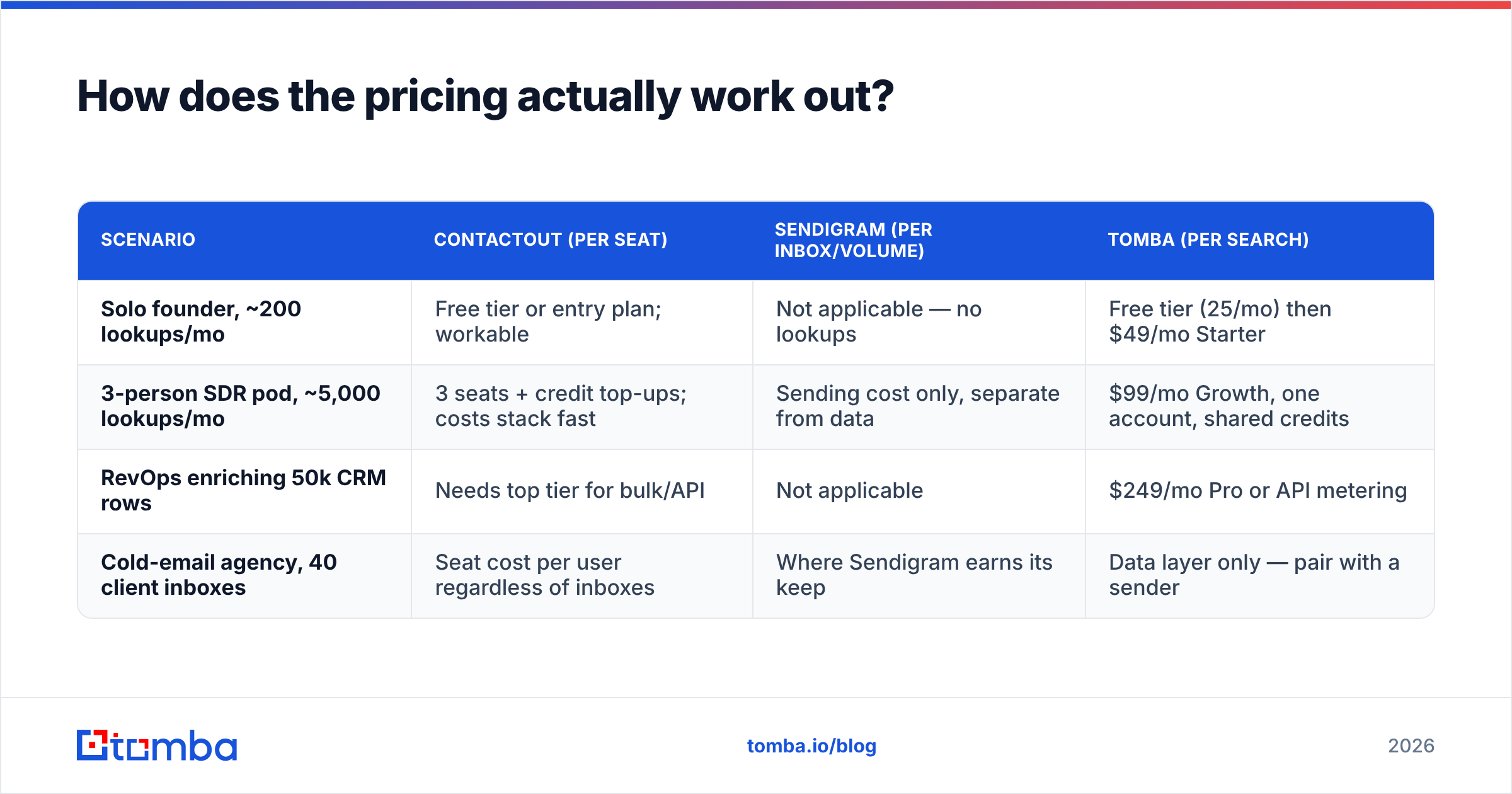
| Scenario | ContactOut (per seat) | Sendigram (per inbox/volume) | Tomba (per search) |
|---|---|---|---|
| Solo founder, ~200 lookups/mo | Free tier or entry plan; workable | Not applicable — no lookups | Free tier (25/mo) then $49/mo Starter |
| 3-person SDR pod, ~5,000 lookups/mo | 3 seats + credit top-ups; costs stack fast | Sending cost only, separate from data | $99/mo Growth, one account, shared credits |
| RevOps enriching 50k CRM rows | Needs top tier for bulk/API | Not applicable | $249/mo Pro or API metering |
| Cold-email agency, 40 client inboxes | Seat cost per user regardless of inboxes | Where Sendigram earns its keep | Data layer only — pair with a sender |
The pattern: ContactOut's cost grows with headcount, Sendigram's grows with sending surface area, and a volume-priced finder's grows with records. If you have three SDRs each doing 300 lookups a month, per-seat pricing means you're paying for three licences to do 900 lookups — work that fits comfortably inside a single $49 plan elsewhere.
Cross-check current numbers on G2 before signing anything annual. Vendors in this space repackage tiers roughly twice a year.
Which tool fits which team?#
- You're a recruiter or executive searcher. ContactOut, clearly. Personal-email coverage is the whole job, and no volume-priced B2B finder will match it. This is the one use case where the seat price is defensible.
- Your emails are landing in spam and you already have good data. Your problem is deliverability, not sourcing. Fix sender reputation, authentication, and warmup — a sending-side platform like Sendigram is the right category. Run an SPF checker before you spend a dollar; a broken record is a free fix.
- You're an SDR team building lists from scratch. Neither is ideal alone. You want a volume-priced finder for the data layer and a sender for delivery. Two tools, two budgets, no overlap.
- You're a developer or RevOps engineer enriching a database. Extension-first tools are the wrong shape. You need an API, bulk endpoints, and predictable per-record cost.
- You're evaluating because a competitor's pricing page annoyed you. Fair. Look at ContactOut alternatives side by side rather than forcing a two-way choice that doesn't map to your actual bottleneck.
What do both tools get wrong that nobody mentions?#
They both assume the list already exists. ContactOut assumes you're on a LinkedIn profile. Sendigram assumes a CSV is ready to load. Neither helps you decide who to target — that's still a strategy problem, and no tool solves it for you.
Bounce risk is treated as someone else's job. ContactOut hands you an address; Sendigram sends to it. The verification step in the middle is where campaigns quietly die, and it's structurally nobody's responsibility in a two-tool stack unless you make it yours.
Catch-all domains are handled inconsistently. Roughly a fifth of B2B domains are catch-all. Tools that report them as "valid" are inflating their accuracy numbers, and tools that report them as "invalid" are throwing away real prospects. Ask any vendor directly how they classify catch-alls — the answer tells you more about their honesty than any G2 badge.
Credit rollover and refunds vary wildly. Whether an invalid result burns a credit is a small clause with a big bill attached. Read it.
Is there a better option than either?#
For a sales team, often yes — and it's usually a different shape of tool rather than a better version of the same one.
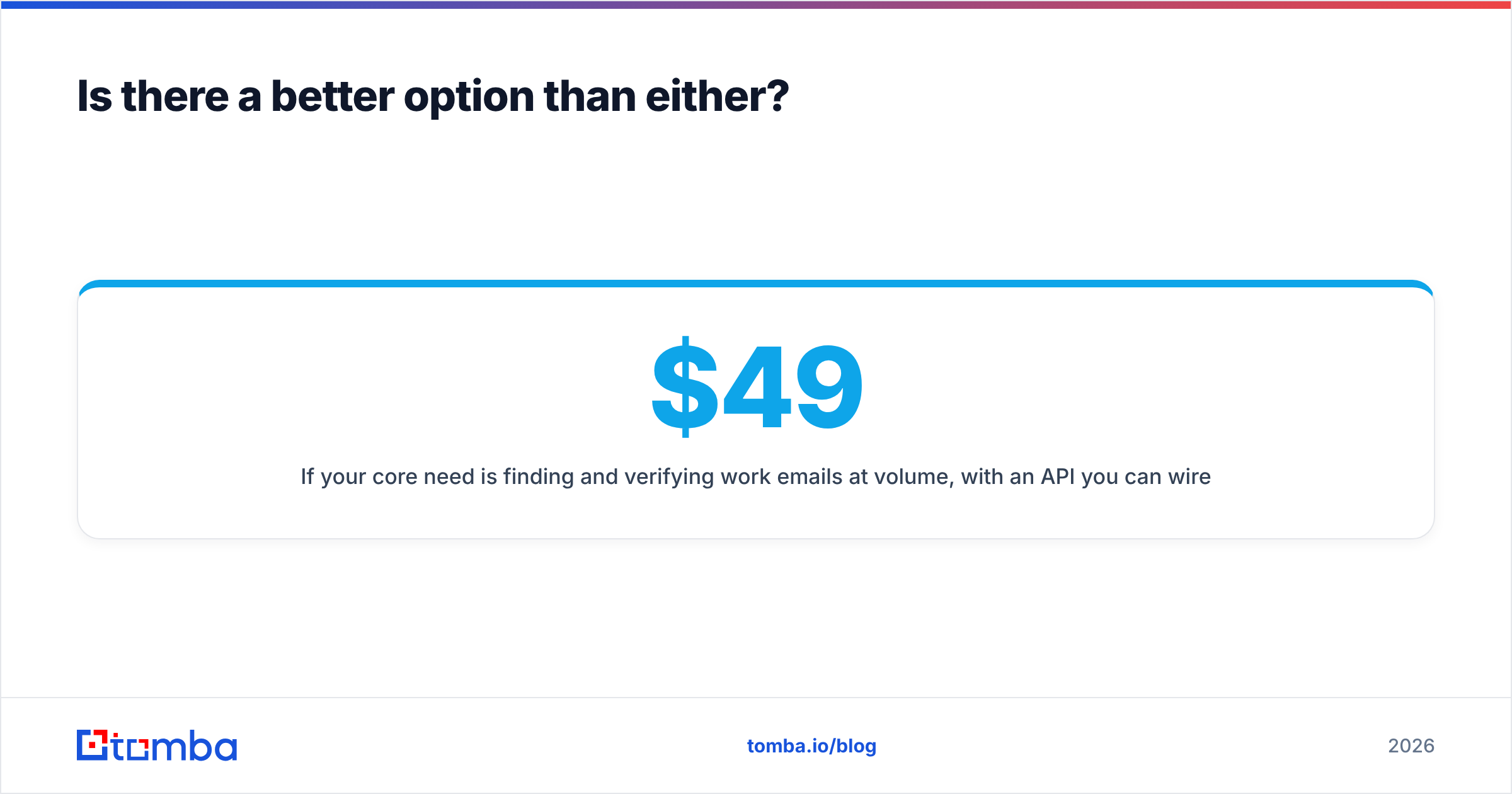
If your core need is finding and verifying work emails at volume, with an API you can wire into your own pipeline, that's what Tomba is built for. Domain search pulls every discoverable address at a company, the bulk email finder handles lists, and verification is native rather than bolted on. Pricing is per volume — Free (25 searches/mo), Starter $49/mo, Growth $99/mo, Pro $249/mo — so adding a teammate doesn't add a licence fee.
What Tomba deliberately does not do: personal/consumer emails. If you need someone's private Gmail for a recruiting outreach, ContactOut is genuinely better, and pretending otherwise would be dishonest.
And if your problem is that good emails are landing in spam, no data tool fixes that. That's a sending-infrastructure problem, and that's the market Sendigram is playing in.
Which should you pick in 2026?#
Pick ContactOut if you source candidates from LinkedIn and personal emails are the deliverable. It's the strongest tool in that lane and the seat price buys you real coverage.
Pick Sendigram if your data is fine and your deliverability isn't — if you're running multiple sending domains, managing inbox pools, or watching reply rates fall while bounce rates stay flat.
Pick neither, and pick a volume-priced finder, if you're an SDR team, a RevOps function, or a developer who needs verified work emails by the thousand, through an API, without paying per human who touches the data.
The framing "ContactOut vs Sendigram" only makes sense as a budget question — two line items competing for the same money. As a capability question, they barely overlap. Figure out whether your campaigns are failing at find or at deliver, and buy for that failure.
Ready to fix the data layer? Tomba's Email Finder finds and verifies work emails by name, domain, or company, with real confidence scores, catch-all detection, and an API that costs the same whether one person or ten people use it. Start free with 25 searches a month, then scale to $49/mo when you outgrow it — no seats, no surprises.
Related guides#
Ready to find emails that actually work?
Join 150,000+ professionals who stopped guessing and started sending. Free credits on signup — no credit card required.
Get the Tomba newsletter
Practical outbound tactics and product updates — once every two weeks.
About the author