ContactOut vs Sendster: Which Tool Do You Actually Need in 2026?
ContactOut finds the contacts. Sendster sends the emails. Most teams comparing them are really asking the wrong question — here's the honest breakdown of what each one does, what it costs, and what you still need.
TL;DR#
- ContactOut and Sendster are not competitors. ContactOut is a contact-data tool (find emails and phone numbers, mostly from LinkedIn). Sendster is a self-hosted email marketing sender that plugs into your own SMTP provider. One fills the list, the other mails it.
- If you're evaluating them head-to-head, you probably need both layers — a data source, a verification step, and a sending platform — and you're currently missing at least one.
- ContactOut's model is per-seat and credit-capped, which gets expensive when more than two or three people need lookups. Sendster's model is a one-time license plus whatever your SMTP relay charges per email.
- Neither tool solves deliverability on its own. Sendster will happily blast a stale list into a spam folder; ContactOut's data still needs verifying before send.
- The cheapest working stack for most B2B teams in 2026: an API-first data source (Tomba, $49/mo Starter), a verifier, and whatever sender you already pay for.
What problem is each tool actually solving?#
Start here, because the "vs" framing hides the real answer.
ContactOut is a B2B contact database with a Chrome extension. You browse LinkedIn, hit the extension, and it surfaces work emails, personal emails, and sometimes phone numbers for the profile you're looking at. It also ships a search portal and an API. Its customers are recruiters and SDRs who live inside LinkedIn Recruiter or Sales Navigator all day. It does not send email.
Sendster is an email marketing application — the kind you license once and run on your own server. You connect an SMTP provider (Amazon SES, SendGrid, Mailgun, your own postfix box), import a list, build a campaign, and send. It has automations, segmentation, autoresponders, and a drag-and-drop editor. It does not find anyone's email address for you.
So the honest comparison isn't "which is better." It's: which layer of your outbound stack is missing, and is this the right tool to fill it?
Think of it like building a car. ContactOut is the fuel. Sendster is the engine. Asking which is better gets you a driveway ornament either way.
ContactOut vs Sendster: how do they compare on paper?#
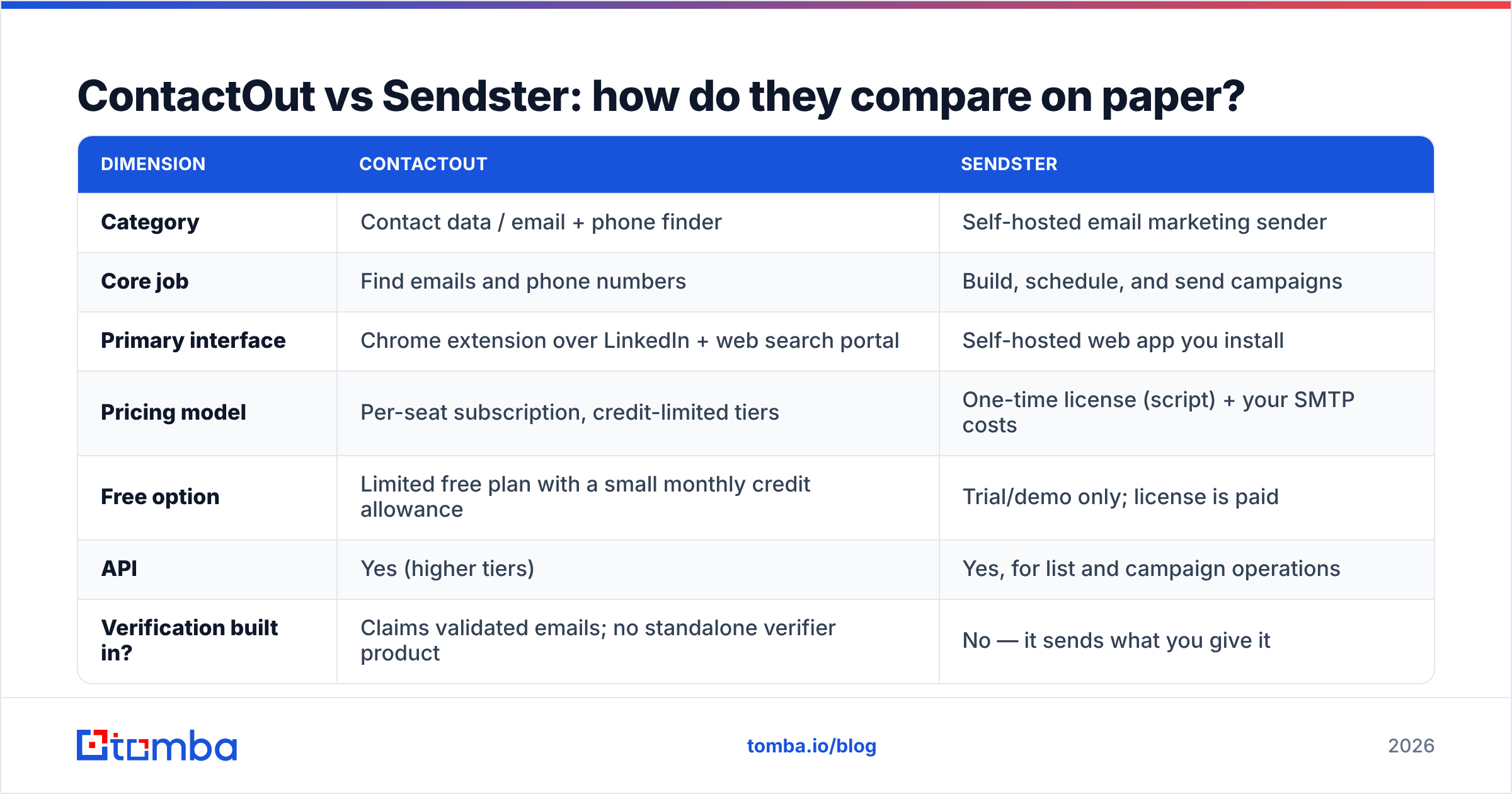
| Dimension | ContactOut | Sendster |
|---|---|---|
| Category | Contact data / email + phone finder | Self-hosted email marketing sender |
| Core job | Find emails and phone numbers | Build, schedule, and send campaigns |
| Primary interface | Chrome extension over LinkedIn + web search portal | Self-hosted web app you install |
| Pricing model | Per-seat subscription, credit-limited tiers | One-time license (script) + your SMTP costs |
| Free option | Limited free plan with a small monthly credit allowance | Trial/demo only; license is paid |
| API | Yes (higher tiers) | Yes, for list and campaign operations |
| Verification built in? | Claims validated emails; no standalone verifier product | No — it sends what you give it |
| Deliverability tooling | Not applicable | Depends entirely on your SMTP relay + domain setup |
| Bulk enrichment | Yes, credit-metered | Import-only (you supply the data) |
| Best fit | Recruiters and SDRs sourcing inside LinkedIn | Teams who want to own their sending infra and avoid per-contact SaaS fees |
Read that table twice. There is exactly one row where these two products touch — the API row — and even there they're doing different things.

What does ContactOut do well, and where does it hurt?#
Where it wins:
- LinkedIn-native workflow. If your sourcing motion is "search Sales Navigator, open profile, grab contact," ContactOut is genuinely fast. The extension sits right where you work.
- Personal email coverage. Recruiters care about this more than sales does, and ContactOut has invested heavily in personal (non-work) email coverage — a meaningful differentiator against pure B2B databases.
- Phone numbers. Coverage is real, if uneven by geography.
Where it hurts:
- Per-seat pricing scales badly. The moment you have five SDRs, five recruiters, and a RevOps person who needs bulk enrichment, per-seat credit tiers get uncomfortable fast. Check the current plans on contactout.com before you budget — tiers move.
- Credit ceilings. Every plan caps lookups. If a campaign needs 8,000 contacts this month and your plan grants 2,000, you're buying an upgrade or waiting.
- You're tethered to LinkedIn. Great if that's your ICP surface. Bad if you're prospecting from conference attendee lists, G2 categories, funding announcements, or your own site traffic.
- No verification layer. "Validated" in a vendor's marketing copy and a fresh SMTP-level check are not the same thing. A list that was accurate six months ago decays — B2B contact data churns at roughly 25–30% a year, and every bounced send eats your sender reputation.
What does Sendster do well, and where does it hurt?#
Where it wins:
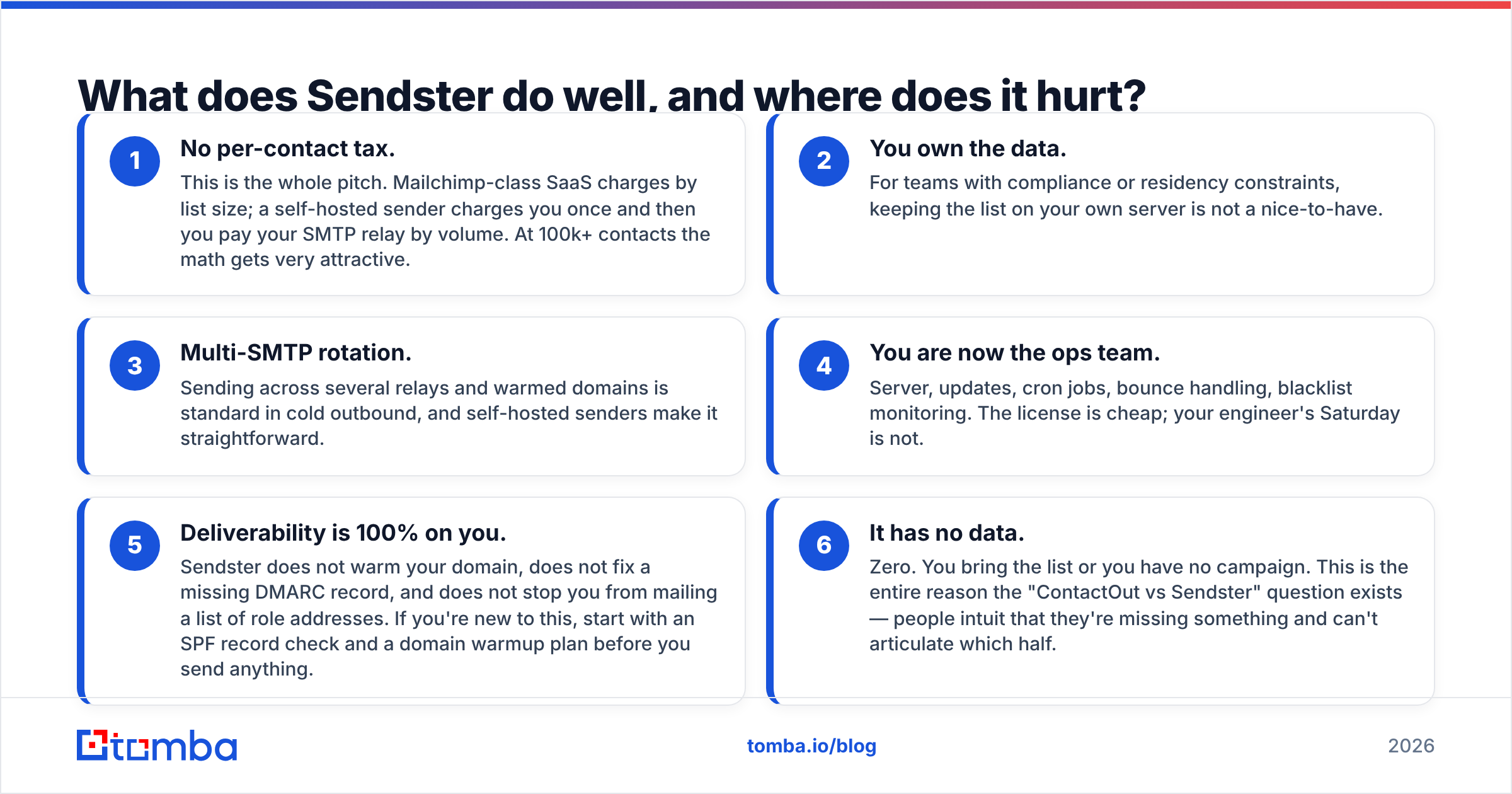
- No per-contact tax. This is the whole pitch. Mailchimp-class SaaS charges by list size; a self-hosted sender charges you once and then you pay your SMTP relay by volume. At 100k+ contacts the math gets very attractive.
- You own the data. For teams with compliance or residency constraints, keeping the list on your own server is not a nice-to-have.
- Multi-SMTP rotation. Sending across several relays and warmed domains is standard in cold outbound, and self-hosted senders make it straightforward.
Where it hurts:
- You are now the ops team. Server, updates, cron jobs, bounce handling, blacklist monitoring. The license is cheap; your engineer's Saturday is not.
- Deliverability is 100% on you. Sendster does not warm your domain, does not fix a missing DMARC record, and does not stop you from mailing a list of role addresses. If you're new to this, start with an SPF record check and a domain warmup plan before you send anything.
- It has no data. Zero. You bring the list or you have no campaign. This is the entire reason the "ContactOut vs Sendster" question exists — people intuit that they're missing something and can't articulate which half.
Is "ContactOut vs Sendster" even the right question?#
No. The right question is: what does a complete outbound stack look like, and what am I missing?
Every functioning B2B outbound motion has four layers:
- Targeting — who are you contacting, and why now? (ICP definition, intent signals, trigger events.)
- Data — getting a real, current email address for that person. This is where ContactOut lives, alongside tools like Apollo, RocketReach, and an email finder API.
- Hygiene — verifying the address is deliverable before you send. Catch-all domains, role accounts, and dead mailboxes all get filtered here.
- Sending — the campaign engine plus the domain infrastructure that keeps you out of spam. This is where Sendster lives.
Buy ContactOut and skip layer 4, and you have a spreadsheet of contacts and no way to reach them. Buy Sendster and skip layer 2, and you have a beautiful campaign builder pointed at an empty list. Skip layer 3 either way and you burn a domain.

How do the costs actually compare across a full stack?#
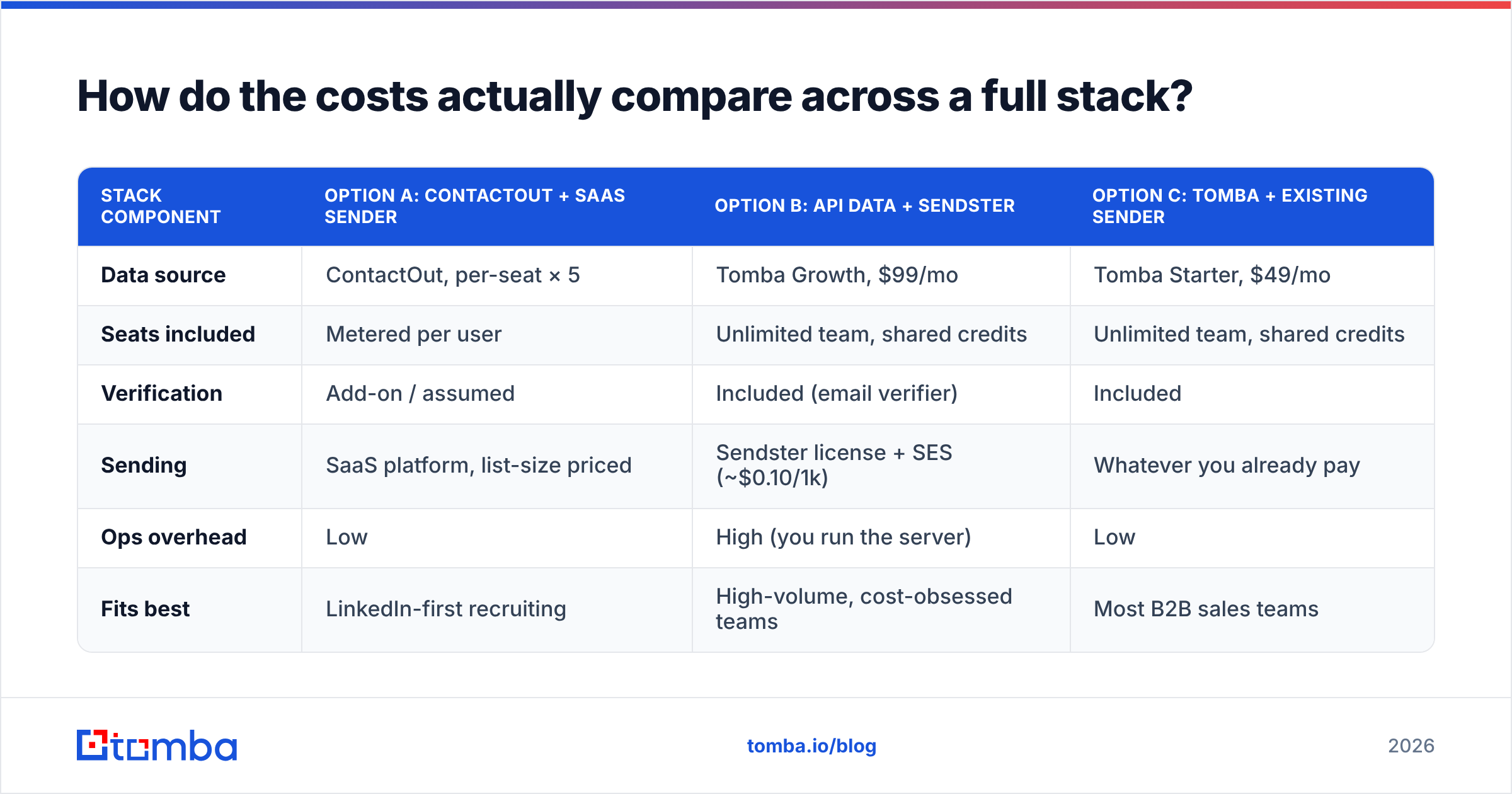
Here's a realistic 5-person outbound team needing roughly 5,000 fresh contacts a month.
| Stack component | Option A: ContactOut + SaaS sender | Option B: API data + Sendster | Option C: Tomba + existing sender |
|---|---|---|---|
| Data source | ContactOut, per-seat × 5 | Tomba Growth, $99/mo | Tomba Starter, $49/mo |
| Seats included | Metered per user | Unlimited team, shared credits | Unlimited team, shared credits |
| Verification | Add-on / assumed | Included (email verifier) | Included |
| Sending | SaaS platform, list-size priced | Sendster license + SES (~$0.10/1k) | Whatever you already pay |
| Ops overhead | Low | High (you run the server) | Low |
| Fits best | LinkedIn-first recruiting | High-volume, cost-obsessed teams | Most B2B sales teams |
Two things fall out of that table.
First, per-seat data pricing is the silent budget killer. Data is a team asset, not a personal one. A pricing model that charges you again every time a new rep joins is charging you for org growth, not for value. Flat-rate, credit-pooled Tomba pricing — Free (25 searches/mo), Starter $49/mo, Growth $99/mo, Pro $249/mo — puts the whole team on one pool.
Second, self-hosting your sender only pays off past real volume. Below ~50k sends a month, the license savings evaporate into engineering hours. Be honest about which side of that line you're on.
What should you look for in the data layer, whichever sender you pick?#
If you take one thing from this comparison: the sender is a commodity, the data is not. Evaluate the data layer on these five criteria.
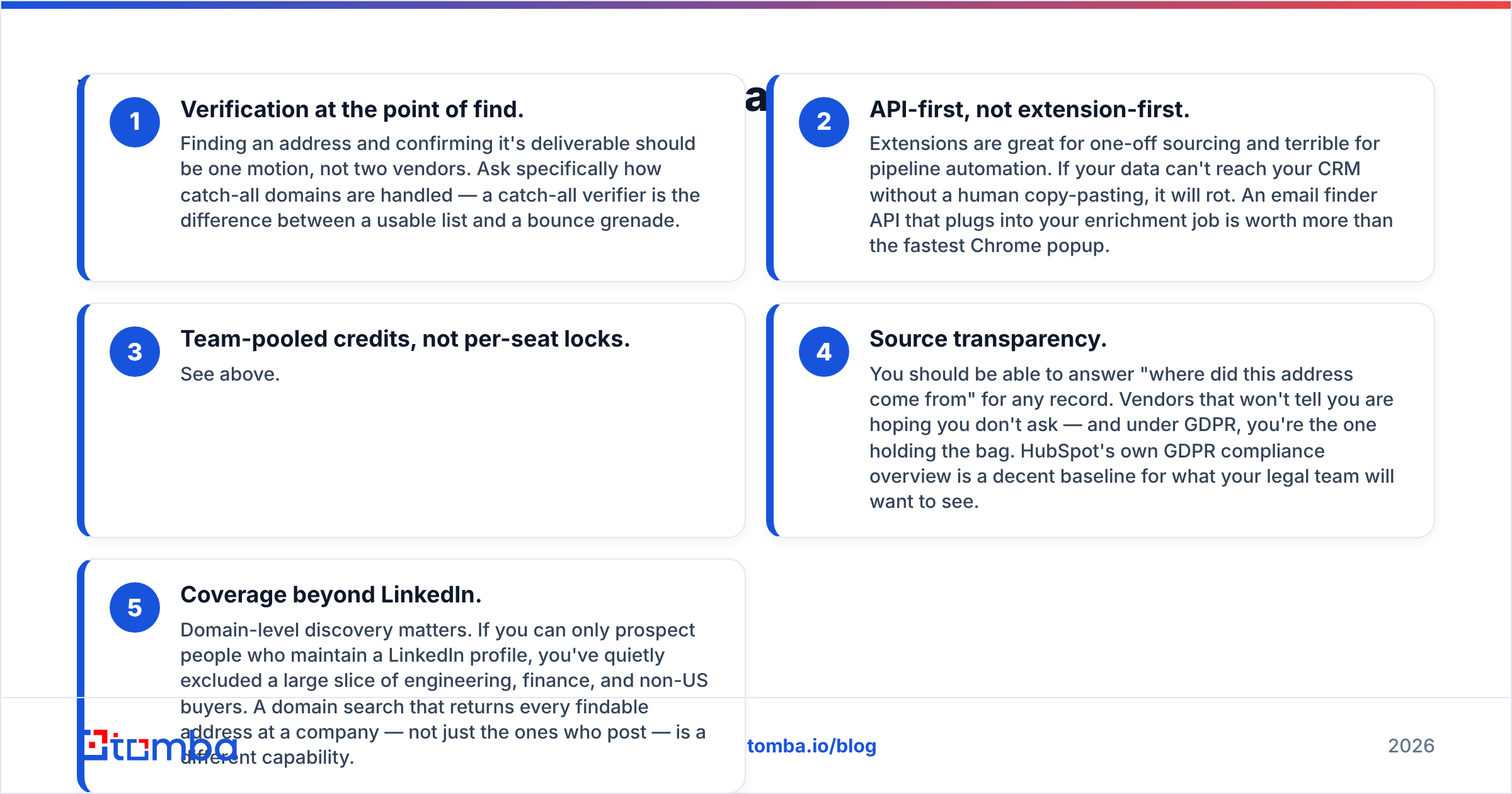
- Verification at the point of find. Finding an address and confirming it's deliverable should be one motion, not two vendors. Ask specifically how catch-all domains are handled — a catch-all verifier is the difference between a usable list and a bounce grenade.
- API-first, not extension-first. Extensions are great for one-off sourcing and terrible for pipeline automation. If your data can't reach your CRM without a human copy-pasting, it will rot. An email finder API that plugs into your enrichment job is worth more than the fastest Chrome popup.
- Team-pooled credits, not per-seat locks. See above.
- Source transparency. You should be able to answer "where did this address come from" for any record. Vendors that won't tell you are hoping you don't ask — and under GDPR, you're the one holding the bag. HubSpot's own GDPR compliance overview is a decent baseline for what your legal team will want to see.
- Coverage beyond LinkedIn. Domain-level discovery matters. If you can only prospect people who maintain a LinkedIn profile, you've quietly excluded a large slice of engineering, finance, and non-US buyers. A domain search that returns every findable address at a company — not just the ones who post — is a different capability.
Cross-check any vendor's claims against real user reviews on G2 rather than the vendor's own accuracy page. Every data company on earth claims 95%+ accuracy. The reviews tell you what the bounce rate actually was.
So which one should you buy?#
Buy ContactOut if: you are a recruiter or a LinkedIn-first SDR, your sourcing happens profile-by-profile, personal emails and mobile numbers matter to you, and your team is small enough that per-seat pricing doesn't sting. It's a good tool for that exact shape of work.
Buy Sendster if: you already have a data pipeline, you're sending real volume (50k+/month), you have someone who can own a server, and per-contact SaaS pricing has become the biggest line item in your marketing budget. Own your infrastructure and route through your own SMTP.
Buy neither if: what you actually needed was a reliable, verified data layer that plugs into the sender you already have. That's the most common case, and it's the one this comparison usually hides.
If that's you, the stack is boring and it works: pull contacts by domain or by name, verify them in the same call, push them into your CRM or sequencer, send. No per-seat tax, no server to babysit, no bounce surprises.
Ready to fix the data layer?#
Start with the Tomba Email Finder. Find professional email addresses by domain, name, or company; verify them in the same request; pull the results into HubSpot, Pipedrive, Sheets, or your own code through the API. The free tier gives you 25 searches a month to test coverage against your own ICP — run 25 contacts you already know the answers for and check the hit rate yourself before you spend a dollar. Starter is $49/mo when you're ready to scale, with credits pooled across your whole team instead of locked to a seat.
Get the data right, and whichever sender you choose stops being the problem.
Related guides#
Ready to find emails that actually work?
Join 150,000+ professionals who stopped guessing and started sending. Free credits on signup — no credit card required.
Get the Tomba newsletter
Practical outbound tactics and product updates — once every two weeks.
About the author