ContactOut vs Skyp (2026): Which Email Finder Actually Wins?
ContactOut leans on LinkedIn. Skyp leans on bulk lookups and verification. We break down accuracy, credits, pricing, and export limits so you can pick the email finder that fits how your team actually prospects.
TL;DR — ContactOut vs Skyp in one screen#
- ContactOut is a LinkedIn-first tool. Its strength is the browser extension: you're on a profile, you click, you get an email and often a mobile number. If your prospecting starts inside LinkedIn Sales Navigator, it feels native.
- Skyp is a lookup-and-verify tool. It's built around finding and validating addresses from names, domains, and lists — closer to a classic email finder + verifier stack than a LinkedIn scraper.
- They lose to each other on the same axis. ContactOut struggles when you have a CSV of 5,000 companies and no LinkedIn URLs. Skyp struggles when your ICP lives on LinkedIn and you want one-click capture mid-browse.
- Cost per usable email is the only metric that matters. A cheap credit that returns an unverified guess is more expensive than a $0.02 credit that returns a deliverable address.
- If you need both motions in one place, a platform with a domain-level email finder, a verifier, and a real API — like Tomba at $49/mo — usually beats bolting two single-purpose tools together.
What is ContactOut, and who is it actually for?#
ContactOut built its reputation on one thing: sitting on top of LinkedIn and revealing contact details without making you leave the page. You install the Chrome extension, open a profile or a Sales Navigator search, and the sidebar surfaces work emails, personal emails, and — this is the differentiator — phone numbers.
That design decision shapes everything else about the product. ContactOut is optimized for recruiters and LinkedIn-native SDRs: people who source one profile at a time, qualify visually, then save to a list. It has a search portal and bulk features too, but the extension is the center of gravity, and the pricing model reflects that (per-seat, credit-metered, with export caps on lower tiers).
Where it gets uncomfortable: your workflow has to run through LinkedIn. If your target account list came from a conference attendee sheet, a G2 category page, or a scraped directory of 3,000 domains with no profile URLs attached, the extension has nothing to attach to. You're back to manual work.
What is Skyp, and how is it different?#
Skyp approaches the same problem from the opposite end. Instead of "who is this person in front of me," it asks "what is the email for this name at this company." It's a finder-plus-verifier: you feed it names and domains (single or in bulk), it returns candidate addresses with a confidence signal, and it validates deliverability before you send.
That makes Skyp a better fit for outbound teams working from account lists. You already know you want the Head of RevOps at 400 mid-market SaaS companies. You don't need to browse anything — you need throughput and a low bounce rate.
The trade-off is the mirror image of ContactOut's. Skyp doesn't give you the "I'm reading this person's profile right now, get me their email" moment. And its phone coverage is not the product's center of gravity the way it is for ContactOut.

How do ContactOut and Skyp compare head-to-head?#
Here's the honest side-by-side. Pricing tiers move — check each vendor's page before you buy — but the structural differences below are stable.
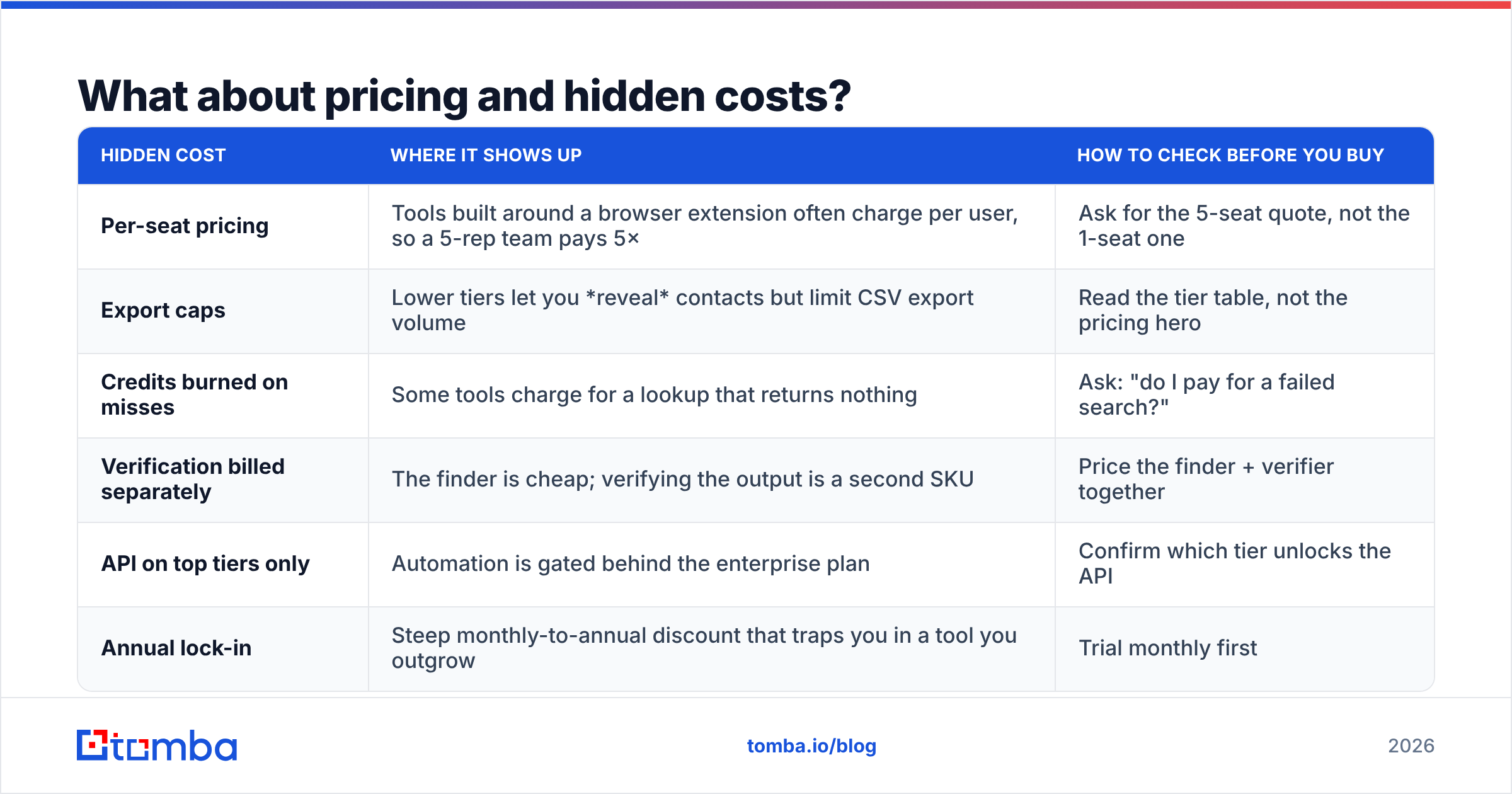
| Dimension | ContactOut | Skyp | Tomba |
|---|---|---|---|
| Primary motion | LinkedIn profile → contact | Name + domain → verified email | Domain, name, or LinkedIn → verified email |
| Chrome extension | Yes — core of the product | Yes, lighter | Yes (browser extension) |
| Bulk CSV enrichment | Available, tier-gated | Core strength | Core strength (bulk email finder) |
| Built-in verification | Basic validity signal | Yes — a main selling point | Yes — standalone email verifier |
| Catch-all handling | Limited transparency | Flags catch-alls | Dedicated catch-all verifier |
| Phone numbers | Strong (a top reason people buy it) | Not the focus | Yes — phone finder module |
| Public API | Available on higher tiers | Yes | Yes, on every paid plan |
| Entry paid price | Roughly $99/mo per seat, tier-dependent | Lower entry, credit-based | $49/mo Starter |
| Free tier | Limited monthly reveals | Limited free credits | 25 searches/mo |
| Best for | Recruiters, LinkedIn-first sourcing | List-based outbound, list hygiene | Teams needing both + API automation |
The table makes the decision look tidier than it is, so let's break the three factors that actually decide it.
1. Where does your list come from?#
This is the whole ballgame. Sit down and answer honestly: in a typical week, does your rep start on a LinkedIn search, or in a spreadsheet?
- LinkedIn-first → ContactOut's extension pays for itself in saved clicks.
- Spreadsheet-first → ContactOut becomes an expensive way to do something it wasn't designed for. Skyp (or a domain-first finder) wins.
- Both, depending on the campaign → you either buy two tools or pick a platform that does both.
2. What is your real cost per usable email?#
Vendors quote cost per credit. Your CFO cares about cost per deliverable address. The math:
Cost per usable email = (monthly price ÷ credits) ÷ (hit rate × deliverability rate)
Run it with real numbers. A $99/mo plan with 1,000 credits looks like $0.099/credit. If the hit rate is 65% and 10% of the "found" addresses bounce, your real cost is $0.099 ÷ (0.65 × 0.90) = $0.169 per usable email — nearly double the sticker. A cheaper tool with a worse hit rate can easily end up more expensive than a pricier one with better data.

3. Do bounces cost you more than credits do?#
They do. Every bounce degrades sender reputation, and once you're past roughly a 2–3% bounce rate, mailbox providers start throttling you. At that point the price of the credit is irrelevant — your entire domain's email deliverability is the thing on fire.
This is where Skyp's verification-forward positioning earns its keep, and where a pure reveal tool leaves you exposed. If your finder hands you an address with no deliverability signal, you're not saving money — you're deferring a cost onto your sending domain.
Which one is more accurate?#
Neither vendor will hand you a clean answer, and you shouldn't trust any blog (including this one) that claims a single accuracy number applies to your list. Accuracy is a function of your ICP, not the tool's marketing page.
Some patterns hold up across independent testing and user reviews on G2:
- ContactOut over-indexes on tech, US, and mid-to-senior white-collar roles — exactly the people who maintain complete LinkedIn profiles. Hit rates outside that band (blue-collar, non-US SMB, industries with thin LinkedIn presence) drop noticeably.
- Skyp and other pattern-based finders over-index on companies with predictable email formats. If a domain uses
first.last@, a pattern engine nails it. If it usesf.lastname2@or a randomized alias scheme, no amount of pattern logic saves you. - Everyone's numbers collapse on catch-all domains. A catch-all server accepts everything at SMTP, so "valid" means nothing. Tools that silently mark catch-alls as valid are inflating their own accuracy stats.
That last point is the one to interrogate in a trial. Ask each vendor directly: what do you return for a catch-all domain? A tool that flags it honestly (and offers a catch-all verifier to probe deeper) is telling you the truth. A tool that returns a confident green checkmark on every catch-all is not.
How to run a fair 200-lead bake-off#
Don't take anyone's word for it. This takes an afternoon:
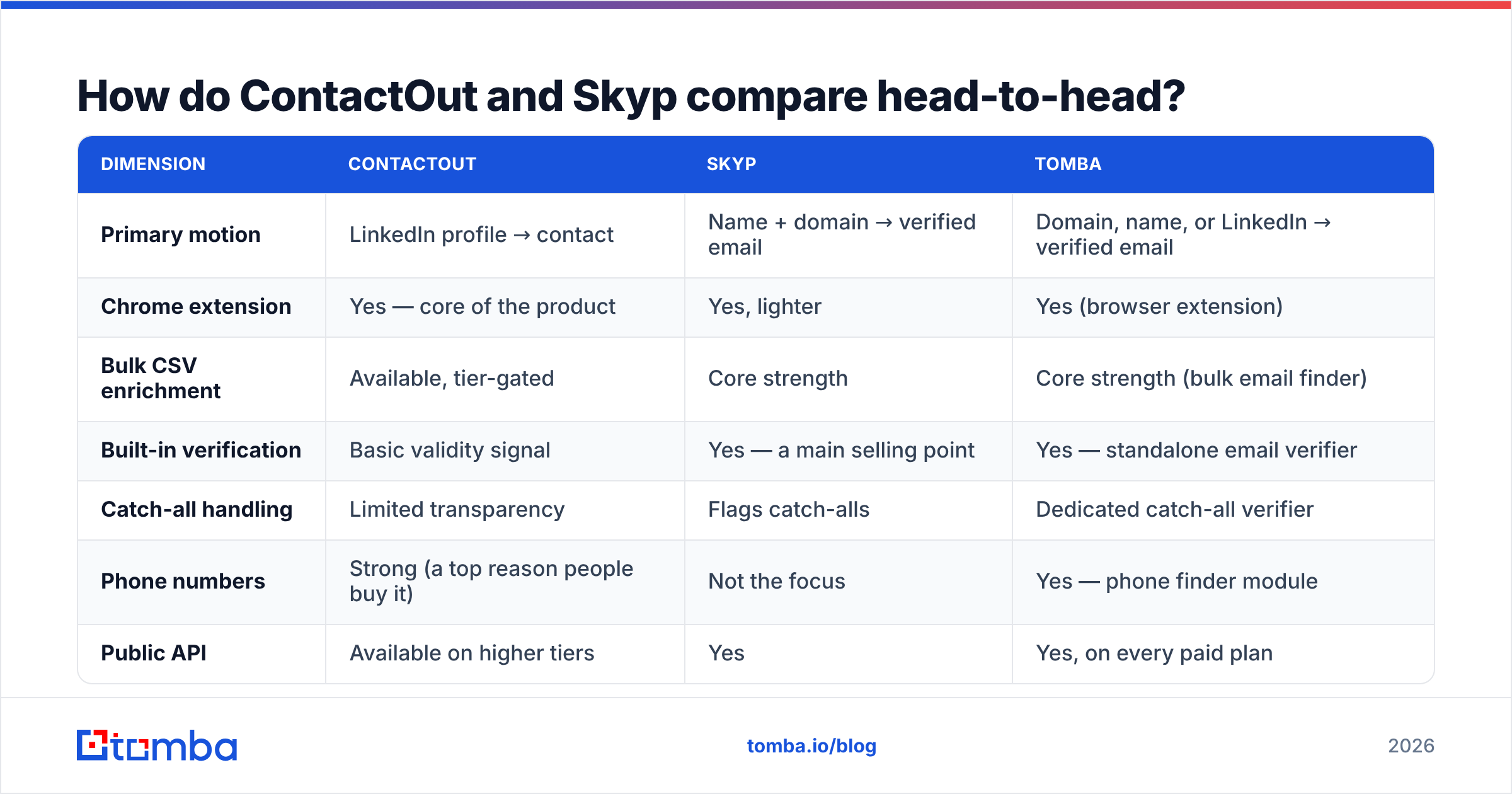
- Build one test list of 200 contacts that mirrors your real ICP — same industries, same seniority, same geographies. Don't cherry-pick easy accounts.
- Run the identical list through every tool on free or trial credits. ContactOut, Skyp, and a third option as a control.
- Record three columns per tool: found (yes/no), the confidence label it returned, and the raw cost of the credits consumed.
- Verify every returned address through one neutral verifier — not the finder's own verifier, or you're grading the homework with the answer key.
- Send one small, real campaign from a warmed domain and log actual bounces. This is the only number that isn't theoretical.
- Compute cost per usable email with the formula above and rank the tools. The winner is frequently not the one with the best hit rate — it's the one with the best hit rate after deliverability.
What about pricing and hidden costs?#
Sticker price is the least interesting part of the comparison. The costs that surprise teams:
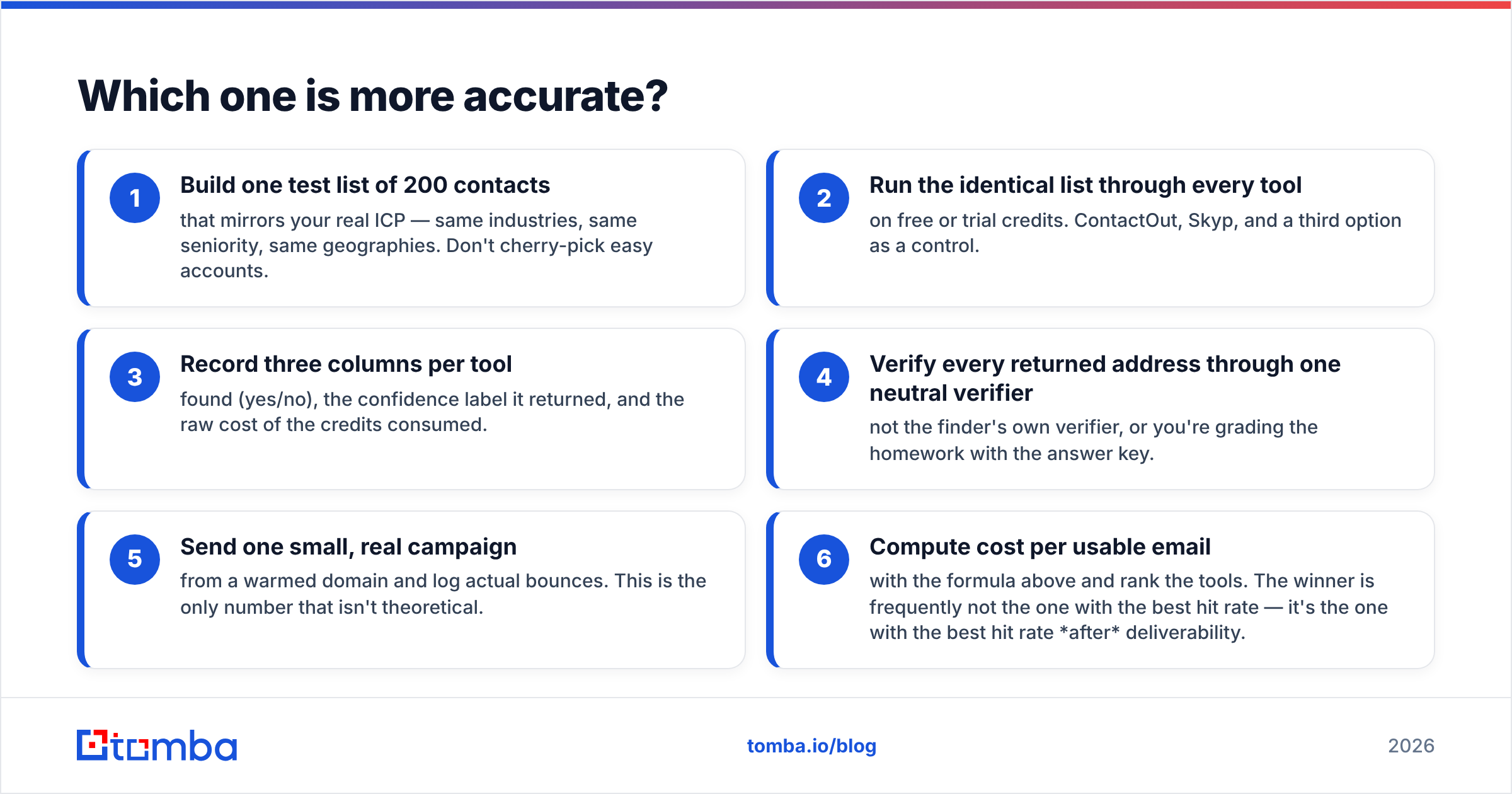
| Hidden cost | Where it shows up | How to check before you buy |
|---|---|---|
| Per-seat pricing | Tools built around a browser extension often charge per user, so a 5-rep team pays 5× | Ask for the 5-seat quote, not the 1-seat one |
| Export caps | Lower tiers let you reveal contacts but limit CSV export volume | Read the tier table, not the pricing hero |
| Credits burned on misses | Some tools charge for a lookup that returns nothing | Ask: "do I pay for a failed search?" |
| Verification billed separately | The finder is cheap; verifying the output is a second SKU | Price the finder + verifier together |
| API on top tiers only | Automation is gated behind the enterprise plan | Confirm which tier unlocks the API |
| Annual lock-in | Steep monthly-to-annual discount that traps you in a tool you outgrow | Trial monthly first |
For reference, Tomba pricing starts at $49/mo for Starter, $99/mo for Growth, and $249/mo for Pro, with a free tier at 25 searches per month — and the Tomba API is included on paid plans rather than reserved for enterprise. That last detail matters more than people expect: if you can't call the finder from your own workflow, you'll be exporting CSVs by hand forever.

Is there a third option worth considering?#
Yes — and the reason is structural, not promotional. The ContactOut vs Skyp debate is really a debate about two different jobs:
- Reveal a contact I'm looking at right now.
- Enrich and verify a list I already have.
Most teams need both. Buying one specialist for each means two subscriptions, two credit pools, two data schemas, and a manual join in the middle. That's not a data problem, it's an ops tax.
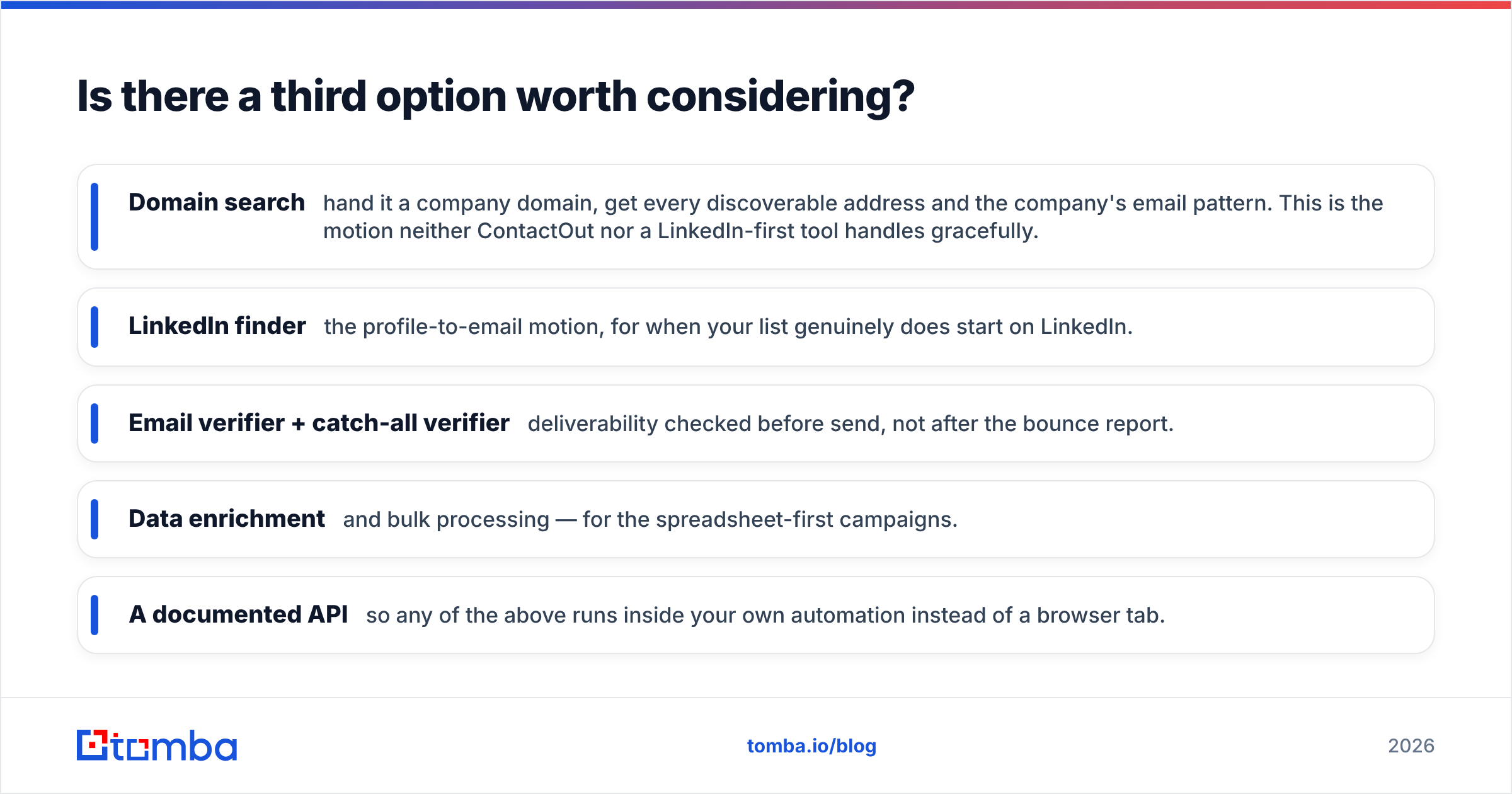
A consolidated platform collapses the two jobs. In Tomba's case that looks like:
- Domain search — hand it a company domain, get every discoverable address and the company's email pattern. This is the motion neither ContactOut nor a LinkedIn-first tool handles gracefully.
- LinkedIn finder — the profile-to-email motion, for when your list genuinely does start on LinkedIn.
- Email verifier + catch-all verifier — deliverability checked before send, not after the bounce report.
- Data enrichment and bulk processing — for the spreadsheet-first campaigns.
- A documented API so any of the above runs inside your own automation instead of a browser tab.
Is Tomba automatically the right answer? No. If your entire team lives inside Sales Navigator and mobile numbers are non-negotiable, ContactOut's phone coverage is a legitimate reason to pay its premium. If you want a lean, credit-cheap finder-and-verifier and nothing else, Skyp does that job without the overhead. Consolidation is only a win when you actually need both motions — and most outbound teams, once they're past the first 20 accounts, do.
Which should you choose?#
Pick by the shape of your workflow, not by the review-site star rating.
- Choose ContactOut if: recruiting or LinkedIn-native sourcing is your core motion, phone numbers materially improve your connect rate, and you have the budget for per-seat pricing across the team.
- Choose Skyp if: you work from lists, you care most about a clean, low-bounce send, and you want a straightforward credit model without the extension-heavy overhead.
- Choose a consolidated platform if: you run both motions, you want one credit pool and one schema, you need an API on a mid-tier plan, and you'd rather not pay two vendors to do half a job each.
Whatever you pick, run the 200-lead bake-off first. It's the difference between choosing a tool and choosing a tool that works on your ICP — and those are not the same decision.
Ready to test it against your own list? Start with the Tomba Email Finder — 25 free searches a month, no card, and every result runs through verification before it lands in your CSV. Run your 200-lead bake-off, compute your real cost per usable email, and let the numbers pick your stack instead of a comparison post. If the numbers favor ContactOut or Skyp, that's a good outcome too — at least you'll know.
Related guides#
Ready to find emails that actually work?
Join 150,000+ professionals who stopped guessing and started sending. Free credits on signup — no credit card required.
Get the Tomba newsletter
Practical outbound tactics and product updates — once every two weeks.
About the author