ContactOut vs SMARTe (2026): Which B2B Data Tool Wins?
ContactOut is a LinkedIn-first contact finder. SMARTe is a global GTM data platform. They win in different places — here is the honest breakdown of accuracy, coverage, pricing and compliance.
TL;DR
- ContactOut is a LinkedIn-first contact finder. Its Chrome extension sits on top of LinkedIn profiles and recruiter search, and it is strongest for one-by-one sourcing of individual people you have already identified.
- SMARTe is a GTM data platform. It sells account-plus-contact data at scale — firmographics, intent, and mobile numbers — with a heavy emphasis on international coverage and privacy compliance.
- They are not really the same product. Pick ContactOut if your workflow starts on a LinkedIn profile. Pick SMARTe if it starts with an ICP filter and a list build.
- Both charge per seat and gate volume behind credits. If you need programmatic lookups (API, bulk CSV, enrichment inside your own stack), a dedicated email finder with flat per-request pricing usually costs less per verified contact.
- Nobody's "98% accuracy" claim survives contact with a real list. Run a 200-row bounce test before you sign anything longer than a month.
What are ContactOut and SMARTe, actually?#
ContactOut (contactout.com) began as a recruiter tool. The core artifact is a browser extension: you open a LinkedIn profile, the sidebar reveals personal emails, work emails, and sometimes a phone number. Over time it added a searchable database, a portal-based search UI, and an API. But the product's center of gravity is still the extension, and the buyer persona is still a recruiter or an SDR who lives inside LinkedIn all day.
SMARTe (smarte.pro) is built for the opposite motion. You do not start from a person; you start from a segment. You filter by industry, headcount, technology, geography, and job function, then pull the contacts that match. SMARTe markets aggressively on two things: mobile-number coverage (especially outside North America) and compliance posture — GDPR, CCPA, and the ability to tell your legal team where a record came from.
That distinction matters more than any feature checkbox. A recruiter sourcing 30 senior engineers a week and a RevOps lead enriching 40,000 CRM rows a quarter are not buying the same thing, and the "winner" changes entirely depending on which one you are.
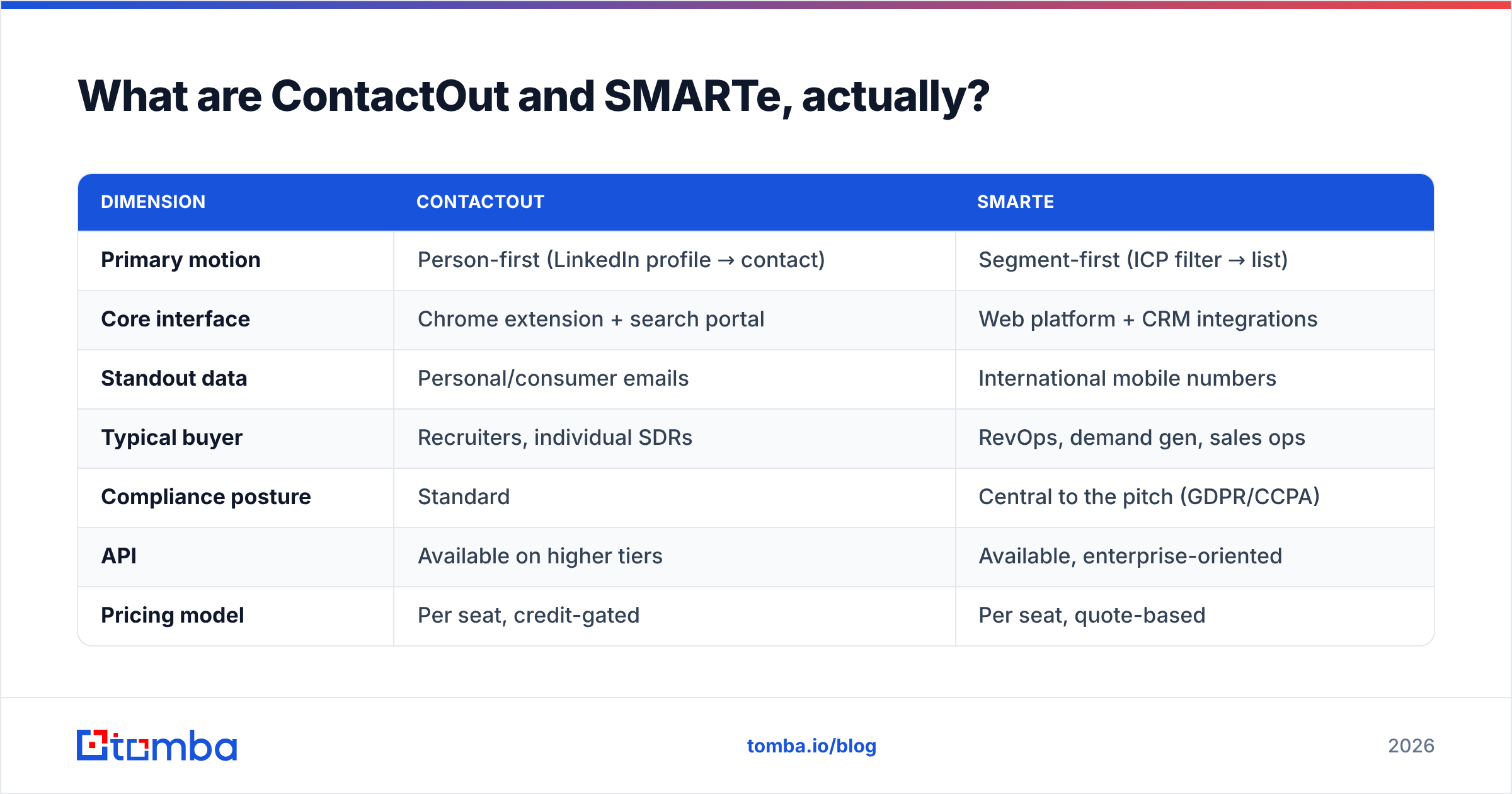
| Dimension | ContactOut | SMARTe |
|---|---|---|
| Primary motion | Person-first (LinkedIn profile → contact) | Segment-first (ICP filter → list) |
| Core interface | Chrome extension + search portal | Web platform + CRM integrations |
| Standout data | Personal/consumer emails | International mobile numbers |
| Typical buyer | Recruiters, individual SDRs | RevOps, demand gen, sales ops |
| Compliance posture | Standard | Central to the pitch (GDPR/CCPA) |
| API | Available on higher tiers | Available, enterprise-oriented |
| Pricing model | Per seat, credit-gated | Per seat, quote-based |
Is ContactOut better than SMARTe for accuracy?#
Neither vendor will hand you a neutral answer, so here is the honest framing: accuracy is not a single number. It splits into at least three different questions, and ContactOut and SMARTe land differently on each.
Work email accuracy. This is the most commoditized layer of the market. Every serious vendor — ContactOut, SMARTe, and the dozen tools competing with them — is pattern-matching against a domain's known email format and then verifying via SMTP. The gap between the best and the median tool on known, non-catch-all domains is smaller than the marketing suggests. Where tools diverge is on catch-all domains, where SMTP verification returns "accept-all" and tells you nothing. That is why a separate catch-all verifier step matters regardless of which platform you buy.
Personal email accuracy. ContactOut's differentiator. Recruiters want the Gmail address, because a candidate who ignores a work-inbox pitch may answer a personal one. SMARTe does not lead with this, and if personal emails are your core need, ContactOut is the stronger buy on that axis alone.
Phone accuracy. SMARTe's differentiator, and the reverse of the above. Direct-dial and mobile coverage outside the US and UK is where most databases fall apart. SMARTe built its pitch around EMEA and APAC mobile coverage. If your reps are dialing into Germany, India, or Singapore, that is a real edge — one that a US-centric phone finder benchmark will not surface.

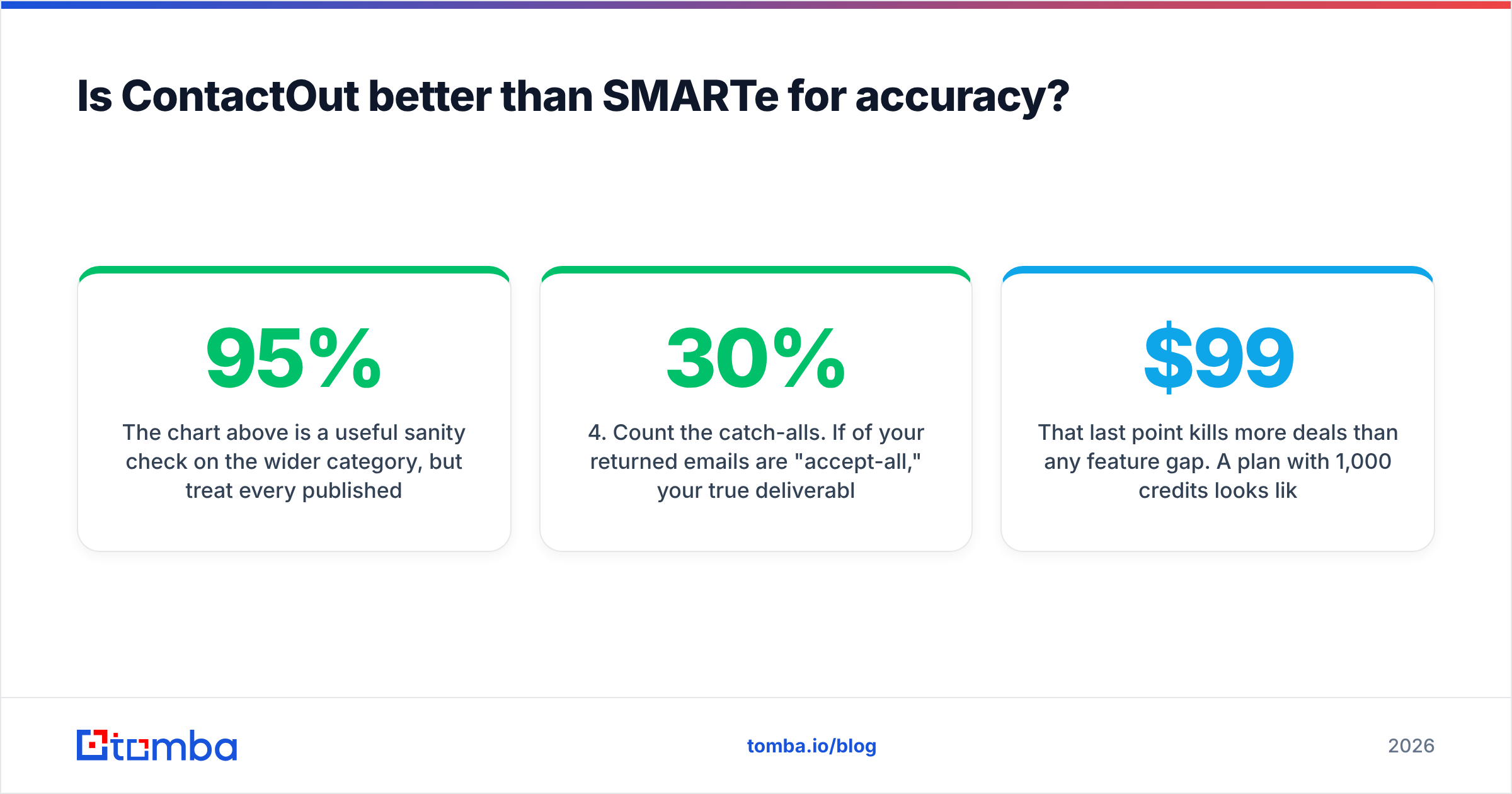
The chart above is a useful sanity check on the wider category, but treat every published accuracy figure — theirs, ours, anyone's — as a starting hypothesis, not a fact about your list. Accuracy is a function of your ICP. A tool that hits 95% on US SaaS mid-market can drop to 60% on European manufacturing SMBs, and both numbers can be true at once.
How to actually test it (30 minutes, before you buy)#
- Build a 200-row ground-truth sample from your real ICP — not the vendor's demo list. Mix domains: enterprise, SMB, at least two non-English-speaking countries.
- Run it through both trials. Record match rate (how many rows returned anything) separately from accuracy (how many of those were right).
- Bounce-test the output through an independent email verifier. Do not let the vendor grade its own homework.
- Count the catch-alls. If 30% of your returned emails are "accept-all," your true deliverable rate is far below the headline.
- Price it per usable contact, not per credit. A cheap credit that returns a bounce costs more than an expensive one that lands.
That last point kills more deals than any feature gap. A $99/month plan with 1,000 credits looks like $0.099 per contact. If 40% bounce or come back empty, you actually paid $0.165 per usable contact — and you also paid in sender reputation, which does not show up on the invoice.
What does ContactOut vs SMARTe cost?#
Both vendors price by seat, and both push serious volume into "contact sales." That is the single biggest practical difference from a self-serve tool: you cannot fully model your cost from a pricing page.
ContactOut publishes a free tier with a small monthly credit allowance and paid plans that scale by seat and reveal volume, with API access typically reserved for higher tiers. SMARTe leans harder into quote-based pricing; the platform is sold to teams, and the number you get depends on seats, credits, and which data modules (intent, technographics, mobile) you turn on. Always confirm current numbers on the vendor's own page before budgeting — both companies repackage tiers regularly.
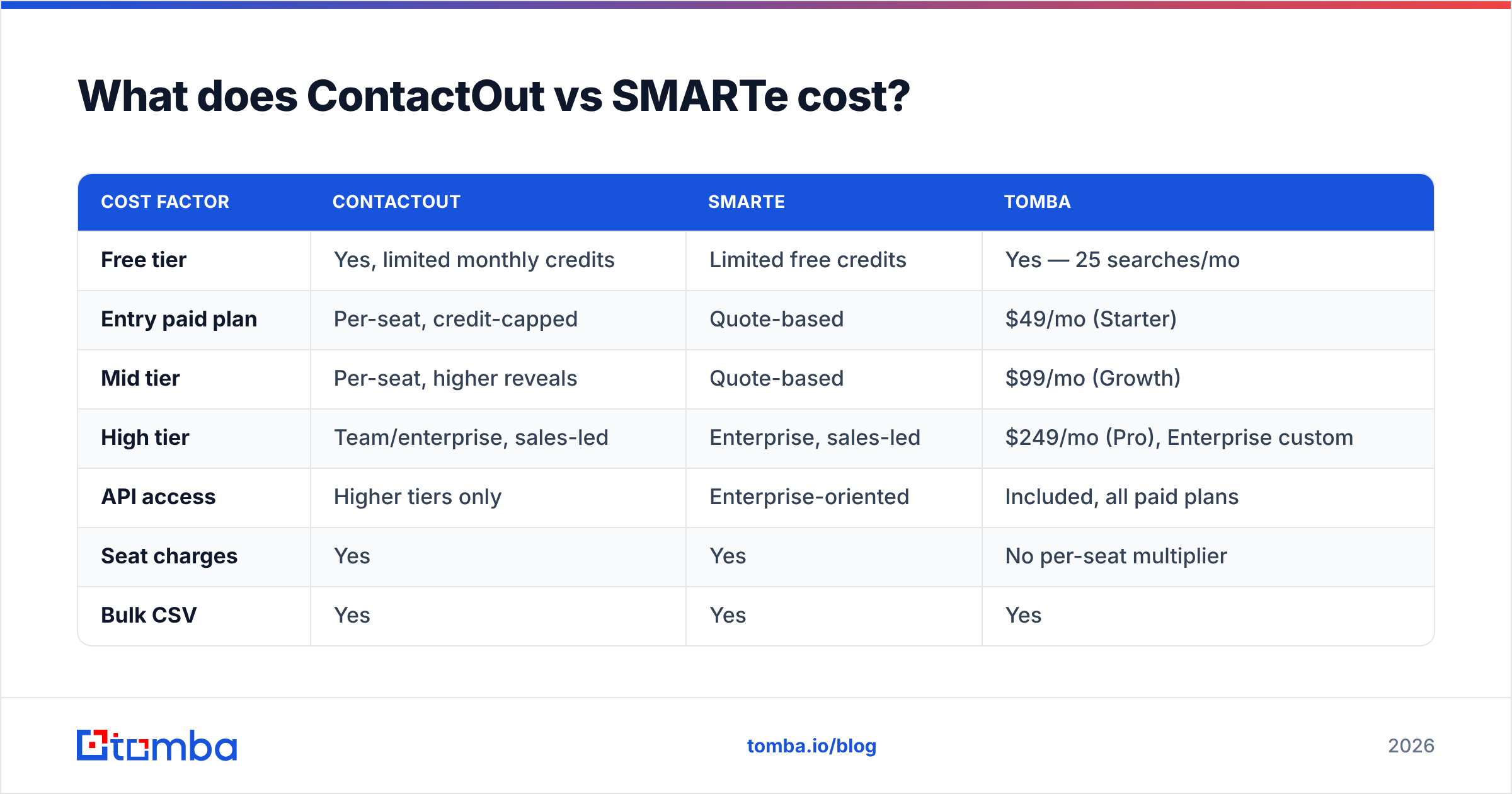
| Cost factor | ContactOut | SMARTe | Tomba |
|---|---|---|---|
| Free tier | Yes, limited monthly credits | Limited free credits | Yes — 25 searches/mo |
| Entry paid plan | Per-seat, credit-capped | Quote-based | $49/mo (Starter) |
| Mid tier | Per-seat, higher reveals | Quote-based | $99/mo (Growth) |
| High tier | Team/enterprise, sales-led | Enterprise, sales-led | $249/mo (Pro), Enterprise custom |
| API access | Higher tiers only | Enterprise-oriented | Included, all paid plans |
| Seat charges | Yes | Yes | No per-seat multiplier |
| Bulk CSV | Yes | Yes | Yes |
The structural issue with seat-based pricing shows up when the work is not seat-shaped. If two ops people need to enrich 50,000 records, a per-seat model is fine. If eight AEs each need occasional lookups, you are paying eight seats for what is really one workload. That is the gap flat-rate, API-first tools exploit — see Tomba pricing for the contrast, where the cost tracks requests rather than headcount.

Which one fits your workflow?#
Forget the feature grid for a moment. Answer this instead: where does your prospecting session begin?
- It begins on a LinkedIn profile or a Recruiter search. ContactOut. The extension is the product, and the workflow is one click. SMARTe can serve this, but you are buying a platform to use a sliver of it.
- It begins with an ICP filter — "Series B fintechs in DACH, 50-200 employees, using Stripe." SMARTe. Its search and firmographic layer is designed for exactly this, and the international mobile coverage is a real asset for a dialing team.
- It begins in a spreadsheet or a CRM export you need to enrich. Neither is ideal. Both will do it, both will charge you seats for it. A bulk email finder or a straight enrichment API is a better structural fit and usually a fraction of the cost.
- It begins in code — a scoring pipeline, an internal tool, an AI agent that needs contact lookup as a step. Neither, unless you are on their top tier. Look for a tool where the email finder API is a first-class citizen on every plan, not an enterprise upsell.
- It begins with a company domain, not a person. Domain search territory — you want every reachable contact at a target account, with roles and confidence scores, in one call.
What about compliance and data sourcing?#
This is where SMARTe earns its keep, and where any buyer with a European footprint should slow down.
Contact-data vendors sit in an awkward legal position. Under GDPR, processing a business contact's personal data requires a lawful basis — usually legitimate interest — plus the ability to honor deletion requests and, critically, to explain where the record came from. Many tools cannot do the last part. SMARTe has built its positioning around being able to, and if your legal team has ever sent back a vendor security questionnaire with red ink on it, that matters more than a two-point accuracy difference.
ContactOut's exposure is different: personal emails and personal mobile numbers are, by definition, personal data with a weaker legitimate-interest argument than a work address. That does not make it unusable — recruiting has established norms here — but it does mean the risk profile changes depending on what you reveal and where the person lives.
Three practical checks before you buy either:
- Ask for the data-sourcing statement in writing. Not the marketing page — the DPA and the sub-processor list. Vendors who publish data sources openly are easier to defend internally.
- Ask how suppression and deletion requests propagate. If someone opts out, does that flow back into the vendor's database, or just your sequencer?
- Ask which fields are gated by region. Good vendors will decline to return a personal mobile for an EU-resident contact by default. If yours returns everything everywhere with no configuration, that is not a feature — it is your liability.
Independent buyer reviews on G2 and Capterra are worth ten minutes here, specifically the one- and two-star reviews. Sort by "most recent" — data quality complaints cluster in time when a vendor loses a supplier.
ContactOut vs SMARTe: the honest verdict#
Neither tool loses this comparison outright, because they are not really competing for the same job.
Buy ContactOut if you are a recruiter or a LinkedIn-native SDR, your volume is measured in dozens of profiles a day rather than tens of thousands of rows a quarter, and personal emails materially improve your reply rate. The extension is genuinely good at what it does, and the alternative — copying names into a separate tool — costs you more in friction than you will save on the invoice. If you want to see how it stacks against a flat-rate option, we keep a detailed ContactOut alternative breakdown.
Buy SMARTe if you build lists from an ICP definition, you sell internationally, and your reps dial. The mobile coverage outside North America is the strongest argument in its favor, and the compliance story will survive a procurement review that a browser-extension-first vendor might not.
Buy neither if your real problem is programmatic: enriching a CRM, powering an internal tool, running bulk verification, or feeding an AI SDR agent. Both of these products are seat-shaped, and seat-shaped pricing punishes automated workloads. What you want there is per-request pricing, an API on every tier, and verification built into the same call as the lookup.
That is the gap Tomba is built for. The Tomba Email Finder returns a verified work email from a name and domain — with a confidence score and the SMTP check already run — through the same API on every plan, starting at $49/mo and with a free tier (25 searches/mo) that is enough to run the 200-row bounce test described above before you spend a cent. Run it head-to-head against your ContactOut or SMARTe trial on your own list, compare cost per usable contact rather than cost per credit, and let the bounce rate settle the argument.
Related guides#
Ready to find emails that actually work?
Join 150,000+ professionals who stopped guessing and started sending. Free credits on signup — no credit card required.
Get the Tomba newsletter
Practical outbound tactics and product updates — once every two weeks.
About the author