ContactOut vs TailorMails (2026): Which Email Finder Wins?
ContactOut is a LinkedIn-first contact extractor. TailorMails is a smaller, newer email-finding play. Here is an honest look at accuracy, pricing, workflow fit, and where a general-purpose email finder beats both.
TL;DR
- ContactOut is a LinkedIn-first contact extractor. Its whole reason to exist is a browser extension that sits on top of LinkedIn profiles and Recruiter, pulling personal and work emails plus phone numbers. Strong for recruiters and LinkedIn-native SDRs; weak if your prospecting starts anywhere else.
- TailorMails is the smaller, newer name in this matchup. Public documentation, third-party review volume, and independent accuracy data are all thin compared to ContactOut — which matters more than any feature checkbox when you are about to route budget through a data vendor.
- Neither tool is a general email finder. Both assume a specific starting point (a LinkedIn profile, a name). If your input is a domain, a company list, a CSV, or an API call from your own app, you will hit a wall fast.
- Bounce rate is the only benchmark that matters. A tool that returns more emails but verifies none of them costs you sender reputation, which is far more expensive than credits.
- If you need domain-first search, bulk enrichment, and a real API, an email finder built around those workflows — Tomba, Hunter, Findymail — is the better spine, with ContactOut layered on for LinkedIn-only edge cases.
What are ContactOut and TailorMails, exactly?#
They solve different halves of the same problem, and it is worth being precise about which half.
ContactOut is a contact-data platform built around a Chrome extension. You open a LinkedIn profile, the sidebar appears, and it surfaces work email, personal email, and phone number. It also ships a web search portal, a recruiter-oriented database, and Salesforce/Greenhouse-style integrations. It's been around since the mid-2010s and has a large public review footprint on G2 and Capterra, which is genuinely useful signal. Its official site is contactout.com.
TailorMails positions itself as an email-finding and outreach-personalization tool — find the address, then tailor the message. That's an appealing pitch, because those two jobs do sit next to each other in real workflows. The honest caveat: as of 2026, TailorMails has a small public footprint. There isn't a body of independent accuracy benchmarking, a widely-cited pricing page history, or the kind of review volume you can triangulate against. That is not an accusation of low quality. It is a risk factor, and it belongs in your evaluation.
Here is the practical framing:
- ContactOut = "I live inside LinkedIn and I need this person's contact info right now."
- TailorMails = "I want find-plus-personalize in one lighter tool."
- A domain-first email finder = "I have a company list, a domain, or an API call, and I need coverage at scale."
- A verifier = "I already have addresses and I need to not get blacklisted."
Most teams that think they have problem #1 or #2 actually have problem #3 with problem #4 attached.
How do ContactOut and TailorMails compare head to head?#

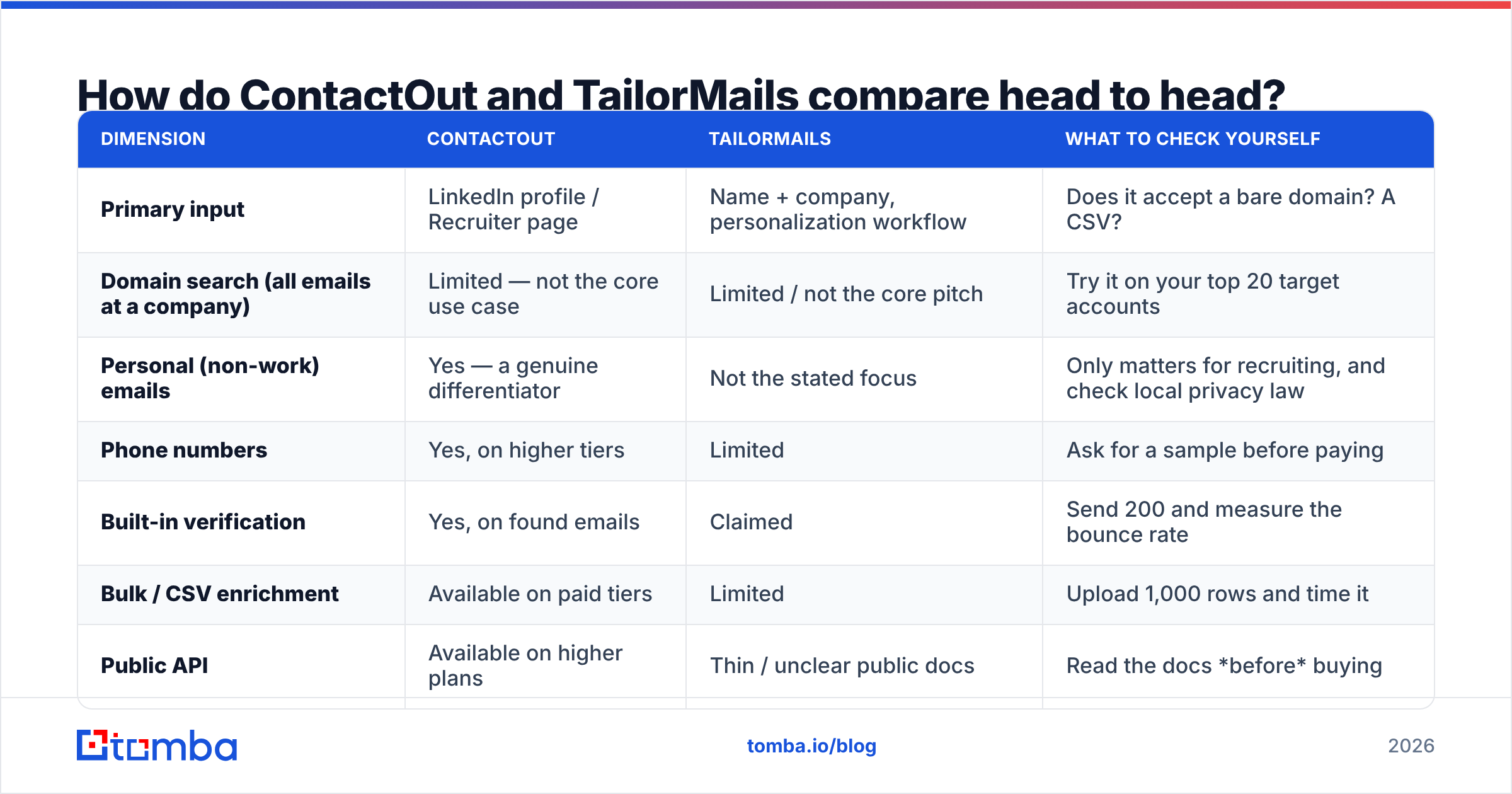
Before the table, one warning about accuracy claims. Nearly every vendor in this space advertises a number in the 95–99% range. Those numbers are self-reported, measured on the vendor's own sample, and usually describe verified results only — i.e. the subset the tool was confident about, not the full set of contacts you asked for. The metric that actually predicts your outcome is coverage × accuracy: what fraction of your list gets a correct, deliverable address. A tool with 99% accuracy on 30% coverage is worse for you than 95% accuracy on 70% coverage, and no vendor page will tell you that.
Test both on the same 100 contacts. That is the only benchmark that is about your data.
| Dimension | ContactOut | TailorMails | What to check yourself |
|---|---|---|---|
| Primary input | LinkedIn profile / Recruiter page | Name + company, personalization workflow | Does it accept a bare domain? A CSV? |
| Domain search (all emails at a company) | Limited — not the core use case | Limited / not the core pitch | Try it on your top 20 target accounts |
| Personal (non-work) emails | Yes — a genuine differentiator | Not the stated focus | Only matters for recruiting, and check local privacy law |
| Phone numbers | Yes, on higher tiers | Limited | Ask for a sample before paying |
| Built-in verification | Yes, on found emails | Claimed | Send 200 and measure the bounce rate |
| Bulk / CSV enrichment | Available on paid tiers | Limited | Upload 1,000 rows and time it |
| Public API | Available on higher plans | Thin / unclear public docs | Read the docs before buying |
| Free tier | Yes — small monthly credit allowance | Trial-style | Free tier size ≈ how confident they are |
| Pricing (entry paid) | Roughly $49+/mo per seat, cheaper annually | Published on vendor site; verify directly | Watch for annual-only pricing and seat minimums |
| Public review volume | High (G2, Capterra, Chrome Store) | Low | Low volume ≠ bad. It is less signal. |
| Best fit | Recruiters, LinkedIn-native SDRs | Solo founders wanting find + write | — |
Pricing in this category changes constantly and is frequently annual-billing-first. Treat every number above as a starting point for your own check on the vendor's live pricing page, not a quote.
Is ContactOut better than TailorMails?#
For most buyers today: yes — on the strength of maturity, not features.
That's an unglamorous verdict, so let me defend it.
When you buy contact data, you are not really buying software. You are buying someone else's data pipeline, and you cannot inspect it. Your only proxies for quality are: how long the pipeline has run, how many people have publicly complained about it, whether the vendor documents where the data comes from, and whether they let you test before committing.
ContactOut clears those bars. It has years of operating history, thousands of public reviews with visible, specific complaints (credit expiry rules, personal-email coverage gaps, LinkedIn dependency), and a free tier that lets you sample. Visible complaints are a good sign — they mean enough people used it to complain.
TailorMails may well be excellent. But at this point in its life you cannot verify that from the outside, and "trust me" is not a procurement strategy. If it interests you, run it on a 100-row sample against a control tool, measure the bounce rate, and let the numbers decide. If it wins, buy it. That is a real answer, and it costs you an afternoon.
Where ContactOut genuinely loses:
- It is chained to LinkedIn. If your ICP list came from a conference roster, a Crunchbase export, a website scrape, or your CRM, ContactOut's core surface is the wrong shape. You end up manually finding each person on LinkedIn first — which is the exact busywork you bought a tool to avoid.
- Per-seat pricing scales badly. Five SDRs means five seats. A domain-first finder with pooled credits usually costs less at team size.
- The API is an afterthought. It exists, but it is not the product. If you are building enrichment into your own app or workflow, that shows.
What actually determines your bounce rate?#
Neither of these tools, really. Your verification discipline does.
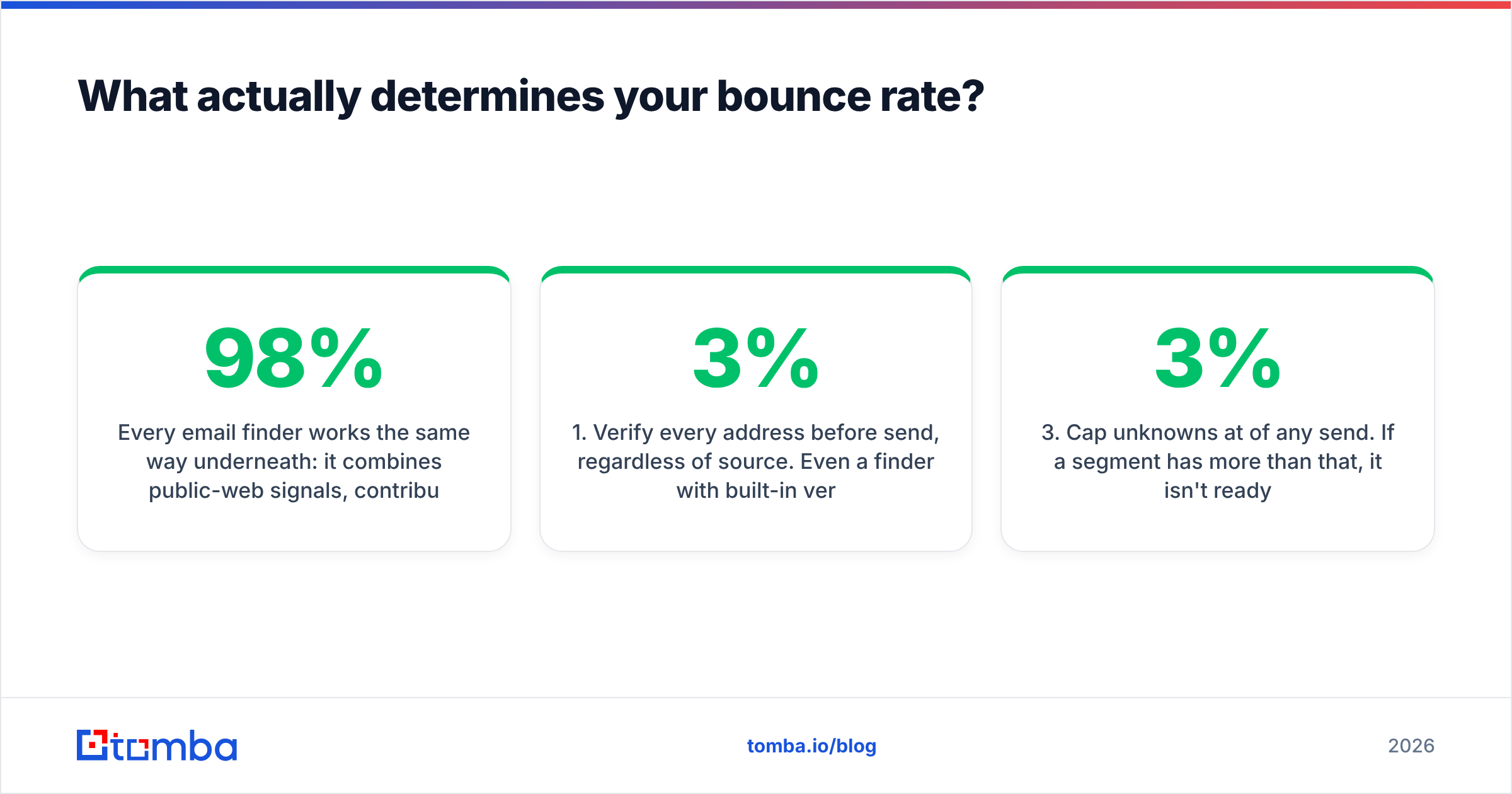
Every email finder works the same way underneath: it combines public-web signals, contributed data, and pattern inference (first.last@, flast@, first@) to produce a candidate address, then tries to confirm it. Confirmation is the hard part. A domain with a catch-all configuration accepts every address at the SMTP handshake — including asdfgh@company.com — so a naive verifier marks garbage as valid. That's how a "98% accurate" tool hands you a 12% bounce rate, and why bounce messages are the metric to instrument rather than credits spent.
Rules that survive contact with reality:
- Verify every address before send, regardless of source. Even a finder with built-in verification should be re-checked if the record is older than ~90 days. B2B data decays at roughly 2–3% per month as people change jobs. A dedicated email verifier is cheap insurance against a domain-level reputation hit.
- Handle catch-all domains explicitly. Don't silently drop them and don't blindly send. Route them through a catch-all verifier and treat "risky" as a separate bucket with its own, smaller send volume.
- Cap unknowns at 3% of any send. If a segment has more than that, it isn't ready.
- Measure the tool, not the invoice. Cost-per-verified-contact is the number. A tool at half the price that returns twice the junk is more expensive.
- Warm up before you scale. No finder saves you from a cold domain blasting 500 sends on day one.
Which tool fits which team?#
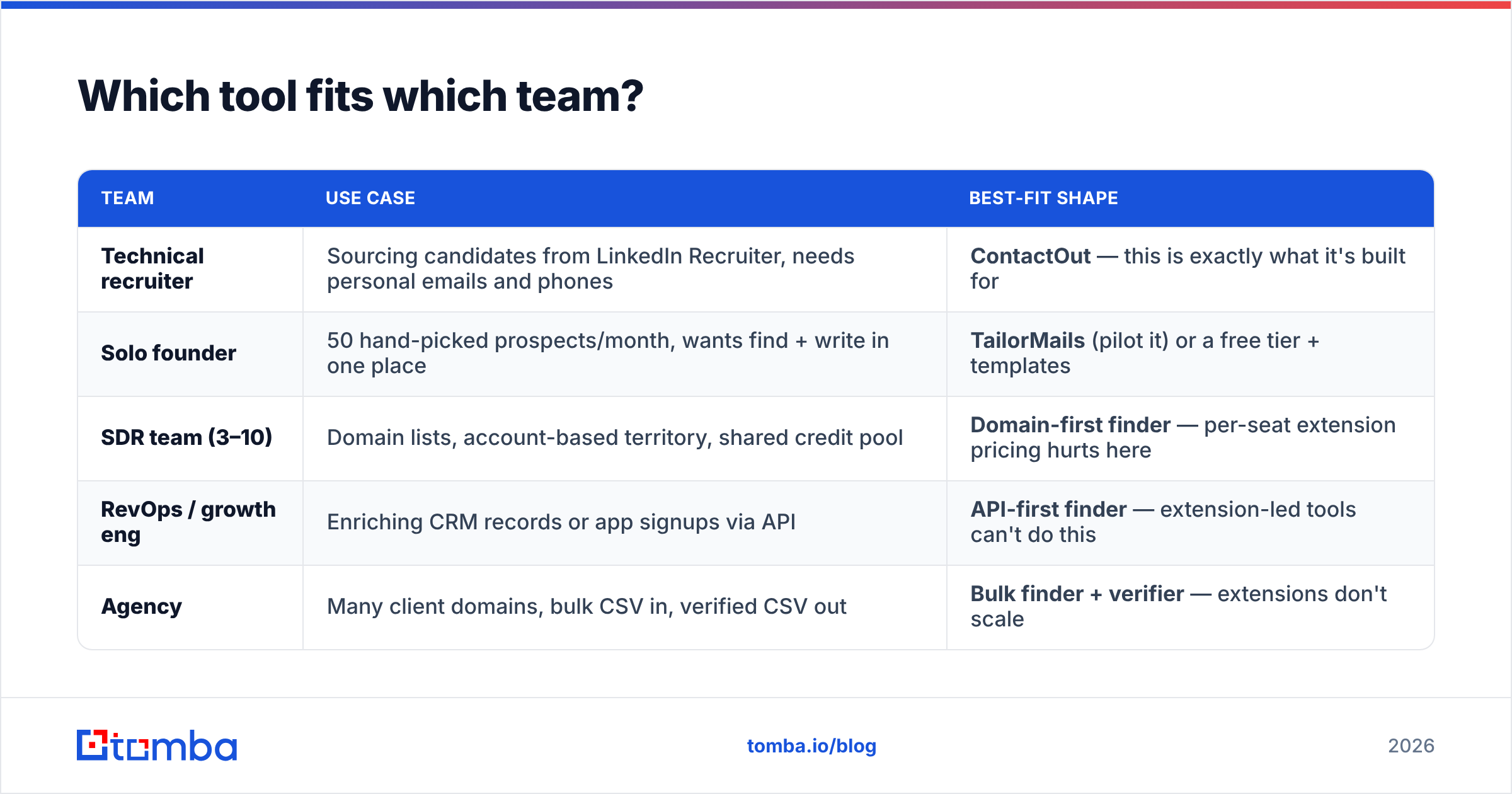
| Team | Use case | Best-fit shape |
|---|---|---|
| Technical recruiter | Sourcing candidates from LinkedIn Recruiter, needs personal emails and phones | ContactOut — this is exactly what it's built for |
| Solo founder | 50 hand-picked prospects/month, wants find + write in one place | TailorMails (pilot it) or a free tier + templates |
| SDR team (3–10) | Domain lists, account-based territory, shared credit pool | Domain-first finder — per-seat extension pricing hurts here |
| RevOps / growth eng | Enriching CRM records or app signups via API | API-first finder — extension-led tools can't do this |
| Agency | Many client domains, bulk CSV in, verified CSV out | Bulk finder + verifier — extensions don't scale |
Note what's happening in that table: only the top two rows are actually a ContactOut-vs-TailorMails decision. The bottom three rows are won by a different category of tool entirely. If you're in one of those rows, this comparison was the wrong question — and it's worth catching that before you buy either one.
Where does Tomba fit in this comparison?#
Different starting point, which is the whole point.
ContactOut starts from a LinkedIn profile. TailorMails starts from a name. Tomba's email finder starts from a domain, which is usually what you actually have: a target-account list, a CSV of companies, a CRM export, an API call from your own product.
That difference produces a different workflow:
- Domain search — give it
acme.com, get back the addresses and the company's dominant email pattern. You aren't looking anyone up one at a time. - Verification in the same pass — every result carries a confidence score and a verification status, so you aren't stitching two vendors together.
- Bulk processing — upload thousands of rows, get verified output back. No 50 browser tabs.
- An API that is the product, not a bolt-on — plus CLI, Sheets, Excel, and Chrome extension surfaces if you'd rather not write code.
- Pooled credits, not per-seat billing — Tomba's pricing runs a free tier at 25 searches/mo, Starter at $49/mo, Growth at $99/mo, and Pro at $249/mo. Five people share one credit pool instead of buying five seats.

The honest limitation: Tomba does not scrape LinkedIn personal emails. If your job is finding a senior engineer's Gmail so you can pitch them a role, ContactOut does that and Tomba does not. That's a real gap and there's no point pretending otherwise. A useful stack for recruiting teams is Tomba for domain-level and bulk work, plus a LinkedIn extension for the profile-by-profile cases. If you're weighing that swap specifically, the ContactOut alternative breakdown goes deeper on the tradeoff.
How should you actually run the evaluation?#
Two hours, one spreadsheet, and you'll never have to read another opinion piece — including this one.
- Build a 100-row control set. Real prospects from your real ICP. Include a few known-good addresses as a sanity check, and a mix of company sizes — small companies are where finders quietly fall apart.
- Run every candidate tool on the identical list. Same 100 rows, no cherry-picking.
- Record three numbers per tool: coverage (rows with an address returned), verified rate (rows the tool marks as confidently valid), and — after a real send — bounce rate.
- Compute cost per verified contact. Total spend ÷ addresses that actually delivered. This will not match the ranking you expected from the pricing pages.
- Then look at workflow fit. Only after the data quality is settled. A tool with great UX and 15% bounces is a liability with good taste.
Most teams skip straight to step 5 because it's the fun one, then wonder why a well-designed tool torched their domain reputation. The tools that survive this test are rarely the ones with the best landing pages, and the industry's own research on data quality and sales productivity keeps landing on the same finding: bad data costs more than any tool in the stack.
The bottom line#
ContactOut vs TailorMails is a real choice for exactly one profile: a LinkedIn-native recruiter or SDR working profile by profile. In that lane, ContactOut's maturity, personal-email coverage, and public track record make it the safer pick today, while TailorMails is worth a paid pilot if find-plus-personalize in one tool is genuinely your bottleneck — just test it on your own data before you commit budget.
For everyone else — anyone working from domains, account lists, CSVs, or an API — this matchup is the wrong bracket. A browser extension is not a data pipeline, and per-seat pricing on a profile-by-profile tool is the most expensive way to build a prospect list at team scale.
If your inputs are domains and company names rather than LinkedIn URLs, start with the Tomba Email Finder. The free tier gives you 25 searches a month — enough to run the 100-row test above across a few target accounts and see the coverage, confidence scores, and verification status side by side with whatever you're using now. Run the test, keep whichever tool wins on cost-per-verified-contact, and stop taking comparison posts at their word. Including this one.
Related guides#
Ready to find emails that actually work?
Join 150,000+ professionals who stopped guessing and started sending. Free credits on signup — no credit card required.
Get the Tomba newsletter
Practical outbound tactics and product updates — once every two weeks.
About the author