ContactOut vs Trueverify (2026): Which Tool Should You Use?
ContactOut finds contacts from LinkedIn. Trueverify checks whether an address is safe to send to. They solve different halves of the same problem — here is how they compare on accuracy, pricing, and export limits, and when you need neither.
TL;DR
- They are not the same category. ContactOut is a contact finder built around a LinkedIn browser extension. Trueverify is a contact verifier — it grades addresses you already have. Comparing them head-to-head only makes sense if you are deciding which problem to solve first.
- ContactOut wins on LinkedIn-native workflow. If your reps live in LinkedIn Recruiter or Sales Navigator all day, an extension that reveals a personal and work email in-sidebar is genuinely fast.
- A verifier wins on cost control. Every unverified address you send to burns sender reputation. Verification is the cheapest insurance in outbound.
- Neither is a complete stack alone. You need find + verify + enrich. Buying two seat-priced tools to cover that is how outbound budgets quietly triple.
- The honest recommendation: if you need both halves, a single API-first platform (Tomba starts at $49/mo, with a free tier) is usually cheaper than a seat-based extension plus a standalone verification vendor.
What is ContactOut, and what is Trueverify?#
Start here, because most "X vs Y" posts skip it and the whole comparison falls apart.
ContactOut (contactout.com) is a B2B contact data platform best known for its Chrome extension. You open a LinkedIn profile, the sidebar pops up, and it surfaces work emails, personal emails, and sometimes phone numbers. It also ships a web search app, list-building features, and a CRM/ATS export path. Its core buyer has historically been recruiters — which shows in the product: personal email coverage is a headline feature, because recruiters need to reach candidates who never check their work inbox.
Trueverify sits on the other end of the pipeline. It is positioned as an email verification / validation service: you upload a list (or hit an API), and it tells you whether each address is deliverable, risky, invalid, or a catch-all. Public documentation is thinner than for the bigger verification vendors, and pricing is not as openly published, so treat any specific number you see quoted around the web with skepticism and ask for a written quote before you commit budget.
That asymmetry matters more than any feature checkbox. Asking "ContactOut vs Trueverify" is close to asking "hammer vs tape measure." The useful question is: which gap in your outbound process is currently costing you the most money?
How do finders and verifiers actually differ?#
Think of it like hiring. A sourcer finds candidates who might exist for the role. A background check confirms the person is who the résumé says. You do not choose one — you sequence them. Skipping the sourcer means an empty pipeline. Skipping the background check means you find out the expensive way.
Here is the split, concretely:
- Finder input/output. A finder takes a person + company (or a domain) and returns an address. Input: "Jane Doe, Acme Corp." Output:
jane.doe@acme.comwith a confidence score. - Verifier input/output. A verifier takes an address and returns a status. Input:
jane.doe@acme.com. Output:valid/invalid/risky/catch-all, usually with MX, SMTP, and disposable-domain checks behind it. - Failure mode of a finder. It guesses a pattern that does not exist, and you get a hard bounce. Confidence scores exist precisely because pattern inference is probabilistic.
- Failure mode of a verifier. It marks a good address as risky (false negative), and you silently delete a real buyer from your list — or it passes a catch-all domain as valid and you bounce anyway.
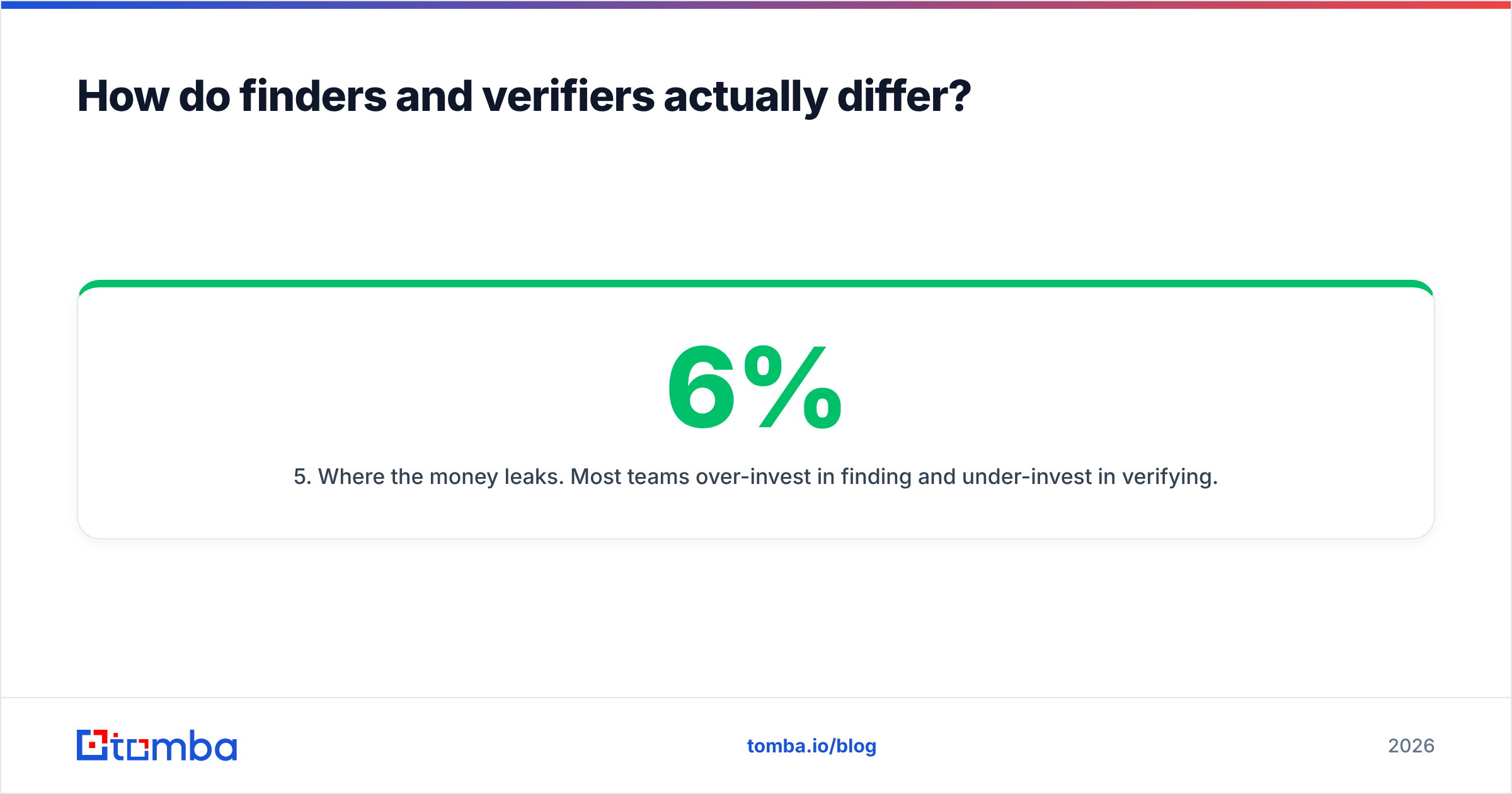
- Where the money leaks. Most teams over-invest in finding and under-invest in verifying. A 6% bounce rate does not just cost you 6% of your sends; it drags sender reputation down and quietly suppresses the other 94%.
- Where the time leaks. Manual copy-paste from an extension into a spreadsheet into a verifier into a sequencer. Every hop is a place data goes stale.

Is ContactOut accurate enough to skip verification?#
No. And that is not a knock on ContactOut specifically — it is true of every finder, including ours.
Any email finder works from some combination of crawled public sources, contributed data, pattern inference, and SMTP-level checks. Coverage and accuracy both vary hard by segment: a US software company with a first.last@ pattern and a public team page is easy; a 12-person agency in Lisbon on a catch-all domain is not. Vendors quote accuracy figures based on their own test sets, which is why two tools can both honestly claim "98%+" and give you very different bounce rates on your list.
The practical rule: treat every finder output as a hypothesis, and verify before you send. Even results that come back with a high confidence score should pass through an email verifier if the campaign matters. The marginal cost of a verification credit is a rounding error next to the cost of a blacklisted sending domain.

The other accuracy trap is catch-all domains. A catch-all server accepts mail for any address at the domain, so a naive SMTP check returns "valid" for asdfgh@company.com just as happily as for the CEO. Standard verification cannot resolve these — you need a dedicated catch-all verifier that uses additional signals. If a meaningful slice of your ICP runs Microsoft 365 with catch-all enabled (and in enterprise, a lot of it does), this is not an edge case. It is your list.
How do ContactOut and Trueverify compare feature by feature?#
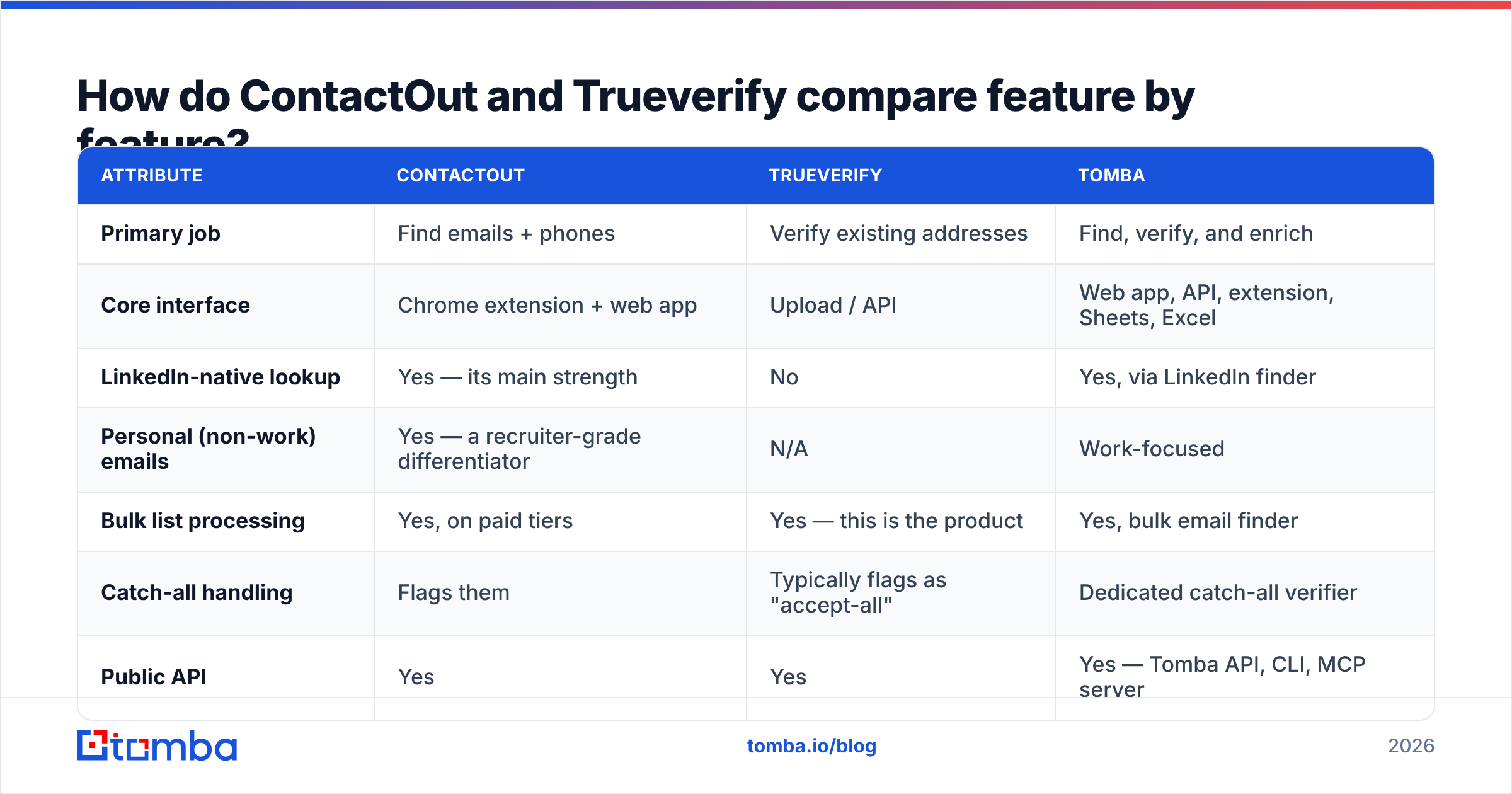
Where public information is unclear, the table says so rather than inventing a number. Confirm current pricing with each vendor directly before you buy.
| Attribute | ContactOut | Trueverify | Tomba |
|---|---|---|---|
| Primary job | Find emails + phones | Verify existing addresses | Find, verify, and enrich |
| Core interface | Chrome extension + web app | Upload / API | Web app, API, extension, Sheets, Excel |
| LinkedIn-native lookup | Yes — its main strength | No | Yes, via LinkedIn finder |
| Personal (non-work) emails | Yes — a recruiter-grade differentiator | N/A | Work-focused |
| Bulk list processing | Yes, on paid tiers | Yes — this is the product | Yes, bulk email finder |
| Catch-all handling | Flags them | Typically flags as "accept-all" | Dedicated catch-all verifier |
| Public API | Yes | Yes | Yes — Tomba API, CLI, MCP server |
| Pricing model | Seat-based, tiered credits | Not consistently published — request a quote | Credit-based, flat monthly |
| Entry paid price | Publicly listed, varies by plan and seat count | Quote-based | $49/mo Starter |
| Free tier | Limited free credits | Trial credits typically available | 25 searches/mo, free forever |
| Best fit | Recruiters and LinkedIn-heavy sourcing | Teams cleaning a large existing list | Teams that need find + verify in one place |

Two things jump out of that table.
First, the overlap is almost zero. If you buy ContactOut, you still have a verification gap. If you buy Trueverify, you still have a sourcing gap. Teams that pick "one" end up buying the other three months later.
Second, the pricing models are structurally different. Extension-first tools tend to be seat-priced, because the value is delivered to a human sitting in a browser. Verification tools tend to be credit-priced, because the value is delivered to a list. That means ContactOut's cost scales with headcount and Trueverify's scales with volume — and if you grow both, you get hit twice.
What does seat pricing actually cost you at scale?#
Run the numbers before you sign anything. A five-rep SDR team on a seat-priced finder plus a separate verification contract routinely lands in the four-figures-per-month range once you add credits and overages. The same five reps working from a shared credit pool on a single platform can run materially cheaper — and, more importantly, the cost stops being a function of how many people you hire.
The hidden costs nobody quotes you:
- Per-seat licenses for occasional users. The AE who does prospecting one day a month still needs a seat.
- Credit overages. Extension-based lookups are easy to burn through when a rep is scrolling Sales Navigator.
- Export limits. Some plans cap how many contacts you can push to CSV or CRM, which quietly forces an upgrade.
- Double-paying for the same contact. Find it in tool A, verify it in tool B, enrich it in tool C — three charges, one lead.
- Integration glue. Engineering time spent stitching two vendors together is real money, and it never shows up in the vendor comparison spreadsheet.
If you are already on ContactOut and feeling the seat math, it is worth reading the case for a ContactOut alternative before your renewal date rather than after it.

Which one should you pick for your use case?#
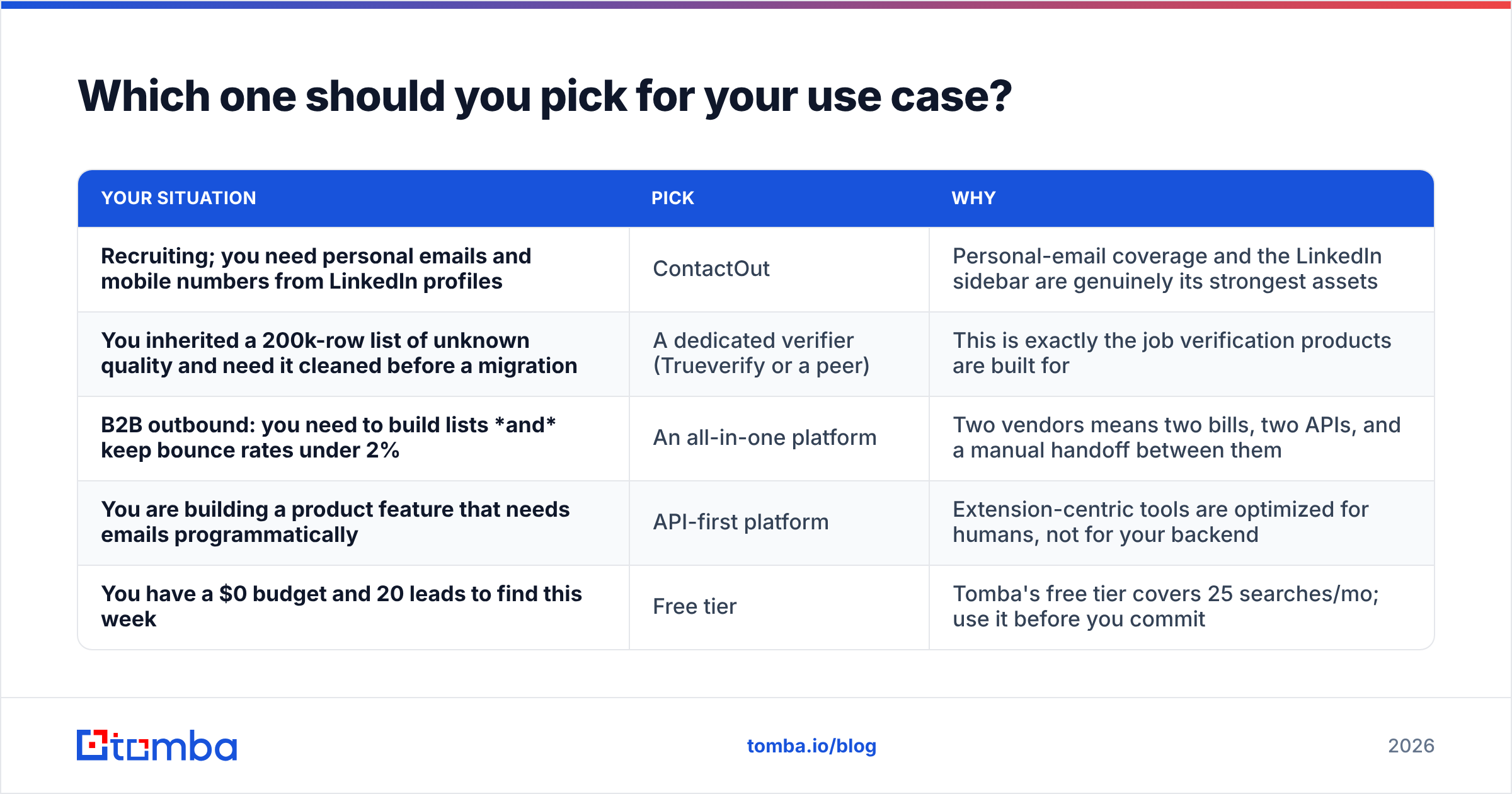
| Your situation | Pick | Why |
|---|---|---|
| Recruiting; you need personal emails and mobile numbers from LinkedIn profiles | ContactOut | Personal-email coverage and the LinkedIn sidebar are genuinely its strongest assets |
| You inherited a 200k-row list of unknown quality and need it cleaned before a migration | A dedicated verifier (Trueverify or a peer) | This is exactly the job verification products are built for |
| B2B outbound: you need to build lists and keep bounce rates under 2% | An all-in-one platform | Two vendors means two bills, two APIs, and a manual handoff between them |
| You are building a product feature that needs emails programmatically | API-first platform | Extension-centric tools are optimized for humans, not for your backend |
| You have a $0 budget and 20 leads to find this week | Free tier | Tomba's free tier covers 25 searches/mo; use it before you commit |
Note the pattern. ContactOut is the right answer for a specific persona — the LinkedIn-native sourcer, especially in recruiting. A verifier is the right answer for a specific event — a list cleanup, a CRM migration, a deliverability incident. Neither is the right answer for the ongoing operating system of a B2B outbound team, because that team does both jobs every single day.
How do you build the stack that actually works?#
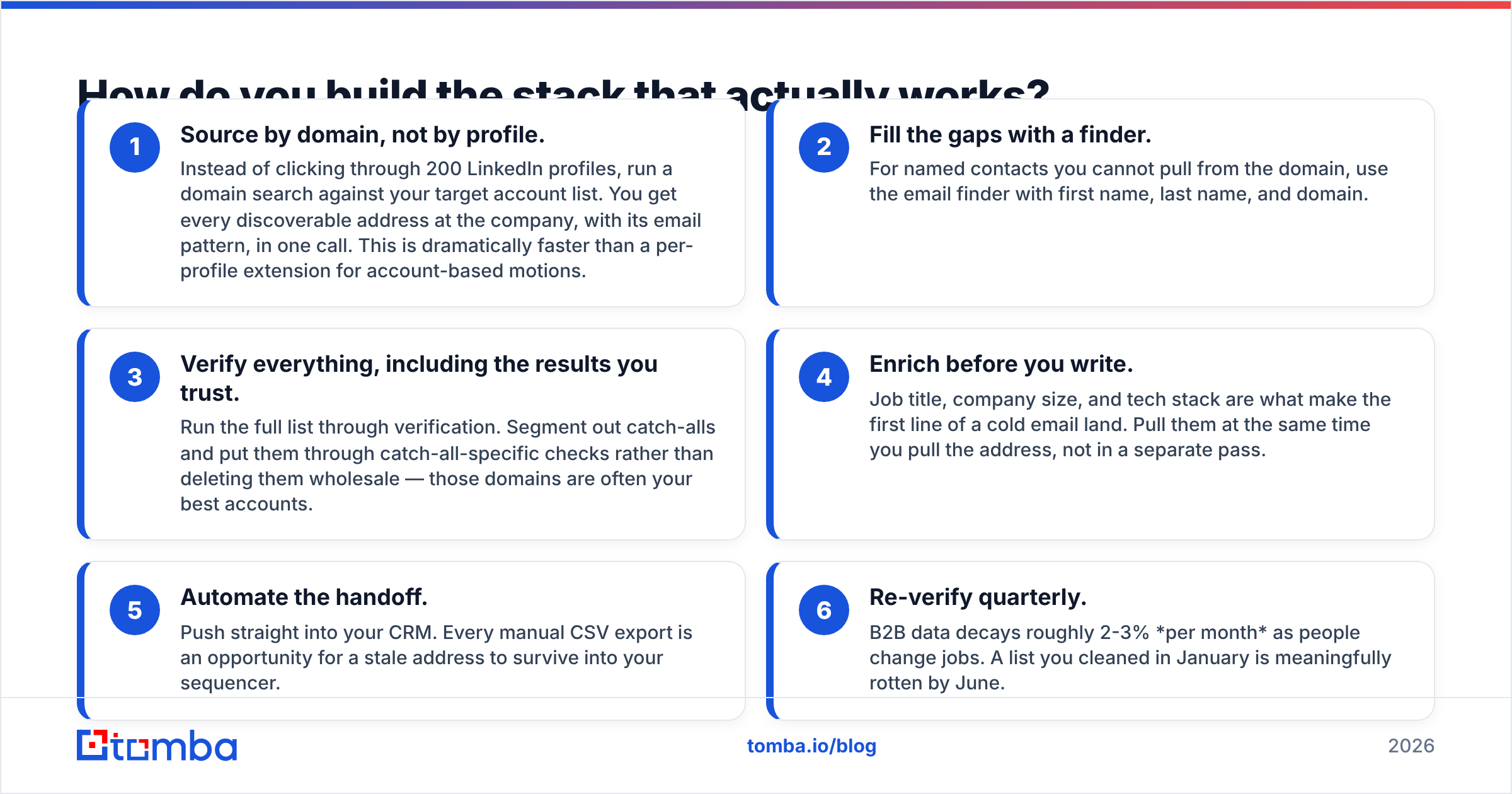
Here is the sequence that keeps bounce rates low without a four-vendor bill:
- Source by domain, not by profile. Instead of clicking through 200 LinkedIn profiles, run a domain search against your target account list. You get every discoverable address at the company, with its email pattern, in one call. This is dramatically faster than a per-profile extension for account-based motions.
- Fill the gaps with a finder. For named contacts you cannot pull from the domain, use the email finder with first name, last name, and domain.
- Verify everything, including the results you trust. Run the full list through verification. Segment out catch-alls and put them through catch-all-specific checks rather than deleting them wholesale — those domains are often your best accounts.
- Enrich before you write. Job title, company size, and tech stack are what make the first line of a cold email land. Pull them at the same time you pull the address, not in a separate pass.
- Automate the handoff. Push straight into your CRM. Every manual CSV export is an opportunity for a stale address to survive into your sequencer.
- Re-verify quarterly. B2B data decays roughly 2-3% per month as people change jobs. A list you cleaned in January is meaningfully rotten by June.
Independent review sites like G2 are useful for gut-checking vendor claims, and HubSpot's research on email engagement is a decent sanity check on what "good" deliverability looks like in your industry. Read the one-star reviews, not the five-star ones — that is where export limits and support response times get discussed honestly.
What is the verdict on ContactOut vs Trueverify?#
They are complements, not competitors — and if you buy both, you are paying two vendors to do what one platform does.
- Choose ContactOut if you are a recruiter or a LinkedIn-first sourcer and personal-email coverage is worth the seat price. It is good at what it is good at.
- Choose Trueverify (or any credible verification vendor) if your immediate, bounded problem is a dirty list. Get a written quote first — the public pricing information is thin.
- Choose neither if you are running a B2B outbound or RevOps motion where finding, verifying, and enriching happen continuously. In that case, seat-priced extensions and single-purpose verifiers are both the wrong shape for your workflow.
The most common mistake we see is teams optimizing the finding step to three decimal places while sending to an unverified list. Fix the verification gap first — it is cheaper, faster, and it protects everything downstream.
Ready to collapse two vendors into one? Tomba's Email Finder gives you domain search, email finding, verification, catch-all checks, and enrichment from a single credit pool — with a REST API, a Chrome extension, and Google Sheets and Excel add-ins so your workflow does not care where the data gets used. Start on the free tier (25 searches/mo, no card), and see the full Tomba pricing — Starter is $49/mo, and it does not go up when you hire your next rep.
Related guides#
Ready to find emails that actually work?
Join 150,000+ professionals who stopped guessing and started sending. Free credits on signup — no credit card required.
Get the Tomba newsletter
Practical outbound tactics and product updates — once every two weeks.
About the author