ContactOut vs Webbula (2026): Which B2B Data Tool Wins?
ContactOut finds contacts. Webbula cleans lists. Most teams pick the wrong one because they think these tools compete. Here's the honest breakdown, with pricing, accuracy, and the stack that actually works.
TL;DR
- These tools don't actually compete. ContactOut is a contact-sourcing tool (LinkedIn-first email and phone lookup). Webbula is a data-hygiene and email-validation platform (bounce prevention, threat detection, list scrubbing). Buying one expecting the other's job is the most common mistake teams make here.
- ContactOut wins if your bottleneck is finding people — recruiters and SDRs living inside LinkedIn Recruiter or Sales Navigator all day.
- Webbula wins if your bottleneck is list quality at scale — email marketers with 500K-record files who need bot traps, spam traps, and hygiene risk flags removed before send.
- Neither is a full prospecting stack. ContactOut's verification is thin; Webbula sources nothing. Pairing a finder like Tomba (with a built-in email verifier) covers both jobs in one workflow starting at $49/mo.
- Real decision rule: if you can't name whether your problem is coverage or deliverability, you're not ready to buy either.
What are ContactOut and Webbula, actually?#
Start here, because half the "ContactOut vs Webbula" searches come from people comparing a hammer to a wrench.
ContactOut is a contact-data platform built around a Chrome extension. You open a LinkedIn profile, click the icon, and it surfaces personal and work emails plus phone numbers. It claims a large contact database (hundreds of millions of profiles) and markets heavily to recruiters. Its center of gravity is acquisition: getting a contact detail you didn't have.
Webbula is a data-quality vendor. Its flagship is email hygiene — running a list you already own through a multi-layer validation and threat-detection engine that flags spam traps, honeypots, bots, complainers, and dead domains. Webbula also sells demographic and identity enrichment (cloudHygiene, cloudDemographics). Its center of gravity is protection: keeping the list you already have from wrecking your sender reputation.
One adds records. One subtracts them. If you frame the comparison as "which is better," you'll get a useless answer. Frame it as "which failure am I currently experiencing," and it resolves in about ten seconds.

How do ContactOut and Webbula compare head-to-head?#
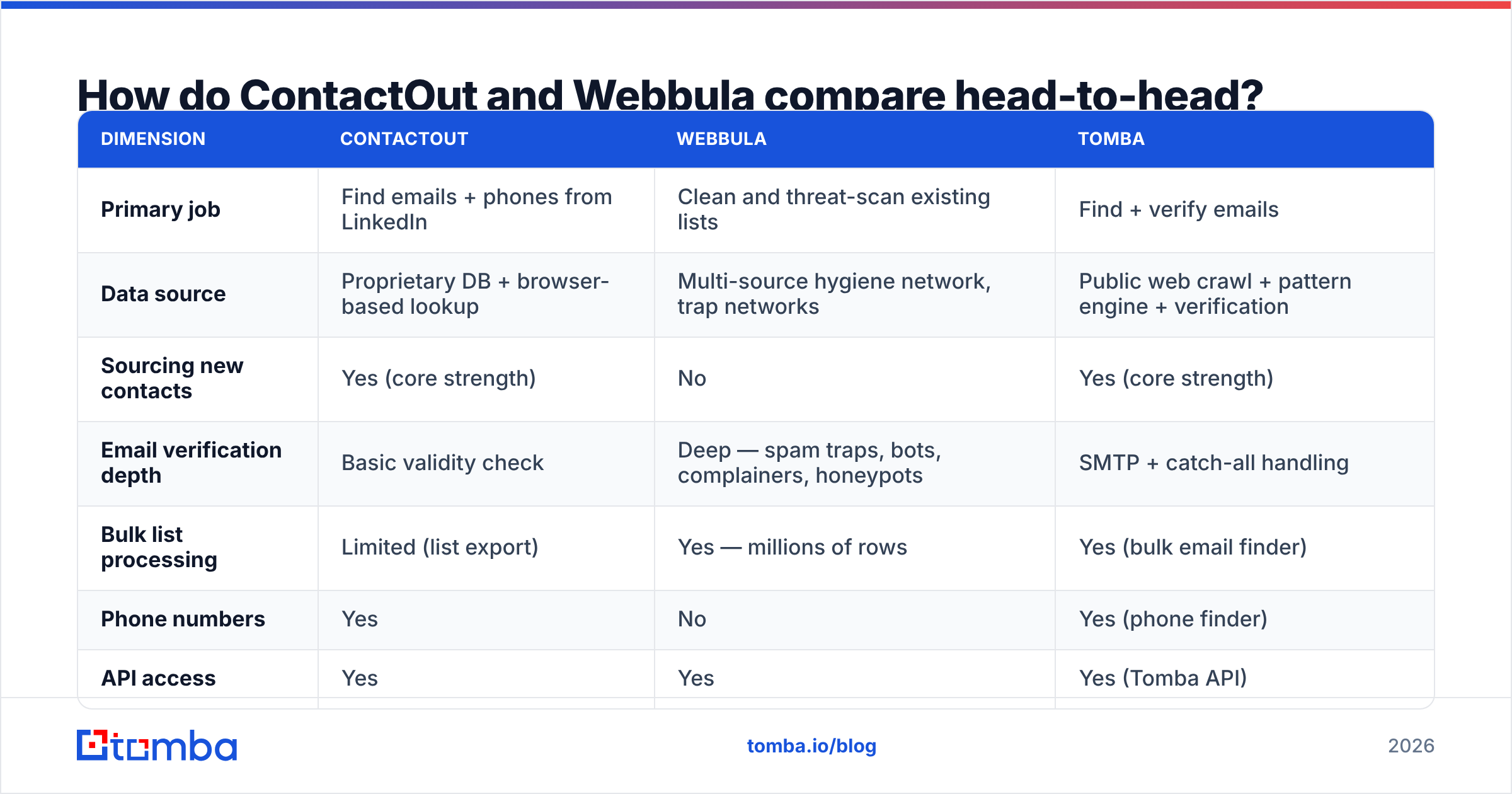
| Dimension | ContactOut | Webbula | Tomba |
|---|---|---|---|
| Primary job | Find emails + phones from LinkedIn | Clean and threat-scan existing lists | Find + verify emails |
| Data source | Proprietary DB + browser-based lookup | Multi-source hygiene network, trap networks | Public web crawl + pattern engine + verification |
| Sourcing new contacts | Yes (core strength) | No | Yes (core strength) |
| Email verification depth | Basic validity check | Deep — spam traps, bots, complainers, honeypots | SMTP + catch-all handling |
| Bulk list processing | Limited (list export) | Yes — millions of rows | Yes (bulk email finder) |
| Phone numbers | Yes | No | Yes (phone finder) |
| API access | Yes | Yes | Yes (Tomba API) |
| Pricing model | Per-seat, credit-tiered (~$49–$99+/user/mo) | Quote-based / per-record, enterprise-leaning | Flat tiers: Free, $49, $99, $249/mo |
| Free tier | Limited free credits | No public free tier | 25 searches/mo |
| Best for | Recruiters, LinkedIn-native SDRs | Email marketers, ESPs, large-list senders | SDRs and RevOps needing find + verify in one |
Two things jump out.
First, pricing transparency. ContactOut publishes seat-based tiers; Webbula does not publish standard pricing at all, which is normal for enterprise data-hygiene vendors but means a procurement cycle, not a credit card. If you're a five-person sales team, that friction alone often decides it.
Second, there is almost no feature overlap. The only shared column is "API access." Everything else is disjoint. That's the whole story.
Is ContactOut worth it in 2026?#
It depends entirely on where you work all day.
Where ContactOut is genuinely strong:
- LinkedIn-native workflow. If your prospecting happens inside Sales Navigator or Recruiter, the extension removes context-switching completely. That's a real productivity gain, not a marketing claim.
- Personal email coverage. Recruiters need to reach candidates who won't answer at a work address. ContactOut's personal-email hit rate is one of the better ones in the category.
- Phone numbers alongside emails. Useful if your motion is multi-channel and you're doing cold calling in the same sequence.
Where it falls short:
- Verification is a checkbox, not a product. ContactOut tells you an address is syntactically plausible and probably deliverable. It does not tell you it's a spam trap, a role account that will generate complaints, or a recycled domain. Those are the addresses that actually hurt you.
- Per-seat pricing punishes teams. Credits are attached to seats. Growing from three reps to ten roughly triples the bill even if total search volume doesn't change.
- Off-LinkedIn coverage thins out. If your ICP lives in industries with weak LinkedIn presence — regional manufacturing, trades, parts of APAC — the hit rate drops noticeably.
For a broader look at where it sits against peers, our ContactOut alternative breakdown goes tool by tool.
Is Webbula worth it in 2026?#
Webbula solves a problem most sales teams don't know they have until their domain is already burnt.
Here's the sequence that kills a sending domain: you buy or scrape a list → some records are recycled addresses that mailbox providers converted into spam traps → you email them → your email deliverability collapses → suddenly even your warm replies land in spam. A standard syntax-plus-SMTP validator catches none of that, because a spam trap accepts mail. That's the point of it.
Webbula's differentiators:
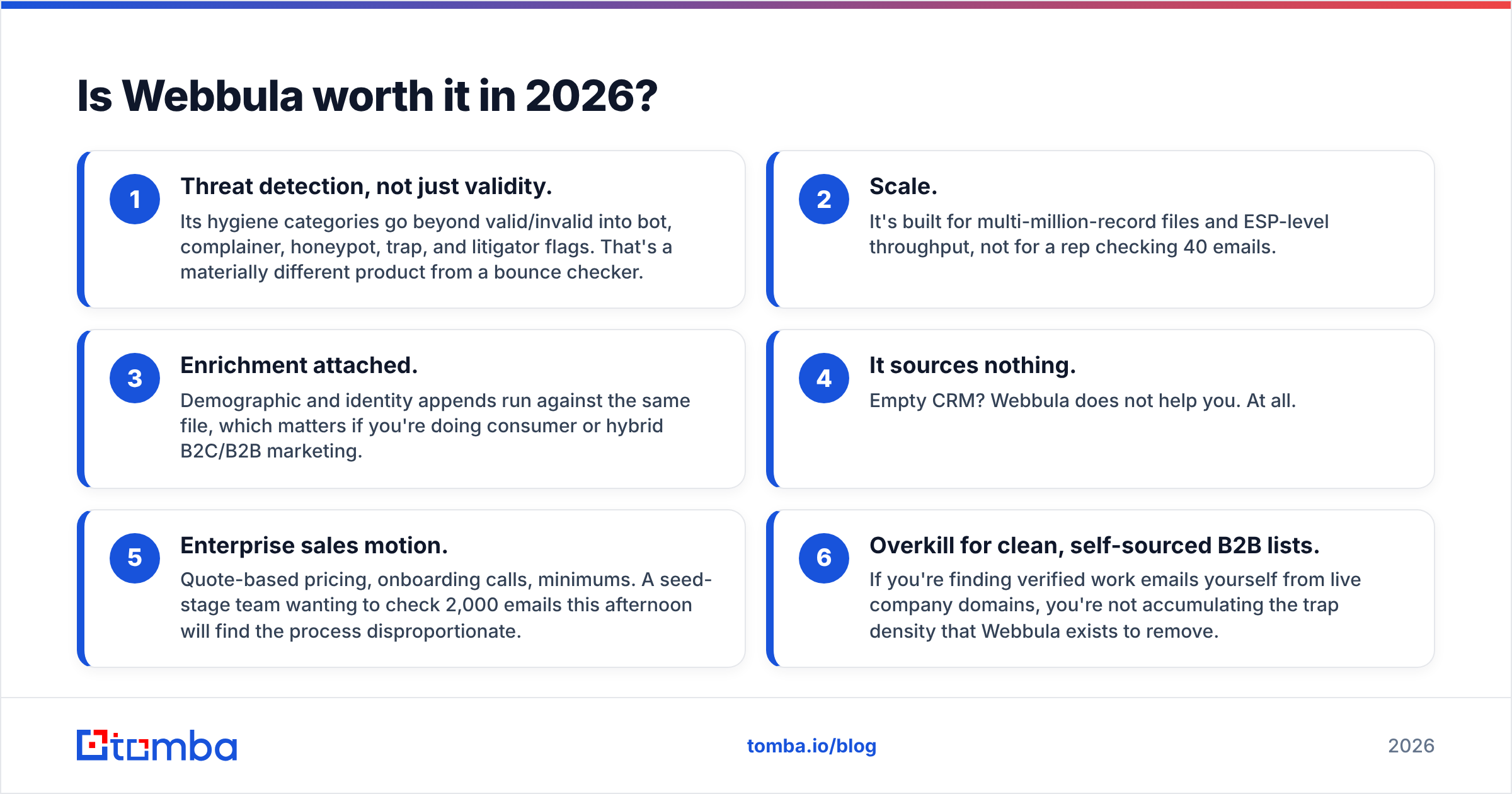
- Threat detection, not just validity. Its hygiene categories go beyond valid/invalid into bot, complainer, honeypot, trap, and litigator flags. That's a materially different product from a bounce checker.
- Scale. It's built for multi-million-record files and ESP-level throughput, not for a rep checking 40 emails.
- Enrichment attached. Demographic and identity appends run against the same file, which matters if you're doing consumer or hybrid B2C/B2B marketing.
Where it doesn't fit:
- It sources nothing. Empty CRM? Webbula does not help you. At all.
- Enterprise sales motion. Quote-based pricing, onboarding calls, minimums. A seed-stage team wanting to check 2,000 emails this afternoon will find the process disproportionate.
- Overkill for clean, self-sourced B2B lists. If you're finding verified work emails yourself from live company domains, you're not accumulating the trap density that Webbula exists to remove.
Worth noting: peer platforms in the data space — including BookYourData, which sells pre-verified B2B contacts with accuracy guarantees — occupy adjacent ground by shipping lists that need less downstream hygiene in the first place. It's a legitimate third path if you'd rather buy clean than clean dirty.
Which one should you buy? A decision framework#
Work through this in order. Stop at the first "yes."
- Is your CRM empty or thin? → You have a sourcing problem. Webbula cannot help. Look at ContactOut or a domain-first finder like Tomba's domain search.
- Are you bouncing above 3% on lists you sourced yourself? → You have a verification problem, not a hygiene-threat problem. A standard email verifier fixes this for a fraction of Webbula's cost.
- Are you sending to purchased, inherited, or 2+ year-old lists at 100K+ scale? → You have a genuine hygiene problem. This is Webbula's exact use case. Buy it.
- Do you live in LinkedIn all day and need personal emails and mobiles? → ContactOut.
- Do you need both find and verify without two contracts? → A combined platform. That's the gap Tomba was built for.
Most teams land on 2 or 5. Very few genuinely land on 3 — and the ones who do usually know it already, because they've had an ESP suspend them.

What does a stack that actually works look like?#
Stop thinking "ContactOut vs Webbula" and start thinking about the pipeline stages.
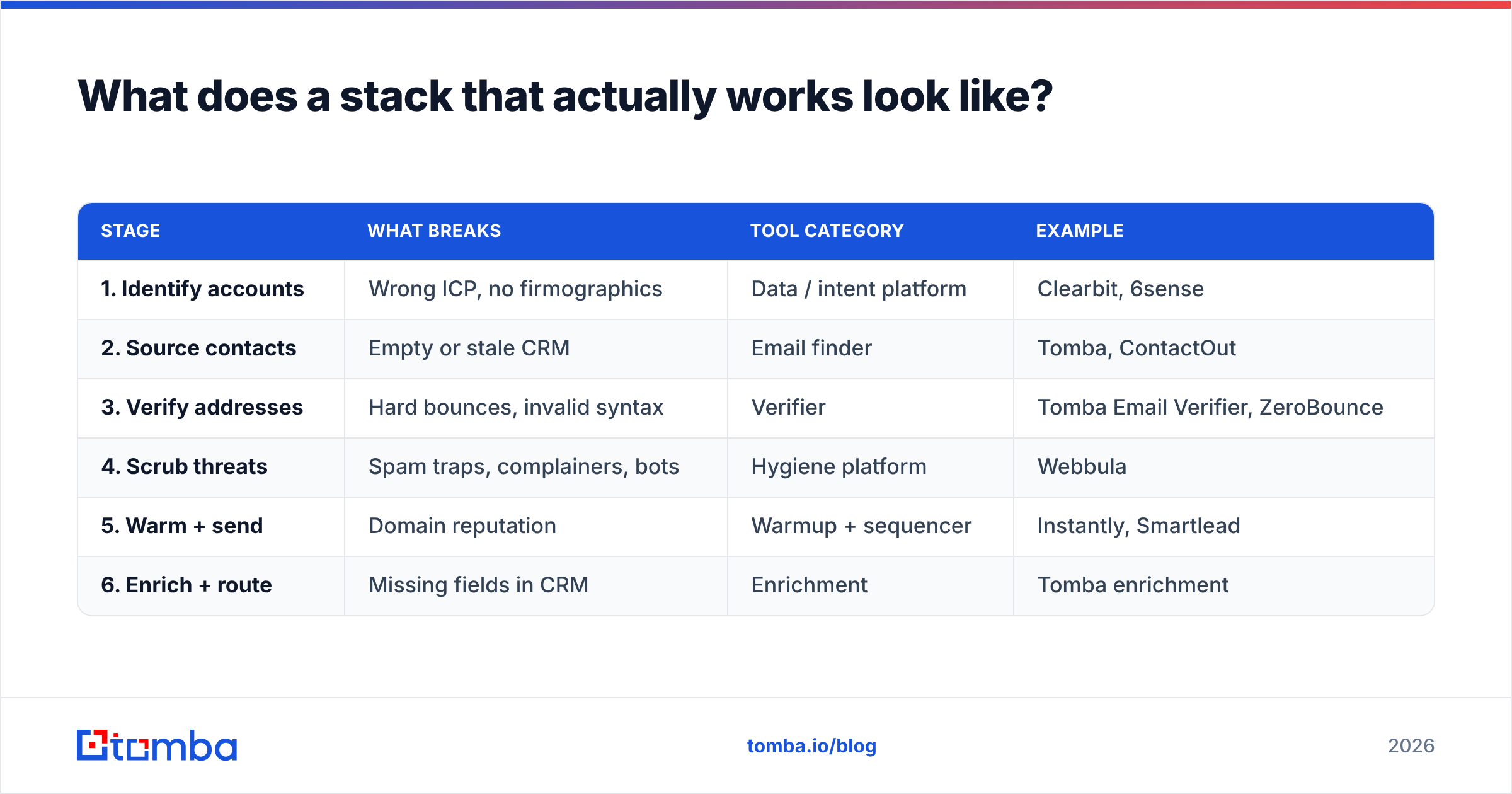
| Stage | What breaks | Tool category | Example |
|---|---|---|---|
| 1. Identify accounts | Wrong ICP, no firmographics | Data / intent platform | Clearbit, 6sense |
| 2. Source contacts | Empty or stale CRM | Email finder | Tomba, ContactOut |
| 3. Verify addresses | Hard bounces, invalid syntax | Verifier | Tomba Email Verifier, ZeroBounce |
| 4. Scrub threats | Spam traps, complainers, bots | Hygiene platform | Webbula |
| 5. Warm + send | Domain reputation | Warmup + sequencer | Instantly, Smartlead |
| 6. Enrich + route | Missing fields in CRM | Enrichment | Tomba enrichment |
ContactOut owns stage 2. Webbula owns stage 4. They are not substitutes — they're neighbors.
The practical implication: stages 2 and 3 should live in one tool. Finding an email and confirming it's real are the same motion, executed a second apart. Splitting them across two vendors means two APIs, two credit pools, two invoices, and a handoff where records get lost. That's why finders with native verification — Tomba being the obvious one here, given who's writing this — collapse that seam.
Stage 4 stays separate, and that's fine. Most B2B teams sourcing fresh contacts from live company domains never need it. If you're mailing a list you bought in 2023, you do. Be honest about which you are.
For the pricing math: ContactOut at seat-based rates for a five-person team runs meaningfully above a flat platform fee. Tomba's pricing is workspace-flat — Starter at $49/mo, Growth at $99/mo, Pro at $249/mo, plus a free tier with 25 searches for testing hit rate on your actual ICP before you commit. Webbula quotes per engagement, so it belongs in a different budget line entirely.
How do you test any of these before you commit?#
Vendor-published accuracy numbers are marketing. Run your own bake-off — it takes an afternoon.
- Build a ground-truth set of 100 contacts. Pull people whose real email you can independently confirm (existing customers, past contacts, publicly listed addresses on company sites).
- Strip the emails. Keep only name + company domain.
- Run the same 100 through each tool. Record: found / not found, and correct / incorrect against your ground truth.
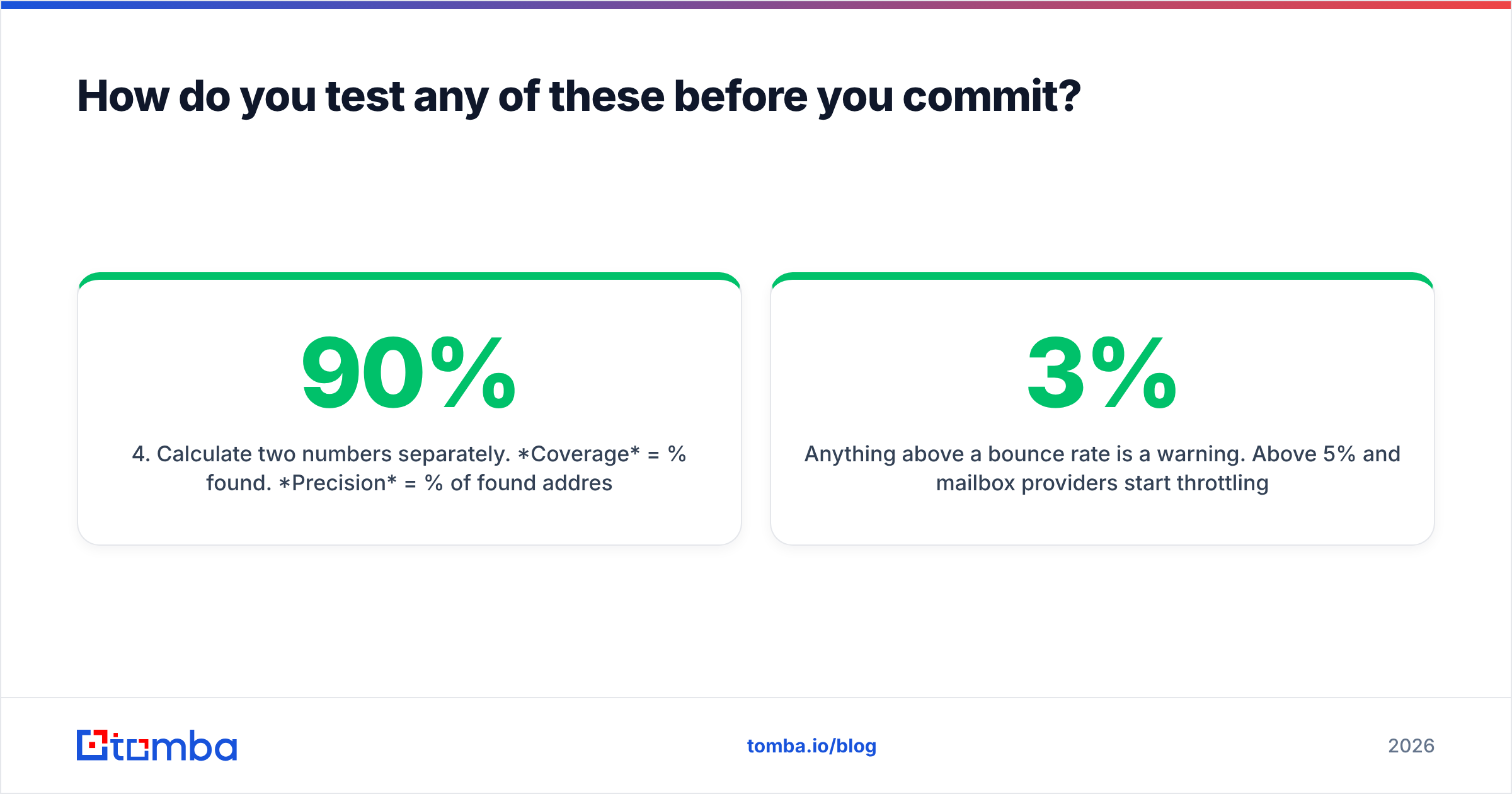
- Calculate two numbers separately. Coverage = % found. Precision = % of found addresses that were correct. A tool with 90% coverage and 70% precision is worse than one with 65% coverage and 97% precision — the first one is quietly burning your domain.
- Send a 200-address test campaign through your ESP and measure actual hard-bounce rate. This is the only number that matters, and it's the one no vendor page will give you.
Anything above a 3% bounce rate is a warning. Above 5% and mailbox providers start throttling you — Google's own sender guidelines are explicit that high bounce and complaint rates degrade delivery. Check what independent reviewers report too; G2's contact data category surfaces the complaints vendors don't publish.
Verdict: which wins?#
Neither, because they were never in the same race.
- Choose ContactOut if you're a recruiter or LinkedIn-heavy SDR, personal emails and mobiles matter, and you can absorb per-seat pricing. Add a real verifier alongside it — its native validation isn't enough on its own.
- Choose Webbula if you own large, aging, or acquired lists and your problem is spam traps and complaint risk. It's a specialist tool that does something few competitors do well, and it's worth its enterprise motion when the problem is real.
- Choose neither if what you actually need is to find accurate work emails and confirm they're deliverable, in one place, without a procurement cycle.
That last case is the majority. Most B2B teams don't have a hygiene crisis or a LinkedIn-extension gap — they have an accuracy gap that shows up as bounce rate three weeks after they start sending.
Get accurate emails without the two-vendor tax#
If your problem is stage 2 and stage 3 — finding the right contact and knowing the address is real before you press send — start with the Tomba Email Finder. Search by domain, name, or company, get an SMTP-verified result with a confidence score attached, and push it straight into your CRM through the integrations you already use. The free tier gives you 25 searches to test hit rate against your own ICP before spending anything, and Starter is $49/mo when you're ready to scale.
Run the 100-contact bake-off described above. Then buy based on your numbers, not anyone's landing page.
Related guides#
Ready to find emails that actually work?
Join 150,000+ professionals who stopped guessing and started sending. Free credits on signup — no credit card required.
Get the Tomba newsletter
Practical outbound tactics and product updates — once every two weeks.
About the author