ContactOut vs Winmo (2026): Which B2B Data Tool Wins?
ContactOut mines LinkedIn for personal emails. Winmo sells ad-spend intelligence on brands and agencies. They barely compete — and picking the wrong one wastes a year of budget. Here's the honest breakdown.
TL;DR — ContactOut vs Winmo in 60 seconds#
- They are not really competitors. ContactOut is a LinkedIn-first contact finder (emails, personal emails, phones). Winmo is an advertising and media sales intelligence database (brands, agencies, ad spend, marketing decision-makers). Buying one expecting the other is the single most common mistake in this comparison.
- ContactOut wins if your ICP lives on LinkedIn and you need a person's email fast, one profile at a time, from a Chrome extension.
- Winmo wins if you sell to marketers — media, martech, production, sponsorship, agency services — and you need to know who holds the budget, what they spent, and when the account is in review.
- Neither is a general-purpose email infrastructure layer. If you need domain-wide coverage, bulk enrichment, and an API that plugs into your own system, a dedicated email finder is the cheaper, more flexible base layer.
- Pricing transparency is the tiebreaker. ContactOut publishes plans. Winmo runs demo-then-quote annual contracts. Tomba starts free and tops out at $249/mo before enterprise.
What is ContactOut, actually?#
ContactOut is a contact-data tool built around a browser extension. You open a LinkedIn profile, the sidebar pops out, and it surfaces work emails, personal emails, and phone numbers for that person. Recruiters made it popular — personal Gmail addresses get replies when the corporate inbox is a graveyard — and sales teams adopted it for the same reason.
The product has three surfaces:
- The Chrome extension — the reason anyone buys it. Works on LinkedIn, LinkedIn Recruiter, GitHub, and a few other profile-shaped pages.
- The search portal — a filterable people/company database you can query without LinkedIn open.
- Integrations and an API — pushes contacts into ATS and CRM systems.
Its strength is depth on one person. Its weakness is that everything is anchored to a profile. If your workflow is "here are 4,000 domains, get me the head of marketing at each," you're fighting the tool's grain. You can read what ContactOut claims for itself on contactout.com, and the pattern in G2 reviews is consistent: praise for personal-email hit rate, complaints about credit limits and seat pricing.
What is Winmo, and why is it priced so differently?#
Winmo isn't a contact scraper. It's a vertical sales intelligence database for the advertising and marketing economy. It tracks national and regional advertisers, their agency rosters, estimated ad spend by channel, agency-of-record relationships, and the decision-makers who control those budgets — CMOs, media directors, brand managers, procurement.
The killer feature is the timing layer. Winmo Edge sends predictive alerts: an account goes into review, a CMO changes jobs, a brand shifts spend into a new channel. For a media seller, that alert is the pipeline. Knowing an agency lost the account is worth more than knowing the media director's email — because everyone already has that email.
That's why the pricing model looks nothing like ContactOut's. Winmo doesn't publish a self-serve price page; you book a demo and get an annual quote, typically seat-based and typically in four-to-five-figure territory depending on team size and data modules. Check winmo.com for the current packaging — it changes, and anyone quoting you a hard number from a blog post is guessing.
The mental model: ContactOut sells you a contact. Winmo sells you a reason to reach out. Those are different line items on a budget, and conflating them is how teams end up paying for a $12k/yr ad-intelligence contract to send cold emails they could have sourced for $49.
How do ContactOut, Winmo, and Tomba compare head-to-head?#
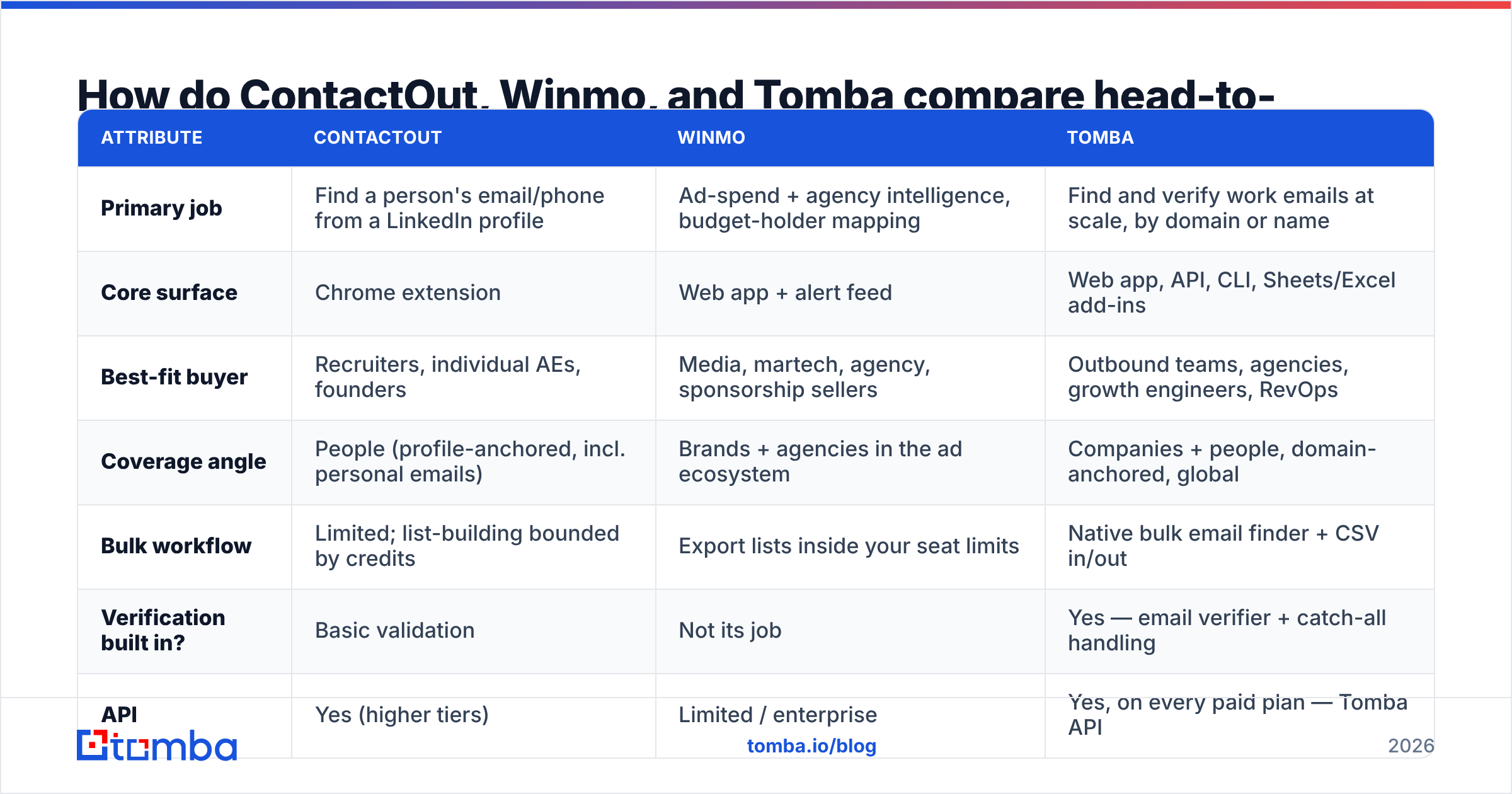
| Attribute | ContactOut | Winmo | Tomba |
|---|---|---|---|
| Primary job | Find a person's email/phone from a LinkedIn profile | Ad-spend + agency intelligence, budget-holder mapping | Find and verify work emails at scale, by domain or name |
| Core surface | Chrome extension | Web app + alert feed | Web app, API, CLI, Sheets/Excel add-ins |
| Best-fit buyer | Recruiters, individual AEs, founders | Media, martech, agency, sponsorship sellers | Outbound teams, agencies, growth engineers, RevOps |
| Coverage angle | People (profile-anchored, incl. personal emails) | Brands + agencies in the ad ecosystem | Companies + people, domain-anchored, global |
| Bulk workflow | Limited; list-building bounded by credits | Export lists inside your seat limits | Native bulk email finder + CSV in/out |
| Verification built in? | Basic validation | Not its job | Yes — email verifier + catch-all handling |
| API | Yes (higher tiers) | Limited / enterprise | Yes, on every paid plan — Tomba API |
| Pricing model | Published self-serve tiers, credit-capped | Demo → annual quote | Free (25/mo), $49, $99, $249, enterprise |
| Time to first value | Minutes | Days (demo, onboarding) | Minutes |
Read that table once more and the decision mostly makes itself. The three tools sit at different layers of the stack. The failure mode isn't picking the "worse" tool — it's paying enterprise money for a job a $49/mo tool does better.
Is ContactOut better than Winmo?#
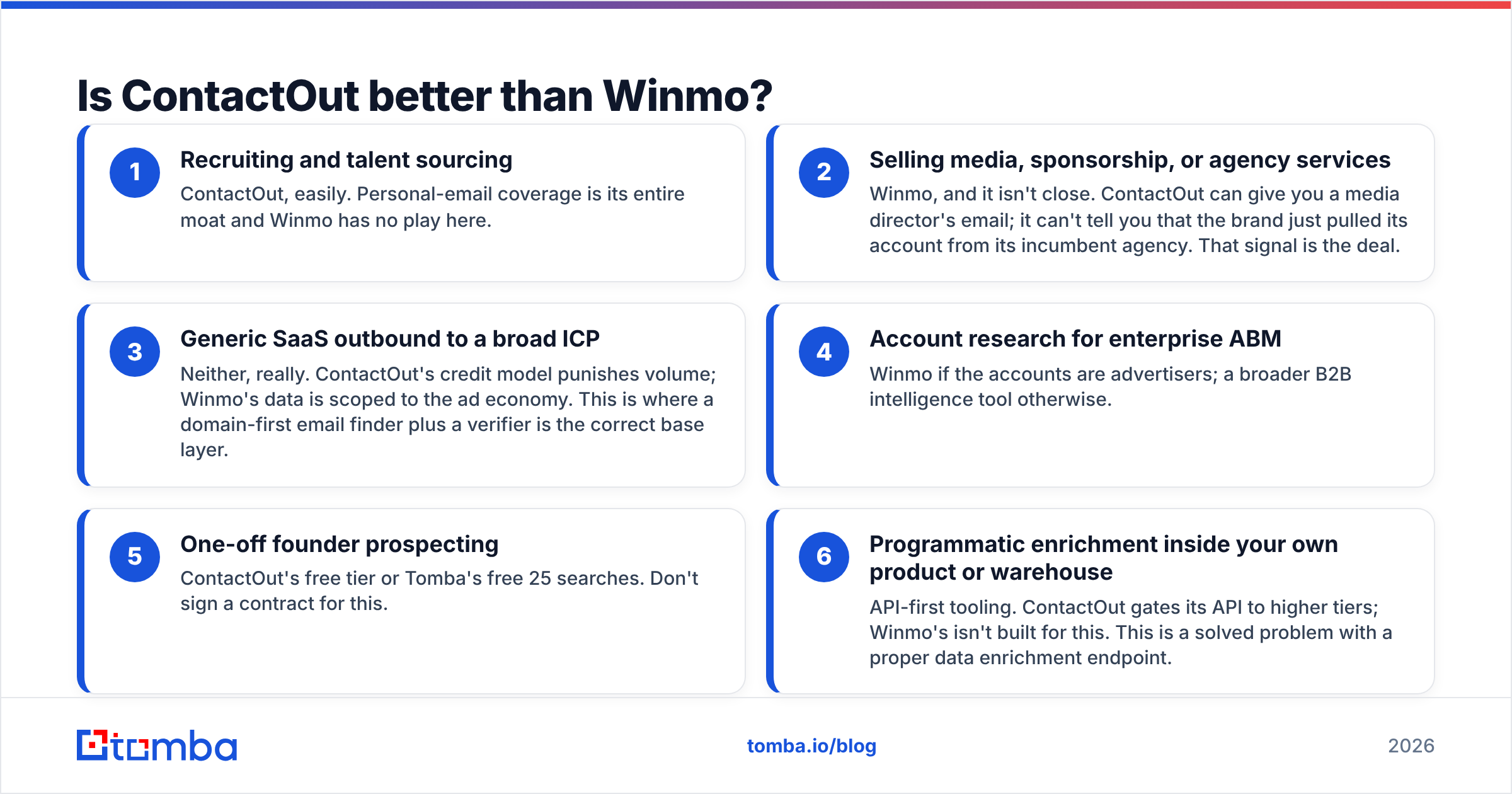
Only for a job Winmo doesn't do. Here's the honest split, by use case:
- Recruiting and talent sourcing — ContactOut, easily. Personal-email coverage is its entire moat and Winmo has no play here.
- Selling media, sponsorship, or agency services — Winmo, and it isn't close. ContactOut can give you a media director's email; it can't tell you that the brand just pulled its account from its incumbent agency. That signal is the deal.
- Generic SaaS outbound to a broad ICP — Neither, really. ContactOut's credit model punishes volume; Winmo's data is scoped to the ad economy. This is where a domain-first email finder plus a verifier is the correct base layer.
- Account research for enterprise ABM — Winmo if the accounts are advertisers; a broader B2B intelligence tool otherwise.
- One-off founder prospecting — ContactOut's free tier or Tomba's free 25 searches. Don't sign a contract for this.
- Programmatic enrichment inside your own product or warehouse — API-first tooling. ContactOut gates its API to higher tiers; Winmo's isn't built for this. This is a solved problem with a proper data enrichment endpoint.
If you're a media seller, stop reading comparisons — buy Winmo and be done. Everyone else is really asking a different question: what's the cheapest reliable way to get verified work emails at volume? That's the question the rest of this post answers.
What do these tools actually cost you?#
Sticker price is the smallest part of the bill. Three hidden costs decide your real cost per meeting:
Credit math. ContactOut, like most profile-anchored tools, charges per reveal — and a reveal that returns a stale address still costs you. If 12% of your reveals are dead, your effective cost per usable email is 14% higher than the number on the invoice. Always compute cost per verified email, not cost per credit.
Contract lock-in. Winmo's annual model is standard for vertical intelligence, and it's defensible when the data is genuinely proprietary. But it means a bad fit costs you twelve months, not one. Insist on seeing real records from your target segment during the demo, not the polished sample account.
Bounce tax. Every unverified send damages sender reputation. A 5% bounce rate on a 3,000-email campaign isn't a 5% loss — it's a deliverability spiral that suppresses the next campaign too. Whatever tool you pick, verification is not optional, and if your finder doesn't do it, you're paying a second vendor for it.
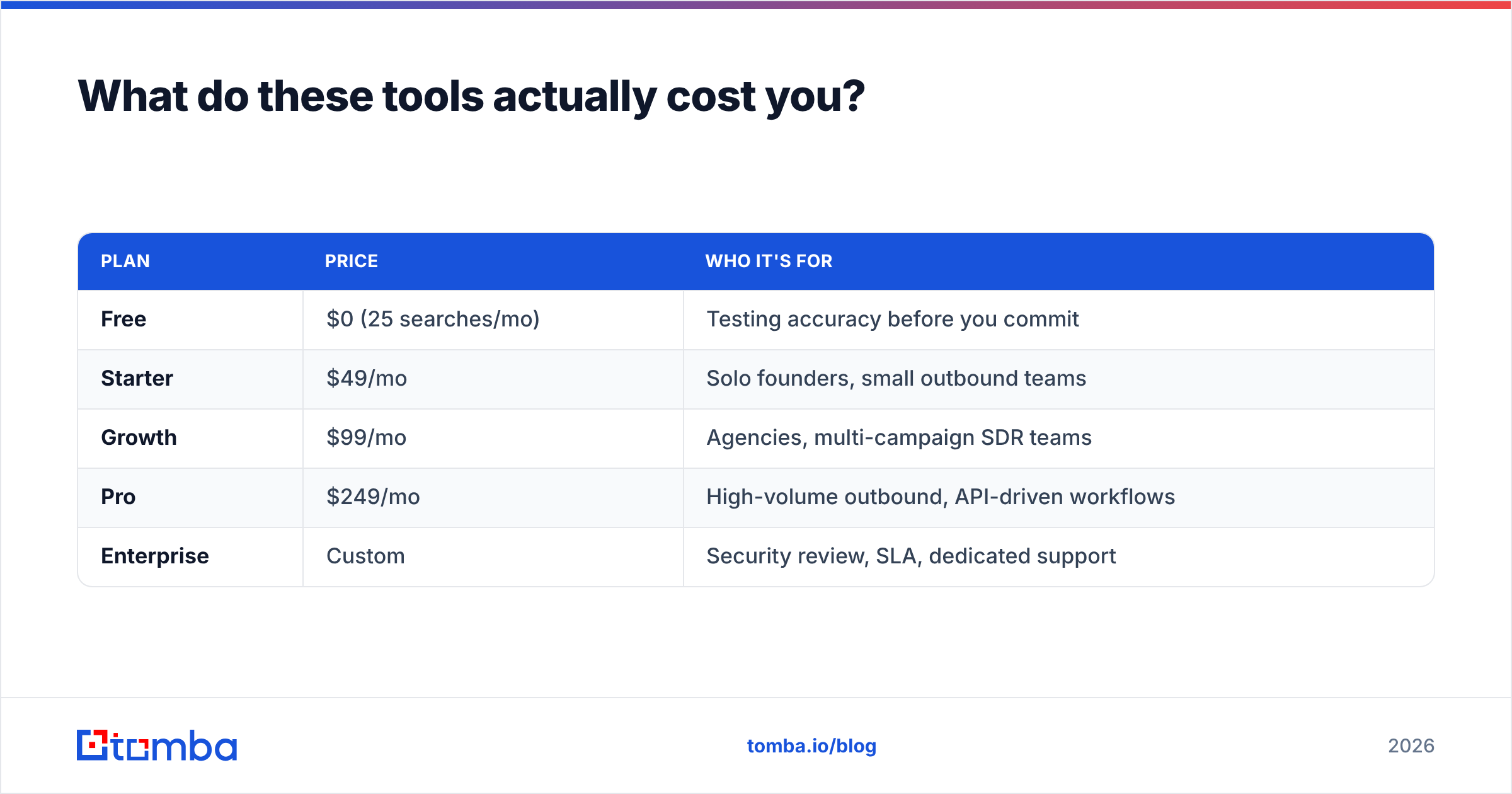
Here's the transparent side of the ledger, since Tomba publishes everything:
| Plan | Price | Who it's for |
|---|---|---|
| Free | $0 (25 searches/mo) | Testing accuracy before you commit |
| Starter | $49/mo | Solo founders, small outbound teams |
| Growth | $99/mo | Agencies, multi-campaign SDR teams |
| Pro | $249/mo | High-volume outbound, API-driven workflows |
| Enterprise | Custom | Security review, SLA, dedicated support |
Full breakdown on the Tomba pricing page. The point isn't that cheaper is better — it's that you can validate hit rate on the free tier before anyone asks for your credit card, which is not a sentence you can write about a quote-gated annual contract.
How accurate is the data, and how would you even know?#
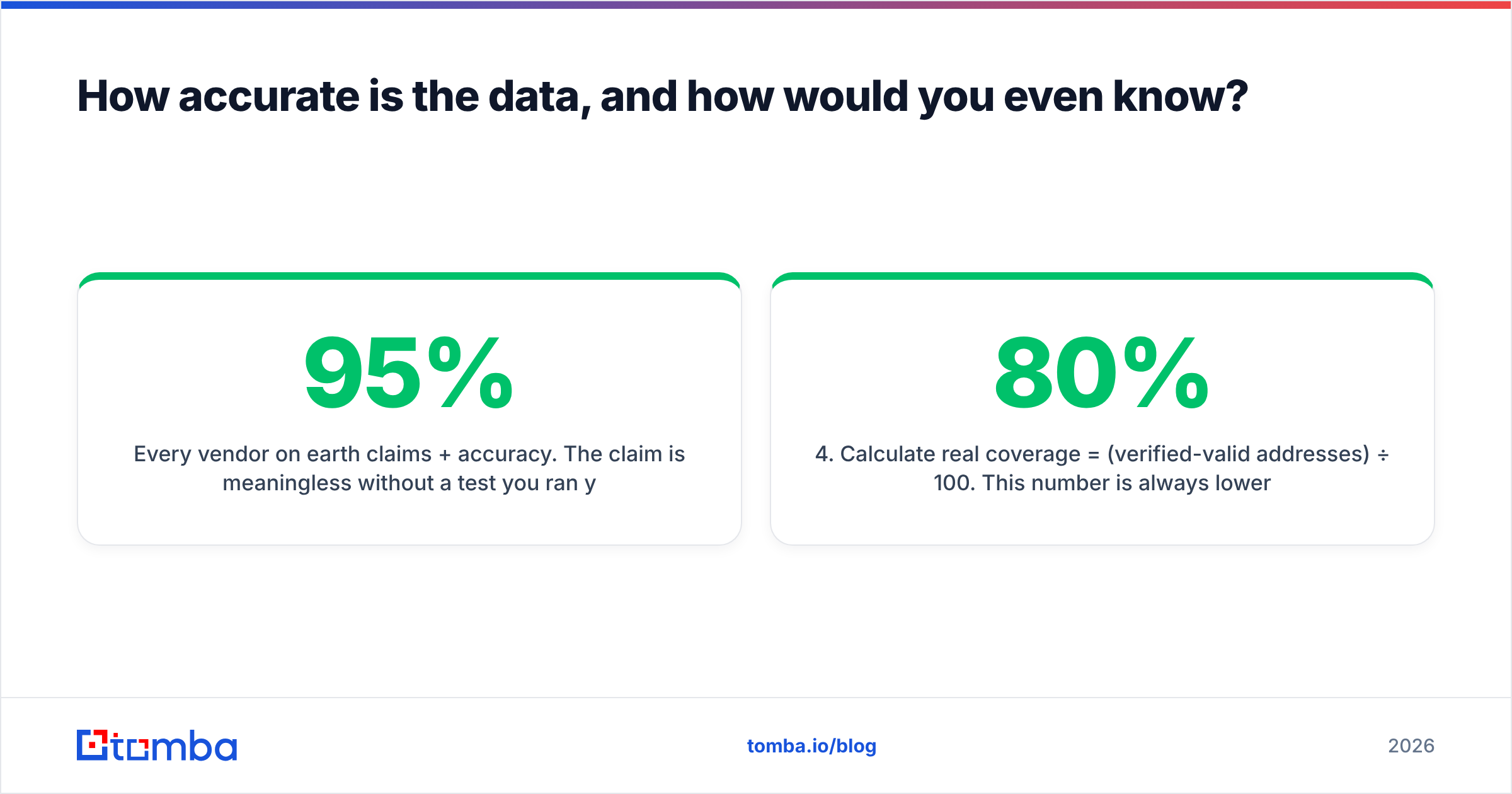
Every vendor on earth claims 95%+ accuracy. The claim is meaningless without a test you ran yourself. Run this one — it takes an afternoon:
- Pull 100 real targets from your actual ICP, not a demo list. Mixed company sizes, mixed geographies, including the awkward ones (non-English domains, sub-3-person companies, catch-all mail servers).
- Run the same 100 through each tool. Record hit rate: how many returned any address.
- Verify every returned address with a neutral third party. Don't let the finder grade its own homework. Use an independent email verifier or a free email checker.
- Calculate real coverage = (verified-valid addresses) ÷ 100. This number is always lower than the marketing page. On a good tool it lands in the 60–80% range for a hard ICP; anyone promising 95% on arbitrary input is measuring something else.
- Check the catch-all pile separately. Catch-all domains accept everything and verify nothing — they're the biggest source of silent bounces. A tool that flags them honestly is worth more than one that reports them as valid. That's exactly what a catch-all verifier is for.
- Divide by cost. Cost per verified email is the only number that belongs in a decision doc.
Do this and the vendor debate usually resolves itself in a spreadsheet. Where the data comes from matters too — public sources, pattern inference, and SMTP validation each fail in different ways, which is why we publish our data sources rather than hand-waving about "proprietary AI."
Worth noting: strong contact data plus weak sending infrastructure still equals zero replies. Before you blame the vendor, check your own email deliverability — SPF, DKIM, warmup, and sending volume ramp. HubSpot's sales statistics research is a decent sanity check on what reply rates actually look like when everything is set up correctly.
Which one should you buy in 2026?#
Buy Winmo if you sell into the advertising and media economy and your value is timing. The alert layer justifies the contract. Nothing else on this list replaces it.
Buy ContactOut if you're a recruiter or a rep whose entire workflow is LinkedIn profile → email → send. The extension is genuinely good at the one thing it does, and personal-email coverage is a real differentiator when corporate inboxes are saturated.
Buy neither if what you actually need is verified work emails at volume, sourced by domain, plumbed into your CRM or your own code. That's a different category, and paying ad-intelligence prices or per-profile credit prices for it is how outbound budgets quietly die. Run a domain search instead, verify the output, and push it to your sequencer.
Buy two of them if you're honest about the layers. Winmo for signal, a general finder for coverage, and a verifier in front of every send. That stack costs less than most people assume, and it's the one most high-performing outbound teams converge on.
Ready to test the data layer for free?#
Stop arguing about vendor accuracy claims and go measure them. Tomba's Email Finder gives you 25 searches a month for free — enough to run the 100-lead test above on a real slice of your ICP, verify the results with the built-in verifier, and see your actual cost per usable email before you sign anything. If the numbers beat what you're paying now, the Starter plan is $49/mo and the API is included on every paid tier. If they don't, you've lost an afternoon instead of an annual contract.
Related guides#
Ready to find emails that actually work?
Join 150,000+ professionals who stopped guessing and started sending. Free credits on signup — no credit card required.
Get the Tomba newsletter
Practical outbound tactics and product updates — once every two weeks.
About the author