ContactOut vs ZeroBounce: Which Email Tool Wins in 2026?
ContactOut finds contacts. ZeroBounce cleans lists. They solve different halves of the same problem — here's how they compare on accuracy, pricing, and coverage, and when one tool can replace both.
TL;DR — ContactOut vs ZeroBounce in one screen#
- They are not really competitors. ContactOut is a contact-discovery tool built around LinkedIn. ZeroBounce is a list-hygiene tool built around bounce prevention. Comparing them head-to-head only makes sense if you're deciding which problem to solve first.
- Pick ContactOut if your bottleneck is "I have a LinkedIn profile and no email address."
- Pick ZeroBounce if your bottleneck is "I have 40,000 emails from three sources and my bounce rate is 9%."
- Most teams end up buying both — a finder plus a verifier — which is how you end up with two subscriptions, two credit pools, and two CSV round-trips per campaign.
- The third option is a platform that does discovery and verification on the same record, so an email is validated the moment it's found. That's where Tomba pricing at $49/mo starter tends to beat running two point tools.
What does ContactOut actually do?#
ContactOut is a prospecting layer that sits on top of LinkedIn. You install the Chrome extension, browse a profile or a Sales Navigator list, and it surfaces work emails, personal emails, and sometimes phone numbers for that person. Recruiters were the original core audience; sales teams adopted it later.
Its strengths are specific:
- LinkedIn-native workflow. You never leave the tab you're already in. For recruiters sourcing candidates one profile at a time, that matters more than any API.
- Personal email coverage. ContactOut leans harder on personal/consumer addresses than most B2B finders do — useful for recruiting, less useful for compliant B2B outbound in the EU.
- Bulk export from search results. You can pull a Sales Navigator search into a list rather than clicking through profiles.
- A search portal for filtering by title, company, and location without starting from LinkedIn at all.
What it does not do well: it is not a verification engine. ContactOut tells you it found an address and gives you a confidence signal. It does not run a full SMTP-level validation pass, screen for spam traps, flag abuse complainers, or grade catch-all domains the way a dedicated verifier does. If you push a raw ContactOut export into a cold sequence, you are trusting the finder's own scoring — which is exactly the assumption that produces a 6% bounce rate three weeks later.
You can read the vendor's own description on the ContactOut site, and the user reviews on G2 are a fair sanity check on the coverage claims.
What does ZeroBounce actually do?#
ZeroBounce is one of the best-known email validation services. You upload a list — from a CRM export, a webinar signup form, a purchased database, a scraper, anywhere — and it returns a status for every row: valid, invalid, catch-all, abuse, spam trap, disposable, role-based.
Its strengths:
- Deep bounce prevention. Syntax, DNS, MX, mailbox-level checks, plus proprietary lists for known complainers and traps.
- Deliverability tooling around the edges. Inbox placement tests, blacklist monitoring, DMARC/SPF/DKIM checks, an email server tester.
- Real-time API validation on signup forms so bad addresses never enter your database in the first place.
- Scoring for catch-alls (their AI-scoring product), which is the hardest category in verification.
What it does not do: find people. ZeroBounce validates an address you already have. If your input is an empty column, ZeroBounce has nothing to work with. Their official site frames the product exactly this way — hygiene, not discovery.
ContactOut vs ZeroBounce: how do they compare feature by feature?#
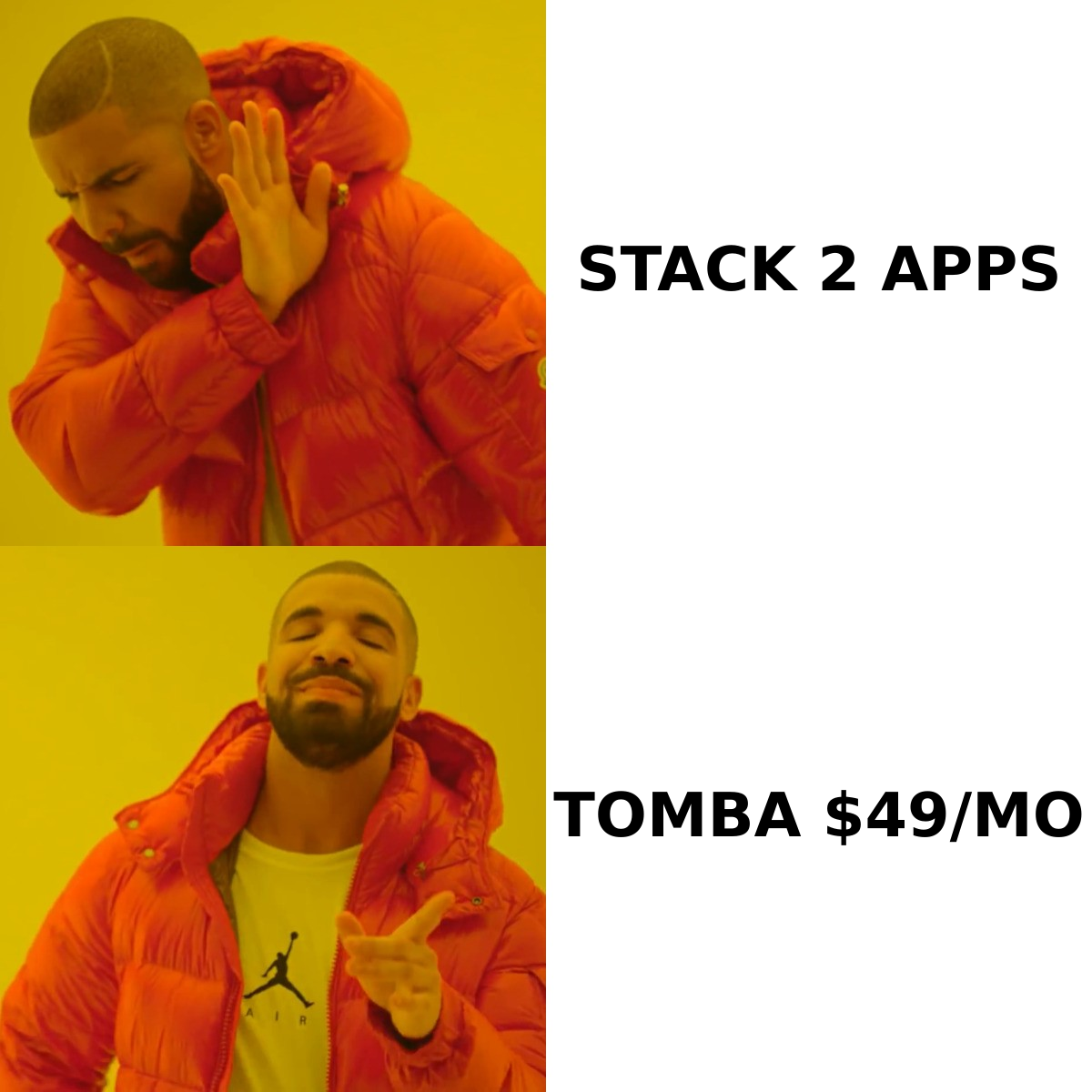
Here is the honest side-by-side. Note that these are two tools built for different halves of the pipeline, so several rows are simply "not applicable" — and that's the most important finding in the whole comparison.
| Capability | ContactOut | ZeroBounce | Tomba |
|---|---|---|---|
| Primary job | Find contacts from LinkedIn | Clean and validate lists | Find and verify |
| Email discovery by name + domain | Yes | No | Yes |
| Domain search (all emails at a company) | Limited | No | Yes |
| LinkedIn profile → email | Yes (core feature) | No | Yes |
| SMTP-level verification | Basic confidence score | Yes (core feature) | Yes |
| Catch-all handling | Not graded | AI-scored (paid add-on) | Catch-all verifier included |
| Spam-trap / abuse detection | No | Yes | Partial |
| Phone numbers | Yes | No | Yes |
| Bulk CSV enrichment | Yes | Yes (validation only) | Yes |
| API access | Yes (higher tiers) | Yes | Yes, all paid tiers |
| Free tier | Limited monthly credits | 100 free validations | 25 searches/mo |
| Entry paid price | ~$79/mo list (varies by seat) | Pay-as-you-go from ~$16 per 2k credits | $49/mo Starter |
| Best for | Recruiters, LinkedIn-first sourcing | List hygiene, ESP compliance, form validation | End-to-end B2B prospecting |
Pricing on both vendors changes frequently and depends on seats, annual commitments, and credit bundles — check their pricing pages before you budget. The structural difference is what matters: ContactOut charges per seat for discovery, ZeroBounce charges per credit for validation, and you pay both bills if you need both jobs done.
How accurate is each one, really?#
Accuracy means different things for a finder and a verifier, and vendors exploit that ambiguity.
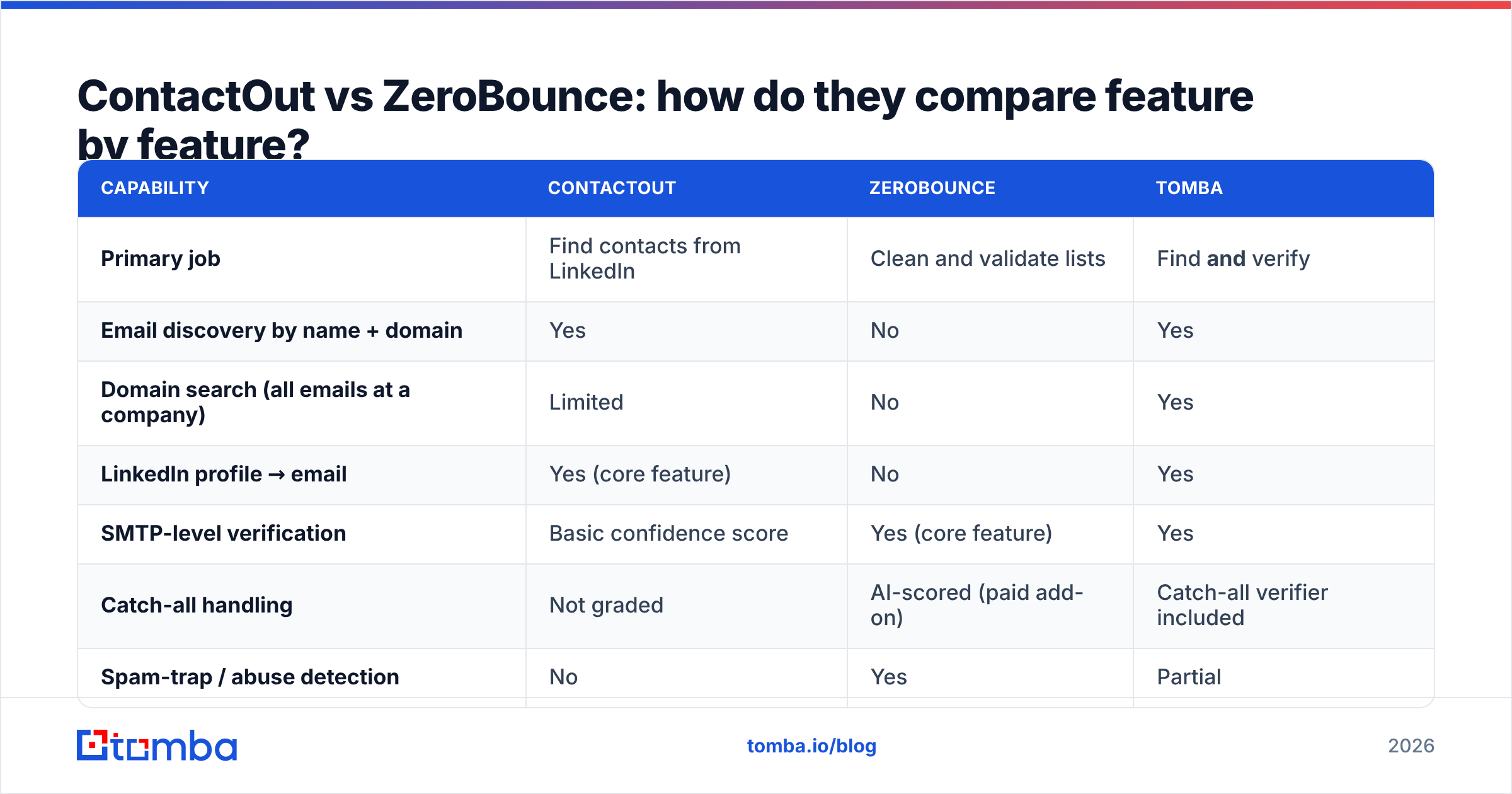
For a finder, accuracy = "of the emails you returned, what share actually deliver?" A finder that returns an address for 90% of your inputs but has a 15% bounce rate is worse than one that returns 60% and bounces at 2%. Coverage without deliverability is a vanity metric.
For a verifier, accuracy = two numbers you should always ask for separately: false-positive rate (marked valid, actually bounces — this is the one that burns your domain) and false-negative rate (marked invalid, actually fine — this one quietly deletes good leads from your list).

Two practical rules from running a lot of these tests:
- Never benchmark on a clean list. Take 200 real prospects in your actual ICP — including small companies, non-US domains, and catch-all setups — and run them through both tools. Vendor-published accuracy is measured on lists that flatter the vendor.
- Judge on the intersection. ContactOut's output is only as good as what survives verification. If you run a ContactOut export through ZeroBounce and 22% come back invalid or risky, that 22% is the real cost of the finder — in wasted credits, wasted sequence slots, and sender reputation.
That second point is the whole argument for a combined workflow. When discovery and validation happen in the same system, you never pay to sequence a contact you were never going to reach. Tomba's email verifier runs on the same record the email finder produced, so the confidence score you see is post-validation, not a guess.
Which one should you buy for your use case?#
Match the tool to the bottleneck, not to the review score.
- You're a recruiter sourcing candidates on LinkedIn. ContactOut is a genuinely strong fit. Personal-email coverage is its edge, and recruiting outreach tolerates a slightly higher bounce rate than cold B2B sales does. Buy it, and validate quarterly.
- You inherited a 200,000-row marketing database of unknown provenance. ZeroBounce, no debate. Pay-as-you-go credits, one pass, and you'll know what fraction of that list is real before your ESP finds out for you.
- You're building outbound from scratch — no list, no database. Neither tool alone gets you there. A finder-only stack ships bad addresses; a verifier-only stack has nothing to verify. You need discovery and validation, which means two subscriptions or one platform that does both.
- You're a RevOps team enriching inbound signups. ZeroBounce's real-time API on the form, plus an enrichment layer behind it. ContactOut is not built for this.
- You run high-volume cold email and bounce rate is the KPI. Verification is non-negotiable. Whichever finder you use, treat every address as unverified until a real verifier says otherwise — and pay attention to email deliverability fundamentals, because a clean list is necessary but not sufficient.

What does the two-tool stack actually cost you?#
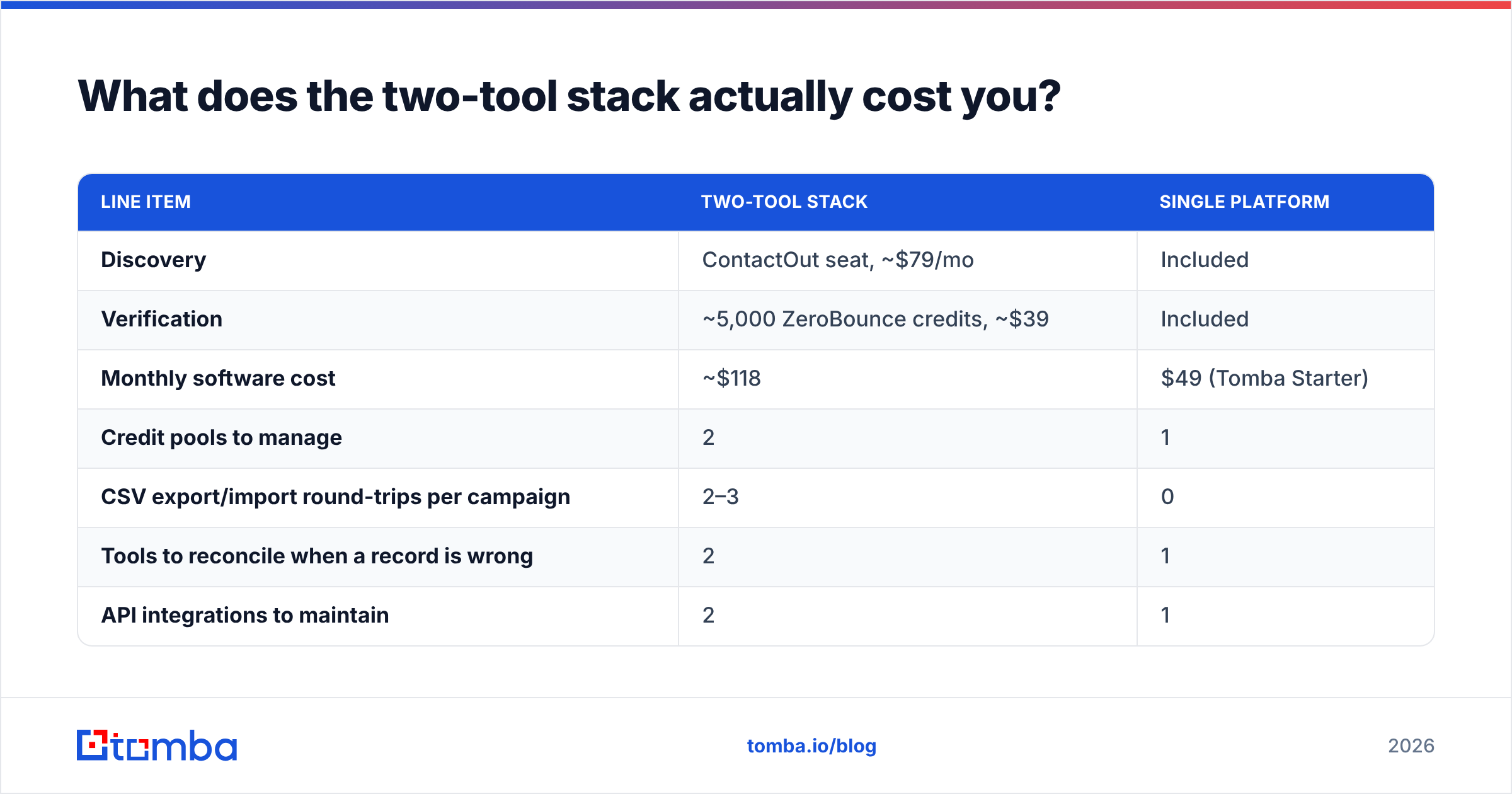
Run the math on a modest outbound motion: one SDR, 1,500 new prospects a month.
| Line item | Two-tool stack | Single platform |
|---|---|---|
| Discovery | ContactOut seat, ~$79/mo | Included |
| Verification | ~5,000 ZeroBounce credits, ~$39 | Included |
| Monthly software cost | ~$118 | $49 (Tomba Starter) |
| Credit pools to manage | 2 | 1 |
| CSV export/import round-trips per campaign | 2–3 | 0 |
| Tools to reconcile when a record is wrong | 2 | 1 |
| API integrations to maintain | 2 | 1 |
The dollar delta is real but it's the second half of that table that costs more. Every CSV round-trip is a place where a column shifts, a dedupe fails, or a stale export gets sequenced twice. Ops overhead is the hidden tax on point-tool stacks, and it scales with headcount.
None of which means "never buy two tools." If your verification needs are genuinely advanced — spam-trap screening on a 500k list, inbox placement testing, DMARC monitoring — ZeroBounce's depth is worth its own line item, and no email finder's built-in verifier matches it. Buy the specialist when you need the specialist. Just don't buy it by default.
Are there better alternatives to running both?#
There's a middle path most teams skip past: a single email-data platform that covers discovery, verification, and enrichment on one credit pool.
That's the category Tomba sits in. Practically:
- Domain search pulls every discoverable address at a company plus the pattern it uses — closer to how you actually prospect than one-profile-at-a-time.
- LinkedIn finder covers the ContactOut motion: profile in, work email out.
- Catch-all verifier handles the domains that generic verifiers punt on with "unknown."
- Bulk email finder handles the list-level work without a second subscription.
- Tomba API exposes all of it on every paid plan — not gated behind an enterprise tier.
Other names worth knowing while you shop: Hunter and Findymail on the discovery side, NeverBounce and Bouncer on the validation side, and BookYourData if you'd rather buy a pre-verified list outright than build one — their data comes verified at point of sale, which is a legitimately different model from paying for discovery and hygiene separately.

How should you actually test them before you commit?#
Do this in an afternoon, not a quarter:
- Build a 200-row gold list. Real prospects. Include at least 40 non-US domains, 40 companies under 50 employees, and 20 domains you know are catch-all.
- Run discovery in ContactOut and in one combined platform. Record hit rate (addresses returned ÷ rows) and time-to-list.
- Run every returned address through ZeroBounce. This is your neutral referee. Record valid / invalid / catch-all / unknown.
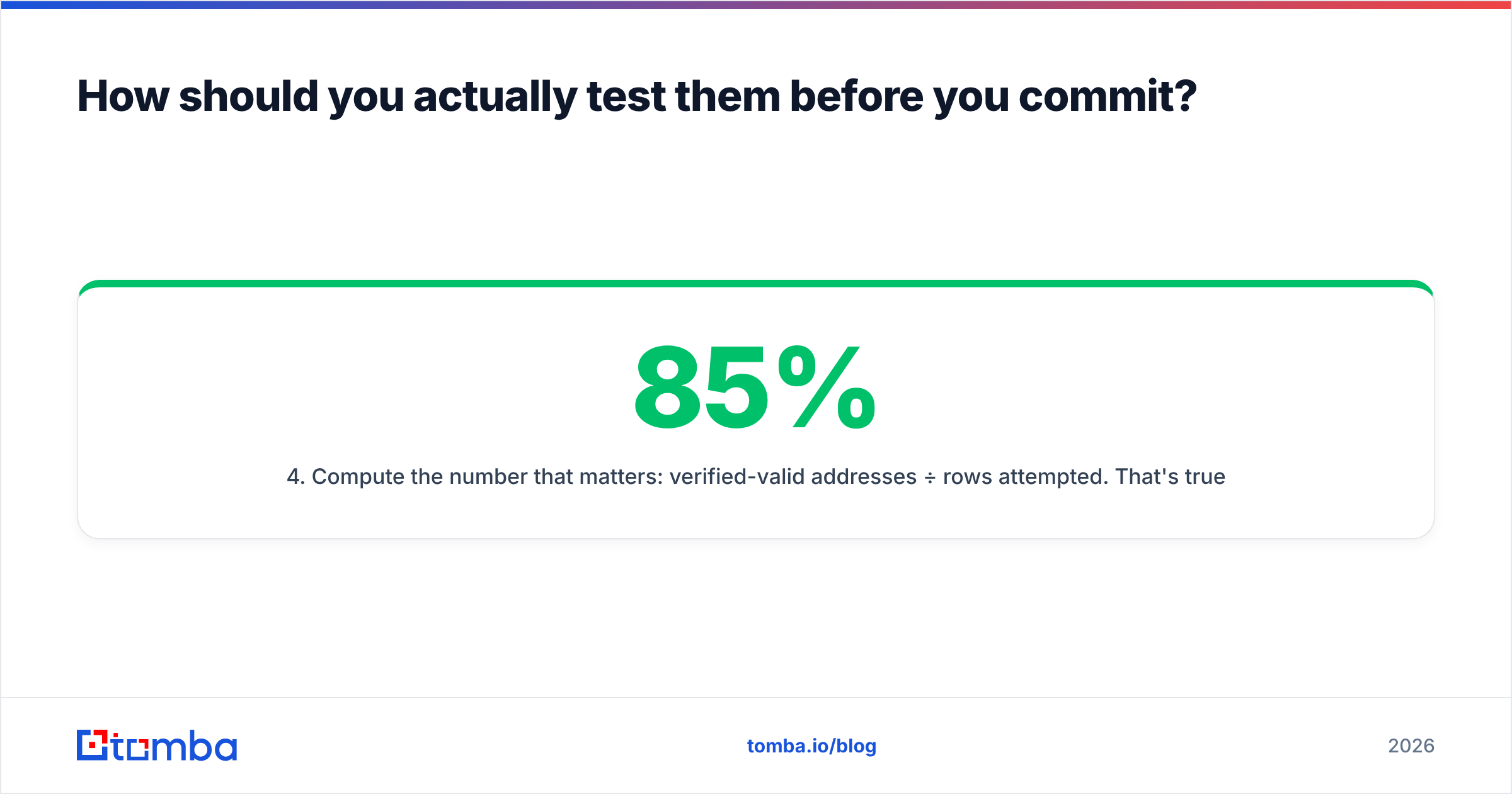
- Compute the number that matters: verified-valid addresses ÷ rows attempted. That's true coverage. A tool with 85% hit rate and 70% valid loses to one with 70% hit rate and 95% valid.
- Send a 50-address canary campaign from a warm domain and record the real bounce rate. Vendor scores are a model; a bounce is a fact.
- Price it against your actual monthly volume, not the headline tier — including the credits you burn on rows that come back invalid.
Free tiers make this cheap: ZeroBounce gives 100 free validations, Tomba gives 25 free searches a month, and ContactOut has a limited free plan. That's enough to run steps 1–4 without a card.
The verdict#
ContactOut vs ZeroBounce is a false binary. ContactOut wins the discovery job — especially for LinkedIn-first recruiting — and ZeroBounce wins the hygiene job, especially at list-cleaning scale with spam-trap and placement requirements. Neither one wins the other's job, and pretending otherwise is how teams end up with an 8% bounce rate or an empty pipeline.
The real decision is architectural: two specialists, or one platform that finds and verifies on the same record. If your verification needs are exotic, buy the specialist. If they're normal — and for most B2B outbound teams they are — one integrated tool removes a subscription, a credit pool, and every CSV round-trip between them.
Start with the Tomba Email Finder. The free tier gives you 25 searches a month with verification built in, so you can test true coverage — verified-valid addresses, not raw hit rate — against your own ICP before you spend anything. If it holds up, Starter is $49/mo; if it doesn't, you've lost an afternoon and learned exactly what your list quality really is.
Related guides#
Ready to find emails that actually work?
Join 150,000+ professionals who stopped guessing and started sending. Free credits on signup — no credit card required.
Get the Tomba newsletter
Practical outbound tactics and product updates — once every two weeks.
About the author